How to Set Up SLAs & Performance Metrics in Odoo 18 Helpdesk?
Why SLAs and Performance Metrics Matter for Your Helpdesk
Imagine this: A customer submits a critical ticket. Hours pass, and no one responds. The customer gets frustrated, their trust erodes, and they decide to take their business elsewhere. Painful, right?
That’s where the Odoo 18 Helpdesk SLA setup comes in handy. It ensures your team is on top of things and gives customers the quick and reliable support they deserve.
With SLAs (Service Level Agreements), you’re not just putting numbers on paper but setting expectations that build trust and accountability. Combine that with performance metrics, and you’ll have a crystal-clear view of how well your team delivers on those promises.
In this guide, I’ll explain how to set up SLAs, track performance, and maximize the use of tools like Odoo 18 helpdesk analytics and reporting.
Why SLAs Are an Innovation for Your Helpdesk
What Exactly Are Odoo 18 SLA Configuration?
Think of SLAs as promises you make to your customers. They outline how quickly you’ll respond to and resolve issues. For example, you might commit to resolving high-priority tickets within 4 hours. You can define these promises using the Odoo 18 SLA configuration and hold your team accountable.
Why does this matter? Because SLAs:
Build Trust: Customers know they can rely on you.
Improve Team Focus: Everyone knows what’s expected of them.
Increase Efficiency: Clear goals mean fewer delays and better resource allocation.
How Odoo 18 Makes SLA Management Easier
Odoo 18 simplifies the process with an intuitive interface. You can set up SLA rules in minutes and even automate notifications for SLA breaches. That means no more manual tracking or missed deadlines.
Step-by-Step Guide to Odoo 18 Helpdesk SLA Setup
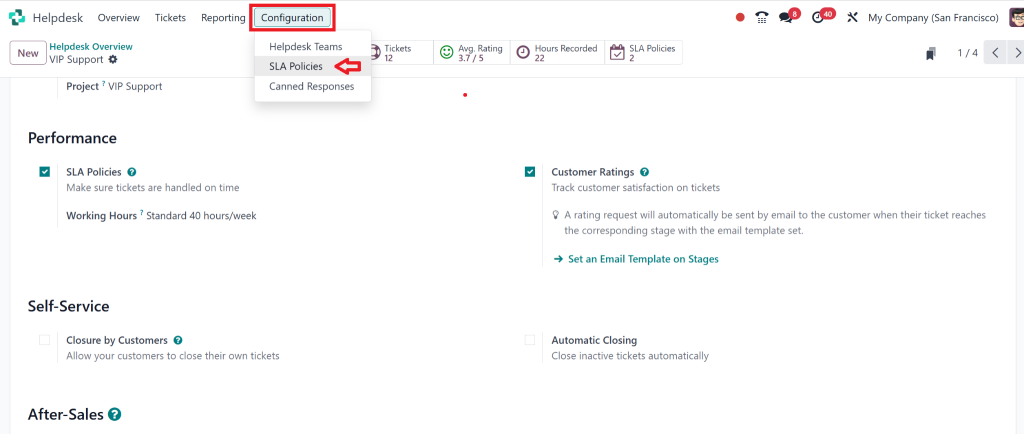
Step 1: Access the Helpdesk Module
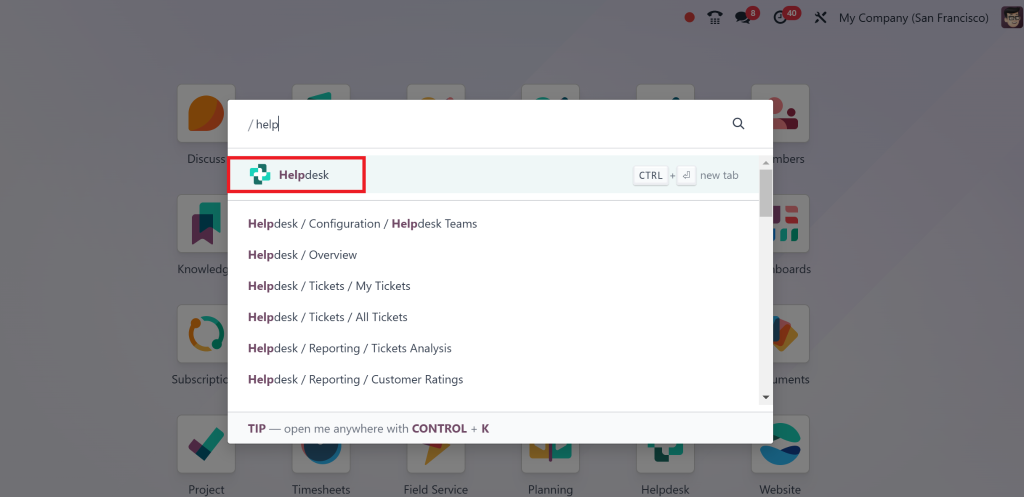
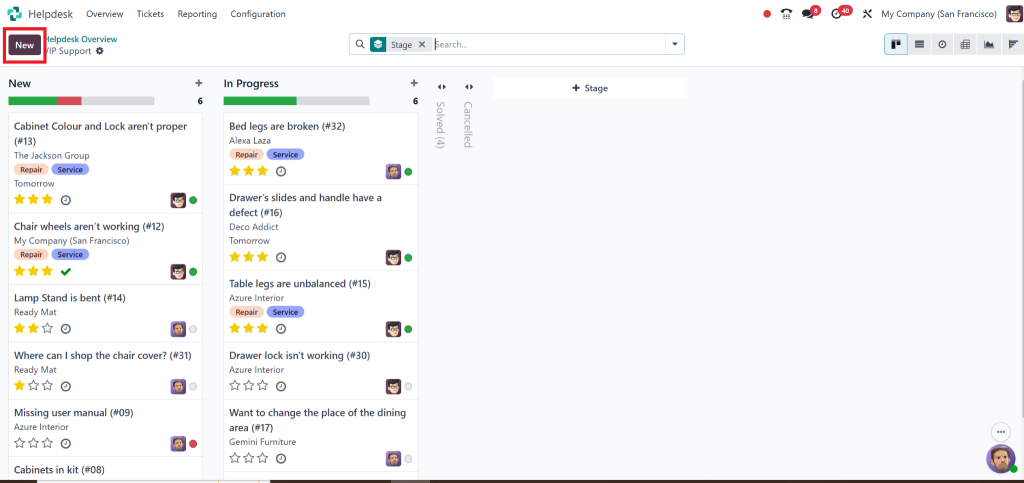
Start by logging into Odoo and going to the Helpdesk module.
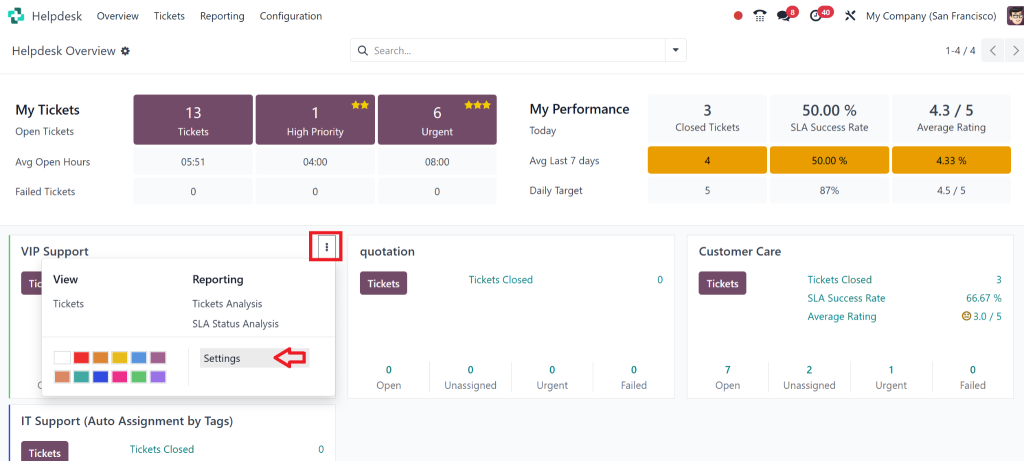
Then, check the settings on the 3 dots from the vip tickets.
That is your control center for managing tickets, teams, and SLAs.
Step 2: Create SLA Policies
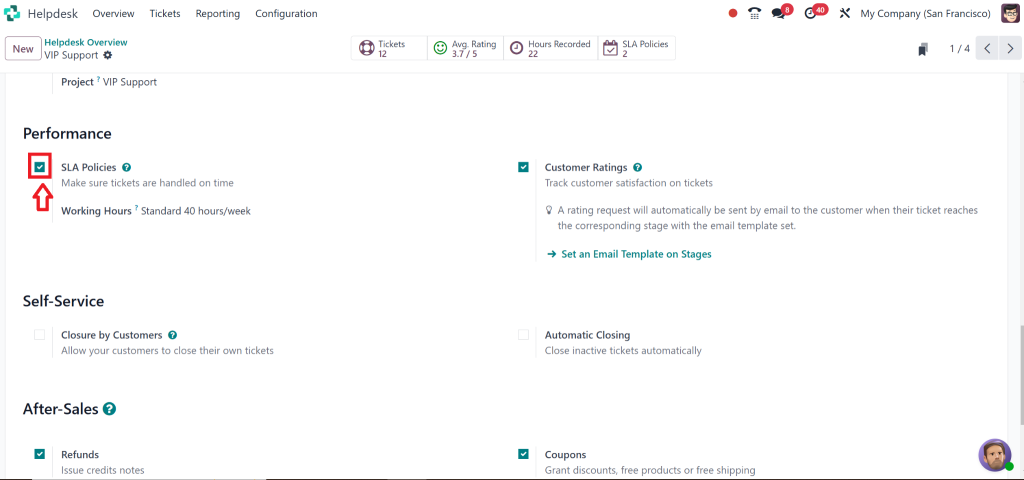
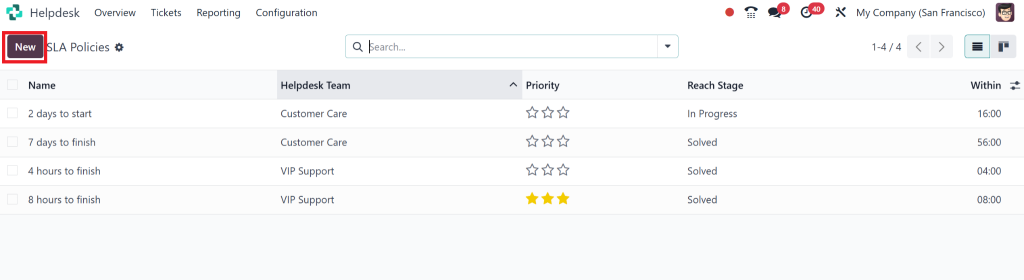
Go to Configuration > SLA Policies.
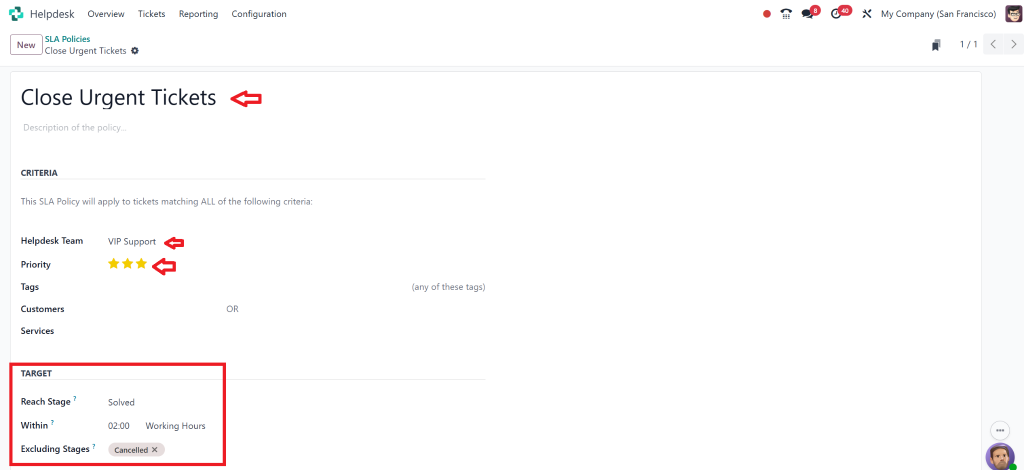
Under the SLA Policies tab, click on “NEW.” Here’s what you’ll need to define:
Priority Levels: High, medium, low – whatever works for your business.
Response Time: How quickly your team should respond to a ticket.
Resolution Time: The time frame for fully resolving the issue.
Step 3: Assign Policies to Teams
Once your SLAs are defined, assign them to specific teams. For instance, your VIP support team might have stricter SLAs than your general helpdesk team.
Step 4: Save and Test
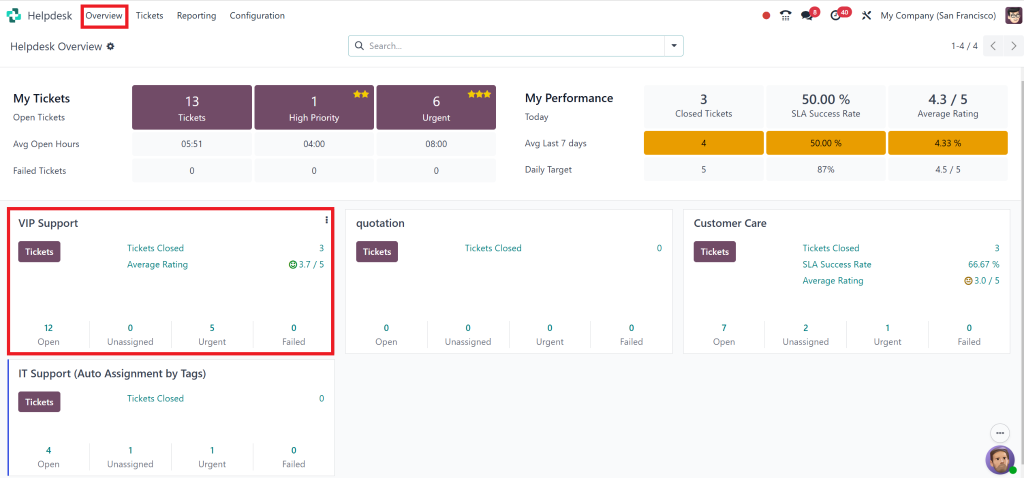
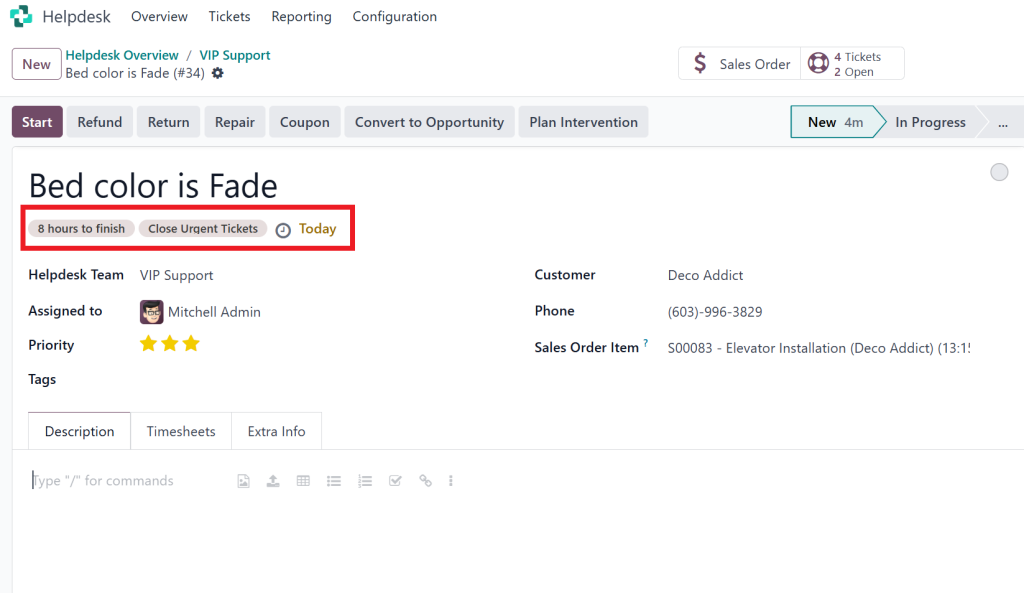
Save your configurations and test them with sample tickets to ensure everything works as expected.
To test, go to Overview, then click on VIP Tickets.
Then, a pipeline will appear. Create NEW.
Odoo 18 Helpdesk Performance Metrics
Why Are Metrics Important?
Metrics are like the health report of your helpdesk. Without them, how do you know if you’re meeting your SLAs? With Odoo 18 helpdesk performance metrics, you can:
Measure Efficiency:
See how quickly your team resolves tickets.
Spot Weaknesses:
Identify bottlenecks before they become significant issues.
Improve Decision-Making:
Use data to allocate resources where needed most.
Odoo 18 Helpdesk Performance Tracking
Here are the must-watch metrics in your helpdesk:
Response Time (FRT):
How quickly does your team respond to a new ticket?
Resolution Time:
How long does it take to resolve an issue fully?
Customer Satisfaction (CSAT):
What do customers think about the service they received?
Ticket Backlog:
How many unresolved tickets are in your queue?
How to Configure Metrics in Odoo 18
Dashboards:
Set up customizable dashboards to view metrics in real-time.
Filters:
Use filters like date range, ticket priority, and team to drill down into specific data.
Automated Reports:
Schedule weekly or monthly reports to stay on top of performance trends.
Using Odoo 18 Helpdesk Reporting for Deeper Insights
Why Odoo 18 Helpdesk Analytics Matters
Reporting isn’t just about crunching numbers; it’s about understanding what those numbers mean. With Odoo 18 helpdesk reporting, you can:
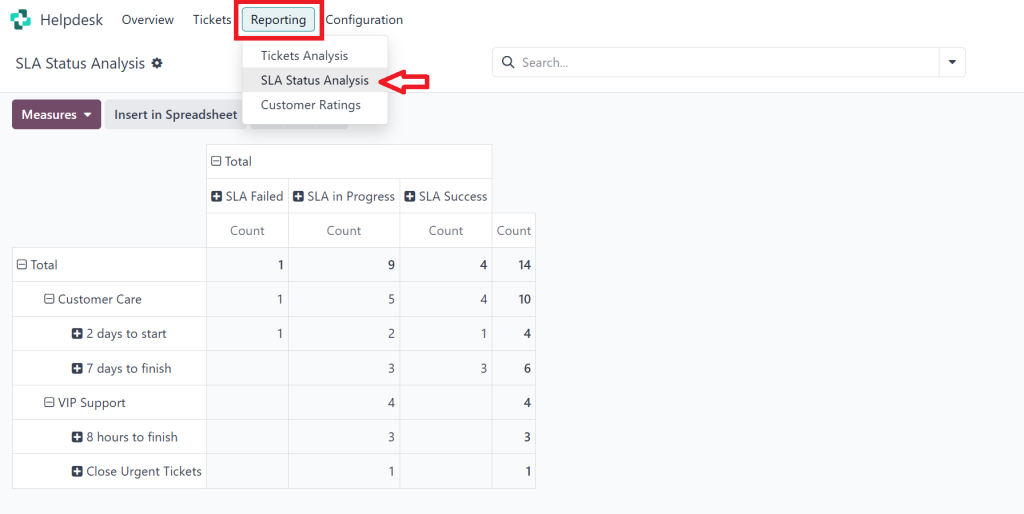
Track SLA Compliance:
See how often your team meets or breaches SLAs.
Analyze Trends:
Look at historical data to identify patterns.
Make Data-Driven Decisions:
Use insights to improve processes and allocate resources.
How to Generate Reports in Odoo 18
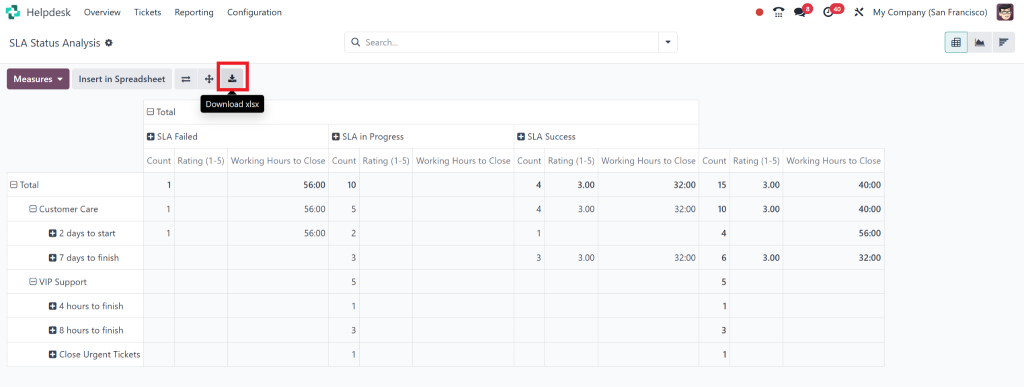
Go to the Reporting section in the Helpdesk module.
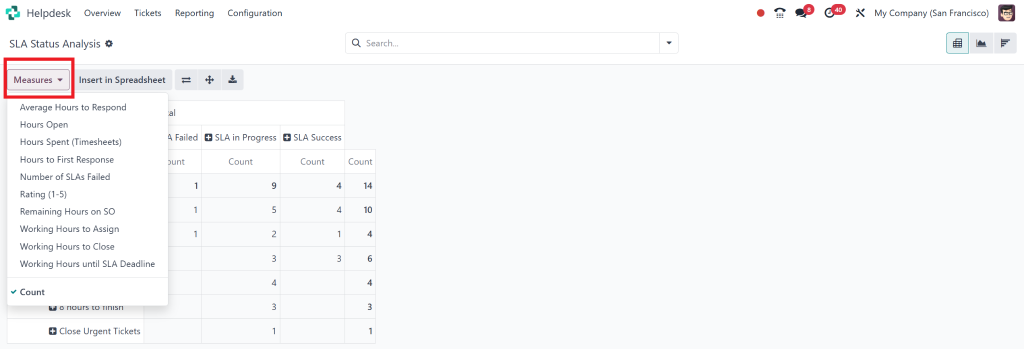
Choose the parameters you want to analyze (e.g., date range, priority).
Generate and export the report as a PDF or Excel file for easy sharing.
Advanced Analytics: Odoo 18 Service Level Agreement
What Are Advanced Analytics?
Advanced analytics in the Odoo 18 helpdesk go beyond basic metrics. They help you predict future performance, identify long-term trends, and evaluate individual team members.
How to Customize Analytics
Filters:
Narrow down data by specific criteria like team or ticket status.
Pivot Tables:
Use pivot tables for a detailed breakdown of performance metrics.
Module Integration:
Combine helpdesk data with CRM or sales modules for a complete customer journey analysis.
Overcoming Common Challenges in SLA Configuration
Challenge 1: Overcomplicated Rules
Overcomplicating SLAs can confuse your team and slow down processes.
Solution: Keep your SLA rules simple and easy to understand. Focus on a few key priorities.
Challenge 2: Data Overload
Too much data can be overwhelming and hard to act on.
Solution: Use filters and dashboards to focus on the most critical metrics.
Challenge 3: Integration Issues
Syncing helpdesk data with other business tools can be tricky.
Solution: Influence Odoo’s smooth integration capabilities to connect your helpdesk with other modules.
What are you waiting for?
Setting up Odoo 18 helpdesk SLA setup and tracking Odoo 18 helpdesk performance metrics isn’t just about ticking boxes. It’s about delivering exceptional customer service, improving team efficiency, and driving business success.
With features like Odoo 18 SLA configuration, helpdesk reporting, and helpdesk analytics, you have all the tools you need to meet and exceed customer expectations.
So, what are you waiting for? Start optimizing your helpdesk today!
Hi, I'm Nabia, an Odoo ERP functional & technical content writer. I specialize in blogs, social media content, ad copy, landing pages, service pages, and email campaigns.
We use cookies to ensure that we give you the best experience on our website. If you continue to use this site we will assume that you are happy with it.