how-relational-fields-widgets-unlock-odoo-visual-potential

How Relational Fields & Widgets Unlock Odoo Visual Potential?

Welcome back to our Unlocking Odoo Visual Potential series!

In Part 1, we explored field decorations and non-relational fields – the foundation of any great Odoo interface. Now in Part 2, we’re diving deeper into Odoo’s rich framework with a spotlight on Relational Fields and Widgets – two key elements that help transform your interface into a dynamic and user-friendly environment.

Let’s explore how you can connect data smoothly and enhance interactivity in your Odoo views, giving users a smooth, visually appealing experience that’s both practical and powerful..

Relational Fields: Connecting Your Odoo visual potential to the World

Relational fields are the cornerstones of data relationships in Odoo. They allow you to connect records across different models, enabling a truly integrated and smart system. Think of relational fields as the glue that binds your application’s data into meaningful structures.

Whether you’re referencing one record, many, or setting predefined choices, Odoo offers flexible options to cover all use cases.

1. Selections & Choices:

Let users choose from a predefined list of options. Add a placeholder to guide users when no selection has been made.

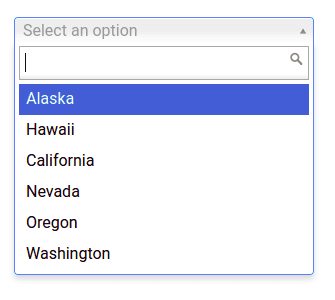
Selection (selection):

Pick from a list! Use a placeholder to give users a hint when nothing is selected. It’s like a friendly nudge.

Supported field types: selection

				
					  <field name="tax_id" widget="selection" placeholder="Select a tax"/>


how-can-relational-fields-and-widgets-unlock-odoo-visual-potential

Field type: selection

Use case: Static choices like tax types, categories, or priorities.

Radio (radio):

Choose one! Display selections as radio buttons. Use horizontal to line them up neatly. Clean and simple.

Supported field types: selection, many2one

				
					<field name="tax_id" widget="radio" options="{Select a tax}"/>
				
			
how-can-relational-fields-and-widgets-unlock-odoo-visual-potential

Field types: selection, many2one

Use case: Ideal for reducing clicks and clearly showing all options.

Badge Selection (selection_badge):

Select with badges! Turn selection options into stylish rectangular badges. Visual and user-friendly.

Supported field types: selection, many2one 

				
					 <field name="status" widget="selection_badge" /> 
				
			
how-can-relational-fields-and-widgets-unlock-odoo-visual-potential

Field types: selection, many2one

Use case: Perfect for status indicators or color-coded categories.

2. Many2one Relationships:

The many2one field connects a record to a single entry in another model. Think of it like assigning a customer to a sales order.

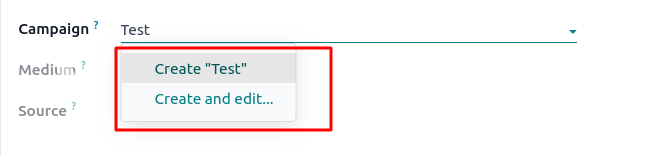
Many2one (many2one):

This is the most common relational field. Customize its behavior using attributes like:

  • can_create: Allow creating a new related record.
  • can_write: Allow editing it.
  • options: quick_create, no_create, no_create_edit, etc.
				
					Supported field types: many2one 
Attributes: can_create, can_write 
Options: quick_create, no_create, no_quick_create, no_create_edit, create_name_field, always_reload, no_open 


how-can-relational-fields-and-widgets-unlock-odoo-visual-potential

Many2one Avatar Variants

Odoo lets you personalize the view further with avatar widgets:

  • many2one_avatar
  • many2one_avatar_user
  • many2one_avatar_employee

These widgets display user or employee images and allow for a more personalized interface, including clickable icons that open chat windows.

Many2one Avatar Employee (many2one_avatar_employee):

Display avatars for related records. Use user – and employee-specific avatars for a personal touch. Click user/employee avatars to open a chat.

Supported field types: many2one 

how-can-relational-fields-and-widgets-unlock-odoo-visual-potential

3. Many2many Relationships:

When you need to associate multiple records with one entry, the many2many field is your go-to. Odoo offers different widgets to make these relationships intuitive and visually pleasing.

Many2many (many2many):

Link multiple records! Use attributes like mode and domain to customize the display and filter data. It’s like creating a linked list.

  • Supported field types: many2many 
  • Attributes: mode, domain 
  • Options: create_text, link, unlink
how-can-relational-fields-and-widgets-unlock-odoo-visual-potential

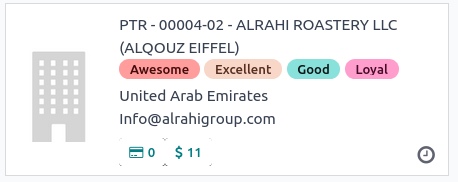
Many2many Tags (many2many_tags):

Tag it! Display many2many fields as tags. Use color_field to add color based on values. Enable tag editing with edit_tags. Organize your data visually.

  • Supported field types: many2many 
  • Options: create, color_field, no_edit_color, edit_tags 
				
					 <field name="tags" widget="many2many_tags" options="{'color_field': 'color', 'edit_tags': true}" /> 
				
			
how-can-relational-fields-and-widgets-unlock-odoo-visual-potential

Many2many Tags - Form View (form.many2many_tags), Many2many Tags - Kanban View (kanban.many2many_tags):

Tags tailored for views! Specializations of many2many_tags for form and kanban views. Edit colors on forms, and use them effectively in kanban.

Supported field types: many2many 

4. One2many Relationships:

One2many (one2many):

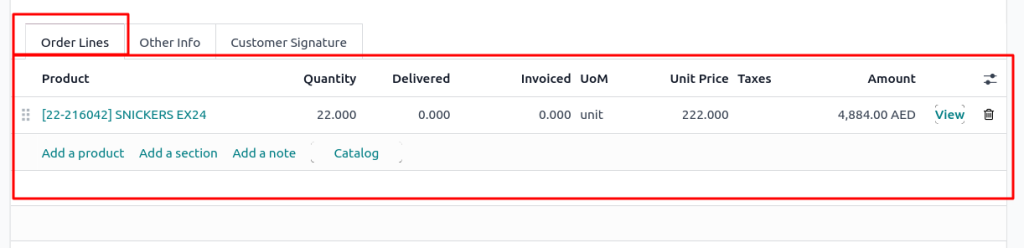
List related records! Display data in sub-lists or kanban views. Control creation and deletion with create and delete options. Customize the ‘Add’ button text with create_text.

Supported field types: one2many 

Options: create, delete, create_text

				
					 <field name="items" options="{'create_text': 'Add Item'}" /> 
				
			
how-can-relational-fields-and-widgets-unlock-odoo-visual-potential

Widgets: Visual Enhancements

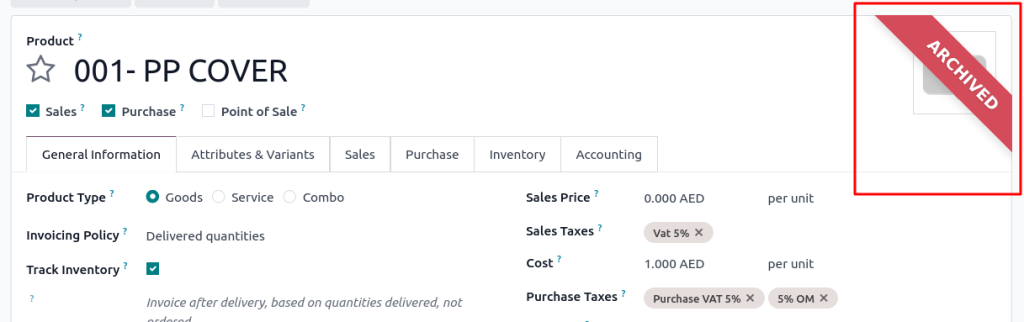
Ribbon (web_ribbon):

  • Add a styled ribbon at the top-right of your form to show important status labels like “Archived,” “Draft,” or “Paid.”
  • Attributes: title, tooltip, bg-class 
				
					 <widget name="web_ribbon" title="Archived" bg_color="text-bg-danger"/> 


how-can-relational-fields-and-widgets-unlock-odoo-visual-potential

Attributes: title, bg_color, tooltip

Use case: Instant visual status indicators in form views.

Week Days (week_days):

Select days easily! Display checkboxes for each day of the week. Perfect for scheduling or availability.

				
					<widget name="week_days" />


Take Your Odoo visual potential Experience to the Another Level

Congratulations! You now have a better understanding of  how to use Relational Fields and Widgets to build smarter, cleaner, and more intuitive interfaces in Odoo visual potential.

By mastering these tools, you can:

  • Build smooth relationships between records
  • Guide users visually with  badges, tags, and ribbons
  • Simplify user input and selection
  • Customize the experience with  avatars, colors, and placeholders

This concludes our two-part series on unlocking Odoo’s visual potential. If you missed Part 1, we highly recommend checking it out to learn about field decorations, non-relational fields, and more foundational UI enhancements.

Picture of Prashanth Polusani

Prashanth Polusani

I’m Prashanth Polusani, a passionate Odoo Developer with expertise in Python, XML, and JavaScript. I specialize in building and customizing Odoo modules to streamline business processes and enhance ERP functionality. With a focus on clean, efficient code, I aim to deliver seamless Odoo solutions.

Get a free quote