

Efficient data management is at the heart of any robust enterprise system, and sequence numbers in Odoo 18 play a pivotal role in this process. These unique identifiers maintain structured data, enhance traceability, and support custom numbering patterns. Commonly used in invoices, sales orders, inventory, and custom modules, sequence numbers are essential for ensuring consistency and accuracy in your business operations.
In this guide, we’ll explore two primary methods for creating sequence numbers in Odoo 18:
- Via Code (ideal for developers)
- Via Odoo Settings Interface (perfect for functional users)
To illustrate these approaches, we’ll create a custom module where each record receives a unique reference number. Whether you’re a developer or a functional user, this guide will help you implement sequence numbers effectively.
Why Are Sequence Numbers in Odoo 18 Important?
Sequence numbers are more than identifiers; they bring structure and reliability to your data management. Here’s why they matter:
- Data Integrity: Prevent duplicate or missing records by ensuring each is unique and sequential.
- Audit Compliance: Provide a transparent tracking mechanism, which is crucial for audits and compliance.
- Operational Clarity: Simplify searches, streamline reporting, and improve integration processes.
Step 1: Define the Model
This step involves creating a new model in your Odoo custom module, which will represent the records you want to assign unique sequence numbers to. In this example, we’re creating a model called custom.document.
Model Structure
This Python code defines custom.document.
In Odoo, your custom create() method checks whether the name is still New when a new record is created. If so, the system knows it’s time to fetch the next number from the defined sequence.
					console.lfrom odoo import models, fields, api

class CustomDocument(models.Model):
	_name = 'custom.document'
	_description = 'Custom Document'

	name = fields.Char(string='Document Number', required=True, copy=False, readonly=True, default='New')
	@api.model
	def create(self, vals):
    	if vals.get('name', 'New') == 'New':
        	vals['name'] = self.env['ir.sequence'].next_by_code('custom.document') or 'New'
    	return super(CustomDocument, self).create(vals)
og( 'Code is Poetry'
Explanation:
- Field Definition: The name field stores the unique document number.
- Custom Create Method: When creating a new record, the method checks if the name field is set to “New.” If true, it fetches the following number from the defined sequence using ir.sequence.
Creating a Sequence in the Backend (XML)
Let’s say we’re building a custom module and want to generate a unique number for a model called custom.document.
					<?xml version="1.0" encoding="UTF-8"?>
<odoo>
	<data noupdate="1">
    	<record id="seq_custom_document" model="ir.sequence">
        	<field name="name">Custom Document</field>
        	<field name="code">custom.document</field>
        	<field name="prefix">CUST/</field>
        	<field name="padding">5</field>
        	<field name="number_next">1</field>
        	<field name="number_increment">1</field>
    	</record>
	</data>
</odoo>
Field Descriptions
- code: Must match the code used in next_by_code().
- prefix: E.g., “CUST” for library.
- padding: Number of digits (e.g., CUST/00001).
- number_next: Start value.
- number_increment: Step size.
Test the Sequence
After installing your module:
- Go to the Custom Document menu.
- Create a book record.
- The NAME will auto-populate (e.g., CUST/00001, CUST/000012…).
By testing the sequence, you ensure that your implementation is functioning correctly.
Don’t forget to add this file to the manifest:
					'data': [
	'data/sequence.xml',
],
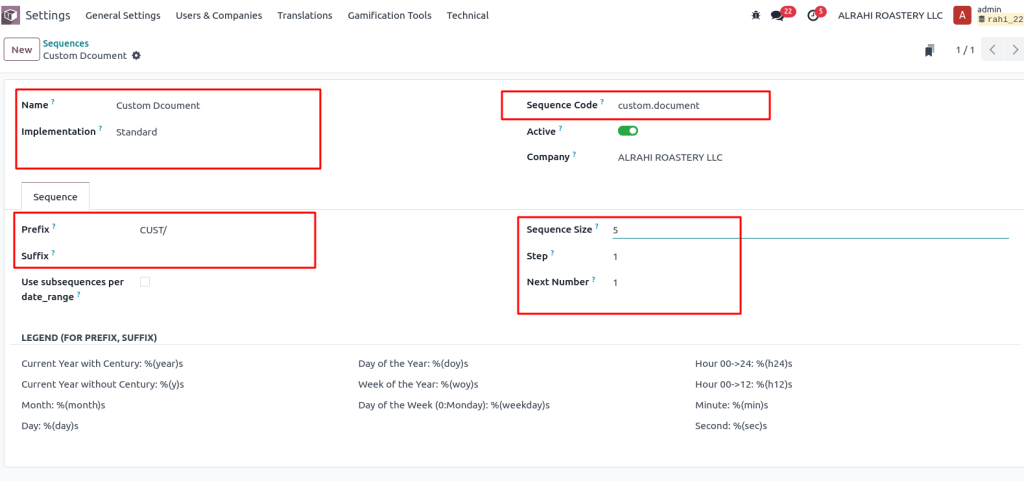
Creating a Sequence via the Odoo UI
Odoo provides a user-friendly interface for non-technical users to create and manage sequences.
Access the Sequence Menu
- Enable Developer Mode in Odoo.
- Go to Settings > Technical > Sequences & Identifiers > Sequences
(Developer Mode must be enabled.)\
Create a New Sequence
Click Create and fill in the details:
- Name: e.g., Custom Document
- Code: Must match your model’s sequence code (custom.document)
- Prefix: e.g., “CUST/”
- Padding: e.g., 5
- Number Next: Starting value (e.g., 1)
- Number Increment: Usually 1
Save and Apply
Once saved, any record created in custom.document will automatically receive a formatted reference number.
Advanced Sequence Numbers in Odoo 18 Options
Odoo’s sequence management is flexible, allowing you to implement advanced features to suit your business needs.
1. Date-Based Sub-Sequences:
You can enable date ranges to reset sequences periodically (e.g., monthly or yearly). To configure this:
- Choose the option Use subsequences per date range in the sequence settings.
- Set the desired interval, such as monthly or yearly.
2. Standard vs No Gap Modes
- Standard: Gaps are allowed if numbers are skipped (common in accounting).
- No Gap: Ensures a strict sequence without missing numbers.
With Odoo18, defining sequence numbers can be done programmatically or effortlessly through the UI. Sequences bring structure, prevent errors, and improve data management across all models. Whether creating a Library System or a complex ERP module, this feature is essential for reliable and traceable operations.
Enhancing Your Sequence Setup
Here are some additional tips to make your sequence setup even more efficient:
Error Handling:
Ensure proper handling of your custom code to manage unexpected issues.Documentation:
Maintain detailed documentation of your sequence configurations for future reference.Customisation for Local Requirements:
Adapt sequences to meet regional or industry-specific compliance needs, such as VAT or audit standards in the UAE.
Sequence Numbers in Odoo 18
Defining and managing sequence numbers in Odoo 18 is a smooth process that caters to developers and functional users. Whether you implement sequences programmatically or through the user interface, these unique identifiers enhance data consistency, prevent errors, and improve operational clarity.
By Utilizing Odoo’s advanced sequence options, such as date-based subsequences and no-gap modes, you can tailor your setup to meet your business’s specific needs. Start creating custom sequences today and experience the benefits of structured and reliable data management in Odoo 18.
Need help with Odoo customisations? Contact us to reach the full potential of Odoo for your business!




