

Why User Experience in Odoo Matters
Looking to make your Odoo environment more interactive and user-friendly? One of the easiest yet most valuable ways to enhance user experience in Odoo is to incorporate visual feedback mechanisms like the Rainbow Effect and Display Notifications.
These playful yet powerful features bring a sense of achievement to everyday tasks and help users stay informed and motivated. Whether you’re managing sales, completing assignments, or confirming actions, these subtle touches can turn routine processes into satisfying moments.
Odoo is more than just a powerful ERP system; it also comes packed with thoughtful UX enhancements that make user interaction smoother and more engaging. Two such features are the Rainbow Effect and Display Notifications. These enhancements visually confirm user actions and highlight completed processes in a fun, dynamic way.
In this blog, we’ll walk you through:
- How to add a Rainbow Effect by inheriting the sale.order.model.
- How to implement a Display Notification by inheriting the purchase.order.model.
What is the Rainbow Effect in Odoo?
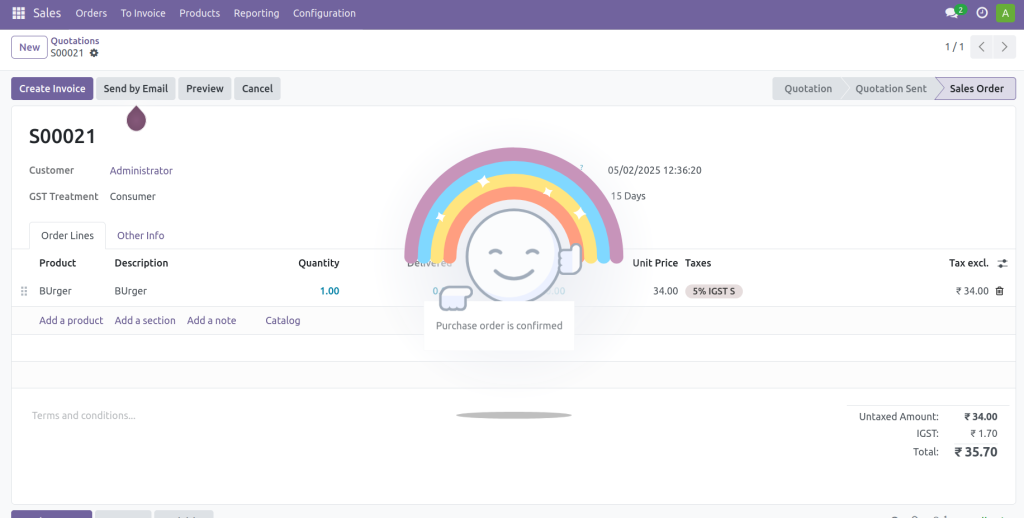
The Rainbow Effect in Odoo is a UI animation that appears as a reward when an action is completed, like confirming a sale order. This effect not only delights users but also gives them a sense of accomplishment.
This feature is handy for sales teams, providing instant positive feedback for closing deals or confirming orders. Here’s how you can implement it:
Add Rainbow Effect to Sale Order Confirmation
					from odoo import fields,api,models
from odoo.exceptions import ValidationError

class SaleOrder(models.Model):
   _inherit = 'sale.order'

def action_confirm(self):
   super(SaleOrder, self).action_confirm()
   return {
       'effect': {
           'fadeout': 'slow',
           'message': 'Sale order is confirmed',
           'type': 'rainbow_man',
       }
   }
Explanation:
- The fadeout effect can be adjusted to either a fast or slow transition.
- The Message refers to the text displayed alongside the rainbow_man effect.
After confirming the sale order, an effect appears on the displayed message.
What is Display Notification in Odoo?
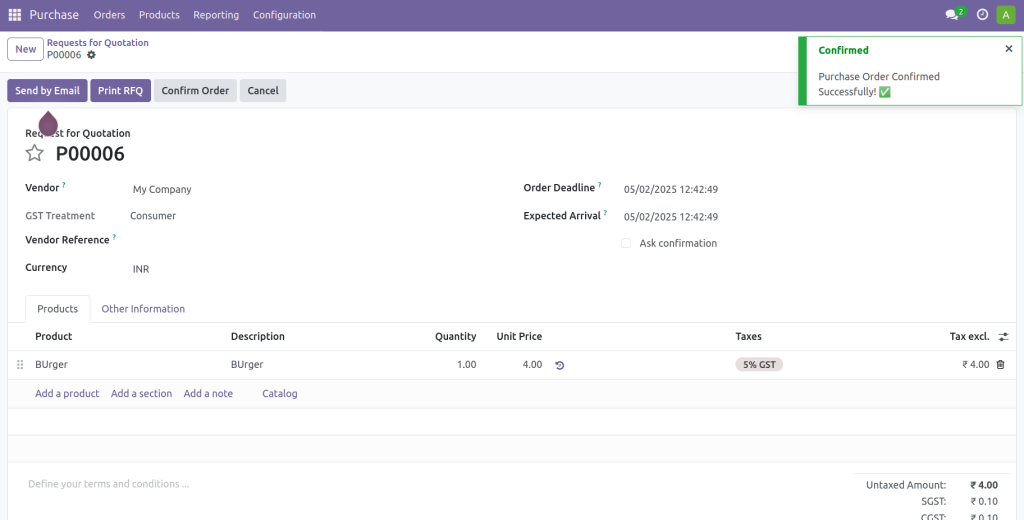
Display Notification in Odoo is a toast-style message shown to the user after an action is triggered. It provides instant feedback, for example, confirming that a record was successfully saved or a process was completed. Here’s how you can add this to a purchase order confirmation:
Add Display Notification to Purchase Order Confirmation
					from odoo import models


class PurchaseOrder(models.Model):
   _inherit = 'purchase.order'


def button_confirm(self):
   res = super().button_confirm()
   return {
       'type': 'ir.actions.client',
       'tag': 'display_notification',
       'params': {
           'title': 'Confirmed',
           'message': 'Purchase Order Confirmed Successfully! ✅',
           'type': 'success',  # 'success', 'warning', 'danger', 'info'
           'sticky': False,
       }
   }
Explanation:
- The title of the notification box.
- The message content is displayed to the user.
- Controls the style of the notification (e.g., success, warning, danger, info).
- If True, the Message stays on screen until dismissed manually. If False, it disappears automatically.
This notification confirms the action to the user and improves transparency in system operations without adding friction to the workflow.
The screenshot below shows a toast message at the top of the screen when a Purchase Order is confirmed, indicating that the action was successful.
Finishing Strong with User Delight
The Rainbow Effect and Display Notifications are simple yet effective ways to enhance user experience in Odoo. These visual cues provide immediate, intuitive feedback, making everyday ERP interactions more satisfying and less mundane.
Whether you’re confirming a sales order or validating a purchase order, these enhancements give users a better sense of engagement and clarity. And the best part? They don’t interfere with your core business logic, just a few lines of code, and you’re offering a richer, friendlier experience in your Odoo interface.
By thoughtfully integrating these features, you can add an extra layer of polish and professionalism to your Odoo system, keeping users motivated and informed at every step.
Why keep it boring? Add some rainbow magic and toast-style fun to your Odoo, and your users will thank you!




