

Sending Birthday Reminders in Odoo 18 Using Automated Emails
Employee birthdays are an essential part of workplace culture. They offer a chance to celebrate and appreciate your staff. However, keeping track of every employee’s birthday manually can be a daunting task for HR teams. This is where automation can make a huge difference. By automating birthday reminders, you ensure that no employee is overlooked, and HR managers can plan for celebrations or greetings. This blog post’ll show you how to set up an automated birthday reminders in Odoo 18. This system will help HR teams to:
- Identify employees who have birthdays coming up in the next 3 days
- Notify HR managers via email
- Run automatically every day using a scheduled cron job (ir.cron)
Let’s get into the steps!
Why Automate Birthday Reminders?
In many organizations, birthdays are more than just a personal milestone. They serve as an opportunity to show appreciation and boost employee morale. A thoughtful birthday greeting can go a long way in strengthening the relationship between employees and their managers. However, manually tracking and sending these automate reminders can be time-consuming and prone to errors.
By automating this process, HR teams will have one less task to worry about, and they can focus on what truly matters: making their employees feel valued. Automation also ensures that no birthday is missed, even during busy times.
Step 1: Add the Python Method to Handle Birthday Notifications
The first step is to extend the hr.employee model and create the logic for sending the birthday reminders. We will create a method called _notify_hr_employee_birthday() that will identify employees with birthdays coming up in the next 3 days and send email reminders to the assigned HR managers.
In this step, we will use Odoo’s ORM to query the hr.employee model for employees whose birthdays match the target date (3 days from the current date). We will also filter out employees who do not have an assigned HR manager.
Here’s the Python code to achieve this:
					from datetime import timedelta
from odoo import api, fields, models


class HrEmployee(models.Model):
   _inherit = 'hr.employee'


   hr_managers_ids = fields.Many2many(
       'res.users',
       string='HR Managers',
       help='HR users to notify about this employee’s birthday'
   )


   @api.model
   def _notify_hr_employee_birthday(self):
       today = fields.Date.today()
       target_day = today + timedelta(days=3)


       employees = self.search([('birthday', '=', target_day)])
       if not employees:
           return


       template = self.env.ref('employee_birthday_reminder.email_template_birthday_reminder')


       for employee in employees:
           for hr_user in employee.hr_managers_ids.filtered(lambda u: u.email):
               if template:
                   template.send_mail(employee.id, force_send=True, email_values={
                       'email_to': hr_user.email,
                   })
Step 2: Email Template XML
Next, we need to create an email template to notify HR managers about upcoming birthdays. This template will include placeholders for the employee’s name and birthday, which will be dynamically replaced when the email is sent.
Here’s the XML code to create the email template:
					<?xml version="1.0" encoding="UTF-8" ?>
<odoo>
   <data>
       <record id="email_template_birthday_reminder" model="mail.template">
           <field name="name">Employee Birthday Reminder</field>
           <field name="model_id" ref="hr.model_hr_employee"/>
           <field name="subject">Upcoming Birthday: {{ object.name }}</field>
           <field name="email_from">${(object.company_id.email or 'info@example.com')|safe}</field>
           <field name="body_html" type="html">
               <div>
                   <p>Dear HR Manager,
                   </p>
                   <p>This is a reminder that
                       <strong>
                           <t t-out="object.name"/>
                       </strong>
                       has a birthday coming up on
                       <strong>
                           <t t-out="object.birthday"/>
                       </strong>
                       .
                   </p>
                   <p>Please plan accordingly!</p>
                   <p>Best Regards,<br/>Thank you.
                   </p>
               </div>
           </field>
       </record>
   </data>
</odoo>
In this template:
- The subject field dynamically includes the employee’s name.
- The body_html contains the employee’s name and birthday date, which will be filled in at runtime.
This simple, yet effective email template will ensure HR managers are always notified in advance of employee birthdays.
Step 3: Add the Scheduled Action (Cron Job)
The final step is to set up a scheduled cron job to run the birthday reminders in Odoo 18 process automatically daily. This will ensure that the reminder system works without requiring any manual intervention.
We’ll use Odoo’s ir.cron model to create a scheduled action that triggers the _notify_hr_employee_birthday() method daily.
Here’s the XML code to set up the cron job:
					<?xml version="1.0" encoding="UTF-8" ?>
<odoo>
   <data>
       <record id="ir_cron_notify_birthday" model="ir.cron">
           <field name="name">Employee Birthday Reminder</field>
           <field name="model_id" ref="hr.model_hr_employee"/>
           <field name="state">code</field>
           <field name="code">model._notify_hr_employee_birthday()</field>
           <field name="interval_number">1</field>
           <field name="interval_type">days</field>
           <field name="active" eval="True"/>
           <field name="nextcall"
                  eval="(DateTime.now().replace(hour=0, minute=0, second=0, microsecond=0)).strftime('%Y-%m-%d %H:%M:%S')"/>
       </record>
   </data>
</odoo>
This cron job will execute every day at midnight, checking for upcoming birthdays and sending reminders as needed. It will keep running automatically without any intervention from HR staff.
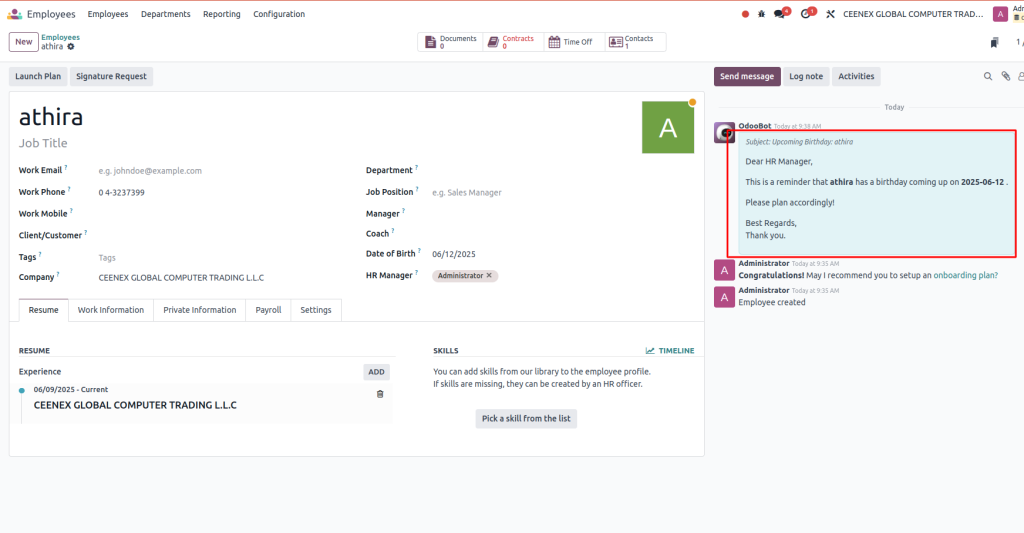
Final Output
Once the system is set up, HR managers will receive an email 3 days before any employee’s birthday. This automation eliminates the need for HR teams to track birthdays, ensuring no special day is forgotten manually.
Benefits of Automating Birthday Reminders
- Time-Saving: Automating the process eliminates the need for HR staff to check each employee’s birthday manually.
- No Birthdays Missed: The cron job runs every day, so HR managers are always notified ahead of time.
- Improved Employee Morale: Timely birthday greetings can help create a positive work environment, leading to happier and more engaged employees.
- Increased Efficiency: HR teams can focus on more important tasks rather than spending time on routine reminders.
Birthday Reminders in Odoo 18
Following these steps, you’ve successfully set up automated birthday reminders in Odoo 18! With the system running daily via the scheduled cron job, HR managers will always have a heads-up about upcoming birthdays, allowing them to plan celebrations and greetings easily.
This small automation can make a massive difference in improving workplace morale and ensuring your employees feel appreciated. So, why not add this little extra appreciation to your workplace?




