

The Odoo platform displays identical data through multiple interfaces including lists and forms and kanban boards and calendars and additional formats. Odoo achieves this capability through its robust and adaptable view system. The complete utilization of Odoo ERP requires developers and functional users to understand views because they enable both developers to create customized solutions and users to optimize their workflows.
This blog explains all available Odoo views while demonstrating their impact on user interaction and data handling. This article guides you through view implementation for your custom module so you can develop interfaces that meet your business requirements effectively. The guide will demonstrate how to use Odoo view architecture for developing applications that provide better user experience. The following section begins our exploration of Odoo view system potential.
1. Form View
Purpose: Form views are used to display the details of a single record. It is the most commonly used view for creating and editing records.
Model
					from odoo import models, fields,api


class Person(models.Model):
   _name = 'custom.person'
   _description = 'Person'


   name = fields.Char(string='Name')
   age = fields.Integer(string='Age')
ir.actions.act_window: Define the Action
					<record id="action_custom_person" model="ir.actions.act_window">
   <field name="name">Persons</field>
   <field name="type">ir.actions.act_window</field>
   <field name="res_model">custom.person</field>
   <field name="view_mode">tree,form,kanban,calendar,pivot,search,graph</field>
   <field name="help" type="html">
       <p class="o_view_nocontent_smiling_face">
           Create your first person record
       </p>
   </field>
</record>
- type: Specifies the kind of action to perform (e.g., ir.actions.act_window opens a model view window).
- view_mode: Lists the available views (like tree, form, kanban, etc.) to display records in the action.
Menu Configuration
					<!-- Root menu -->
<menuitem id="menu_custom_root" name="Custom Persons"/>


<!-- Sub menu for person -->
<menuitem id="menu_custom_person"
         name="Persons"
         parent="menu_custom_root"
         action="action_custom_person"/>


<!--    Form view-->
   <record id="view_person_form" model="ir.ui.view">
   <field name="name">person.form</field>
   <field name="model">custom.person</field>
   <field name="arch" type="xml">
       <form string="Person">
           <sheet>
               <group>
                   <field name="name"/>
                   <field name="age"/>
               </group>
           </sheet>
       </form>
   </field>
   </record>
After adding the above form view, the front-end displays a detailed Person form layout where users can enter or edit individual records with fields like Name and Age

2. Tree View
Purpose: Tree views (also known as list views) are used to display multiple records in a tabular format.
Tree View XML:
					<!--tree view-->
   <record id="view_person_tree" model="ir.ui.view">
       <field name="name">person.tree</field>
       <field name="model">custom.person</field>
       <field name="arch" type="xml">
           <tree string="Person">
               <field name="name"/>
               <field name="age"/>
           </tree>
       </field>
   </record>
After adding the above tree/list view, the front-end shows a clean tree/list layout

3. Kanban View
Purpose: Kanban views are used for visual management of records, often used in sales, CRM, and project modules.
Kanban View XML:
					<record id="view_person_kanban" model="ir.ui.view">
   <field name="name">person.kanban</field>
   <field name="model">custom.person</field>
   <field name="arch" type="xml">
       <kanban>
           <field name="name"/>
           <templates>
               <t t-name="kanban-box">
                   <div><strong><field name="name"/></strong>
                       <div>Age:<field name="age"/></div>
                   </div>
               </t>
           </templates>
       </kanban>
   </field>
</record>
After adding the above Kanban view, the front-end shows a clean kanban layout

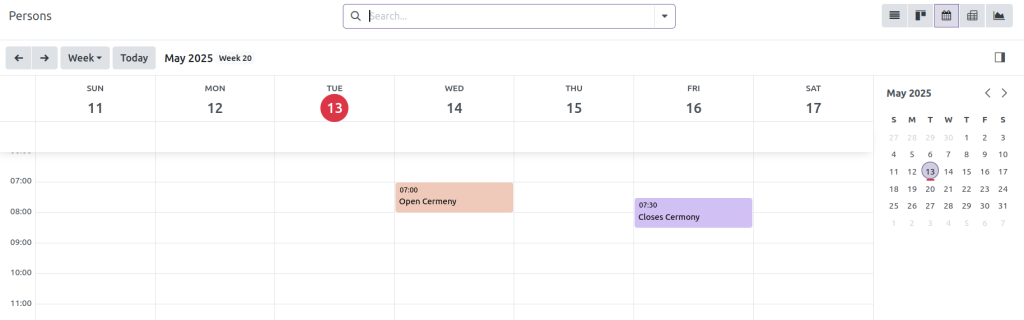
4. Calendar View
Purpose: Calendar views display records with date or datetime fields on a calendar interface.
Calendar View XML:
					<record id="view_person_calendar" model="ir.ui.view">
   <field name="name">person.calendar</field>
   <field name="model">custom.person</field>
   <field name="arch" type="xml">
       <calendar string="Person" date_start="start_date" date_stop="end_date"
       color="name">
           <field name="name"/>
       </calendar>
   </field>
</record>
date_start=”start_date” sets the beginning of each calendar event.
date_stop=”end_date” defines the end time for the event on the calendar.
color=”name” assigns a different color to events based on the Name field, helping visually distinguish them.
After adding the above calander view, the front-end shows a clean calander layout
5. Pivot View
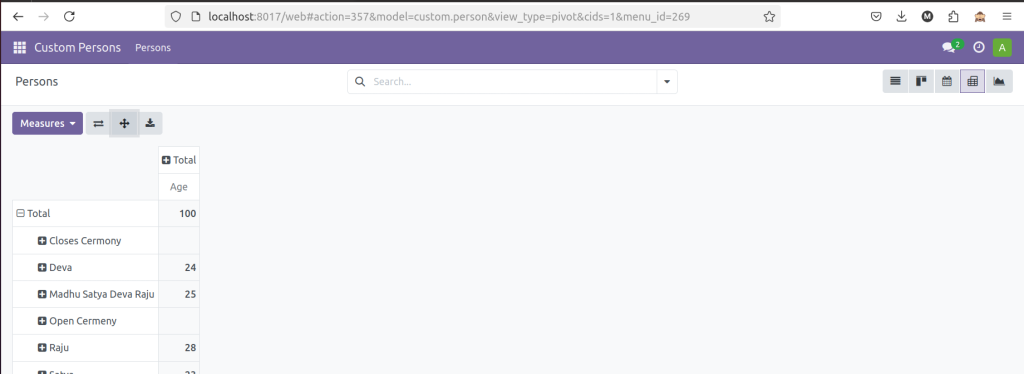
Purpose: Pivot views are used for data analysis and aggregation, providing summaries with grouping and measures.
Pivot View XML:
					<record id="view_person_pivot" model="ir.ui.view">
   <field name="name">person.pivot</field>
   <field name="model">custom.person</field>
   <field name="arch" type="xml">
       <pivot>
           <field name="name" type="row"/>
           <field name="age" type="measure"/>
       </pivot>
   </field>
</record>
type=”row” – Defines the grouping of records by rows.
type=”col” – Groups records by columns for comparison.
type=”measure” – Used for numerical data (integers or floats) to define values that will be measured or aggregated
6. Graph View
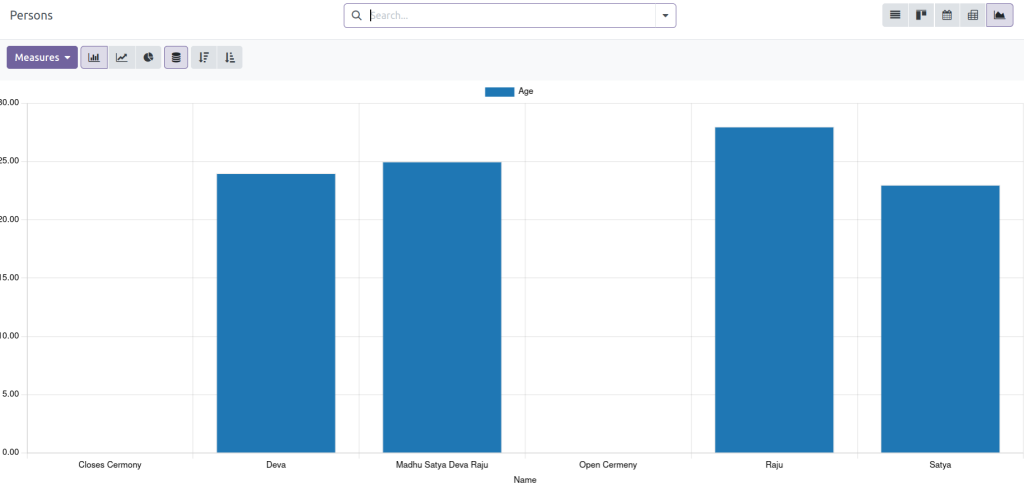
Purpose: Graph views allow you to visualize data in bar, line, or pie chart formats.
Graph View XML:
					<record id="view_person_graph" model="ir.ui.view">
   <field name="name">person.graph</field>
   <field name="model">custom.person</field>
   <field name="arch" type="xml">
       <graph type="bar">
           <field name="name" type="row"/>
           <field name="age" type="measure"/>
       </graph>
   </field>
</record>
After adding graph view than the front-end shows:-
7. Search View
Purpose: Search views define how the search bar behaves and which filters are available in list or kanban views.
Search View XML:
					<!--    search view-->
   <record id="view_person_search" model="ir.ui.view">
       <field name="name">person.search</field>
       <field name="model">custom.person</field>
       <field name="arch" type="xml">
           <search>
               <field name="name"/>
               <field name="age"/>
           </search>
       </field>
   </record>
In the search view, you can search records by Name or Age using the corresponding fields to quickly filter person records.

Smarter Workflows: Mastering Odoo’s View Flexibility
The different views in Odoo operate independently to create a flexible and dynamic user experience. Multiple view types integrated into your custom modules enable you to create applications that are both powerful and user-friendly. Your solutions will be customized to match the specific workflows and preferences of your users through this approach which leads to increased productivity and user satisfaction. Use Odoo’s view system versatility to develop business applications that deliver seamless user experiences and maximum efficiency and engagement.




