Why Wins and Losses in Odoo 18 CRM Define Your Sales Strategy
Here’s the truth most sales teams won’t admit: they don’t know why they win or lose deals. They celebrate the wins, forget the losses, and move on, missing out on the most potent growth tool hiding in plain sight.
What if we told you that your Odoo 18 CRM win loss management is already a goldmine of answers?
Inside every “Won” and “Lost” opportunity lies a secret pattern, one that, if understood, could unlock your best deals again and again. That’s the power of correctly managing wins and losses in Odoo 18 CRM.
In this blog, you’re going to discover:
How to set up win/loss tracking step-by-step in Odoo 18
Which CRM filters reveal your real sales patterns
How to turn your pipeline into a predictable growth engine
How smart businesses double their win rates with simple tweaks
You’ll walk away with practical tools, proven strategies, and a whole new mindset about your CRM. Let’s get into the untapped power of Odoo 18 CRM win-loss management – and show you how to win more, lose less, and sell smarter.
The Strategic Importance of Wins and Losses in Odoo 18 CRM
Sales success isn’t just about what you close – it’s about understanding why you close it. Likewise, every lost opportunity contains valuable lessons. With proper Odoo 18 CRM filters and Odoo CRM group-by-stage views, teams can dissect patterns and unlock winning behaviours.
What Happens When You Don’t Track Wins and Losses?
Missed insights into buyer objections
Repeated sales mistakes
Inaccurate forecasting
Poor rep performance visibility
Now imagine the opposite: Clean data, actionable insights, and repeatable success. That’s the power of managing wins and losses in Odoo 18 CRM.
Practical Steps to Set Up Win Loss Management in Odoo 18 CRM
Let’s start configuring your Odoo CRM for better win/loss tracking.
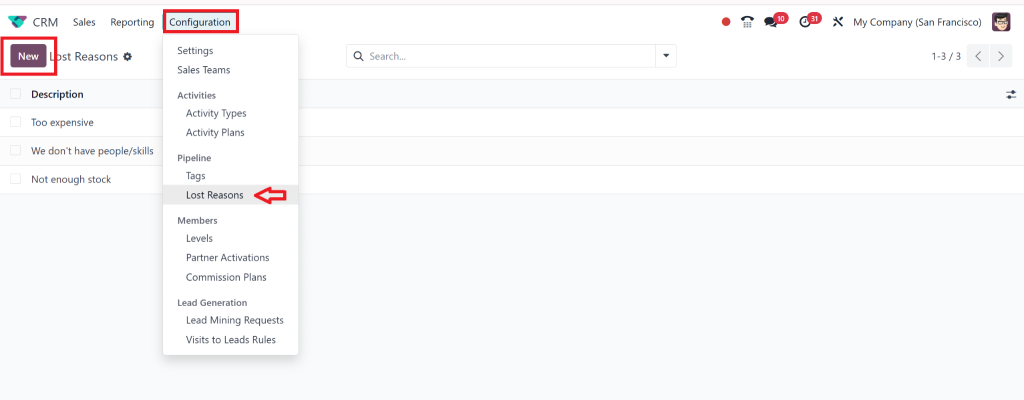
Step 1: Enable Lost Reasons in Odoo
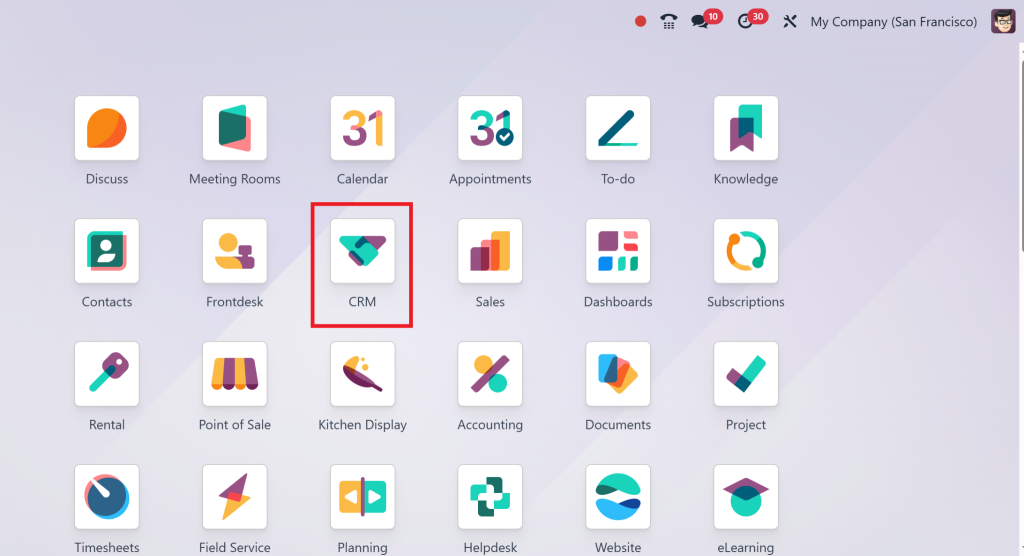
Go to CRM.
Create common reasons, such as “Price, “Competitor,” “No Response,” or “Timing.”
This allows you to capture the exact reason every time a deal is marked as lost, feeding into your Odoo win-loss report.
Step 2: Create Custom Stages for Better Visibility
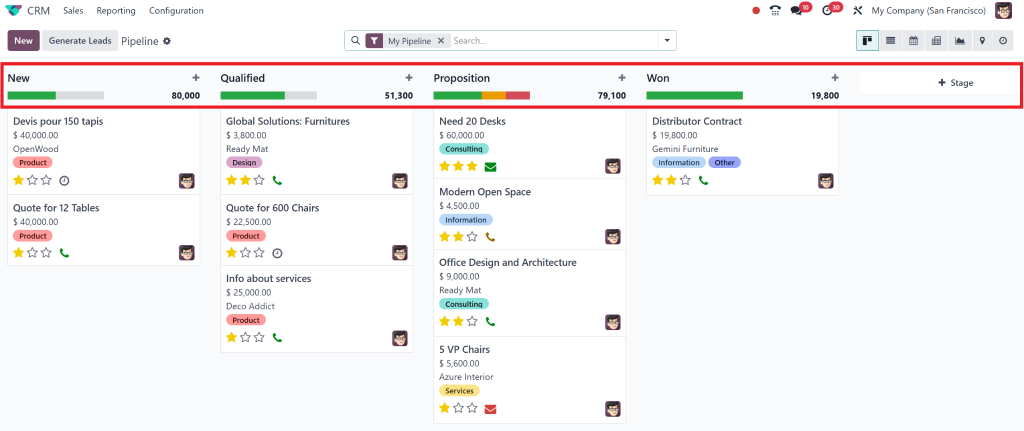
Navigate to your CRM pipeline.
Click on Add a new stage.
Create stages like:
Negotiation (Won)
Lost – No Budget
Lost – Competitor
Lost – Unqualified
These can also be used with the Odoo CRM group by stage filter.
Step 3: Use Tags to Enhance Filtering
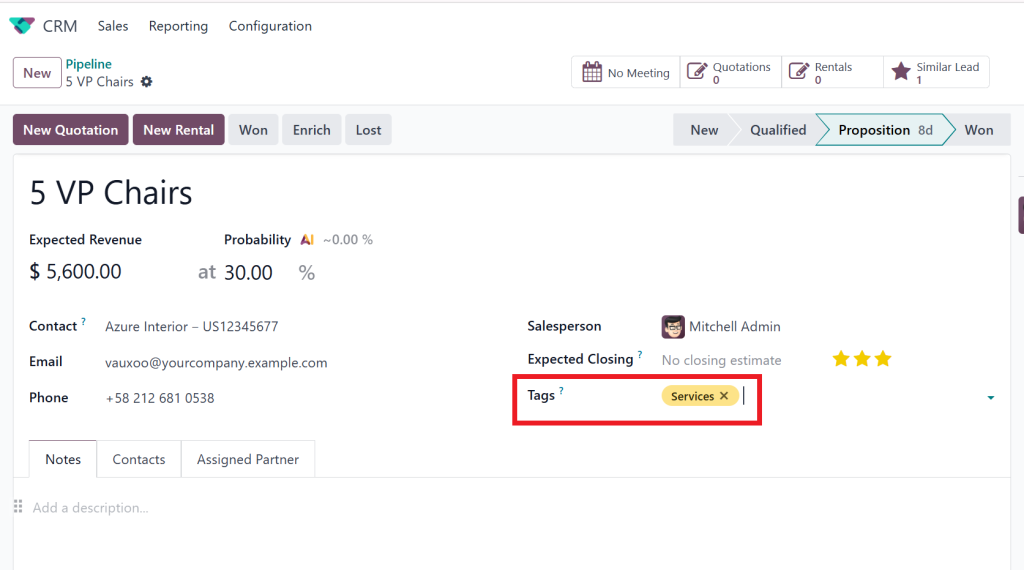
Tags are powerful when combined with Odoo CRM custom filters:
Add tags like “High-Value Lead”, “Warm Prospect”, and “Cold Lead”.
Filter views based on these tags and stages to analyze conversion rates.
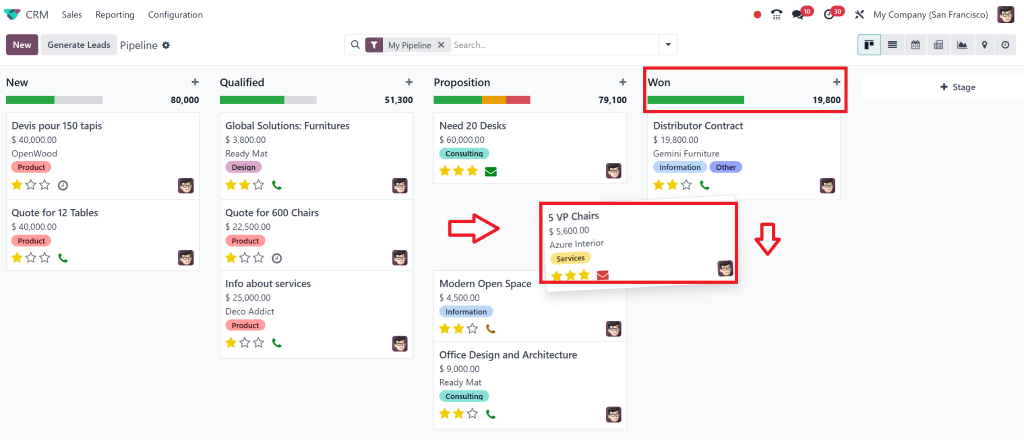
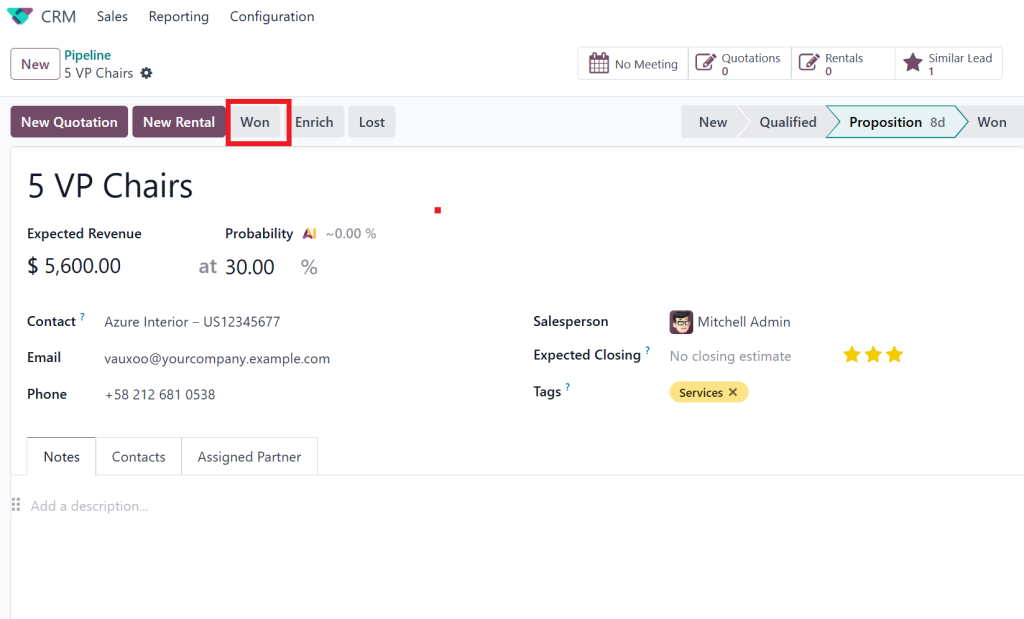
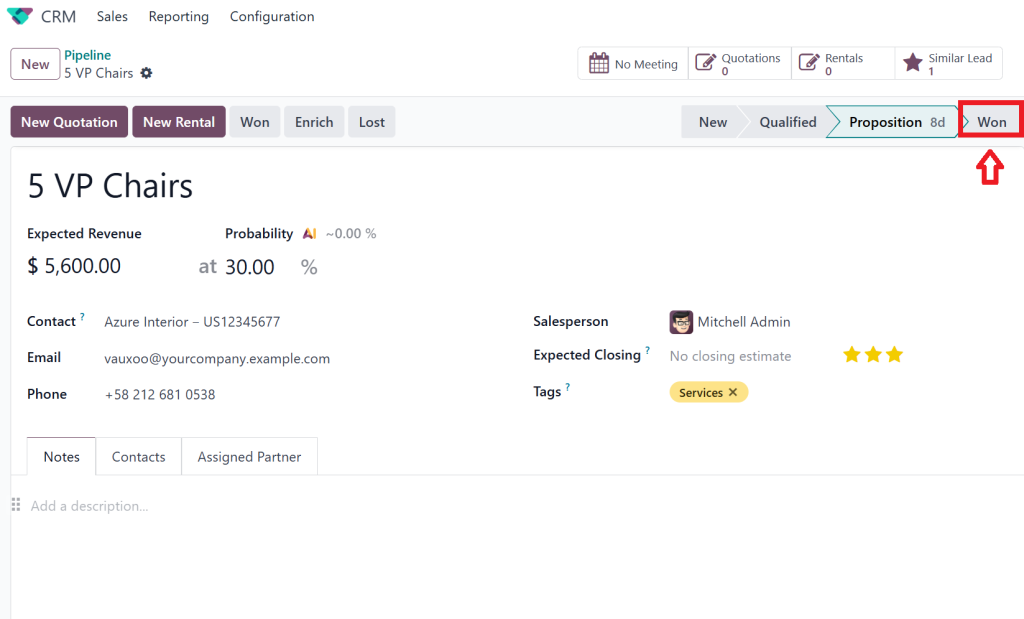
For Example, for marking the lead as “Win”, we have three different ways that are:
In our First way to show as Win, we can simply draft our lead to the won stage:
In the second way, we can click on the won just on the left side.
Thirdly, we can also click on the ” won” on the right side.
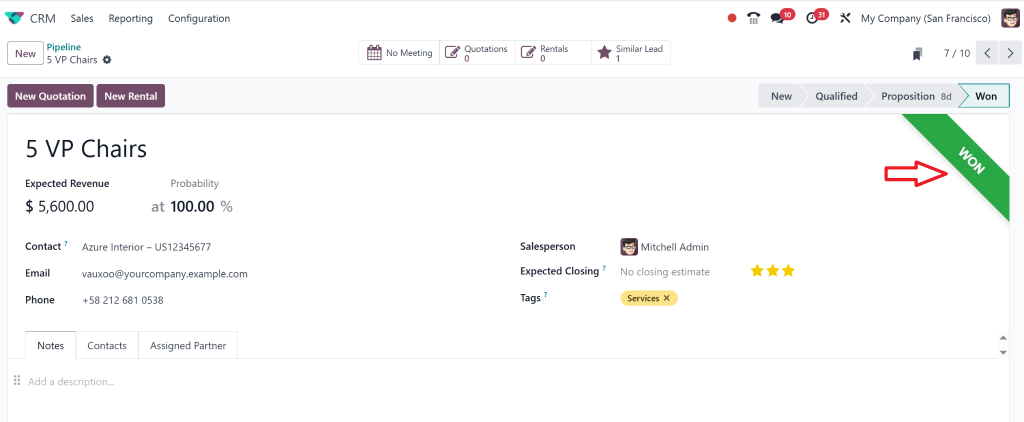
Once we perform any of these steps, our lead is marked as won in the ribbon form, in the Won stage.
Step 4: Build Custom Filters for Win/Loss Dashboards
Go to the CRM list view or kanban view:
Use “Add Custom Filter”
Stage = Won
Date = This Month
Salesperson = [Name]
Save this view as “Monthly Wins by Rep” and repeat for losses.
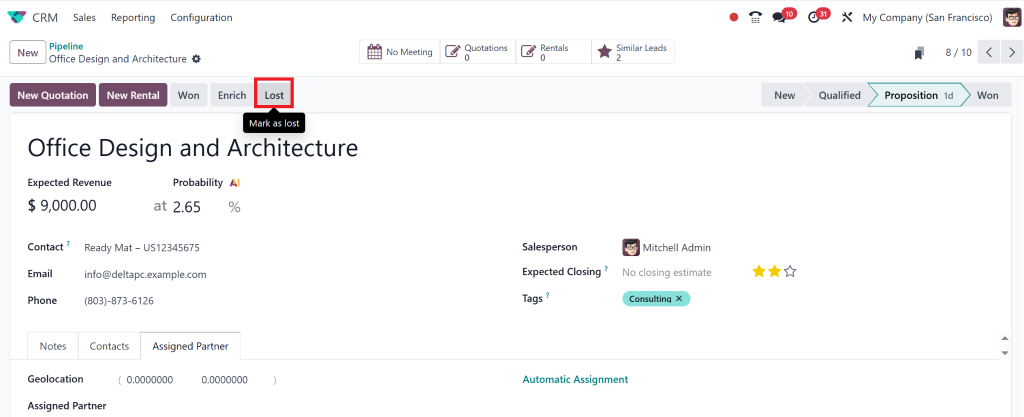
For loss, simply click on ‘Lost’.
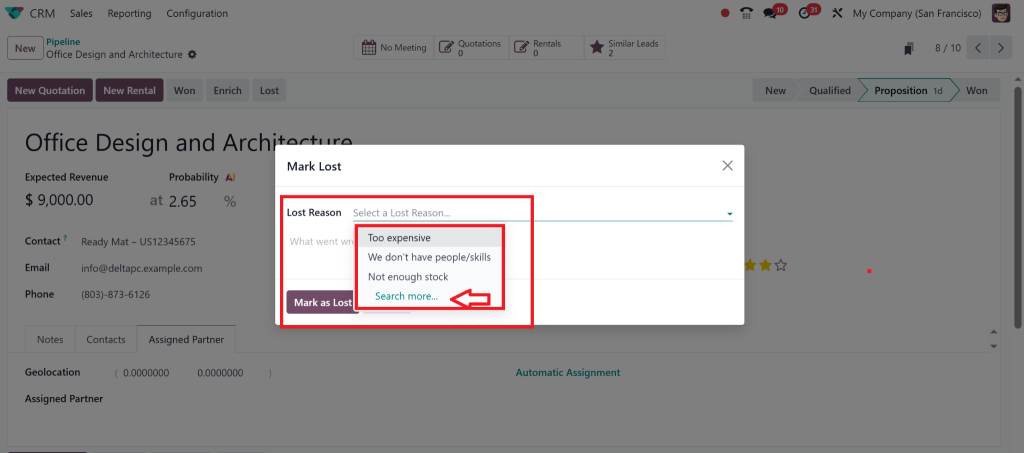
Select any lost reason, if not found in the existing reasons, then you could create a new one.
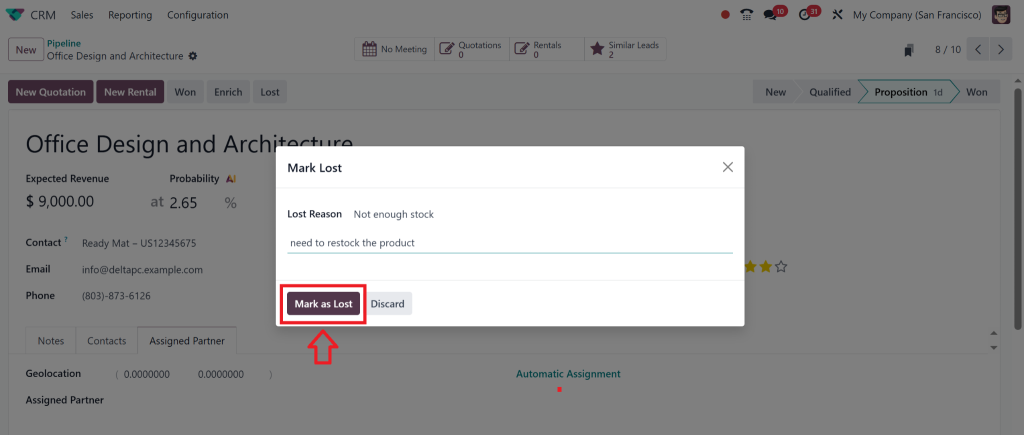
After selecting the reason, mark it as Lost.
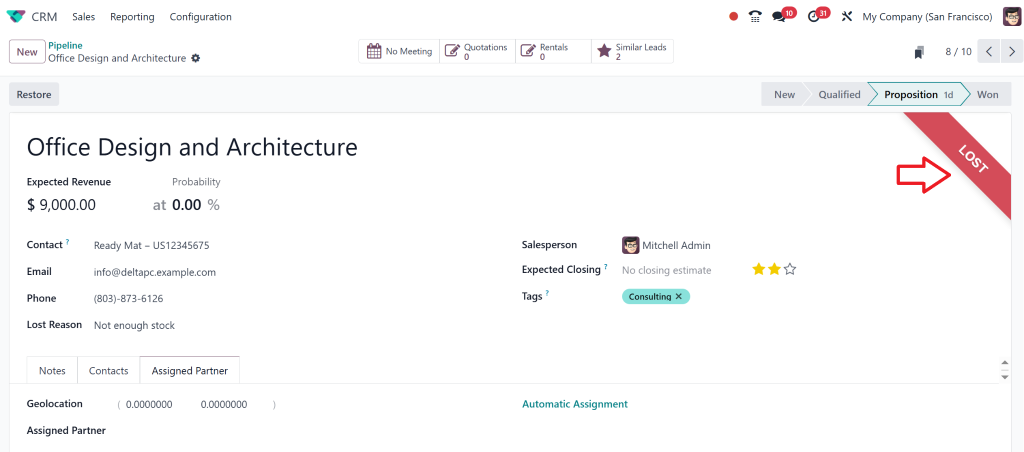
A red ribbon with the lost words appears on the right above corner.
To add a new lost reason, we can also do so by going to Configuration, then selecting Lost Reasons and adding New.
Advanced Reporting with Odoo Win/Loss Reports
Once your CRM is tracking properly, it’s time to build reports. Here’s how to create a basic Odoo win/loss report using Odoo Studio or built-in views.
Step-by-Step: Building a Win/Loss Graph
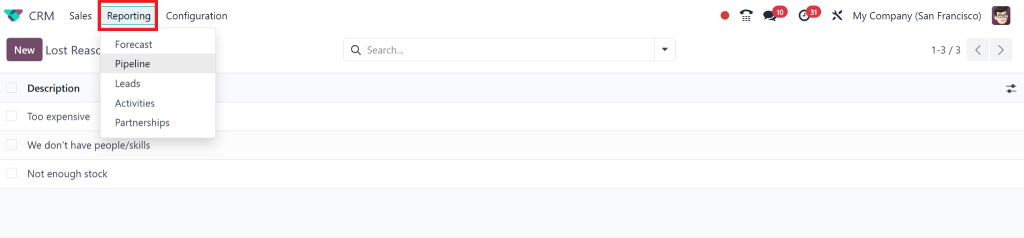
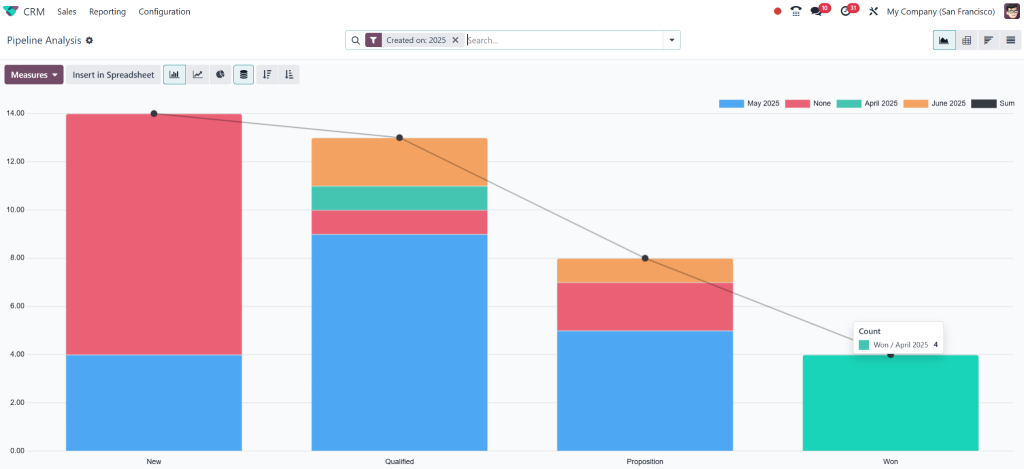
Go to Reporting > Pipeline, leads etc.
In the graph view:
X-axis: Salesperson
Y-axis: Count of Opportunities
Measure: Opportunity Stage (Won vs Lost)
Add Filters:
Date Range
Lead type
Sales team
You can export these or embed them into your Odoo CRM dashboard.
How to Use Odoo CRM Pipeline Analysis to Predict Sales Trends
Odoo CRM pipeline analysis is your forecasting superpower. Here’s how to analyze it:
Metrics to Watch:
Average deal age: Deals that sit too long often go cold.
Conversion rate by stage: Where do you lose the most leads?
Average deal value by win/loss: Are big deals slipping away?
Visualizing this data can help identify bottlenecks and improve conversions. This is especially effective when layered with Odoo CRM custom filters and tags.
Sales Coaching Based on Win/Loss Trends
Wins and losses in Odoo 18 CRM offer rich material for 1-on-1 sales coaching. Here’s how:
Review each rep’s monthly performance.
Breakdown wins: Which industries? What was said?
Break down losses: Pricing issue? Lack of follow-up?
Create training playbooks based on high performers.
This data-driven coaching helps underperforming reps align with what works.
Sales Strategy Tips Backed by Odoo CRM Reporting
With good data comes a smart strategy. Use these tactics to turn your CRM insights into action:
Split Marketing Campaigns Based on Win Rate
Use win/loss trends to direct future marketing budgets. Focus campaigns on industries or products with the highest historical win rates.
Reactivate Lost Leads Automatically
Create a reactivation workflow:
Set up an automated sequence in Odoo.
Target leads marked “Lost” 30+ days ago.
Send them a new offer or resource.
Schedule Weekly Pipeline Reviews
Block time for a team review using your custom dashboards:
Filter by team or territory
Analyze changes in win/loss ratios
Identify leads needing follow-up
Use Case: How a B2B Tech Firm Doubled Wins with Odoo CRM
Problem: A tech firm was closing just 18% of leads.
Solution: Netilligence customized their Odoo CRM with:
Filtered win/loss reasons by industry
Automatic tagging and reminders
Weekly dashboards per team
Result: Within 3 months, their win rate hit 34%. Their reps started spending time only on high-conversion leads.
How Netilligence Helps You Lead Wins and Losses in Odoo 18 CRM
With Netilligence, your business gets more than just set up. We help you extract real ROI from your Odoo CRM system.
Our Services Include:
Custom CRM configuration and pipeline design
Advanced dashboard creation using Odoo Studio
Sales automation for reactivation and follow-up
Hands-on training on Odoo 18 CRM win-loss management
Track Smarter, Sell Better with Wins and Losses in Odoo 18 CRM
If you’re not tracking your wins and losses in Odoo 18 CRM, you’re guessing. When you start, you’re growing.
By using Odoo 18 CRM filters, Odoo CRM pipeline analysis, and custom reports correctly, you can empower your sales team to be smarter, sharper, and more successful.
Don’t just install a CRM. Transform it into a sales strategy engine with Netilligence.
Book your free CRM strategy session today and start winning more – with clarity.
Hi, I'm Nabia, an Odoo ERP functional & technical content writer. I specialize in blogs, social media content, ad copy, landing pages, service pages, and email campaigns.
We use cookies to ensure that we give you the best experience on our website. If you continue to use this site we will assume that you are happy with it.