Why You Must Learn to Manage Maintenance Requests in Odoo 18
Businesses that rely on equipment often experience significant frustration when their equipment suddenly stops working. Odoo 18 provides a solution to eliminate stress through simple click-based operations. Odoo 18 provides this solution. This guide provides a comprehensive overview of Manage Maintenance Requests in Odoo 18, utilising one of the world’s most powerful ERP platforms.
The maintenance module of Odoo 18 provides advanced functionality to automate, track and optimise all repair and upkeep operations. The ability to handle maintenance requests in Odoo 18 will help you save time while decreasing costs and enhancing team productivity for both minor equipment issues and complete equipment replacements.
The following blog post provides a complete overview of everything.
Creating maintenance requests
Scheduling preventive maintenance
Understanding the Odoo 18 maintenance request workflow
Managing and tracking maintenance operations
Leveraging analytics and automation
Let’s read and explore the full capacity of the Odoo 18 maintenance module.
What is the Odoo 18 Maintenance Module?
The Odoo 18 maintenance module is your all-in-one tool to handle equipment upkeep across departments. From manufacturing to logistics, hospitals to service centres, the module offers a centralised way to monitor, assign, and track every kind of maintenance activity.
With it, you can:
Log issues instantly
Assign technicians
Schedule repairs
Automate preventive maintenance
Track progress in real-time
It’s never been easier to manage maintenance requests in Odoo 18, thanks to its flexibility and transparency.
Why businesses love it:
Fully integrated with Inventory, Projects & Manufacturing
Offers a modern, drag-and-drop Odoo maintenance request workflow
Visual dashboards and detailed logs
How to Manage Maintenance Requests Odoo 18 Step-by-Step
This is the core of your operations – and Odoo makes it surprisingly simple to use.
Create Maintenance Requests in Odoo 18
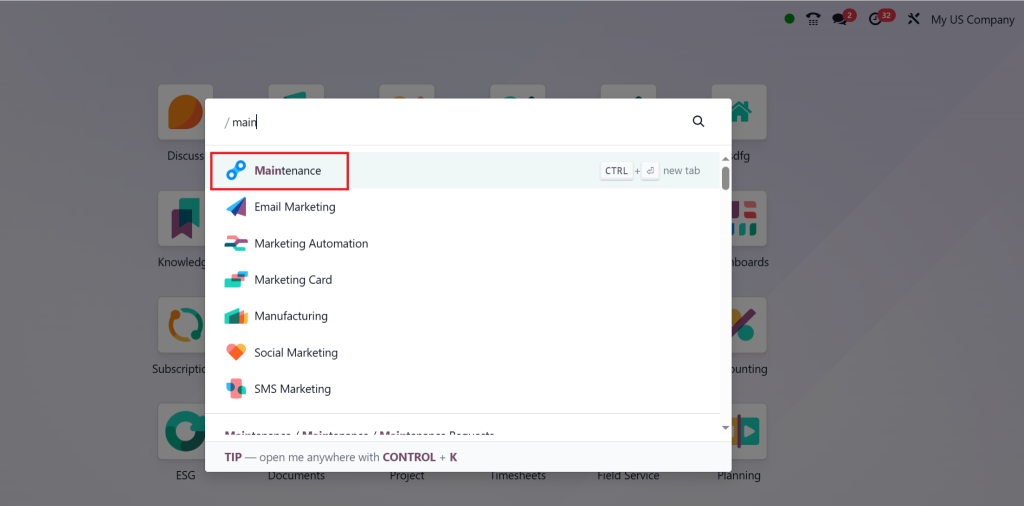
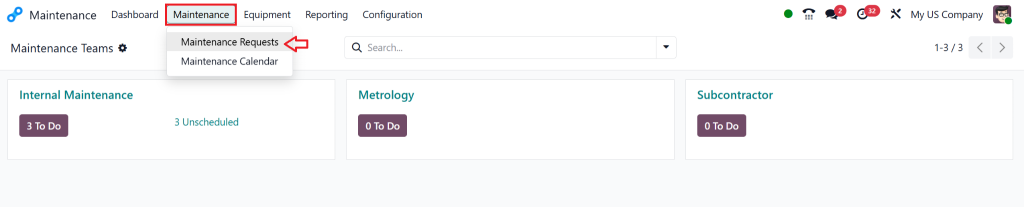
Go to the Maintenance module
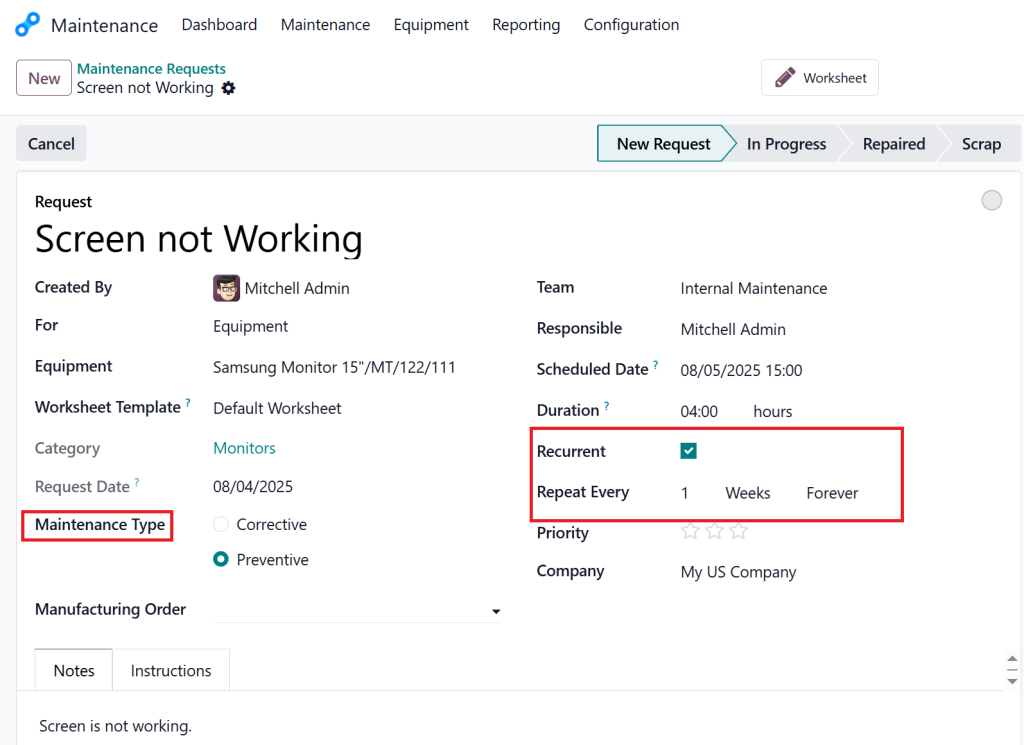
Click on “Maintenance Request”
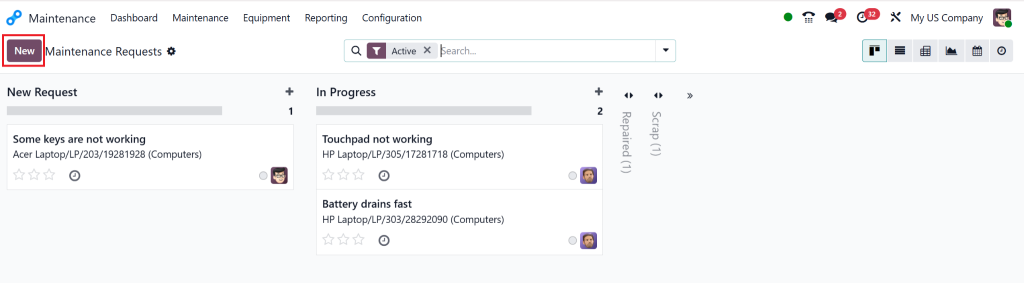
Click “NEW”.
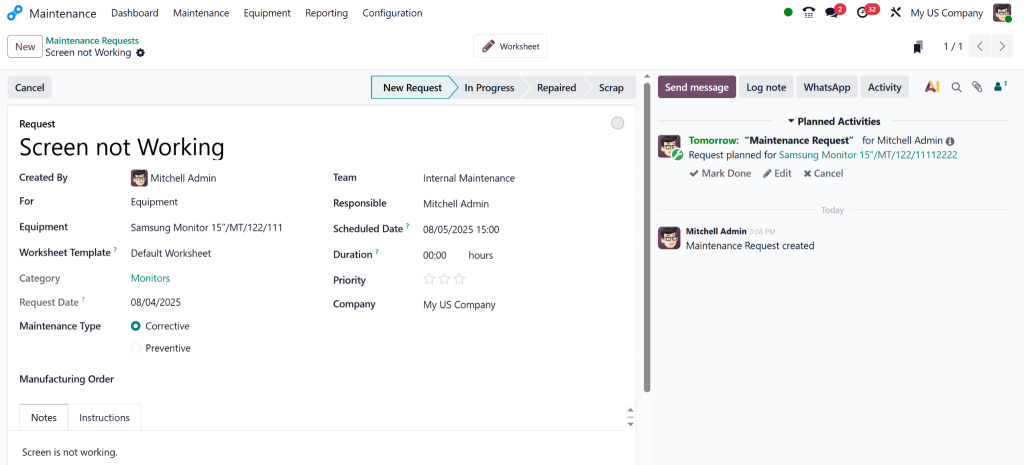
Choose equipment or an asset
Add description, priority, and assign to a technician or team
Set type: preventive maintenance or corrective maintenance
Save and track in the workflow board
Using this process, you can manage maintenance requests in Odoo 18 with minimal effort and complete control.
Preventive Maintenance Odoo 18: Smart Planning
Preventive maintenance in Odoo is an innovation. It allows you to plan maintenance before failure happens, reducing downtime and surprise costs.
Setting Up Preventive Maintenance Schedules
Go to the Equipment tab
Select asset > click on Preventive Maintenance
Set recurrence (daily, weekly, monthly)
Assign a responsible technician.
Automate request generation
Now you can automatically manage maintenance requests in Odoo 18 without human intervention.
Example: A generator needs oil checks every 30 days. With preventive scheduling, Odoo 18 will auto-generate that task on time.
Benefits:
Prolongs asset life
Reduces urgent breakdowns
Lowers maintenance costs
Odoo 18 Maintenance Request Workflow Explained
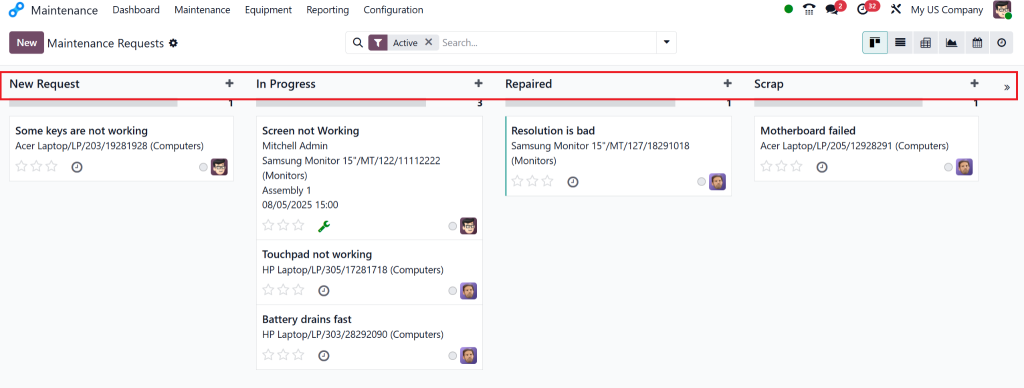
Managing requests involves understanding how they progress through various stages. The Odoo maintenance request workflow provides a clean, visual process.
Workflow Stages in Odoo 18
New: Request created
In Progress: Task assigned and started
Done: Task completed and closed
Cancelled: Request withdrawn
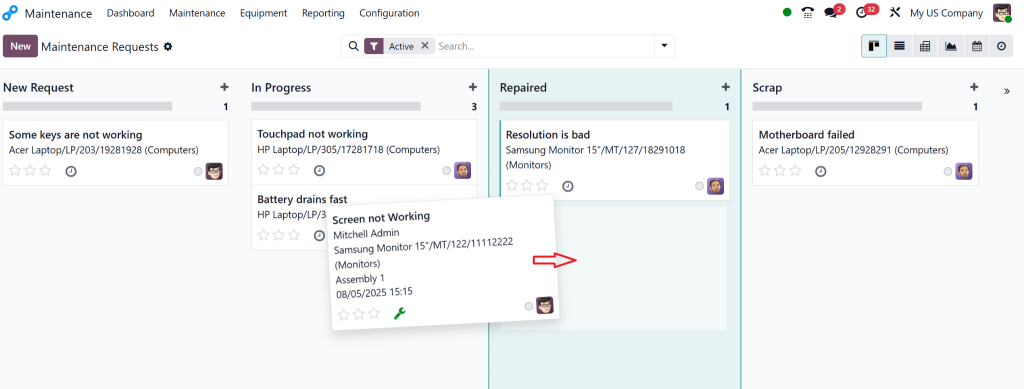
With Kanban and calendar views, it’s super easy to drag and drop requests, making it intuitive to manage maintenance requests in Odoo 18.
Customise it:
Add tags like “Waiting for parts” or “Urgent”
Assign based on department or technician expertise
Maintenance Scheduling Odoo 18: Calendar and Gantt View
Maintenance scheduling in Odoo 18 is user-friendly and visual.
Planning Repairs Made Easy
Use Odoo’s inbuilt:
Calendar view: Weekly/monthly tasks
Gantt view: Project-level planning
Kanban view: Drag-and-drop task status
Features:
Set priorities
Filter by location or team
Avoid scheduling conflicts
View technician workload
These tools make it effortless to manage maintenance requests in Odoo 18 with visibility and balance.
Real-Time Odoo Maintenance Tracking & Insights
Want to improve productivity and reduce costs? Track it all in real time.
Dashboards and Metrics That Matter
Analyse completed vs. pending requests
Track most faulty equipment
Monitor technician efficiency
Generate daily/weekly/monthly reports
You can also set automated email alerts for high-priority tasks.
With this level of data, you can identify trends, predict future needs, and more easily manage maintenance requests in Odoo 18.
Managing Equipment Maintenance Odoo 18: Best Practices
As an Odoo Partner, Netilligence is trusted by hundreds of companies to deploy, configure, and optimise the Odoo 18 maintenance module. Our custom solutions help you:
Build preventive maintenance plans
Automate scheduling & notifications
Create custom dashboards and workflows
Integrate with your manufacturing, HR, and inventory apps
Clients love us for our deep Odoo knowledge, fast deployment, and post-launch support.
Let us help you manage maintenance requests in Odoo 18 the right way.
Ready to Master Odoo Maintenance Requests Workflow?
Your commitment to enhancing maintenance operations has brought you this far. The path to success is now within your reach. All tools, including preventive maintenance in Odoo, as well as custom workflows and scheduling, are available for immediate use.
Our assistance will help you:
Facilitate tasks
Avoid critical breakdowns
Improve asset lifespan
Start today. Contact Netilligence to receive expert guidance on managing maintenance requests in Odoo 18.
Hi, I'm Nabia, an Odoo ERP functional & technical content writer. I specialize in blogs, social media content, ad copy, landing pages, service pages, and email campaigns.
We use cookies to ensure that we give you the best experience on our website. If you continue to use this site we will assume that you are happy with it.