How to Configure a Proforma Invoice in Odoo 18 Sales?
Proforma Invoice in Odoo 18 Sales
Every document you send plays a crucial role in professional sales management. The Proforma Invoice feature in Odoo 18 Sales enables you to enhance customer communication and accelerate your invoicing process while shortening the time needed to finalize deals. The ability to configure Proforma Invoice in Odoo 18 Sales helps businesses of all sizes optimize their operations and create positive client impressions.
This blog provides a comprehensive overview of Odoo 18 proforma invoices, explaining their importance, setup process, and role in sales cycles. The guide offers tailored information for business owners, sales managers and ERP enthusiasts who want to maximize Odoo 18’s capabilities.
By the end of this article, you will know:
What a proforma invoice is
How it functions within Odoo 18 Sales
How to create a proforma invoice in Odoo 18
How to send it to your clients
The difference between proforma and other Odoo 18 sales module invoice types
Let’s explore the powerful tools Odoo 18 puts at your fingertips.
What is a Proforma Invoice and Why It Matters
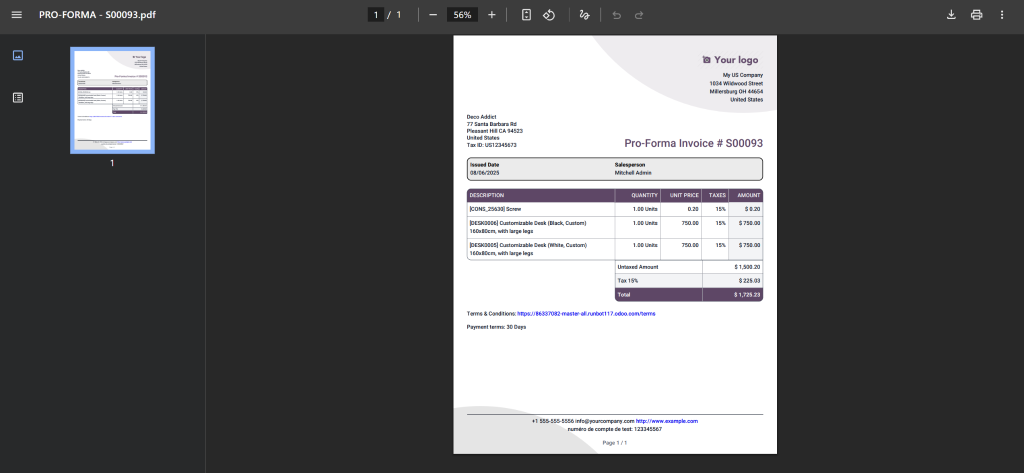
A proforma invoice functions as an initial receipt or bill of sale, which businesses send to customers before delivering their goods. The document outlines purchased items, the total amount due, and essential details; however, it does not function as a payment invoice. The tool functions as a strong instrument which helps sellers demonstrate their dedication to their buyers.
The Sales module in Odoo 18 allows businesses to configure and send proforma invoices directly, which streamlines the process and enhances professional efficiency.
Use cases include:
When a customer requests a formal quotation before confirming the order
For customs or international trade purposes
As a soft agreement to outline pricing before committing
The Power of the Odoo 18 Proforma Invoice Feature
Odoo 18 has made significant upgrades to the Sales module, and one of the most useful is the ability to generate proforma invoices quickly and efficiently. Here are some reasons:
Professional Customer Communication
With just a few clicks, you can create a branded and detailed document to send to your clients.
Workflow Integration
The Odoo 18 sales proforma invoice can be created directly from your quotation or sales order without needing third-party plugins or customisations.
Customer Trust
Clients love clarity. A proforma invoice adds transparency and sets clear expectations before proceeding with an order.
How to Configure Proforma Invoice Odoo 18 Sales
Now let’s get to the heart of this guide: how actually to configure and use the proforma invoice Odoo 18 offers.
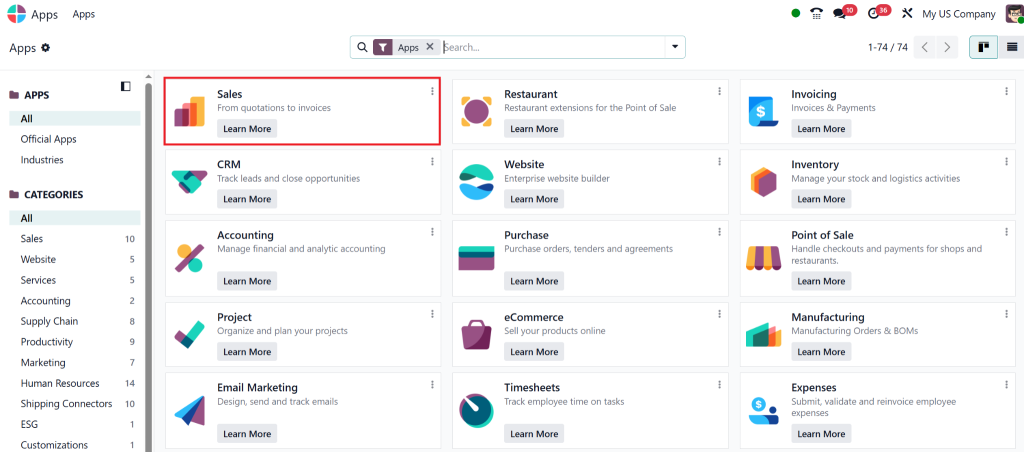
Step 1: Activate the Sales Module
Before using the proforma invoice feature, ensure that the Sales module is installed and active.
Go to Apps > Sales
Click Install if it’s not already active
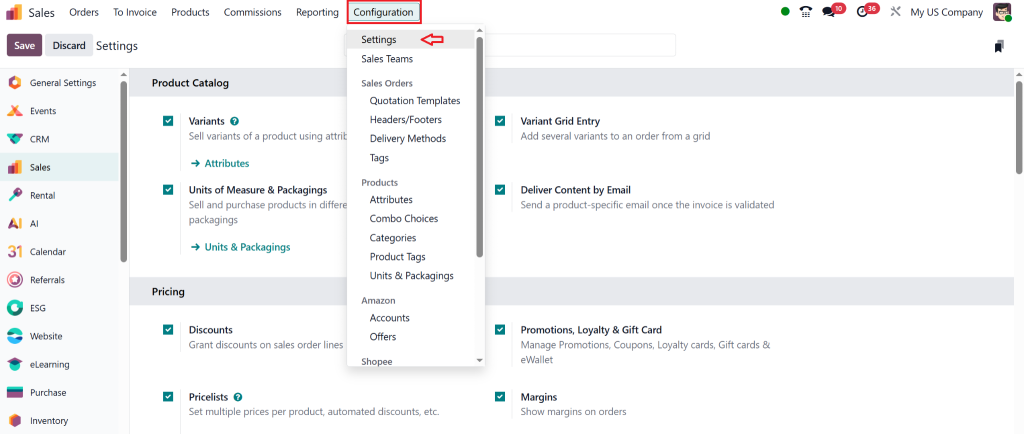
Step 2: Access Sales Settings
Goto Sales > Configuration > Settings
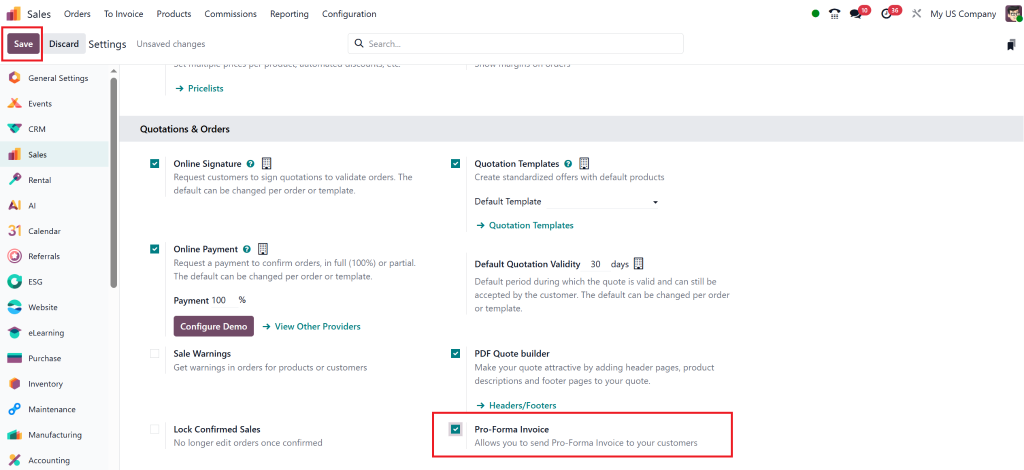
Scroll to the section related to invoicing or quotations
Make sure the “Proforma Invoice” option is enabled. This feature may be toggled depending on your version or configurations.
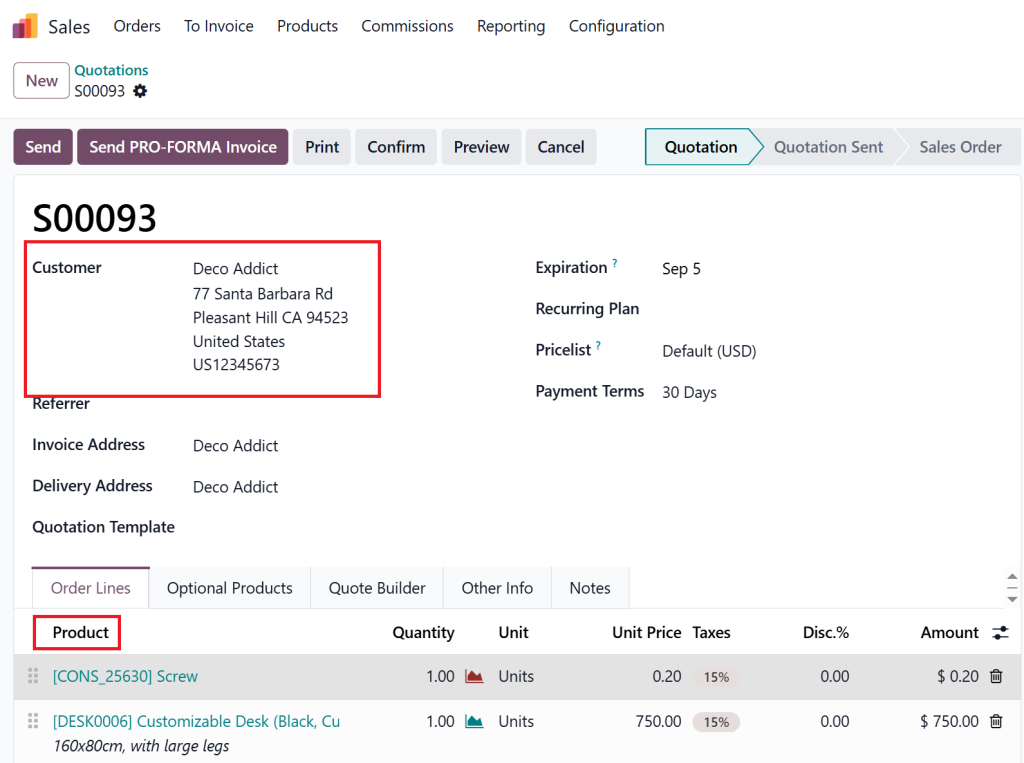
Step 3: Create a Sales Quotation
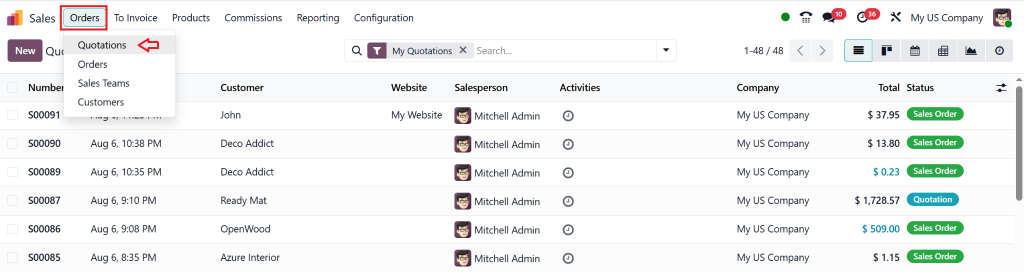
Go to Sales > Quotations > Create
Fill in customer details, products, pricing, and terms
Save the quotation
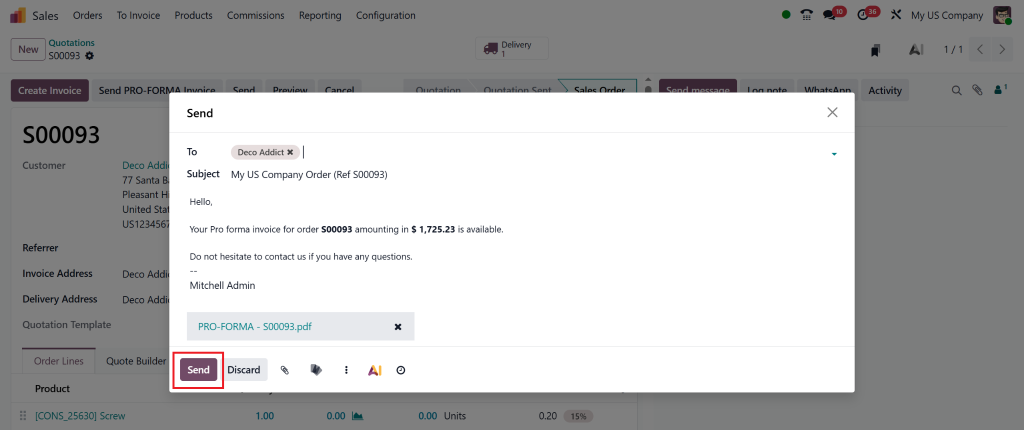
Step 4: Print or Send as Proforma Invoice
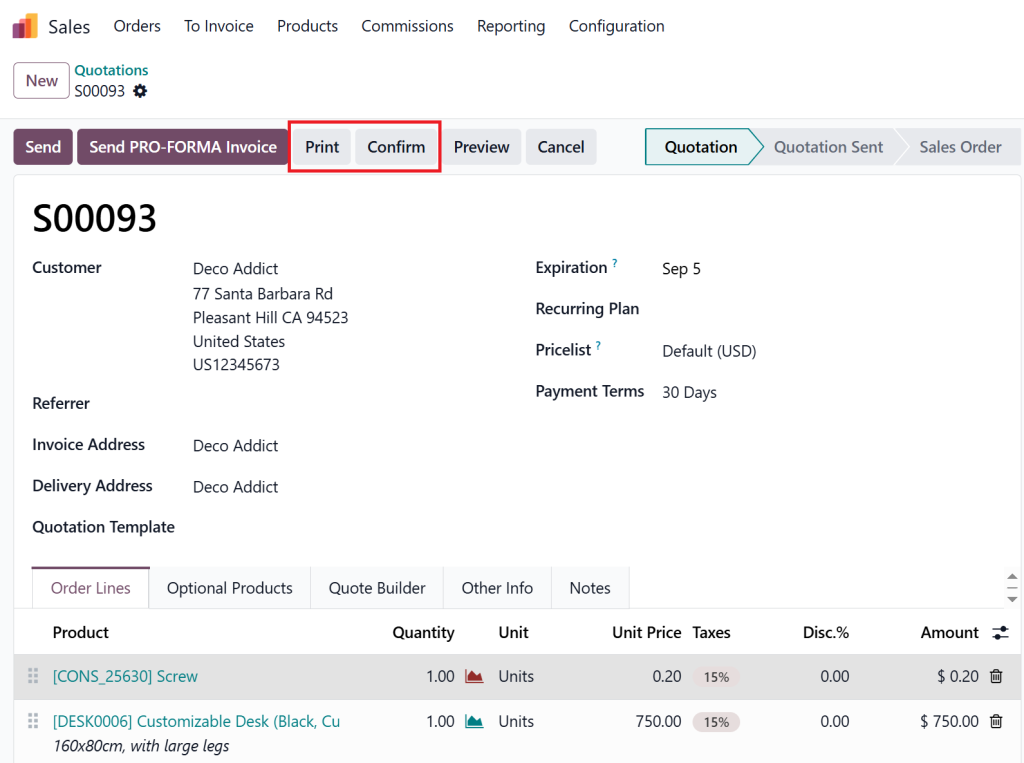
After saving your quotation, click the “Print” or “Send by Email” button
Choose the Proforma Invoice from the list of available templates
Review properly
Review and send to the customer
Step 5: Customise Your Template (Optional)
Odoo 18 allows complete customisation of invoice templates:
Go to Settings > Technical > Reports
Locate Proforma Invoice Template
Edit the layout, add logos, terms, or dynamic fields
And there you have it – your proforma invoice in Odoo 18 Sales is live and ready to use.
Odoo 18 Sales Module Invoice Types Explained
The proper placement of a proforma invoice within the Odoo 18 sales module invoice types requires understanding for both clarity and compliance purposes.
Proforma Invoice
A preliminary, non-binding invoice is sent before confirming the order.
Quotation
An offer to sell a product/service under specified conditions.
Sales Order
A confirmed order awaiting delivery and billing.
Regular Invoice
The final bill is used to request payment from the buyer.
This separation of documents ensures legal compliance and clear financial communication. With the Odoo 18 proforma invoice feature, you are always one step ahead.
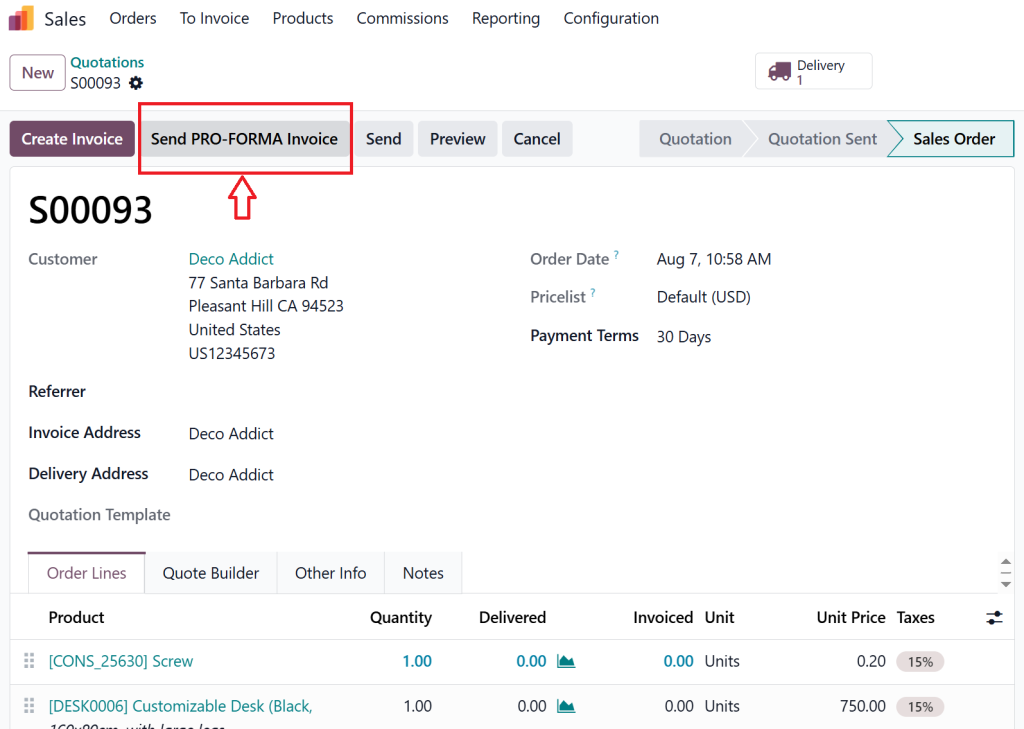
How to Send Proforma Invoice Odoo 18 Sales
Odoo 18 provides its users with an easy-to-use document management system as one of its main advantages.
The following steps show how to create a proforma invoice in Odoo 18 in just a few seconds:
Create a quotation or sales order
Click “Print” or “Send by Email”
Select “Proforma Invoice”
Customise your message
Hit send
Done. The client receives a professional-looking document that helps you crack deals faster and with more confidence.
Best Practices for Using Proforma Invoices in Odoo 18
To get the most out of the proforma invoice Odoo 18 feature, follow these expert tips:
Always confirm terms before sending: Double-check product descriptions, prices, taxes, and delivery dates.
Use templates: Save time by creating custom templates for different business segments.
Track responses: Use Odoo’s chatter and activity tracking to monitor customer engagement.
Set reminders: Follow up on pending proforma invoices within Odoo’s CRM or Sales dashboard.
Train your team: Make sure all sales agents are comfortable generating and sending these documents.
Why Choose Netilligence to Create Proforma Invoice Odoo 18
As an Odoo Partner, Netilligence brings industry-grade experience and deep technical know-how. We help you:
Smoothly configure and implement the Odoo 18 proforma invoice feature
Train your team for smooth operation
Provide ongoing support and optimisation
Why Us?
10+ years of Odoo expertise
Certified team
100+ successful Odoo projects
Contact Netilligence today to streamline your sales cycle with a Proforma invoice in Odoo 18 Sales.
Make Every Invoice Count with Odoo 18 and Netilligence
The Odoo 18 proforma invoice feature serves as more than a document because it provides powerful capabilities that enhance transparency, boost professionalism, and speed up deal closures. The feature becomes essential for your sales communication strategy when correctly set up.
Odoo 18 provides an uncomplicated process for all operations. Your success is guaranteed when you work with Netilligence.
So don’t wait. Start creating proforma invoices in Odoo 18 Sales today and elevate your customer experience.
Hi, I'm Nabia, an Odoo ERP functional & technical content writer. I specialize in blogs, social media content, ad copy, landing pages, service pages, and email campaigns.
We use cookies to ensure that we give you the best experience on our website. If you continue to use this site we will assume that you are happy with it.