


Why Configure Task and Project Stages in Odoo 18 Matters
Every project has a story. It begins with an idea, then moves through planning, hard work, reviews, and finally the result. But in the middle of this journey, it’s easy to lose track of where tasks stand. This is why it’s so important to learn how to configure task and project stages in Odoo 18. The stages in Odoo 18 are like checkpoints that guide you step by step. They tell you where things are, what’s already done, and what still needs attention.
As you start configuring task and project stages in Odoo 18, you’ll notice that projects become easier to follow. You no longer have to wonder if a task is waiting, started, or finished. With the simple setup options, you can design stages that reflect the way your team works. Whether you are a small group handling a single project or a bigger company running multiple projects, Odoo 18 gives you the ability to set up clear paths for each task.
The idea of Odoo 18’s configure project stages is not about making things complicated. Instead, it’s about creating a simple flow that matches real-life work. The Odoo 18 task stages setup allows you to track tasks at an efficient level, while the overall project stages give you a broader picture. When configuring stages in Odoo 18 Projects, you can decide how tasks move forward. The Odoo task stage configuration makes sure that nothing gets missed along the way.
This guide is more than just an explanation. It’s a complete Odoo 18 project stage tutorial written in a way that feels like a conversation. As you read through, you’ll see how you can customize project workflow in Odoo 18 to match your business and why the Odoo 18 stages settings for tasks help bring clarity to even the most minor details. By the end, you’ll understand not just how to set things up, but also why it makes every day work feel more organized.
Odoo 18 Configure Project Stages and Give Projects a Clear Direction
When we talk about Odoo 18 configure project stages, we’re talking about giving structure to something that can easily feel overwhelming. Every project is different, but all of them need direction. For example, you might want to start with a “Planning” stage where ideas are collected, then move to “Execution” where work is carried out, followed by “Review” for checks, and finally “Completed.” These stages tell the story of the project.
The attractiveness of Odoo 18 is that you don’t have to follow a fixed rule. You get to create the stages the way you want. If your team prefers short, simple steps, you can set up just three or four stages. If your work requires more detail, you can add extra stages that reflect each step. The process of configuring project stages in Odoo 18 is about matching the tool to your way of working. When the stages make sense to your team, everyone feels more confident about where the project is heading.
Odoo 18 Task Stages Setup that Follows the Life of a Task
A project is made up of many tasks, and every task tells its own little story. The Odoo 18 task stages setup helps ensure that those stories are clear. Without stages, tasks can feel like they’re floating without direction. With stages, you can see precisely where each task stands, whether it’s “To Do,” “In Progress,” “Waiting for Review,” or “Done.”
Setting up these stages in Odoo 18 is simple. You can create names that fit the way your team speaks. Maybe you want to call a stage “Brainstorming” or “Under Review.” You can even use colors to make it easier to notice what’s important. Once the Odoo 18 task stages setup is in place, moving tasks through their life cycle becomes as natural as moving pieces across a board. You can see the flow, spot the delays, and keep things moving.
Configure Stages in Odoo 18 Projects and Make the System Serve You
One of the most valuable aspects of Odoo 18 is its ability to adjust to your specific needs. When you begin to configure stages in Odoo 18 Projects, you realize that the system doesn’t force you into a rigid way of working. Instead, you decide how many stages you need and what to call them.
This flexibility makes a big difference. Imagine you’re managing a design project. You might need stages like “Concept,” “Draft,” “Feedback,” and “Approved.” On the other hand, if you’re handling a sales project, your stages might look like “Lead,” “Negotiation,” “Agreement,” and “Closed.” By configuring stages in Odoo 18 Projects, you can set up a flow that feels natural to your industry. This is why Odoo 18 is so appealing, it respects the way you work instead of forcing you into a fixed path.
Odoo Task Stage Configuration that Keeps Tasks on Track
When it comes to details, the Odoo task stage configuration is where things get interesting. Each stage is not just a name, it represents a step in how tasks move forward. By setting up these stages carefully, you give every task a clear route. You can even fold stages when they’re no longer needed, keeping your board clean and focused.
For example, if you’re running a software project, you might have stages like “To Do,” “In Progress,” “Testing,” and “Deployed.” If you’re managing an event, you might use “Preparation,” “In Progress,” “Final Check,” and “Finished.” The Odoo task stage configuration enables the design of a realistic workflow. It’s not about adding extra work, it’s about making sure the job you’re already doing is easy to follow.
Step-by-Step Guide to Configure Task and Project Stages in Odoo 18
Now that we understand the importance, let’s get into the step-by-step process of how to configure task and project stages in Odoo 18.
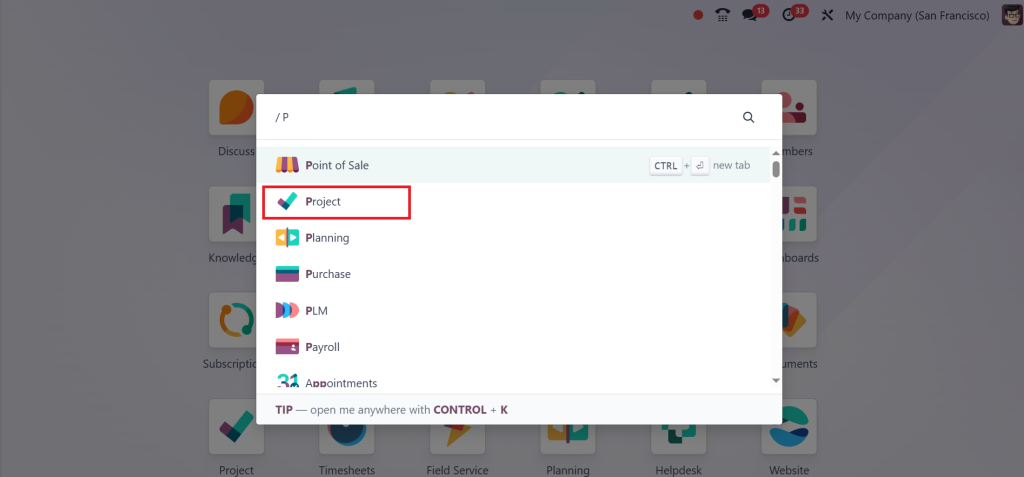
Go to the Project app in Odoo 18. This is where you will manage both projects and tasks.
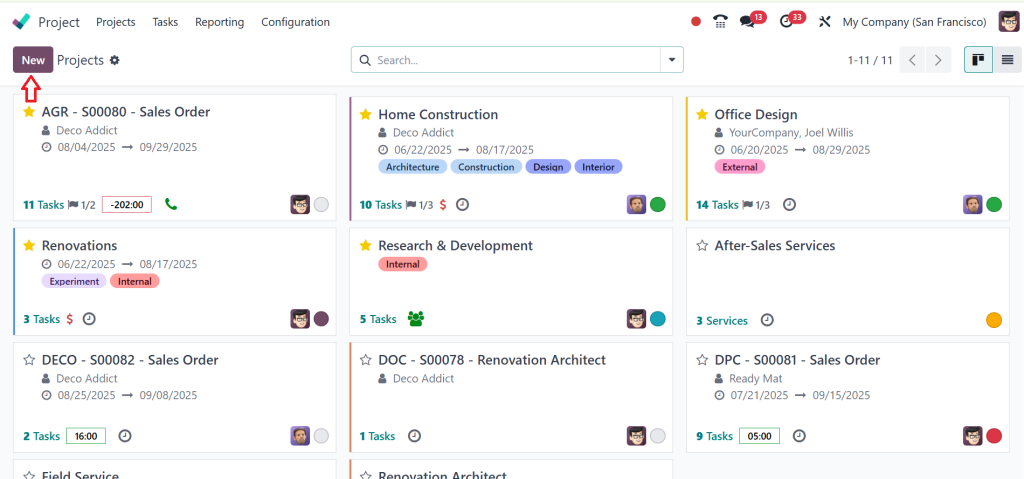
Select an existing project or click New to create a new one.
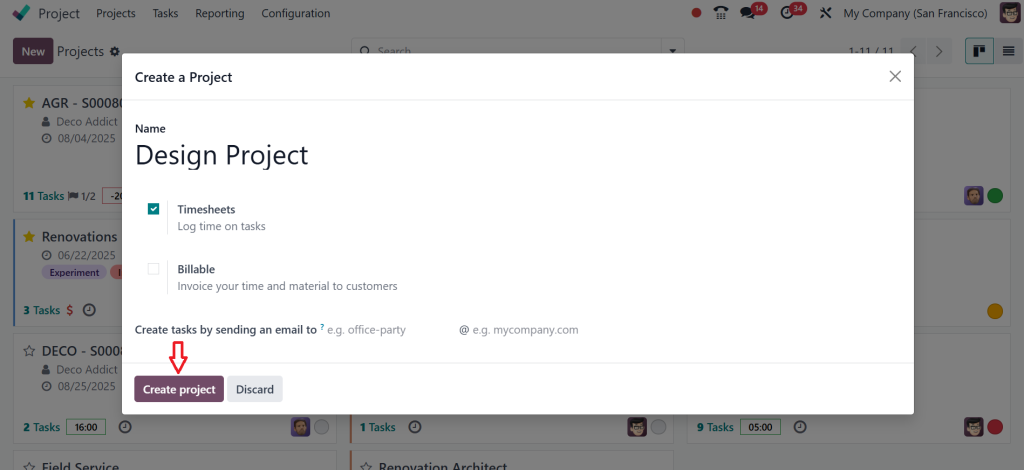
Fill out the project details by entering the project name, enabling Timesheets to log project time, and selecting the Billable option if time and materials are to be invoiced to the customer. Additionally, an email alias can be provided to automatically create tasks for the project when an email is sent to this alias, as specified in the “Create tasks by sending an email to” field, and then click on the Create Project button.
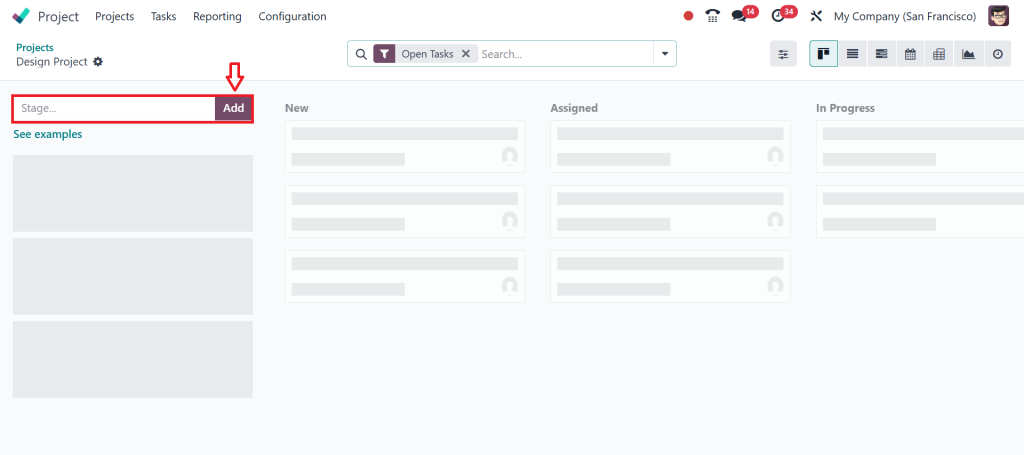
After clicking the Create project button, a new page appears where you can configure the task stages. Click on Add to create a new task stage.
Alternatively, there is an option called See Examples, which provides different kanban examples. Click on the See Examples option.
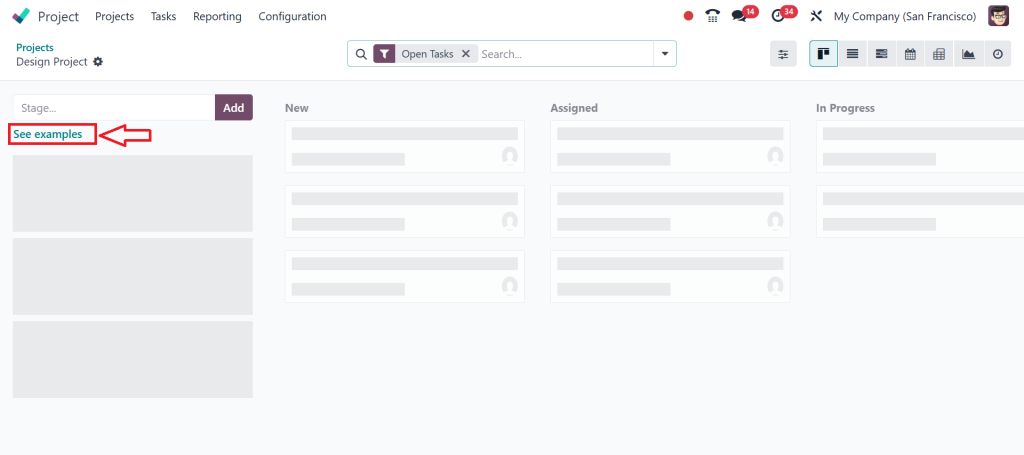
Please select one of them so that the task stages are automatically added based on the chosen example. I will select Design based on my project. With this feature, Odoo provides suggestions for the task stages once the related project has been chosen from the given examples. After selecting, click on the Use This For My Project button.
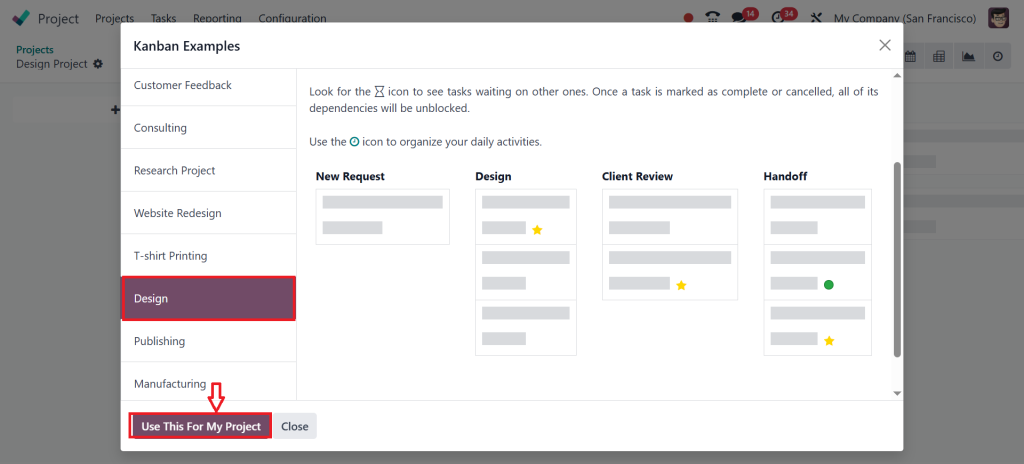
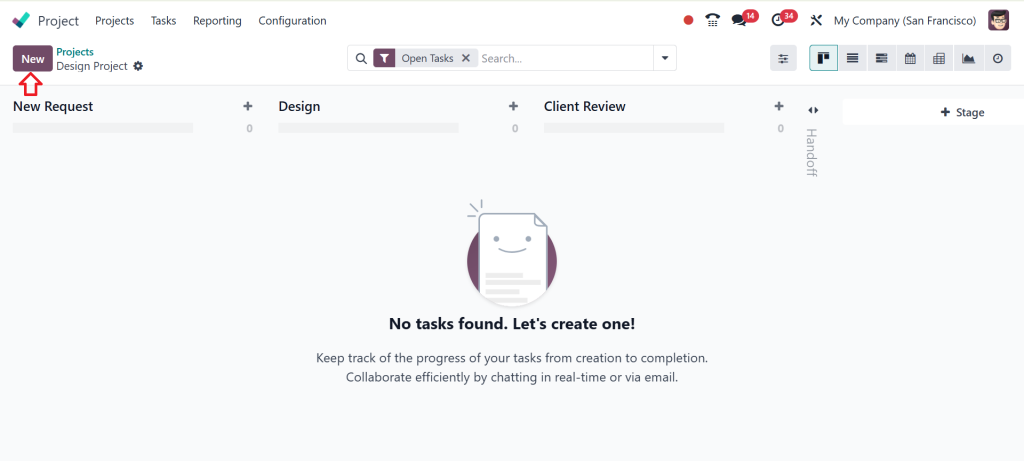
This step completes the Odoo 18 task stages setup, ensuring every task follows a structured journey. So, let’s create a task by clicking on New.
Enter Task details and assign users, then click on Save.
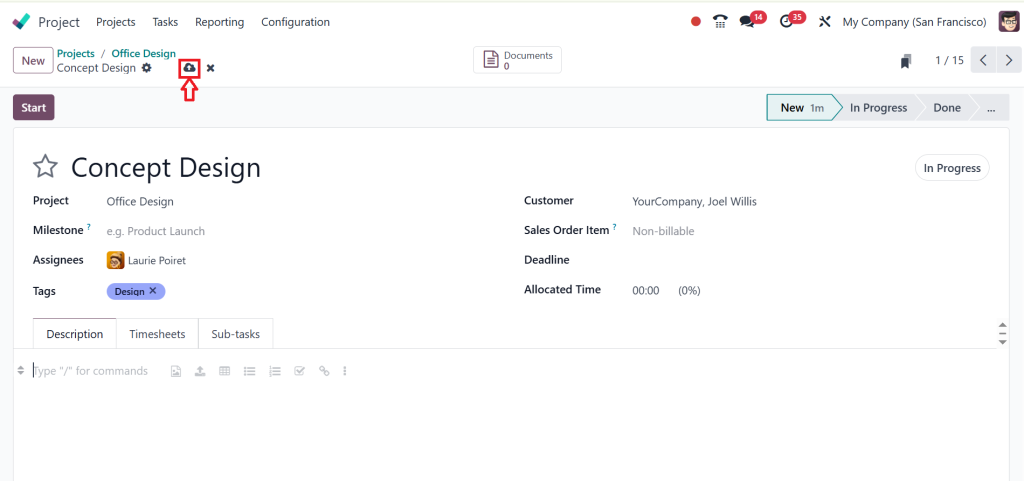
As you can see in the Screenshot below, we have created a new task in the Odoo 18 Project app. Move the task across stages to ensure your Odoo task stage configuration works flawlessly.
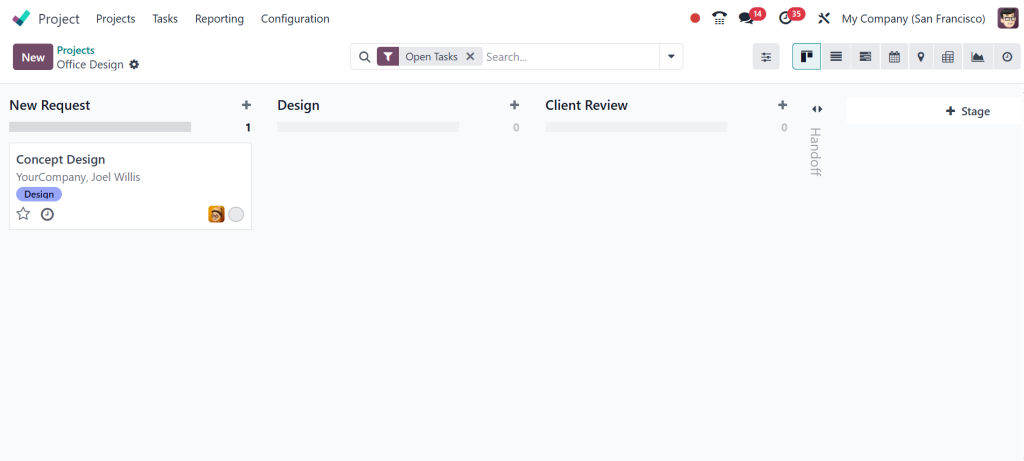
That’s how you configure Task and Project Stages in Odoo 18. Once tested, roll out the configuration to your teams. Provide training so everyone understands how to use the Odoo 18 stages settings for tasks effectively.
Learning by Doing with Odoo 18 Project Stage Tutorial
You might expect a tutorial to feel heavy or full of technical terms, but the Odoo 18 project stage tutorial feels different. It’s about seeing how the pieces fit together by actually using them. You create a project, add stages, and watch how tasks move from one to the next. The visual boards in Odoo 18 make it easy to see what’s happening. You don’t just read about it, you experience it.
What’s interesting about the Odoo 18 project stage tutorial is that it doesn’t take long before you feel comfortable. The system guides you with simple clicks and drag-and-drop options. Even if you’ve never managed a project before, you’ll quickly see how stages make the whole process easier to understand.
Customize Project Workflow Odoo 18 to Your Way of Working
Every team has its habits. Some people prefer simplicity, while others prefer more detail. That’s why the option to customize the project workflow in Odoo 18 is so valuable. You don’t have to follow someone else’s idea of what a workflow should look like; you build your own.This customization can be small or big. You should add an extra stage for approvals.
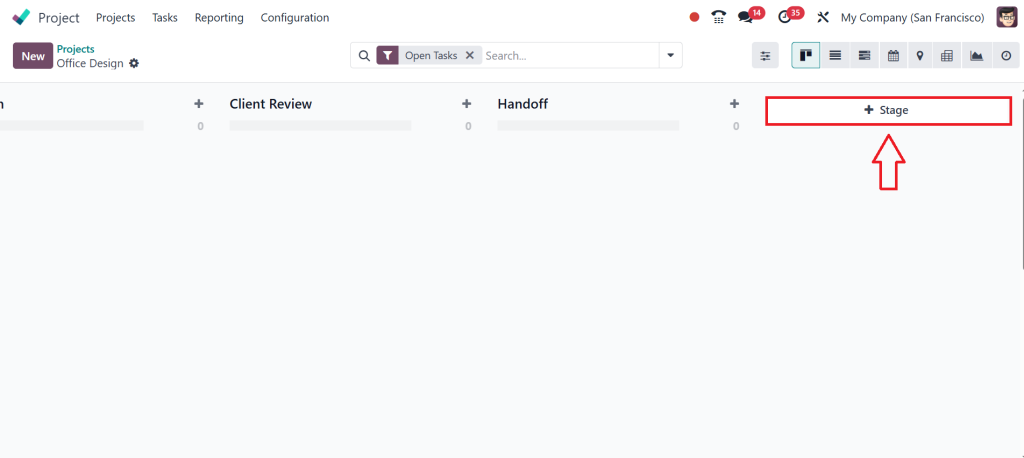
You should send a reminder when a task reaches a certain point. Alternatively, you can connect tasks to other Odoo apps, such as Timesheets or CRM. The purpose of customizing project workflows in Odoo 18 is to simplify, not complicate, processes. When the system reflects the way you work, it feels more natural to use it every day.
Odoo 18 Stages Settings for Tasks Details That Matter
Sometimes, the small details are what make the most significant difference. The Odoo 18 stages settings for tasks give you control over how tasks behave in each stage. You can decide if a stage should fold when not in use, set colors for quick identification, or add small rules that make tasks more straightforward to handle.
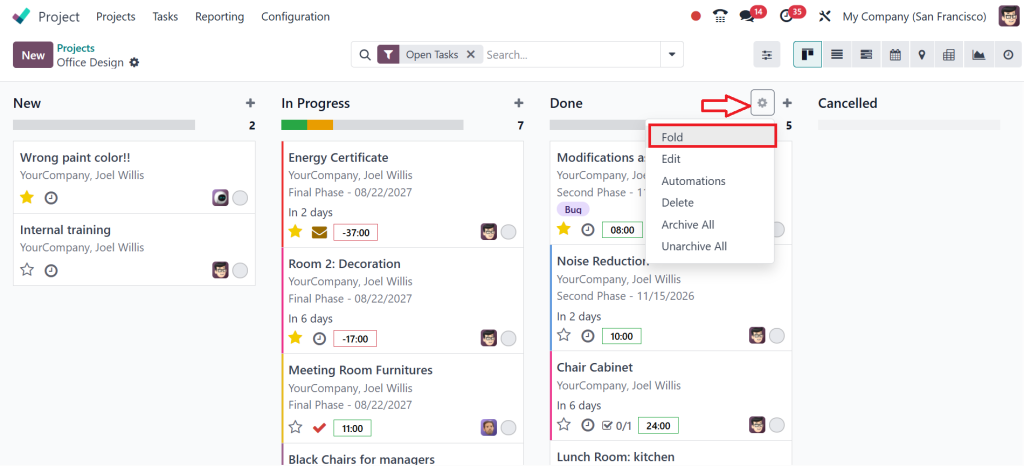
These settings might look minor at first, but they bring clarity to the system. For example, folding completed stages keeps your board clean so you can focus on what’s active. Adding colors helps the team quickly spot urgent tasks. The Odoo 18 stages settings for functions may be simple, but they make every day work smoother and more organized.
The Simplicity of Configuring Task and Project Stages in Odoo 18
When you sit down to configure task and project stages in Odoo 18, you’re not just setting up software, you’re creating a way to see your work more clearly. The Odoo 18 configuration project stages feature provides structure to projects, while the Odoo 18 task stages setup adds detail to each task. By learning to configure stages in Odoo 18 Projects, you shape the system around your workflow instead of the other way around.
Through careful Odoo task stage configuration, you make sure tasks follow a clear path. By going through the Odoo 18 project stage tutorial, you see how simple it can be to set things up. With the ability to customize the project workflow in Odoo 18, you make the system truly yours. And with the Odoo 18 stages settings for tasks, you polish the little details that matter in day-to-day work.
In the end, learning how to configure task and project stages in Odoo 18 is about more than just stages, it’s about giving your projects a flow that everyone can follow. It’s about clarity, focus, and keeping work on track without extra effort. Once you set it up, you’ll wonder how you ever managed projects without it.
Now is the right time to set up your stages and make project management easier. If you’re ready to take the next step and want expert help in setting up or learning more about configuring task and project stages in Odoo 18, get in touch with Netilligence today. Our team can guide you with the proper setup and help you get the most out of Odoo 18 for your business.




