Managing invoices manually can be time-consuming, prone to human error, and overwhelming as your business grows. That’s where automation comes in. By learning how to Automate Invoice Emails in Odoo 18, you can save countless hours, improve accuracy, and create a professional customer experience.
When you automate invoice emails in Odoo, invoices are instantly generated and sent to customers at the right time. You don’t need to track due dates or reminders manually; Odoo 18 invoice email automation does all the heavy lifting for you.
In this article, we’ll explore everything you need to know about automating invoice emails in Odoo 18, why it matters, and how Netilligence (an official Odoo Partner) can help your business streamline financial workflows.
We’ll cover:
Benefits of Odoo automatic invoice sending
Step-by-step process of setting up invoice auto email Odoo 18
Best practices for customization
Real-world advantages of using Odoo include sending invoices automatically
How Netilligence can support your automation journey
By the end of this blog, you’ll clearly understand how to set up invoice automation in Odoo 18, and why it’s essential for business growth.
The Power of Automating Invoice Emails in Odoo 18
Automation is no longer a luxury; it’s a necessity. Invoices are one of the most critical documents in any business, and automating invoice emails in Odoo ensures your customers get professional communication without delays.
Key Benefits of Odoo 18 Invoice Email Automation
Time Savings – Forget manual follow-ups. With Odoo’s automatic invoice sending, invoices reach clients immediately after validation.
Reduced Errors – Manual mistakes like wrong dates, missed recipients, or duplicate sends are eliminated.
Professional Branding – Each Odoo email invoice to the customer can be customized with your logo and professional tone.
Customer Satisfaction – No more “we never received the invoice” complaints.
How to Automate Invoice Emails in Odoo 18 – Step by Step
If you want Odoo to send invoices automatically by email, here’s the exact process you should follow:
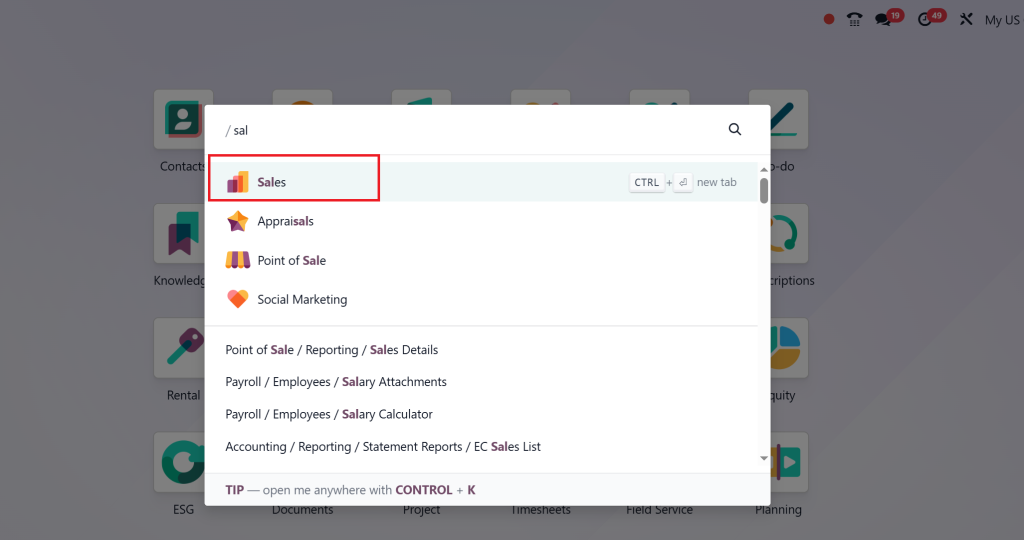
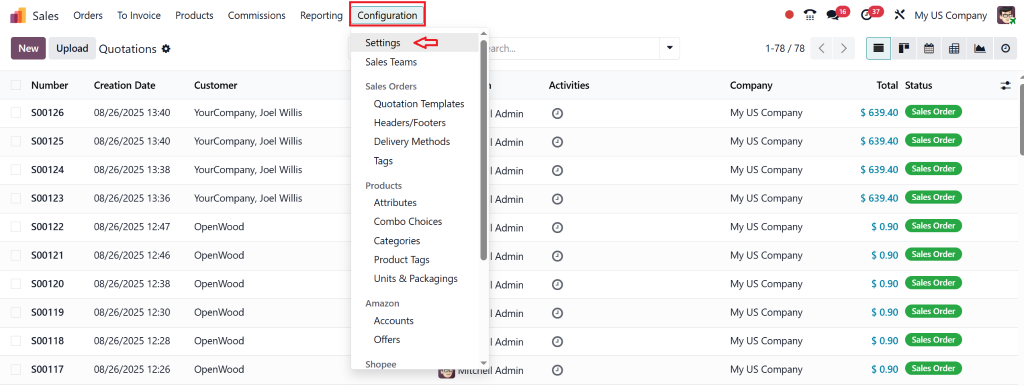
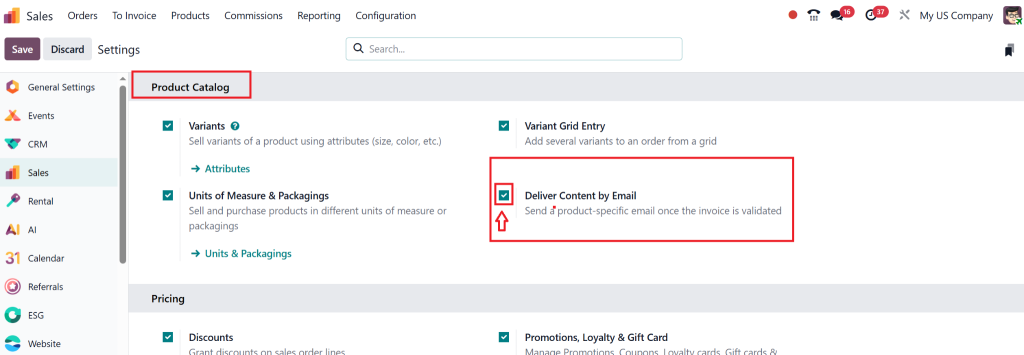
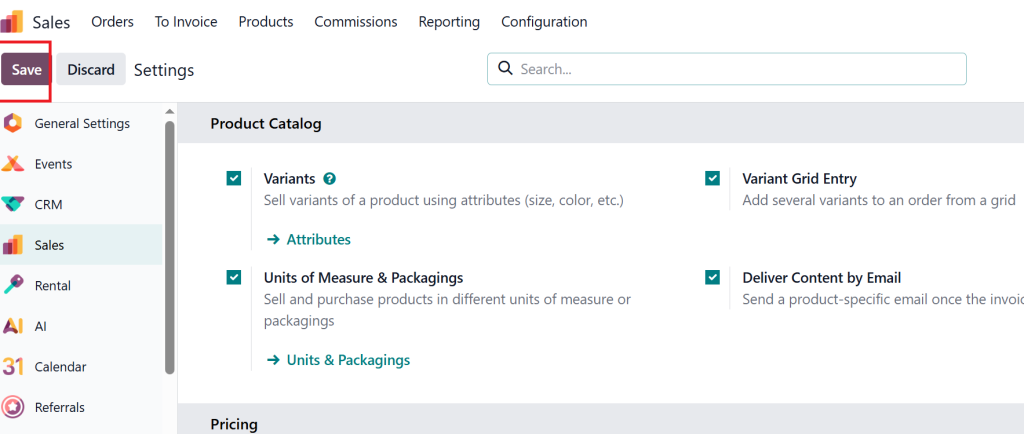
Step 1 – Enable the Right Setting in Sales
Go to Sales App →
Configuration →settings..
From Product Catalog head Tick the checkbox Deliver Content by Email.
Click Save.
Why? This activates the Email Template option in the product’s Accounting tab.
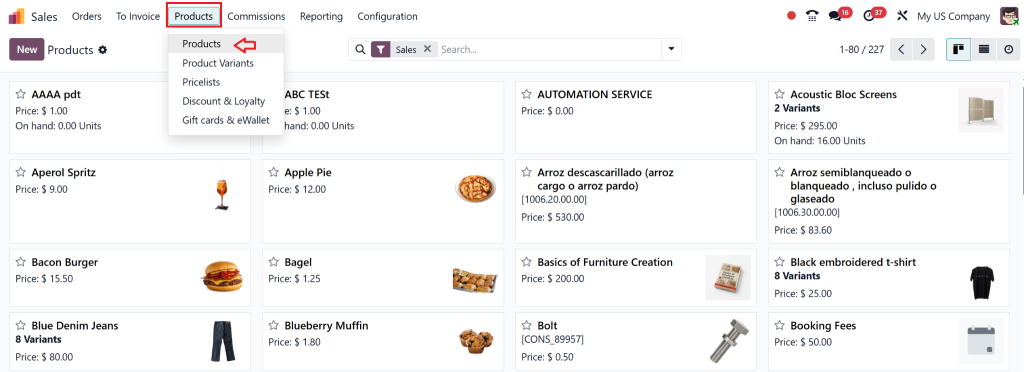
Step 2 – Assign an Email Template to a Product
Open the Sales App → Products.
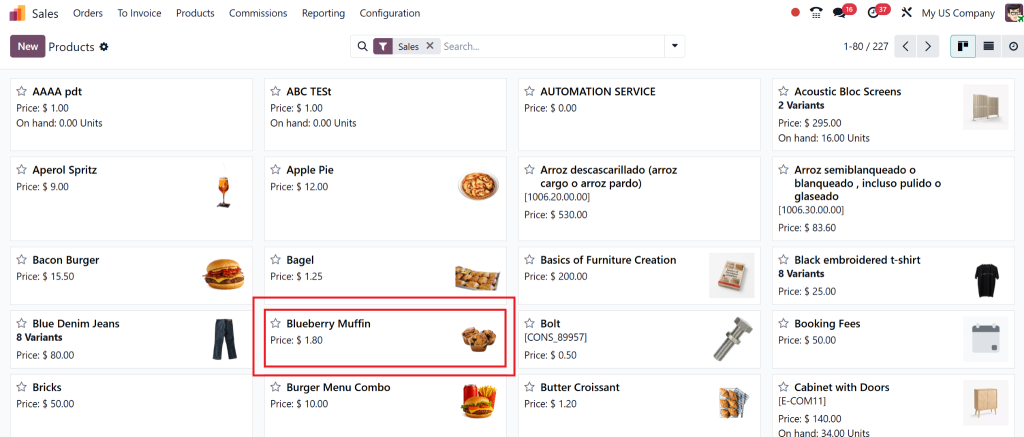
Select the product you want to configure.
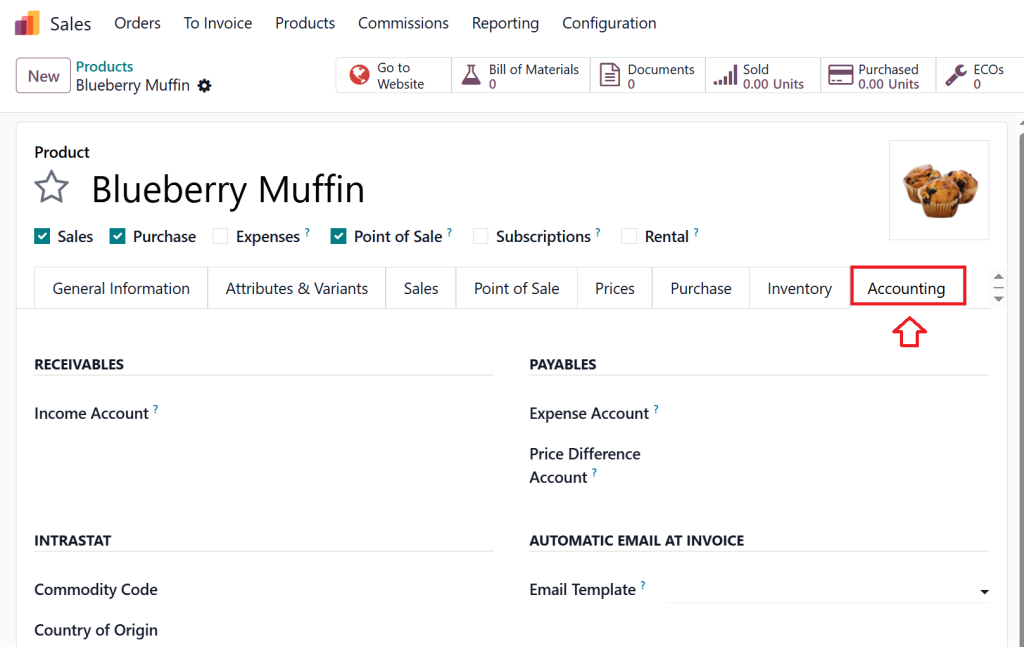
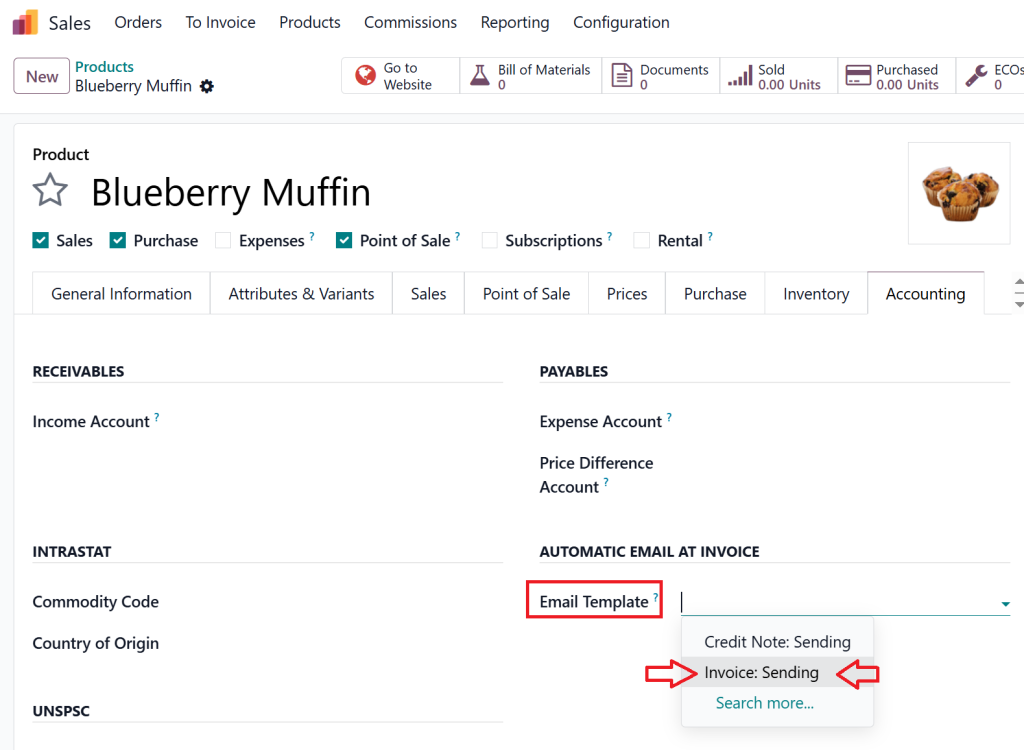
Open the product and go to the Accounting tab.
Under Email Template, select Invoice Sending.
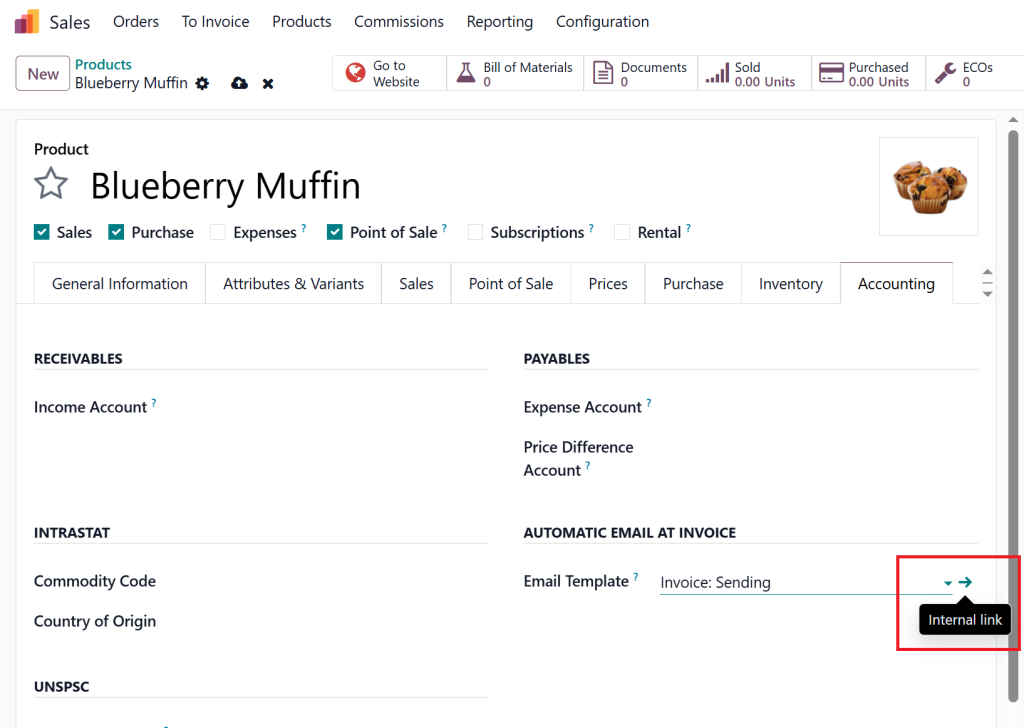
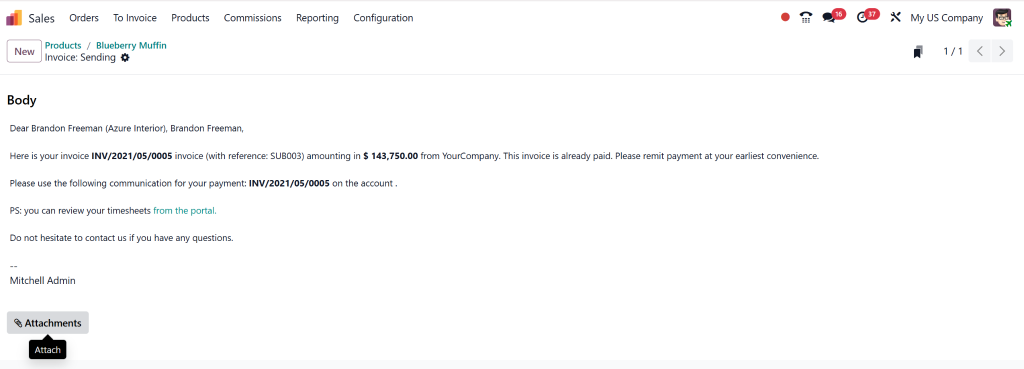
To preview or edit the template, click the small internal link (arrow) icon next to the template name.
Here you can edit the subject, body, and placeholders, or attach files like payment guides and terms.
Save your changes.
Step 3 – Create a Sales Order with the Configured Product
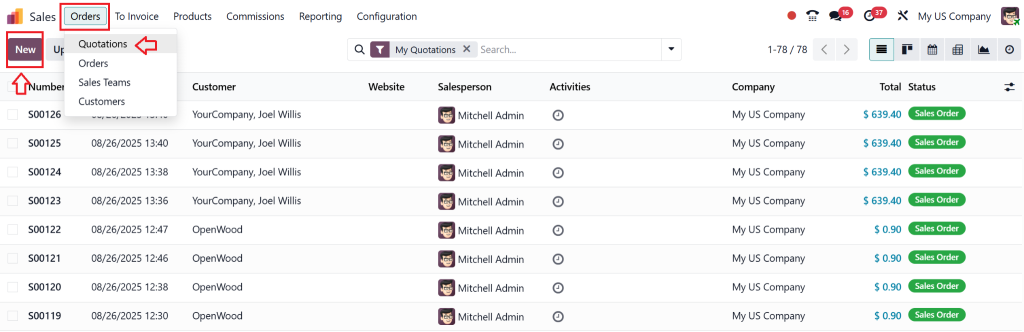
Go to Sales → Orders → Quotations → New.
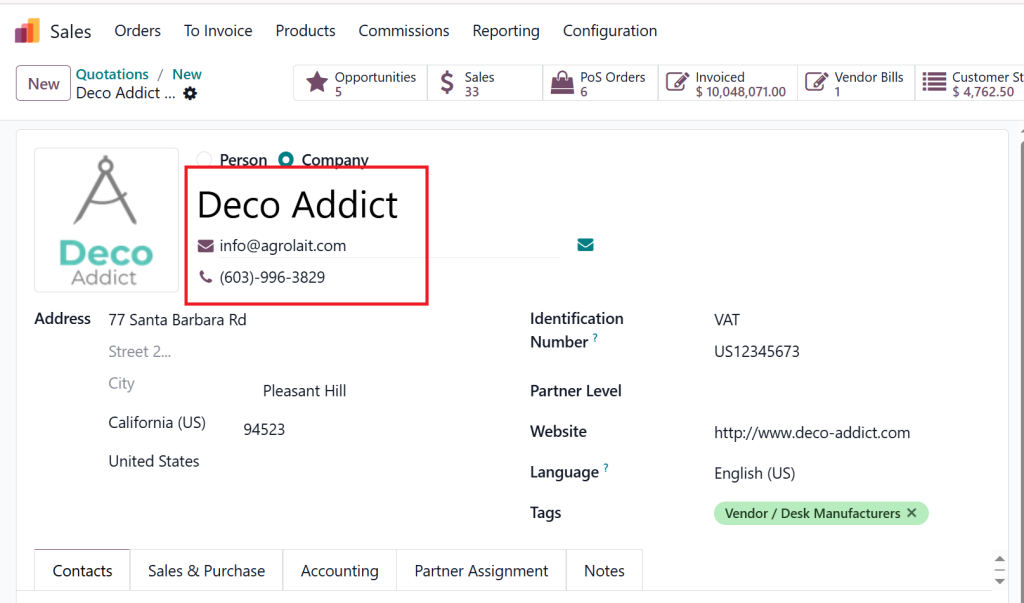
Select a Customer (ensure the customer record contains a valid email address).
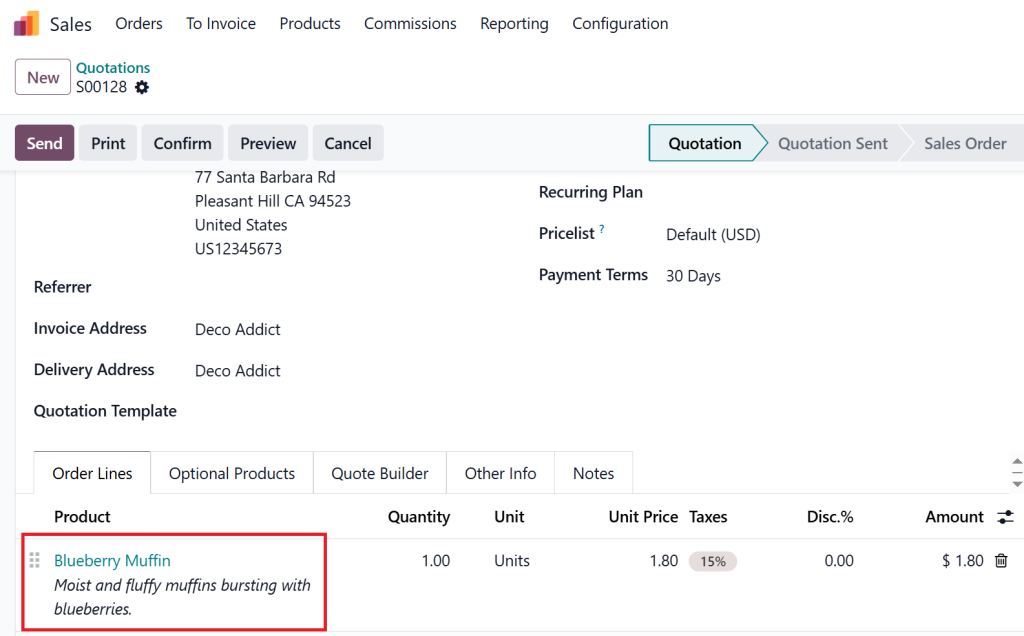
Add the product you configured earlier.
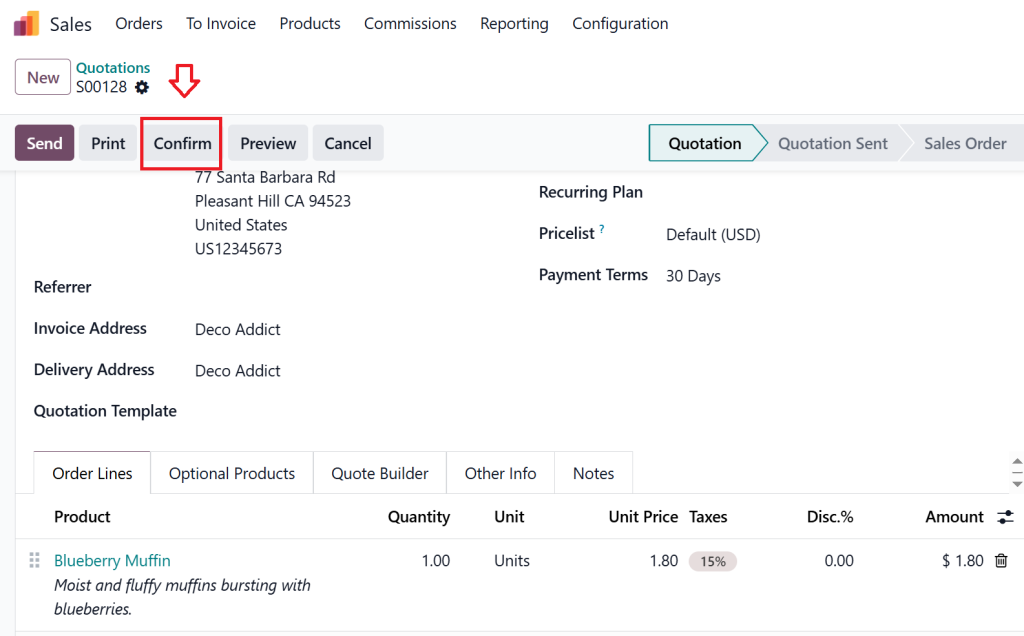
Confirm the quotation (it becomes a Sales Order).
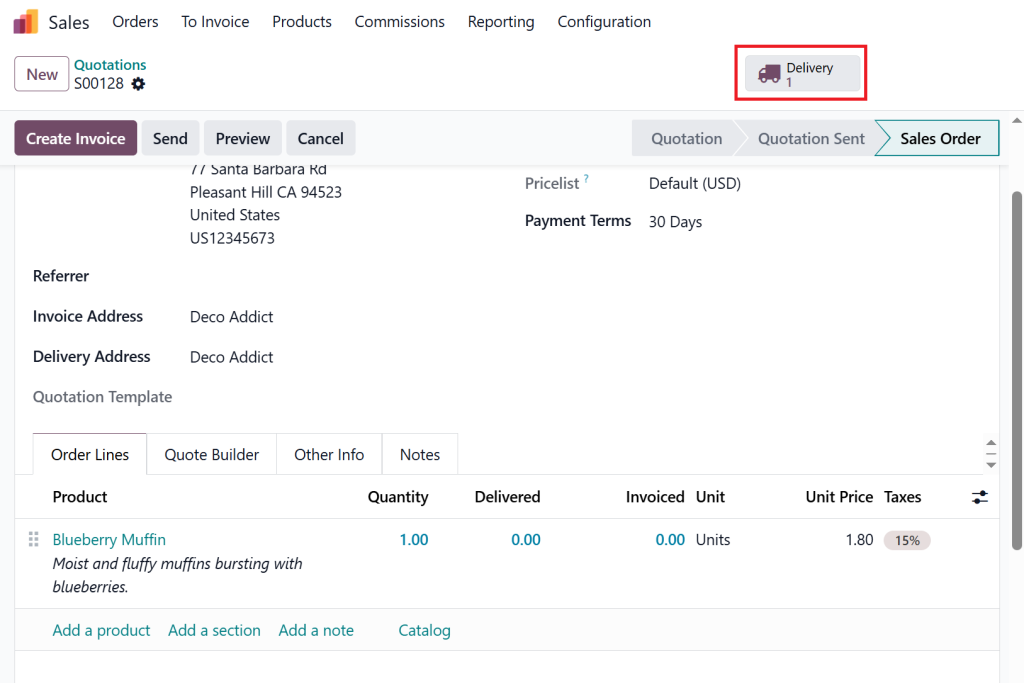
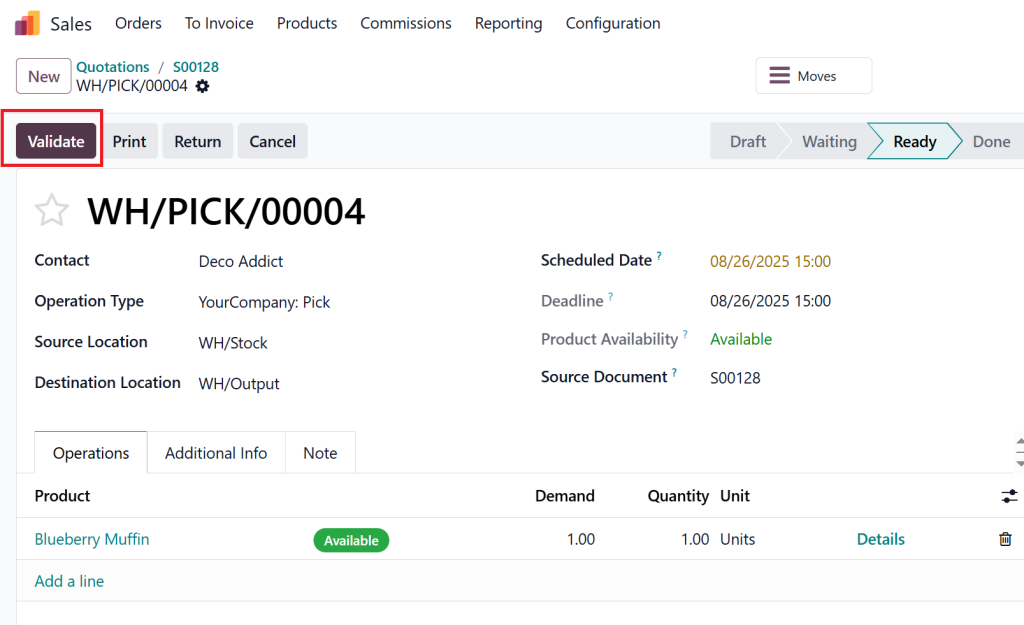
Click the Delivery smart button.
and then Validate to confirm delivery.
Step 4 – Create and Post the Invoice
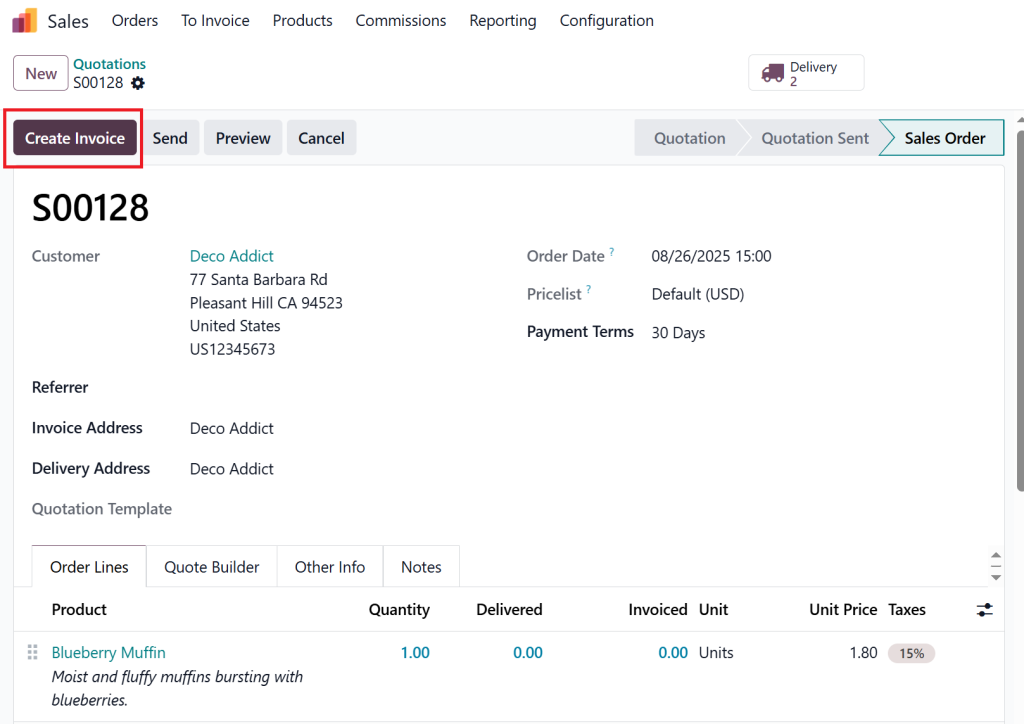
Return to the Sales Order.
Click Create Invoice.
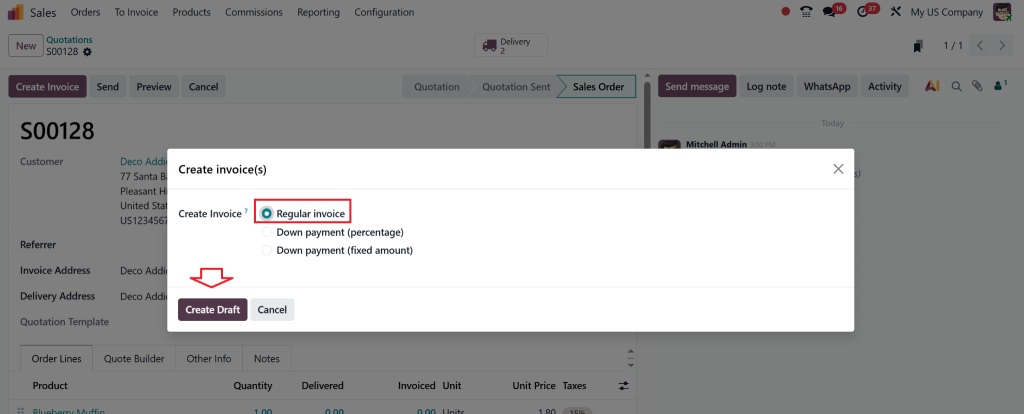
Select Regular Invoice and create a draft.
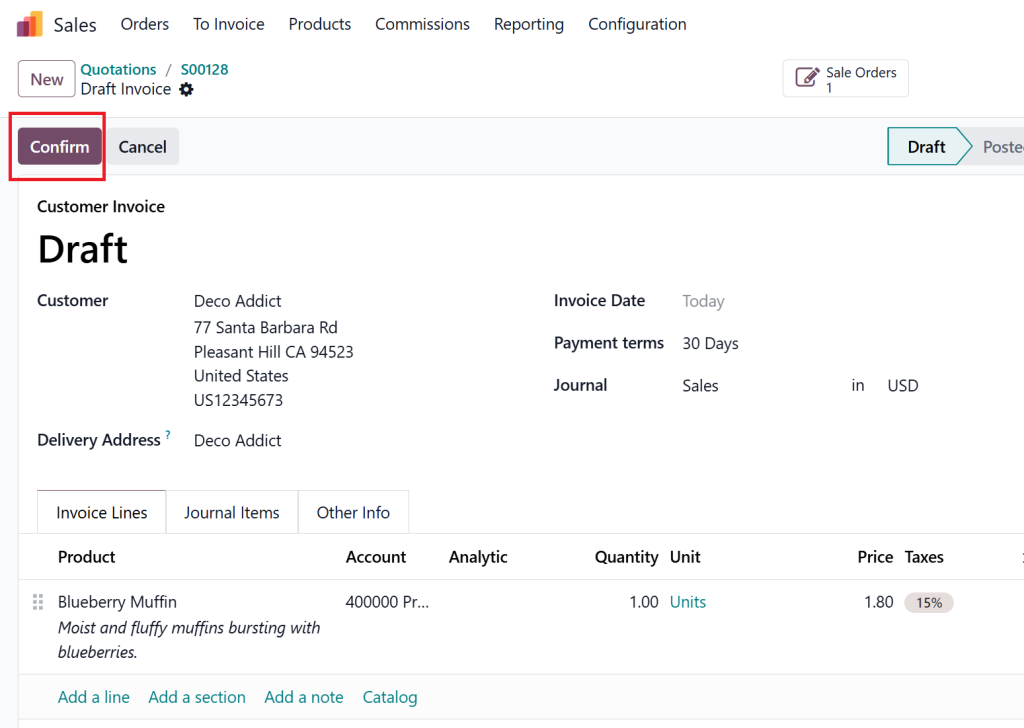
Confirm (post) the invoice.
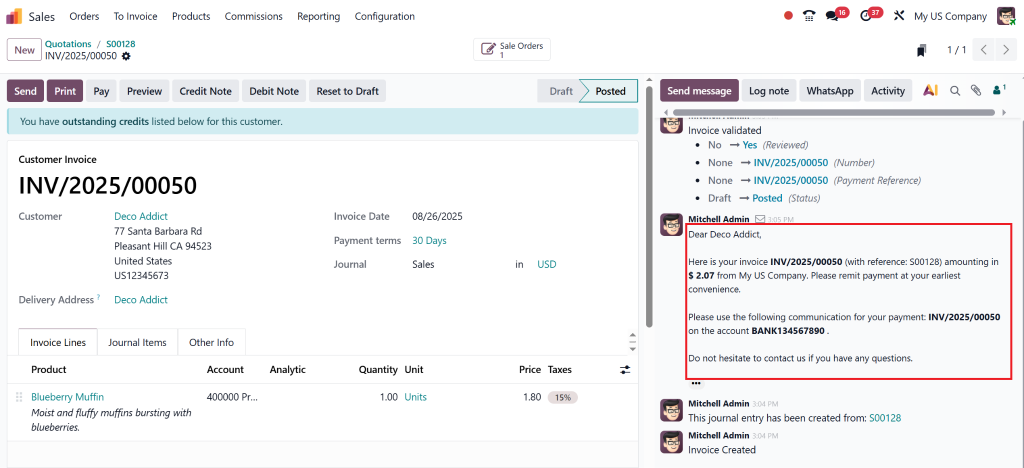
Odoo will now automatically send the invoice email using the selected template.
Go to the Chatter section of the invoice and check the message log. You should see a confirmation that an email was sent, along with a copy of the email.
Pro Tips to Ensure Smooth Automation
Customer Email Address: Always check that the customer record has a valid email; otherwise, Odoo has nowhere to send the invoice.
Mail Server Setup: Make sure outgoing mail servers (SMTP) are configured in Odoo’s technical settings.
Personalized Templates: Add placeholders like invoice number, due date, payment link, and company signature to make your invoice emails look professional.
Attachments: If you always want the PDF invoice attached, configure it in the email template.
Test Before Go-Live: Run the workflow once with a test customer and product to confirm everything works correctly.
Best Practices for Invoice Auto Email in Odoo 18
Automating emails is powerful, but it must be done right. Here are some expert tips from Netilligence – Odoo Partner:
Use Professional & Clear Language
Your Odoo email invoice to the customer should include:
Invoice number
Due date
Payment link or bank details
Support contact
Personalize Messages
Customers appreciate personal touches. Add:
Customer’s name
Custom greeting
Company signature
Schedule Payment Reminders
Integrate Odoo 18’s invoice auto-email feature with automated reminders for unpaid invoices. This ensures better collection rates.
Lorem ipsum dolor sit amet, consectetur adipiscing elit. Ut elit tellus, luctus nec ullamcorper mattis, pulvinar dapibus leo.
Why Businesses Choose Invoice Automation Odoo 18
Thousands of businesses worldwide are shifting to Odoo 18 invoice email automation because it saves resources and strengthens financial management.
Real-World Example
Imagine a company generating 200 invoices monthly. Without automation, staff spend hours sending and following up on tasks. With Odoo, send invoices automatically, this process happens in seconds, freeing teams for more strategic work.
Common Mistakes to Avoid While Automating Invoice Emails Odoo
Avoid testing the automation without checking first to prevent sending errors.
Forgetting Payment Instructions – Missing payment info = delayed transactions.
Overloading with Attachments – Keep emails light and easy to download.
How Netilligence Helps You Automate Invoice Emails in Odoo 18
As a trusted Odoo Partner, Netilligence doesn’t just implement features; we customize, optimize, and future-proof your automation setup.
Our Services Include:
Custom Template Design – Professional branded invoice emails.
Advanced Automation Setup – Multi-step workflows like invoice + reminders.
Integration with Payment Gateways – Add direct payment links in invoices.
Training & Support – Empower your team to manage automation smoothly.
By partnering with Netilligence, you’re not just learning how to automate invoice emails in Odoo 18, you’re investing in efficiency, accuracy, and business growth.
Lorem ipsum dolor sit amet, consectetur adipiscing elit. Ut elit tellus, luctus nec ullamcorper mattis, pulvinar dapibus leo.
The Future is Automated with Odoo 18 Invoice Email Automation
Manual invoicing is a productivity killer with Odoo’s automatic invoice sending, your business gains speed, accuracy, and professionalism in one go.
Here’s what you gain when you automate invoice emails Odoo 18:
Hours saved every month
Faster customer payments
Improved cash flow and financial visibility
Stronger customer relationships
At Netilligence, we’ve helped countless businesses successfully implement invoice automation in Odoo 18, and we’re ready to do the same for you.
Don’t waste another day sending invoices manually. Let Odoo send invoices automatically while you focus on scaling your business.
Contact Netilligence today and take the first step toward smarter, automated finance management.
Hi, I'm Nabia, an Odoo ERP functional & technical content writer. I specialize in blogs, social media content, ad copy, landing pages, service pages, and email campaigns.
We use cookies to ensure that we give you the best experience on our website. If you continue to use this site we will assume that you are happy with it.