


Why Activate Developer Mode in Odoo 18?
In the world of ERP, Odoo 18 is making waves with its sleek design, enhanced performance, and deeper customization capabilities. For developers, system administrators, and even curious business owners, one feature stands as a gateway to opening the true strength of this platform, which is the activation of developer mode in Odoo 18. But why is this so crucial?
Once you activate developer mode in Odoo 18, you access the system’s hidden layers’ settings beyond the surface. You’re not just clicking around anymore; you’re in the driver’s seat, ready to change the Odoo experience for your business or client. The Odoo 18 developer mode is where technical insights meet practical control, where debugging, customization, and development become smooth. The curiosity begins when you flip the switch and enter this world of Odoo debug mode.
Whether you’re new to Odoo or have been steering its many versions, you’ll quickly realize that the Odoo 18 debug environment is not just for developers; it’s a vital toolkit for anyone looking to get more from their ERP.
This guide explores how to activate developer mode in Odoo 18, reveals what happens behind the scenes, and shows how access to Odoo developer tools can reshape how you interact with the system.
So buckle in as we go beyond the interface and into the actual soul of Odoo 18 technical features and developer settings; you’re about to discover why this mode isn’t just an option but a necessity.
How to Activate Developer Mode in Odoo 18?
To begin your journey into customization, diagnostics, and development, you must activate developer mode in Odoo 18. Fortunately, it’s easier than you might expect, and yet the potential it opens is far-reaching.
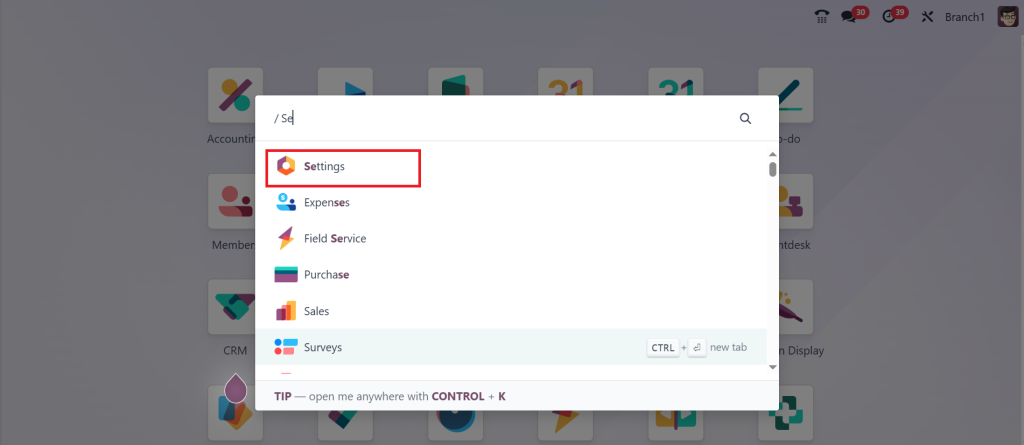
To activate developer mode in Odoo 18, log into your Odoo instance, go directly to the Settings.
Scroll down until you see the Developer Tools section. You’ll find a clickable link: “Activate the developer mode.” Click it, and just like that, you’re in.
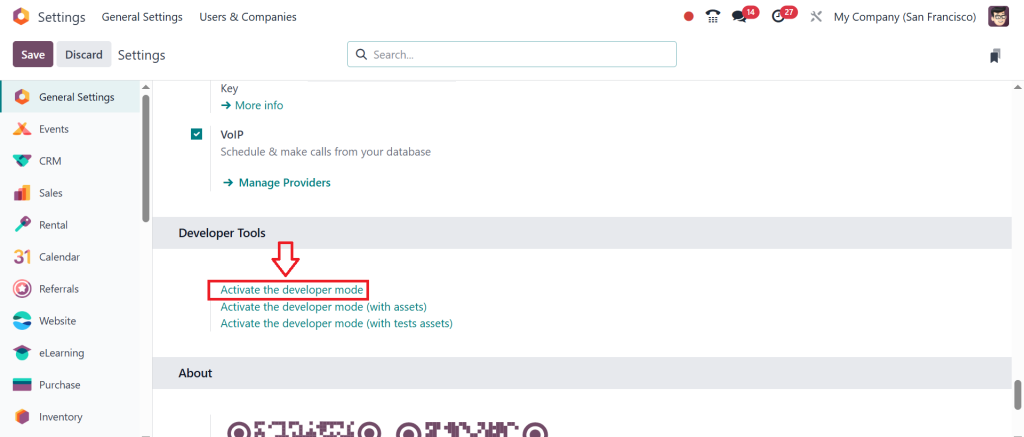
You’ve opened the Odoo 18 debug mode, giving you access to hidden menus and diagnostic tools.
The beauty lies not in the straightforward method but in what follows: full access to Odoo 18 developer settings and the technical configurations that turn users into builders and explorers.
Exploring the Supremacy of Odoo 18 Developer Mode
So, you’ve successfully managed to activate developer mode in Odoo 18. Now what?
What unfolds before you are a developer’s playground? New menus appear: “Technical,” “Developer Tools,” “Models,” “Views,” and more. These are not just extra buttons but the core of Odoo 18 technical features. You can now see models, fields, XML views, record rules, and automated actions. In other words, you can see how the machine is built and, more importantly, how to rewire it.
Want to add a custom field to a model? Done. Need to inspect a button action and trace its Python method? Easy. Are you trying to identify an access rights issue or debug a broken report? You’re now armed with every tool needed.
The Odoo 18 debug mode isn’t just about fixing problems. It’s about understanding architecture. You begin to grasp the data models, the one-to-many and many-to-one relationships, the workflows, and how views and templates come together. It has become more than a platform; it is a living system you can now shape.
Why Every User Should Care About Odoo 18 Developer Mode
You might wonder, “But I’m not a developer. Why should I care?” That’s the magic of Odoo 18’s developer mode, which is designed for more than just coders.
For power users and functional consultants, access to Odoo developer tools means troubleshooting without opening a support ticket. It can inspect views, activate developer insights, and control user experience enhancements.
For business owners, it offers transparency. You no longer need to trust that your ERP behaves correctly and unquestioningly. With the Odoo 18 debug environment, you can peek under the hood and make sense of the system’s logic.
For system administrators, this is the gateway to maintaining performance and integrity. You’ll configure automated actions, clean up records, and test security roles in a way that the regular user interface doesn’t allow.
The curiosity deepens as you explore more, and each new corner of Odoo 18 developer settings you reveal leads to further questions: How is this report generated? Why is this workflow not triggering? Can I automate this process? The answer, most often, lies in developer mode.
What Else Comes with Odoo 18 Debug Mode?
One of the most exciting parts of using Odoo 18 debug mode is the sheer number of hidden tools it reveals. You’re not just seeing the backend but gaining control over it.
You can now:
View and edit technical features like models, sequences, scheduled actions, and email templates.
Debug views to see XML structures and inherit views dynamically.
Access Odoo developer tools that allow you to inspect and test UI actions, automate scripts, and even modify translations on the fly.
To modify the system visually, you can utilize tools like “View Metadata” and “Edit Form View” directly in the browser’s influential shortcuts.
Every hidden feature is like a puzzle piece, and with each tool, your ability to lead the Odoo ecosystem grows. It’s not about managing the system anymore; it’s about commanding it.
Odoo 18 Developer Settings in Action
Customization is where Odoo 18 developer settings truly shine. Whether adding fields, changing views, writing server actions, or configuring security, everything becomes more accessible and intuitive in developer mode.
Add a checkbox to your sales order form to indicate “Express Shipping.” Without developer mode, this would require development time and backend access. But with developer mode active, you can inspect the form view, modify it, and introduce the custom field within minutes.
Do you need to hide certain menus for specific users? With Odoo 18 technical features, you can tweak access control lists and record rules from the front end. What was once a long development cycle became a rapid customization task.
The control is now in your hands, and as you explore these possibilities, you’ll ask yourself, “What else can I do with this?” That’s the pull of Odoo 18 developer mode. It invites exploration, encourages learning, and rewards curiosity.
Debugging and Diagnostics with Odoo 18 Debug
When issues arise, the average user might see an error message. But the user who’s enabled Odoo 18 debug sees the roadmap to resolution.
Debug mode gives you full trace backs, access to logs, visibility into ORM (Object Relational Mapping) behaviors, and real-time inspection of fields and dependencies. You’re not reacting to issues anymore; you anticipate and fix them at their root.
Advanced users can simulate workflows, test security settings, and inspect fields and forms down to their attributes. For example, you can click on a field and see which model it belongs to, whether it’s required, read-only, or computed, and what other records reference it.
That’s not just debugging; that’s proficiency.
Your Invitation to Explore More in Odoo 18
Now that you know how to activate developer mode in Odoo 18, the path ahead is wide open. This is more than just a feature; it’s a philosophy. Odoo believes entrusting users to control and enhance their business systems developer mode is the key to that promise.
Whether customizing your CRM, analyzing purchase workflows, or building entirely new modules, Odoo developer tools access will be your constant companion. Everything starts when you flip the switch and enter the Odoo 18 debug mode, from hidden menus to powerful scripting tools, from configuration to modification.
And remember, the more you explore, the more curious you become. Every button you click in Odoo 18 developer settings opens a new door, revealing what’s possible when power meets simplicity.
So activate it, explore it, and make Odoo truly yours.




