

In any manufacturing business, not everything goes perfectly. Sometimes, products get damaged, raw materials become unusable, or items fail quality checks. What happens to those? They’re not sold or stored; they are scrapped. Now, imagine if you had to do all this manually, track every broken or defective product on paper, and then try to update your stock levels. It would be a mess, right? That’s where Odoo 17 comes in, making the entire process of handling scrap not just easy but also smart.
In this blog, we’ll dive into how to manage scraping of product in Odoo, how the Odoo 17 manufacturing app features help you, and why Odoo 17 scrap handling is a must for any modern business.
Managing scrap isn’t just about throwing away damaged products, it’s about knowing what went wrong, when, and why. With Odoo 17, you get a complete digital system that helps you track, analyze, and manage scrap in just a few clicks.
Let’s explore how the Odoo 17 manufacturing process has been improved with better scrap handling tools, and how you can get complete control over your manufacturing waste.
Odoo 17 Manufacturing App Features for Scrap Management
Odoo 17 brings several prevailing features that make managing scrap efficient and straightforward. The Odoo 17 manufacturing app features include scrap tracking within manufacturing orders, direct scrap creation from inventory, and automatic stock updates when you scrap an item. These features are designed to help you reduce waste, improve product quality, and maintain accurate inventory data without extra manual work.
When using the manufacturing app, you’ll notice how easy it is to scrap a product right in the middle of production. With just one click, the damaged product is sent to a designated scrap location. This ensures your inventory levels are always correct, and you never accidentally count unusable items as sellable stock. These features are not just for big factories; even small manufacturers can use them to keep their production clean and organized.
Understanding Odoo 17 Manufacturing Process and Scrap Handling
The Odoo 17 manufacturing process is built around efficiency and transparency. It allows you to plan, execute, and track every stage of production. But what’s great is how it handles exceptions like scrap. Whether you’re producing in bulk or custom orders, there’s always a chance that some items will not pass inspection. That’s when Odoo’s scrap handling features shine.
When you mark an item as scrap during the production process, Odoo automatically moves that product to a separate scrap location. This way, you don’t mix faulty items with good stock. The system also lets you record the reason for scrapping, which is essential for tracking quality issues. Over time, these insights help you reduce the number of defective items and improve your entire manufacturing flow.
How to Manage Scraping of Product in Odoo 17 Manufacturing App?
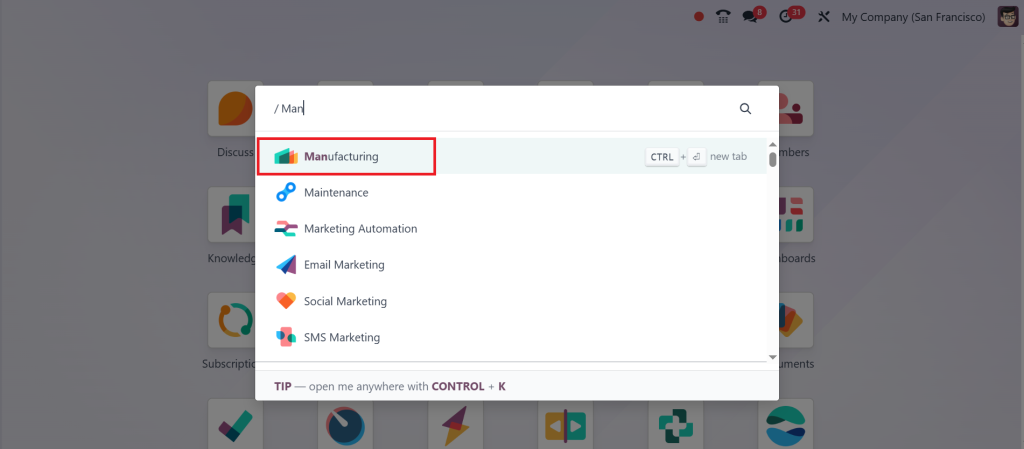
So, how do you manage scrap products in Odoo 17? The first step is to open the Manufacturing App.
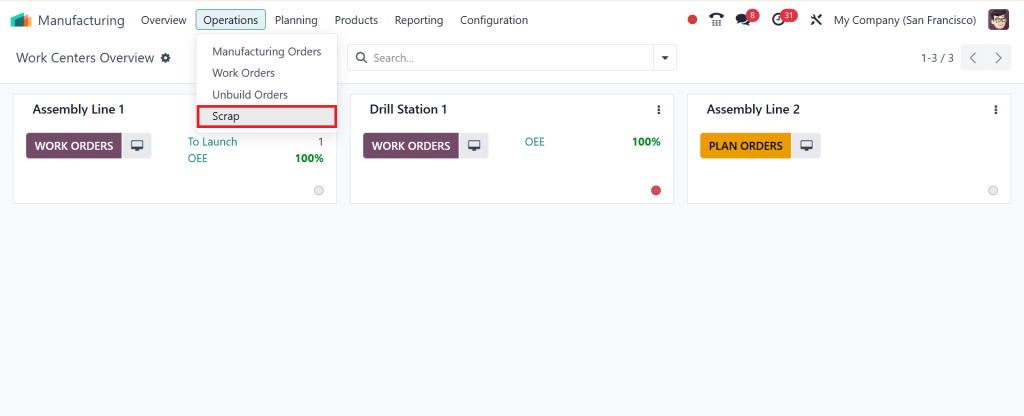
Under the Operations menu, we have the option Scrap.
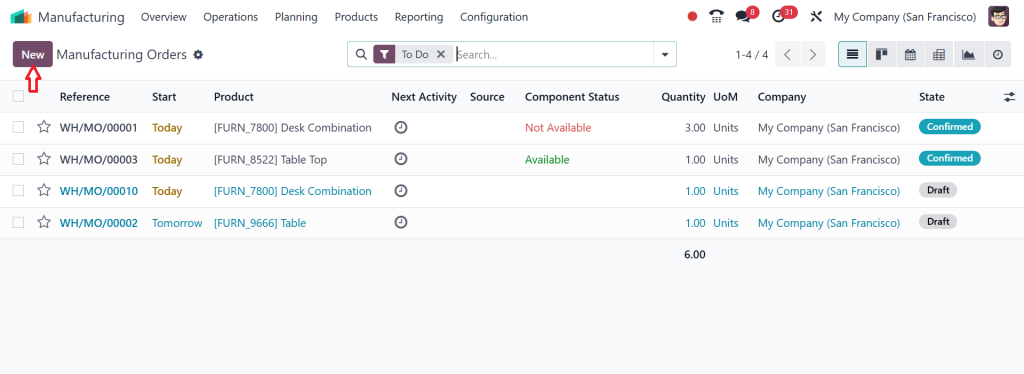
Here, you can view all the scrap orders that have been created. We can scrap the item during manufacturing, and we can also scrap the entire product once manufacturing is complete. This is because, during the manufacturing process, we sometimes know that specific components may be damaged or cannot be used for manufacturing purposes. In such cases, we can scrap particular components only. After manufacturing, the entire product may be damaged or unsuitable for sale so that we may scrap it entirely. So, let’s scrap the order by creating a new manufacturing order, which can be done by going to Operations > Manufacturing Orders.
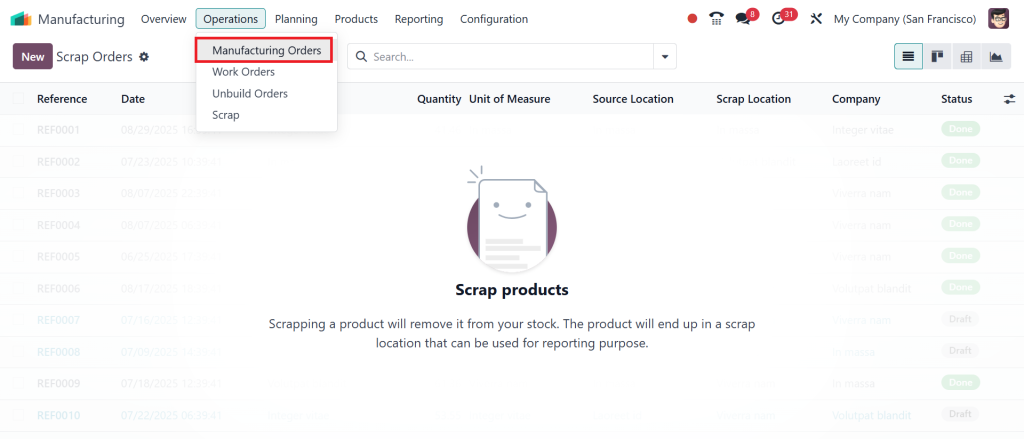
Click on New.
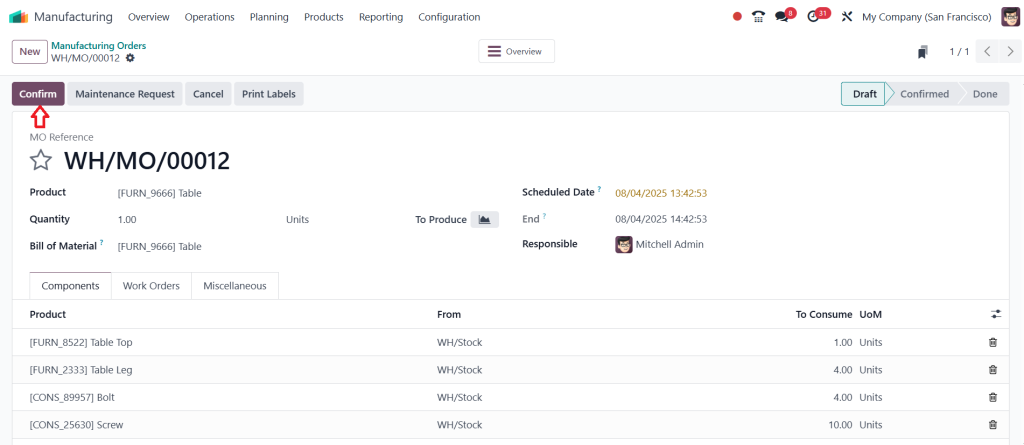
Now, I am going to scrap the product component during the manufacturing process. So, let’s choose the Bill of Materials, which is a table. After selecting the BOM, you can view the components and work orders in the screenshot below, which will be automatically populated in the field. Click on Confirm.
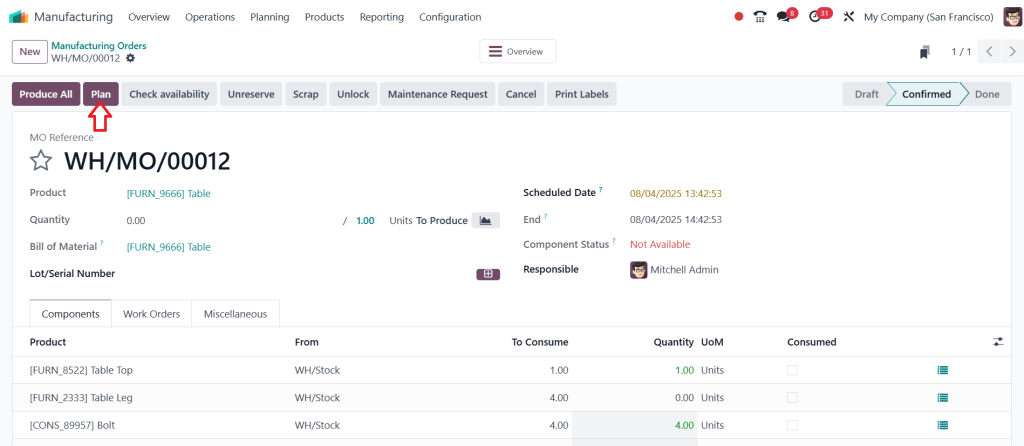
Now, we need to plan the manufacturing order for the work center, so click on the Plan button.
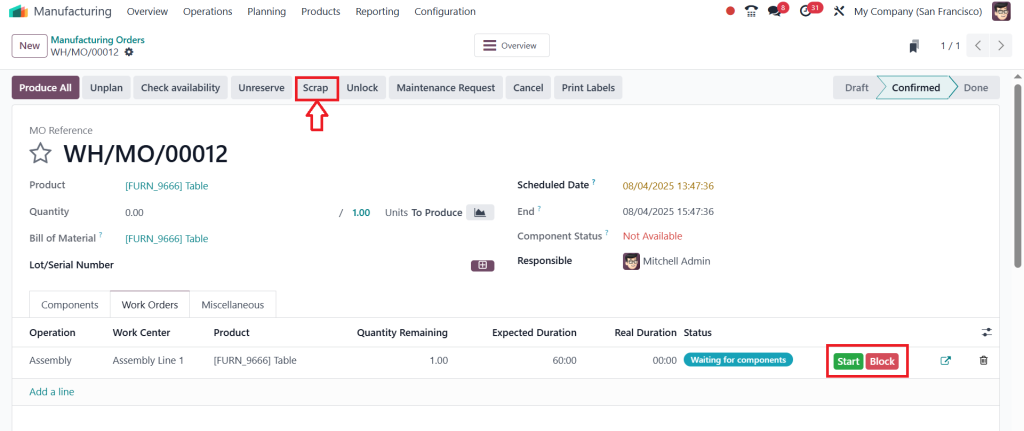
Later on, we can start working on our manufacturing operations, starting from the assembly line and moving to one work centre. So, to do that, click on Start. As you go through the manufacturing process or plan for it, you’ll notice that one of the materials is scrap. Click on the Scrap button.
Here, you can choose the material that you want to move into the Scrap. Then click on the Scrap Products.
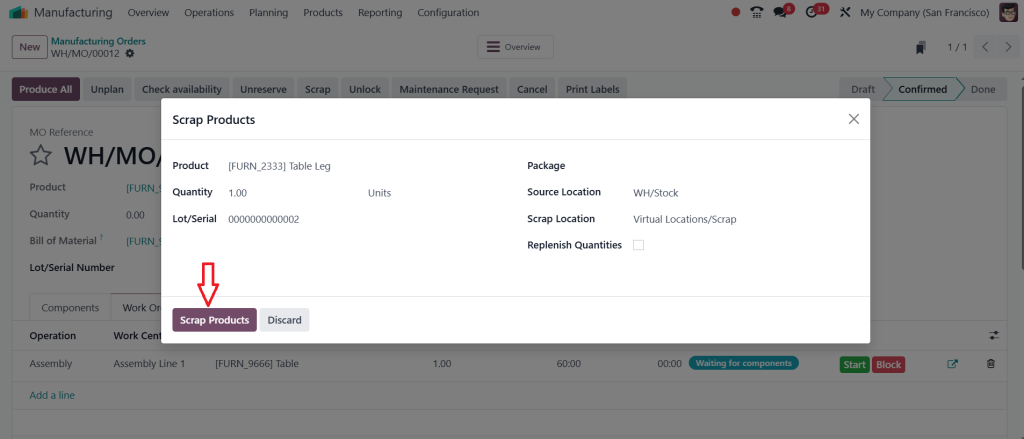
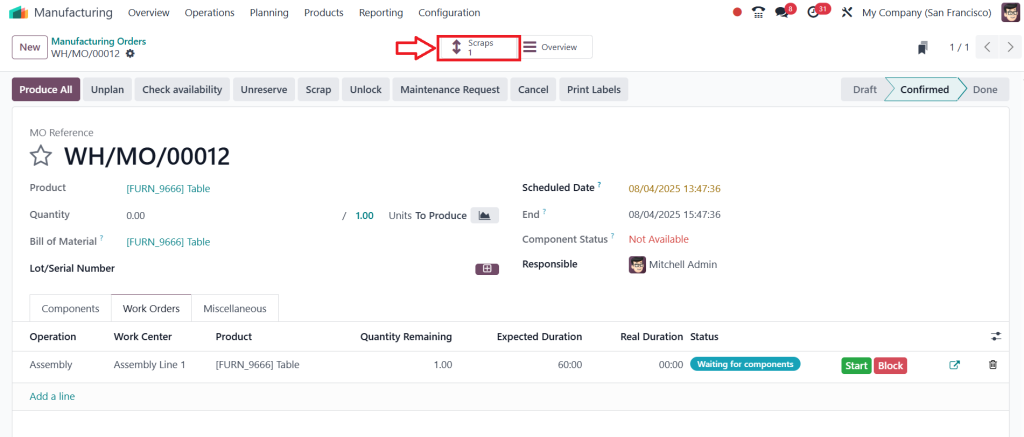
So, one quantity is scrapped, and you can find the scrapped materials by clicking on the Scraps smart button.
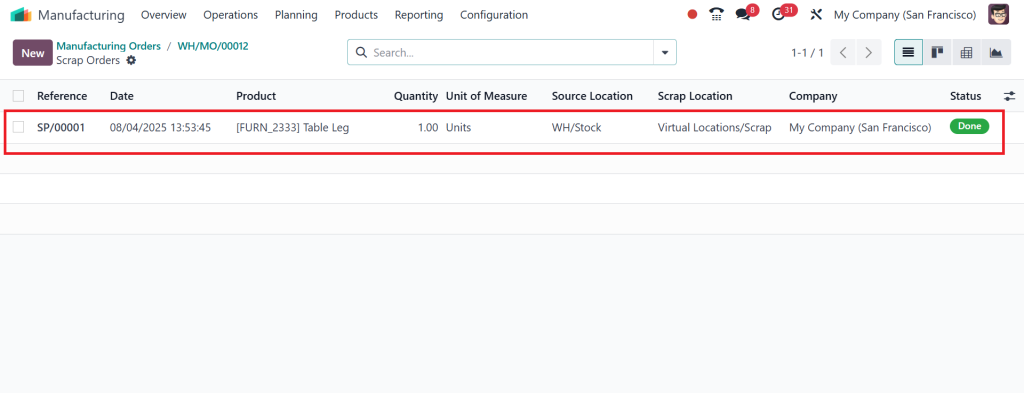
Here, you can also find its reference number, date (on which the component is scrapped), the product name, as well as the quantity, source location, scrap location, and the company that has set the components as scrap.
That’s how Odoo 17 makes scrap handling easy. The best part? You can even scrap products during quality checks or after they have been moved to the warehouse.
Odoo 17 Manufacturing Scrap Management for Better Control
Good businesses don’t just throw away bad items, they learn from them. That’s precisely what Odoo 17 manufacturing scrap management helps you do. Every time you scrap an item, you can record the reason. Maybe it was damaged during packaging, or perhaps it was a supplier issue, or it failed quality inspection. Whatever the case, you now have data. And data helps you make better decisions.
You can later view reports showing the most common reasons for scrap, which employees handled the scrapped items, or which machines were involved. With this level of control, you can start reducing scrap over time, improve training for your team, or even renegotiate with suppliers if you’re receiving too many faulty parts.
Scrap Orders in Odoo 17 and How They Work
Every time you scrap a product, Odoo 17 automatically creates scrap orders. These are official records of what was scrapped, how much, and why. These scrap orders are not just helpful for inventory, they’re essential for audits, reporting, and quality control.
Let’s say your manager wants to know how many units were scrapped this month. Instead of digging through notes or spreadsheets, you can pull up scrap orders directly in Odoo. These orders also help you track trends. Are you scrapping more products this month than last month? Is one product being scrapped more than others? With Odoo 17, all this information is available in a few clicks.
Easy Inventory Updates with Odoo 17 Inventory Scrap
Inventory accuracy is one of the most significant challenges in manufacturing. But with Odoo 17 inventory scrap, this issue is handled automatically. When a product is marked as scrap, Odoo adjusts the inventory levels immediately. No delays, no confusion.
This means your stock reports are always up to date. If you’re selling products online or managing a tight warehouse, you know how important this is. Selling a product that doesn’t exist because it was damaged can lead to cancelled orders and unhappy customers. With real-time scrap updates, you avoid these problems and keep your operations running smoothly.
Managing Scrap in Real Life with Odoo 17
Suppose you run a factory that makes wooden furniture. You get a shipment of wooden panels, and during cutting, your worker notices that a few of them are damaged. Using Odoo 17, the worker scrapes the damaged panels right from the work order screen. The system logs the reason, updates the inventory, and sends the panels to the scrap location.
Now imagine this happens regularly. With Odoo 17’s scrap reports, you notice that 60% of damaged panels come from one supplier. You now have the proof to talk to your supplier and demand better quality or switch to someone else. This is how digital scrap management turns small actions into significant results.
Why Odoo 17 Scrap Handling Makes Business Smarter
There’s a reason businesses choose Odoo over other tools; it’s not just about managing processes; it’s about making more intelligent decisions. With Odoo 17 scrap handling, you turn what used to be a frustrating task into a helpful learning tool.
Scrap handling helps your team work better. Instead of hiding or ignoring bad products, they know there’s a clear and straightforward way to deal with them. It also helps your management team make decisions backed by real data. Whether it’s quality issues, machine errors, or supplier problems, scrap data gives you the whole picture.
And when everything from manufacturing to inventory to reporting is connected in one system, there’s less room for mistakes. That’s the power of using Odoo 17 for your manufacturing business.
Odoo 17 Manufacturing App Features Give You the Edge
Beyond scrap handling, the Odoo 17 manufacturing app features are designed for smart, scalable growth. You can manage work orders, bill of materials, routing, subcontracting, and more. But when combined with strong scrap management, these features create a smooth flow where nothing is wasted, not time, not materials, and not opportunities.
You can even custom-make the app to fit your business. Add approval workflows for scrap actions, link scrap to maintenance requests, or set quality rules that auto-trigger scrap in specific situations. With Odoo, you’re not limited, you’re entrusted.
Manage Scraping of Product in Odoo the Smart Way
To wrap it all up, the ability to manage product scraping in Odoo is more than just a feature, it’s a smart strategy. With tools built right into the Odoo 17 manufacturing process, you can track scrap in real time, learn from your mistakes, and improve production quality.
From scrap orders in Odoo 17 to Odoo 17 inventory scrap, every part of the system is connected, automatic, and user-friendly. Even if you’re new to Odoo, you’ll find the system easy to use and incredibly helpful.
If you’re serious about improving your manufacturing operations, reducing waste, and growing your business, then learning scrap management in Odoo 17 should be on your priority list.
At Netilligence, we help manufacturers like you get the most out of their Odoo systems. So don’t let scrap slow you down, use it as a stepping stone to more intelligent manufacturing.




