

Introduction to Access Stock Report in Odoo 18 Inventory
Keeping track of stock is one of the most critical functions of any warehouse or product-based business. When you have multiple warehouses, fast-moving inventory, and frequent stock transfers, understanding the real-time picture of what’s available, where, and how it’s moving becomes essential. That’s where the Odoo 18 Inventory comes in. Access stock report in Odoo helps you monitor and understand your warehouse activity more clearly.
Using Odoo’s built-in reporting features, especially in version 18, gives businesses the confidence to make better inventory decisions. This isn’t just about seeing what’s on hand; it’s about getting a complete view of your product flow. From receipts and deliveries to internal transfers and forecasted demand, the Odoo inventory stock report paints a picture of your stock’s behaviour.
Whether you’re looking to reduce unnecessary holding costs or ensure you never run out of high-demand products, knowing how to access stock reports in Odoo makes that possible.
How Odoo 18 Stock Report Access Brings Clarity to Inventory
When you begin using Odoo 18 stock report access tools, you’ll first notice how everything is presented. The platform combines all relevant inventory data in a clean and organized format. You no longer have to jump between spreadsheets or systems. Instead, Odoo consolidates product movements, current quantities, and warehouse locations into one central dashboard. This allows for fast decision-making without spending time reconciling disconnected information.
With Odoo 18, the inventory reporting tools are designed to be user-friendly, with filters that can be applied instantly. For example, you can easily filter by product, warehouse, or lot number. You can check what items are running low and where they are stored or see which items haven’t moved in weeks.
This level of visibility helps identify slow-moving inventory, optimize reorder points, and reduce surplus stock. Accessing the stock report in Odoo is simple and provides a consistent way to keep your inventory data up-to-date.
What Makes the Odoo Inventory Stock Report Essential for Business
When businesses grow, so do their inventory challenges. From managing hundreds of SKUs to handling regional warehouses, complexity increases. The Odoo inventory stock report helps tackle that complexity by showing precisely what is available and where. It also includes vital details like a unit of measure, product variants, and real-time availability. The ability to track all this within one system helps improve coordination between sales, purchasing, and operations.
The report isn’t static; it updates as stock moves in or out. Every transfer, delivery, and receipt is reflected almost instantly. As a result, supervisors can make informed decisions based on the latest data. Whether you need to know which items are overstocked or close to being depleted, the Odoo inventory stock report gives you that answer without delay. This consistent view helps avoid overordering, delays in fulfilment, or unnecessary stock-outs.
How to View Stock Report in Odoo 18 with Greater Insight
Getting to the point where you can view stock reports in Odoo 18 requires no special setup. It’s already integrated into the Inventory module. Users can explore the data immediately by going to the reporting tab and choosing Inventory Report. The degree of control and customization makes the viewing experience in Odoo 18 different.
You can select which fields to display, such as product category, warehouse location, or inventory status. The interactive report view means you can sort and group data by various dimensions. Want to see how much of a particular product is available across all locations? Just one filter can provide that. Curious about what items haven’t moved in the last 30 days? The date filters make that easy. Viewing the stock report in Odoo 18 is about discovering the story behind your inventory movements and using that information to support daily decisions.
How Odoo 18 Inventory Reporting Helps Simplify Stock Operations
One of the strengths of Odoo 18 Inventory reporting lies in connecting real-time actions with historical data. It doesn’t just show what you have now but how your stock has been moving over time. This is especially helpful for understanding seasonal trends, preparing for high-demand periods, or identifying products that may require liquidation. Having current and past stock data in the same environment makes inventory planning more accurate.
Odoo 18’s reporting is faster and more responsive than before. The interface allows you to select date ranges, compare previous periods, and evaluate changes in stock behaviour. Whether you analyze returns, check available quantities, or prepare for an audit, the reports provide precisely what you need. For businesses aiming to reduce delays, improve fulfilment times, and optimize procurement, the Inventory reporting tools in Odoo 18 provide dependable support.
Why the Odoo 18 Reporting Inventory App Supports Smarter Planning
The Odoo 18 Reporting Inventory app is not just another feature; it is a powerful environment in which every transaction and movement in your warehouse is reflected and visualized. It allows users to navigate inventory data with ease and precision. Whether you’re handling retail, manufacturing, or wholesale operations, this app ensures that you have accurate inventory information to act on.
Within the app, you can check stock valuations and forecasted quantities and apply pivot views for in-depth analysis. Exporting options are also available for teams that need to share inventory updates or generate reports for weekly reviews. The reporting app syncs with other Odoo modules, such as Sales, Purchase, and Manufacturing, meaning you’re not viewing inventory in isolation. Everything from product lifecycle to supplier deliveries is reflected in the inventory figures.
The Odoo 18 Reporting Inventory app becomes a reliable source of insight for teams that want to reduce waste, improve delivery timelines, or know what’s happening across their storage facilities.
Simple Steps on How to Access the Stock Report in Odoo 18 Inventory
Understanding how to open stock report Odoo is simple when you follow these step-by-step instructions:
Step 1 – Log in to Your Odoo 18 Dashboard
Log in to your Odoo account and ensure you have administrator access or appropriate user rights to the Inventory module.
Step 2 – Direct to the Inventory Module
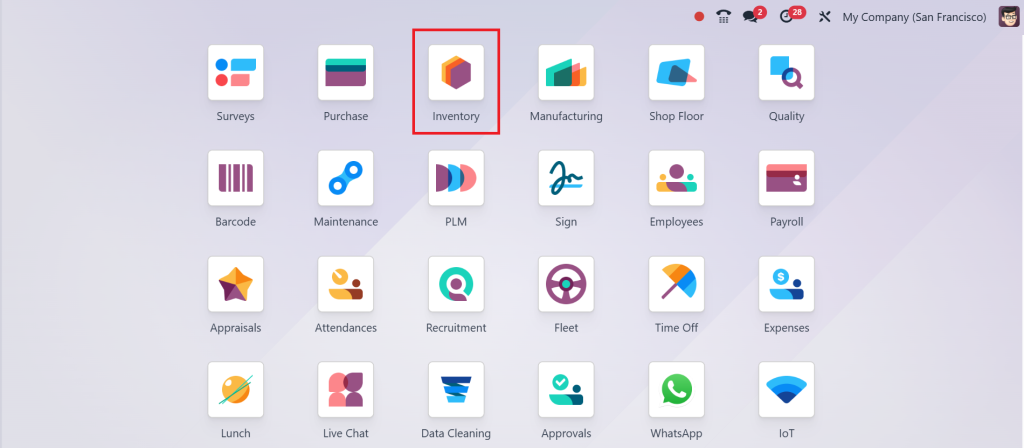
From the main dashboard, click on the Inventory application. This will take you to the central workspace where you can manage stock operations.
Step 3 – Access the Reporting Section
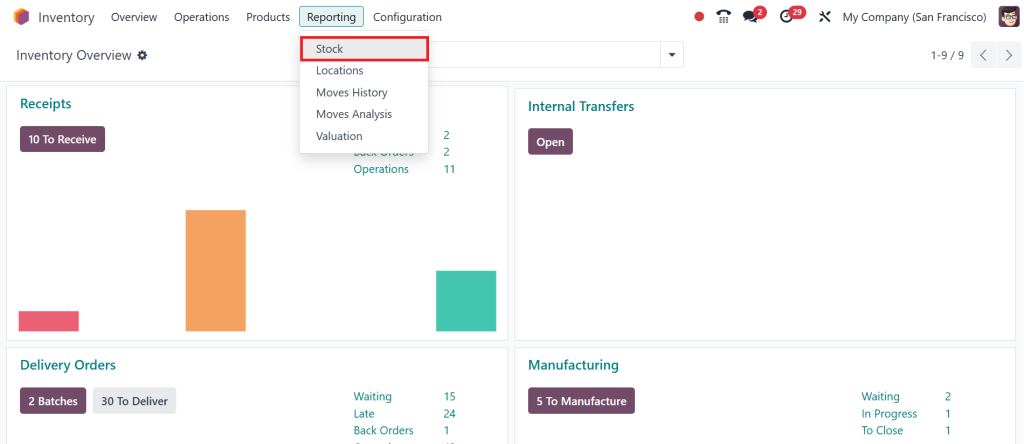
Look for the Reporting menu in the top navigation bar within the Inventory module. Click on Reporting > Stock.
Step 4 – Choose 'Inventory Report'
Select Inventory Report from the dropdown list. This is where you can view the stock report in Odoo 18.
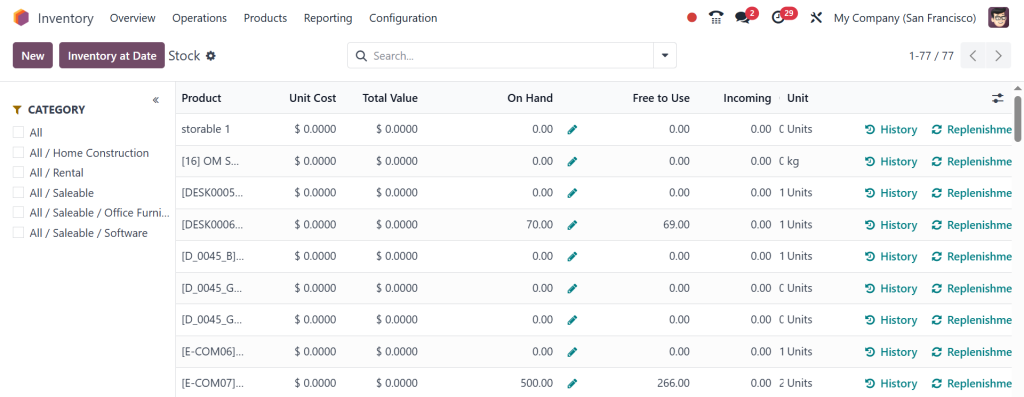
The report displays the stock of each product categorized by location, lot/serial number, and more.
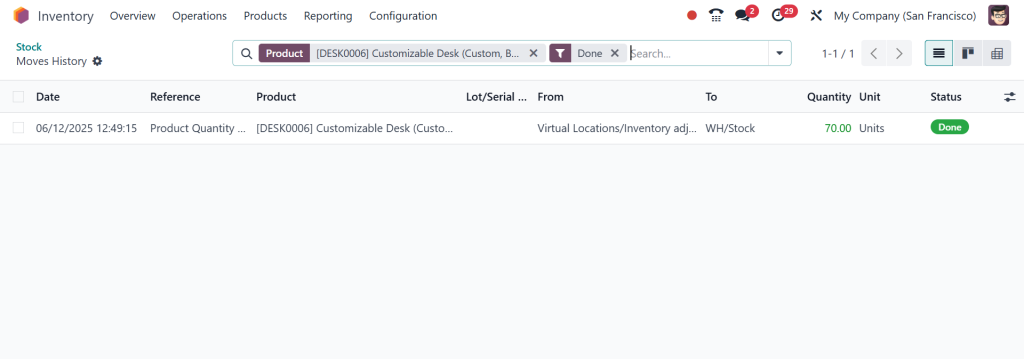
Step 5 – Use Filters and Grouping
Customize your view by using the filters and group-by features. You can filter data by location, category, product type, lot number, or date.
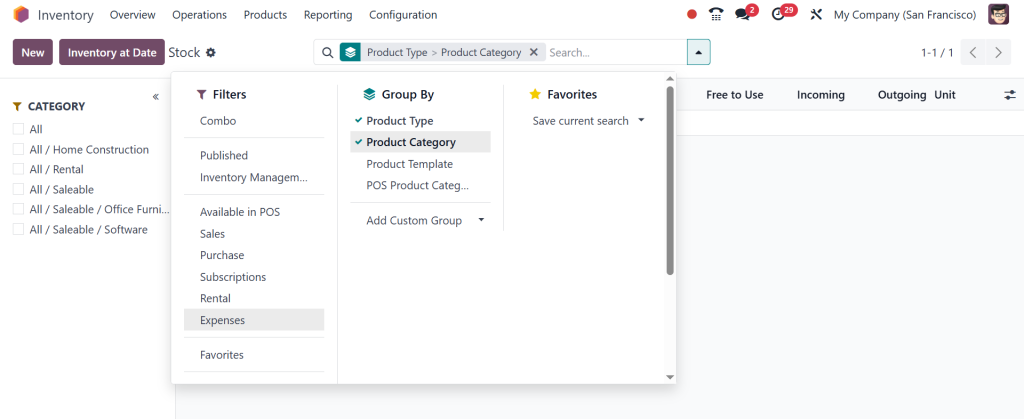
This flexibility makes Odoo 18 stock report access incredibly powerful.
Step 6 – Export or Print Reports
You can easily export the Odoo inventory stock report to Excel or PDF for analysis or documentation. This is especially useful for audits or interdepartmental sharing.
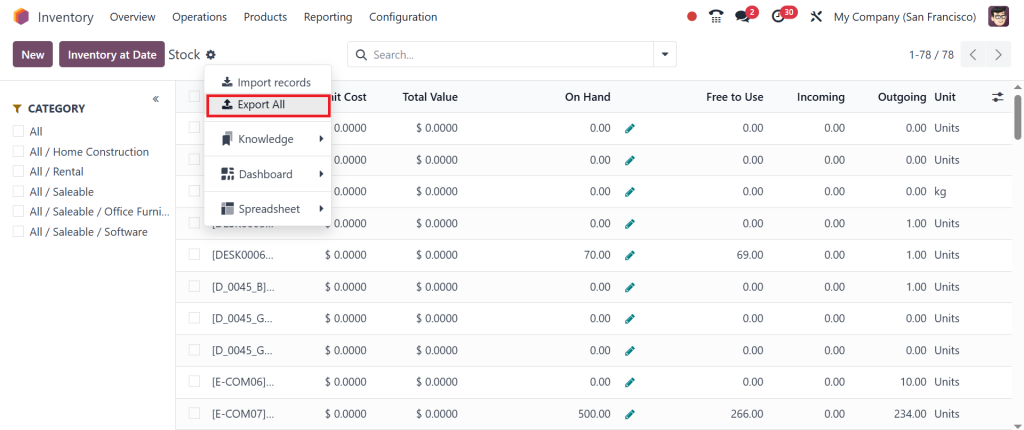
By learning how to open stock report Odoo and applying the built-in filters, warehouse teams can stay informed and proactive in managing stock efficiently.
Managing Inventory Becomes Easier with Odoo 18 Stock Report Access
The everyday task of managing inventory becomes more manageable when the proper reporting tools are available. With Odoo 18 stock report access, you get more than just numbers on a screen. You get data that reflects actual warehouse conditions and tells you when action is needed. Whether it’s restocking a best-seller or identifying a product that hasn’t sold in months, the report gives you real visibility.
More importantly, the data helps various teams stay aligned. Purchasing can make smarter buying decisions. Sales can avoid promising unavailable products. Warehouse staff can plan their operations based on accurate stock counts. Everyone benefits from having the same reliable information. And because Odoo is cloud-based, this access is available from anywhere, supporting remote decision-making.
How to Use Access Stock Report in Odoo to Improve Efficiency
Accessing the stock report in Odoo is the first step to understanding your warehouse, but using it regularly brings continuous benefits. As you monitor trends and identify repetitive stock issues, you can improve your supply chain strategy. For example, you can adjust procurement settings if a product is frequently overstocked. If another is often out of stock, you can revise reorder rules or review supplier performance.
Using the report also helps prevent losses. Products near expiration can be identified early, slow movers can be bundled in promotions, and fast movers can be prioritized for restocking. Over time, these minor adjustments result in improved warehouse efficiency and better financial outcomes. For any business that relies on product movement, knowing how to access stock reports in Odoo and using it consistently makes operations smoother and more data-driven.
Final Thoughts on How to Access Stock Report in Odoo 18 Inventory
Knowing how to access stock reports in Odoo 18 Inventory brings clarity, organization, and better control to your warehouse management process. It lets your team view stock status, monitor product flow, and make more informed decisions. Whether checking available quantities or preparing long-term procurement plans, the report provides all the information you need in one place.
The benefits extend across the company, from logistics to finance to customer service. With access to accurate, real-time data, everyone can work more efficiently. The flexibility of filters, visual formats, and export options means that each team can use the report to support their role.
As businesses grow and customer expectations rise, reliable inventory reporting becomes more important. With Odoo 18, accessing that information is simple, effective, and built into the tools you already use. The more you explore, the more opportunities you discover for improvement.
If you’re ready to improve the control of your stock operations, contact Netilligence today and discover how Odoo 18 Inventory reporting can benefit your business.




