

Adopting Next-Level Sales with Odoo 19 Quotation
The Odoo 19 Quotation marks a significant advancement in how businesses create, manage, and close sales proposals. With enhancements like AI automation, online signature and payment, advanced quotation templates, and flexible expiration settings, Odoo 19 reinvents the way you create quotations in Odoo 19. In this article, we’ll explore the top Odoo 19 quotation new features, show how to make a quotation in Odoo 19, get into Odoo sales quotation template capabilities, explain Odoo quotation expiration period setup, and highlight online signature and payment Odoo 19 sales, AI automation in Odoo 19 quotation, and the improved quotation design Odoo.
By the end, you’ll know why your sales process deserves an upgrade, and how Netilligence, as an Odoo Partner, can help you harness these innovations.
1. The Big Shift: Why Odoo 19 Quotation Matters
When your sales team sends proposals, minor friction points add up: manual tweaks, formatting hassles, expired offers, chasing the signature, and follow-up for payment. The Odoo 19 Quotation reimagines this with automation, smart controls, and a beautiful design. Unlike earlier versions, Odoo 19 centralizes quoting, allowing your team to spend more time selling and less time wrestling with documents.
Here are the headline innovations:
- Deep AI automation in Odoo 19 quotation for innovative product suggestions, discounts, and follow-ups
- Native support for online signature and payment in Odoo 19 sales, closing deals online
- Enhanced Odoo 19 sales quotation template engine for dynamic, reusable templates
- Flexible Odoo 19 quotation expiration period setup to enforce urgency
- A fresh, modern, improved quotation design, Odoo 19, built for clarity and conversion
This isn’t just a version bump; it’s a strategic sales upgrade.
2. Creating Quotations in Odoo 19: A Step-by-Step Guide
One of the most requested features is how to create a quotation in Odoo 19 easily. Let’s walk through the process.
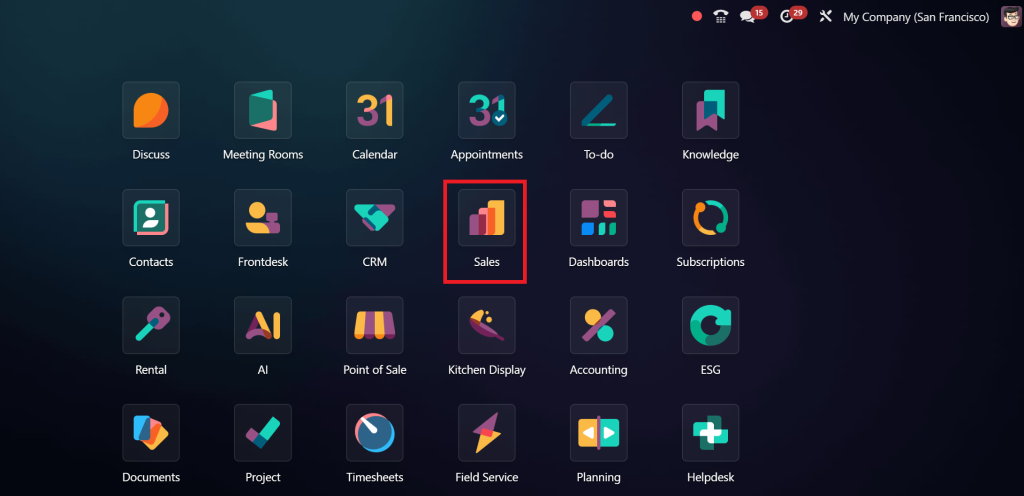
Go to the Sales App
From your Odoo dashboard, open the Sales module. This is your base for quotations, orders, and pipelines.
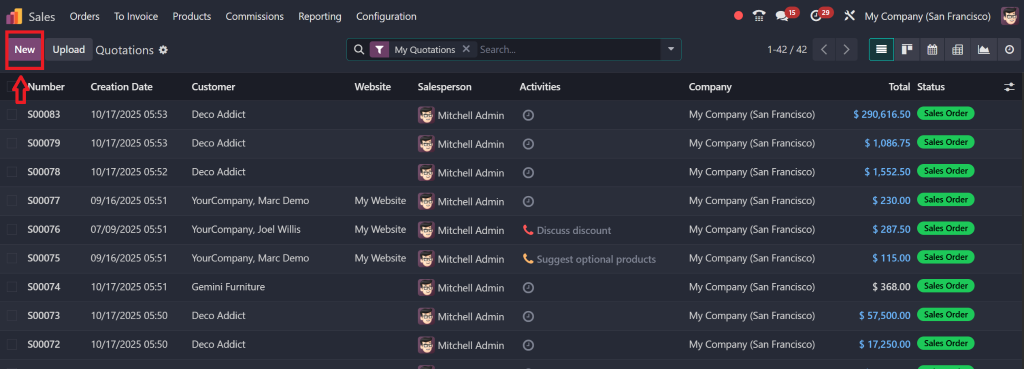
Click “New Quotation”
In the Quotations dashboard (List or Kanban view), select New to begin a new quote.
Looking to maximise your Odoo sales performance? Don’t miss our step-by-step guide on How to Create a Flash Sale in Odoo 18 Sales. It perfectly complements the features you’ve seen in Odoo 19 Quotation, helping you manage both quotations and time-limited promotions effectively.
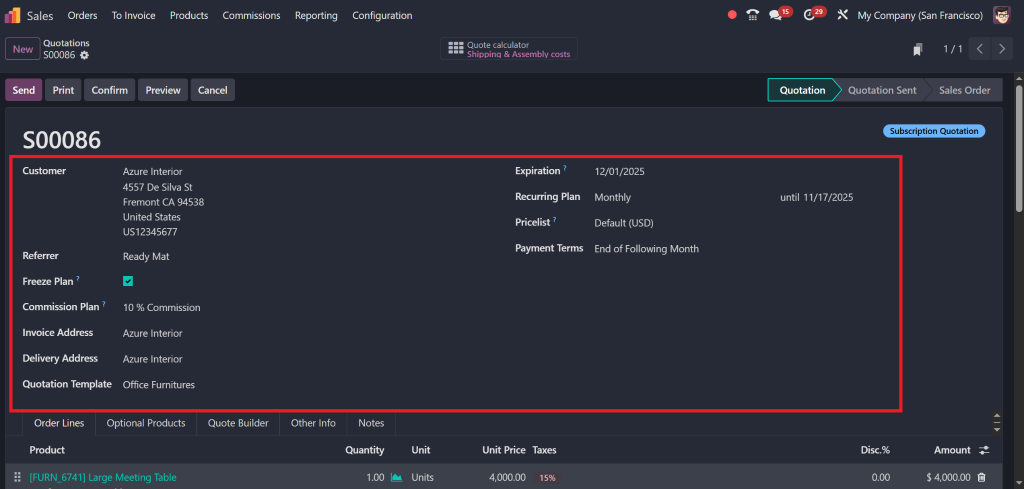
Enter Customer & Basic Info
- Choose your customer. The invoice and delivery addresses auto-populate if contact records exist.
- Optionally add a Referrer and, if relevant, a Commission Plan.
- Under Quotation Template, pick one of your preconfigured templates (covered in section 3 below).
- The Expiration date defaults based on settings, but you can tweak it (covered in section 4).
- If it’s a subscription or recurring product, choose a Recurring Plan.
- Select a Pricelist and Payment Terms if specific terms apply.
Add Order Lines & Optional Products
- Under the Order Lines tab, click “Add a product,” select the items, set the quantity, taxes, and discounts.
- Use “Add a section to group items” and “Add a note under lines” for custom comments.
- In the Optional Products tab, pick cross-sell or upsell items that buyers can optionally include.
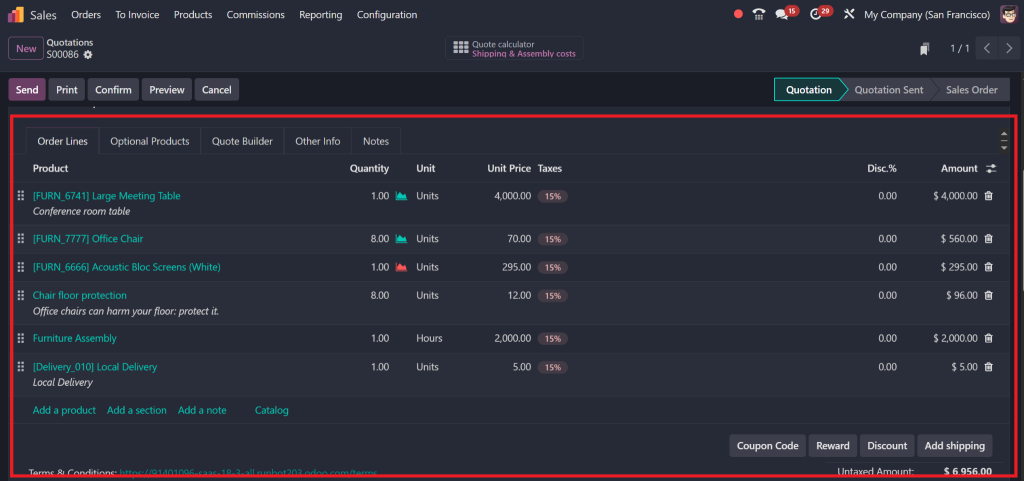
(Odoo’s documentation for creating quotations in version 18 gives you a sense of the structure, which essentially carries forward to 19)
Other Info & Terms
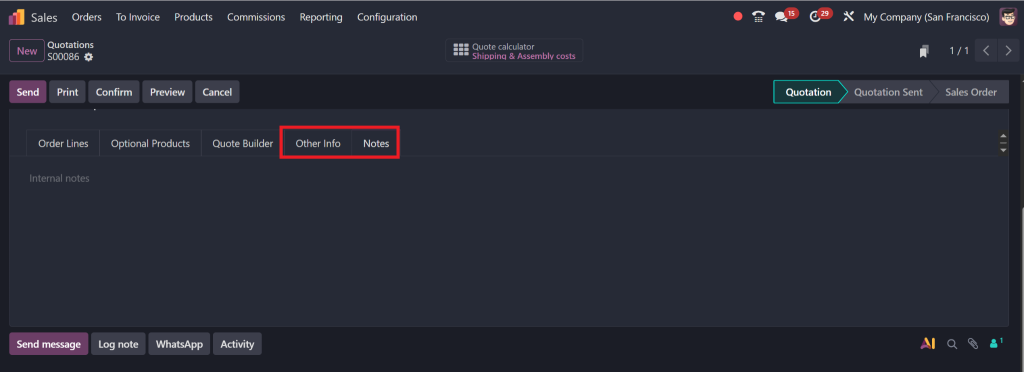
You can add delivery method, salespersons, payment terms, internal notes, and attach files under the Other Info or Notes tabs.
Preview, Send & Confirm
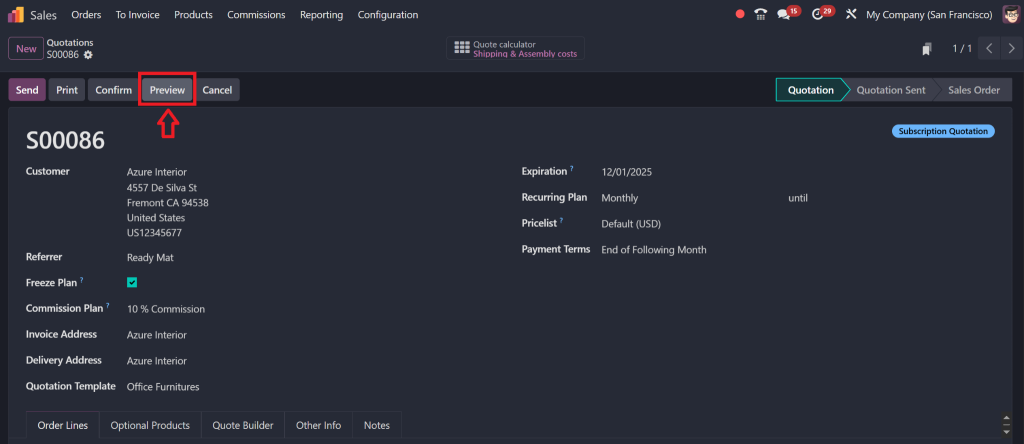
- Use the Preview button to see how the customer will see the quote.
- When ready, use Send by Email.
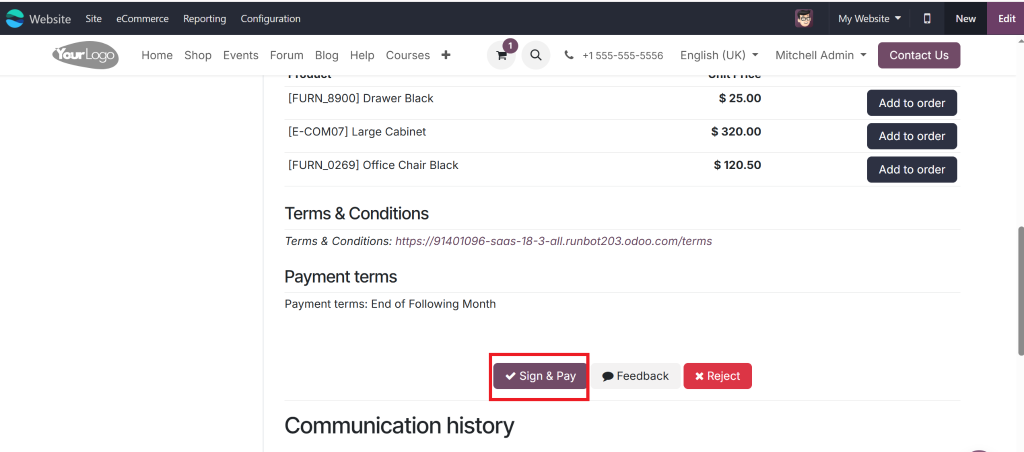
- After the customer completes their online action (signing or paying),
- Click Confirm to convert the quotation to a sales order.
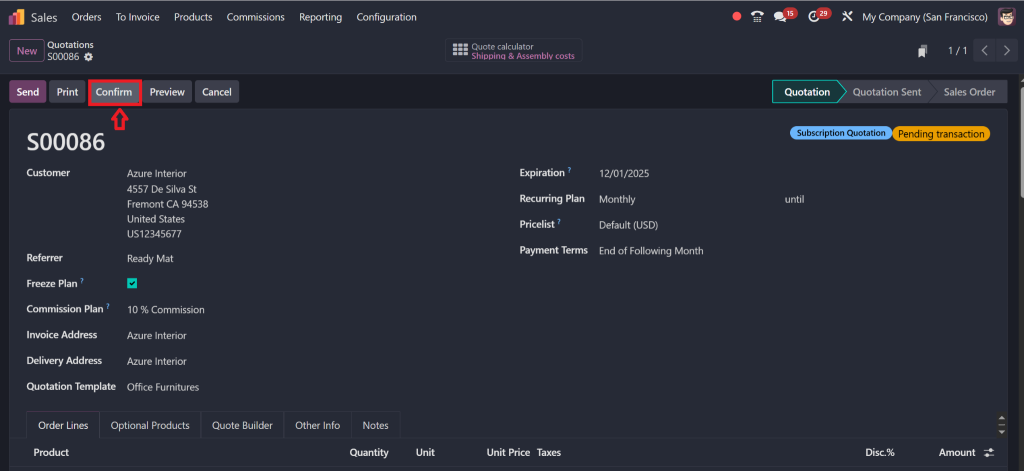
By following these steps, you can seamlessly create a quotation in Odoo 19 with minimal friction, leveraging all the new features under the hood.
3. Odoo 19 Sales Quotation Template
What is a Quotation Template?
A quotation template is a preset configuration of products, terms, layout, expiration rules, approval rules, and even signature/payment settings. When you select it on a new quotation, much of the structure is auto-filled.
How to Configure a Template
- Go to Configuration → Quotation Templates in the Sales app.
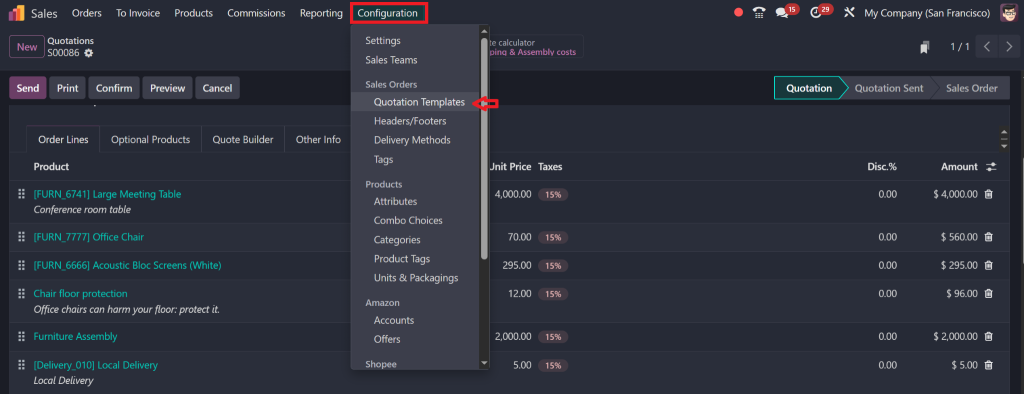
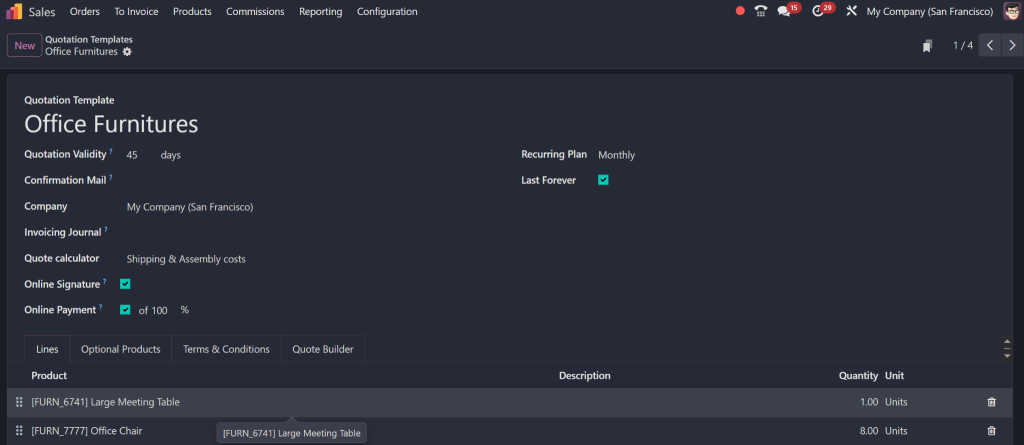
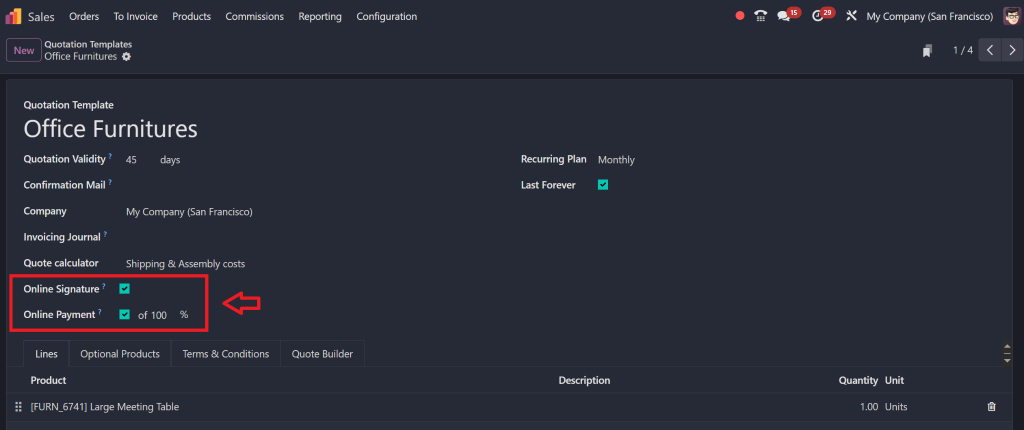
- Create a new template: assign a name, company, default expires after days, activate Online Confirmation (Signature / Payment), and default terms & conditions.
- In Lines, add default product lines, sections, and notes.
- In Optional Products, assign upsell items.
- In Terms & Conditions, include boilerplate legal text or special clauses.
Template vs Manual Quotation
When you’re in the create quotation screen and select a template, it auto-inserts product lines, optional items, expiration, terms, and settings. You can still adjust individual fields, but this gives your team a fast starting point.
By doing so, you can dramatically reduce manual errors and improve brand consistency across all quotes using Odoo 19’s sales quotation template features.
4. Setting Quotation Expiration Period, Control & Urgency
One of the more minor but strategically essential enhancements in Odoo 19 is the management of proposal expiration, specifically through the setup of quotation expiration periods.
Why Expiration Matters
If you let quotes remain open indefinitely, you lose leverage. The expiration period prompts clients to act, enabling your team to follow up on stale quotes.
How It Works in Odoo 19
- In each quotation template, you can set a default Expires After (e.g., 7, 14, 30 days).
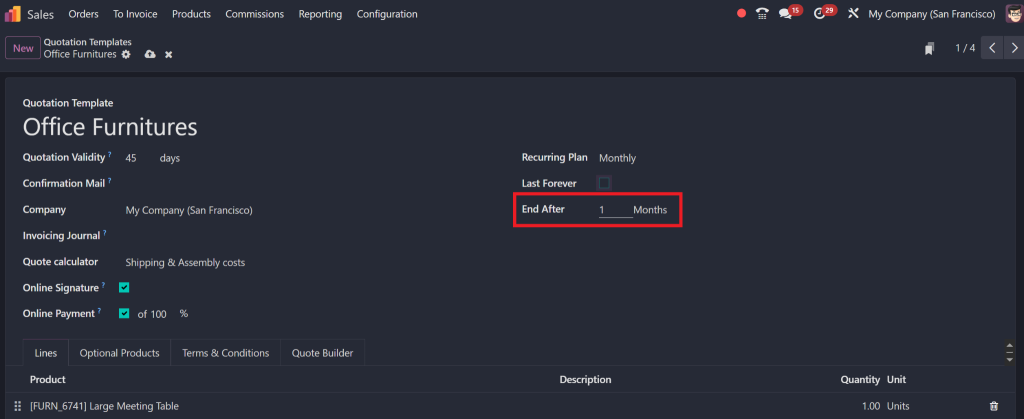
- When creating a quotation, the Expiration field is prefilled based on the template or global default.
- Users can override expiration per quote, if needed.
- The system can flag or filter expired quotations in dashboards, reminding your sales team to follow up or archive them.
By using Odoo 19’s quotation expiration period setup, you retain control over your sales pipeline and avoid “floating” proposals.
5. Online Signature & Payment in Odoo 19 Sales Quotes
One of the most transformative enhancements in Odoo 19 Quotation is the built-in support for online signatures and payments for Odoo 19 sales. This turns your quotes into executable contracts and invoices, all in one step.
Enabling Online Confirmation
- In your quotation template, tick options for Signature and Payment under Online Confirmation.
- This adds Sign & Pay or Accept & Sign buttons on the customer portal view.
Customer Experience
When customers open the quotation (via portal link or email), they see options to:
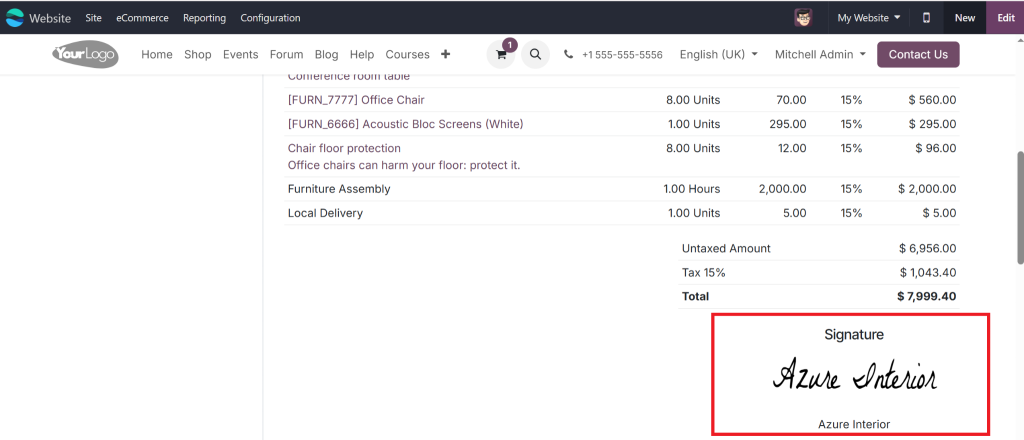
- Sign electronically (legally valid eSignature)
- Pay online using supported payment acquirers (Stripe, PayPal, etc.)
Once they sign and pay, Odoo can automatically convert the quote into a confirmed order and generate the invoice.
Benefits for Sales
- You eliminate the signature/email chase.
- You cut the friction between quote acceptance and payment.
- You accelerate cash flow and close deals faster.
- Everything remains within Odoo, centralised, auditable, and trackable.
The integration of online signature and payment Odoo 19 sales is a significant incentive to upgrade your quoting system now.
AI Automation in Odoo 19 Quotation
The most exciting frontier in Odoo 19 is its move toward AI automation in Odoo 19 quotation. By embedding intelligence into your quoting workflow, Odoo enables sales teams to make more brilliant suggestions, avoid errors, and respond more quickly.
Smart Recommendations
- Odoo can suggest related or complementary products based on the items in the quotation.
- It can automatically propose discount thresholds or upsell bundles.
- It can auto-fill recurring services or subscription lines where suitable.
Automated Follow-Ups
- If a quotation is nearing expiration without response, the system can trigger automated reminder emails.
- It can suggest the following actions (call, email, send a revised quote) based on behaviour or time lags.
Risk & Validation Checks
- Odoo can warn you if a quoted margin is too low or if discounts exceed allowed thresholds.
- It can validate pricing against the current product list and promotion rules to prevent mistakes.
These capabilities of AI automation in Odoo 19 quotation shift the process from purely manual to intelligently assisted. Your sales team gets a built-in advisor, reducing errors and saving decision time.
7. Improved Quotation Design Odoo 19
No matter how robust your features are, presentation still matters. That’s why Odoo 19 puts a strong focus on improved quotation design, clear layouts, responsive design, brand consistency, and conversion-friendly elements.
Modern, Clean Layout
Quotation views now use cleaner typography, spacing, and emphasis to make key numbers and details stand out.
Branded Headers & Footers
You can upload custom header pages and footer pages per template (or globally), ensuring every quote stays on brand.
Product Images & Documents
You can embed product images or document attachments (e.g., spec sheets) inside the quotation PDF.
8. Real Business Benefits & Use Cases
Let’s look at how real businesses will benefit from adopting the new Odoo 19 Quotation features.
Shorter Sales Cycles
By enabling online signature and payment, you close the gap between sending a quote and closing the sale. Less waiting, more deals.
More Accurate, Consistent Quotes
With templates, AI checks, and validation rules, quoting becomes less error-prone. That reduces discount leakage and misquoted pricing.
Better Follow-Ups & Pipeline Hygiene
Expiration rules and automation trigger prompts for action on stale quotes. You don’t lose leads to forgetfulness.
Stronger Upsell & Cross-sell
AI suggestions and optional product modules enable your team to dynamically propose upgrades or add-ons, thereby boosting average deal size.
Professional Branding & Trust
Beautiful, branded quotes that clients can sign and pay online build confidence. They see a modern, trustworthy experience, which reflects well on your brand.
9. Why Choose Netilligence As Your Odoo 19 Quotation Partner
At Netilligence, an Odoo Partner, we specialise in designing and delivering quotation workflows that harness the full power of Odoo 19 Quotation. Here’s why working with us is a smart move:
Advantage What Netilligence Delivers
- Expert Implementation
- Template & Workflow Design
- Smart Automation
- Signature & Payment Setup
- Training & Support
- Design & Branding
- Migration & Upgrades
Our mission is to make quoting a competitive advantage for you, not just a back-office chore.
10. Odoo 19 Quotation: A New Way of Success
In the fiercely competitive world of sales, your tools need to do more than manage data; they must actively help you win deals. The Odoo 19 Quotation module is precisely that: a leap forward in quoting, closing, and converting. Odoo 19 offers a range of enhancements, from its new features like AI assistance to its sales quotation template power, including quotation expiration period setup, online signature and payment capabilities, AI automation, and improved quotation design. This upgrade is designed to transform your business.




