How to Collect Customer Ratings in Odoo 18 Projects?
Why Collect Customer Ratings in Odoo is Important
Every project tells a story, but that story is not complete until you know how the customer felt about it. That is why it is so important to collect customer ratings in Odoo. In Odoo 18, this feature has become more useful than ever, enabling teams to understand whether they are meeting expectations or falling short. When you collect customer ratings in Odoo, you get clear insights from the people who matter most, your clients.
Think about it: without feedback, how do you know if your work really matched what your customer had in mind? By using Odoo 18 customer ratings, you no longer have to guess. You can easily capture opinions and use them to improve future projects. Many businesses are already utilizing project feedback in Odoo because it provides them with a clear understanding of what is working and what needs to change.
Another reason this is so valuable is that you can enable the customer ratings project module in Odoo and make the whole process part of your daily project workflow. With the correct settings, the system will not only collect ratings but also connect them to the right stage of a project. This is known as Odoo project stage feedback, and it means customers are asked for their views exactly when it makes the most sense.
What’s more, you can set up the system to automate feedback requests Odoo, so no one forgets to ask clients for their thoughts. And with Odoo customer satisfaction tracking, you have everything in one place to monitor results and see the bigger picture. That’s why learning how to collect customer ratings in Odoo is not just a technical step; it’s a practical move that changes how you understand your projects.
Understanding Odoo 18 Customer Ratings
When we talk about Odoo 18 customer ratings, we are referring to a simple way of gathering opinions directly from clients inside the same platform where you manage your projects. Instead of relying on random emails or separate surveys, ratings are built into the project flow. Clients can rate their experience quickly, and the results show up for managers to review.
This process matters because it adds clarity. With ratings, project managers know how satisfied the client is at every stage. When you collect customer ratings in Odoo, you bring consistency to the feedback process, and the data is available whenever you need it.
Project Feedback in Odoo and Why It Matters
Feedback is often the bridge between what was delivered and how it was received. With project feedback in Odoo, you are not waiting until the end of a contract to ask if the customer is happy. Instead, you ask along the way. If something is not going well, you find out earlier, not later.
By doing this, businesses reduce misunderstandings and improve trust. When you collect customer ratings in Odoo, the message to clients is clear: “Your opinion is important, and we want to hear it.” That kind of interaction makes relationships firmer and projects smoother.
How to Use & Enable the Customer Ratings Project Module in Odoo
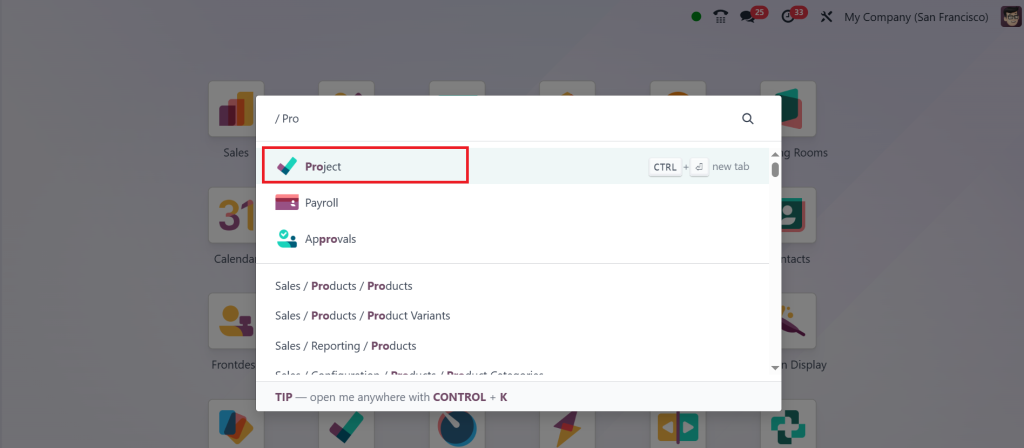
To start using ratings, you first need to enable the customer ratings feature of the project module in Odoo. Direct to the Project App.
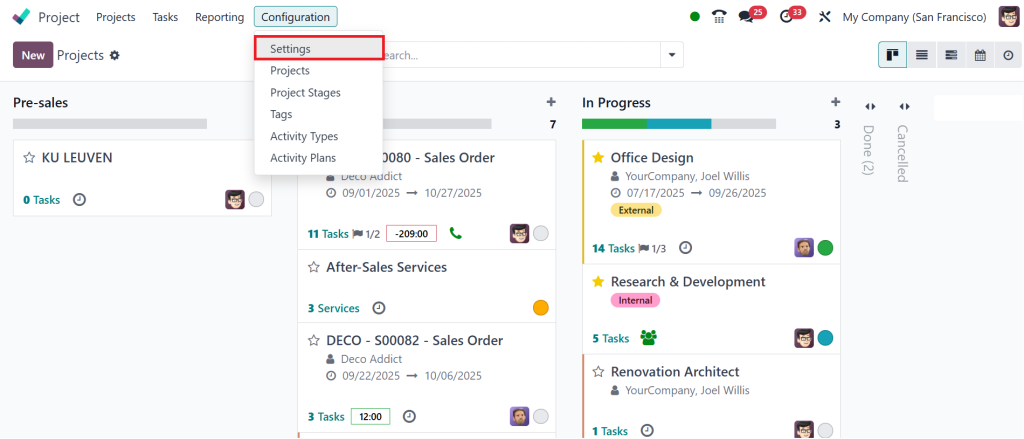
Then, click on the Configuration > Settings.
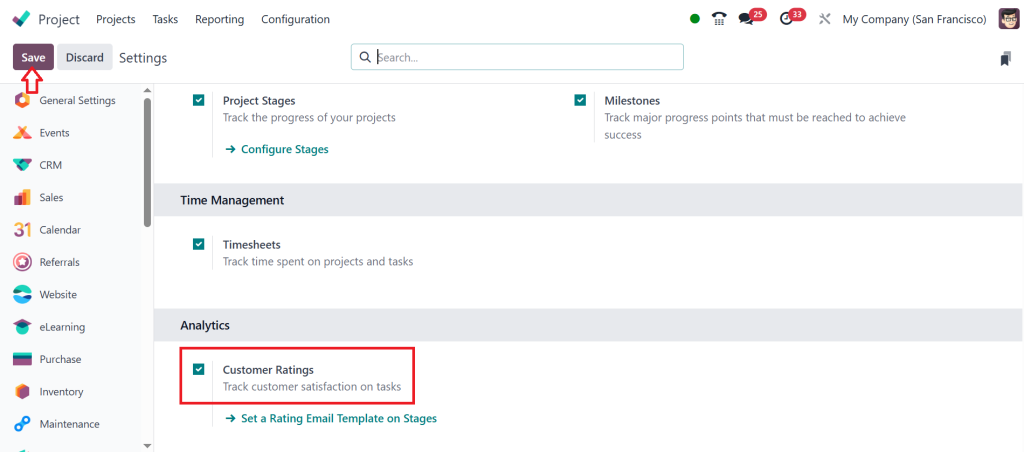
In the analytics section, locate the ‘‘Customer Ratings’’ option. Check (✔) the box and click on Save.
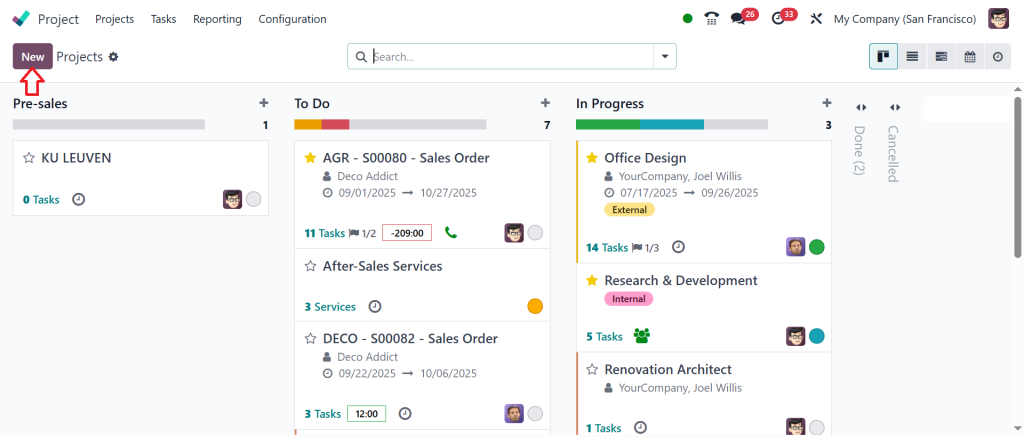
Go to the Project dashboard and click on New.
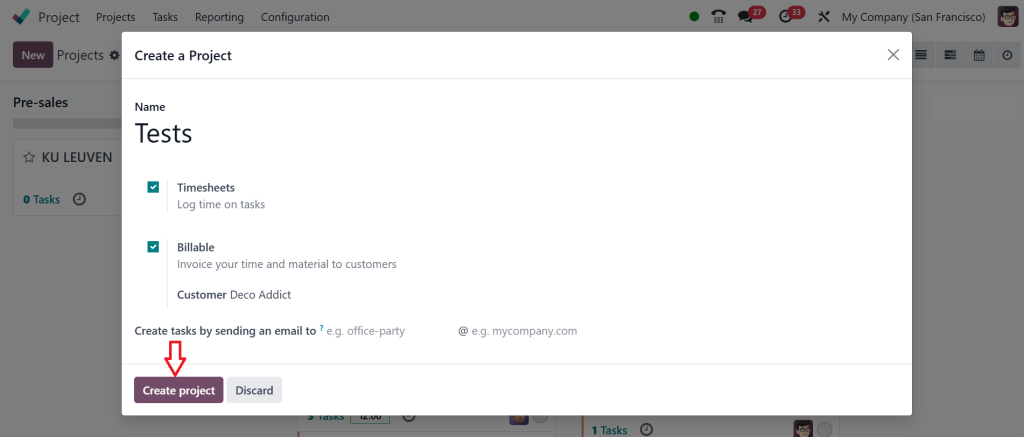
Enter the project name, and enable time tracking if needed. Select the Billable option, fill in the customer field and then click on the ‘‘Create Project’’.
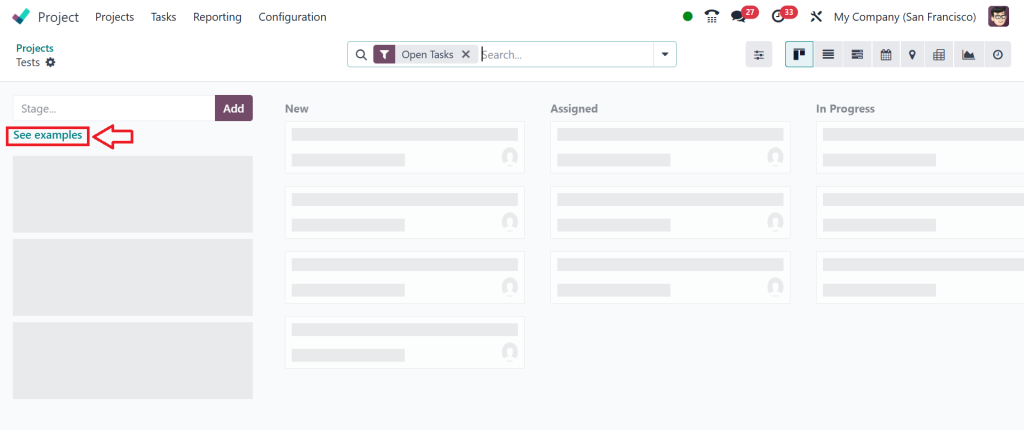
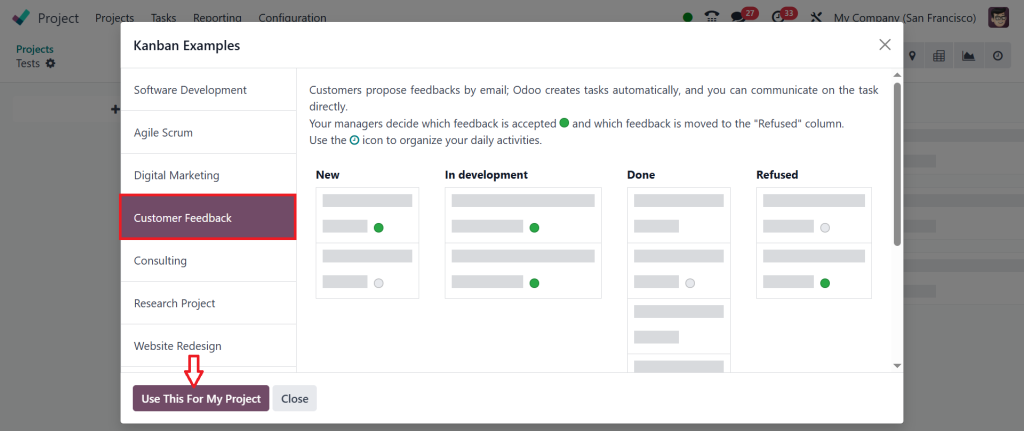
Stages can be added manually or chosen from ready-made examples. Click on the ‘‘See examples’’ to open a new window with stage templates.
Select the one best fit for your project and then click on the ‘‘Use This For My Project’’.
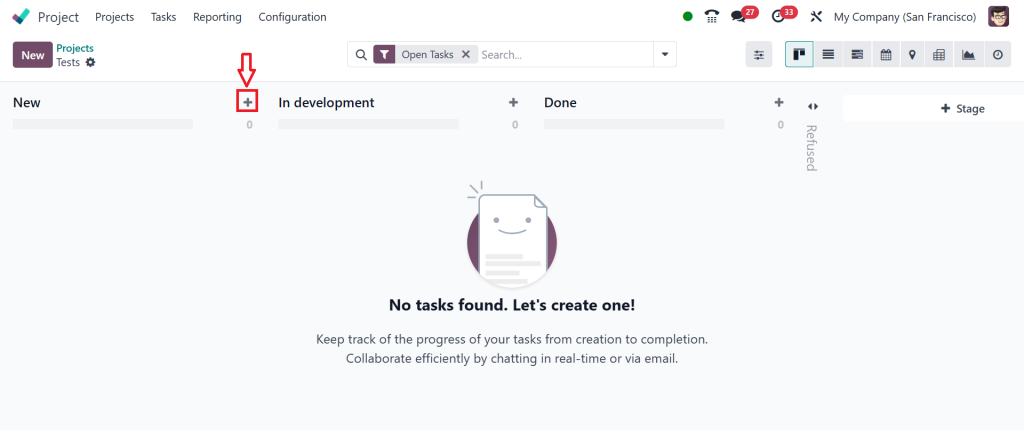
The selected stages will be automatically added to your project, and you can edit or reorder them as needed. To create a task, click on the plus(+) icon.
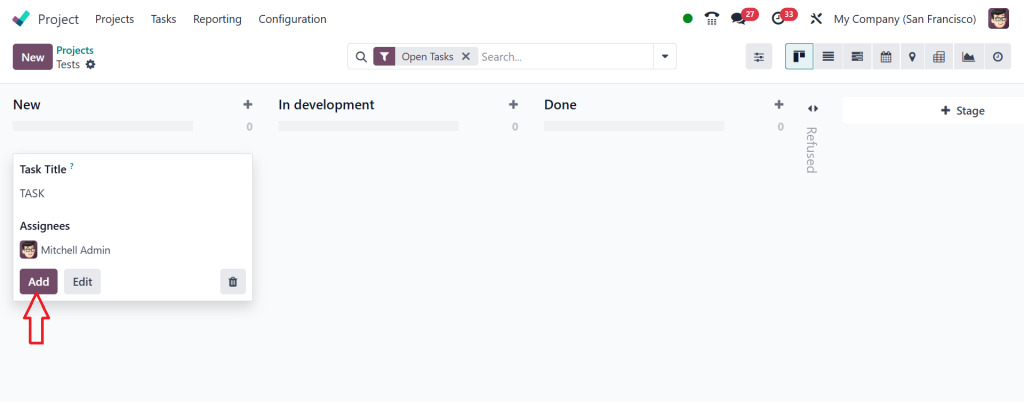
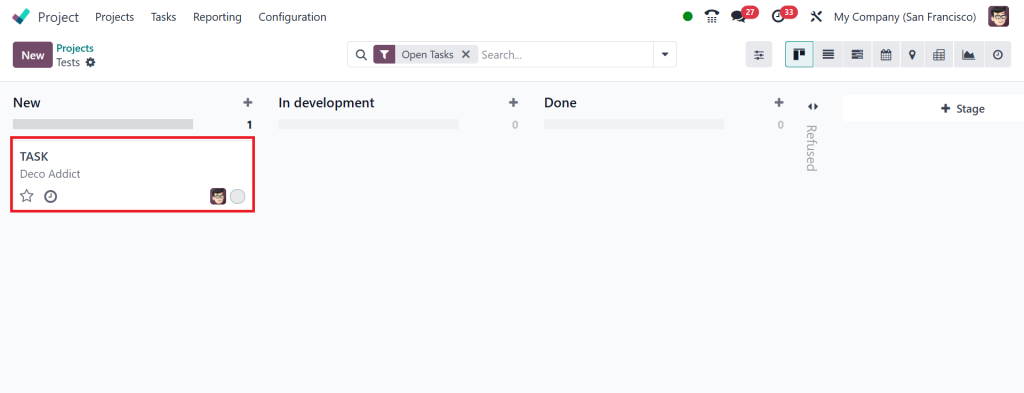
Enter the task name and assign it to a responsible person, and then click on the ‘‘Add’’ to finalize the creation of a task.
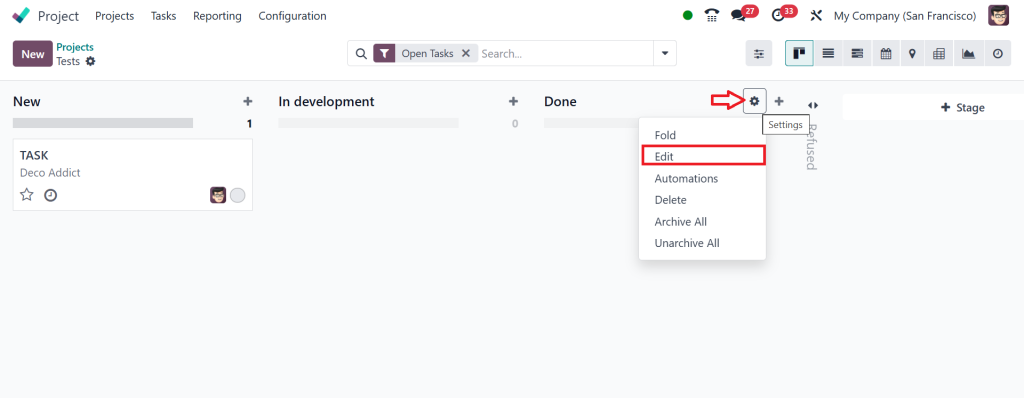
Suppose you want to collect the feedback at the ‘‘Done’’ stage. Open the settings for this stage and click ‘‘Edit’’.
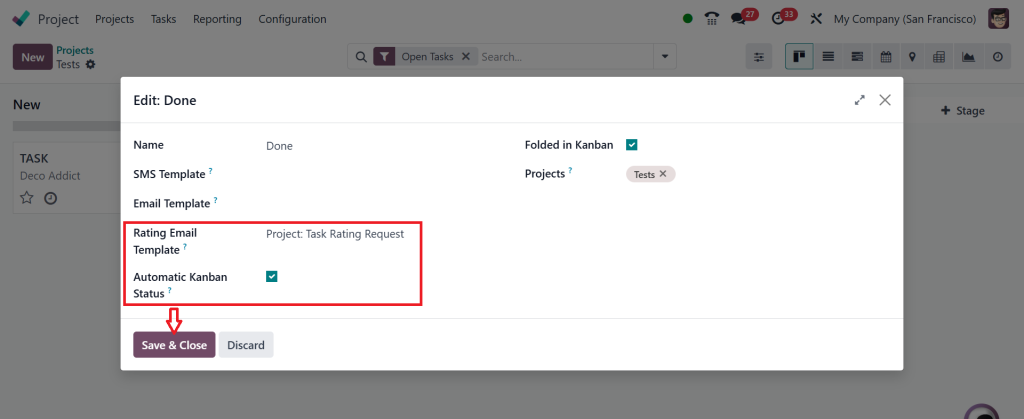
Select the rating email template and tick (✔) the Automatic Kanban Status, and click on the Save & Close.
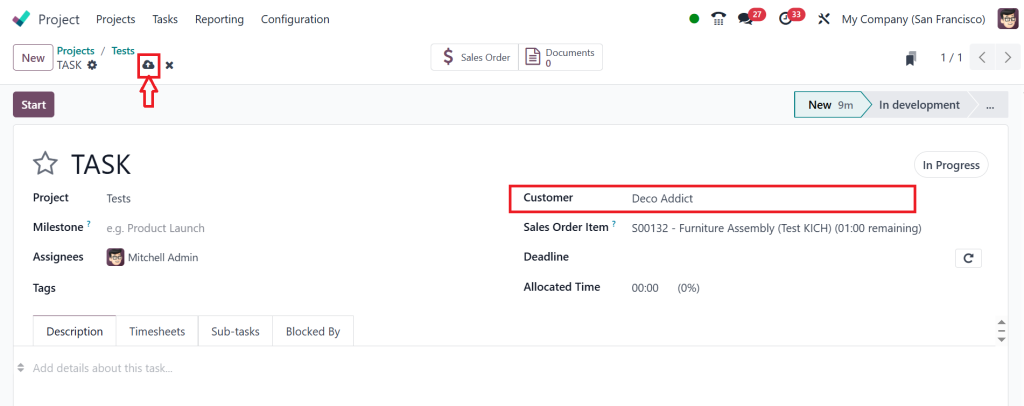
Next, open the existing task.
In the task form, find a customer field and select the client you want linked to this task. Once selected, click Save to apply the changes.
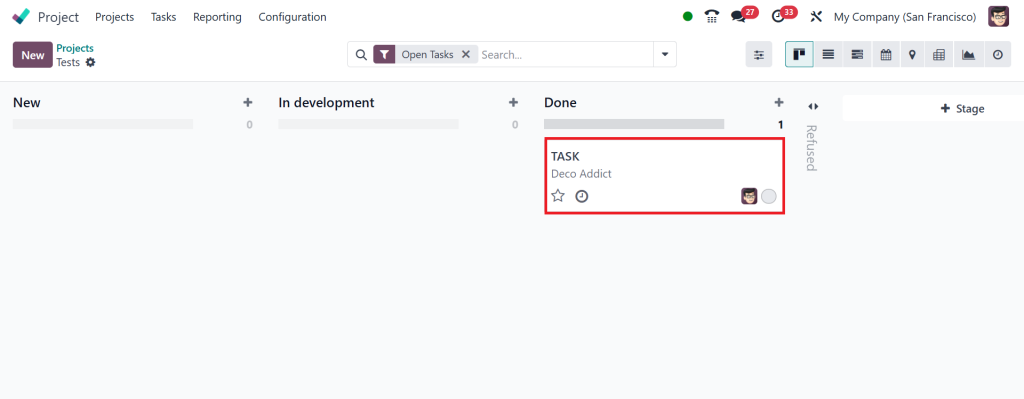
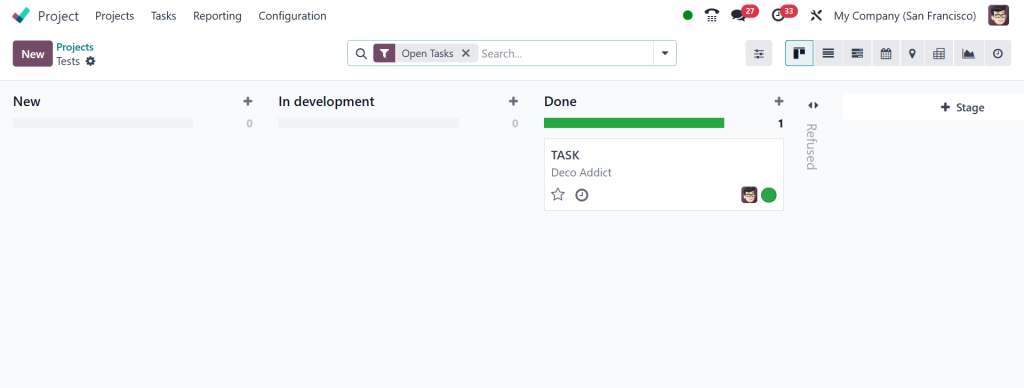
Then, go back to the main project view, locate the task in its current stage and drag it to the ‘‘Done’’ stage.
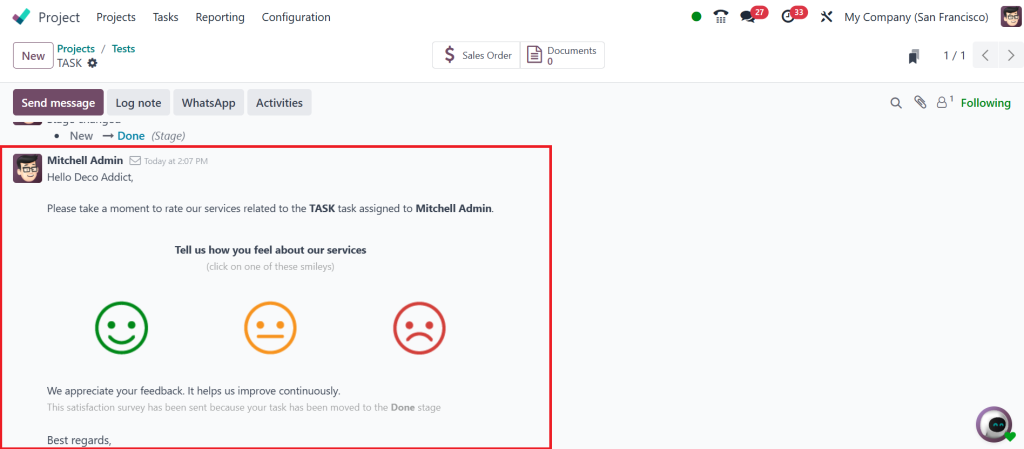
This transition will trigger the feedback process. Since the rating email template is set, the client automatically receives an email, and from the email, the client can leave a rating.
The email includes three smiley (🙂, 😐, 🙁) options, green for satisfied, orange for okay and red for dissatisfied. After selecting one, the clients are redirected to a new page where they can leave feedback in the form of a text message in the provided field and click ‘‘Send Feedback’’.
Back in the task, you will see the rating and the kanban status automatically changed to approved, along with a green indicator.
This way, Odoo 18 allows you to quickly gather feedback, monitor client satisfaction and respond promptly to their needs. This improves transparency, project quality and client trust.
Automate Feedback Request in Odoo for Better Consistency
One of the most valuable features is the ability to automate feedback requests in Odoo. Instead of sending manual reminders to clients every time you want feedback, the system can do it for you. When a task is marked as complete or a stage is finished, the system can automatically ask the client for a rating.
This automation saves time, but more importantly, it ensures that feedback is always requested at the right moment. When you consistently collect customer ratings in Odoo, you start to see patterns. Some projects show high ratings at the start and lower ratings at the end, while others improve as they progress. This kind of insight is only possible when feedback collection is steady and reliable.
Odoo Customer Satisfaction Tracking for Insights
Once ratings are collected, they need to be analyzed. This is where Odoo customer satisfaction tracking comes in. The system gathers all ratings and presents them in reports and dashboards that are easy to read.
You can see average scores across different projects, notice if one type of work tends to get higher ratings than others, and spot areas that may need extra attention. Tracking results over time shows if the steps you are taking to improve are actually working.
When you collect customer ratings in Odoo and track them regularly, you gain a clear picture of your performance. It becomes easier to make decisions because they are based on actual client opinions rather than assumptions.
Using Odoo Project Stage Feedback to Improve Projects
Another interesting part of this system is the Odoo project stage feedback. By linking feedback to project stages, you make sure that clients are asked for their opinion when it is most relevant.
For example, after the design stage is complete, you can ask the client if they are happy with the design before moving to the development stage. This prevents misunderstandings from growing into bigger problems later. When you collect customer ratings in Odoo at each stage, you are not only measuring satisfaction, you are guiding the project in the right direction as it happens.
Practical Example of Collecting Ratings in Odoo 18
Imagine you are managing a software development project. The client is involved in multiple stages: design, coding, testing, and delivery. You decide to enable the customer ratings project module in Odoo and set feedback requests at the end of each stage.
After the design stage, the client gives their rating. If it’s high, you know the team is on the right track. If it’s low, you can ask questions and fix the issues before moving on. Later, after coding and testing, the client provides more ratings. By the time you deliver the final product, you already know if they are satisfied. This is only possible because you decided to collect customer ratings in Odoo at every critical step.
Why Every Business Should Collect Customer Ratings in Odoo
The habit of asking for feedback is not just about numbers; it is about building better projects and better relationships. Businesses that utilize Odoo 18 often experience improvements in communication and delivery, as indicated by customer ratings. When customers notice that their feedback leads to changes, they are more likely to trust the team and return for future work.
With project feedback, Odoo automates feedback requests and customer satisfaction tracking, making the process part of everyday work. You no longer need separate tools or extra systems. Everything happens inside Odoo, making it easier to manage.
Most importantly, when you regularly collect customer ratings in Odoo, you create a culture where feedback is regular. This culture encourages teams to strive for excellence and clients to share openly.
Collect Customer Ratings in Odoo for Lasting Results
In the end, learning how to collect customer ratings in Odoo is about more than just turning on a feature. It is about listening. With Odoo 18 customer ratings, businesses can ask for and record opinions directly inside their projects. By combining this with project feedback, companies can configure the Odoo system to enable the customer ratings project module, set up automated feedback requests, and analyze results using Odoo customer satisfaction tracking. This approach allows them to enhance both their projects and client relationships.
Adding Odoo project stage feedback ensures that opinions are gathered at the right time, making them more valuable and accurate. The process keeps teams focused, clients involved, and projects on track. That is why the ability to collect customer ratings in Odoo is becoming such an essential part of project management in Odoo 18.
If you want to make the most of Odoo 18 and start collecting meaningful customer ratings in your projects, get in touch with Netilligence today and see how we can guide you step by step.
Hi, I'm Ilsa Shabbir, an Odoo ERP content writer specializing in functional blogs on Odoo modules. I simplify complex Odoo features, creating clear and engaging content to help businesses understand and optimize their ERP solutions.
We use cookies to ensure that we give you the best experience on our website. If you continue to use this site we will assume that you are happy with it.