

Why You Must Learn to Manage Quality Alerts in Odoo 18 Quality
In a world where a single defect can trigger a product recall or hurt your brand reputation, quality control is no longer optional; it’s the lifeline of your operations. If you’re using Odoo 18, the system hands you a secret weapon: quality alerts.
However, here’s the catch: knowing how to manage quality alerts in Odoo 18 Quality app isn’t just about clicking buttons. It’s about understanding a strategy, restructuring your workflow, and turning minor quality issues into big learning opportunities.
Whether you’re a production lead, a quality controller, or a business owner using Odoo for the first time, this guide will show you exactly how to create quality alert Odoo 18, how to raise quality alert Odoo, how to configure the right Odoo quality alert form fields, and how to leverage Odoo 18 quality management alerts to manage your shop floor and beyond proactively.
We’ll even take a deep dive into the quality alert workflow in Odoo 18, so you can stop guessing and start optimizing your processes. So, buckle up, this is your go-to tutorial on Odoo 18 quality alerts.
How to Create Quality Alert in Odoo 18 Without Missing a Detail
Suppose you’ve just received a shipment of materials, but some of the items appear to be incorrect. You need to flag this before it enters production. This is where knowing how to create high-quality alerts in Odoo 18 becomes a catalyst for success.
Here’s how to create a quality alert in Odoo 18 from scratch.
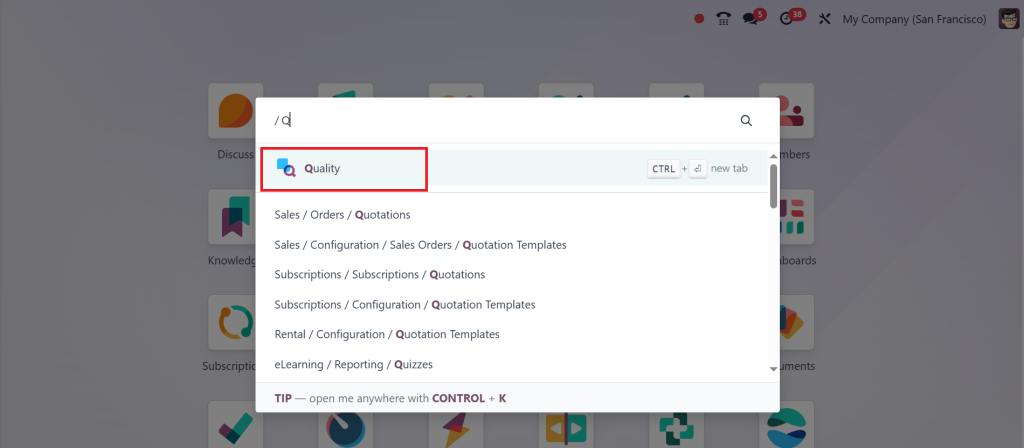
Step 1 – Go to the Quality App
From the main dashboard, click on the Quality module.
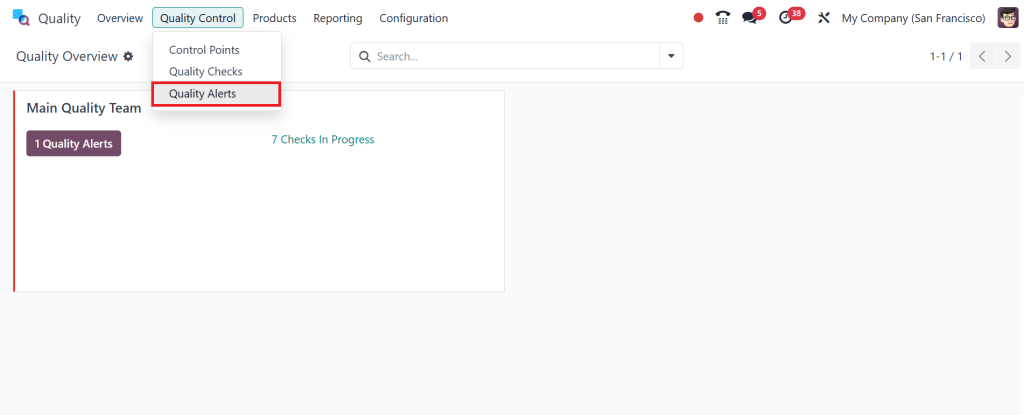
Step 2 – Direct to Quality Alerts
Click on Quality Control > Quality Alerts from the top menu.
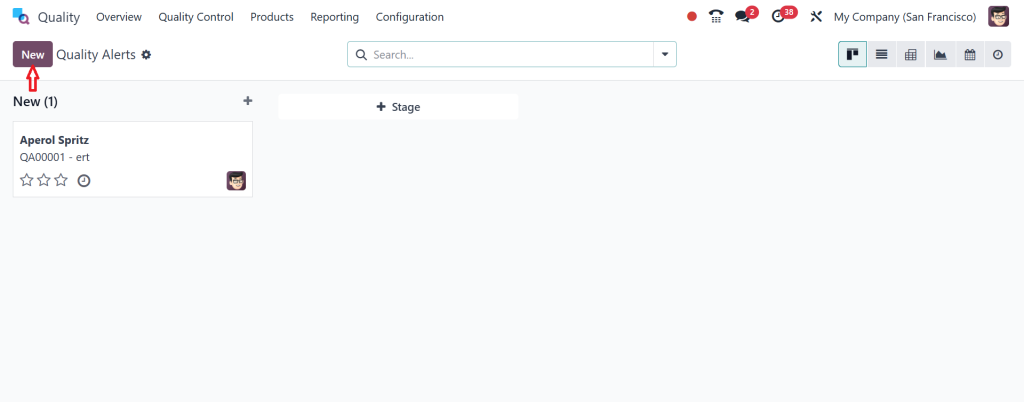
Click New to create a new alert form.
Step 3 – Fill in Odoo Quality Alert Form Fields
Each alert requires detailed input for effective resolution. The Odoo quality alert form fields include:
Title: A short and descriptive subject of the issue.
Product: The affected product.
Lot/Serial Number: (if applicable)
Responsible: Person in charge of resolving it.
Team: The team associated with the issue.
Priority: Low, Medium, High, or Urgent.
Company: Auto-filled if you manage multiple companies.
Tags: Add filters for easier classification.
Root Cause: Document what caused the issue.
Corrective Actions: Steps to fix the current problem.
Preventive Actions: Steps to avoid it in the future.
Notes: Any additional info or attachments.
Click on Save.
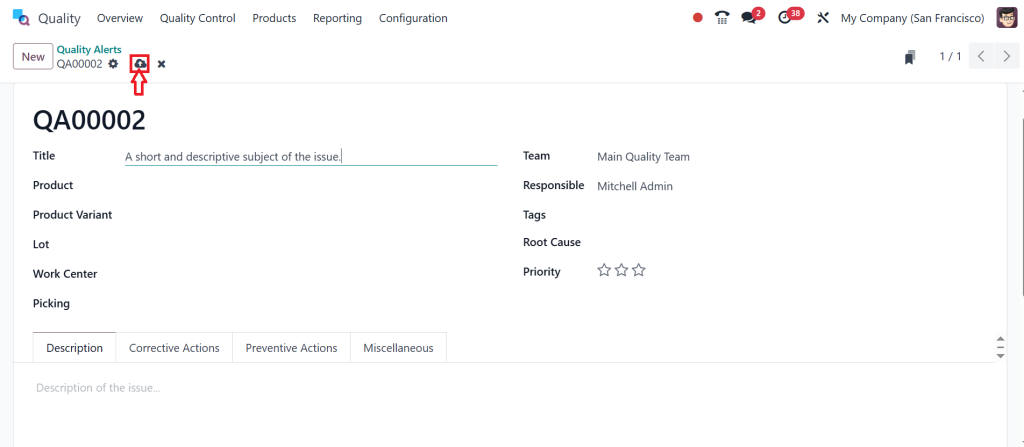
So, that’s how you can easily create new quality alert in Odoo 18. Learning these Odoo quality alert form fields is essential for effectively managing quality alerts in Odoo 18 Quality.
Discover How to Raise Quality Alert in Odoo Like an Expert
Now, what if you want to automate this process? Imagine a scenario where, during a routine manufacturing operation, a quality check fails. Instead of someone manually logging an issue, would it be smarter for the system to flag it automatically?
That’s where knowing how to raise quality alerts in Odoo from control points becomes crucial. In Odoo 18, you can set up control points based on operations, products, or vendors. Once a defined condition fails, such as a measurement outside the threshold or a packaging defect, a quality alert is automatically generated. This means fewer delays, faster responses, and fewer bad products slipping through the cracks. It’s not just automation, it’s intelligent prevention built into your workflow.
Odoo Quality Alert Form Fields Explained
Understand the Heart of the System
When it comes to filling out a quality alert, the Odoo quality alert form fields are more than just formality. They’re the DNA of your defect analysis. Let’s decode them.
Each alert has a title that should be concise yet informative. Then comes the product, along with the optional lot or serial number. This allows you to track which batch or item the issue is associated with. Next up: the responsible person and team. Assigning ownership ensures accountability. The priority field enables you to categorize the urgency: is it a minor issue or a red alert?
The root cause and corrective/preventive actions are where the gold lies. This is your reflection zone where the team learns what went wrong and how to stop it from happening again. It’s how businesses turn setbacks into growth strategies. The more detailed you are in these Odoo quality alert form fields, the more value you extract from the alert system.
Quality Alert Workflow Odoo 18 That Actually Works
So, you’ve raised an alert. Now what? This is where the quality alert workflow in Odoo 18 comes into play. And no, it’s not just dragging cards on a Kanban board.
The default workflow includes stages like “New,” “Confirmed,” “Action Proposed,” “Action Validated,” and “Done.” However, here’s where Odoo 18 truly shines: you can customize these stages. Add “Root Cause Found”, or “Waiting for Supplier Response”, or whatever suits your process. This level of customization gives your business total control over how alerts flow and who is involved.
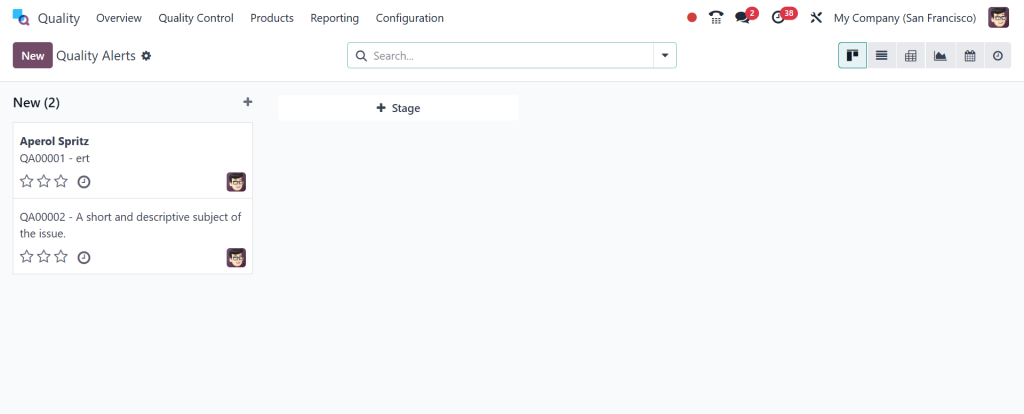
Think of the quality alert workflow in Odoo 18 as the rhythm of your quality operations. If you tune it skillfully, everything flows. If you don’t, you risk bottlenecks, confusion, or worse, unresolved issues.
How to Manage Quality Alerts in Odoo 18 Quality Without Losing Track
Managing dozens or even hundreds of alerts can quickly become chaotic unless you know how to manage quality alerts in Odoo 18 Quality the smart way. Odoo allows you to filter alerts by product, team, stage, tag, or even the responsible person. You can track them visually in a Kanban board, list view, pivot chart, or calendar view. This visual flexibility enables you to prioritize what matters most.
Need to take action fast? Use the chatter feature. Collaborate with your team by tagging users, attaching images, and logging decisions right within the alert. This ensures everything is documented and nothing slips through the cracks. It’s like having a real-time audit trail, ready to impress both your managers and your quality inspectors.
Open Insights with Odoo 18 Quality Management Alerts and Reporting Tools
One of the most underrated features of Odoo’s Quality module is the ability to generate real-time reports from your Odoo 18 Quality Management alerts. Head over to the reporting dashboard and watch patterns emerge. You’ll spot which products have recurring issues, which teams resolve problems the fastest, or which suppliers send defective goods most frequently.
Want to get even more grainy? Use custom filters to track issues over time or across locations. Download reports to Excel for in-depth analysis or PDF for use in boardroom meetings. When you manage quality alerts in Odoo 18 Quality in this manner, you not only resolve issues but also promote a culture of steady improvement, supported by comprehensive data.
Why the Odoo 18 Quality Alert Tutorial Is the Only Guide You'll Need
You’ve probably seen a dozen guides online claiming to explain how to use Odoo’s quality alerts. However, here’s why this Odoo 18 quality alert tutorial stands out: it’s not just telling you what to do; it also explains why to do it and how to make it work for your team.
Because real businesses don’t just follow steps, they adapt systems to their workflows. This guide isn’t just about teaching you how to create a quality alert in Odoo 18 or how to raise a quality alert in Odoo from a failed check. It’s showing you how to turn those alerts into lessons that save time, money, and reputation.
Make Every Alert Count with Odoo 18
You’ve now walked through every stage of the process, from knowing how to raise a quality alert in Odoo, to configuring the right Odoo quality alert form fields, to building a custom quality alert workflow in Odoo 18 that fits your team. But what truly sets you apart is how you use this information.
The difference between an average company and a great one lies in how they handle their alerts. One might brush them under the rug. The other, like yours, sees them as opportunities. With the proper use of Odoo 18 quality management alerts, you’re not just solving problems, you’re preventing them.
Take Your Quality Management to the Next Level with Netilligence
Are you ready to implement or upgrade your Odoo 18 quality workflows? At Netilligence, we help businesses configure and optimize their Odoo systems to work flawlessly with their unique operational needs. Whether it’s setting up control points, customizing alert forms, or training your team on efficient alert management, we’ve got you covered.
Contact us today for an Odoo quality consultation and start converting your quality alerts into a competitive advantage.




