

Simplifying Your Finances with Importing a Vendor Bill in Odoo 19
If you’ve ever managed multiple vendor bills at once, you know how confusing it can get, especially when new products appear on a bill that don’t yet exist in your system. That’s where importing a vendor bill in Odoo 19 simplifies the process.
With Odoo 19, you can import vendor bills and upload them directly into your accounting module. Additionally, Odoo 19 automatically creates products from these bills. This means you don’t have to stop your workflow every time a new item shows up on an invoice. Instead, Odoo 19 accounting vendor bill creation enables you to manage all aspects of bill creation, from uploading to recognizing new products and updating inventory, in a single process.
Odoo’s latest version has rationalized this entire process, making it smoother, more accurate, and faster. With Odoo 19 upload bill and auto product creation, businesses save time and reduce manual data entry errors. Plus, the new Odoo AI document recognition for bills and Odoo 19 automated vendor bill workflow mean that your system can read your bills, extract information automatically, and even help you create a new product directly from the bill without switching between menus or modules.
In this guide, I’ll walk you through how all of this works simply and practically, with no jargon, just the steps and understanding you actually need.
Odoo 19 Import Vendor Bill – A Smarter Way to Manage Bills
Let’s start by talking about what makes Odoo 19’s import vendor bill so valuable.
Traditionally, when you receive a vendor bill, you would need to enter every product manually, assign the right category, and match it with your existing product list. But in Odoo 19, things have improved. You can now import your vendor bill directly using an Excel file, PDF, or scanned copy.
This simple import step saves hours of typing. When you import a vendor bill in Odoo 19, the system automatically reads the vendor details, product names, quantities, and prices. It fills in the details for you using its AI-based document recognition.
You need to verify and confirm the data. If the product doesn’t already exist in your database, Odoo gives you the option to create a product from a vendor bill in Odoo 19 right there on the same screen.
There’s no need to return to the inventory module. No need to pause your process. Everything happens in one continuous flow.
Odoo 19 Accounting Vendor Bill Creation – A Step-by-Step View
To understand how easy this is, let’s go step-by-step through Odoo 19 accounting vendor bill creation.
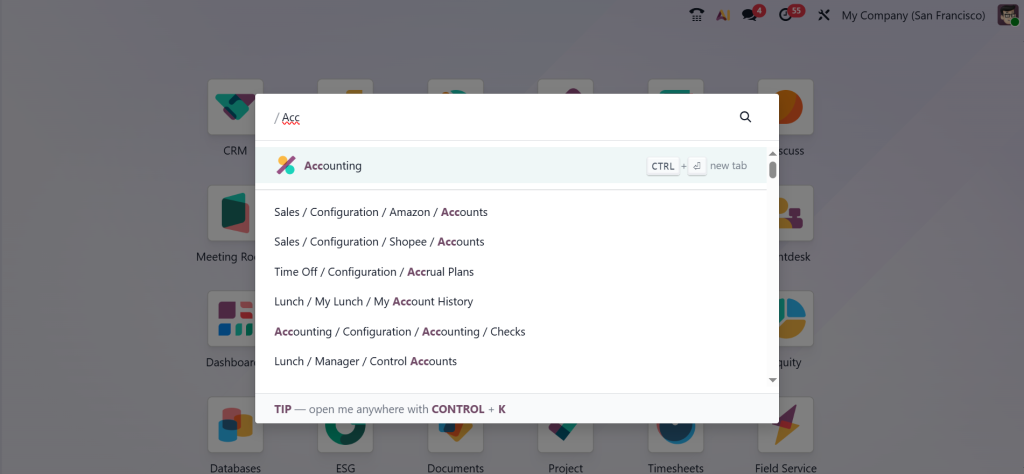
Open the Accounting app from your Odoo 19 dashboard.
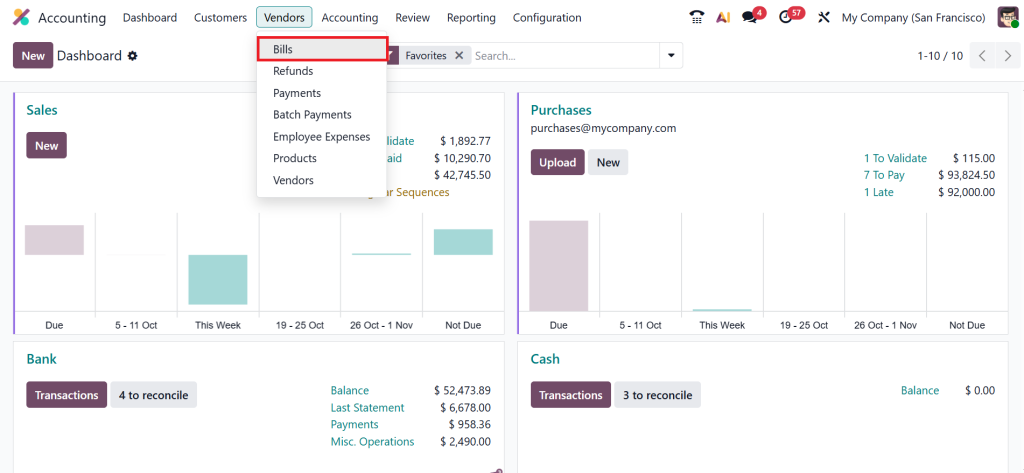
Go to Vendors → Bills.
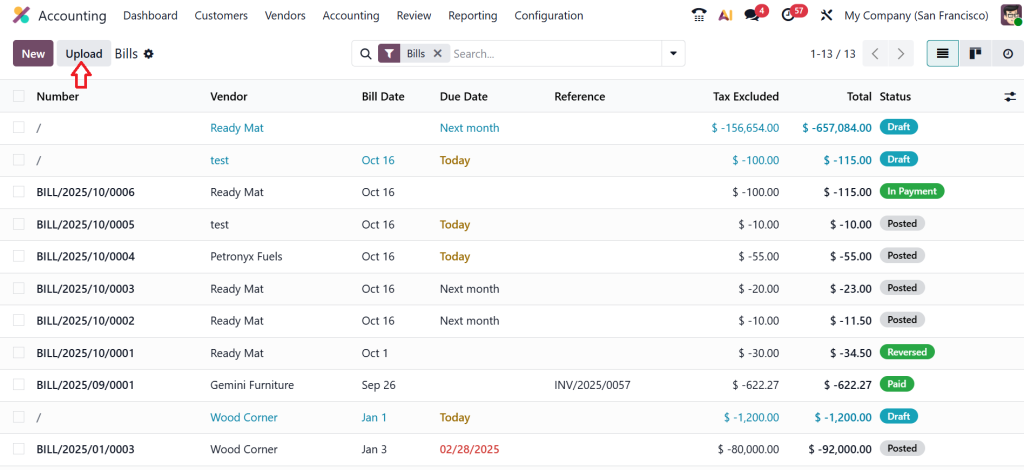
Click Upload and let Odoo recognize the document. This is where Odoo AI document recognition for bills does its job. It reads the vendor name, date, items, prices, taxes, and totals.
If it finds an unknown product, it will ask: “Would you like to create a new product?” Say yes, and boom! It’s created instantly. Odoo shows you a draft bill with all fields filled automatically. You can make edits or adjustments before clicking on the Confirm button.
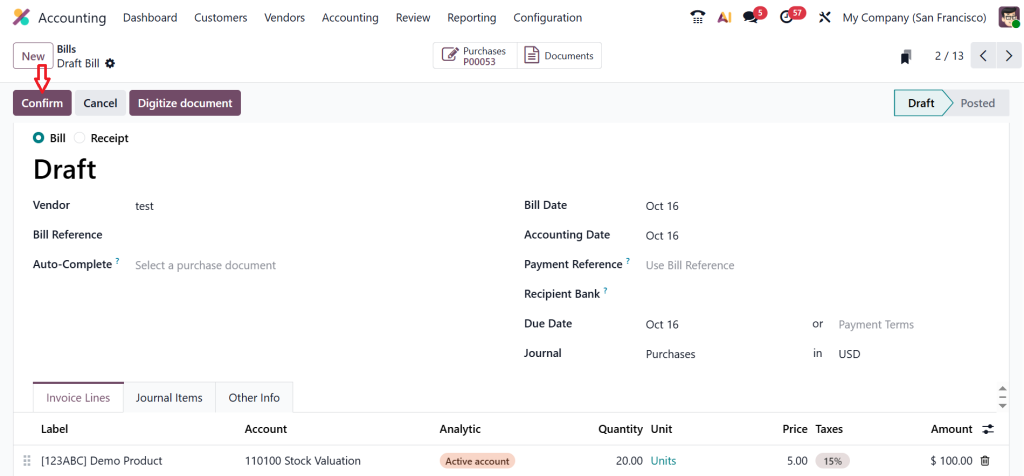
If any product on the bill doesn’t exist in your system, Odoo gives you the choice to create it directly from the same interface. This product was made from a vendor bill in Odoo 19. Once everything looks good, you pay or validate the bill.
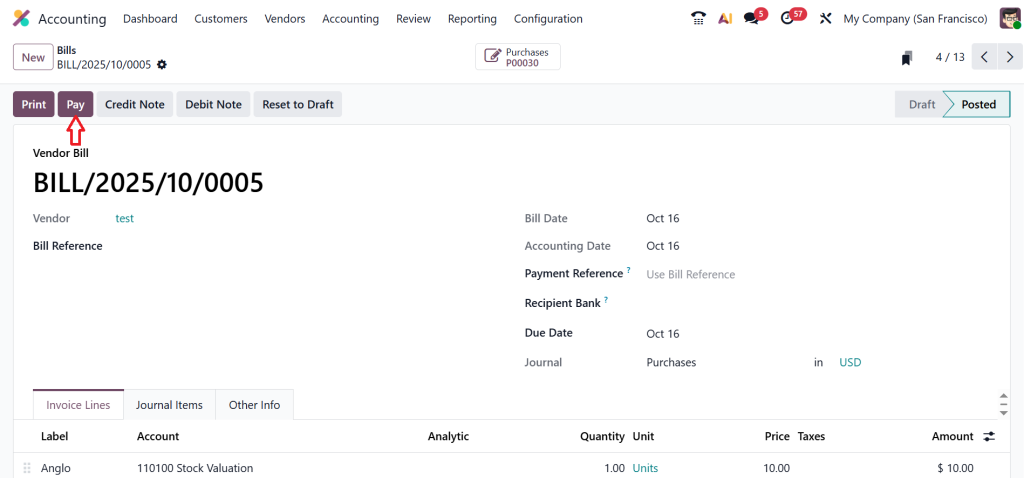
The system automatically updates your accounting entries, inventory, and even the vendor’s balance. After payment is recorded and bank transactions reconciled, the bill will be marked as paid and moved to a closed state in the vendor ledger.
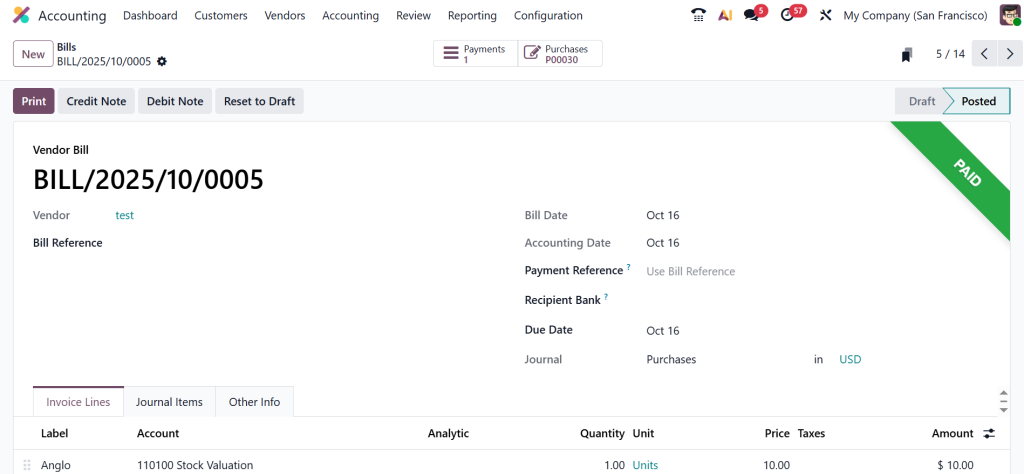
This whole process brings clarity and speed. You don’t have to jump between modules or remember what to add later. It’s all handled in one place, reducing human error and keeping your records clean.
Odoo 19 Upload Bill and Auto Product Creation – Making Workflows Easier
When you hear about Odoo 19 upload bill and auto product creation, think of it as an intelligent shortcut.
Let’s say your vendor sends you a bill that includes a new type of packaging material. Previously, you had to stop, direct to the Products menu, create a new item, add pricing details, assign categories, and then return to your bill. It was time-consuming.
Now, Odoo lets you handle this on the spot. Once you upload your bill, the system identifies unknown products and gives you a quick option to “Create Product.” It automatically fills in the details using data extracted from your bill.
This simple action saves a lot of time, especially for companies that deal with multiple suppliers and product types. By automating this small but critical step, Odoo 19 reduces repetitive work and keeps your accounting records up to date.
Document Digitization Odoo 19 Accounting – Going Paperless, the Smart Way
Managing physical bills is outdated. With document digitization in Odoo 19 accounting, you can convert all your paper invoices into digital records that remain organized and accessible at any time.
How it works: when you upload your bills, Odoo converts them into structured digital documents. The system stores them safely, links them to the right vendor, and keeps them searchable.
No more lost invoices or manual filing. Plus, with digitized documents, you can easily cross-check data, filter by vendor, or access bills from any device.
This isn’t just about convenience; it’s about having a clear digital trail of all your business expenses. It improves transparency and makes audits much smoother.
Odoo AI Document Recognition for Bills – Accuracy You Can Rely On
Another standout improvement in Odoo 19 is the Odoo AI document recognition for bills.
This feature uses artificial intelligence to read and understand your uploaded vendor bills. Instead of manually entering every detail, Odoo identifies key information like vendor name, bill date, product lines, totals, and taxes.
Even if the layout of the bill changes from one supplier to another, Odoo adapts automatically. It learns from each upload, improving its accuracy over time.
What’s great about this is that it minimizes typing mistakes. You’re less likely to enter wrong figures or forget a line item. The system handles data capture, and you only need to verify the results. This keeps your records reliable and speeds up your workflow.
Create Product from Vendor Bill Odoo 19 – The Smart Integration
As your business grows, new products emerge, such as a new raw material or a different model of a product you already purchase. Although managing this can be tiring, creating a product from a vendor bill becomes effortless with Odoo 19.
How it works: whenever you upload a vendor bill, Odoo scans every product line. If it detects a new product that isn’t in your system, it prompts you with an option to “Create Product.”
Once you confirm, Odoo automatically fills in the basic details like product name, category, cost, and vendor reference. You can adjust these details before saving.
The most significant advantage is that your database stays updated without interrupting your accounting process.So, the next time you receive another bill from the same vendor, the product will already be there, ready to go.
Odoo 19 Automated Vendor Bill Workflow – Smooth from Start to Finish
Let’s explore how the Odoo 19 automated vendor bill workflow integrates all relevant processes.
This workflow connects all the steps from importing the vendor bill, recognizing data, creating products, and posting entries in your accounts.
Once you upload a bill, Odoo automatically:
- Reads the data using AI recognition.
- Fills the bill form.
- Detects missing products and helps you create them instantly.
- Posts the validated bill into accounting.
- Updates vendor balances and inventory levels.
The process runs in one continuous flow. You don’t have to jump between modules or rely on multiple tools.
For businesses handling dozens or hundreds of bills monthly, this automation significantly enhances time management and accuracy.
Odoo 19 Accounting Vendor Bill Creation – Why It Matters
Why is Odoo 19 accounting vendor bill creation such a big deal?
Because accuracy in vendor bills directly affects your financial reports, payments, and inventory levels. If you enter data manually, even minor errors can lead to mismatched accounts or delayed payments.
Odoo 19 solves this by combining automation, digitization, and AI. Every bill you upload becomes part of a consistent workflow, verified, categorized, and ready for posting.
It’s not just about convenience; it’s about ensuring that your data stays clean and reliable across all departments.
Importing a Vendor Bill in Odoo 19 – How It Helps Your Business Grow
When you start using importing a vendor bill in Odoo 19, you’ll quickly notice that your accounting feels more organized.
You don’t waste time typing the same data repeatedly. You don’t lose track of which bills are pending. And most importantly, you always have real-time visibility into your expenses.
With the Odoo 19 upload bill and auto product creation feature, your team can efficiently handle new supplier products without interrupting the workflow. This means faster processing, fewer errors, and more confidence in your numbers.
For small and medium businesses, this can make a noticeable difference in how quickly they handle supplier payments and how accurately they plan for future purchases.
Odoo 19's Simplified Accounting Approach
To sum it up, Odoo 19 accounting vendor bill creation, Odoo 19 import vendor bill, and create product from vendor bill Odoo 19 all work together to make your accounting smooth, accurate, and simple.
From document digitization Odoo 19 accounting to Odoo AI document recognition for bills, every feature is designed to save time and reduce human effort.
With Odoo 19’s upload bill and auto product creation features, you can speed up data entry and keep your product catalogue updated automatically. With Odoo 19’s automated vendor bill workflow, you can ensure that every transaction flows flawlessly from upload to posting.
In the end, importing a vendor bill in Odoo 19 isn’t just about recording expenses; it’s about managing your finances smarter, faster, and with more accuracy.
Ready to experience this in your own business?
Let Netilligence help you implement Odoo 19 Accounting the right way, customized to your needs. From setup to training, we’ll ensure you get the most out of Odoo’s automation features.
Get in touch with Netilligence today and take your accounting to the next level with Odoo 19.




