

Simplify How You Manage Vendors in Odoo 19
If you’ve ever struggled to keep your vendor records accurate, handle supplier payments on time, or manage multiple purchase orders without confusion, then this guide is for you. Managing vendors is one of the most essential parts of running a business efficiently, and Odoo 19 gives you a smart way to handle everything in one place.
In this blog, we’ll talk about how to manage vendors in Odoo 19, how Odoo 19 vendor management works step by step, and how you can use the Odoo purchase module tutorial to make your daily tasks much easier. You’ll also learn how to add vendors in Odoo 19, maintain a vendor price list in Odoo, and keep track of every detail with vendor bills tracking Odoo features.
The goal of this guide is simple: by the end, you’ll understand how to use Odoo supplier management features effectively, handle the purchase order workflow in Odoo 19, and build better, more transparent relationships with your vendors.
So, let’s start exploring how you can manage vendors in Odoo 19 and make your purchasing process smarter, faster, and more accurate.
Understanding Odoo 19 Vendor Management
Before we jump into the steps, let’s first understand what Odoo 19 vendor management really means.
When you’re managing a business, vendors play a vital role. From raw materials to finished goods, everything passes through your supplier network. If vendor communication, pricing, or invoices are not correctly organized, the whole supply chain can slow down. That’s where Odoo 19 steps in.
With the Odoo purchase module, you can manage all your vendors in one dashboard, add their details, create purchase orders, track bills, and even compare vendor price lists to get the best deals. The Odoo 19 vendor management system doesn’t just store data; it helps you make better purchasing decisions by showing you the complete picture of your supplier relationships.
Odoo Purchase Module Tutorial: The Foundation of Vendor Management
Now, if you’re new to Odoo or just upgraded to version 19, you might be wondering how to begin. Don’t worry; this Odoo purchase module tutorial will guide you step by step.
The purchase module in Odoo 19 connects every part of your procurement process from vendor selection to purchase order confirmation. You can manage your suppliers, products, and pricing, all from one interface.
When you first open the Purchase app, you’ll notice sections like Vendors, Products, Purchase Orders, Vendor Bills, and Reporting. Each one of these sections plays a vital role in vendor management. Let’s go through them one by one, in a way that makes sense for your daily work.
Add Vendors in Odoo 19 — The First Step to Organized Procurement
The first thing you need to do before creating any purchase order is to add vendors in Odoo 19. Think of this as creating a digital profile for every supplier you work with.
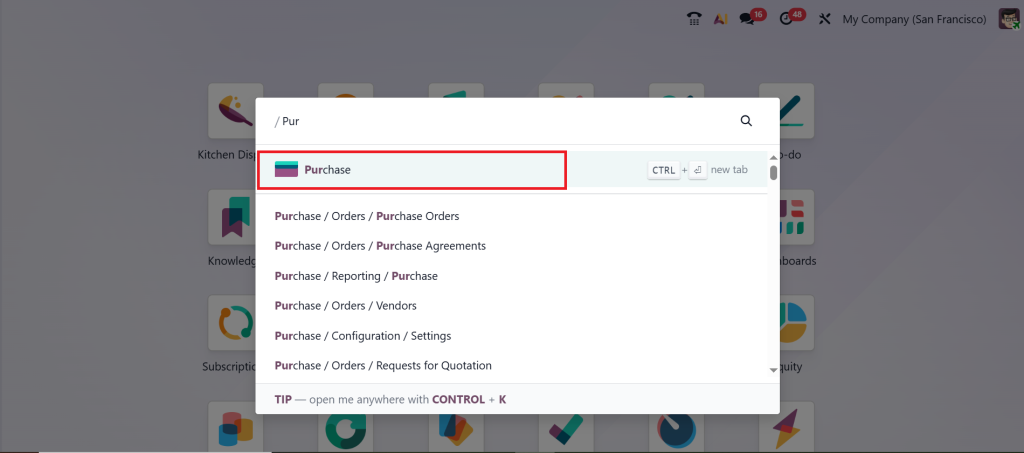
To add a vendor, go to the Purchase module.
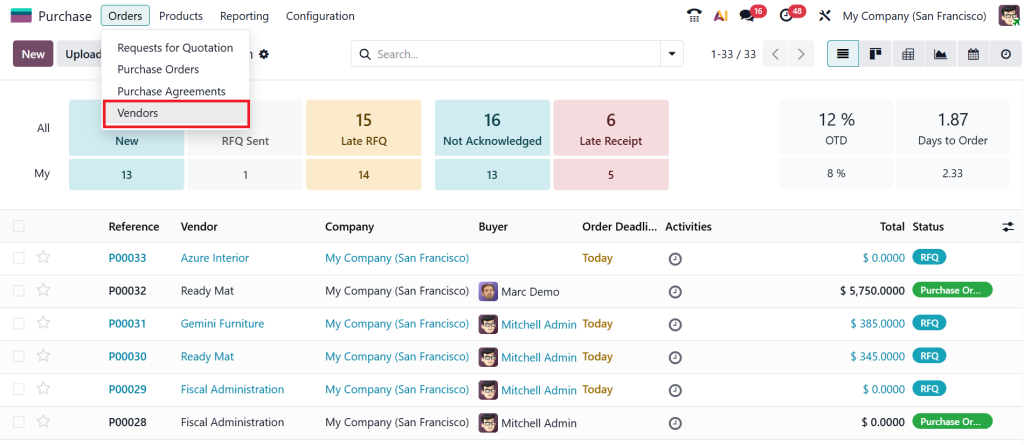
Go to Orders → Vendors.
Then click ‘‘New’’.
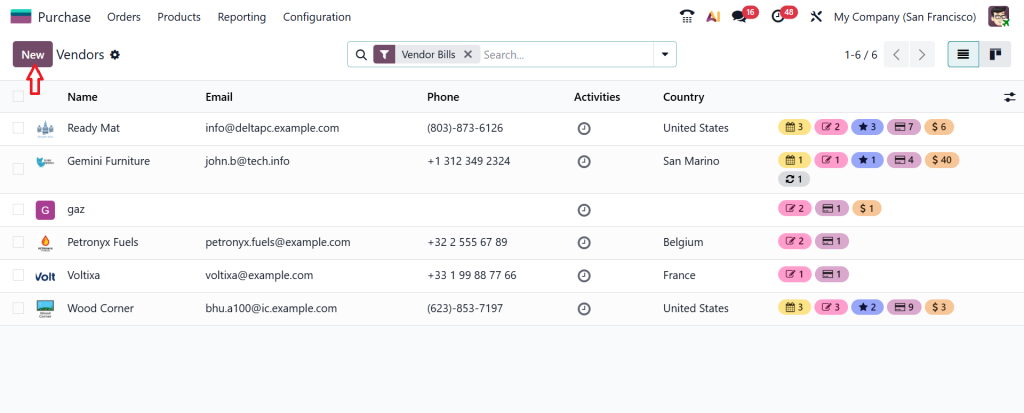
Here you’ll enter all the basic details such as the vendor’s name, contact number, email, address, and tax ID and click Save.
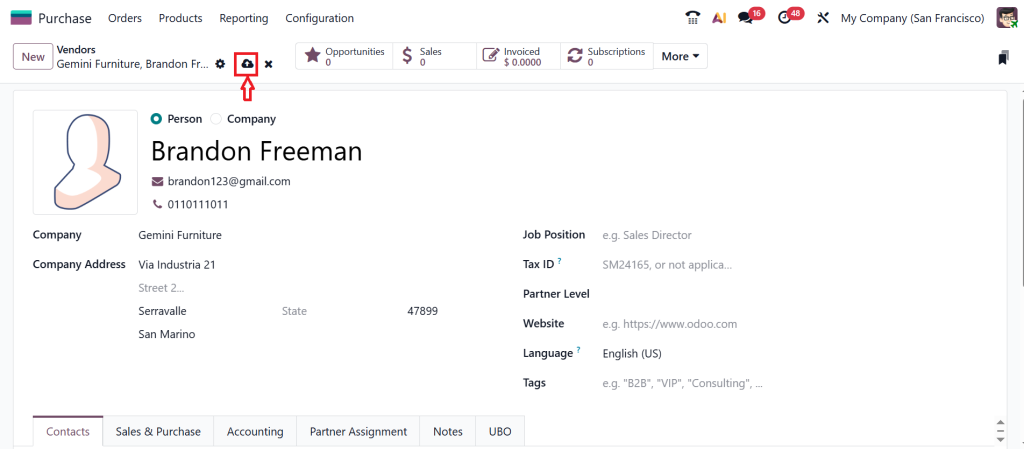
But what makes Odoo 19 even better is that you can also define their payment terms, preferred currency, and price lists right in their profile. You can even set up multiple contacts under one vendor, which helps when you’re dealing with large organizations that have different departments.
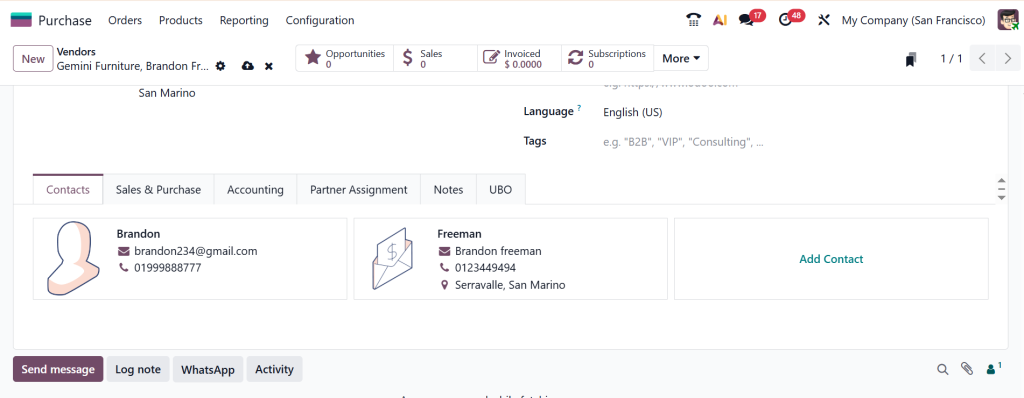
This simple step of adding vendors correctly makes your entire purchasing workflow more accurate. No more confusion or manual searching; you’ll always have vendor data ready when you need it.
Odoo Supplier Management — Making Strong Vendor Relationships
Once your vendors are added, it’s time to manage them effectively. The Odoo supplier management feature gives you complete visibility of every vendor’s performance. You can check their history how many orders they’ve fulfilled, how timely their deliveries were, and how consistent their pricing has been.
You can use this information to decide who your most reliable vendors are. It also helps you identify suppliers that may be causing delays or errors in your supply chain.
In Odoo 19 supplier management, you can also assign categories to your vendors. For example, you can label them as “Local Suppliers,” “International Vendors,” or “Preferred Partners.” These tags make filtering and reporting much easier when you’re managing hundreds of suppliers.
What makes this feature even more powerful is the ability to compare pricing and delivery terms among vendors. This helps you make wiser purchasing decisions and negotiate better deals.
Purchase Order Workflow Odoo 19 — From Request to Receipt
Now that your vendors are set up, let’s move to the most critical part the purchase order workflow in Odoo 19.
This workflow ensures that every purchase request in your company follows a proper approval process and that all details are recorded. Here’s how it works in simple steps:
Purchase Requisition or Request for Quotation (RFQ)
You start by creating a request for quotation. Odoo allows you to send this request to multiple vendors at once.
Vendor Comparison
Once you get the quotes, you can compare them directly inside Odoo based on price, delivery time, and other terms.
Purchase Order Creation
After selecting your preferred vendor, convert the quotation into a confirmed purchase order with just one click.
Order Approval and Receipt
Depending on your company settings, the purchase order can go through an approval process before it’s confirmed. Then, you can mark goods as received when they arrive.
Vendor Billing
Once goods are received, the vendor bills tracking Odoo feature comes into play to record payments and invoices accurately.
This entire purchase order workflow in Odoo 19 ensures that you have complete control over every purchase your business makes without using multiple spreadsheets or manual follow-ups.
Vendor Bills Tracking Odoo — Keeping Payments Clear and Accurate
We all know how important it is to stay on top of vendor payments. Late or missing payments can harm your relationships and affect your credibility.
With vendor bills tracking in Odoo, you don’t have to worry about that anymore. Every bill is automatically linked to its related purchase order, making it easy to track and verify.
You can view the bill amount, due date, and payment status all in one place. Odoo also helps you avoid duplicate bills by flagging any repeated entries.
When it comes to spending suppliers, you can generate payments directly from the system. Odoo 19 supports multiple payment methods and currencies, which is helpful for businesses that deal with global suppliers.
This transparency in vendor bills tracking Odoo ensures that you never lose track of who’s been paid, what’s pending, and what’s overdue. It’s a simple but prevailing way to stay organized and maintain trust with your vendors.
Vendor Price List in Odoo — Get the Best Deals Without Guesswork
Now, let’s talk about something that every business loves reasonable pricing. Odoo 19 makes this easy through its vendor price list feature.
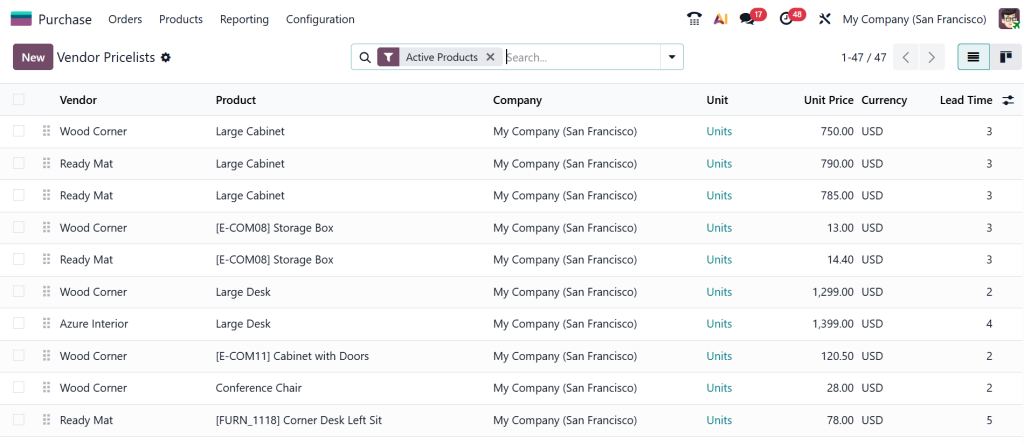
Each vendor can have their own price list based on products, quantities, and validity dates. When you create a new purchase order, Odoo automatically picks up the correct price from the vendor’s price list.
This not only saves you time but also prevents pricing mistakes. If vendors change their rates, you can simply update the price list in their profile, and it will apply automatically to future orders.
The vendor price list in Odoo helps you compare costs, plan purchases better, and make informed financial decisions. You’ll always know who’s offering the best price and when their offers expire no manual tracking needed.
Smart Tips to Manage Vendors in Odoo 19 Effectively
Now that you know how each part of the system works, let’s talk about how to use them effectively.
- Keep your vendor data clean and updated. Outdated data can lead to confusion and missed opportunities.
- Use tags and categories wisely. This helps you filter and analyze vendor data quickly.
- Review vendor performance regularly. Use Odoo’s reports to identify your best and worst-performing suppliers.
- Automate routine actions. Set up reminders for bill payments or approval workflows so nothing is forgotten.
- Use the vendor price list feature. Always keep price lists current to avoid pricing errors in purchase orders.
When you start managing your vendors this way in Odoo 19, you’ll notice how much smoother your purchase process becomes.
Reports and Insights — The Unseen Influence of Odoo 19 Vendor Management
Odoo 19 doesn’t just help you manage daily tasks; it also gives you valuable insights. The reporting section lets you analyze your purchasing trends, which vendors you buy from the most, how much you’ve spent, and how delivery times vary.
These reports help you make better business decisions. For example, if you notice one supplier always delivers late, you can either address it with them or switch to another vendor.
You can also monitor your spending by product category, vendor, or time period. This visibility helps control costs and avoid unnecessary expenses.
Common Challenges Solved by Odoo 19 Vendor Management
Many businesses struggle with vendor management because of scattered data and manual communication. Emails get lost, price changes aren’t updated on time, and bills don’t always match the orders.
The Odoo 19 vendor management system fixes these problems by keeping everything connected every vendor, every purchase order, every payment all in one place. This means fewer mistakes, faster processing, and better relationships with suppliers.
Manage Vendors in Odoo 19 with Confidence
Managing vendors doesn’t have to be stressful. With Odoo 19, you can organize your suppliers, control your purchase order workflow, and track every bill without confusion.
Whether you’re adding new vendors, checking price lists, or reviewing supplier performance everything is right at your fingertips.
So, if you’ve been struggling to stay on top of your vendor management tasks, it’s time to start using Odoo 19 vendor management features effectively. Explore the Odoo purchase module tutorial, learn how to add vendors in Odoo 19, and use tools like vendor bills tracking Odoo and vendor price list in Odoo to make your procurement process more straightforward and smarter.
By managing vendors in Odoo 19 the right way, you’re not just saving time you’re building a stronger, more efficient foundation for your entire business.
Ready to organize your purchasing process and manage vendors more effectively? Get in touch with Netilligence today and discover how Odoo 19 can reshape the way you handle supplier relationships and business operations.




