How to Create a Rental Product & Set the Rental Period in Odoo 19?
Why Businesses Struggle to Create a Rental Product in Odoo 19
A lot of people come to us with the same confusion. They use Odoo; they have rental items, but they don’t know how to create a rental product, how pricing should work, or how to correctly set the rental period without making mistakes. Some even try workarounds because they don’t fully understand the Odoo ERP rental module.
If you are reading this, chances are you are also trying to create a rental product in Odoo 19 ERP rental, but things are not as clear as they should be. You might be worried about rental dates, billing errors, or customers returning items late without proper tracking. This is precisely where this Odoo rental tutorial will help you.
In this blog, I am going to walk you through how to configure rental products in Odoo, how Odoo create rental products, and how to properly set the rental period in Odoo, so your rental business runs smoothly. Whether you are handling tools, machines, vehicles, or any other equipment in Odoo, this guide is written to solve your real problems, not confuse you further.
Understanding the Odoo Rental Module in Odoo 19 Rental
The Odoo ERP rental module is designed for businesses that don’t sell products permanently but rent them for a specific period. In Odoo 19 ERP Rental, this module is tightly integrated with sales, inventory, and accounting, keeping everything in one place.
When you use the Odoo ERP rental module, you are not just adding products. You are controlling rental dates, tracking availability, calculating charges based on time, and properly managing returns. This is why understanding the module before you make a rental product is essential.
Many businesses fail at rental management because they treat rental products like everyday sales products. Odoo does not work that way. Once you understand this difference, Odoo equipment rental management becomes much easier.
Why Odoo 19 Rental Is Useful for Equipment Rental Management
Odoo 19 ERP rental is helpful because it understands a straightforward thing: rental businesses run on time, not just quantity. A product rented for one day is different from a product rented for ten days, even if it’s the same item. With Odoo equipment rental management, you can:
See which product is rented and for how long
Avoid double bookings
Control pricing based on rental duration
Keep proper records of returns
This is why learning to configure rental products in Odoo is essential if rentals are part of your business.
How to Configure Rental Products in Odoo Using the Odoo Rental Module
Before you jump into clicks and settings, I want you to understand something clearly. When you make a rental product, you are not just making a product record. You are setting rules for how that product behaves in real life.
In the Odoo ERP rental module, rental configuration starts from the product itself. If your product is not appropriately configured, no quotation or invoice will ever make sense later.
Odoo Create Rental Product Step by Step in Odoo 19 Rental
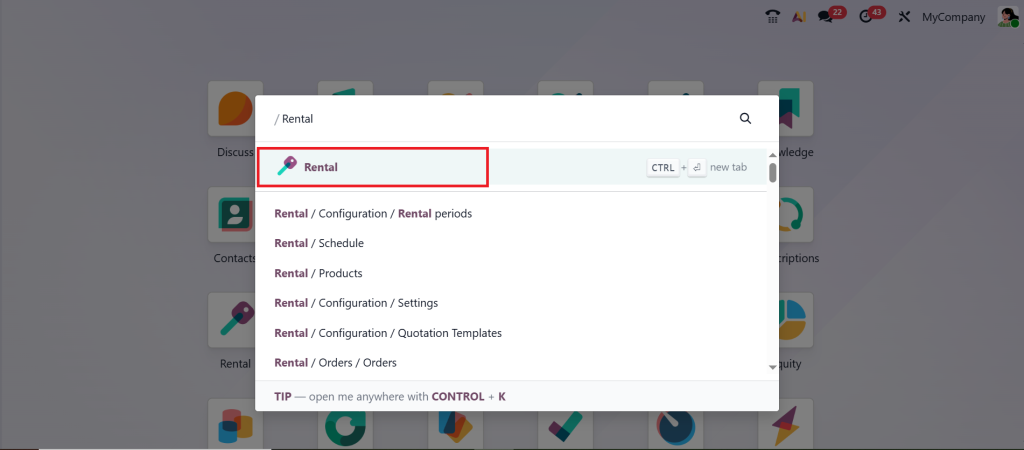
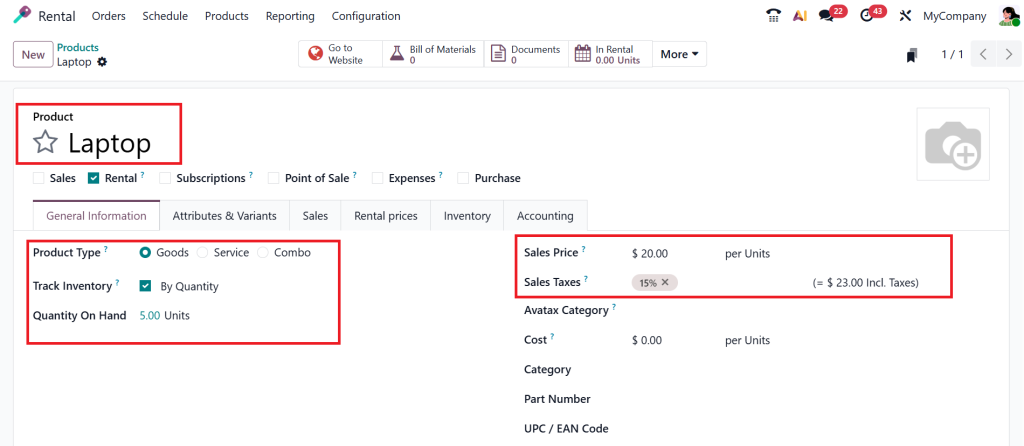
Now, let’s get to the practical part that most people struggle with: creating a rental product in Odoo. Open the Rental module from your Odoo 19 dashboard.
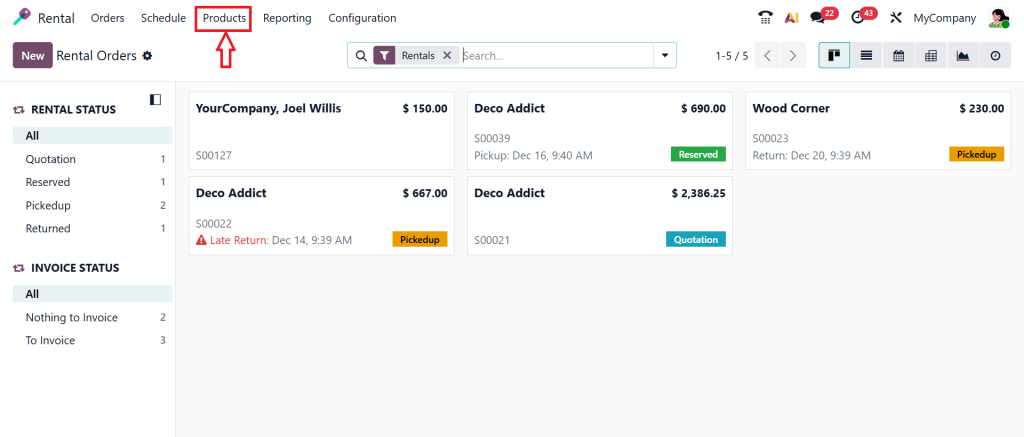
Go to the Products section.
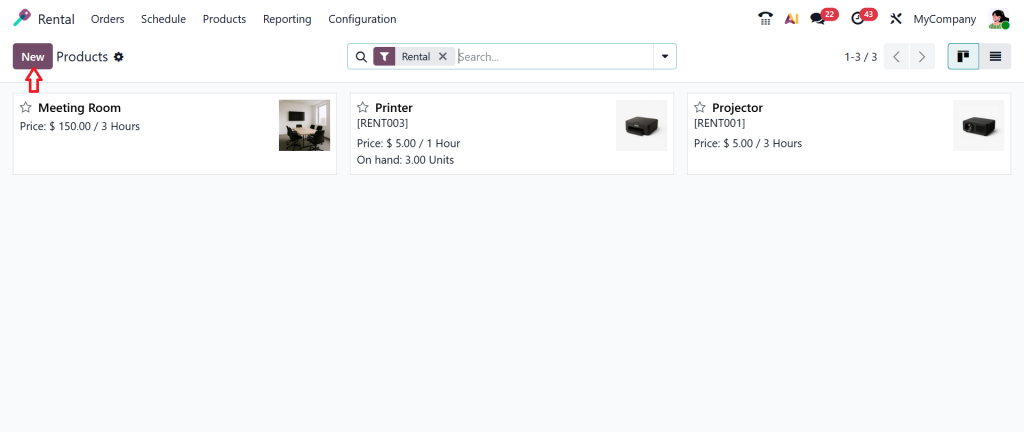
From there, you create a new product by clicking on New.
You get a new form and need to fill out all the configuration options, such as Product name, type, and sales price.
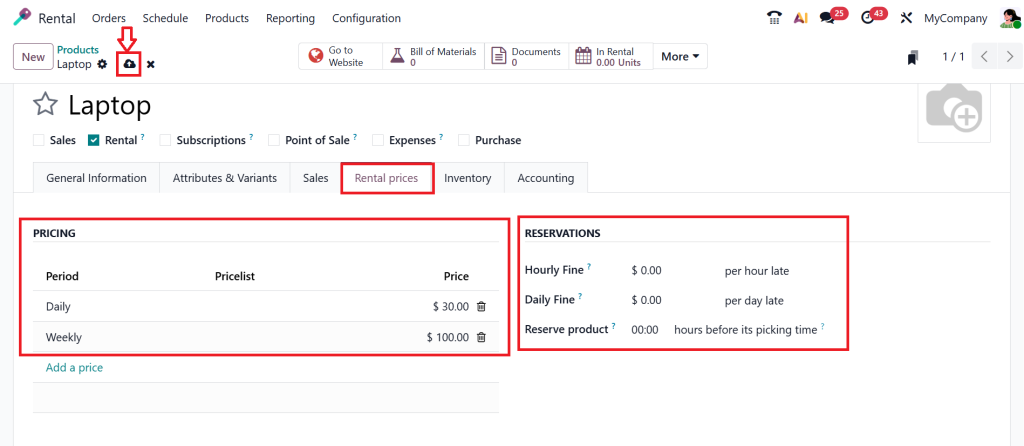
Let’s click the Rental prices tab. Here you can see two sections: Pricing and Reservations. For a particular period, you can create a price. For example, if you are renting this product for daily or weekly use, you can simply set a price here.
Next, we have the reservations section, which means an hourly fine or daily fine, a fine per hour late if the product isn’t received after the rental period. You can put a particular fine for that. Once everything is done, just hit the Save button.
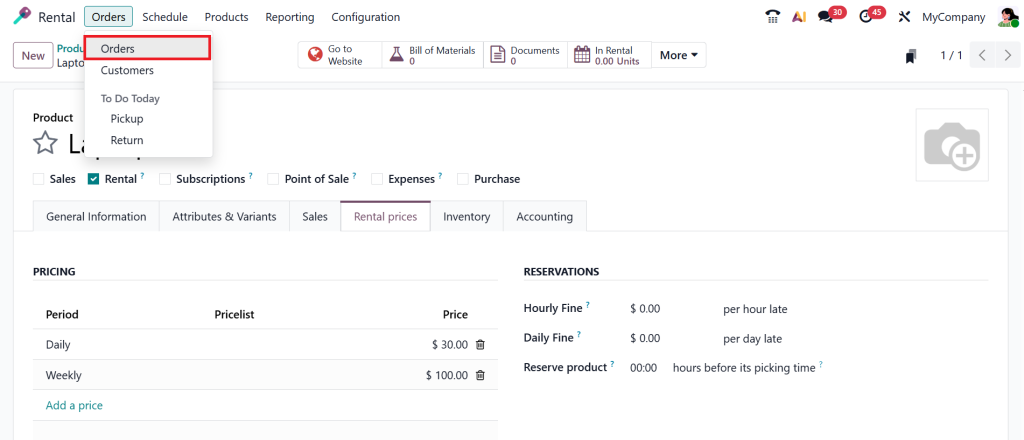
This single step decides whether your rental setup will work or keep creating issues later. Let’s move to the Orders > Orders.
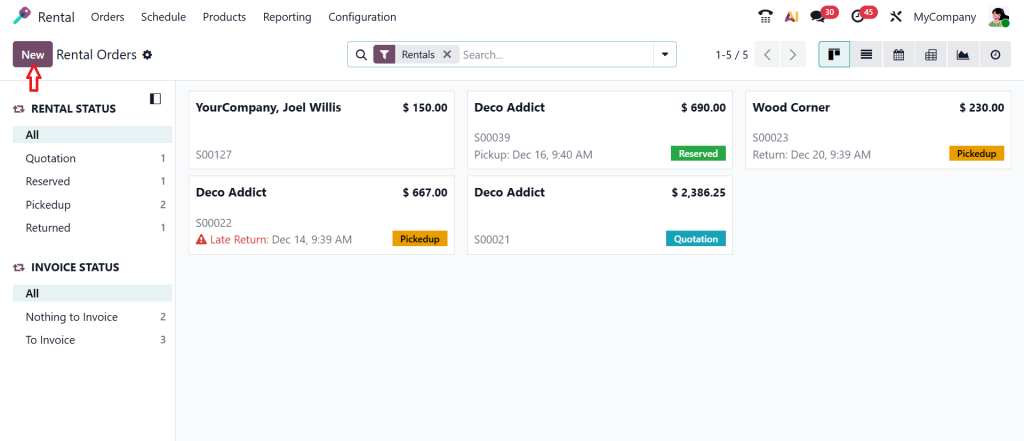
Click ‘New’ and create a new rental order.
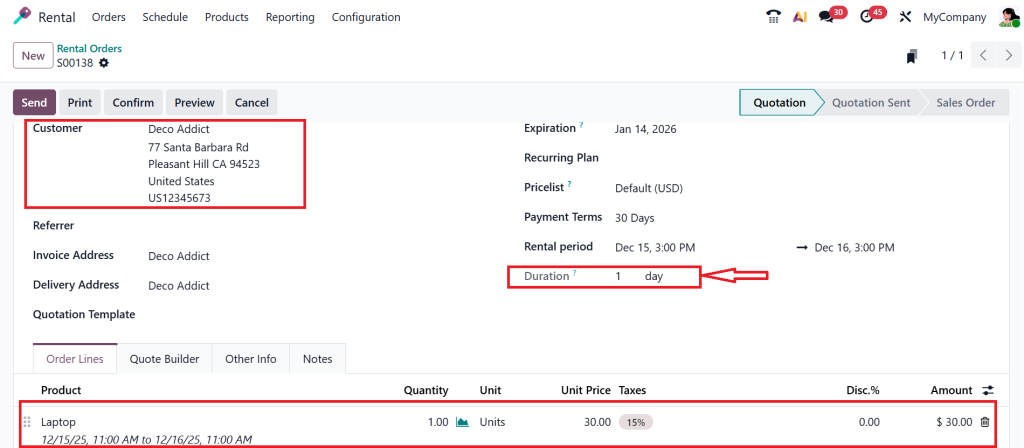
Select the customer, then click Add a product to add the rental product.
As shown in the screenshot above, the default duration is 1 day. So, we are charging $30 per day for a specific product: a laptop that we are going to give as a rental.
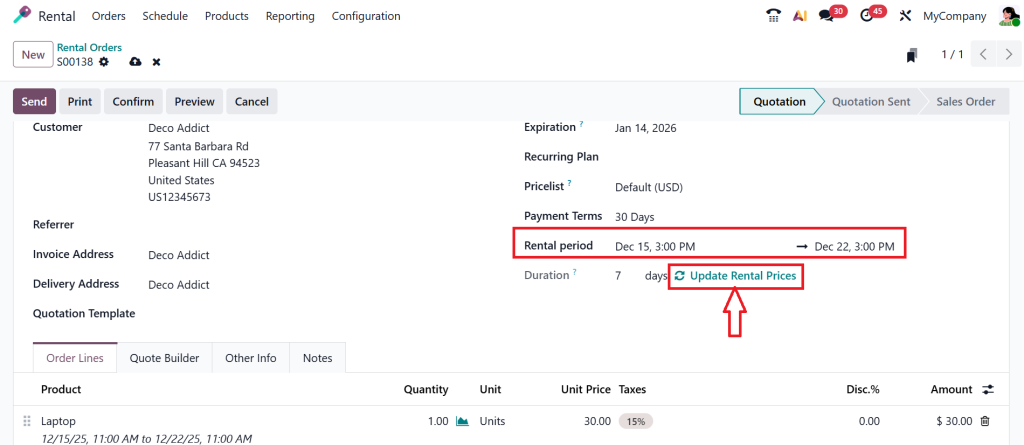
Let’s change the Rental period from daily to weekly, then click Update Rental Prices.
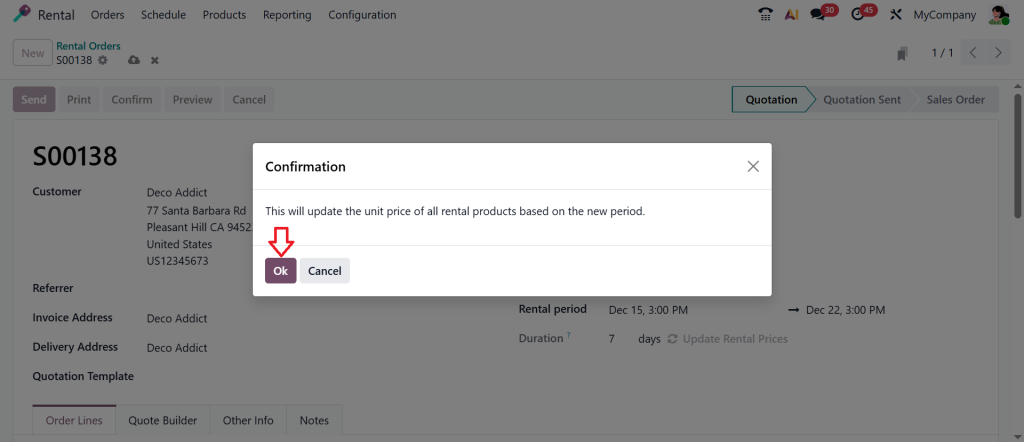
Click Ok.
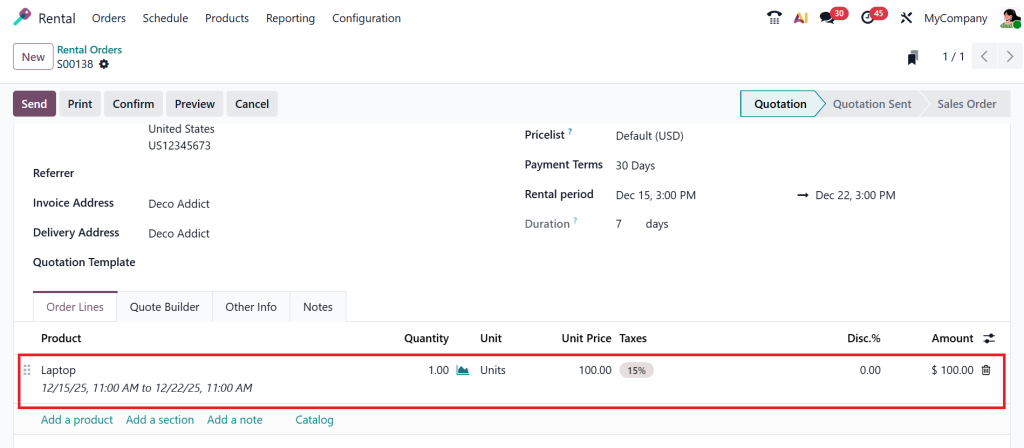
As you can see in the screenshots above, the unit price of $30 doesn’t change. After clicking the update rental prices option, the unit price changed from $30 to $100 because we set a rental period for this product when creating the rental product.
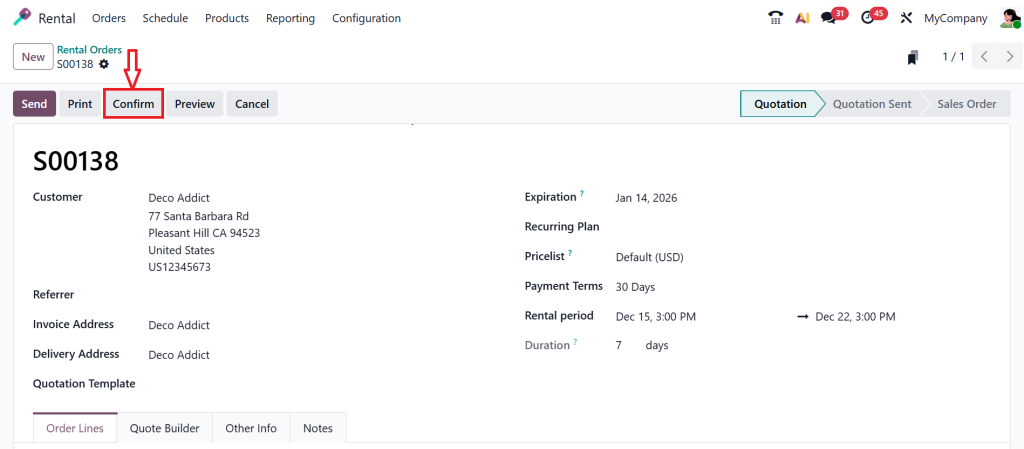
Click on the Confirm button.
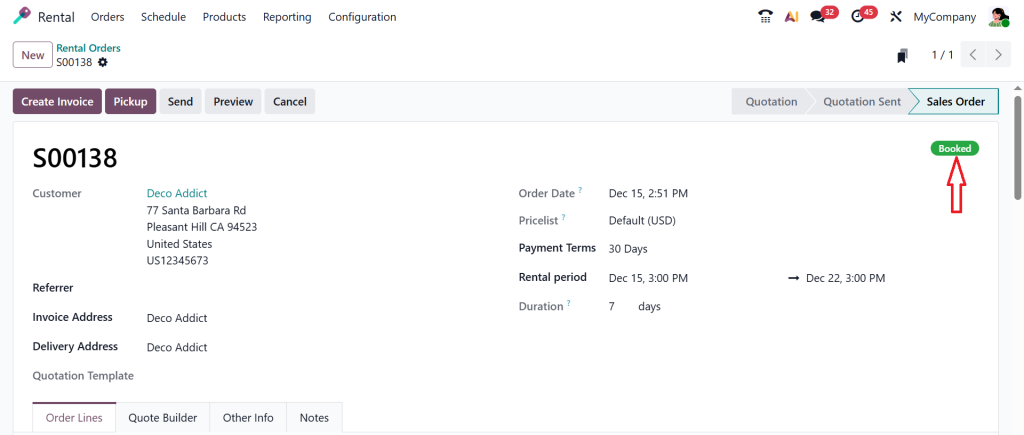
As shown in the screenshot below, the rental order is successfully booked.
Odoo automatically calculates the rental charge, checks the availability of those dates, and blocks the item to prevent double-booking. And that’s how Odoo eliminates manual rental errors: you set it up, and Odoo automates everything.
Necessary Product Settings When You Make a Rental Product
When creating a rental product, keep things simple. Use a name that your sales team understands. Don’t use confusing internal names.
Pricing should not be random. This pricing aligns with how you set the rental period later. Internal references are optional, but they help a lot when your rental inventory grows.
These small things matter more than people realise in Odoo equipment rental management.
Setting Rental Pricing Rules in the Odoo Rental Module
Once you make a rental product, the subsequent confusion usually comes from pricing. People often ask, “How do I charge daily, weekly, or monthly?”
The Odoo ERP rental module lets you define multiple pricing rules for a single rental product. This means the same product can have different prices based on how long it is rented.
For example, renting for one day should not cost the same as renting for ten days. Odoo understands this logic, but only if you define it properly. This is where many businesses fix billing problems without changing anything else.
Odoo Set Rental Period Correctly in Odoo 19 Rental
When customers rent something, the rental period decides everything: pricing, availability, and return schedule. In Odoo 19 ERP rental, rental periods are controlled through start and end dates, not manual calculations.
When you create a quotation and add a rental product, Odoo prompts you to enter rental dates. Based on these dates, it automatically calculates the duration and applies the correct rental price just like we created above.
This means you no longer need Excel sheets or manual tracking. You need to set the rental period correctly at the quotation stage.
How Odoo Set Rental Period Helps Avoid Common Rental Problems
Many rental businesses face issues like late returns, undercharging, or overlapping bookings. These problems mostly happen because rental periods are not clearly defined. When you set the rental period correctly, Odoo:
Knows when the product is unavailable
Calculates charges correctly
Tracks late returns
Keeps rental history clean
This is why rental dates should never be treated casually.
Creating Rental Quotations in Odoo Rental Tutorial
Once you make a rental product and set the rental period, using it in quotations becomes very easy.
In a rental quotation, you select the customer, add the rental product, and choose rental dates. Odoo does the rest. It calculates duration, applies pricing rules, and prepares the document for confirmation.
This flow is clearly explained in every good Odoo rental tutorial, but many people skip it and later get confused.
Rental Order Flow in Odoo Equipment Rental Management
After confirmation, the rental quotation turns into a rental order. This order follows a proper flow that supports Odoo equipment rental management.
The product goes out on rent, the system tracks the dates, and once returned, Odoo prepares the invoice. Everything stays connected. No guessing, no missing records.
This structured flow is why businesses prefer Odoo 19 ERP rental for long-term rental operations.
Managing Availability Using Odoo Rental Module
One major fear in the rental business is double-booking. This happens when two customers want the same item at the same time.
The Odoo ERP rental module solves this by tracking availability based on rental periods. Once a product is booked for specific dates, Odoo automatically blocks it for those dates.
This single feature saves businesses from arguments, refunds, and unhappy customers.
Some people install Odoo and expect everything to work automatically. That’s where problems begin. Odoo equipment rental management works well only when:
You correctly make a rental product
You clearly set the rental period
Pricing rules are logical
Staff follow the system process
Without these, even the best system will feel confusing.
Common Mistakes While Creating Rental Products in Odoo
One common mistake is treating rental products like regular services. Another mistake is ignoring rental pricing rules. Some businesses also forget to train staff on rental dates.
These mistakes don’t seem serious at first, but they gradually lead to billing issues, customer complaints, and inventory confusion.
This is why learning to configure rental products in Odoo from the start properly matters a lot.
How Netilligence Helps with Odoo Rental Module Setup
At Netilligence, we see these problems daily. Businesses don’t lack effort; they lack clear guidance. We help you:
Configure the Odoo ERP rental module
Properly make a rental product
Define pricing rules
Set rental periods correctly
Improve Odoo equipment rental management
We don’t just set things up. We explain why things are done in a certain way so your team feels confident using the system.
Where Your Odoo 19 Rental Setup Starts Making Sense
If rentals are part of your business, then understanding Odoo 19 ERP rental is not something you should delay. Once you learn how to make a rental product, how to set the rental period, and how the Odoo ERP rental module works, most of your daily problems start disappearing on their own.
This Odoo rental tutorial was written to guide you step by step, in simple words, without technical pressure. If you follow these practices, your rental operations will feel more controlled, precise, and reliable.
Need Help with Odoo Rental Configuration?
If you want professional help creating a rental product, improving Odoo equipment rental management, or fully configuring the Odoo ERP rental module for your business, Netilligence is ready to support you.
Contact Netilligence today and get your Odoo rental setup done the right way, without confusion or delays.
Hi, I'm Ilsa Shabbir, an Odoo ERP content writer specializing in functional blogs on Odoo modules. I simplify complex Odoo features, creating clear and engaging content to help businesses understand and optimize their ERP solutions.
We use cookies to ensure that we give you the best experience on our website. If you continue to use this site we will assume that you are happy with it.