

Introduction to Odoo 19 Subscription App
Right from the start, the Odoo 19 Subscription App stands out as an innovation for businesses looking to dive into Odoo 19’s subscription features. If you’re searching for an Odoo 19 Subscription App overview, you’ve landed in the right place. This fantastic tool transforms how you manage subscriptions in Odoo 19, especially with its new Odoo 19 recurring billing capabilities, personalised for growing enterprises.
In the UAE’s SaaS market, where Odoo subscriptions SaaS UAE demand efficiency, the Odoo 19 Subscription App delivers smooth Odoo 19 subscription management. Imagine automating renewals, keeping track of income, one thing leads to another – customers stay happy, all without the usual stress. Netilligence, your go-to Odoo expert across the region, supports local companies in making the most of what’s possible. Running a logistics business? A real estate project? Or a manufacturing setup – this tool sharpens how you handle your Odoo 19 Subscription App moves.
Why does it matter? Subscriptions are the backbone of recurring revenue, and Odoo 19 makes it effortless. In this Odoo 19 Subscription App overview, we’ll break down features, tutorials, and tips to get you started. By the end, you’ll see why partnering with Netilligence for implementation is your most brilliant move.
Why Choose the Odoo 19 Subscription App for Your Business
The Odoo 19 Subscription App isn’t just another module, it’s a revenue rocket. Businesses in the UAE, from Dubai’s SaaS startups to Abu Dhabi’s enterprise giants, are switching to Odoo 19 subscription features for their ease and power.
Key Benefits of Odoo 19 Subscriptions Features
What sets this app apart? First, it handles everything from creation to cancellation with zero drama. Managing subscriptions in Odoo 19 becomes a breeze thanks to intuitive dashboards that display real-time metrics, including churn rates and lifetime value.
- Automated Recurring Billing: Say goodbye to manual invoices. The new Odoo 19 recurring billing engine processes payments and integrates with UAE gateways such as PayTabs or Telr.
- Flexible Pricing Models: Offer tiers, discounts, or usage-based plans, perfect for Odoo subscriptions SaaS UAE.
- Customer Retention Tools: Send personalised reminders and upsell prompts to keep subscribers hooked.
Netilligence has helped clients like Navire Logistics cut billing errors by 70%. Imagine your cash flow stabilising overnight. That’s the Odoo 19 Subscription App difference: reliable, scalable, and UAE-ready.
Real-World Impact in UAE Markets
What sets the GCC apart is the tightness of its markets. Our client in Musat grew subscriber numbers quickly – first 50, then 500 in just a few months – all because of sharp insights pulled from this tool’s data tracking. Spreadsheets? They’re now just dust collecting. Growth these days comes not from guessing, but from what these reports reveal.
Odoo Subscription App Tutorial UAE: Step-by-Step Guide
Ready for hands-on? This Odoo Subscription App tutorial for the UAE walks you through the setup, customised for local needs such as AED currency and e-invoicing.
Step 1: Install and Configure
Log in to Odoo 19, go to Apps > Search “Subscription.”
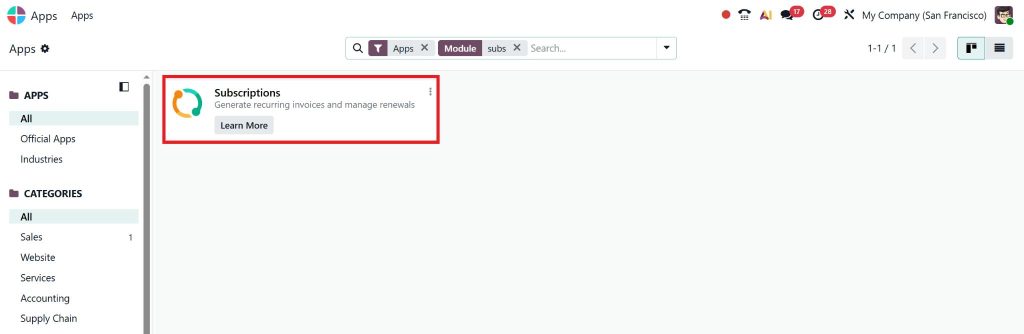
Install the Odoo 19 Subscription App. Activate it under Subscriptions > Configuration.
Set defaults:
- Currency: AED
- Tax: 5% UAE VAT
- Payment Providers: Add Stripe or local gateways.
Step 2: Create Your First Subscription
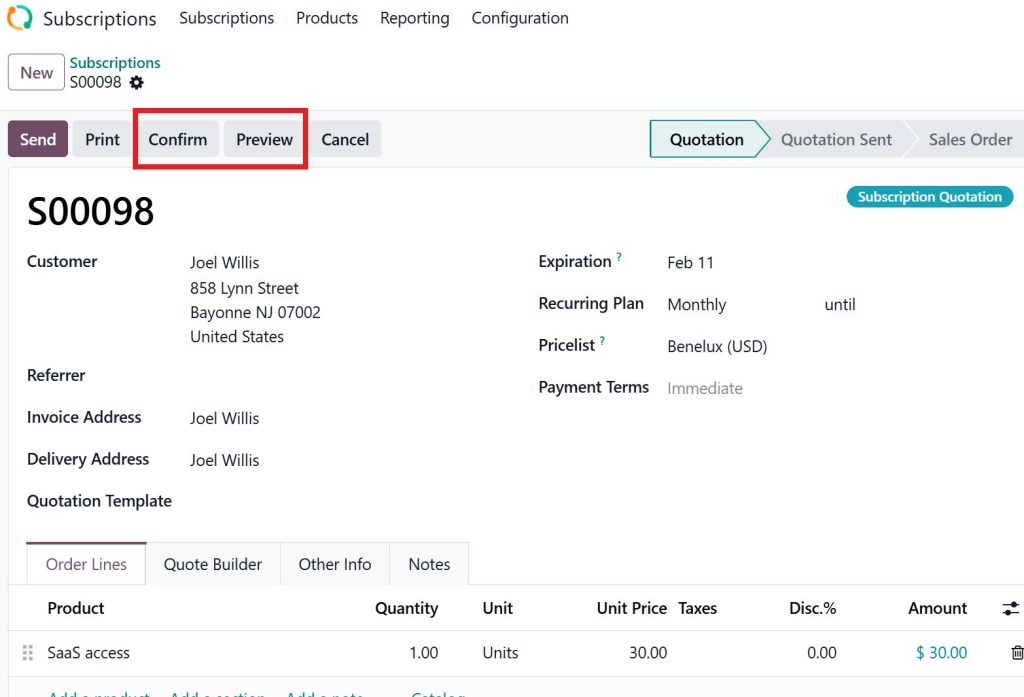
Go to Subscriptions > Create:
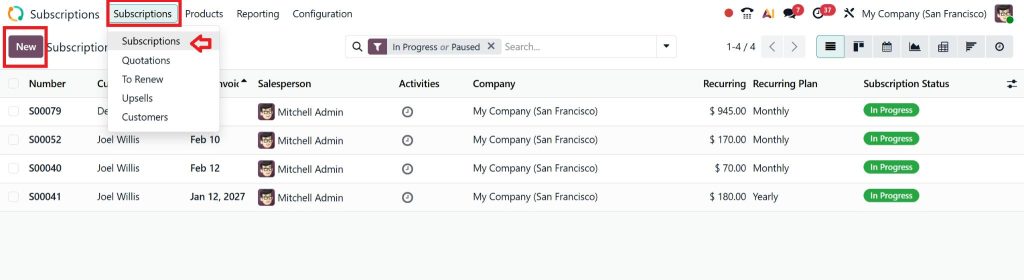
- Add customer (pull from CRM).
- Select product (e.g., SaaS access).
- Define recurrence: “Monthly, day 1.”
- Pricing: Fixed fee + add-ons.
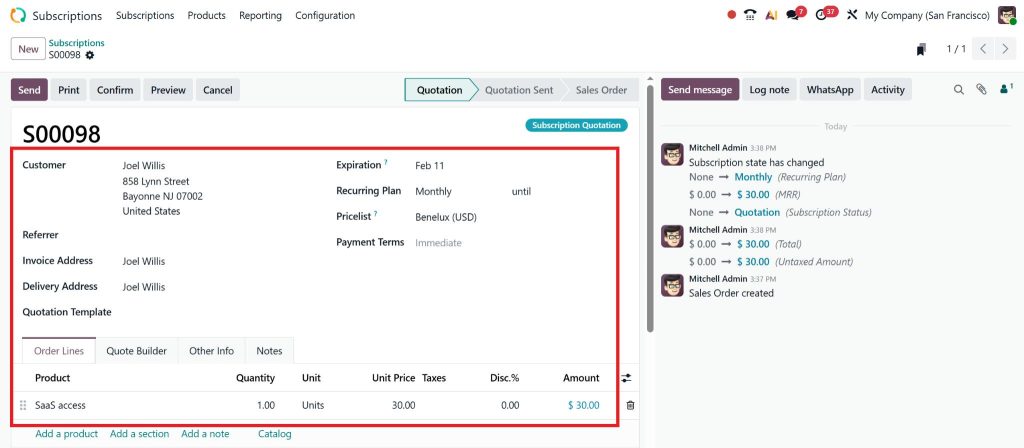
Preview and confirm. Test with a sandbox payment.
Step 3: Manage Subscriptions Odoo 19 Like a Pro
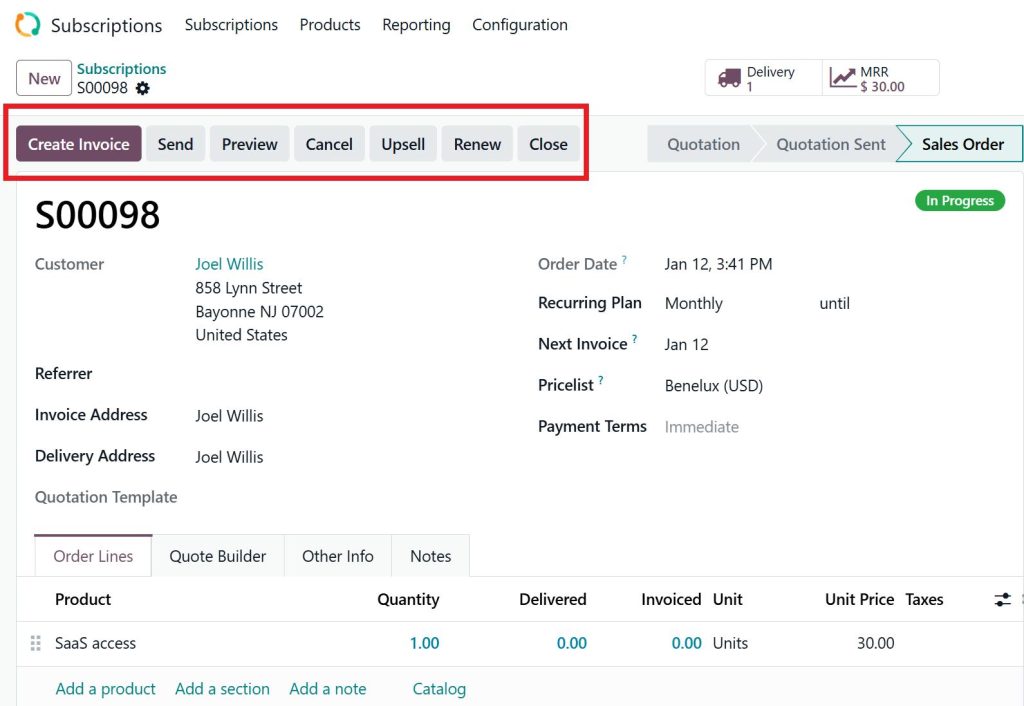
Use the dashboard:
- Pause/Resume: Handle trials effortlessly.
- Prorate Changes: Upgrade mid-cycle? No lost revenue.
- Bulk Actions: Renew 100+ subs instantly.
Troubleshooting Common UAE Issues
- Sometimes the gateway throws errors – make sure SSL is turned on for PayFort setup.
- VAT compliance maps to ZATCA standards using automated tools.
- Multi-Company: Perfect for GCC groups.
Netilligence’s experts handle this setup in under a day, faster than a DIY approach.
Odoo 19 Subscription App Features
Diving deeper into the Odoo 19 Subscription App overview, let’s explore the standout Odoo 19 subscription features. Odoo 19 launches with upgrades that make managing subscriptions Odoo 19 smarter and faster.
Automated Subscription Lifecycle
From signup to renewal, the app automates it all. Create a subscription in seconds: select products, set billing cycles (monthly, quarterly, annual), and apply UAE VAT compliance automatically.
Here’s how it works:
- Onboarding: Customers self-subscribe via your Odoo website.
- Billing: New Odoo 19 recurring billing triggers invoices and payments.
- Upgrades/Downgrades: One-click changes that don’t disrupt service.
Advanced Analytics and Reporting
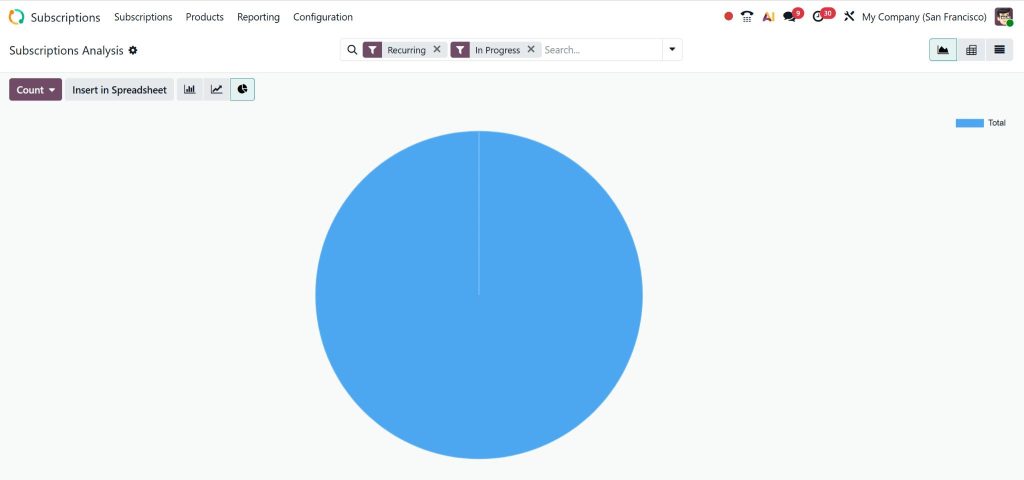
Track MRR (Monthly Recurring Revenue), ARR, and churn with built-in reports. Customise dashboards to spot trends, vital for Odoo 19 subscription management in dynamic markets.
Feature | Benefit | UAE Relevance |
Revenue Forecasting | Predict cash flow accurately | Essential for VAT filings |
Churn Analysis | Reduce losses by 20-30% | Boosts SaaS retention |
Usage Tracking | Bill based on actual use | Ideal for logistics APIs |
Integration Powerhouse
What makes the Odoo 19 Subscription App tick is its tight integration with Odoo’s whole ERP system, including accounting, inventory tracking, and customer relationship management. In the UAE, where software-as-a-service plays a significant role, this link also extends to manufacturing tools, so subscription models always match real-time stock conditions.
Advanced Tips for Odoo 19 Recurring Billing
Get live updates via webhooks instead. Link up with WhatsApp to remind customers about renewals – it works well in the UAE.
New Odoo 19 Recurring Billing: What's Revolutionised
The new Odoo 19 recurring billing in the Odoo 19 Subscription App is a standout. Odoo 19 introduces AI-driven predictions that forecast churn before it happens.
Upgrades from Odoo 18
- Smart Invoicing: Drafts invoices 7 days early.
- Partial Payments: Handle the UAE’s instalment culture.
- Revenue Recognition: IFRS 15 compliant for audits.
Odoo SaaS subscriptions in the UAE get easier to grow. A real estate company that upgraded to Netilligence saw sales climb by 40%.
Odoo 19 Subscription Management Best Practices
Master Odoo 19 subscription management with these pro tips:
Optimise for Retention
- Segment subscribers: VIPs get priority support.
- Set up a test using Odoo’s experiments tool. Pricing changes get split between groups.
- Gather input using built-in form tools.
Scaling for UAE Enterprises
Handle 10,000+ subs? Odoo 19’s performance shines. Pair with Netilligence’s cloud hosting for 99.9% uptime.
Case Study: UAE Logistics Success
From Lahore to Dubai, a Logistics business turned to the Odoo 19 Subscription App, tapping into API features. Growth followed – monthly revenue rose by 25 per cent – and billing arguments vanished entirely.
Why Netilligence is Your Odoo Partner in the UAE
Don’t just read, ACT. Netilligence specialises in Odoo Subscription App tutorials in the UAE and complete implementations. We’ve powered campaigns for Royal Estates and Muscat Grand Mall.
Our Services
- Custom Odoo 19 setups.
- Odoo 19 Subscription App training.
- Ongoing support for managing subscriptions in Odoo 19.
Ready to dominate Odoo subscriptions SaaS in the UAE? Contact us today for a free demo. Transform your business, start your Odoo 19 Subscription App journey now!




