What is the Difference Between Credit Notes and Debit Notes in Odoo 19 Accounting?
If you are working in accounts, you already know one thing for sure. No invoice is perfect forever. Customers return items. Prices change. Someone adds extra charges after the invoice is sent. And suddenly, your clean books start looking confusing. This is exactly where credit notes and debit notes in Odoo 19 accounting help you.
I see this problem again and again in companies. The finance team knows something is wrong with the invoice, but they do not know whether to use a credit note or a debit note. That confusion leads to wrong balances, wrong VAT numbers, and unhappy customers. Once you understand the differences between Odoo 19 credit notes and debit notes, this problem becomes much easier to handle.
In this blog, I will walk you through the real difference between credit and debit notes in Odoo Accounting so you always know what to do when an invoice needs fixing.
Credit Notes and Debit Notes in Odoo 19 Accounting Explained for Daily Business Use
Every time I talk to a finance team, I hear the same question. “We have a return, should we cancel the invoice or create something else?” This is where credit notes and debit notes in Odoo 19 accounting make life easier.
When you use credit notes and debit notes in Odoo 19 accounting, you are not deleting history. You are correcting it properly. This is very important for VAT, audits, and customer trust.
The credit notes and debit notes in Odoo 19 accounting help you keep a clear link between the original invoice and the correction. That is why the Odoo 19 credit note vs debit note matters so much.
If you know the difference between credit and debit notes in Odoo Accounting, you will never panic when a customer asks for a refund or when you need to add a missed charge. The right tool is already available in Odoo 19, accounting for credit and debit notes.
This Odoo Accounting credit debit notes guide is written in a simple way, so you can relate it to what happens in your office every day.
Odoo 19 Credit Note vs Debit Note – What They Really Mean
A credit note is used when you owe something back to the customer. A debit note is issued when the customer owes you more. Understanding the differences between Odoo 19 credit notes and debit notes is essential for accountants and finance managers.
Feature
Credit Note
Debit Note
Purpose
Reduces customer balance
Increases customer balance
Issued When
Refunds or returns
Extra charges or underbilling
Impact
Lowers revenue
Increases revenue
VAT Effect
VAT is reduced
VAT is increased
The difference between credit and debit notes in Odoo Accounting lies mainly in whether the invoice value increases or decreases.
Credit Note Refund Odoo 19 UAE and Why It Is Used
In many UAE businesses, product returns are common. A customer may receive damaged goods or send back items that were not needed. In this case, you must issue a credit note refund in Odoo 19 UAE instead of deleting the invoice.
In Odoo 19 accounting, credit and debit notes keep the original invoice and adjust the amount. This keeps your VAT records clean. When you issue a credit note refund in Odoo 19 UAE, Odoo also adjusts the tax, so you do not overpay VAT.
This is why understanding credit notes and debit notes in Odoo 19 accounting is so important in the UAE. VAT reporting depends on it.
When to Use Debit Note Odoo 19 in Real Situations
Many people think debit notes are rare, but in real life, they are very common. You should know when to use the Odoo 19 debit note to avoid losing money.
If you delivered extra items after the invoice was sent, you use a debit note. If transport or handling charges were missed, you use a debit note. If the price was wrong and should be higher, you use a debit note.
This is part of credit notes and debit notes in Odoo 19 accounting that many businesses ignore, and then they wonder why revenue does not match the work they did.
How to Create a Credit Note in Odoo 19
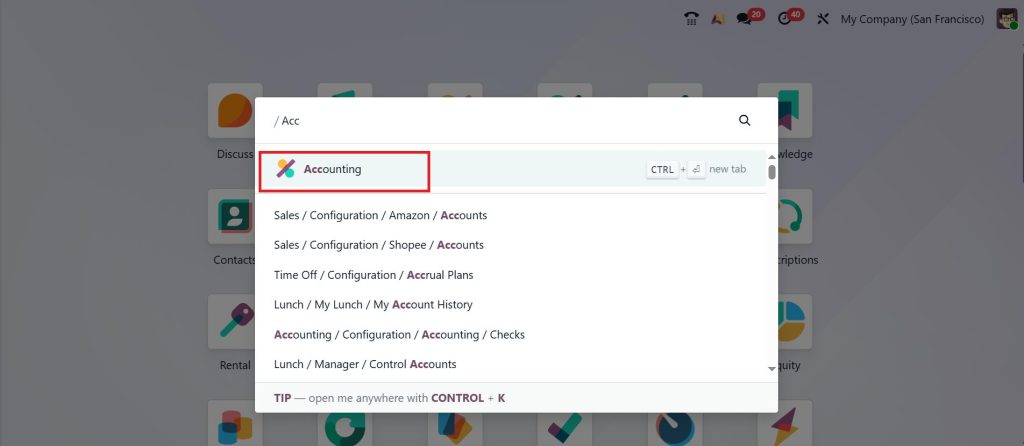
Creating a credit note is just as simple. Open the Accounting module.
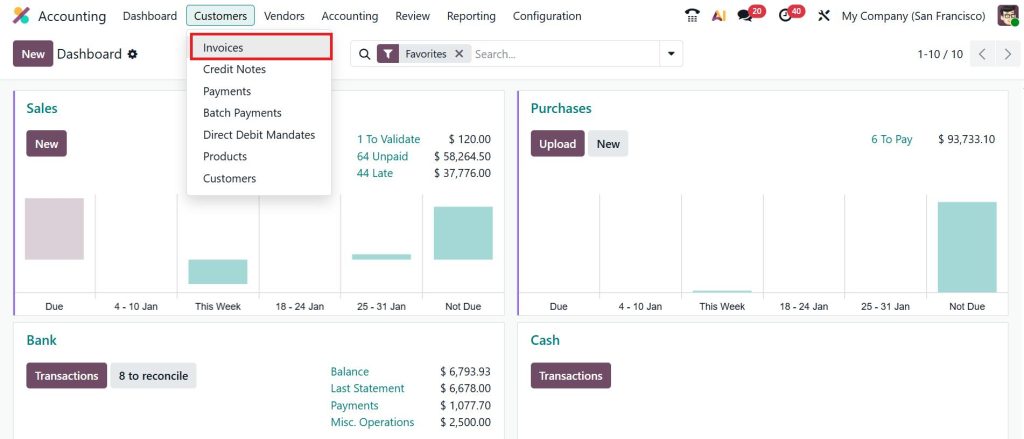
Go to the Customers → Invoices.
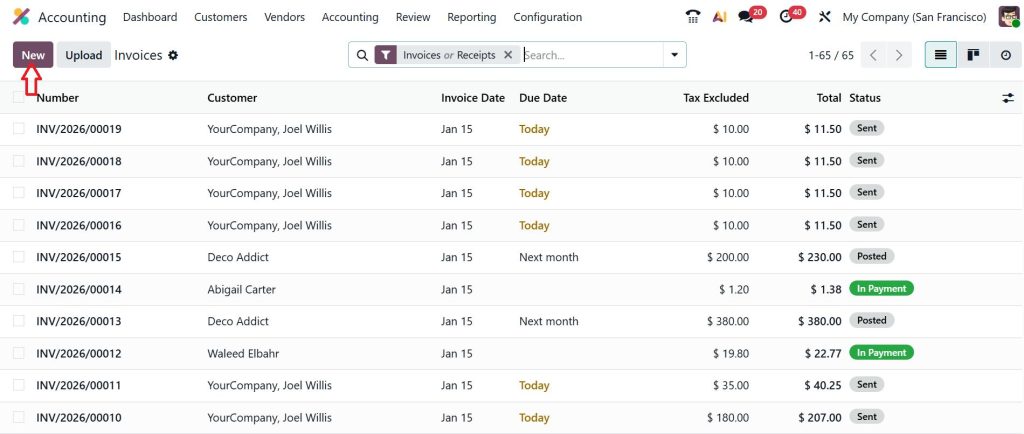
Click New to create a new invoice.
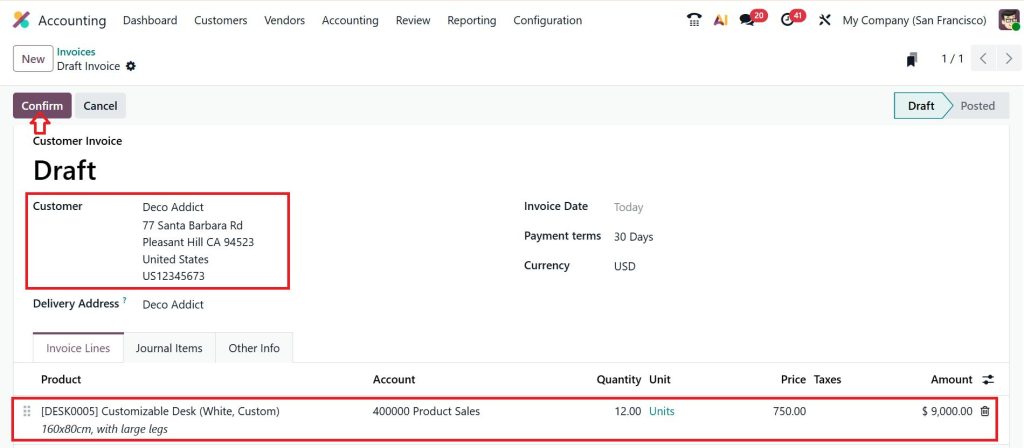
Select the customer, add a product, and click Confirm.
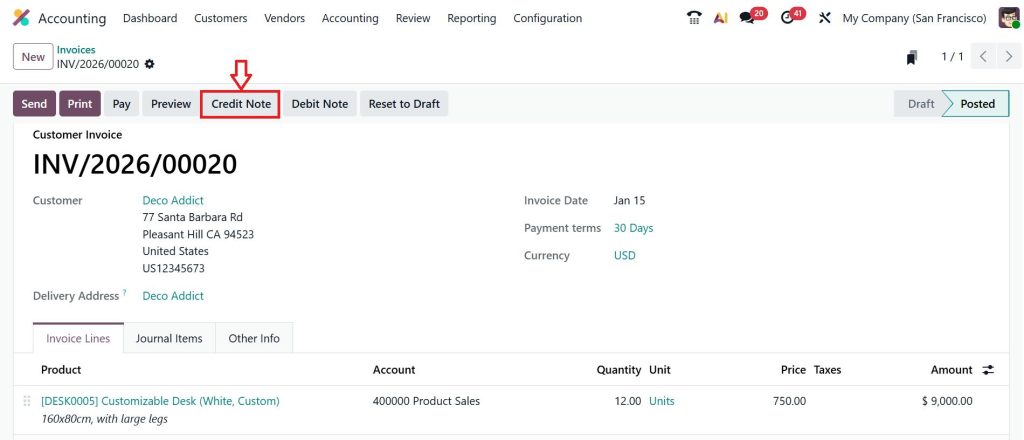
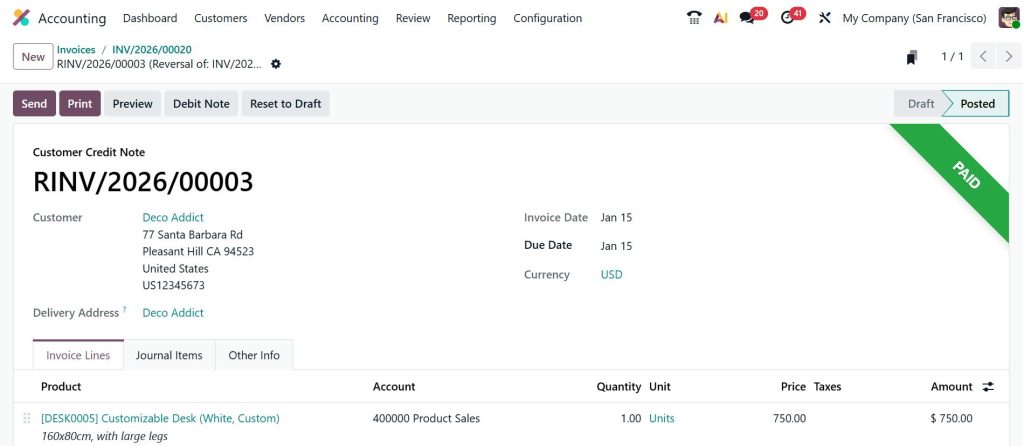
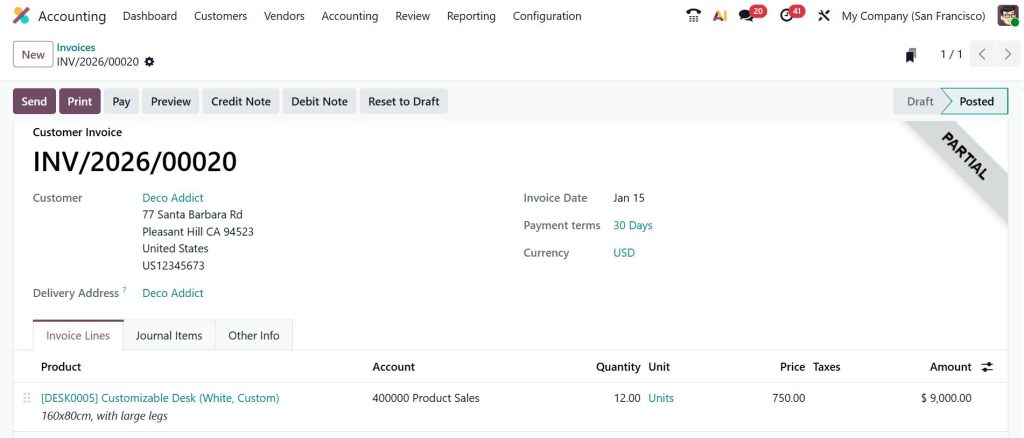
Now, you can see that it will be moved to the posted stage. But we learned that one of the products is damaged. So, we want to reduce the amount of the damaged product by creating a credit note. Let’s click on the Credit Note button.
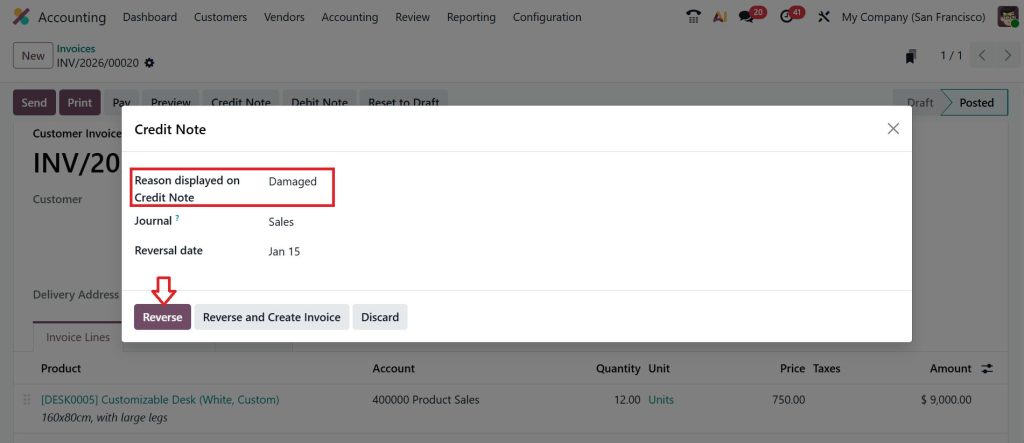
Give the Reason, then click Reverse.
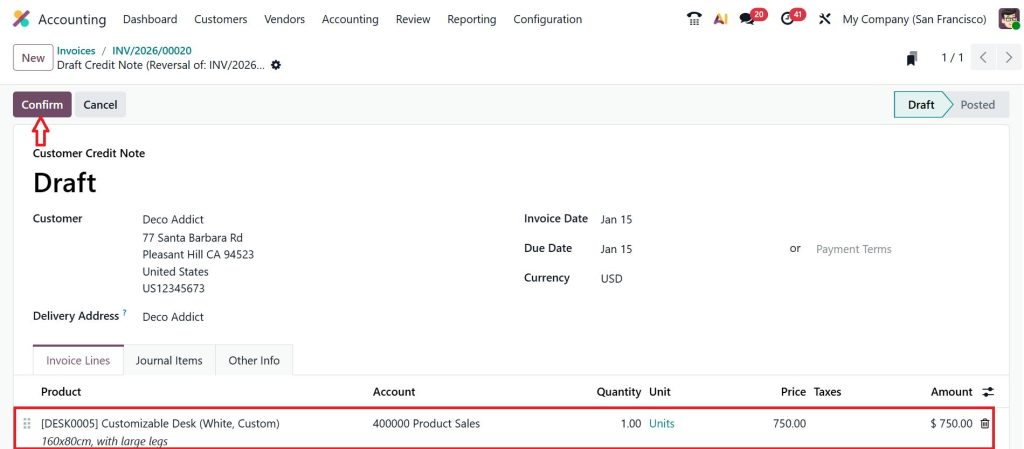
Since we only want to reverse the one quantity, you can set it here and click Confirm.
Now, you can see that the amount has been paid back to the customer, and that will be marked under the credit note.
We have just made a partial payment; we can also make a full payment by following the same steps.
This is how you process a credit note refund Odoo 19 UAE in a VAT-compliant way.
Odoo 19 Debit Note Creation Tutorial for Daily Work
Let us walk through the Odoo 19 debit note creation tutorial so you can understand how easy it is.
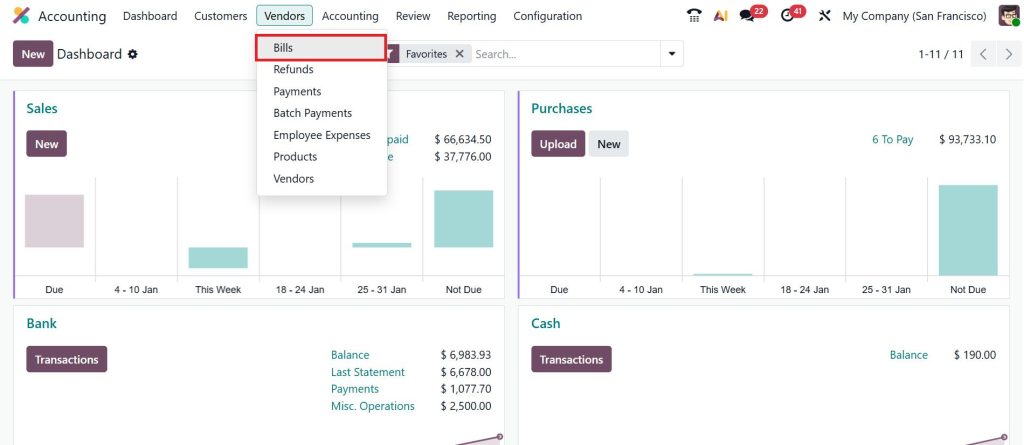
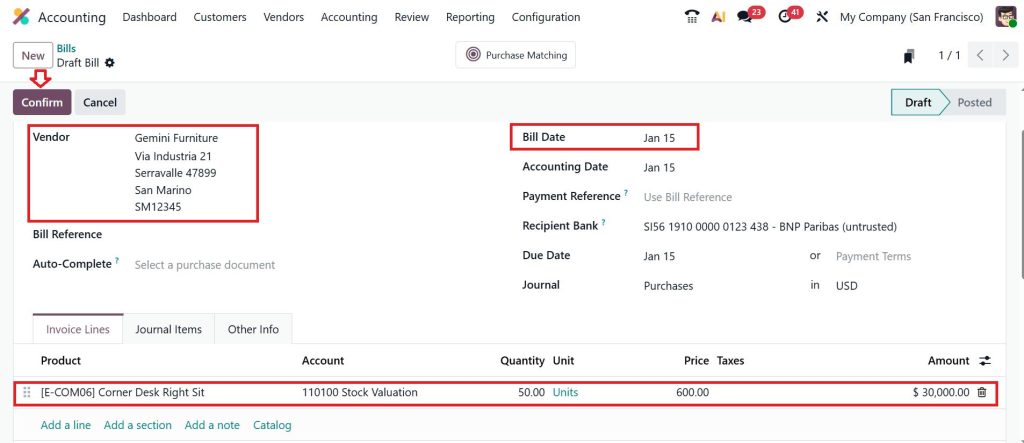
Go to Accounting → Vendors → Bills.
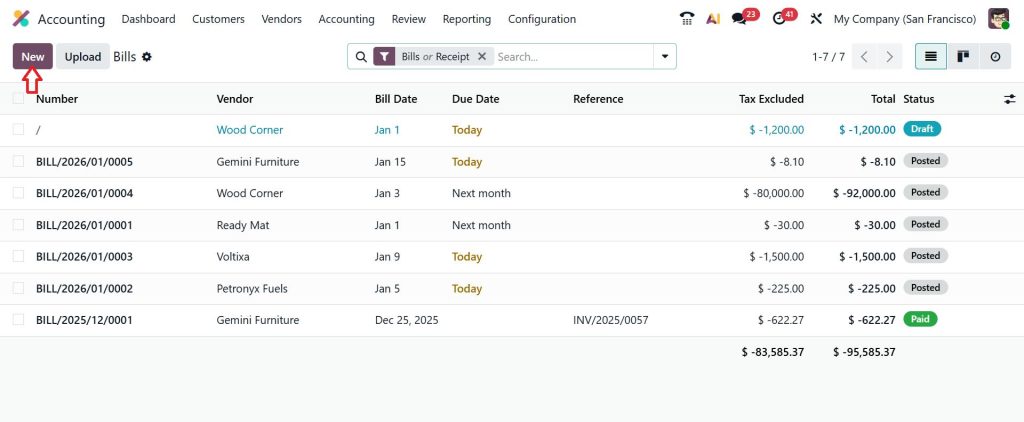
Click New.
Select the Vendor, choose the bill date, add a product, and then click Confirm.
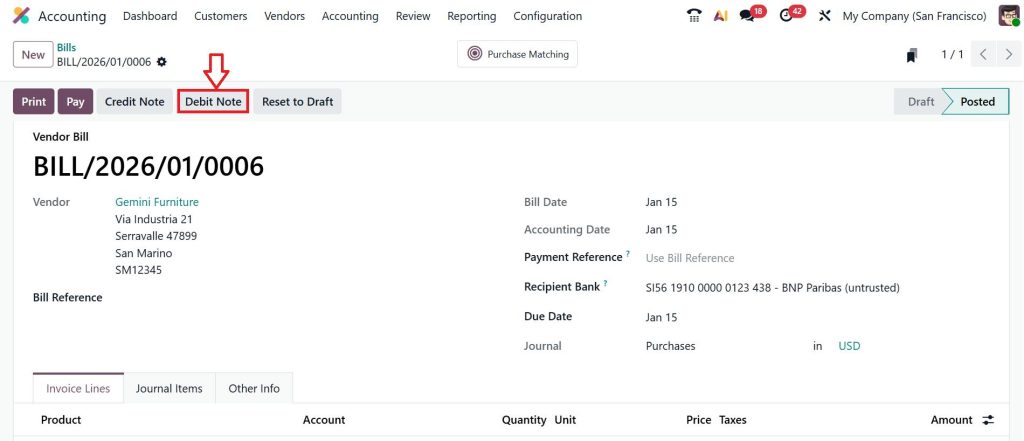
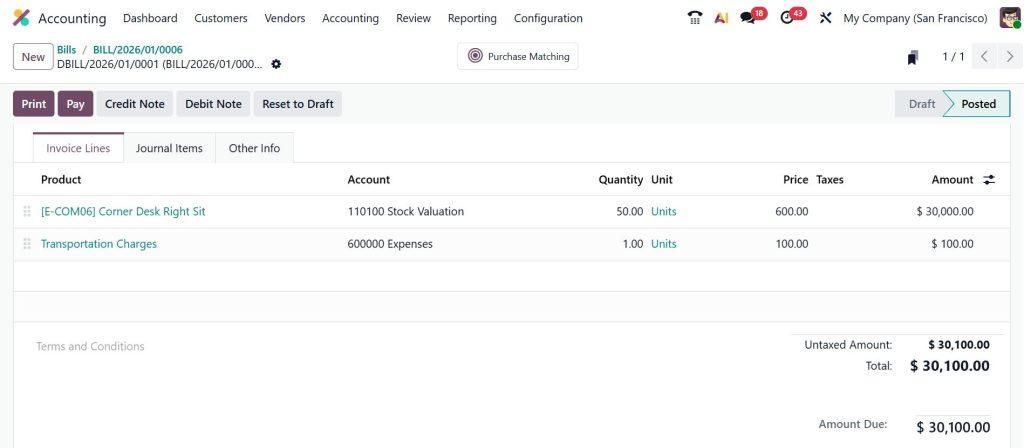
At this moment, we came to know that we have not added the extra charges for that, just click on the Debit Note.
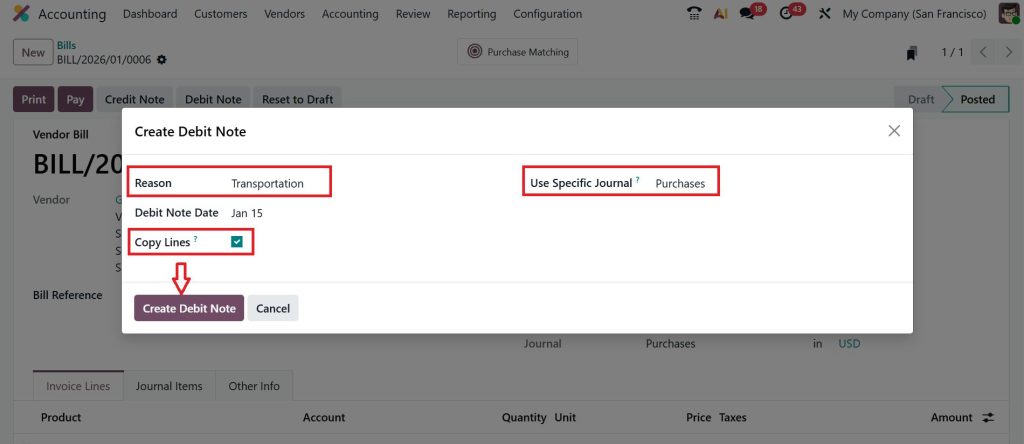
Here, you can add the extra charges as transportation, and if you just want to add the product (Corner Desk Right Sit) in the debit note, you can check (✔) the copy lines option, and you can also specify the journal and then click Create Debit Note.
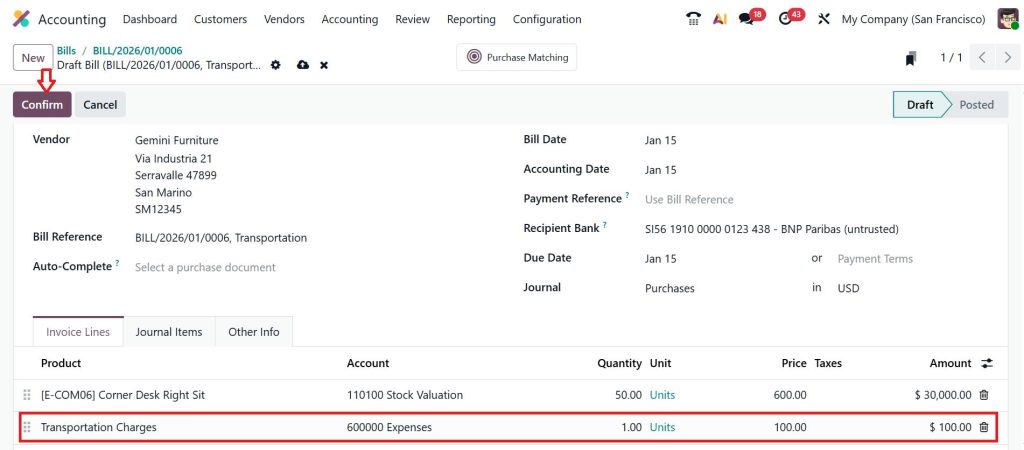
Add the $100 transportation charge and click Confirm.
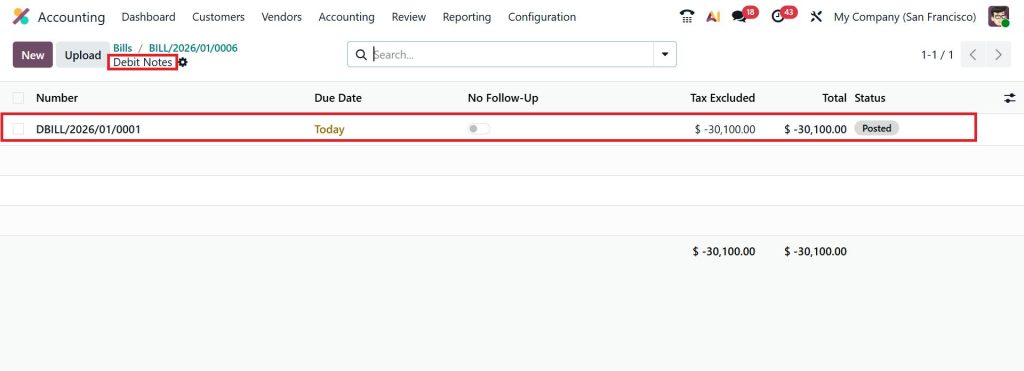
As you can see below, we have successfully added the debit note.
Odoo will automatically post the journal entries and link the debit note to the original invoice.
When you follow the Odoo 19 debit note creation tutorial, all entries remain linked to the original invoice, which is very helpful during audits.
Important Note: Many people think a credit note is used to manage customer invoices and a debit note is used to manage vendor bills, but this is a misconception. A credit note is used to reduce the amount, and a debit note is used to make corrections and add the amount. So, you can use both credit and debit notes in customer invoices as well as in vendor bills.
Difference Credit Debit Notes Odoo Accounting in Reports
One thing I always explain to finance teams is how these notes affect reports. In the difference between credit and debit notes, Odoo Accounting, a credit note reduces revenue and VAT. A debit note increases revenue and VAT.
So, when you look at your Profit and Loss report or VAT report, you will see the correct numbers only if you use credit and debit notes correctly in Odoo 19 accounting.
Odoo Accounting Credit Debit Notes Guide for Clean Books
This Odoo Accounting credit-debit note guide is not just about features. It is about keeping your books clean. Instead of editing invoices or making manual entries, you use proper credit and debit notes.
This keeps everything traceable. In Odoo 19 accounting, your auditor can see the original invoice, the credit note, and the debit note, all linked together under credit notes and debit notes.
Configure Debit Credit Notes Odoo 19 for Your Company
Before you start using these documents, you should configure debit and credit notes in Odoo 19 in your accounting settings. This includes setting journals, tax rules, and refund methods.
Once you configure debit and credit notes in Odoo 19, Odoo handles all calculations for you. That is why many companies rely on credit and debit notes in Odoo 19 accounting rather than spreadsheets.
Why Businesses Depend on Credit Notes and Debit Notes in Odoo 19 Accounting
In daily business, things change all the time. Orders change. Prices change. Deliveries change. Without credit notes and debit notes in Odoo 19 accounting, your books would never match reality.
The Odoo 19 credit note vs. debit note system provides a clear way to handle all adjustments. The difference in credit and debit notes in Odoo Accounting helps you decide what to do without confusion.
Making Your Odoo 19 Accounting Clear and Stress-Free
If you are running accounts in the UAE, you simply cannot ignore credit notes and debit notes in Odoo 19 accounting. These are not just accounting terms. They are the tools that help you fix invoice mistakes, manage returns, and handle extra charges without messing up your VAT or customer balances.
Once you clearly understand the difference between Odoo 19 credit notes and debit notes, you stop guessing and start working with confidence. You know exactly when to issue a credit note refund in Odoo 19 UAE and when to use a debit note for extra charges. You also avoid errors that come from not knowing the real difference between credit and debit notes that Odoo Accounting teams deal with every day.
When you follow the Odoo 19 debit note creation tutorial and correctly configure debit and credit notes in Odoo 19, Odoo takes care of your calculations, taxes, and reports in the background. That means fewer disputes, fewer adjustments, and more trust in your numbers.
If you are still confused about how credit or debit notes are handled in your Odoo 19 system, now is the time to fix it.
Reach out to Netilligence today and let our Odoo accounting experts review your setup, address any gaps, and help you use credit and debit notes correctly so your accounts stay clean, clear, and compliant.
Hi, I'm Ilsa Shabbir, an Odoo ERP content writer specializing in functional blogs on Odoo modules. I simplify complex Odoo features, creating clear and engaging content to help businesses understand and optimize their ERP solutions.
We use cookies to ensure that we give you the best experience on our website. If you continue to use this site we will assume that you are happy with it.