

Introduction: How Odoo Calculates Employee Salaries In Odoo 19
How Odoo calculates employee salaries in Odoo 19 is a key question for HR managers, finance heads, and business owners seeking to automate payroll without compromising compliance or employee trust.
Payroll is not just about transferring money at the end of the month. It involves multiple components, including basic salary, HRA, allowances, bonuses, PF, ESI, income tax, overtime, unpaid leave, and employer contributions. If done manually, errors are common. If not configured properly, compliance risks increase.
Understanding how Odoo 19 calculates employee salaries helps businesses eliminate confusion and gain full control over payroll operations. The powerful Odoo 19 payroll salary calculation engine automatically computes salaries based on configurable salary rules and structures.
With the proper setup of Odoo 19 salary rules and structures, companies can define:
- Earnings components
- Deduction formulas
- Employer contributions
- Conditional rules
- Country-specific compliance logic
Once you configure the salary structure in Odoo 19, the system automatically handles the entire Odoo 19 payroll module payslip computation process. From Odoo 19 payroll PF/ESI/HRA calculations to Odoo 19 employee payslip generation, everything becomes structured, transparent, and automated.
In this complete guide, we will explain in detail:
- The core payroll logic
- Salary structures and rules
- Statutory compliance configuration
- Payslip computation workflow
- Real-world payroll scenarios
- Why expert implementation matters
Let’s get into how Odoo truly transforms payroll management.
The Influence of Odoo 19 Payroll Module
Odoo 19 is not just software, it’s a payroll powerhouse. The payroll module automates everything from basic wages to complex deductions, including statutory compliance, allowances, bonuses, and arrears.
Key benefits:
- Automated Calculations: Eliminates manual formulas.
- Customizable Rules: Personalize Odoo 19 salary rules and structures for PF, ESI, HRA, etc.
- Integration: Whole connection with HR, attendance, and accounting.
- Reporting Dashboards: Monitor payroll, overtime, and bonuses instantly.
Businesses using Odoo 19 report 40% faster payroll cycles and zero calculation errors.
How Odoo Calculates Employee Salaries in Odoo 19 - Core Mechanics
At its core, how Odoo 19 calculates employee salaries depends on salary rules, salary structures, contracts, worked days, and inputs (such as bonuses or deductions).
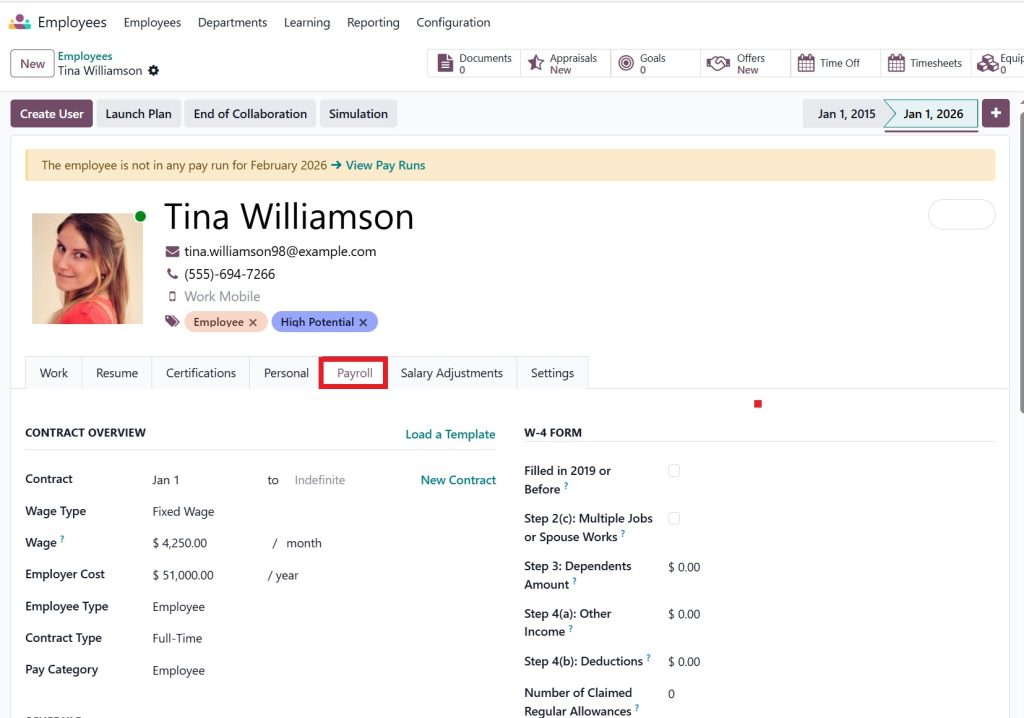
Step-by-Step Logic:
- Fetch Employee Contract: Wage, working hours, and salary structure.
- Apply Salary Rules: Sequence-based computation of earnings and deductions.
- Compute Totals: Gross salary → deductions → net salary.
- Generate Payslip: Ready for PDF export or posting to accounting.
For example, for an employee with a basic salary of 15,000 AED:
Component | Calculation | Amount (AED) |
Basic | Fixed | 15,000 |
HRA | 20% of Basic | 3,000 |
Special Allowance | Fixed | 1,000 |
PF Deduction | 12% of Basic | 1,800 |
ESI Deduction | 0.75% of Gross | 150 |
Net Salary | Gross – Deductions | 17,050 |
Odoo computes this automatically in seconds.
Odoo 19 Salary Rules and Structures
Salary structures define how an employee’s salary is built, while salary rules determine how each component is calculated.
Step-by-Step: Configure Salary Structure in Odoo 19
- Access Salary Structures: Payroll → Configuration → Salary Structures → Create.
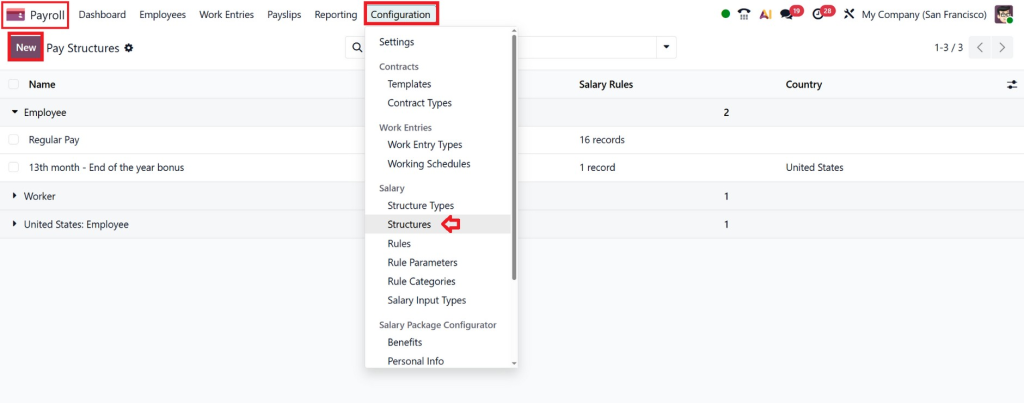
- Define Components: Basic, HRA, Allowances, Bonus, PF, ESI.
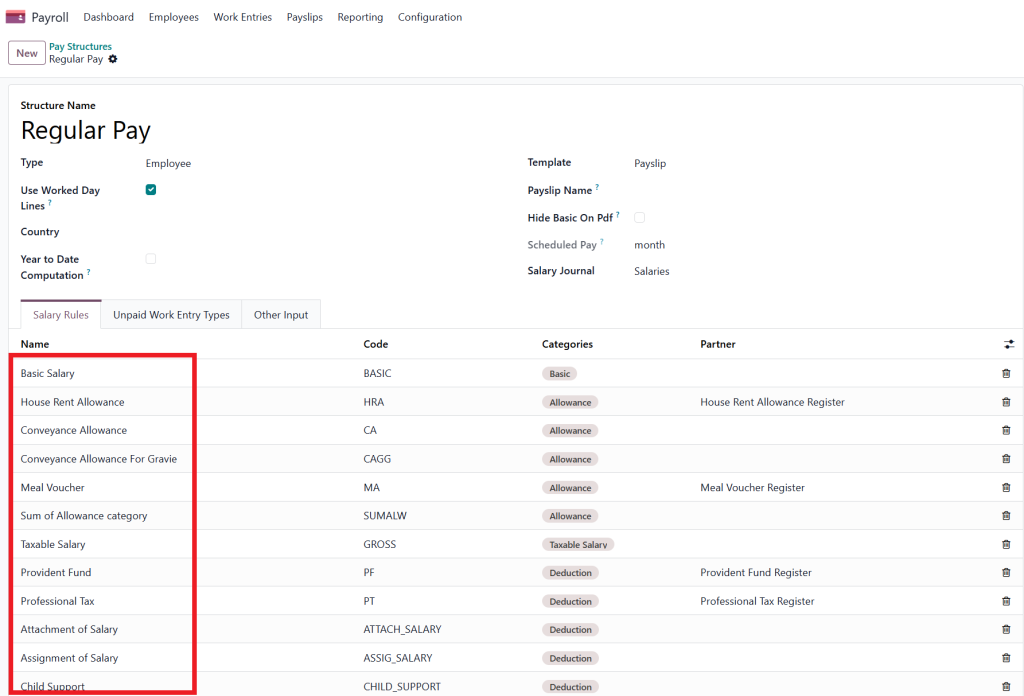
- Set Salary Rules: Fixed, percentage-based, or formula computation.
- Order Rules: Execution is sequence-sensitive.
- Test: Use “Compute Sheet” for previews.
Example Table – Salary Rule Setup:
Sequence | Component | Type | Formula / Computation | Category |
100 | Basic | Fixed | Contract wage | Earnings |
200 | HRA | Percentage | Basic * 0.40 | Earnings |
300 | Special Allowance | Fixed | 1000 | Earnings |
400 | Gross Salary | Computed | Sum of earnings | Gross |
500 | PF | Percentage | Basic * 0.12 | Deduction |
600 | ESI | Percentage | Gross * 0.0075 | Deduction |
700 | Net Salary | Computed | Gross – Deductions | Net |
Worked Days & Leave Impact on Salary
Odoo calculates salary based on worked days and leave inputs, ensuring fairness and accuracy.
Example:
- Salary = 30,000 AED
- Total Days in Month = 30
- Unpaid Leave = 2 days
Calculation:
Daily Rate = 30,000 ÷ 30 = 1,000 AED
Deduction for Leave = 2 × 1,000 = 2,000 AED
Net Salary = 28,000 AED
This is handled automatically via worked_days_line_ids in the Odoo 19 payroll module.
Odoo 19 Payroll PF, ESI & HRA Calculation
PF (Provident Fund): 12% of Basic from employee and employer
ESI (Employees’ State Insurance): Employee 0.75%, Employer 3.25% (conditional threshold)
HRA (House Rent Allowance): 20–50% of Basic, tax-exempt up to limits
Practical Example Table:
Component | Base | % | Deduction / Contribution |
PF | Basic | 12% | 1,800 AED |
ESI | Gross | 0.75% | 150 AED |
HRA | Basic | 40% | 3,000 AED |
Rules can be customized in Python-like formulas
Employee Payslip Generation Step by Step
Odoo 19 employee payslip generation step by step is simple:
- Link the employee to the contract
- Integrate attendance / leave data
- Payroll → Payslips → Create → Select period/employees
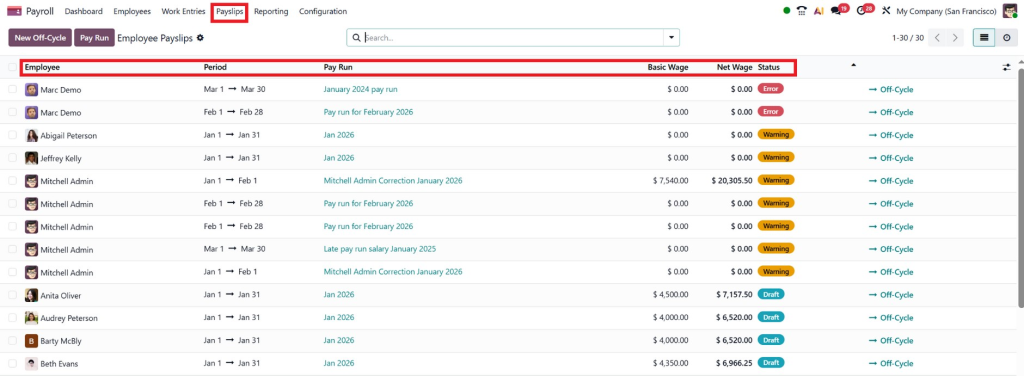
- Click “Compute Sheet” → Odoo calculates automatically
- Review, Approve, Post → Sends journal entries to Accounting
- Share payslip PDF or portal access
Advanced Tips:
- Handle arrears or salary hikes retroactively
- Deduct loans/advances automatically
- Bulk export for banks
Accounting Integration - Automatic Journal Entries
When you validate a payslip:
Account | Debit (AED) | Credit (AED) |
Salary Expense | 50,000 | |
PF Payable | 1,800 | |
ESI Payable | 500 | |
Net Salary Payable | 47,700 | |
This ensures transparency and financial accuracy.
Batch Payroll Processing
For large organizations:
- Payroll → Batches → Create → Add Employees → Compute All → Validate All
- Automates hundreds of payslips in minutes
- Generates bank files, salary registers, and PF/ESI challans
Compliance & Reporting
Odoo generates statutory reports:
- PF / ESI / Professional Tax
- Department-wise salary summary
- Bank advice & salary register
- Contribution summary
Netilligence customizes reports to comply with country-specific laws, ensuring audit-ready payroll.
Why Choose Netilligence for Odoo 19 Payroll Implementation?
- Custom Configuration: Custom-made Odoo 19 salary rules and structures
- Migration Support: All-in-one from old systems
- Training & Go-Live: Hands-on sessions
- Ongoing Support: 24/7 assistance
- Integration: Accounting, CRM, ERP
Payroll mistakes can damage trust. Let Netilligence implement a fully compliant, automated payroll system for you.
Upgrade Payroll Into a Growth Engine with Odoo 19
Mastering how Odoo calculates employee salaries in Odoo 19 isn’t just about payroll; it’s about empowering your business. With Odoo 19, payroll becomes accurate, automated, and fully compliant, freeing HR and finance teams to focus on strategic growth rather than tedious calculations.
From flexible salary rules and structures, automatic PF/ESI/HRA computation, to step-by-step payslip generation, Odoo 19 turns a complex payroll process into a smooth, error-free operation. And with Netilligence by your side, implementation is flawless, customized, and ready for scaling, so your team can save time, eliminate disputes, and focus on what matters most, growing your business.




