

How Do Accrual Plans Work in Odoo?
How do accrual plans work in Odoo? It is one of the most common questions businesses ask when they want to automate employee leave management. Instead of manually adding leave balances each month or year, Odoo allows organizations to create smart rules that automatically grant leave in line with company policies. Understanding how accrual plans work in Odoo helps HR teams save time, reduce errors, and provide employees with a transparent leave management process.
Modern businesses need a leave management system that is accurate, flexible, and easy to manage. This is where Odoo Time Off accrual plans become valuable. They automatically calculate leave balances according to predefined rules, ensuring every employee receives the correct amount of leave without manual calculations.
Whether your company provides monthly vacation leave, yearly paid leave, or sick leave based on employment duration, Odoo’s accrual plan setup simplifies the entire process. With the right Odoo Time Off leave accrual configuration, HR departments can eliminate repetitive work while employees can clearly see their available leave at any time.
Another important benefit is the ability to define Odoo leave accrual rules in line with your company policy. Some organizations grant leave monthly, while others allocate leave quarterly or annually. Odoo supports all these methods with flexible Odoo accrual plan configuration options.
Businesses upgrading to Odoo 19 accrual plans will also benefit from improved automation and easier leave management. Companies can even configure employee leave accrual Odoo policies that reward long-term employees with additional leave after a certain number of years.
One of the most useful features is carry-forward leave in Odoo Time Off, allowing unused leave to be transferred to the next year in accordance with company policies.
If you have ever wondered how accrual plans work in Odoo, this guide explains everything you need to know, from setup and configuration to best practices that help businesses automate leave management efficiently.
Understanding Odoo Time Off Accrual Plans
Leave management may seem simple until your workforce grows. HR professionals often spend countless hours manually updating leave balances, correcting mistakes, and answering employee questions.
Odoo Time Off accrual plans solve this problem by automating leave allocation.
An accrual plan is a predefined schedule that determines how much leave an employee earns over time. Instead of receiving all annual leave at once, employees gradually earn leave according to rules created by HR.
For example:
- 1.5 vacation days every month
- 15 annual leave days each year
- Additional leave after completing five years
- Quarterly leave allocation
- Leave based on working hours
This automation improves accuracy while ensuring that employees receive leave in accordance with company policy.
Because everything is calculated automatically, HR teams spend less time maintaining spreadsheets and more time focusing on employee experience.
How Do Accrual Plans Work in Odoo?
Understanding how accrual plans work in Odoo becomes much easier once you know the process.
The workflow usually follows these steps:
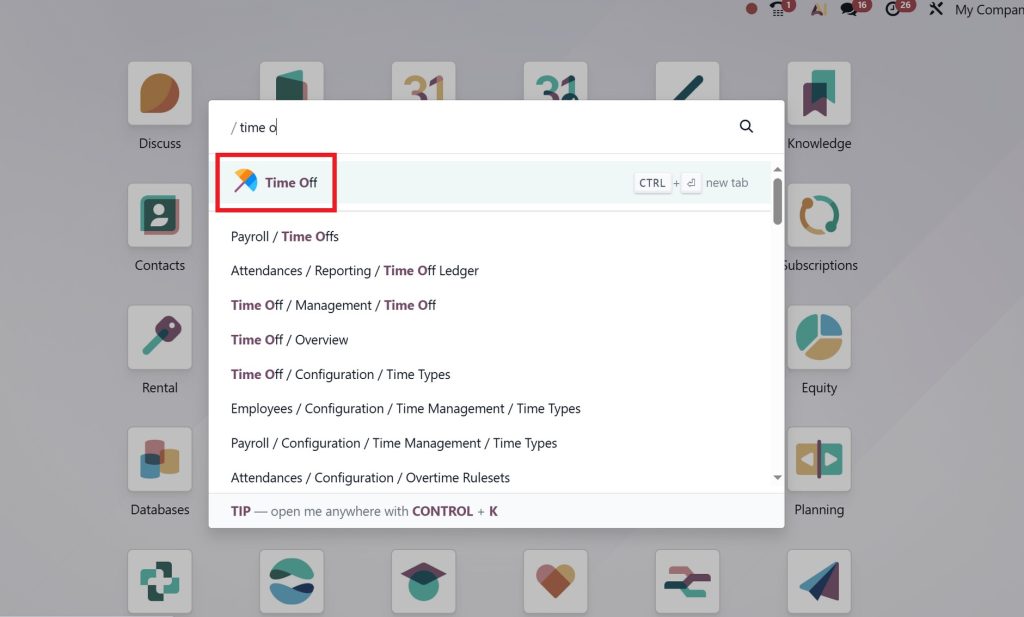
Step 1: Open the Time Off Module
Log in to your Odoo database and open the Time Off application from the dashboard. This module allows you to manage leave types, employee requests, approvals, and accrual plans.
Step 2: Enable Accrual Plans
Go to:
Time Off → Configuration → Settings
Under the Time Off settings, enable the Accrual Plans option if it is not already activated. Save the changes.
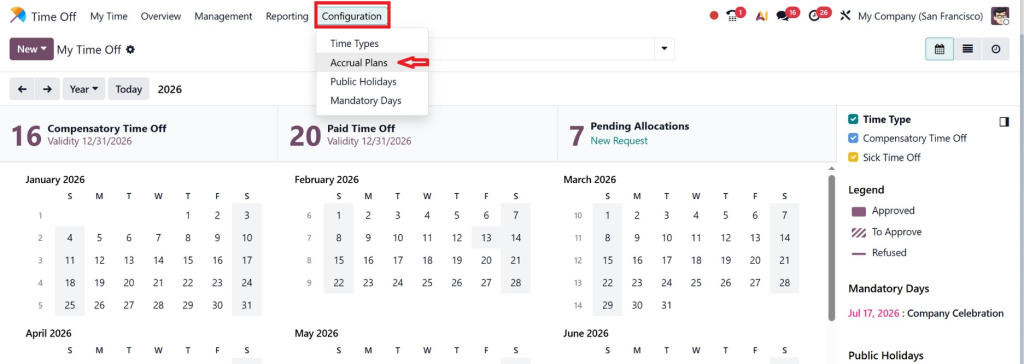
This allows you to create automated leave accrual rules for different leave types.
Step 3: Create or Select a Time Off Type
Navigate to:
Time Off → Configuration → Time Off Types
Either create a new leave type or edit an existing one, such as:
- Annual Leave
- Paid Leave
- Vacation Leave
- Sick Leave
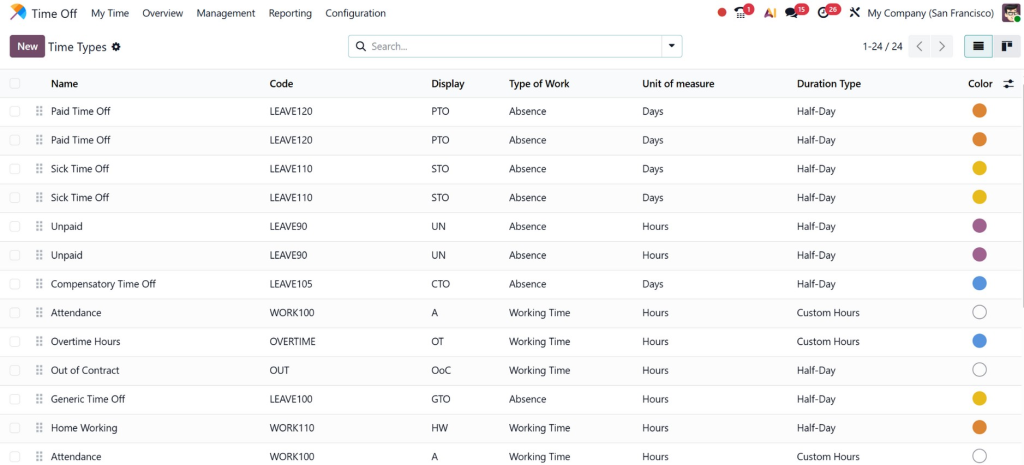
In the Time Off Type form, choose Accrual Plan as the allocation method.
Step 4: Create a New Accrual Plan
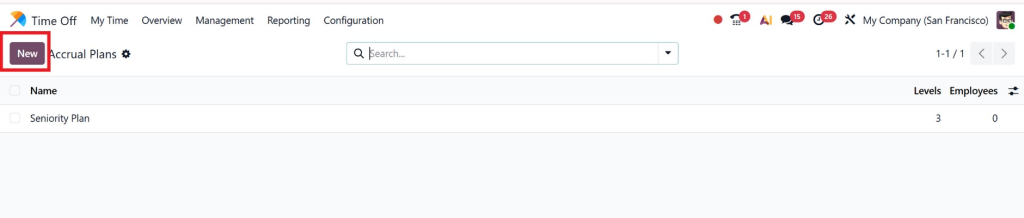
Go to:
Time Off → Accrual Plans
Click New to create a new accrual plan.
Enter details such as:
- Accrual Plan Name
- Company
- Employee Eligibility
- Start Date
- Allocation Method
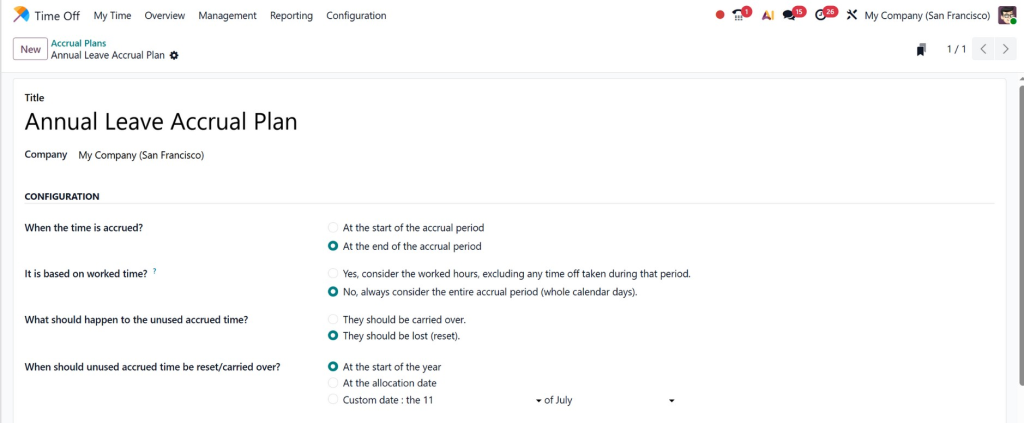
This plan will define how employees earn leave over time.
Step 5: Configure the Accrual Rules
Inside the accrual plan, click Add a Milestone
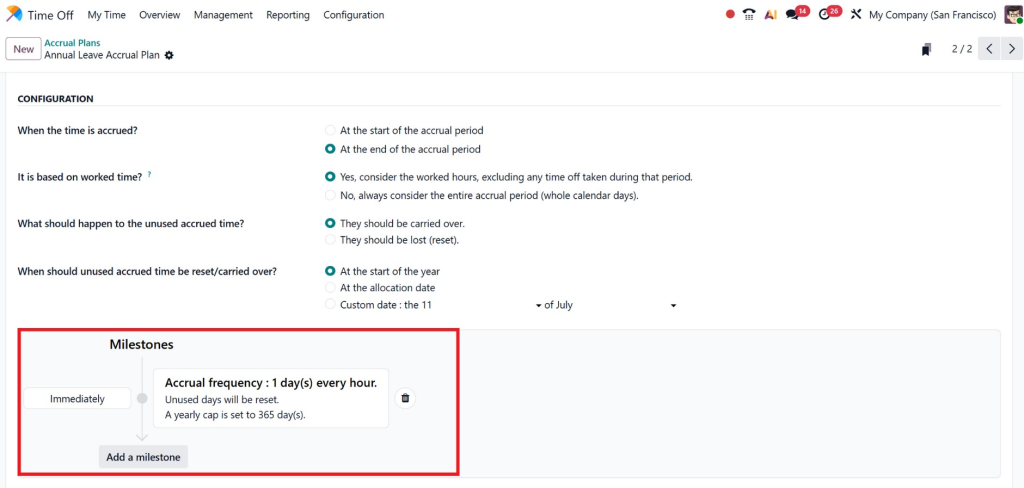
Configure the rule by selecting:
- Accrual Frequency (Monthly, Weekly, Yearly, or Daily)
- Number of Leave Days or Hours to Allocate
- Maximum Leave Balance
- Waiting Period (if required)
- Maximum Accrued Time
- Milestone Conditions (optional)
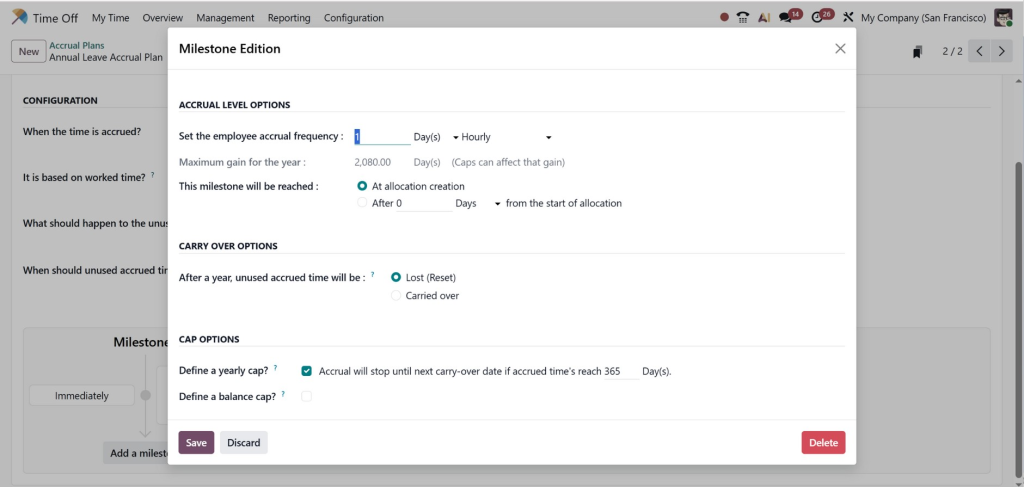
You can also create multiple rules within the same plan. For example, employees may earn 1.5 days per month during their first five years and 2 days per month after completing five years of service.
Step 6: Configure Carry Forward Rules
If your company allows unused leave to be carried forward to the next leave period, configure the carry-forward settings within the accrual plan.
You can define:
- Full Carry Forward
- Partial Carry Forward
- Maximum Number of Days to Carry Forward
- Expiration Date for Carried Leave
These settings ensure that unused leave is managed automatically in accordance with company policy.
Step 7: Assign the Accrual Plan to Employees
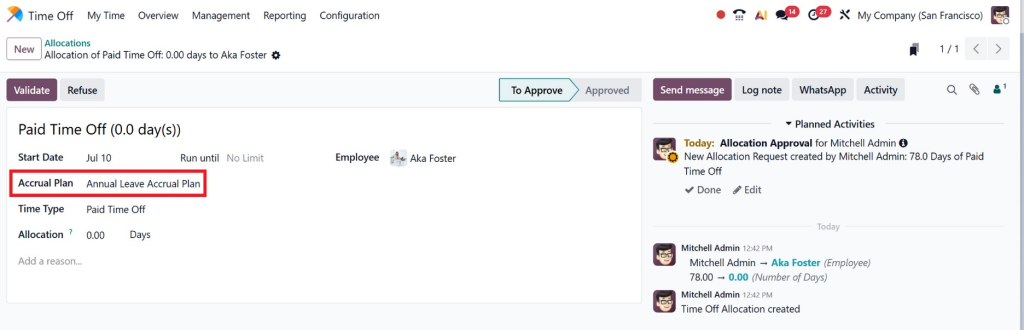
Open the employee record or create a leave allocation.
Go to:
Time Off → Management → Allocations
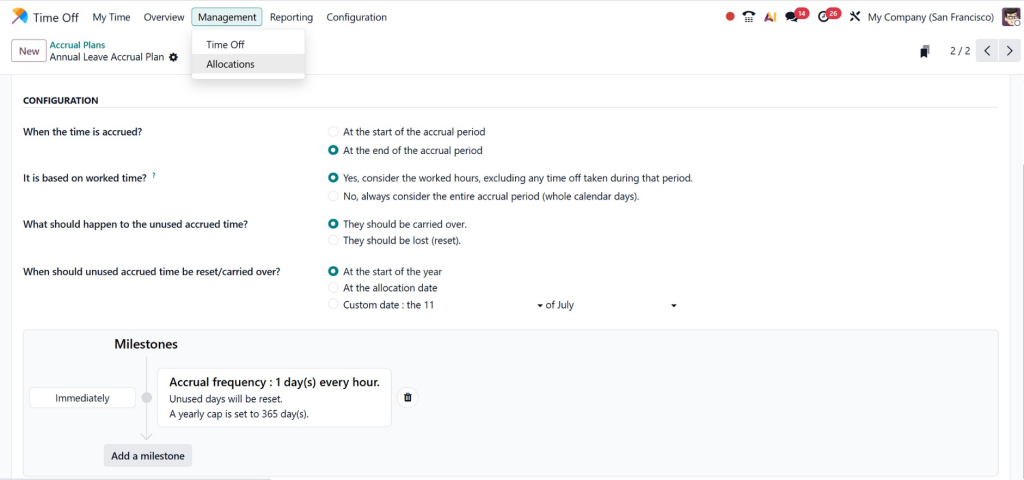
Create a new allocation, select the employee, choose the Time Off Type, and assign the Accrual Plan.
Once approved, the employee becomes part of that accrual plan.
Step 8: Automatic Leave Accrual
After the accrual plan is assigned, Odoo automatically adds leave according to the configured schedule.
For example:
- 1.5 leave days every month
- 18 days every year
- Additional leave after a service milestone
No manual calculations are required.
Step 9: Employees Request Time Off
Employees can view their available leave balance directly from the Time Off dashboard.
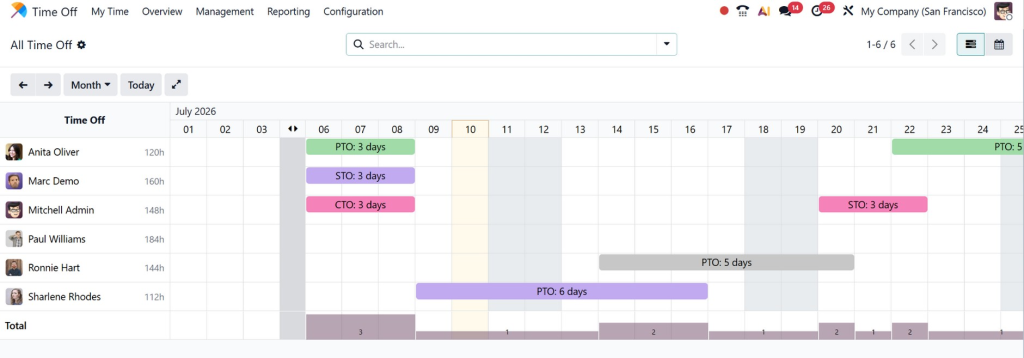
When they submit a leave request, managers receive it for approval. Once approved, Odoo automatically deducts the requested leave from the employee’s accrued balance.
Step 10: Monitor and Update Accrual Plans
HR managers can review accrual plans at any time by navigating to:
Time Off → Configuration → Accrual Plans
If company policies change, they can edit the accrual rules, update carry-forward settings, or create new plans without unnecessarily affecting existing leave records.
Benefits of Odoo Time Off Leave Accrual
Implementing Odoo Time Off leave accrual offers many business advantages.
Reduces Manual Work
Manual leave calculations consume valuable HR time.
Automation eliminates repetitive tasks.
Improves Accuracy
Human calculation errors can create payroll and compliance issues.
Odoo performs calculations consistently.
Better Employee Transparency
Employees can always view:
- Available leave
- Used leave
- Pending requests
- Future accruals
This reduces confusion and HR inquiries.
Supports Different Leave Policies
Every organization has different leave rules.
Odoo easily supports:
- Monthly leave
- Annual leave
- Probation leave
- Contract-based leave
- Seniority leave
Easy Policy Changes
If company policies change, HR simply updates the accrual rules rather than recalculating each employee’s balance.
Odoo Accrual Plan Configuration Best Practices
Proper configuration of the Odoo accrual plan ensures accurate leave management.
Keep Policies Simple
Avoid unnecessary complexity.
Simple policies are easier to understand and maintain.
Match Company HR Policies
Your Odoo configuration should reflect your employee handbook.
Consistency avoids disputes.
Test Before Deployment
Always test accrual calculations using sample employees before applying them company-wide.
Separate Different Leave Types
Vacation leave, sick leave, and earned leave should each have separate accrual plans.
This improves reporting.
Review Plans Regularly
As company policies evolve, update accrual plans accordingly.
Odoo 19 Accrual Plans and New Improvements
Businesses upgrading to Odoo 19 accrual plans enjoy a more user-friendly experience.
Some improvements include:
Better Automation
Leave allocation happens automatically with fewer manual adjustments.
Cleaner User Interface
HR professionals can configure leave policies more efficiently.
Improved Employee Portal
Employees can easily monitor leave balances.
Better Integration
Leave data connects with Payroll, Employees, Attendance, and Planning modules.
Flexible Rules
Companies can configure multiple accrual policies without complicated workarounds.
Employee Leave Accrual Odoo for Different Business Scenarios
Every business has unique leave policies.
Here are common examples.
Monthly Vacation Accrual
Employees receive:
1.5 vacation days every month.
Annual Leave Allocation
Employees receive:
21 days at the beginning of each year.
Seniority-Based Leave
Employees receive:
15 days annually.
After five years:
20 days annually.
Contract Employee Leave
Temporary employees receive:
1 day every month.
Permanent employees receive:
2 days every month.
Probation Period
No leave during the first three months.
Accrual begins after confirmation.
All of these scenarios are supported through employee leave accrual Odoo configuration.
Carry Forward Leave Odoo Time Off
Many businesses allow unused leave to move into the next year.
Using carry forward leave Odoo Time Off, HR can define:
- Maximum carry forward balance
- Expiration date
- Partial carry forward
- Complete carry forward
- No carry forward
For example:
Employees receive 20 annual leave days.
If only 15 are used, the remaining 5 days automatically move to the next year.
Alternatively, HR may allow only 3 days to carry forward, with the remaining balance expiring.
Everything happens automatically according to company policy.
Common Mistakes to Avoid During Odoo Accrual Plan Setup
Although setup is straightforward, some businesses make avoidable mistakes.
Ignoring Company Policies
The configuration should always match official HR policies.
Incorrect Frequencies
Monthly policies should not accidentally be configured as yearly.
Missing Maximum Limits
Without limits, leave balances may grow beyond company policy.
Skipping Testing
Always verify calculations before implementation.
Not Reviewing Existing Leave Data
When migrating from another system, employee balances should be carefully validated.
Why Businesses Choose Netilligence for Odoo Time Off Configuration
Implementing leave management correctly requires more than technical knowledge. Every business has unique HR policies, approval workflows, and compliance requirements. At Netilligence, we understand these differences and configure Odoo to match the way your organization actually works.
Our experienced Odoo consultants help businesses design reliable Odoo Time Off accrual plans, configure complex leave policies, automate approvals, and integrate leave management with Payroll, Employees, Attendance, and other Odoo applications.
Whether you need a simple Odoo accrual plan setup or a fully customized configuration with seniority-based rules, probation policies, or multi-company support, our team ensures everything is implemented accurately and efficiently.
From consultation and implementation to customization, migration, user training, and ongoing support, Netilligence provides complete Odoo services that help businesses reduce manual work, improve HR efficiency, and create a better employee experience.
Learning How Accrual Plans Work in Odoo
Learning how accrual plans work in Odoo is essential for organizations that want to modernize leave management. Instead of relying on spreadsheets and manual calculations, businesses can automate leave allocation with intelligent rules that reflect their HR policies.
Features like Odoo Time Off accrual plans, flexible Odoo leave accrual rules, automated employee leave accrual in Odoo, and carry-forward leave in Odoo Time Off help ensure every employee receives the correct leave balance while reducing administrative effort.
Whether your company needs monthly accruals, annual leave allocations, probation-based policies, or seniority rewards, Odoo 19 accrual plans provide the flexibility to handle every scenario with ease.
If you’re ready to simplify leave management and maximize the value of your Odoo ERP investment, Netilligence is here to help. Our experts can configure, customize, and optimize your Odoo Time Off module so your HR team can focus on people, not paperwork.




