

Configure Default Settings in the Odoo 19 Rental for Better Business Performance
Configure default settings in the Odoo 19 Rental app before creating your first rental order, or you might end up solving problems you never expected.
Imagine this.
A customer reserves a projector for Friday morning. Another customer books the same projector just 30 minutes after it’s supposed to be returned. The first customer returns it late, the warehouse team hasn’t had time to inspect it, and now the second customer is waiting while your staff scrambles to figure out what went wrong.
The surprising part? Nothing is actually wrong with Odoo.
The problem is that the Rental app was never configured to match how your business operates.
Many businesses jump straight into creating rental products and quotations, believing they’re ready to start renting. But hidden inside the Odoo 19 rental app settings are powerful configuration options that quietly control your entire rental workflow. A few minutes spent setting them up can save countless hours of manual corrections, scheduling conflicts, inventory issues, and customer complaints later.
That’s where understanding how to configure Odoo 19 rental app settings becomes essential.
From defining Odoo rental padding time to prevent overlapping bookings, to setting up Odoo rental delay costs for late returns, to managing Odoo rental transfers between warehouses, to enabling Odoo rent online settings for seamless online reservations, every option plays a role in building an efficient rental business.
Think of these settings as the operating rules behind the scenes. Your customers may never see them, but they’ll definitely notice the results: accurate availability, timely deliveries, transparent pricing, and a smooth rental experience from start to finish.
In this guide, we’ll walk you through configuring default settings in the Odoo 19 Rental app step by step. You’ll learn what each setting does, why it matters, when to use it, and how the right configuration can help you automate operations, reduce errors, and deliver a better customer experience. Whether you’re implementing Odoo Rental for the first time or optimizing an existing setup, these practical insights will help you unlock the module’s full potential.
Let’s start by exploring why these default settings are far more important than most businesses realize.
Why Default Settings Matter in Odoo 19 Rental
Every rental business follows certain operational rules. Some businesses charge penalties for late returns, while others allow a grace period. Some require warehouse transfers before delivery, while others allow direct pickups.
Instead of manually applying these rules every time, Odoo lets you configure them once through the default settings.
The Odoo 19 rental default settings ensure consistency across your entire rental process by:
- Automating rental workflows
- Reducing human errors
- Saving employee time
- Standardizing rental policies
- Improving scheduling accuracy
- Simplifying inventory management
Without proper settings, businesses may experience overlapping bookings, inaccurate invoices, inventory shortages, and customer complaints.
How to Configure Default Settings in the Odoo 19 Rental
To begin configuring the rental application:
- Open the Rental module.
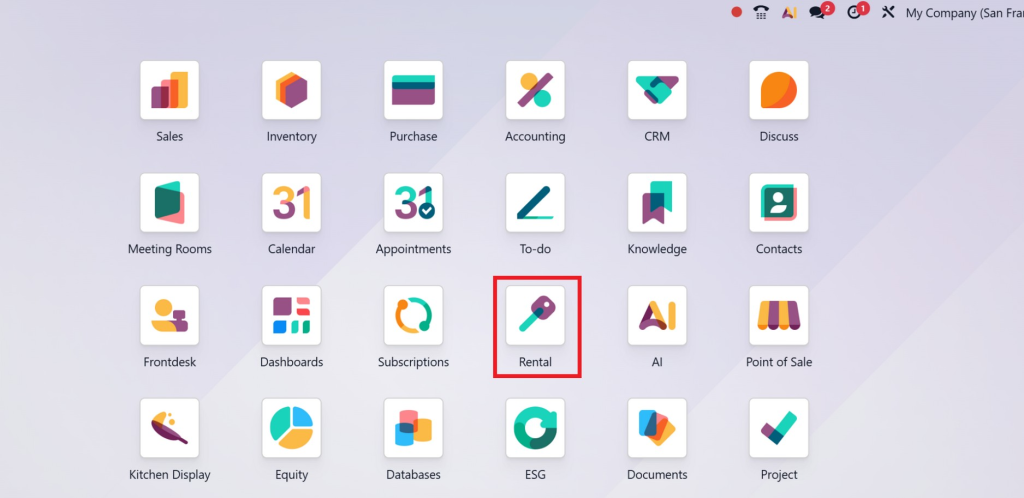
- Navigate to Configuration.
- Select Settings.
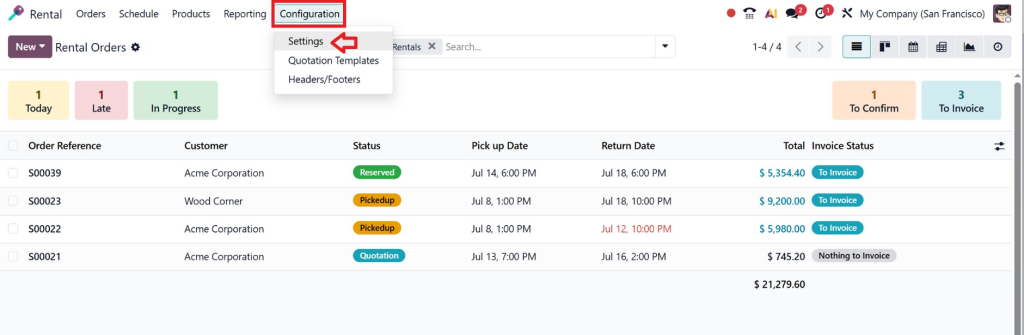
- Review the available rental configuration options.
- Save your changes after completing the setup.
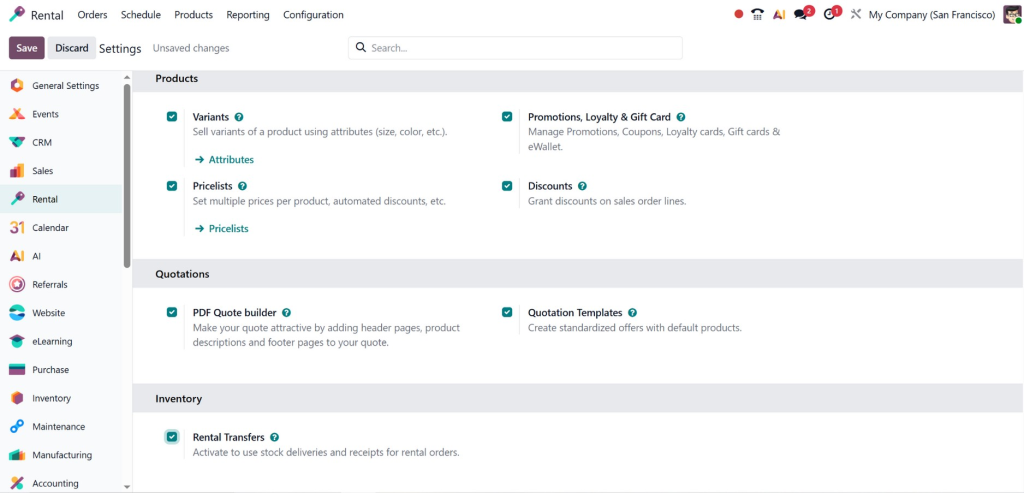
The settings page includes several important configuration areas that affect the entire rental workflow.
Let’s examine each one in detail.
Configure Rental Padding Time
One of the most useful features in Odoo 19 rental app settings is Odoo rental padding time.
What is Rental Padding Time?
Padding time is the buffer period added before or after a rental.
It prevents two customers from booking the same product too closely together.
For example:
- Customer A returns a projector at 10:00 AM.
- Customer B wants the same projector at 10:15 AM.
Without padding time, this could create operational problems.
Adding a one-hour buffer gives your team enough time to:
- Inspect equipment
- Clean products
- Perform maintenance
- Prepare for the next customer
- Complete warehouse processing
This significantly reduces scheduling conflicts.
Benefits of Padding Time
- Better inventory availability
- Reduced operational stress
- Improved maintenance scheduling
- Higher customer satisfaction
- More accurate delivery planning
Businesses renting expensive equipment benefit greatly from this feature because products often require inspection between rentals.
Configure Delay Costs for Late Returns
Late returns are common in rental businesses.
Instead of manually calculating penalties, Odoo applies automatic delay charges via rental delay costs.
Feature: How Delay Costs Work
When a customer returns rented products after the agreed date, Odoo automatically calculates additional rental charges based on your predefined rules.
You can configure:
- Hourly penalties
- Daily penalties
- Fixed late fees
- Automatic invoice adjustments
Example
Rental Duration:
3 Days
Rental Fee:
$300
Late Return:
2 Days
Late Charge:
$40 per day
Total Additional Cost:
$80
Final Invoice:
$380
Everything is calculated automatically.
Advantages
- Fair pricing
- Transparent billing
- Reduced manual calculations
- Faster invoicing
- Improved revenue collection
Customers also understand the pricing structure before renting, reducing disputes.
Configure Rental Transfers
Inventory movement plays a major role in rental businesses.
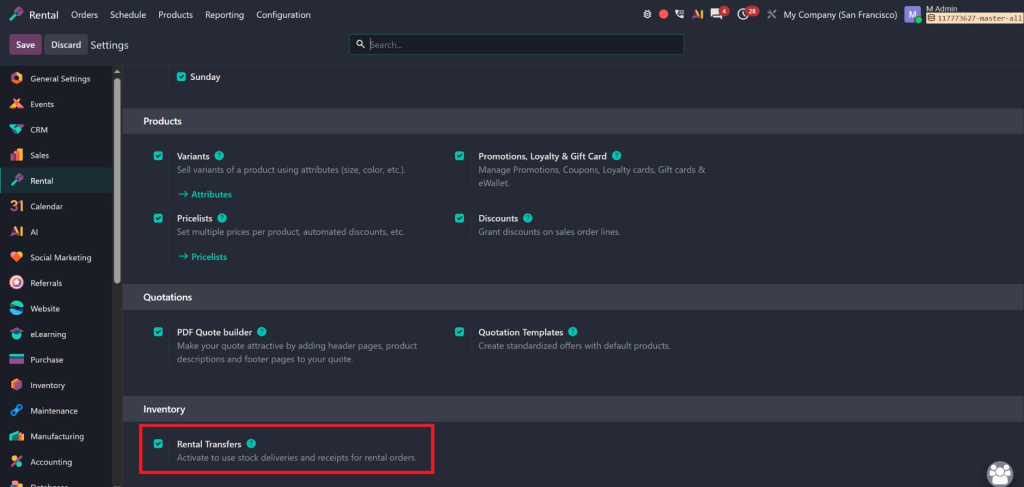
The Odoo rental transfers feature manages warehouse operations automatically.
What are Rental Transfers?
Rental transfers move products between warehouse locations during the rental process.
For example:
- Warehouse → Customer
- Customer → Warehouse
- Warehouse A → Warehouse B
Odoo automatically generates transfer orders based on rental confirmations.
Why Rental Transfers Matter
Without automated transfers:
- Inventory may become inaccurate.
- Employees may forget stock movements.
- Warehouse teams lose visibility.
- Delivery tracking becomes difficult.
Automated transfers improve:
- Inventory accuracy
- Warehouse coordination
- Delivery management
- Product tracking
Every rental order maintains a complete movement history.
Enable Rent Online Settings
Today’s customers expect online booking.
The Odoo rent online settings integrate the Rental module with your website.
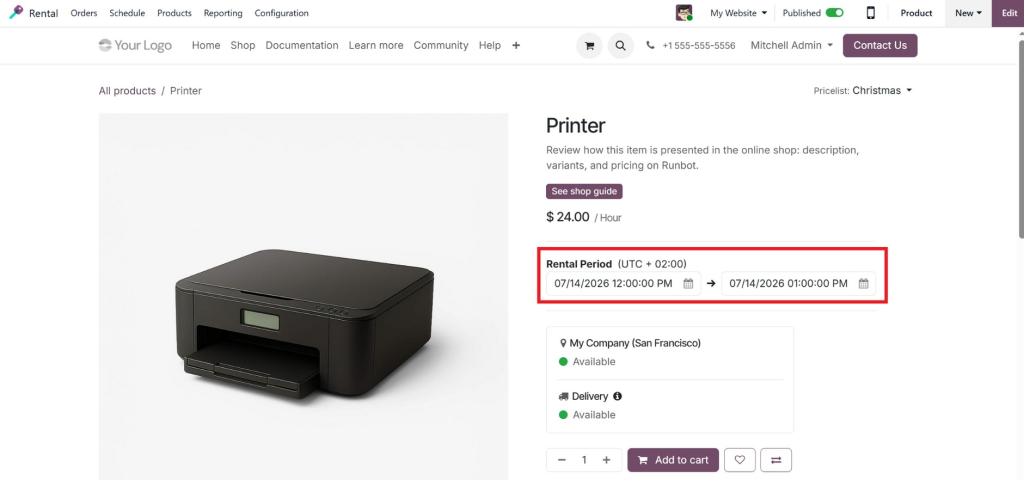
Online Rental Configuration
After enabling online rentals, customers can:
- Browse rental products
- Check availability
- Select rental periods
- Reserve products
- Make online payments
- Receive confirmations
This creates a smooth self-service experience.
Benefits
- 24/7 bookings
- Less manual work
- Increased sales
- Better customer convenience
- Automated reservations
Businesses with large product catalogues benefit significantly from online rentals.
Configure Rental Pricing Rules
Rental pricing varies depending on duration.
Odoo supports flexible pricing models.
You can define prices for:
- Hourly rentals
- Daily rentals
- Weekly rentals
- Monthly rentals
- Long-term contracts
Example:
Duration | Price |
1 Hour | $20 |
1 Day | $80 |
1 Week | $400 |
1 Month | $1,200 |
The system automatically applies the correct pricing.
Manage Security Deposits
Many rental businesses collect refundable deposits.
Odoo allows businesses to include deposits during rental orders.
Benefits include:
- Protection against damage
- Reduced financial risk
- Easier refund processing
- Better customer accountability
Deposits remain separate from rental income until refunded.
Configure Rental Product Availability
Availability management prevents double bookings.
When products are rented:
- Inventory updates automatically.
- Future reservations become visible.
- Staff know knowsuct availability instantly.
This minimizes scheduling conflicts.
Configure Rental Scheduling
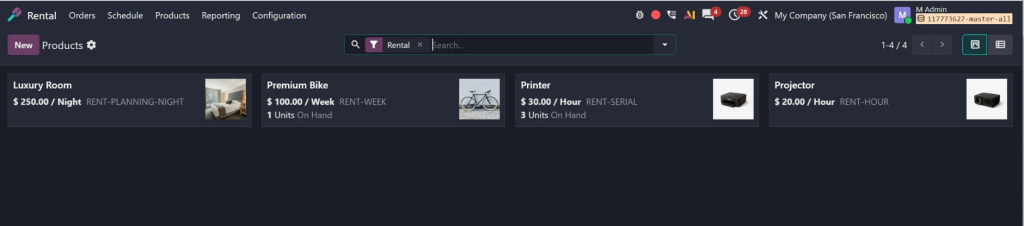
Scheduling tools provide a complete rental calendar.
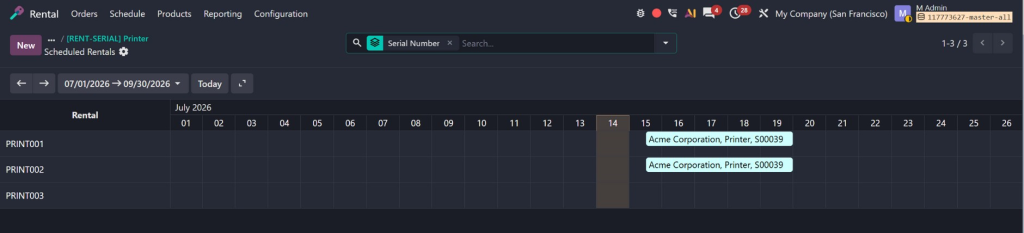
Managers can monitor:
- Upcoming rentals
- Active rentals
- Returns
- Maintenance
- Reserved inventory
This improves planning across departments.
Enable Digital Documents
Odoo allows digital documentation throughout the rental process.
Businesses can generate:
- Quotations
- Rental agreements
- Delivery slips
- Return documents
- Customer invoices
Everything remains stored inside Odoo.
Benefits include:
- Less paperwork
- Faster approvals
- Better document tracking
Connect Rental with Other Odoo Modules
One of Odoo’s biggest strengths is integration.
The Rental app connects with:
Inventory
Tracks stock movements automatically.
Sales
Converts quotations into rental orders.
Accounting
Creates invoices automatically.
Website
Supports online rentals.
CRM
Tracks customer opportunities.
Purchase
Orders replacement products when necessary.
Maintenance
Schedules equipment servicing between rentals.
Together, these modules create a complete rental management system.
Lorem ipsum dolor sit amet, consectetur adipiscing elit. Ut elit tellus, luctus nec ullamcorper mattis, pulvinar dapibus leo.
Best Practices When Configuring the Odoo 19 Rental App
When setting up your rental business, consider these recommendations.
Define Clear Rental Policies
Customers should understand:
- Rental duration
- Return rules
- Cancellation policy
- Damage policy
- Deposit requirements
Use Padding Time Wisely
Too little padding creates scheduling conflicts.
Too much padding reduces product utilization.
Choose a balance based on your products.
Automate Delay Charges
Avoid manual calculations.
Automation ensures fairness and saves time.
Enable Warehouse Transfers
Inventory accuracy improves dramatically with automatic transfers.
Test Website Rentals
If you offer online booking, perform several test rentals before going live.
Review Reports Regularly
Odoo provides reports on:
- Rental revenue
- Product utilization
- Late returns
- Customer activity
These insights help improve business decisions.
Common Mistakes to Avoid
Many businesses rush through the setup process.
Avoid these mistakes:
- Ignoring padding time
- Forgetting delay costs
- Turning off warehouse transfers
- Not testing online rentals
- Using incorrect pricing rules
- Skipping employee training
- Leaving default settings unchanged
A small configuration mistake can affect hundreds of rental orders.
Why Choose Netilligence for Odoo Rental Implementation?
Configuring the Rental app involves more than enabling a few settings. Every rental business has unique workflows, pricing models, warehouse operations, and customer expectations. A professional implementation ensures that the system is tailored to your business from the start.
At Netilligence, we help businesses implement and customize Odoo solutions that improve efficiency and support long-term growth. Our Odoo experts understand how different rental businesses operate and configure the system to match your daily processes.
Our services include:
- Complete Odoo Rental implementation
- Configuration of Odoo 19 rental app settings
- Custom rental workflows
- Pricing and billing setup
- Warehouse and inventory integration
- Website rental configuration
- User training and support
- Ongoing system optimization
Whether you’re launching a new rental business or upgrading to Odoo 19, our team ensures your Rental app is configured correctly so you can focus on serving your customers and growing your business.
Configure Default Settings in the Odoo 19 Rental for Long-Term Success
Taking the time to configure default settings in the Odoo 19 Rental app is one of the smartest investments you can make for your rental business. Proper configuration creates a strong operational foundation, improves inventory accuracy, simplifies warehouse management, automates pricing and delay charges, and delivers a better customer experience.
Features like Odoo rental padding time, Odoo rental delay costs, Odoo rental transfers, and Odoo rent online settings work together to eliminate manual work while ensuring every rental follows consistent business rules.
If you want to maximize the value of Odoo 19 and build a rental process that is efficient, scalable, and customer-focused, partnering with experienced Odoo professionals makes all the difference.
Netilligence is ready to help you configure, customize, and optimize your Odoo Rental solution so your business can operate with confidence and continue growing without operational bottlenecks.




