


Why Suggested Quantities Matter in Purchase Orders in Odoo
Purchase Orders in Odoo are designed to make purchasing faster, smarter, and more accurate. Instead of manually deciding how much stock to buy every time, Odoo can recommend quantities based on historical demand, inventory levels, and replenishment rules. This saves time while reducing the chances of ordering too much or too little.
Businesses often struggle with inventory planning because customer demand changes constantly. Ordering excess stock ties up cash and warehouse space, while ordering too little can result in delayed deliveries and unhappy customers. This is where Odoo purchase order suggestions become valuable. They help purchasing teams make informed decisions without spending hours analyzing stock reports.
Using Odoo purchase order suggestions, companies can quickly generate RFQs with recommended quantities based on real business data. Whether you manage a retail store, manufacturing company, or wholesale business, Odoo replenishment suggestions make inventory planning much easier. Features like the Odoo purchase catalog, Odoo historical demand purchase, Odoo RFQ suggested quantities, and the Odoo stock replenishment purchase order process work together to improve purchasing efficiency while reducing errors.
In this guide, you’ll learn how suggested quantities work in Purchase Orders in Odoo, how they are calculated, their benefits, and how your business can use them to build a more efficient purchasing workflow.
What Are Suggested Quantities in Purchase Orders in Odoo?
Suggested quantities are recommendations generated by Odoo to help buyers determine how much inventory to purchase. Rather than entering numbers manually, the system analyzes inventory-related information and suggests appropriate purchase quantities.
The recommendations are not random. Odoo evaluates several business factors before making suggestions, including:
- Current stock available
- Forecasted inventory
- Product demand
- Purchase rules
- Vendor information
- Replenishment settings
These recommendations simplify purchasing decisions while helping businesses maintain healthy stock levels.
Instead of spending valuable time calculating inventory requirements, purchasing managers can simply review the suggested quantity and confirm or adjust it before sending the purchase order.
How Do Suggested Quantities Work in Odoo?
Understanding how suggested quantities work in Odoo is easier than many businesses think. Odoo gathers inventory information from multiple areas of the ERP and converts it into purchasing recommendations.
Current Stock Availability
The system first checks the available inventory for each product.
If enough stock already exists, Odoo may recommend purchasing nothing.
If inventory is running low, suggested quantities are automatically calculated.
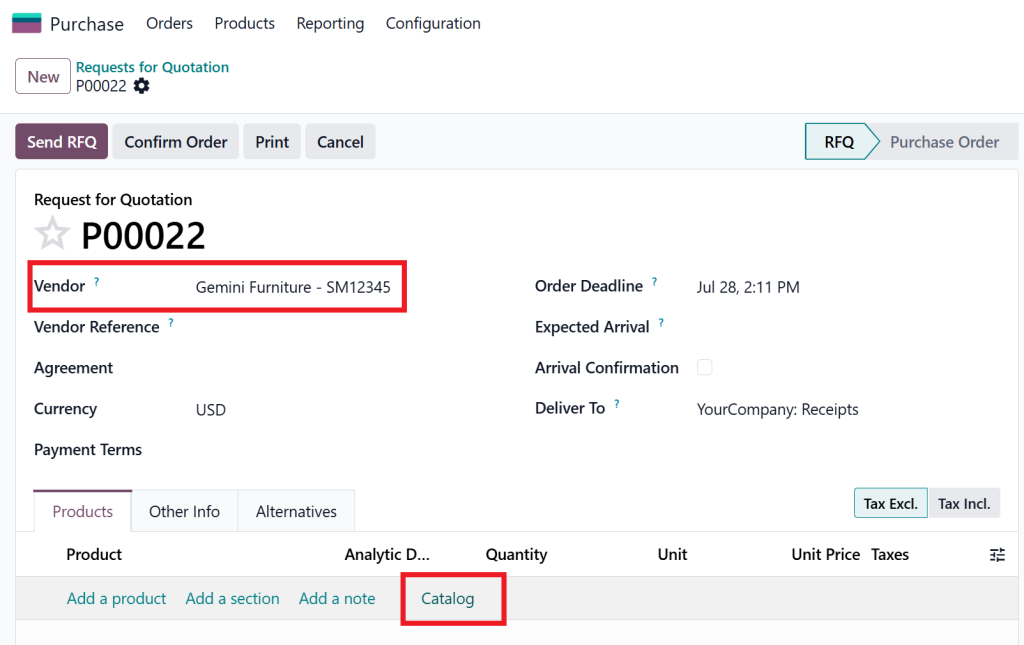
Go to the Purchase Module, then click “New,” select the vendor, and click the cataloguing option.
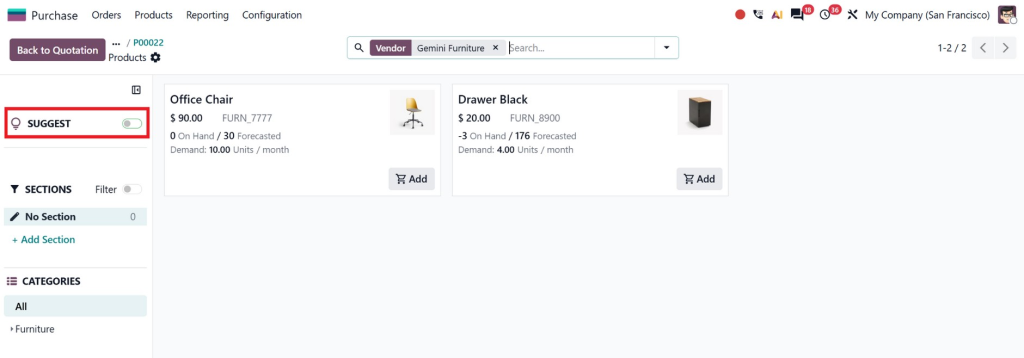
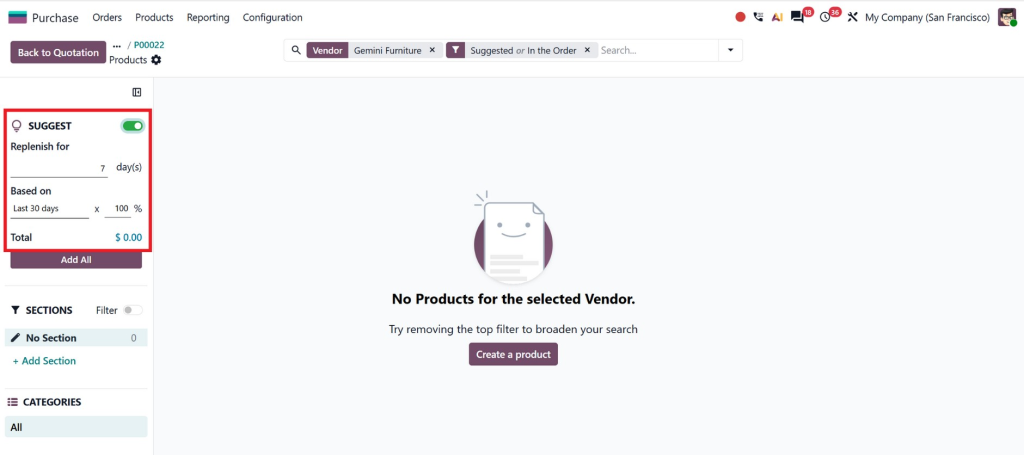
Then turn on the suggestion options.
Forecasted Demand
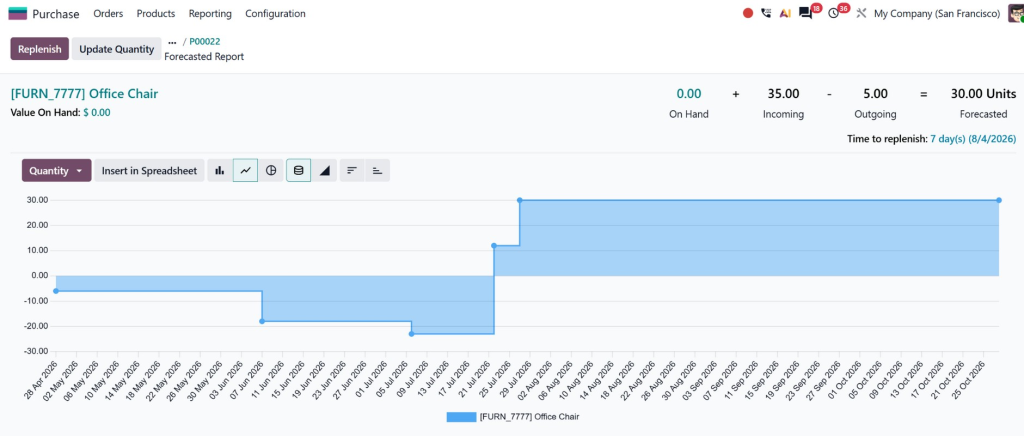
Odoo doesn’t only look at today’s inventory.
It also considers expected outgoing quantities from:
- Sales Orders
- Manufacturing Orders
- Delivery Orders
- Reservations
This helps businesses prepare before inventory shortages happen. Replenishment Rules
Replenishment rules define when products should be reordered.
Businesses can configure:
- Minimum stock levels
- Maximum stock levels
- Order multiples
- Lead times
Once inventory falls below the minimum level, Odoo replenishment suggestions automatically recommend purchasing additional stock.
Historical Purchasing Data
One of the most useful features is Odoo historical demand purchase analysis.
The system reviews previous purchasing and sales activity to understand buying trends.
For example:
- Seasonal products
- Frequently purchased items
- Fast-moving inventory
Historical demand helps businesses avoid shortages during busy periods.
Suggested Quantities During RFQ Creation
When creating Requests for Quotation, businesses often spend time deciding purchase quantities.
With Odoo RFQ suggested quantities, that process becomes much faster.
When products are selected, Odoo can automatically display recommended quantities based on replenishment calculations.
Purchasing teams simply:
- Review suggested quantities.
- Adjust them if necessary.
- Send the RFQ to vendors.
This minimizes manual calculations and speeds up procurement.
Companies purchasing hundreds of products every week benefit greatly from this automation.
Odoo Purchase Catalog Suggest Quantities
The purchase catalog offers another intelligent purchasing feature.
Using the Odoo purchase catalog to suggest quantities, buyers can quickly view products that require replenishment while placing orders.
Instead of searching product by product, the catalog displays recommended quantities alongside inventory information.
This provides several advantages:
- Faster purchasing
- Better purchasing decisions
- Reduced ordering mistakes
- Improved vendor communication
Buyers can simply review recommendations and confirm purchases within minutes.
Benefits of Odoo Purchase Order Suggestions
The biggest advantage of Odoo purchase order suggestions is that purchasing decisions become data-driven instead of guesswork.
Some major business benefits include:
Better Inventory Accuracy
Suggested quantities help maintain optimal stock levels without excessive inventory.
Reduced Stock Shortages
Businesses avoid running out of popular products because replenishment recommendations are generated before shortages occur.
Lower Inventory Costs
Ordering only what is needed reduces unnecessary inventory carrying costs.
Companies save money on:
- Warehouse space
- Storage expenses
- Insurance
- Inventory handling
Faster Purchasing Process
Manual calculations disappear.
Buyers spend more time approving purchases instead of analyzing spreadsheets.
Improved Decision Making
Purchasing teams gain confidence knowing recommendations are based on real inventory data.
Managers can still modify quantities whenever special circumstances arise.
Best Practices for Using Purchase Orders in Odoo
To get the most from Purchase Orders in Odoo, businesses should configure inventory settings carefully.
Here are some recommended practices.
Keep Inventory Updated
Suggested quantities depend on accurate stock information.
Always ensure:
- Inventory adjustments are completed.
- Deliveries are validated.
- Receipts are processed promptly.
Configure Replenishment Rules Properly
Minimum and maximum stock levels should reflect actual business demand.
Review them regularly, especially during seasonal changes.
Monitor Historical Demand
Businesses should periodically analyze previous purchasing trends.
This allows Odoo’s recommendations to match customer buying behavior better.
Review Suggestions Before Confirmation
Suggested quantities are intelligent recommendations, not mandatory values.
Purchasing managers should always review recommendations before approving purchase orders.
Train Purchasing Teams
Employees should understand:
- How suggestions are generated
- When adjustments are necessary
- How replenishment settings affect recommendations
Proper training leads to better purchasing decisions.
Why Businesses Choose Netilligence for Odoo Implementation
Powerful purchasing features are only valuable when they are configured correctly. Every business has different inventory levels, purchasing workflows, and replenishment requirements. That’s why expert implementation makes a significant difference.
At Netilligence, we help businesses configure Purchase Orders in Odoo to match their operational needs. From setting up replenishment rules and purchase catalogs to optimizing inventory workflows and vendor management, our team ensures that suggested quantities work accurately for your business. We also provide customization, user training, and ongoing support so your purchasing process remains efficient as your business grows.
Whether you’re implementing Odoo for the first time or improving an existing system, our experts help you make the most of every purchasing feature while reducing manual work and inventory costs.
Make Every Purchase Smarter with Purchase Orders in Odoo
Managing inventory should never rely on guesswork. With Purchase Orders in Odoo, businesses can use intelligent suggested quantities to make purchasing decisions based on real-time inventory, historical demand, and replenishment rules. Features such as Odoo suggested quantities, Odoo purchase order suggestions, Odoo replenishment suggestions, Odoo purchase catalog suggest quantities, and Odoo RFQ suggested quantities work together to simplify procurement, reduce stock shortages, and improve overall efficiency.
As your business grows, purchasing becomes more complex, but it doesn’t have to become more difficult. By using these smart recommendations and partnering with experienced Odoo specialists like Netilligence, you can build a purchasing process that saves time, reduces costs, and keeps your inventory ready for customer demand. If you’re looking to optimize your purchasing workflow, now is the perfect time to discover what Purchase Orders in Odoo can do for your business.




