

Introduction – What If Your Warehouse Never Had to Store Products?
Imagine paying for a huge warehouse… but the products inside barely stay there.
Sounds impossible?
Most businesses believe inventory must sit on shelves for days, or even weeks, before it’s shipped. But what if your products could arrive in the morning and leave for customers just minutes later? No endless stacking. No unnecessary storage. No wasted warehouse space.
That’s exactly what cross-docking makes possible.
Think about it: every extra hour a product spends sitting in storage costs money. More handling means more labor. More storage means higher expenses. More delays mean unhappy customers. So why let products collect dust when they could already be on their way to buyers?
This is where the cross docking process changes everything.
If you’ve ever searched for what is cross docking, you’re about to discover why some of the world’s fastest supply chains rely on it. Instead of moving products through multiple warehouse stages, cross docking inventory allows goods to flow almost directly from incoming trucks to outgoing deliveries.
The best part? You don’t need complicated systems or manual coordination anymore. With Odoo inventory, businesses can automate the entire workflow. The latest Odoo 19 inventory features make it easier than ever to build a smart cross docking warehouse, reduce handling, and speed up deliveries without increasing operational costs.
So, how does warehouse cross docking actually work inside Odoo? How does inventory cross docking reduce storage costs while improving delivery speed? And is it the right strategy for your business?
Let’s open the warehouse doors and find out. The answer might completely change the way you think about inventory management.
What Is Cross Docking and Why Does It Matter?
Many businesses keep inventory in storage until customer orders arrive. While this works for some industries, it also increases warehouse expenses, inventory holding costs, and handling time.
The answer to what is cross docking is much simpler than traditional warehousing. Products arrive from suppliers and are immediately sorted, packed if necessary, and loaded onto outbound vehicles for delivery.
Instead of following this process:
Supplier → Warehouse Storage → Picking → Packing → Shipping
Cross-docking follows this path:
Supplier → Receiving Dock → Sorting → Shipping Dock → Customer
This shorter workflow offers several advantages:
- Faster order fulfillment
- Lower warehouse storage costs
- Reduced inventory handling
- Better warehouse space utilization
- Lower risk of product damage
- Improved customer satisfaction
Businesses dealing with fast-moving products especially benefit from a well-organized cross docking warehouse.
How Does Cross-Docking Work in Odoo 19 Inventory?
Odoo 19 inventory includes advanced warehouse routing capabilities that make cross-docking easy to manage. Instead of manually deciding where products should go after receiving them, Odoo automatically follows predefined warehouse routes.
Here’s how the process works.
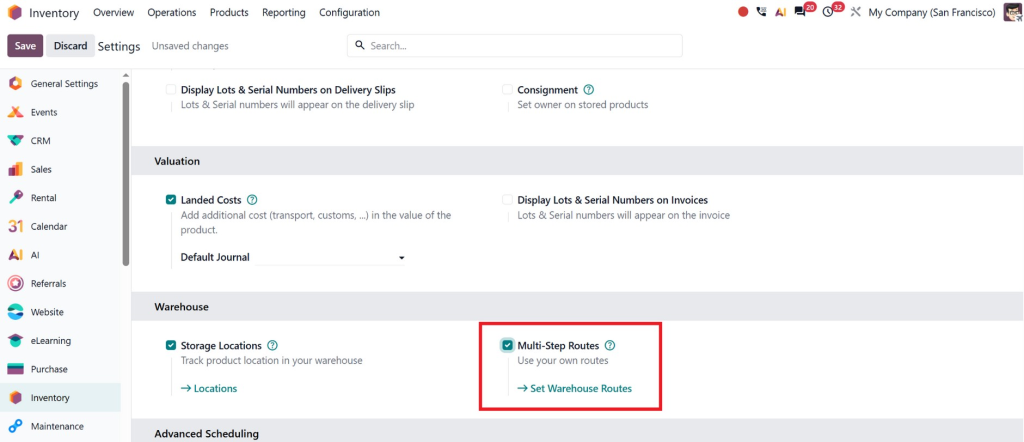
Enable multi-step routes from settings
For this go to inventory module and then configuration:
Step 1 – Enable Cross-Docking for Your Warehouse
Before you can use cross-docking, you need to enable it in your warehouse settings.
Go to Inventory → Configuration → Warehouses
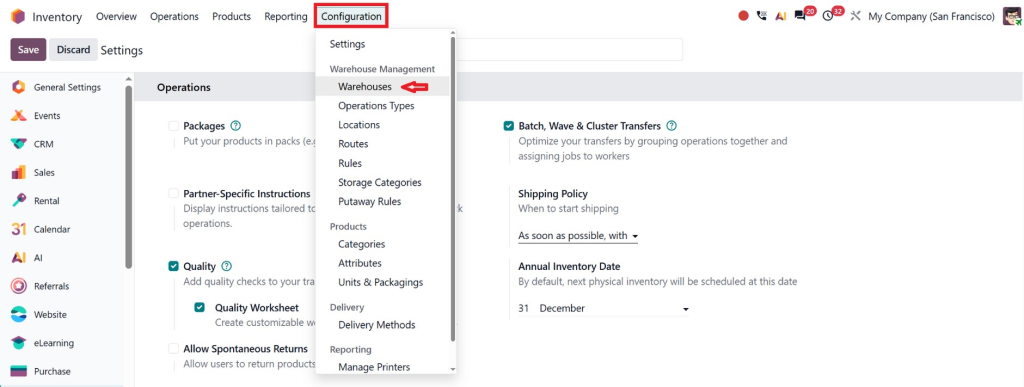
And open the warehouse where you want to use cross-docking. Under the warehouse configuration, enable the Cross-Dock route (or select the appropriate reception and delivery flow that supports cross-docking). Save your changes.
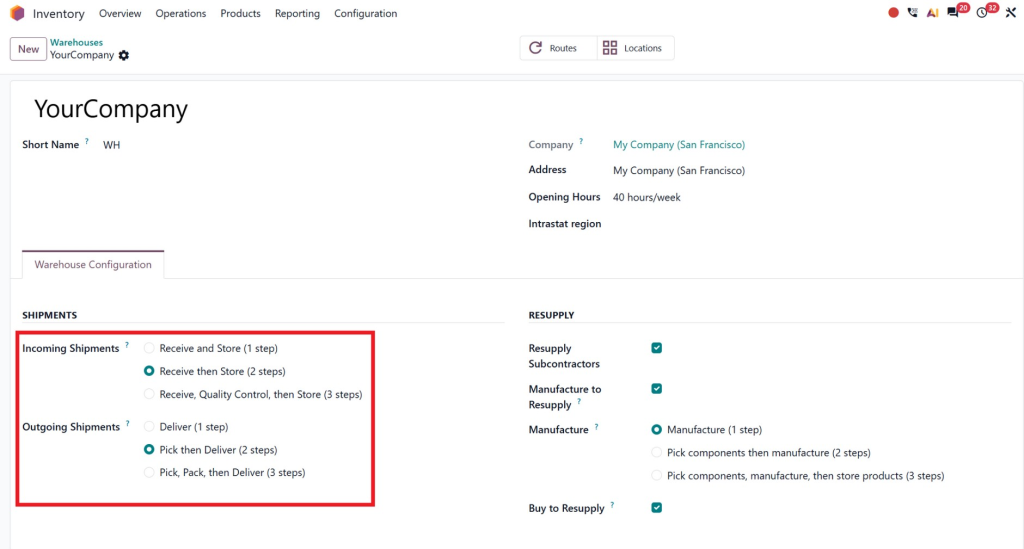
Once enabled, Odoo automatically creates the necessary routes and operation types required for cross-docking.
Step 2 – Create a Sales Order and Purchase Order
Cross-docking works when there is customer demand for a product that is not currently available in stock.
First, create and confirm a Sales Order for the customer.
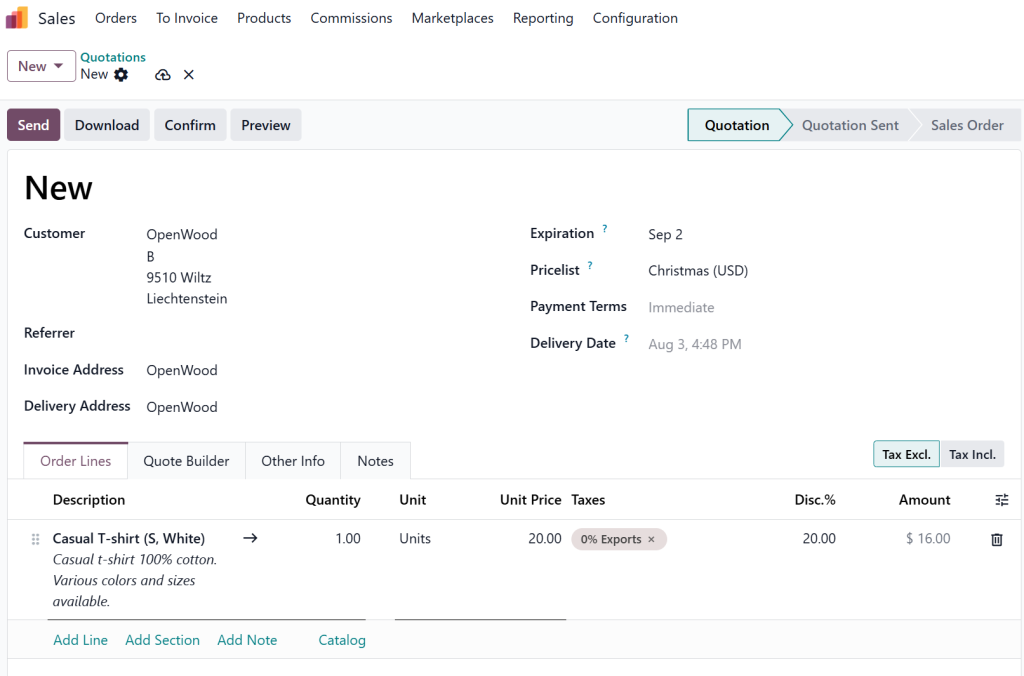
Since the product is unavailable, Odoo reserves the demand but waits for incoming stock.
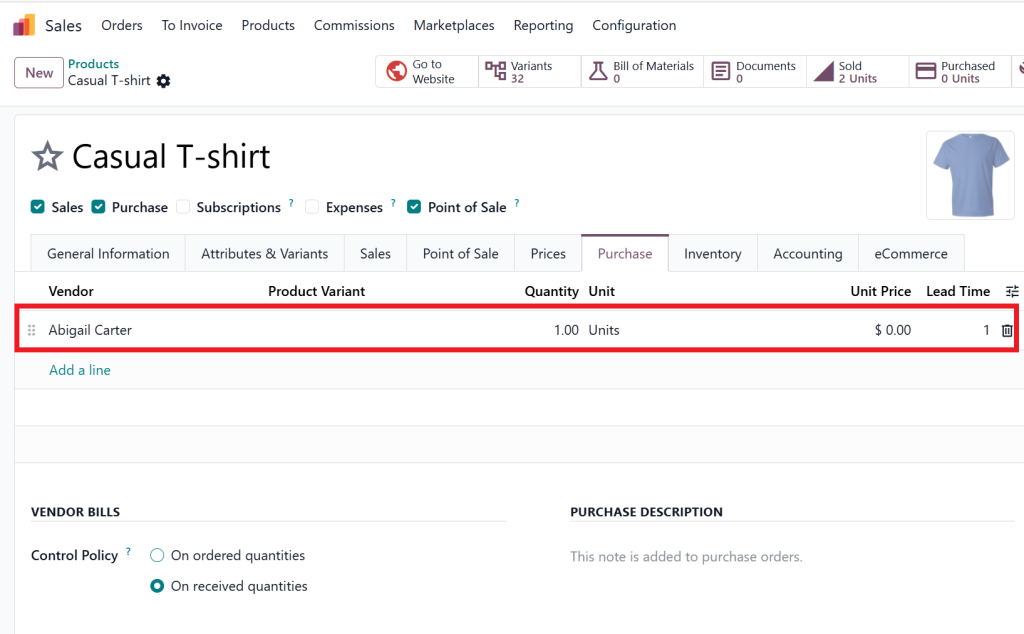
For the product also add a vendor.
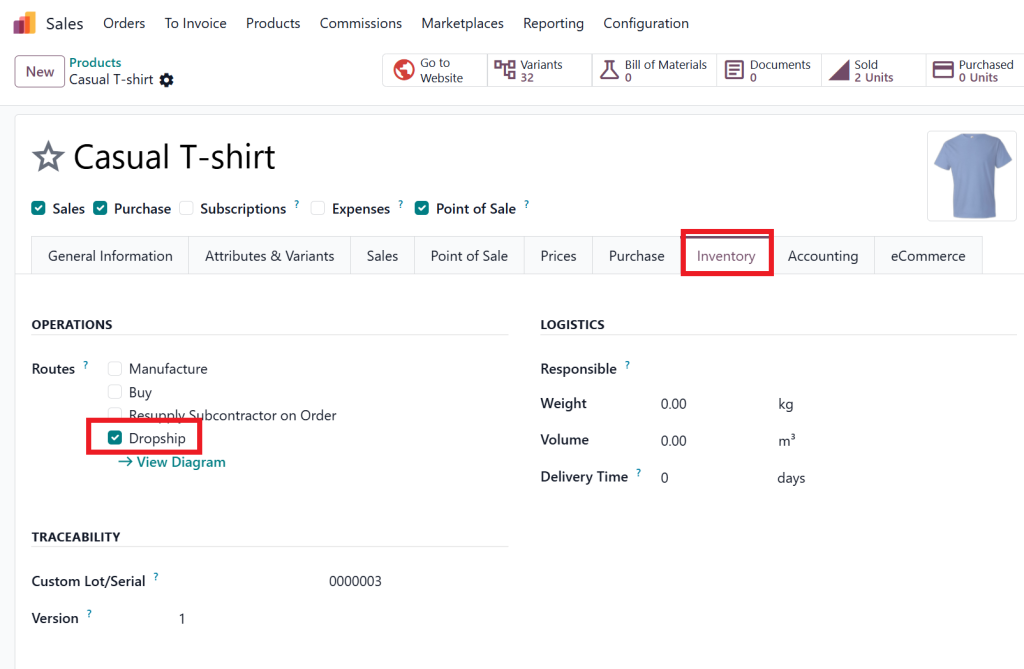
Also check the dropship option under inventory.
Next, create and confirm a Purchase Order for the same product. Odoo now understands that the incoming products are already needed for an existing customer order.
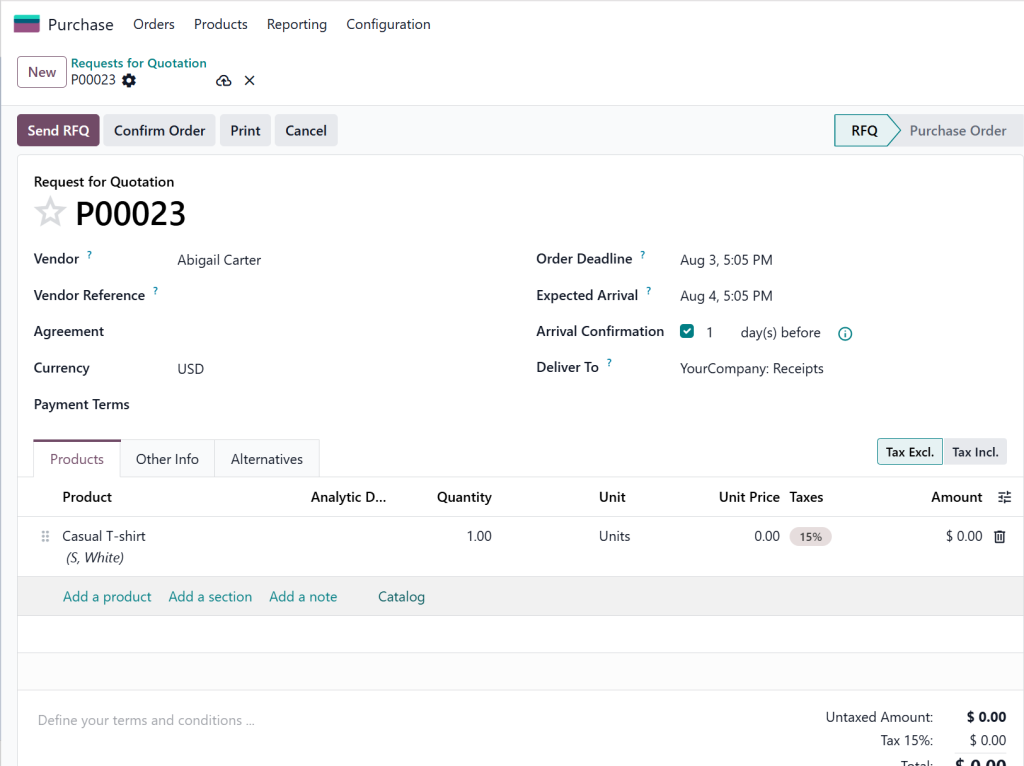
Step 3 – Validate the Incoming Receipt
After confirming the Purchase Order, Odoo generates an incoming Receipt.
Navigate to Inventory → Operations → Receipts,
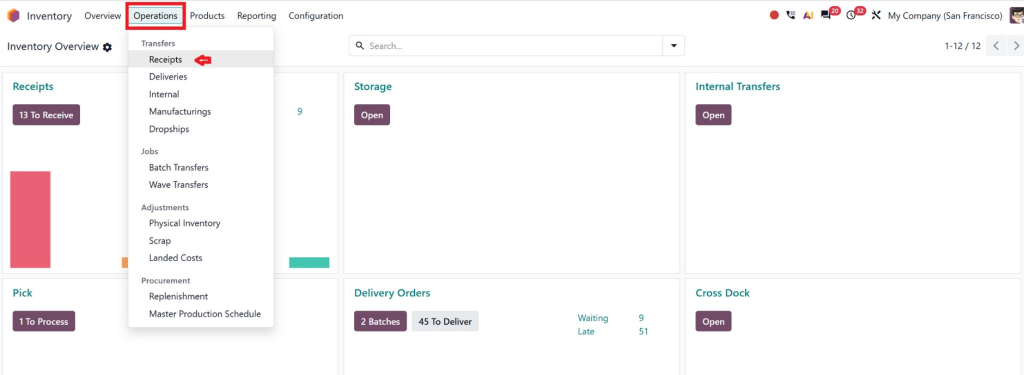
Open the receipt, verify the received quantities, and click Validate.
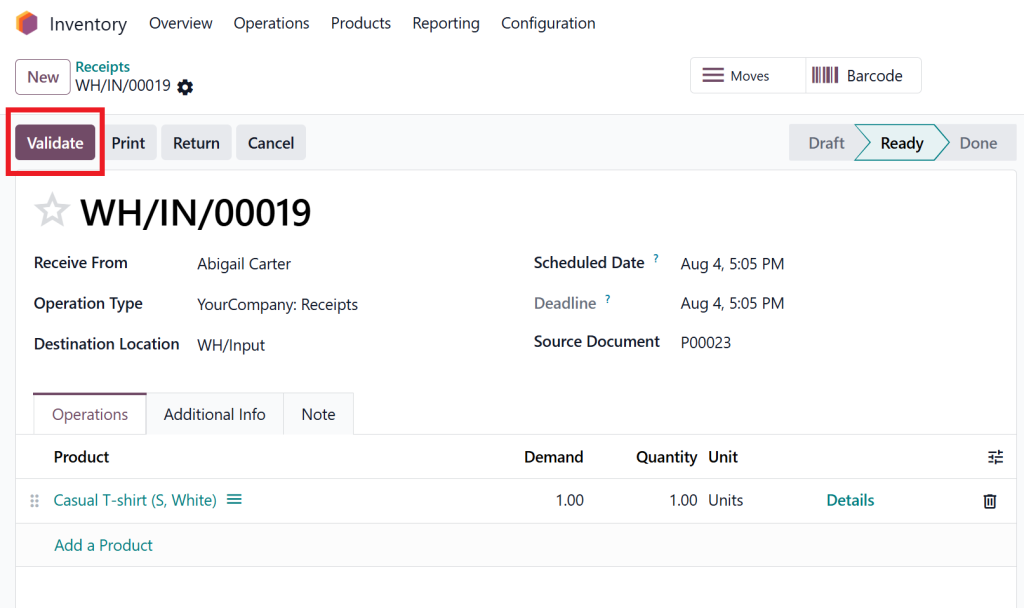
Instead of moving the products into the warehouse storage location, Odoo recognizes the cross-docking route and prepares the next stock movement automatically.
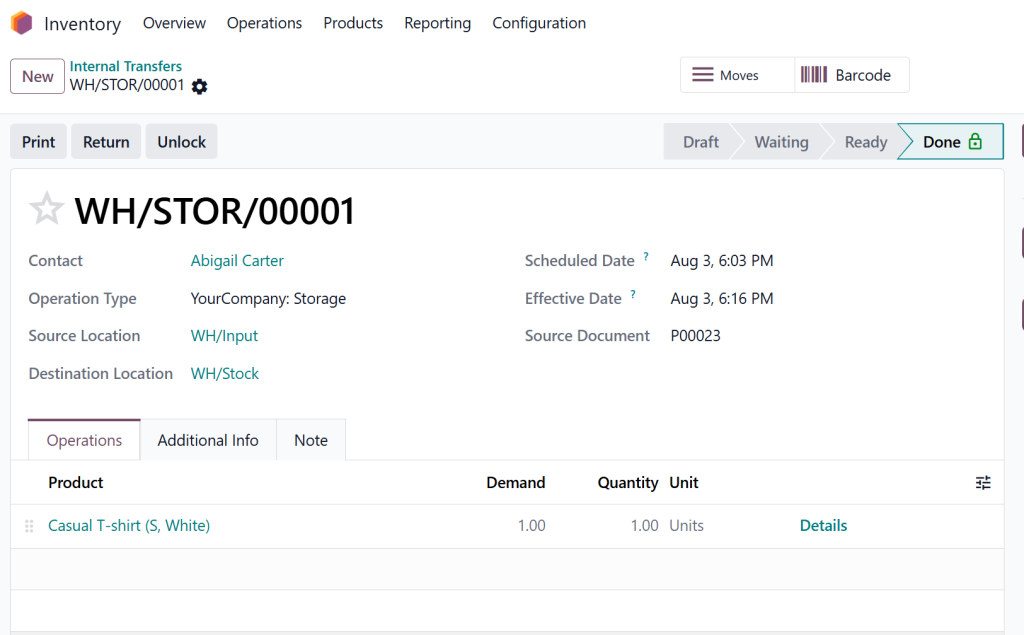
Step 4 – Process the Internal Transfer
Once the receipt is validated, Odoo automatically creates an Internal Transfer to move the products from the receiving dock to the Output or Shipping area.
Go to Inventory → Operations → Internal Transfers, open the generated transfer, review the quantities, and validate it.
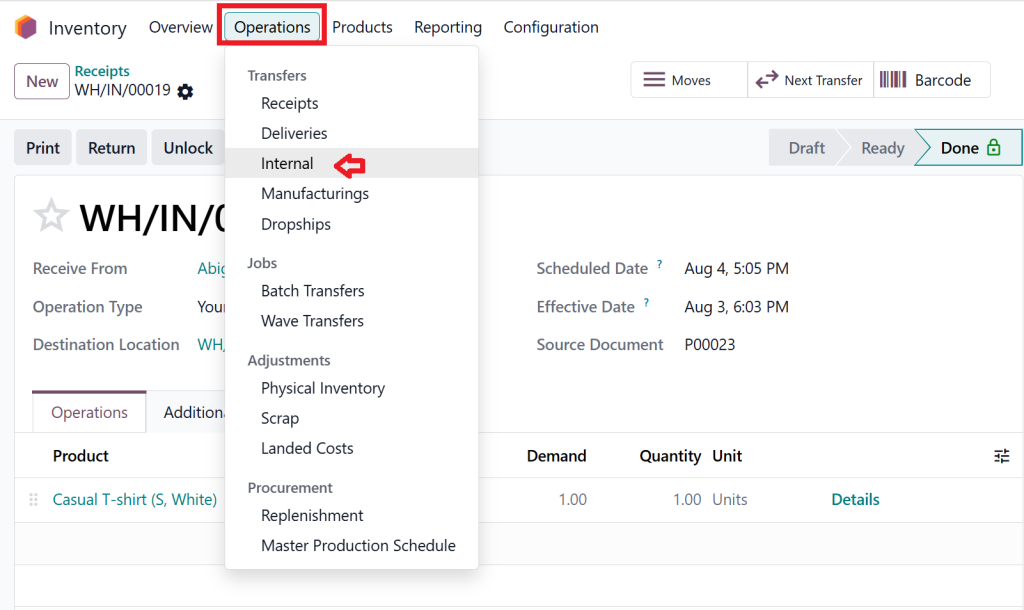
This step is the heart of the cross docking process, allowing products to bypass storage and move directly toward shipment.
Step 5 – Validate the Delivery Order
After the internal transfer is completed, Odoo automatically prepares the Delivery Order linked to the customer’s Sales Order.
Navigate to Inventory → Operations → Delivery Orders,
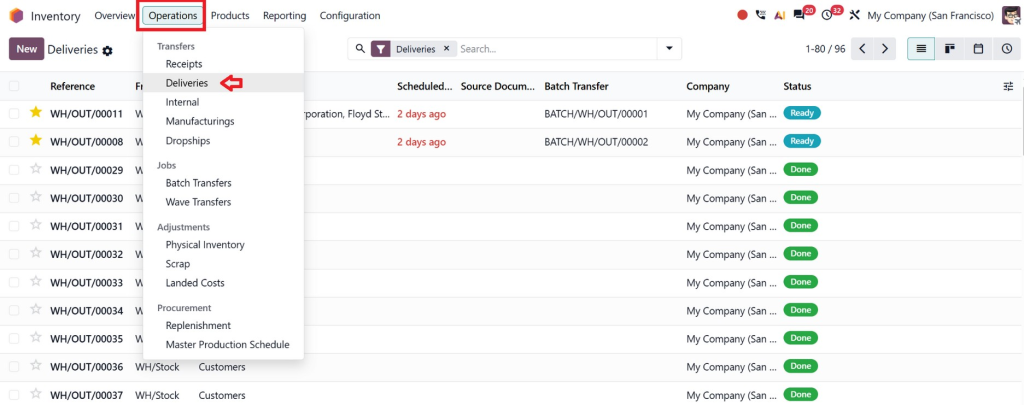
Open the delivery, verify the product quantities, and click Validate.
The products are shipped to the customer, inventory levels are updated automatically, and complete traceability is maintained. By following this workflow, Odoo 19 Inventory helps businesses automate inventory cross docking, reduce warehouse handling, minimize storage costs, and deliver orders much faster.
Benefits of Cross-Docking in Odoo 19 Inventory
Implementing cross-docking inside Odoo offers both financial and operational advantages.
Lower Inventory Costs
Products spend less time sitting in storage.
Businesses reduce warehouse rental expenses, storage equipment costs, and inventory carrying costs.
Faster Deliveries
Customer orders are processed immediately after products arrive.
This helps companies meet growing customer expectations for same-day or next-day shipping.
Better Warehouse Space
A traditional warehouse requires large storage areas.
A cross docking warehouse needs far less storage space because inventory keeps moving instead of remaining on shelves.
Improved Inventory Accuracy
Because products move directly through the warehouse, there are fewer stock movements.
Fewer movements mean fewer opportunities for inventory mistakes.
Reduced Product Damage
Every time products are moved, there’s a chance they may be damaged.
The cross docking process reduces handling, keeping products safer.
Increased Employee Productivity
Warehouse employees spend less time storing and retrieving products.
Instead, they focus on receiving and shipping activities that generate value.
Which Businesses Should Use Inventory Cross Docking?
Not every company requires cross-docking, but many industries benefit greatly from it.
Retail Distribution
Retailers often receive products that are already assigned to store orders.
Using inventory cross docking speeds up deliveries to multiple branches.
eCommerce Companies
Online businesses handling hundreds of daily orders can reduce delivery times while minimizing warehouse storage.
Food and Beverage
Fresh products have limited shelf life.
Cross-docking ensures products reach customers quickly.
Manufacturing
Manufacturers often receive raw materials needed immediately for production.
Cross-docking keeps production moving without unnecessary storage.
Wholesale Distribution
Wholesalers handling large quantities can move products directly to customers without filling warehouse shelves.
Best Practices for Successful Warehouse Cross Docking
Although Odoo automates much of the workflow, businesses should still follow best practices.
Configure Warehouse Routes Correctly
Proper routing rules are the foundation of successful warehouse cross docking.
Incorrect configurations may send products to storage instead of shipping.
Keep Real-Time Inventory Updated
Employees should validate receipts and deliveries immediately.
Real-time inventory keeps stock information accurate.
Train Warehouse Staff
Employees should understand the workflow and know which products are processed through cross-docking.
Forecast Demand
Cross-docking works best when customer demand is predictable.
Accurate sales forecasting helps businesses prepare incoming shipments.
Monitor Performance
Use Odoo reporting tools to measure:
- Delivery speed
- Warehouse efficiency
- Inventory turnover
- Order accuracy
- Receiving performance
Regular analysis helps improve warehouse operations over time.
Why Choose Netilligence for Odoo Inventory Implementation?
Technology alone cannot improve warehouse operations without proper implementation.
At Netilligence, we help businesses configure Odoo inventory based on real operational requirements.
Our Odoo specialists assist with:
- Complete Odoo 19 Inventory implementation
- Warehouse route configuration
- Cross-docking setup
- Inventory automation
- Warehouse optimization
- Multi-warehouse management
- Barcode integration
- Employee training
- Ongoing technical support
We don’t simply install software, we build inventory solutions that improve efficiency, reduce operational costs, and help businesses scale with confidence.
Whether you’re implementing Odoo for the first time or upgrading your existing warehouse processes, our team ensures every workflow is configured to match your business goals.
Make Every Shipment Faster with Cross-Docking in Odoo 19
Modern supply chains demand speed, accuracy, and efficiency. Businesses can no longer afford slow warehouse processes or unnecessary storage costs. By implementing cross-docking in Odoo 19 inventory, companies can move products faster, reduce handling, improve warehouse productivity, and deliver better customer experiences.
If your organization wants to simplify logistics, optimize warehouse operations, and automate inventory workflows, Netilligence is ready to help. Our experts can design a customized Odoo Inventory solution that supports your unique business processes and helps you get the most from cross docking inventory strategies.
Partner with Netilligence today and discover how Odoo 19 Inventory can transform your warehouse into a faster, smarter, and more profitable operation.




