

Why Odoo Email CC Makes Customer Communication Easier
Odoo Email CC is one of those small features that can make a big difference in your daily business operations. Whether you’re sending a quotation, confirming a sales order, or sharing a customer invoice, multiple people often need to receive the same email. Instead of forwarding messages manually every time, Odoo allows you to include additional recipients using the CC field, making communication faster, clearer, and more organized.
Imagine you’re working with a purchasing manager, an accounts officer, and a company director. When you send an important document, all three may need a copy. Without Odoo Email CC, someone has to forward the email later, increasing the chances of delays or missed information. With the right setup, everyone receives the email at the same time.
Businesses that rely on Odoo email notifications appreciate how much time this saves. Teams no longer need to remember who should receive each message because the system can automatically include the right contacts.
The same applies to every Odoo sales order email. Sales representatives often need customers, procurement teams, and decision-makers to receive quotations together. Adding multiple recipients ensures everyone stays informed without creating extra work.
When invoices are involved, communication becomes even more important. A properly configured Odoo invoice email can reach both the finance department and the purchasing contact in a single message, helping businesses avoid payment delays caused by missing emails.
Many users also search for how to add CC in Odoo emails because they want to automate this process instead of entering email addresses manually every time. Fortunately, Odoo offers flexible options depending on your workflow and business requirements.
If your company needs to send sales order emails to multiple contacts, Odoo makes it simple through customer contacts, email templates, and additional customization when required.
Similarly, every Odoo customer invoice email can be delivered to all relevant stakeholders, ensuring invoices are received, reviewed, and processed without unnecessary follow-ups.
In this guide, we’ll explain how Odoo Email CC works, where it can be used, how it improves communication for sales and accounting teams, and why businesses often customize it to match their internal approval processes.
What Is Odoo Email CC?
Odoo Email CC is a feature that allows you to send a copy of an email to additional recipients while keeping the primary recipient unchanged. It works just like the CC option available in popular email services, but it becomes much more valuable when integrated into your ERP workflows.
Whenever a quotation, sales order, delivery confirmation, or invoice is sent from Odoo, the system generates an email using predefined templates. By adding CC recipients, the same message reaches multiple people without sending separate emails.
For example:
- The purchasing manager receives the quotation.
- The finance department receives the same copy.
- The company owner stays informed.
- Your internal sales manager can also receive a copy if needed.
This creates a single source of communication where everyone has access to the same information.
Instead of forwarding emails after they have already been sent, every stakeholder receives the original message immediately.
This approach reduces confusion, minimizes manual work, and creates better transparency between your business and your customers.
How to Add CC in Odoo Emails
One of the most common questions businesses ask is how to add CC in Odoo emails. The answer depends on your Odoo version and whether you’re using the standard functionality or a customized implementation.
In the standard Odoo setup, emails are usually sent using predefined email templates. These templates automatically populate customer details, document information, and other fields before the email is sent.
To include additional recipients, businesses typically configure the email template or customize the workflow so that the required contacts are automatically added to the CC field.
A typical process looks like this:
Step 1 – Open the Sales Order or Invoice
Navigate to the Sales or Accounting module
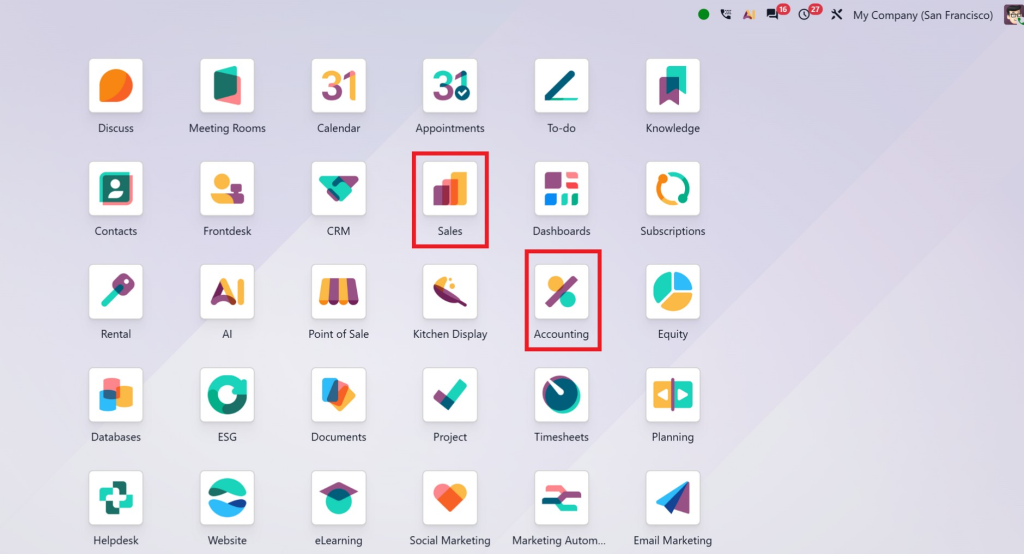
and open the document you want to send.
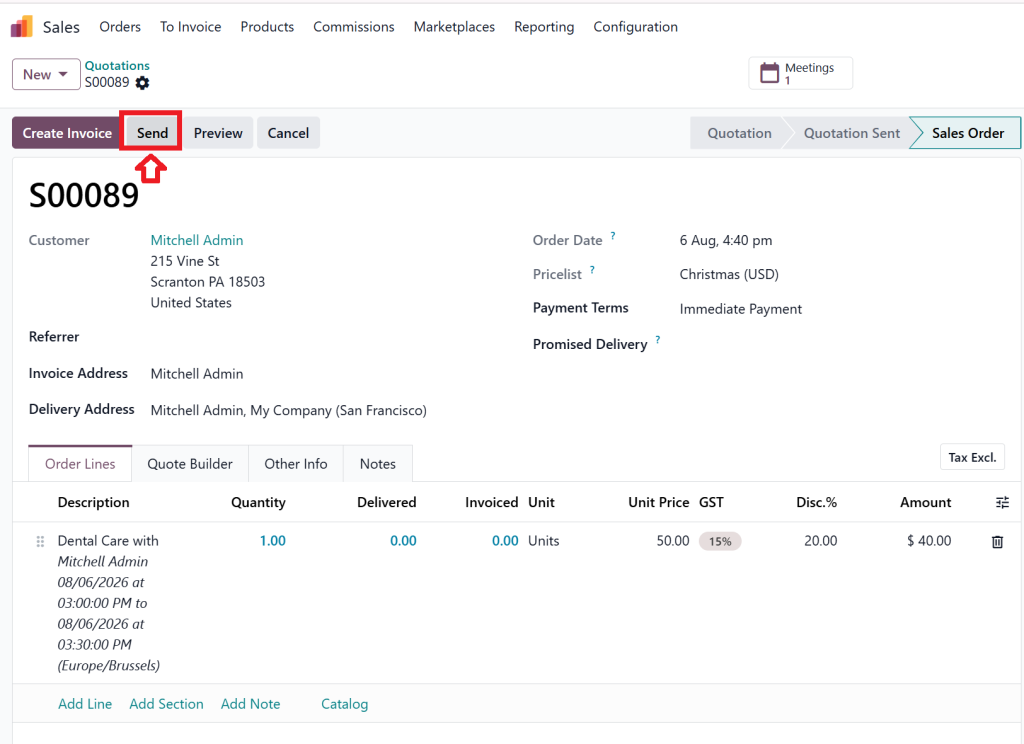
Step 2 – Click Send by Email
Odoo generates the email using its built-in template, including the customer information and document attachment.
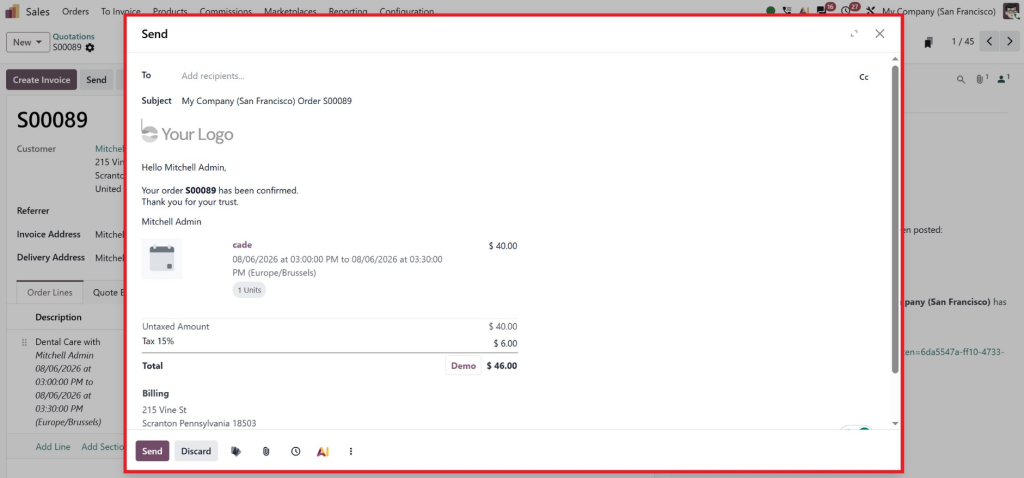
Step 3 – Add Additional Recipients
Before sending, you can include additional contacts in the CC field if your system supports it.
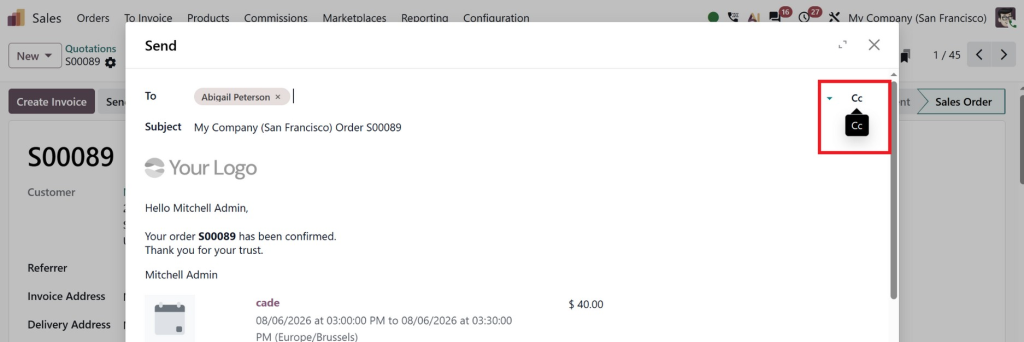
Many businesses also customize Odoo to populate these recipients automatically based on customer records.
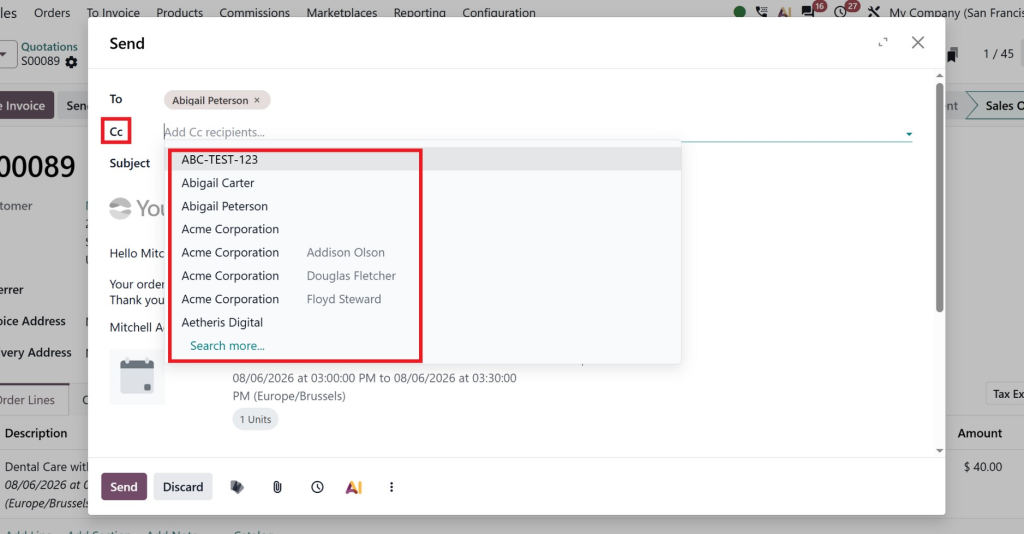
Step 4 – Send the Email
Once the email is confirmed, every recipient receives the same document simultaneously, ensuring everyone stays informed.
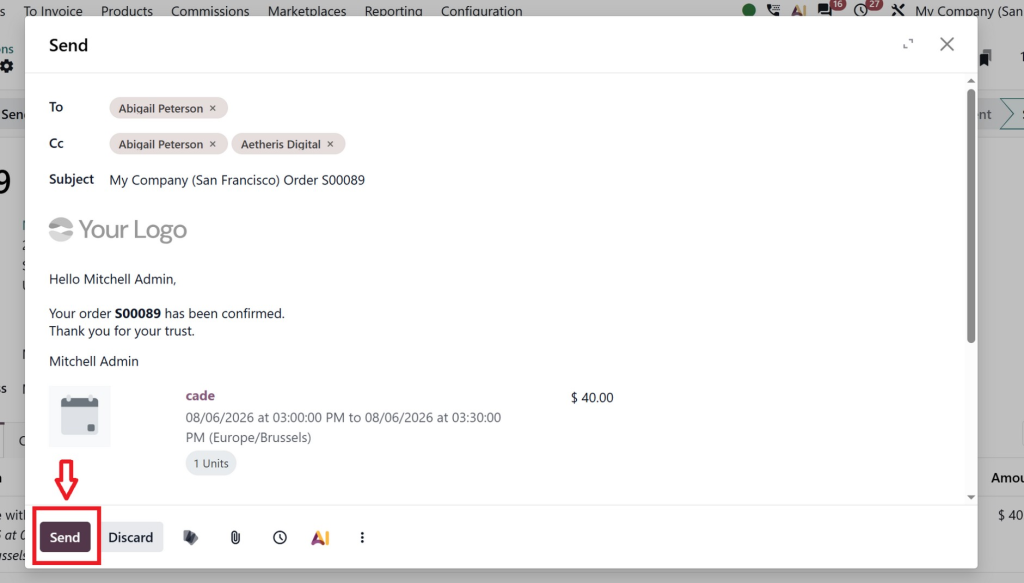
For businesses handling a high volume of quotations and invoices, manual entry can still become repetitive. This is why many organizations choose to automate the process through Odoo customization, eliminating the need to enter CC recipients each time.
Why Businesses Need Email CC for Sales Orders and Invoices
Many companies don’t communicate with just one person. A single transaction often involves several departments.
For example:
Sales Teams
The sales executive may send a quotation to the purchasing manager while copying the department head so that approvals happen more quickly.
Finance Teams
When sending invoices, accounting departments often need both the accounts payable team and the purchasing contact to receive the document.
Project-Based Companies
Construction companies, IT firms, and service providers frequently work with project managers, procurement officers, and finance representatives. Sending separate emails to each person wastes valuable time.
Using Odoo Email CC ensures that everyone involved receives identical information simultaneously.
This reduces misunderstandings and helps organizations maintain professional communication throughout the sales cycle.
Another advantage is better record keeping. Since all recipients receive the original email directly from Odoo, there is less dependence on manual forwarding, which often results in missing conversations or outdated attachments.
For growing businesses handling hundreds of quotations and invoices every month, this feature becomes even more valuable. It allows teams to maintain consistent communication while reducing repetitive administrative work.
Send Sales Order Email to Multiple Contacts in Odoo
Modern businesses rarely communicate with just one contact. A single sales order may involve procurement teams, finance departments, project managers, and company directors.
When you need to send sales order email to multiple contacts Odoo provides the flexibility to include everyone involved in the transaction.
For example, a manufacturing company may send a quotation to the purchasing manager while also copying:
- Finance Manager
- Operations Manager
- Project Coordinator
- Company Director
Instead of sending four separate emails, Odoo distributes the same document to all recipients in one action.
This offers several advantages:
- Faster communication across departments.
- Fewer follow-up emails.
- Better visibility for all stakeholders.
- Reduced risk of missing important information.
- A more professional customer experience.
The same workflow can also be extended to order confirmations, delivery notifications, and payment reminders.
When implemented correctly, businesses spend less time managing emails and more time focusing on sales and customer relationships.
Why Customize Odoo Email CC for Your Business?
Every company has different communication requirements. While standard Odoo covers many common scenarios, growing businesses often require additional flexibility.
Customization allows you to:
- Automatically add finance contacts to every invoice.
- Copy account managers on important quotations.
- Send documents to multiple departments based on customer records.
- Create different CC rules for different customers.
- Include internal team members for tracking and approvals.
- Reduce manual errors by automating recipient selection.
These improvements may seem small individually, but together they create a more efficient communication process.
Instead of relying on employees to remember who should receive each email, Odoo handles it automatically.
This improves accuracy, strengthens customer relationships, and helps businesses maintain consistent communication throughout the sales process.
Why Choose Netilligence for Odoo Customization?
At Netilligence, we understand that every business has unique workflows. That’s why we don’t believe in one-size-fits-all ERP solutions.
Our Odoo experts help businesses customize email workflows to match their operational needs, whether it’s configuring Odoo Email CC, enhancing Odoo email notifications, or automating customer communication.
Our services include:
- Odoo implementation
- Odoo customization
- Sales and Accounting module configuration
- Email workflow automation
- Custom reports and dashboards
- Third-party integrations
- Ongoing technical support
Whether you need to improve your Odoo sales order email, automate every Odoo customer invoice email, or configure advanced CC rules for multiple contacts, our team can deliver a solution that fits your business.
With years of experience implementing Odoo across different industries, Netilligence focuses on practical solutions that improve efficiency, reduce manual work, and support long-term business growth.




