

Make Every New Payment Method Work for Your Business
A New Payment Method can make a noticeable difference when your business accepts payments through different channels. Whether customers pay by cash, bank transfer, cheque, or another supported option, configuring the right Odoo payment method helps your accounting team record transactions correctly. When you use Odoo to register a payment, the selected method determines how the transaction is recorded and connected to the relevant journal.
For businesses managing a large number of transactions, having the right Odoo payment methods available can save time and reduce accounting mistakes. Instead of manually adjusting every Odoo invoice payment, your team can select the appropriate option during the payment process. If a required option is missing, knowing how to add a payment method in Odoo becomes important.
The process of adding a New Payment Method is closely connected with journals. Odoo allows payment methods to be configured from the Incoming Payments and Outgoing Payments sections of a bank or cash journal. This means your Odoo register payment method should be configured according to the way your business receives or sends money.
In this guide, we will explain how to register a payment in Odoo, when you may need a New Payment Method, how to configure it, and how the Odoo invoice payment method works in the overall accounting workflow. If your business needs several Odoo payment methods, understanding this setup can help you create a cleaner and more reliable payment process.
Why Do You Need a New Payment Method in Odoo?
Businesses rarely use only one way to receive or send money. A company may receive customer payments through cash, bank transfers, cheques, or other payment channels. Similarly, vendor payments may be handled through different bank-based methods.
Odoo provides payment methods that can be configured for different types of transactions. These methods are associated with bank or cash journals and can be used when registering payments.
You may need a New Payment Method when:
- Your business starts accepting a different payment type.
- Your accounting team wants to identify a particular payment channel separately.
- You want better visibility during reconciliation.
- You need to distinguish cheques or specific manual payment types.
- Your existing payment configuration does not match your business workflow.
For example, suppose your company receives customer payments through bank transfers and cheques. Instead of recording every cheque simply as a generic manual payment, you can create a specific payment method called “Cheque.” Odoo’s documentation gives this approach as an example for identifying customer cheque payments more easily.
This small configuration change can make payment records easier to understand and reconcile later.
How to Add a Payment Method in Odoo
Before using a New Payment Method during payment registration, you need to configure it in the appropriate journal.
In Odoo 19, payment methods can be configured from the Incoming Payments and Outgoing Payments tabs of a bank or cash journal.
Step 1: Open Accounting and Journals
Go to the Accounting application and open:
Accounting → Configuration → Journals
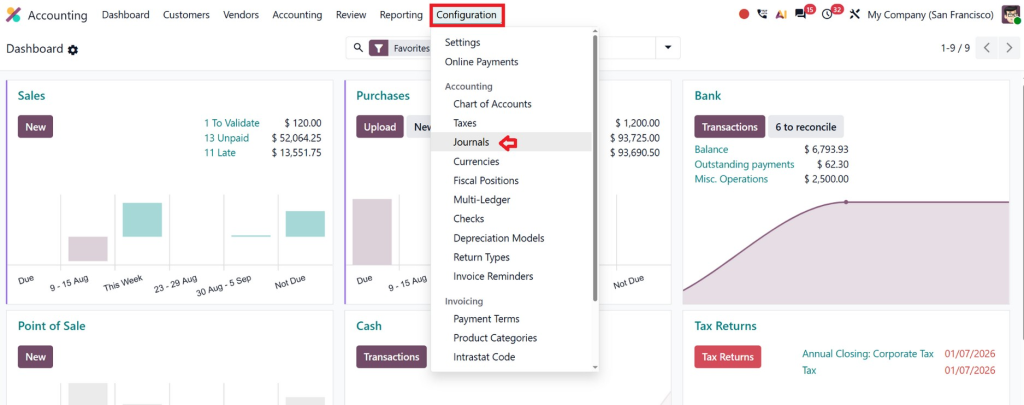
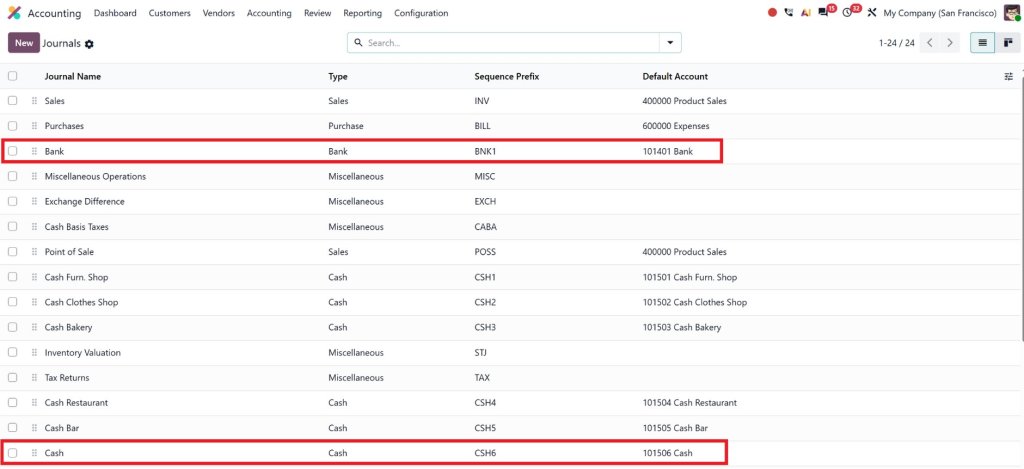
Find the bank or cash journal that should be used for the payment.
The journal is important because it determines where the payment transaction is recorded. Choosing the correct journal from the beginning helps maintain accurate accounting records.
Step 2: Open the Appropriate Payment Tab
Depending on the transaction, use the relevant tab:
- Incoming Payments for money received from customers.
- Outgoing Payments for money paid to vendors or other recipients.
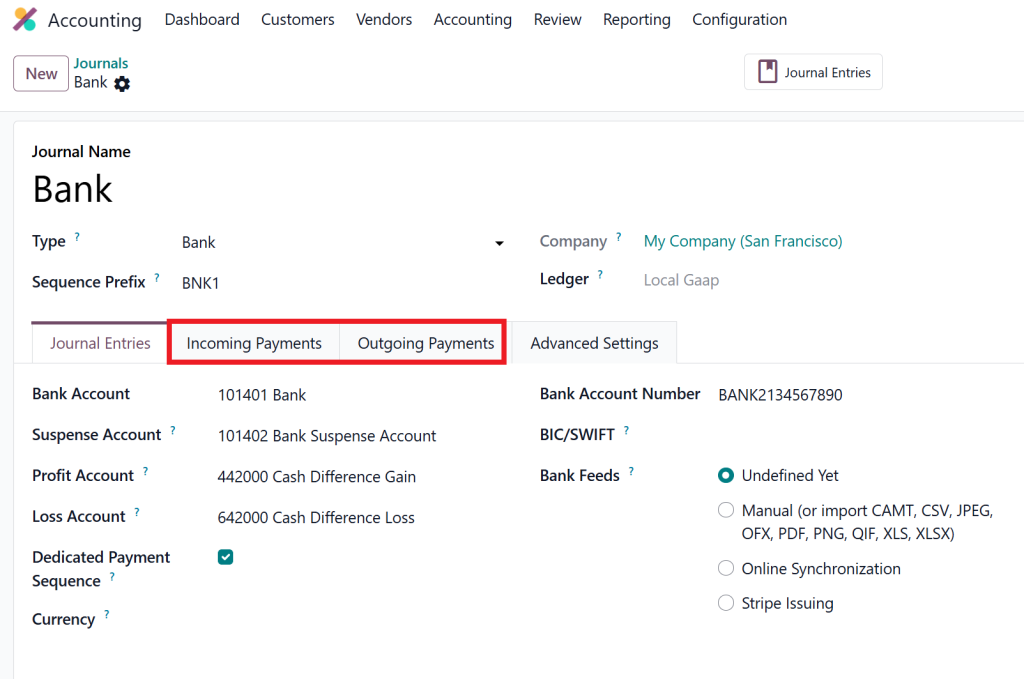
If you are creating a method for customer invoice payments, you will generally work with the incoming payment configuration.
Step 3: Add a Payment Method
In the relevant payment section, click Add a line.
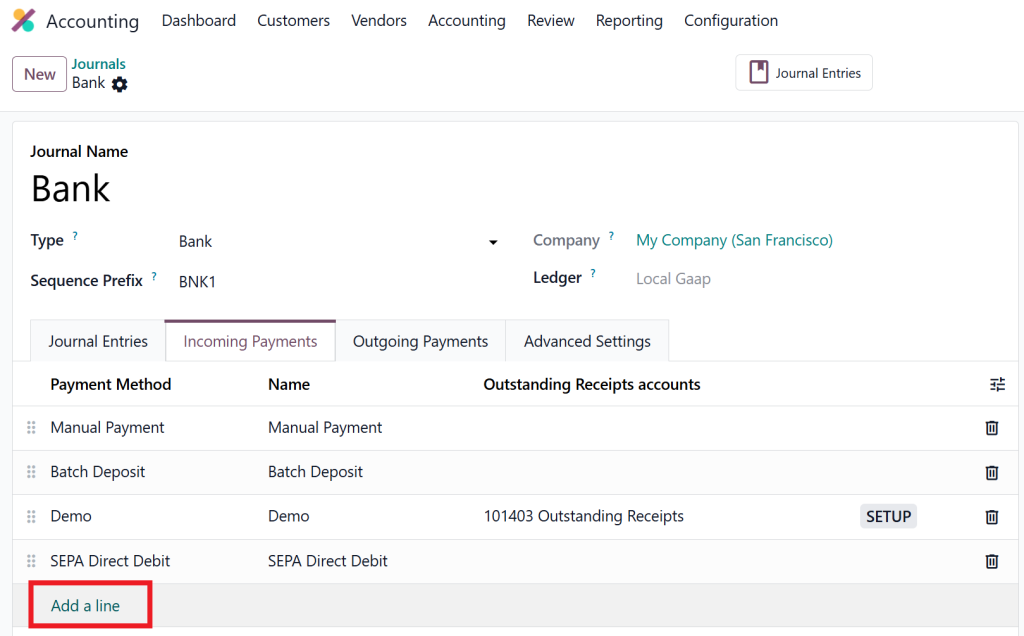
Odoo allows you to select an available payment method and give it a suitable name. For example, its documentation shows how a business can select Manual and name the new method Check for incoming cheque payments.
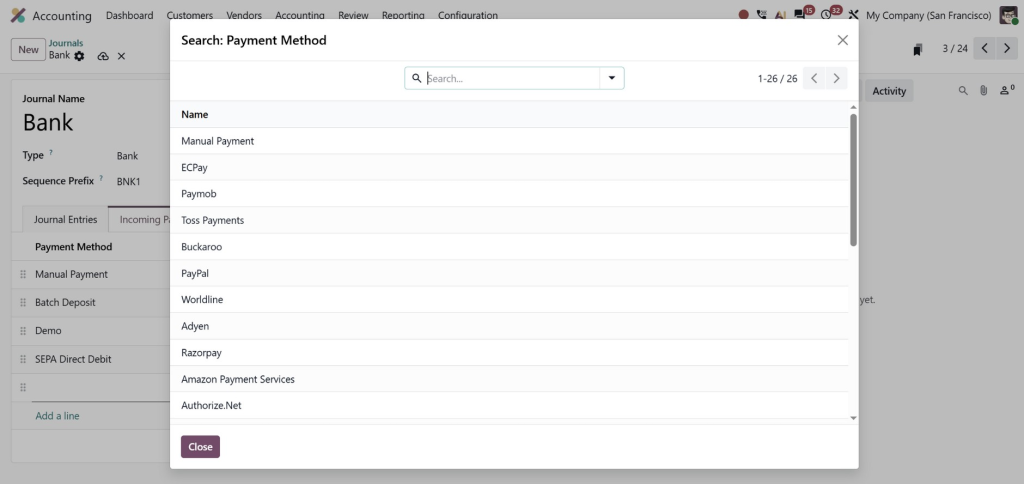
Your method name should be simple and recognizable.
Examples include:
- Customer Cheque
- Bank Transfer
- Cash Collection
- Corporate Card
- Local Transfer
Avoid creating multiple methods with almost identical names. Clear naming makes it easier for accountants to select the right option later.
How to Register Payment Using the New Payment Method
Once your New Payment Method is configured, you can use it when recording a customer or vendor transaction.
For an invoice, open the relevant customer invoice and click Pay or Register Payment, depending on your Odoo interface and version.
The payment window allows you to select the journal and payment details. In Odoo 19, the standard flow includes selecting the journal and payment date, reviewing the payment amount, editing the memo if required, and then clicking Create Payment.
Step 1: Open the Customer Invoice
Go to:
Accounting → Customers → Invoices
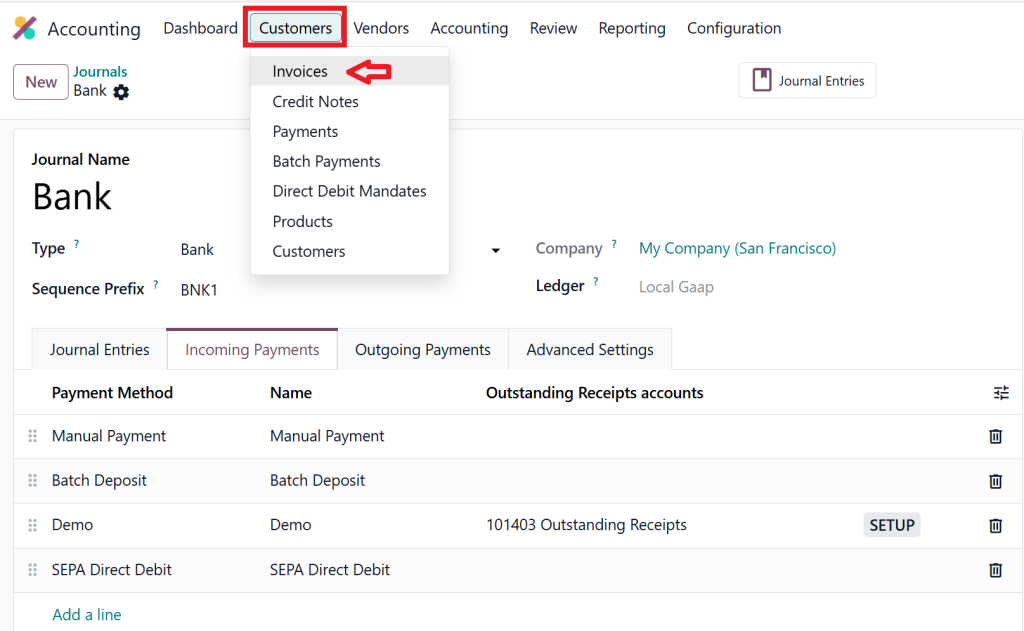
Open the invoice for which you have received payment.
The invoice should be in the appropriate posted status before payment registration.
Step 2: Click Pay or Register Payment
Click the payment button available on the invoice.
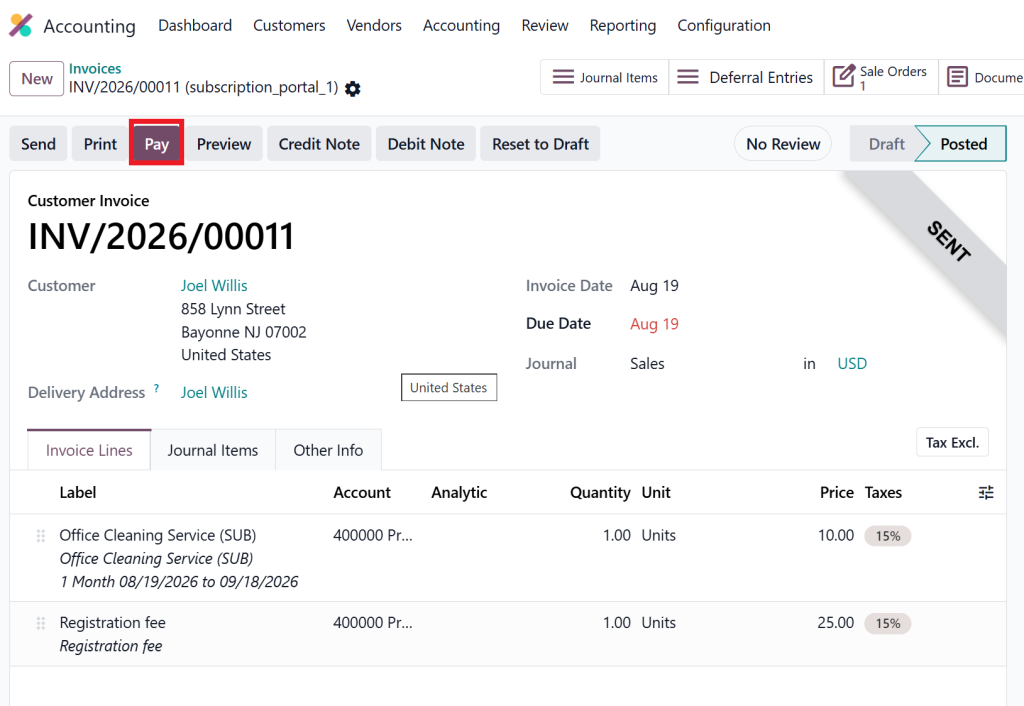
Odoo opens the payment window.
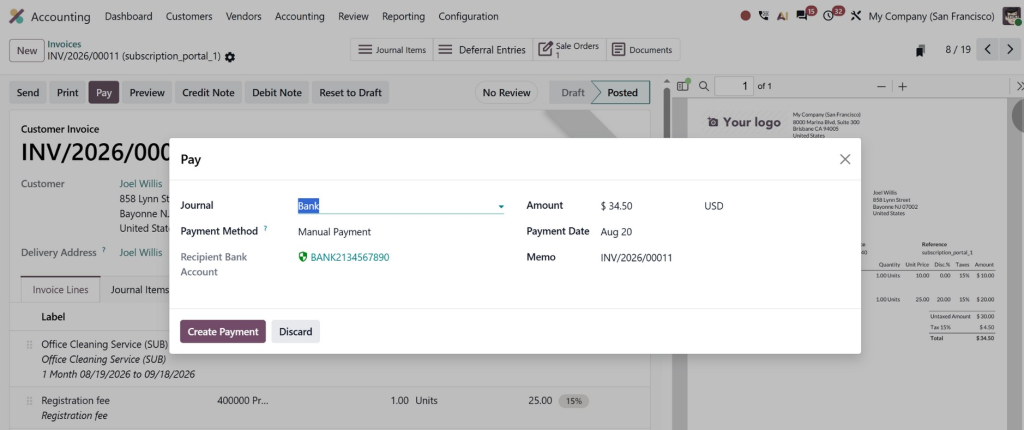
Step 3: Select the Journal
Choose the bank or cash journal associated with your payment.
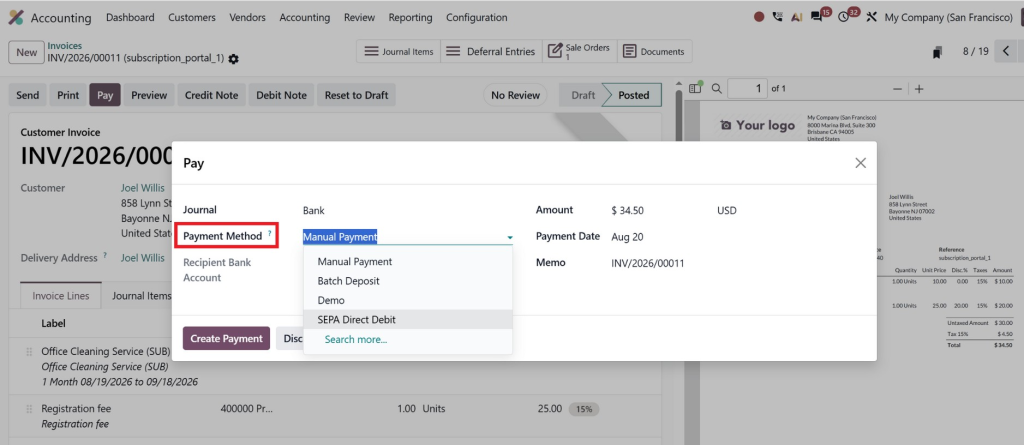
For example, if the customer paid through your business bank account, select the relevant bank journal.
Step 4: Select the New Payment Method
Now select your newly configured payment method.
This is where your New Payment Method becomes part of the actual Odoo invoice payment process.
Step 5: Review the Payment Details
Check:
- Payment amount
- Payment date
- Journal
- Payment method
- Memo or reference
- Customer details
If everything is correct, click Create Payment.
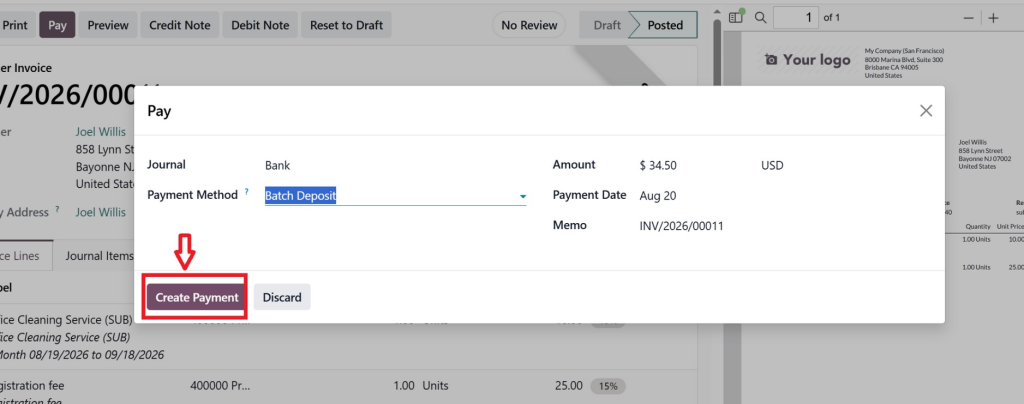
The invoice can then move to an In Payment status, depending on the accounting configuration. Odoo explains that the invoice is finalized as Paid after the relevant payment is reconciled with the bank transaction when outstanding accounts are being used.
What Happens After You Register the Payment?
Understanding what happens after Odoo register payment is just as important as knowing how to create it.
When a payment is linked to an invoice, Odoo uses the payment to reduce or settle the amount due on that invoice. Multiple payments can also be linked to the same invoice.
However, registering a payment and reconciling a bank transaction are not always the same thing.
For example, suppose a customer transfers PKR 100,000 to your bank account. Your accounting team registers the payment against the invoice. The invoice may show In Payment while the corresponding bank transaction is still waiting to be reconciled.
Once the bank transaction is matched with the registered payment, the invoice can be marked as Paid.
This is why the correct Odoo payment method and proper bank reconciliation work together.
Why Reconciliation Matters
Bank reconciliation confirms that the payment recorded in Odoo corresponds to the actual transaction appearing in the bank statement.
Without proper reconciliation, your accounting records can become difficult to review. Payments may appear to be registered while invoices remain in an intermediate status.
A well-configured Odoo register payment method therefore supports more than payment entry. It contributes to a complete accounting workflow.
Common Mistakes When Adding Payment Methods
Adding a New Payment Method is straightforward, but businesses can still run into problems if the configuration is not planned carefully.
Choosing the Wrong Journal
A payment method should be associated with the appropriate bank or cash journal. If the wrong journal is selected, transactions may be posted or reconciled against the wrong account.
Creating Too Many Similar Methods
Creating “Bank Transfer,” “Bank Payment,” “Bank Transfer 1,” and “Online Bank Transfer” without a clear reason can confuse users.
Use names that describe actual differences in your payment process.
Ignoring Reconciliation
Registering a payment does not necessarily mean the entire banking workflow is complete. If your configuration uses outstanding accounts, the payment may need to be reconciled with the corresponding bank transaction before the invoice becomes fully paid.
Using the Wrong Incoming or Outgoing Configuration
An incoming customer payment and an outgoing vendor payment serve different purposes. Make sure the method is configured in the correct section.
How Netilligence Can Help You Configure Odoo Payments
Payment configuration may look simple when you have only a few transactions. But as your business grows, accounting workflows become more complicated.
Different customers may use different payment channels. Multiple bank accounts may need separate journals. Your finance team may also need specific reconciliation rules, payment reporting, and controls.
This is where professional Odoo implementation can add real value.
At Netilligence, we help businesses configure Odoo according to their actual accounting processes instead of forcing teams to work around a generic setup. From configuring journals and payment methods to improving invoice workflows and reconciliation, the goal is to make Odoo easier for your finance team to use every day.
A properly configured New Payment Method can be a small change, but the wider accounting setup needs to work together. When journals, payment methods, invoices, outstanding accounts, and reconciliation are configured correctly, your team can spend less time fixing payment records and more time managing the business.
If your current Odoo payment workflow feels confusing, payments are regularly left unreconciled, or your team cannot find the right Odoo invoice payment method, it may be time to review the configuration rather than adding manual workarounds.
Build a Better Payment Workflow with Odoo
Adding a New Payment Method in Odoo allows businesses to record different types of payments in a more organized way. By configuring the appropriate journal, adding the payment method under Incoming or Outgoing Payments, and selecting it while registering a payment, your accounting team can create a more structured payment workflow.
The key is not simply knowing how to add payment method in Odoo. The real value comes from configuring the payment process around your business requirements.
Whether you need to manage customer payments, vendor payments, bank transfers, cheques, or reconciliation, Odoo provides the flexibility to support different accounting workflows.
If you want to get more from your Odoo Accounting setup, Netilligence can help you review your current configuration, identify workflow gaps, and implement a payment process that fits the way your business actually operates.




