

Monitoring project progress is a critical aspect of effective project management. The Odoo 18’s Kanban view offers a user-friendly interface that simplifies task tracking and enhances overall efficiency. With this tool, project managers can visualize the entire workflow, making it easier to identify potential issues and adjust priorities as needed. Odoo 18’s project management capabilities provide teams with the necessary insights for successful task completion.
One study found that teams utilizing visual management tools like Kanban experience up to a 30% increase in productivity. This statistic underlines the importance of employing efficient methods for Odoo 18 project progress monitoring. By effectively managing tasks, organizations can ensure smoother operations and timely project delivery.
In this blog, we will delve into the features of the Odoo 18 Kanban view and how it can significantly enhance your project management efforts. From task stages to project dashboards, we will explore everything you need to know about monitoring project progress with Odoo 18.
Understanding Odoo 18’s Kanban View
What is Kanban?
Kanban is a visual workflow management method that helps teams visualize their tasks and monitor project progress. It uses boards divided into columns, representing various stages of a project. In Odoo 18, the Kanban view is an integral part of the project management suite, allowing users to manage tasks effectively.
Key Features of Odoo 18 Kanban View
- Visual Task Management: The Kanban board provides a clear visual representation of tasks, helping teams see what needs to be done at a glance.
- Customizable Stages: Users can customize Odoo 18 task stages to reflect their specific workflow, enhancing the relevance of the tool to their processes.
- Drag-and-Drop Functionality: Moving tasks between stages is as simple as dragging and dropping, making task updates quick and easy.
- Integration with Other Tools: The Kanban view integrates seamlessly with other features in Odoo 18, such as project reporting and dashboards.
How to Set Up Odoo 18 Kanban View for Your Projects
Step 1: Create Your Project
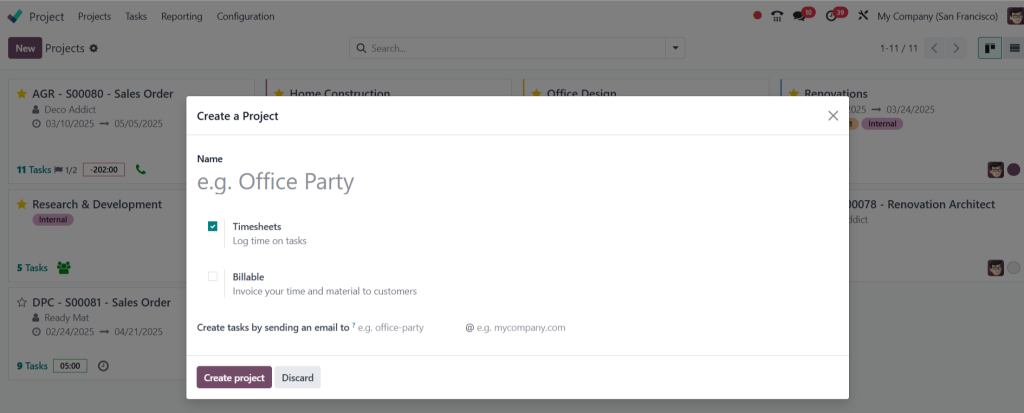
To start using the Odoo 18 Kanban view, create a new project within the Odoo platform. Navigate to the project management section and click on “Create.” Fill in the necessary details about the project, including its name and description.
Step 2: Define Task Stages
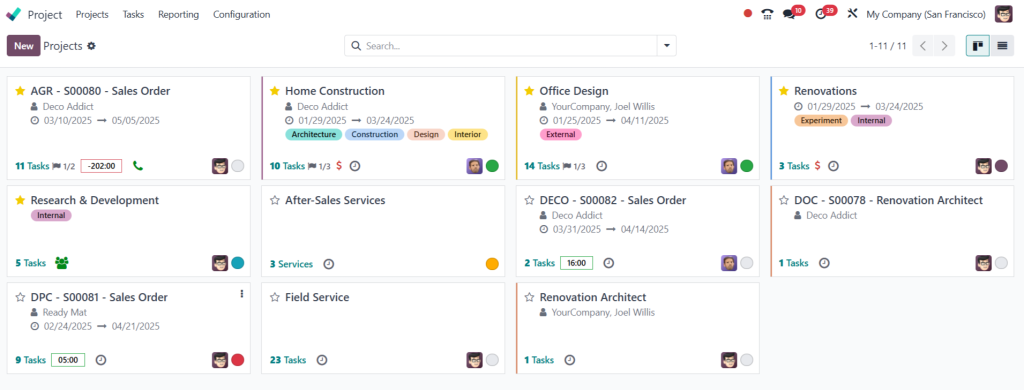
Once your project is set up, define the Odoo 18 task stages relevant to your workflow. Common stages include:
- To Do
- In Progress
- Under Review
- Completed
By clearly defining these stages, you can easily track the status of each task.
Step 3: Add Tasks
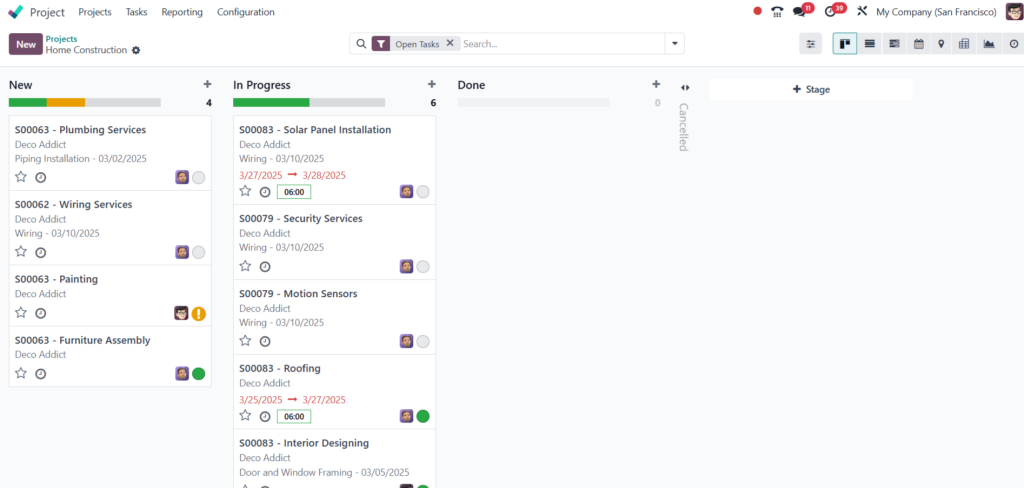
After defining the stages, start adding tasks to your project. Each task should include a description, deadlines, and assigned team members. This level of detail helps improve Odoo 18 task tracking.
Step 4: Customize Your Kanban View
Customize your Kanban board by adjusting the layout, colors, and fields displayed. Tailoring the board to fit your team’s needs can make it easier to monitor project progress.
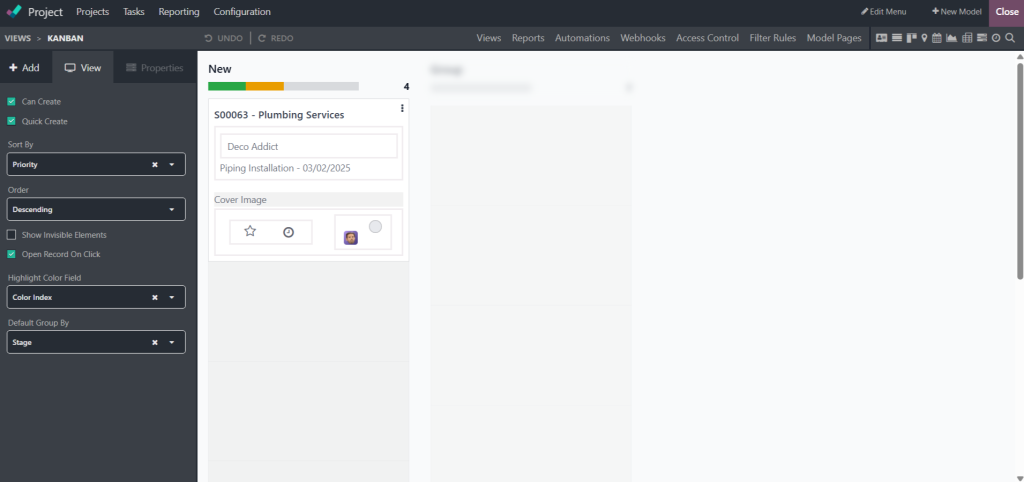
Monitoring Project Progress with Odoo 18 Kanban View
Real-Time Updates
One of the significant advantages of the Odoo 18 Kanban view is its ability to provide real-time updates. As tasks move through the defined stages, team members can see changes instantly. This transparency improves collaboration and accountability.
Analyzing Project Data
Odoo 18 offers powerful project reporting features that allow managers to analyze project data efficiently. The Odoo 18 project dashboard provides key performance indicators (KPIs), such as task completion rates and deadlines met. These insights help in making informed decisions.
Benefits of Using Odoo 18 Kanban View for Project Monitoring
Improved Communication
Using the Kanban view enhances communication among team members. Everyone has access to the same information, reducing the chances of misunderstandings or duplicated efforts.
Increased Productivity
With a clear visual representation of tasks, teams can focus on their priorities. The Odoo 18 project progress monitoring features help identify roadblocks early, enabling timely interventions.
Enhanced Flexibility
Odoo 18 allows teams to adjust task stages and workflows as needed. This flexibility ensures that project management remains adaptable to changing circumstances.
Tips for Effective Project Management Using Odoo 18 Kanban View
Regular Updates
Encourage team members to update the Kanban board regularly. This practice ensures that everyone stays informed about the project’s status.
Review Meetings
Hold regular review meetings to discuss progress and challenges. Use the Odoo 18 project dashboard to guide these discussions, focusing on data-driven insights.
Training
Provide training for team members unfamiliar with the Kanban view. Ensuring everyone knows how to use the tool effectively can maximize its benefits.
Odoo 18 Kanban view is a powerful tool for monitoring project progress
With its visual layout and customizable features, it enhances project management, task tracking, and reporting. By implementing this tool, teams can improve communication, increase productivity, and adapt to changing project requirements.
Whether you’re managing a small team or a large organization, the Odoo 18 Kanban view can transform how you monitor and manage projects. Start utilizing this effective method today to experience the benefits for yourself.




