How to Import Customer Invoices and Vendor Bills in Odoo 18 Accounting?
How Can You Simplify Accounting in Odoo 18?
Have you ever struggled to manage customer invoices and vendor bills manually, only to find errors and inconsistencies creeping into your records? What if there was a way to handle this quickly, precisely, and efficiently? Enter Odoo 18, the ultimate tool to revolutionize your accounting processes. You can transform tedious tasks into all-in-one workflows by learning how to import customer invoices and vendor bills in Odoo 18. But how exactly does it work? This guide will reveal the secrets behind Odoo 18’s powerful import features.
Importing customer invoices and vendor bills in Odoo 18 is a simple and efficient way to manage your accounting data. By uploading invoices and bills in bulk, businesses can save time, reduce errors, and simplify their financial processes. At Netilligence, we cover the step-by-step process for importing customer invoices and vendor bills into Odoo 18, including tips for ensuring accurate data, troubleshooting common issues, and optimizing your workflow for better financial management. Whether you’re new to Odoo or looking to refine your process, this tutorial will help you quickly steer the features of Odoo 18 import invoices and Odoo 18 import vendor bills.
Imagine a world where tasks like Odoo 18 import invoices, Odoo 18 import vendor bills, and even Odoo 18 bulk invoice uploads are completed with just a few clicks. No more endless hours of manual data entry! This blog will show you the process, tips, and tricks to master Odoo 18 import customer invoices and Odoo 18 import supplier bills like a pro.
Why Should You Care About Importing Customer Invoices and Vendor Bills?
Accounting forms the backbone of any business. Managing it efficiently is key to success. But why is learning to import customer invoices and vendor bills in Odoo 18 crucial? Here are a few reasons that might spark your interest:
Speed and Efficiency
Manual entry is time-consuming and prone to errors. With tools like Odoo 18 import invoices, you save valuable time while ensuring accuracy.
Scalability
As your business grows, handling large transaction volumes becomes scary. Odoo 18 bulk invoice upload allows you to scale effortlessly.
Integration
Odoo integrates your invoices and bills flawlessly with other modules like sales, CRM, and inventory, creating a unified system.
Think of it: all your data in one place, processed precisely. Isn’t that a dream come true for any business owner?
The Hidden Gems of Odoo 18 Accounting
Did you know Odoo 18 import vendor bills are not just about uploading spreadsheets? It’s a gateway to better financial management. Here are some features that make Odoo 18 accounting data import stand out:
Template-Based Imports: Forget about formatting nightmares. Odoo provides templates to structure your data effortlessly.
Error Detection: Odoo’s validation tools flag errors before they disrupt your workflow.
Batch Processing: Handle massive amounts of data with ease using batch uploads.
Customizability: Need a unique setup? Odoo allows you to customize import fields to suit your needs.
These tools make the Odoo 18 import of customer invoices as smooth as possible, ensuring your financial records are always accurate and up to date.
What You Need Before You Begin
Preparation is key to success, especially with Odoo 18 import supplier bills. Here’s how you can set yourself up for a hassle-free experience:
Get the Right Template: Download Odoo’s predefined invoices and vendor bill templates.
Organize Your Data: To match the template requirements, clean and format your data.
Choose Your File Type: Use CSV or Excel files, as they are fully compatible with Odoo.
Verify Data Accuracy: Double-check for errors before uploading. This will save you from headaches later.
The Odoo 18 accounting data import process becomes easy and enjoyable when these steps are in place.
How to Import Customer Invoices in Odoo 18 Accounting?
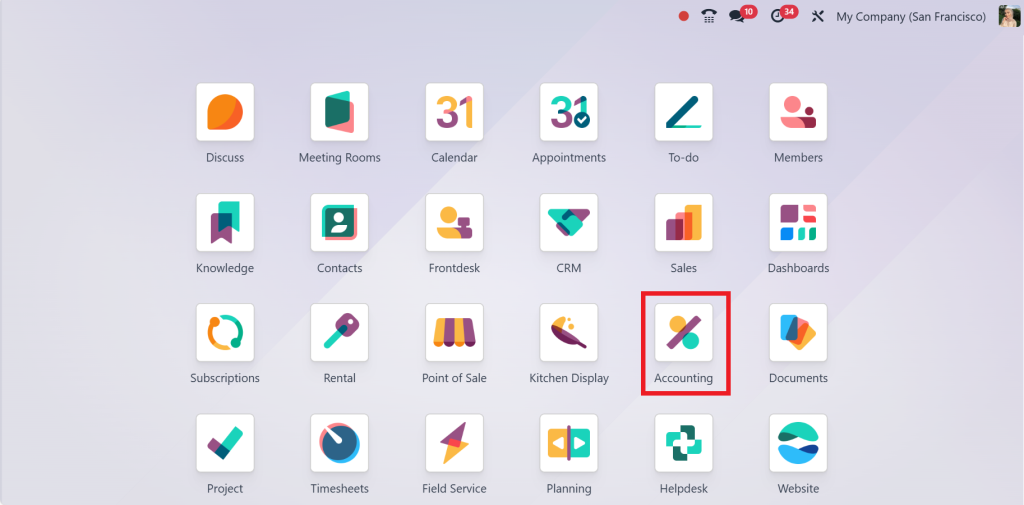
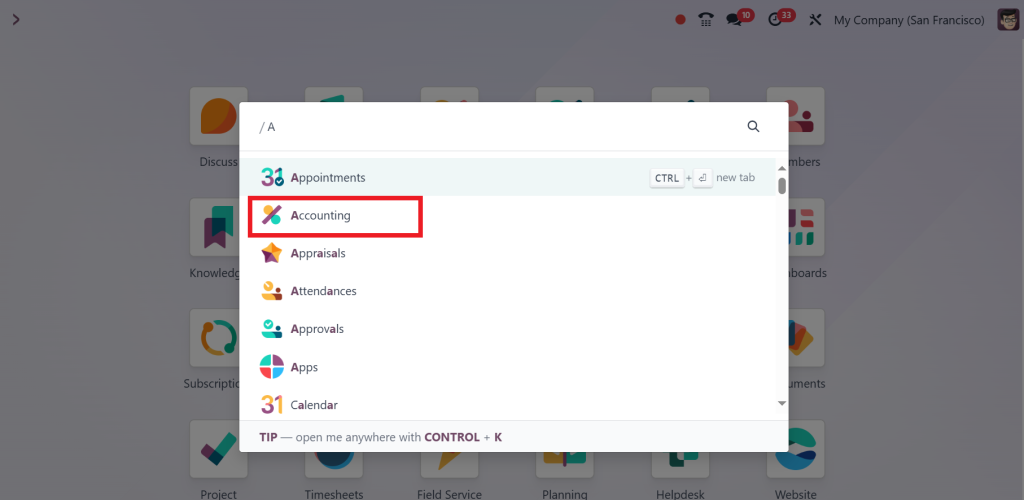
Open the Accounting module in Odoo 18.
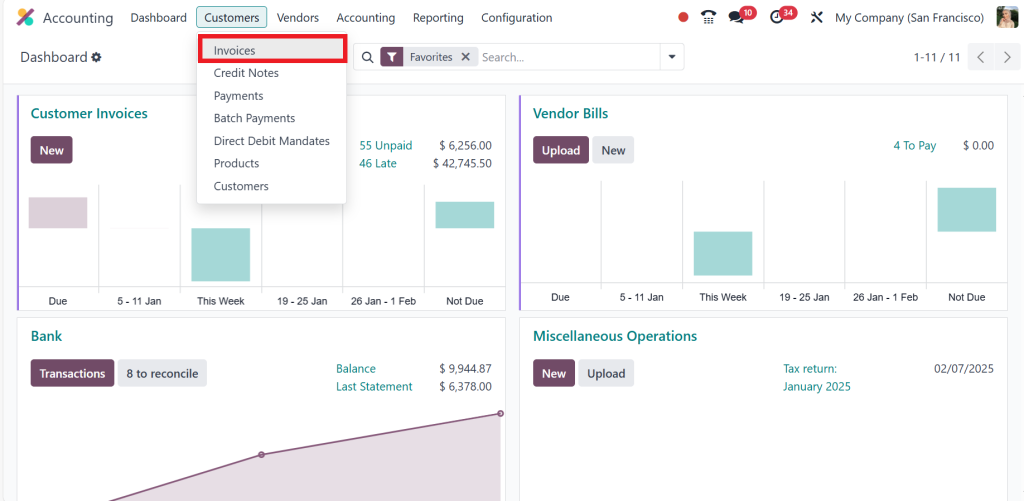
And head to the Customer Invoices section.
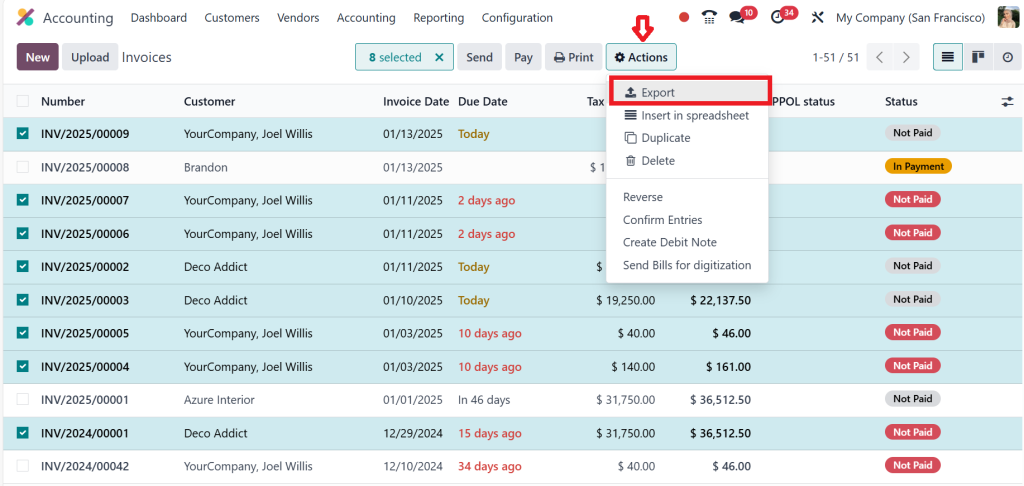
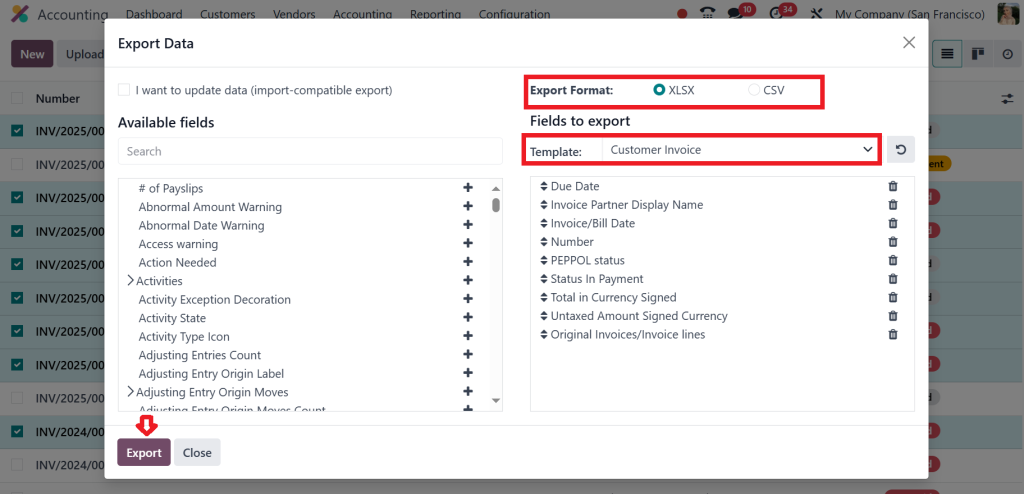
Here, you’ll find the magical Export button waiting for you to show its potential.
Now, select Export Format and click Export.
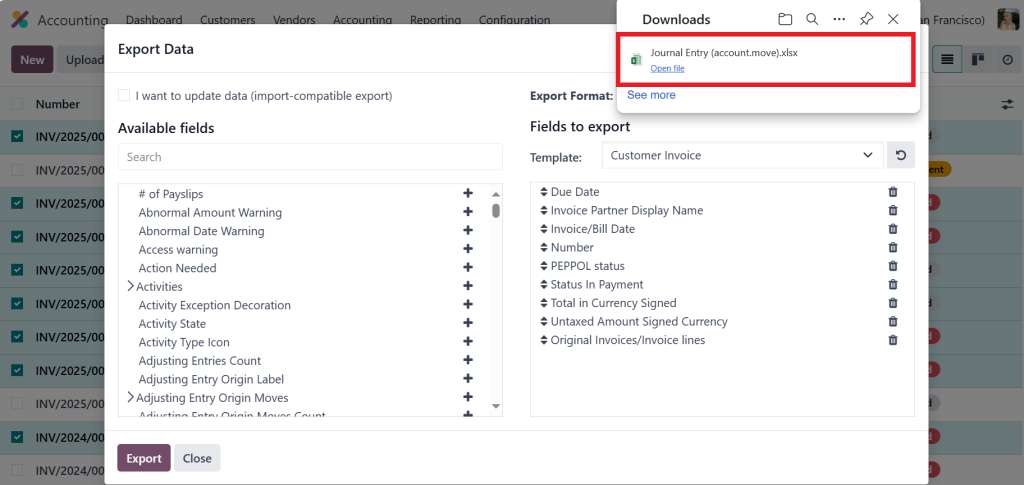
The file is exported successfully.
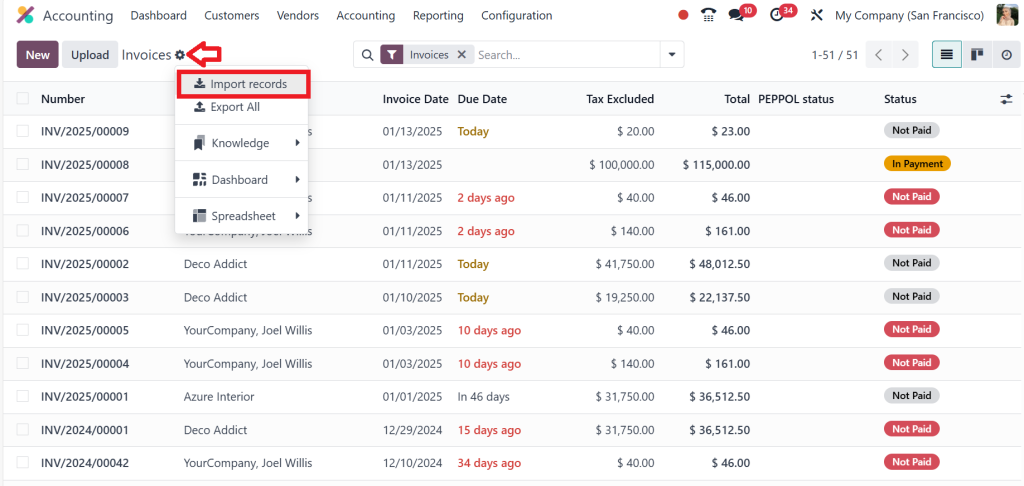
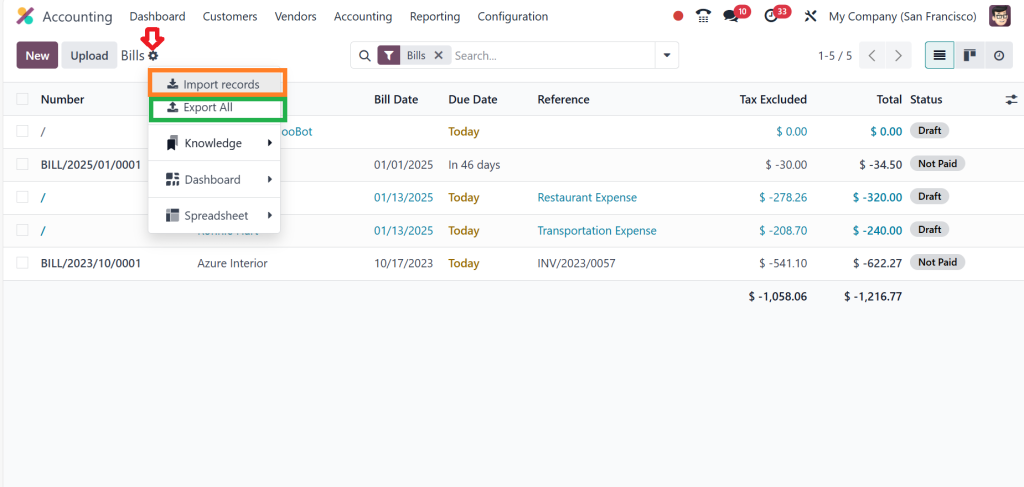
Now, let’s Import data by clicking the settings icon and choosing Import records.
Once your data is ready, upload the file. Use the Test Import feature to preview the results and catch any errors before they happen. It’s that simple to complete Odoo 18 import customer invoices.
How to Import Vendor Bills in Odoo 18 Accounting?
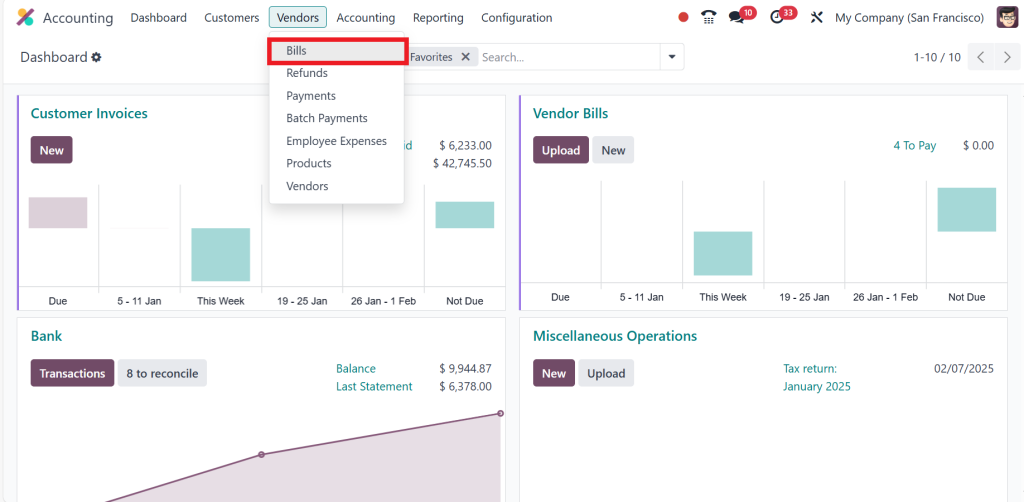
Direct to the Accounting Module.
Go to the Vendors menu and click on the Bills option.
Here, you’ll perform the same magic as with customer invoices. Upload your file and review the data preview. Click Import Records to complete the process.
Congratulations, you’ve mastered the import vendor Bills in the Odoo 18 accounting module.
Troubleshooting Common Issues
Data Format Issues
Ensure that your CSV/Excel file is formatted correctly. Common issues include using incorrect date formats or mismatched column headers.
If Odoo 18 cannot map your columns automatically, manually adjust the mapping to ensure accuracy.
Import Errors
If you encounter import errors, check the error message for details. It might indicate missing data or incorrect field formats.
Correct any issues in your import file and try uploading again.
Secrets to a Smooth Accounting Data Import
Even with the best tools, challenges can arise. Here are some pro tips to ensure your Odoo 18 bulk invoice upload is flawless:
Stick to Templates: They’re designed to eliminate guesswork.
Clean Your Data: Remove duplicates and errors beforehand.
Start Small: Test with a small dataset before importing large files.
Backup Your Records: Always have a backup if things go awry.
Leverage Batch Processing: Divide large datasets into smaller chunks for easier handling.
By following these steps, you’ll simplify your work and gain confidence in using Odoo 18 import invoices.
Real-Life Applications of Odoo 18 Import Features
Consider this scenario: A growing retail business must process hundreds of invoices and bills monthly. With Odoo 18 import customer invoices, they can upload bulk data in minutes, ensuring their financial records are accurate and up-to-date. Similarly, suppliers benefit from Odoo 18 import vendor bills, which allows for quick expense reconciliation.
These tools are not just about saving time; they’re about empowering businesses to focus on growth rather than administrative tasks.
Releasing the Full Potential of Odoo 18
By now, you’ve seen how features like Odoo 18 import invoices, Odoo 18 import supplier bills, and Odoo 18 accounting data import can transform your financial management. But why stop there? Dive deeper into Odoo’s capabilities, explore advanced customization options, and reveal the full power of this incredible platform.
Tools like Odoo 18 bulk invoice upload are invaluable in a world where time is money. They don’t just make accounting easier; they make it brighter. So why wait? Start your journey with Odoo 18 today and revolutionize how you manage your business finances.
Hi, I'm Ilsa Shabbir, an Odoo ERP content writer specializing in functional blogs on Odoo modules. I simplify complex Odoo features, creating clear and engaging content to help businesses understand and optimize their ERP solutions.
We use cookies to ensure that we give you the best experience on our website. If you continue to use this site we will assume that you are happy with it.