Imagine you’ve just confirmed a purchase order in Odoo 18, and everything seems perfect. But wait; what if someone accidentally (or intentionally) changes the order? Chaos occurs. Deliveries get delayed, budgets spiral out of control, and your procurement process becomes a nightmare. It sounds like a plot twist you didn’t sign up for, right?
Well, here’s the good news: Odoo 18 has a superhero feature that can save the day, locking confirmed purchase orders. That’s right! With just a few clicks, you can lock down your purchase orders, ensuring no one can mess with them once they’re confirmed; no more accidental edits, no more unauthorized changes, and no more procurement fuss.
But wait, there’s more! Locking purchase orders isn’t just about avoiding disasters; it’s about taking control of your Odoo 18 purchase order management like a pro. Imagine efficient workflows, defensible security, and audit trails so clean they’d make a detective jealous. Delighted yet?
In this guide, we’re diving deep into how to lock confirmed purchase orders in Odoo 18, why it’s a game-changer for your business, and how it can transform your Odoo 18 procurement process. Whether you’re a seasoned Odoo user or just getting started, this is your ultimate playbook for mastering Odoo 18 purchase order locking and opening the full potential of your procurement system.
So, buckle up and get ready to discover how to restrict purchase order edits in Odoo 18, boost your Odoo 18 purchase order security, and make your procurement process smoother than ever. Trust us, by the end of this, you’ll wonder how you ever managed without it. Let’s dive in!
What Does It Mean to Lock Confirmed Purchase Orders in Odoo 18?
Locking confirmed purchase orders in Odoo 18 prevents any further modifications to a purchase order once it has been confirmed. This feature is handy for businesses that want to maintain a clear audit trail and ensure no unauthorized changes are made to critical procurement documents.
When you lock confirmed purchase orders in Odoo 18, you essentially freeze the order in its current state. Users cannot edit, add, or remove items, change quantities, or modify pricing. The purchase order becomes a static document, ensuring all stakeholders can access accurate and unaltered information.
Benefits of Odoo 18 Purchase Order Locking
1. Enhanced Data Integrity: By locking confirmed purchase orders, you ensure that the data remains consistent and accurate throughout the procurement process.
2. Improved Security: Restricting edits to confirmed purchase orders minimizes the risk of unauthorized changes, enhancing Odoo 18 purchase order security.
3. Simplified Audits: Locked purchase orders provide a clear and unalterable record, making conducting audits easier and complying with regulatory requirements.
4. Efficient Workflow Management: Locking purchase orders helps rationalize the Odoo 18 procurement process by reducing the need for manual checks and approvals.
How to Lock Confirmed Purchase Orders in Odoo 18
Locking confirmed purchase orders in Odoo 18 is a straightforward process. Follow these steps to enable this feature:
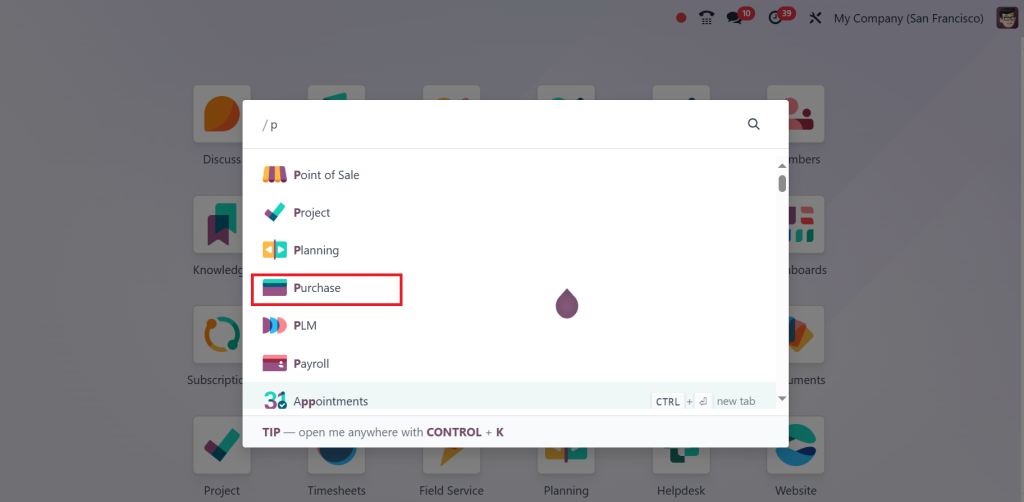
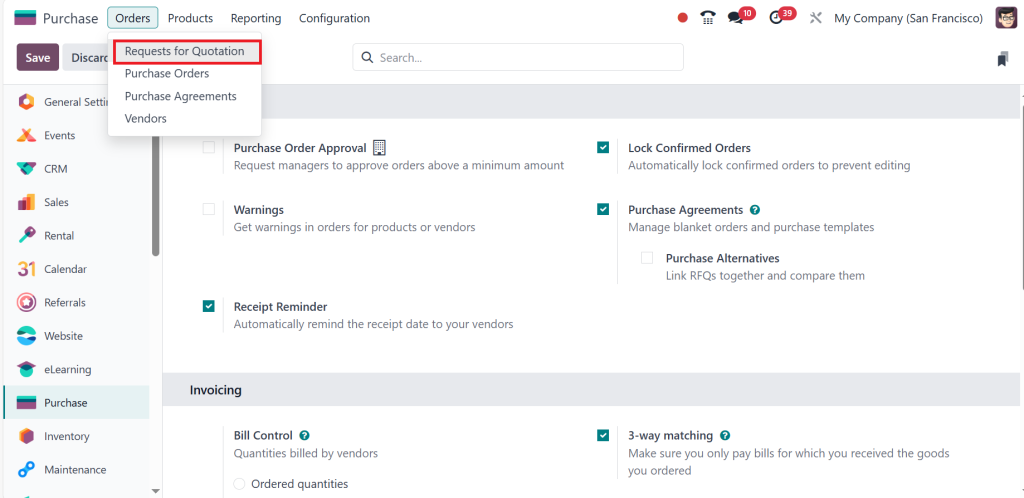
Direct to the Purchase module from the main dashboard.
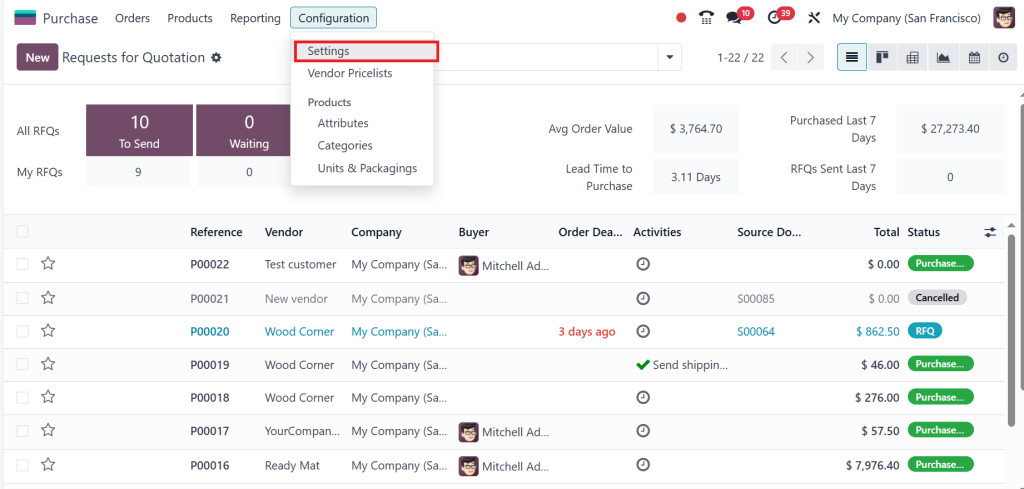
Go to the Configuration > Settings.
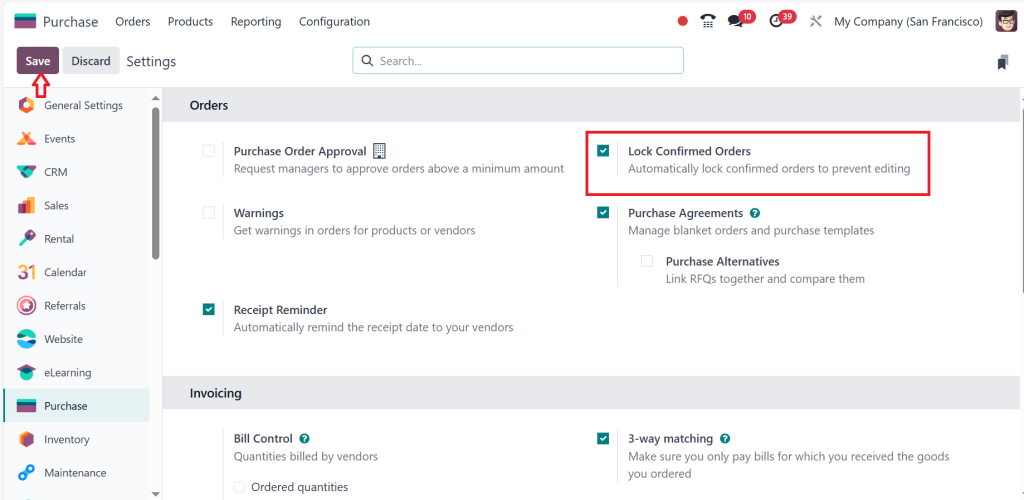
Enable the ‘‘Lock Confirmed Orders’’ feature and click on Save.
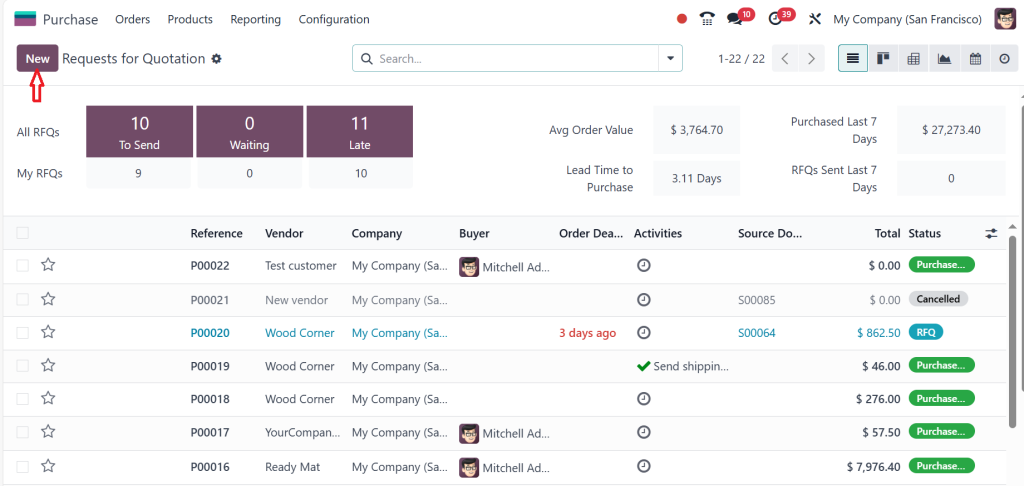
Then go to the Orders menu and select ‘‘Requests for Quotations’’.
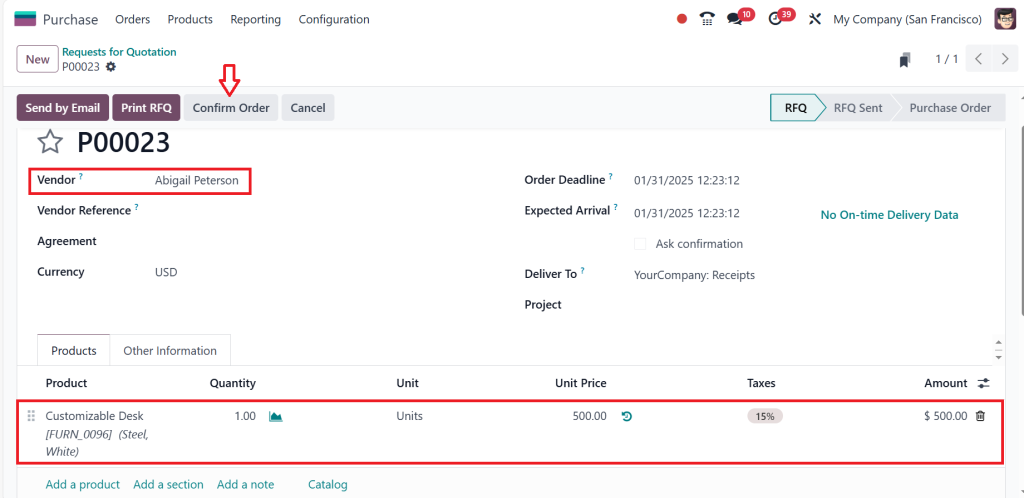
Click on ‘‘New’’ and create an RFQ.
Add vendor and product, then click on ‘‘Confirm Order’’.
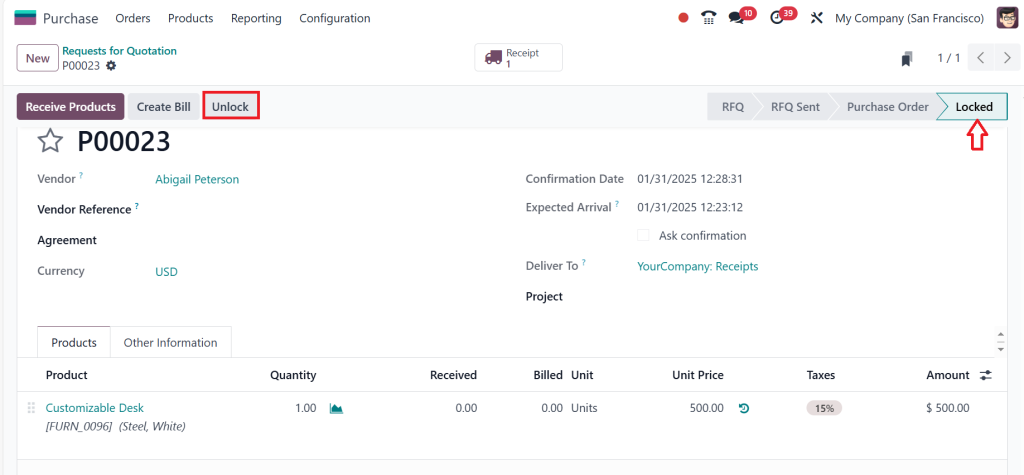
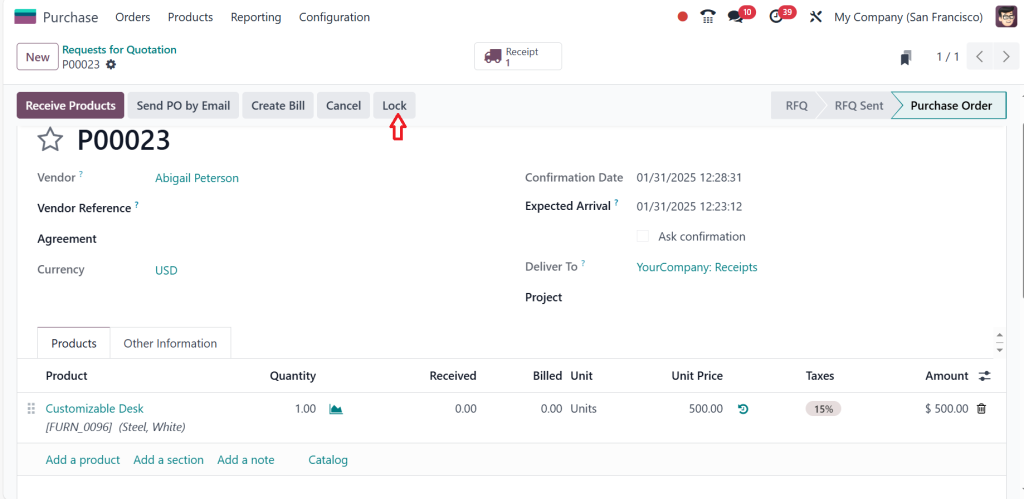
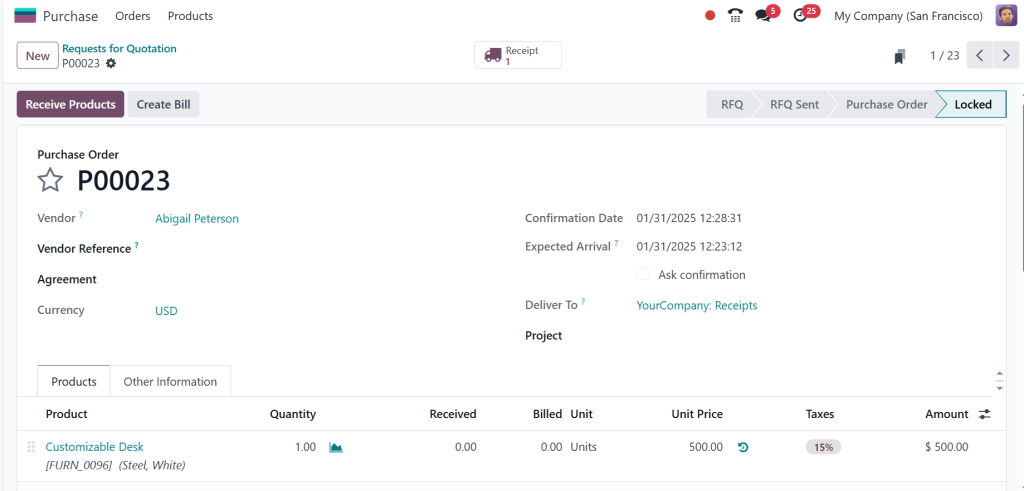
After confirming the order, Can you notice it’s currently locked rather than going to the purchase order? Once the locking is done, nobody can edit this RFQ further. I am logged in as an Admin, so I can easily unlock this RFQ by clicking the “Unlock” button in the screenshot below.
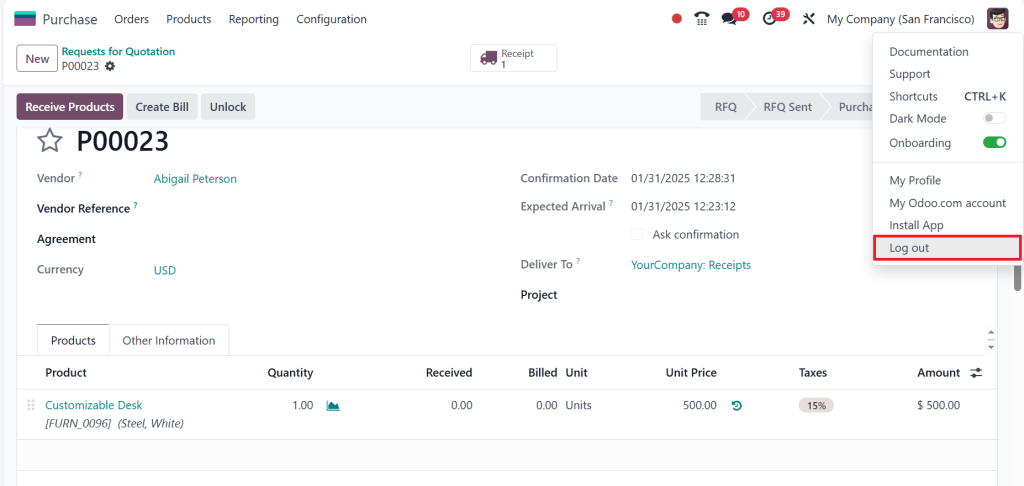
If you click the ‘Unlock’ button, the RFQ is unlocked, as shown in the screenshot below. If you want to lock this RFQ again, click ‘‘Lock’’. So, this is basically how you do it.
So, I am just logging out as the Admin.
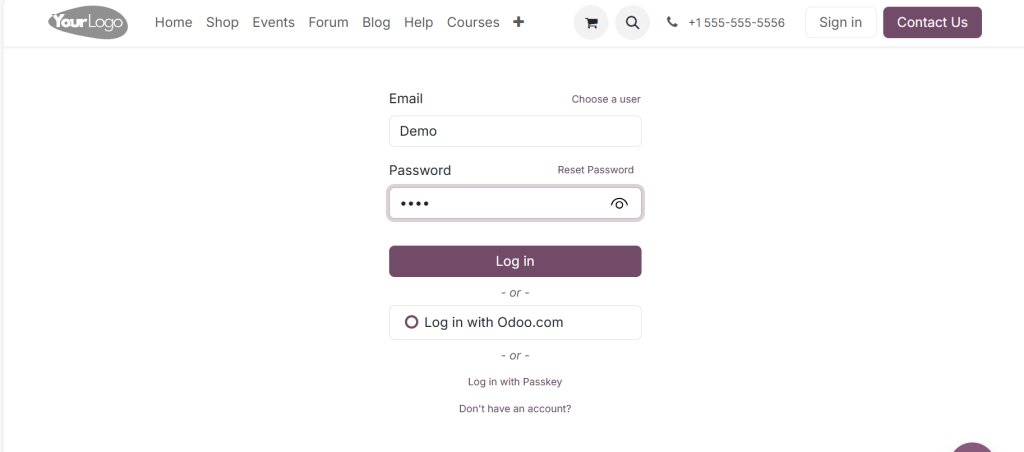
And logging in as a User Demo.
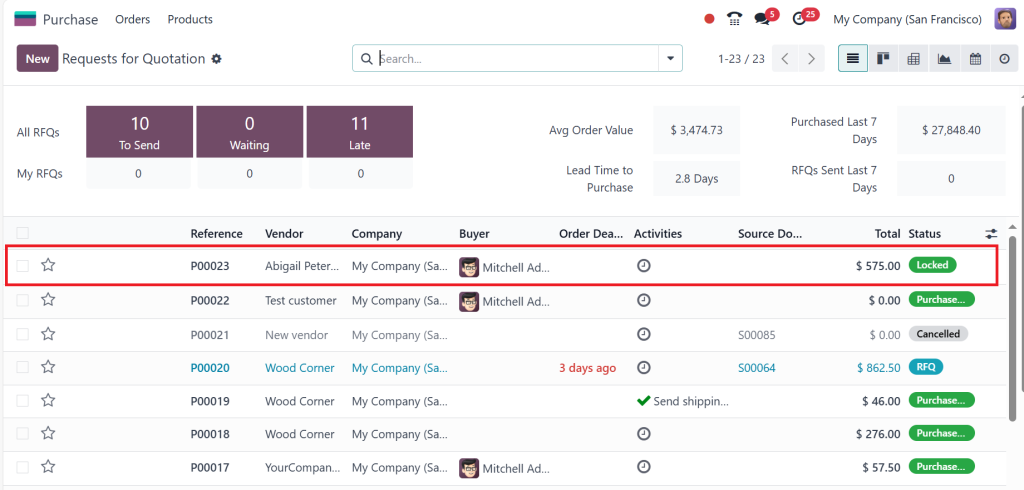
Then go to the Purchase module and open it. Now you can see in the screenshot below that the RFQ I created as an Admin is in a locked state. And if you open it.
You cannot make any edits; you can only receive the products because it’s locked, so you can’t do any edits.
This is how locking works in the Odoo 18 purchase module. Continue reading and explore more valuable and interesting information related to this topic.
Customizing Locking Rules in Odoo 18
Odoo 18 allows you to customize the locking rules to suit your business needs. For example, you can specify which user roles have permission to unlock and edit confirmed purchase orders. This level of customization ensures that only authorized personnel can make changes, further enhancing Odoo 18 purchase order security.
How Odoo 18 Restrict Purchase Order Edits for Enhanced Security
In Odoo 18, restricting purchase order edits is a game-changing feature designed to bolster security and maintain the integrity of your procurement process. Once a purchase order is confirmed, the system allows you to lock it, preventing further modifications. This ensures that critical details like items, quantities, and pricing remain unchanged, reducing the risk of errors or unauthorized tampering.
Enabling this feature allows businesses to enforce strict control over their purchase orders, allowing only authorized users to make changes if necessary. This enhances Odoo 18 purchase order security and streamlines audits and compliance by providing a clear, unalterable record of transactions. With customizable permissions and role-based access, Odoo 18 empowers organizations to safeguard their procurement workflows, ensuring a smooth and secure purchasing process.
Advanced Features for Odoo 18 Purchase Order Management
In addition to locking confirmed purchase orders, Odoo 18 offers advanced features restricting purchase order edits. These features include:
Role-Based Permissions: Assign specific permissions to users based on their roles, ensuring that only authorized personnel can modify purchase orders.
Approval Workflows: Implement multi-level approval workflows to add security to your procurement process.
Audit Trails: Track all changes made to purchase orders, providing a transparent record of modifications.
Simplifying the Odoo 18 Procurement Process
You can rationalize your procurement process and improve efficiency by leveraging the Odoo 18 purchase module features. Key features include:
Automated Purchase Order Generation: Automatically generate purchase orders based on predefined rules and thresholds.
Vendor Management: Maintain a centralized database of vendors, complete with performance metrics and communication history.
Integration with Other Modules: Flawlessly integrate the Purchase module with the Inventory, Accounting, and Manufacturing modules for end-to-end visibility.
Best Practices for Odoo 18 Purchase Order Security
Regularly Review User Permissions
Reviewing and updating user permissions is essential to maintain Odoo 18 purchase order security. Ensure that only trusted personnel have access to sensitive procurement data.
Implement Multi-Level Approval Workflows
Multi-level approval workflows add an extra layer of security to your procurement process. You can minimize the risk of fraud and errors by requiring multiple approvals for high-value purchase orders.
Conduct Periodic Audits
Regular audits help identify potential vulnerabilities in your procurement process. Use Odoo 18’s built-in reporting tools to generate audit trails and analyze purchase order data.
Opening the Full Potential of Odoo 18 Purchase Order Management
Locking confirmed purchase orders in Odoo 18 is a powerful feature that enhances data integrity, security, and efficiency. Following the steps outlined in this guide, you can effectively lock confirmed purchase orders in Odoo 18 and fully utilize the purchase module features.
Whether you’re looking to restrict purchase order edits in Odoo 18 or rationalize your Odoo 18 procurement process, this functionality is a game-changer for businesses of all sizes. Implement these best practices today and experience the benefits of secure and efficient purchase order management in Odoo 18.
Hi, I'm Ilsa Shabbir, an Odoo ERP content writer specializing in functional blogs on Odoo modules. I simplify complex Odoo features, creating clear and engaging content to help businesses understand and optimize their ERP solutions.
We use cookies to ensure that we give you the best experience on our website. If you continue to use this site we will assume that you are happy with it.