In real-world retail environments—whether you’re running a supermarket, a fashion boutique, or a B2B outlet—enforcing customer credit limits is essential. Allowing customers to purchase on credit can benefit business relationships, but without proper checks, it opens the door to financial risk, cash flow issues, and bad debts. While Odoo’s backend provides tools to manage credit at the accounting level, the Point of Sale (POS) system, by default, doesn’t strictly enforce these credit controls during transactions.
That’s where a bit of customization comes into play.
In this blog post, we’ll walk you through a technical implementation that enhances the Odoo POS module with credit limit validation. This ensures that credit policies are enforced right at the moment of sale. This solution benefits companies that allow deferred payments or invoice-based transactions from the POS interface.
Step 1: Add Credit Limit Field to Customer Form
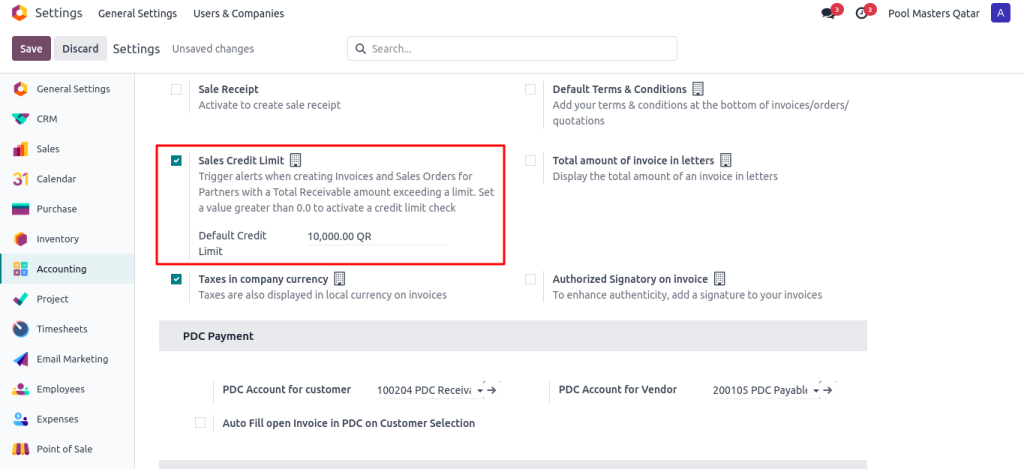
First, we ensured the Credit Limit field is Activated from settings .
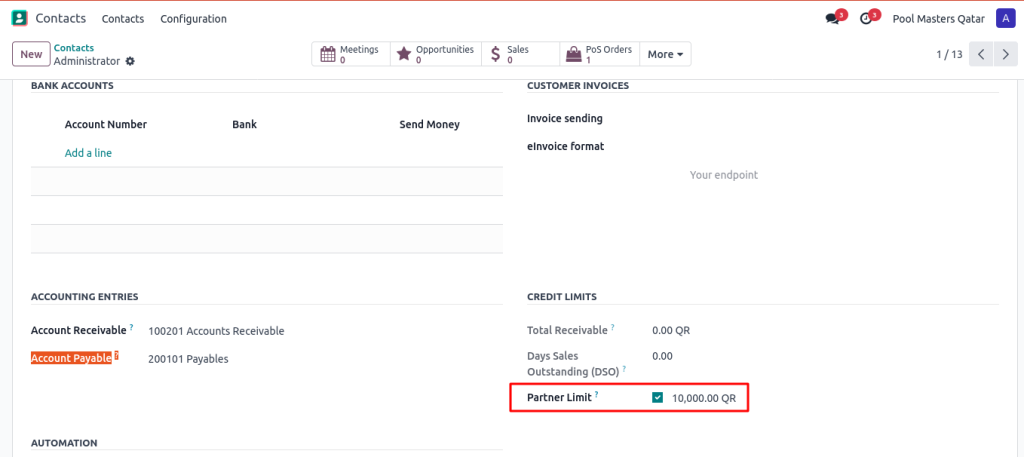
maximum credit limit per customer.
Step 2:Pass Credit Limit to POS Session (Python Code)
To make this data available in the POS frontend, we inherited the res.partner model and extended the _load_pos_data_fields method:
					from odoo import models


class ResPartner(models.Model):
   _inherit = 'res.partner'


   def _load_pos_data_fields(self, config_id):
       data = super()._load_pos_data_fields(config_id)
       data += ['use_partner_credit_limit', 'credit_limit']
       return data
This ensures that both use_partner_credit_limit and credit_limit values are sent to the POS frontend when the session is loaded.
Step 3: Add JavaScript Validation in POS
We patched the POS flow to check if the selected customer’s credit limit is exceeded when clicking the Payment button.
					import { PosStore } from "@point_of_sale/app/store/pos_store";
import { patch } from "@web/core/utils/patch";
import{AlertDialog }from "@web/core/confirmation_dialog/confirmation_dialog";
import { _t } from "@web/core/l10n/translation";


patch(PosStore.prototype, {
   async pay() {
       const currentOrder = this.get_order();
       if (!currentOrder.canPay()) {
           return;
       }


       const customer = currentOrder.get_partner();
       const total = currentOrder.get_total_with_tax();
       const credit_limit_validation = customer ? customer.is_credit_limit : false;


       // Credit Limit Validation
       if (
           credit_limit_validation &&
           total > customer.credit_limit &&
           pos_credit_limit_validation
       ) {
           this.env.services.dialog.add(AlertDialog, {
               title: _t("Credit Limit Exceeded"),
               body: _t(
                   `The customer's credit limit is ${customer.credit_limit}, but the total order amount is ${total}.\n\nPlease review the order or get approval before continuing.`
               ),
           });
           return;
       }


       await super.pay();
   }
});
This patch intercepts the payment process and checks if the current order total is greater than the customer’s credit limit. If it is, an alert dialog is shown to the cashier preventing the transaction from proceeding.
POS Alert – Credit Limit Exceeded
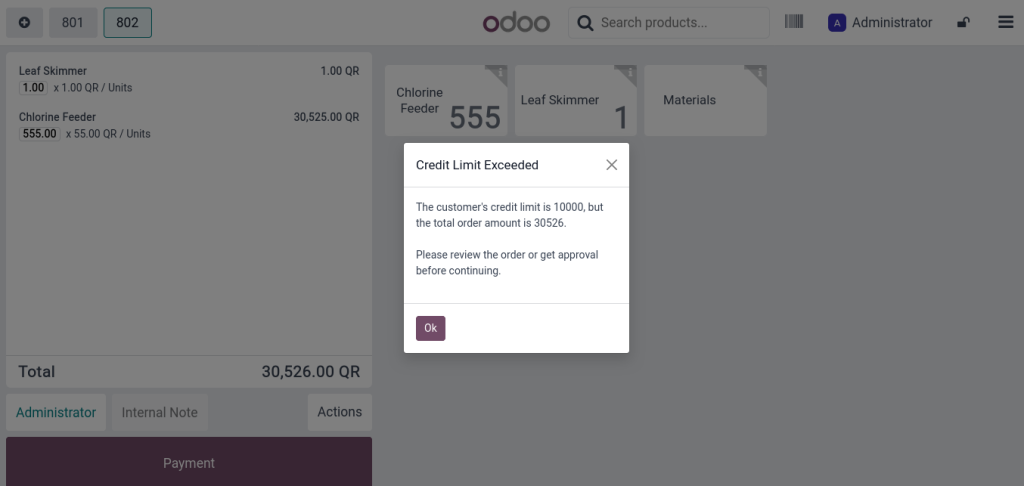
If the customer’s credit limit is lower than the total POS order amount, the system prevents payment and shows an informative message.
Strengthening Credit Control in Odoo POS
This customization improves financial control by implementing customer credit limits directly within the POS interface. By integrating backend logic in Python with real-time JavaScript validations on the front end, businesses can prevent over-crediting at the source. This approach helps maintain healthier cash flow while ensuring that sales operations remain efficient and unobstructed.