Manage combo products in Odoo 18 Sales authorizes businesses to create, configure efficiently, and track product bundles or kits, driving better sales performance and enhancing customer satisfaction. With features for real-time inventory management, automated pricing strategies, and flexible bundle configurations, Odoo 18 ensures smooth sales operations while offering customizable options to meet diverse customer needs. Whether it’s fixed product kits or dynamic combinations, mastering Odoo 18 combo product management updates processes, boosts revenue, and keeps you ahead in today’s competitive market.
Imagine you are running a business and have a range of products that are doing well, but still, you are looking for a way to bring your sales to the next level. Am I Right or not? Of course, I am right!
So, my friend, congratulations, you are in the right place because, at Netilligence, we have a solution for all your sales-related problems.
If you want solutions to all your problems related to managing combo products in Odoo 18 sales, stay on this page and read the entire blog. I promise that by the end of this blog, you know the answer to every question you have.
Most importantly, you’ll discover how to manage combo products in Odoo 18 Sales. That’s because we don’t just explain; we show you how to do it and ensure you understand everything clearly without any confusion. So, why wait?Let’s start!
What’s the Secret to Opening the True Potential of Odoo 18 Sales?
How do successful businesses always have their product offerings perfectly packaged, effortlessly boosting customer satisfaction and increasing sales? The answer lies in strategic product bundling and combo management. When done right, managing combo products in Odoo 18 Sales can transform your operations, enhance efficiency, and give your customers exactly what they want, all in one unified package.
Whether creating curated Odoo 18 product bundles, setting up sales kits, or managing intricate Odoo 18 combo product management, you’re in the right place to learn how to make it all work smoothly. So buckle up; we’re diving deep into the Odoo 18 sales module combo setup journey that will revolutionize your approach to sales!
Why Combo Products Matter in Today’s Sales Strategies
In the competitive world of e-commerce and retail, offering more than just standalone products gives you a critical edge. Imagine walking into a coffee shop and being offered a “Morning Starter Combo” of coffee, a pastry, and juice at a discounted rate. Wouldn’t you be tempted to grab that deal instead of buying everything separately?
That’s the power of product bundles! In the digital business landscape, the Odoo 18 sales bundle configuration makes it easier than ever to replicate this magic online by offering similar irresistible product combinations.
What Are Combo Products in Odoo 18?
Combo products (or product bundles) are collections of individual items grouped as a single offering. These combinations are often curated to:
Enhance customer convenience: One purchase, multiple solutions.
Boost perceived value: Customers often see bundles as more cost-effective.
Increase sales opportunities: Encourage customers to purchase related products together.
Through Odoo 18 product bundles, businesses can create pre-packaged kits with flexible options for customizable bundles or promotional combinations to meet customer demands while managing their operations flawlessly.
How to Manage Combo Products in Odoo 18 Sales: A Step-by-Step Guide
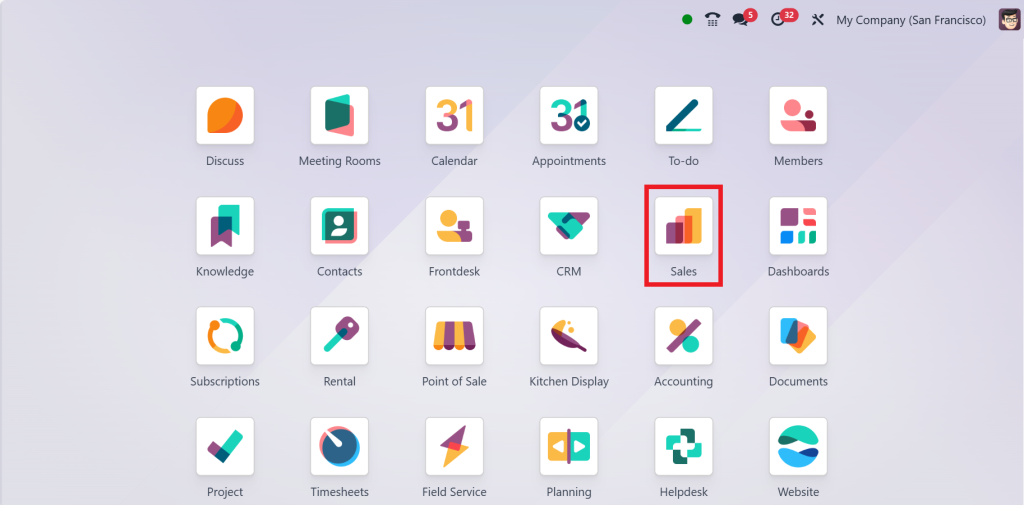
Direct to the Sales Module.
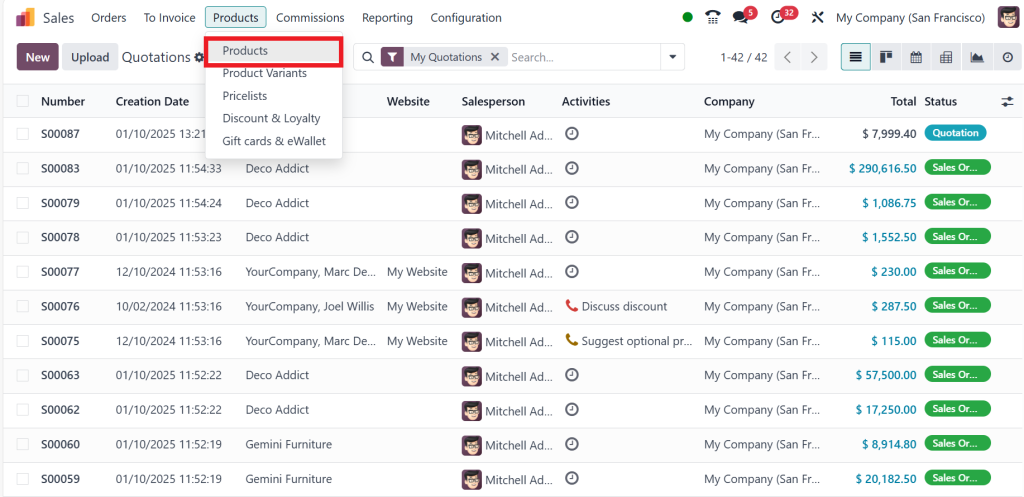
Go to the Products menu and click on Products.
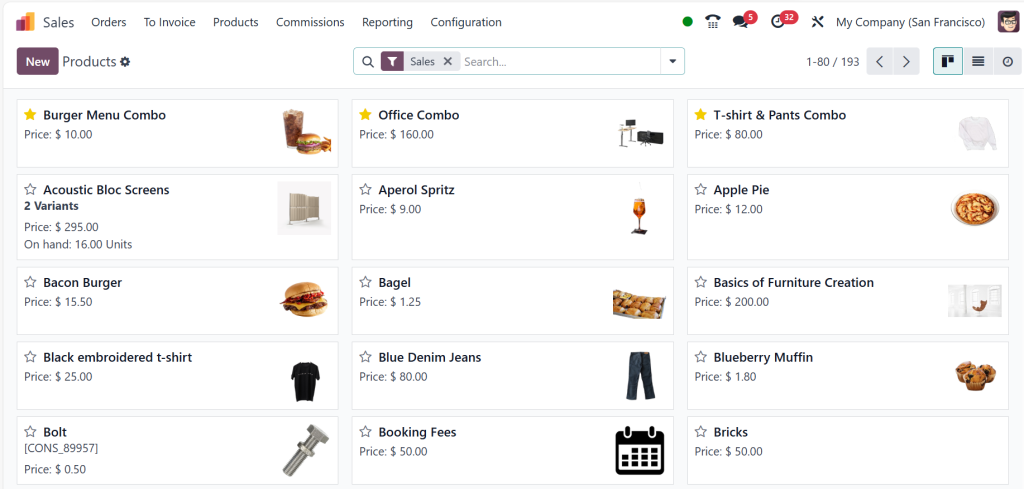
Now, you can see different products, such as service products, goods, and combo products.
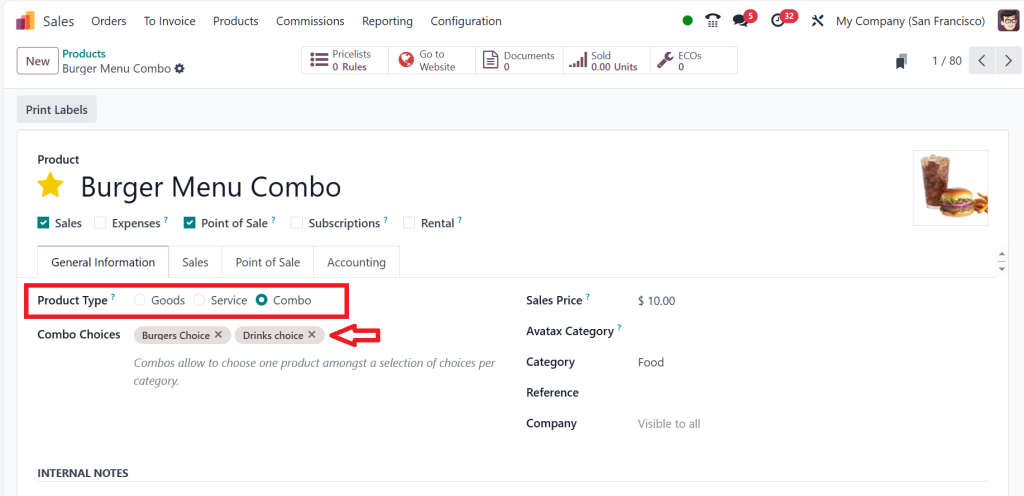
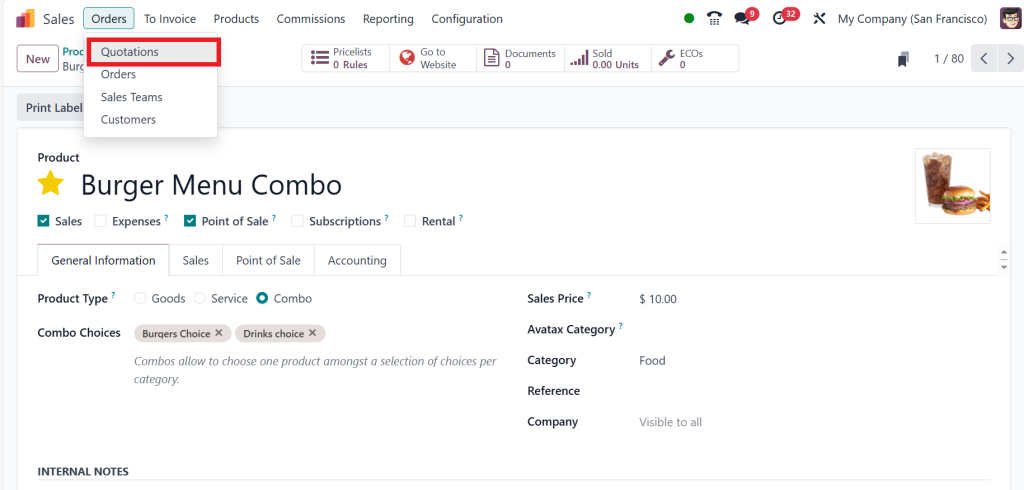
So, click on Burger Menu Combo to see the Product Type as Combo. We can also choose the Combo Choices. The combo choices allow you to choose one product among a selection of options for the category. And in the screenshot below, you can see two choices: Burgers Choice and Drinks Choice.
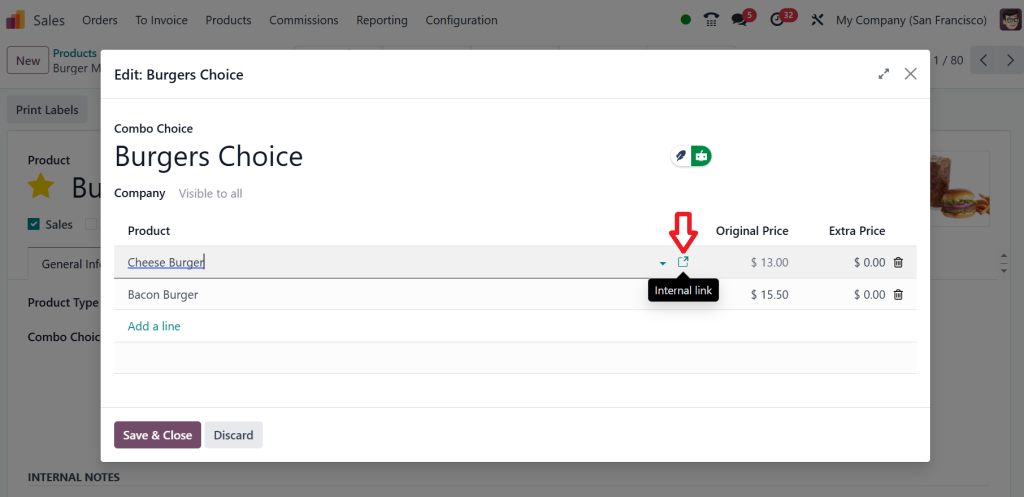
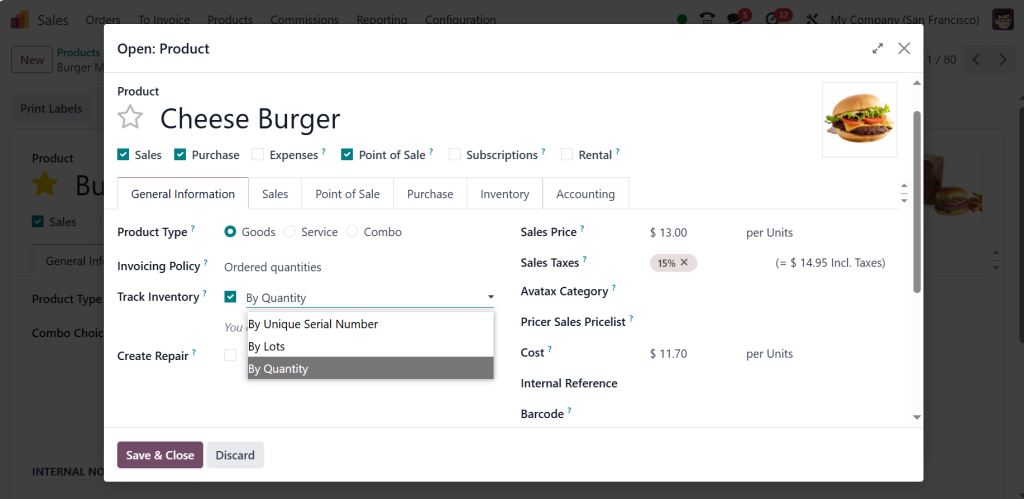
Let’s click on the Burgers Choice; you can see different Burgers here. If you click on the internal link for any product.
Then, you can easily track this product based on its quantity. You can also track the inventory by unique serial number or lots.
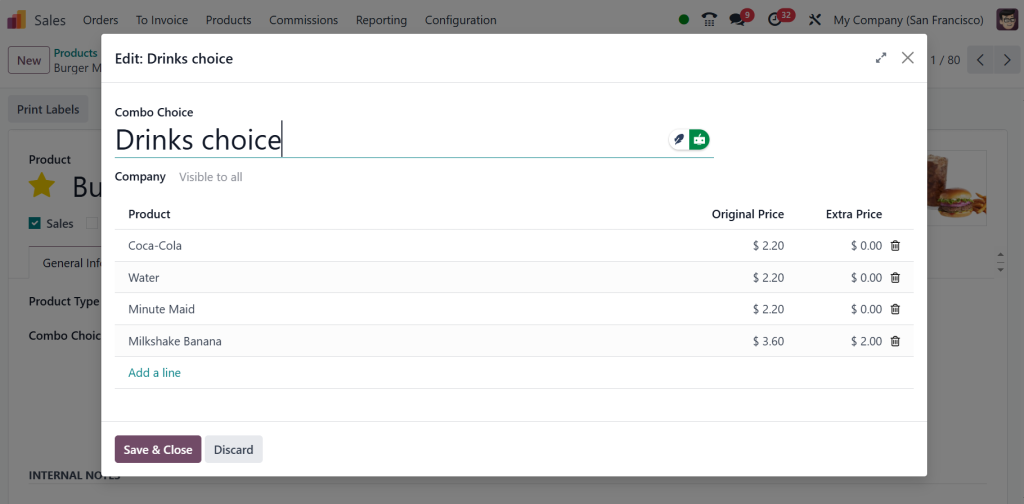
If you click on the other choice, the ‘‘Drinks Choice,’’ you can see the different varieties of drinks and choose any of them.
Now, let’s move to the Orders menu and click on Quotations.
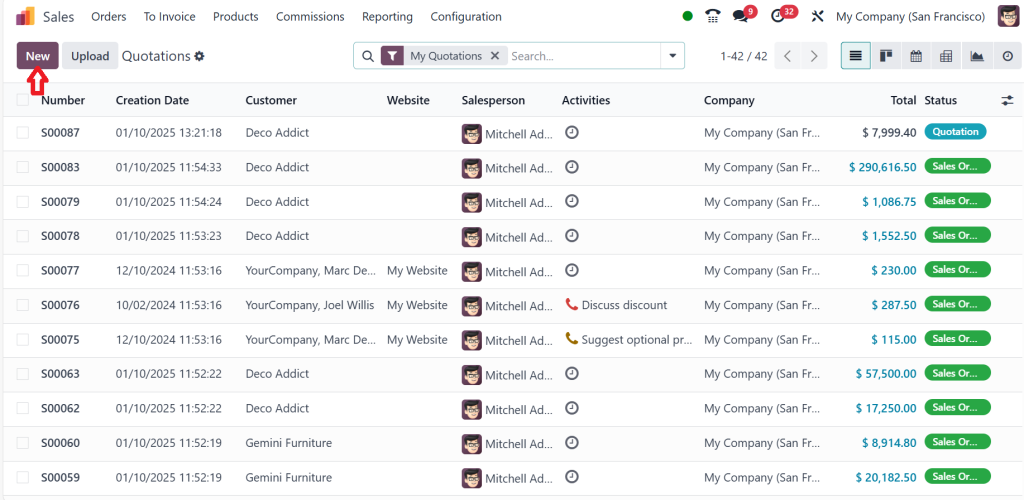
Click on New.
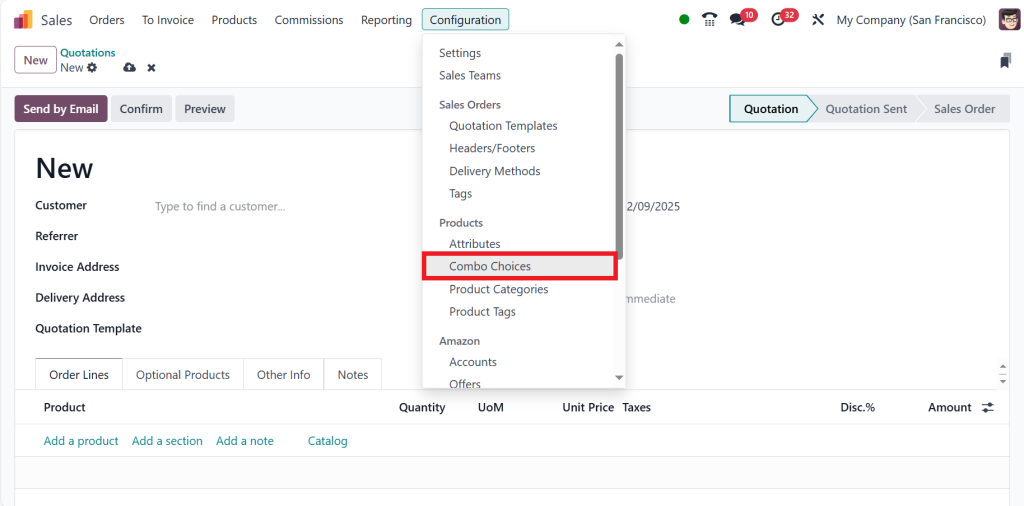
So, before that, let’s see how to create the combo products. Go to the Configuration menu and click on Combo Choices.
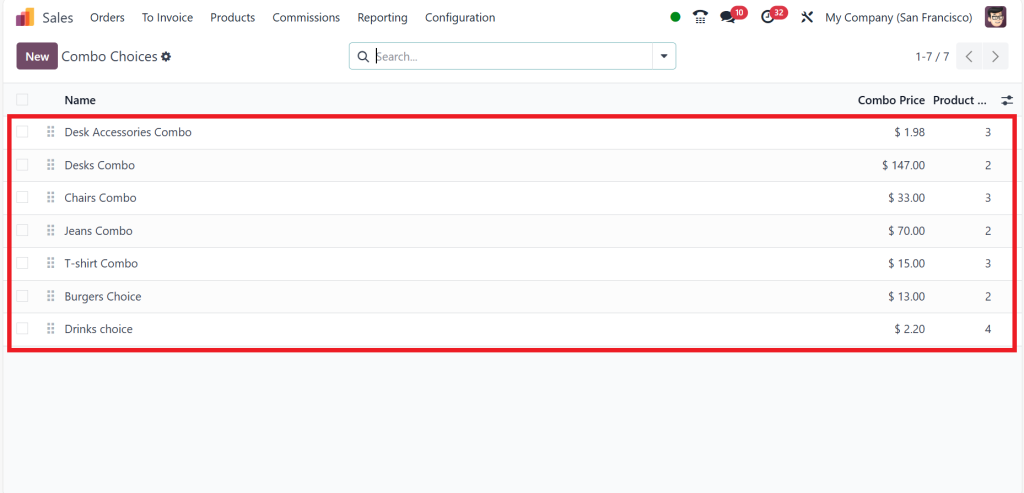
And you will be able to find all the combo choices here. That also shows the combo price and the number of products included in each option.
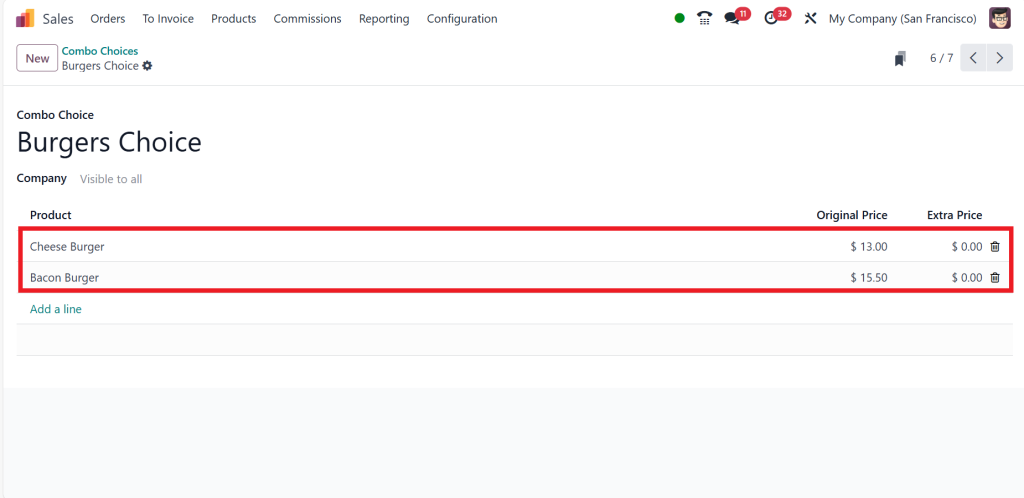
By clicking on any choice, let’s click on ‘‘Burgers Choice,’’ here, you can see the product name, the original price, and the extra cost.
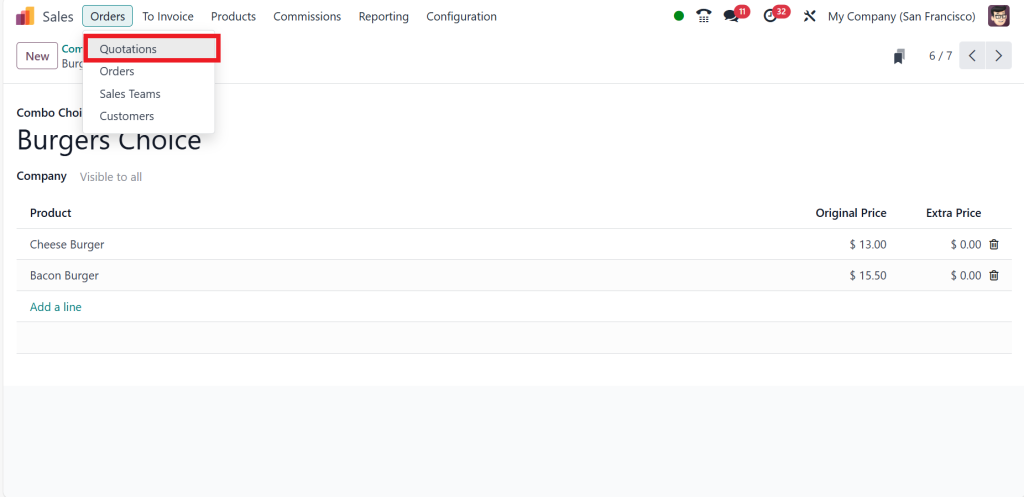
So, let’s return to the orders menu, click on quotations, and then click on ‘‘New’’.
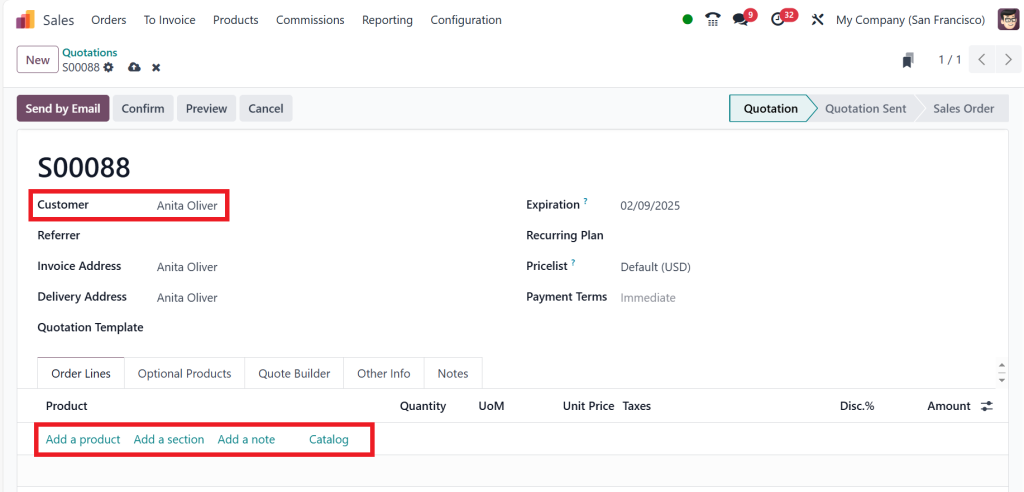
Create a new order for the customer ‘‘Antita Oliver’’ and add a product.
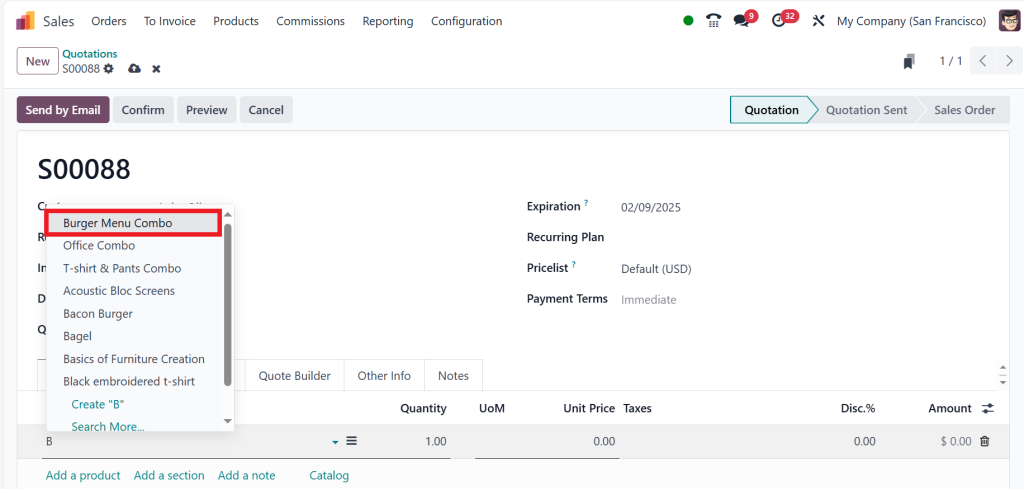
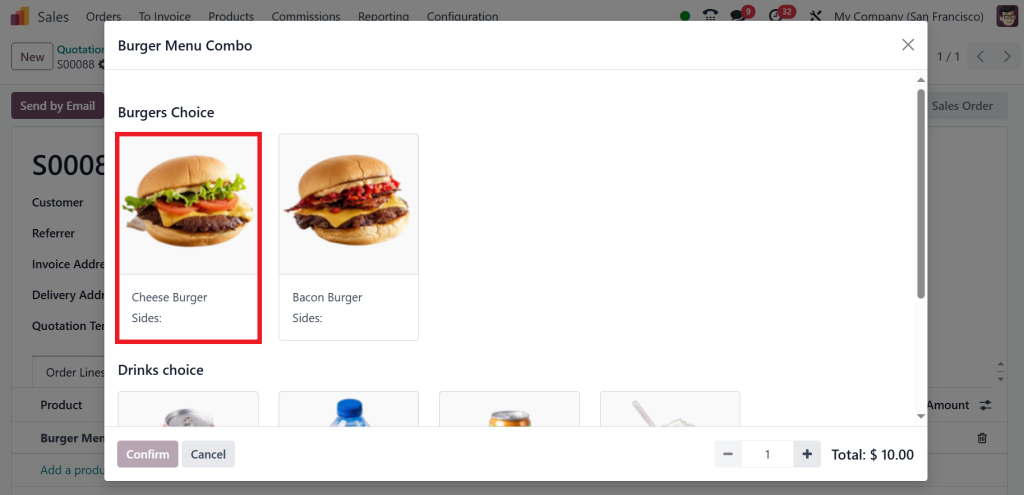
The product she wants is the ‘‘Burger Menu Combo.’’
Then, click on Cheese Burger.
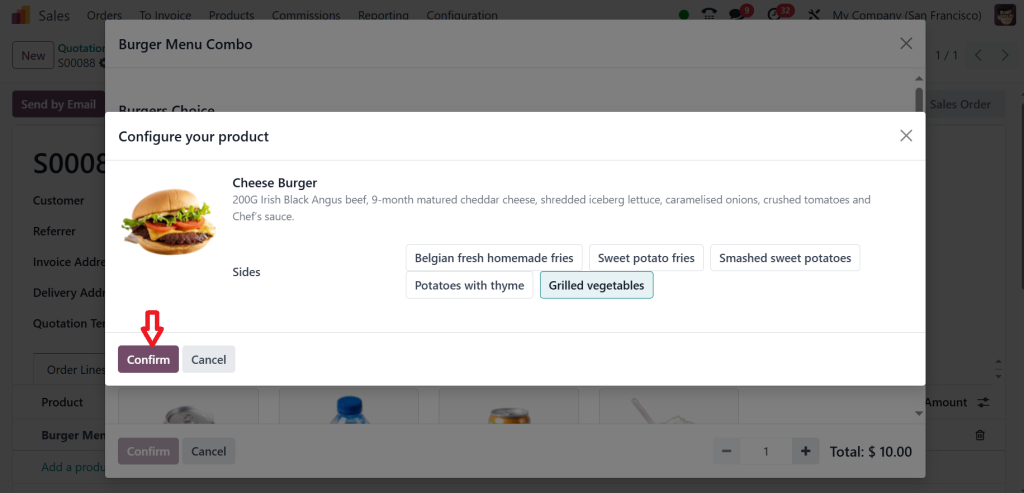
Because she would like to choose a Cheese Burger with Grilled Vegetables and click on ‘‘Confirm’’.
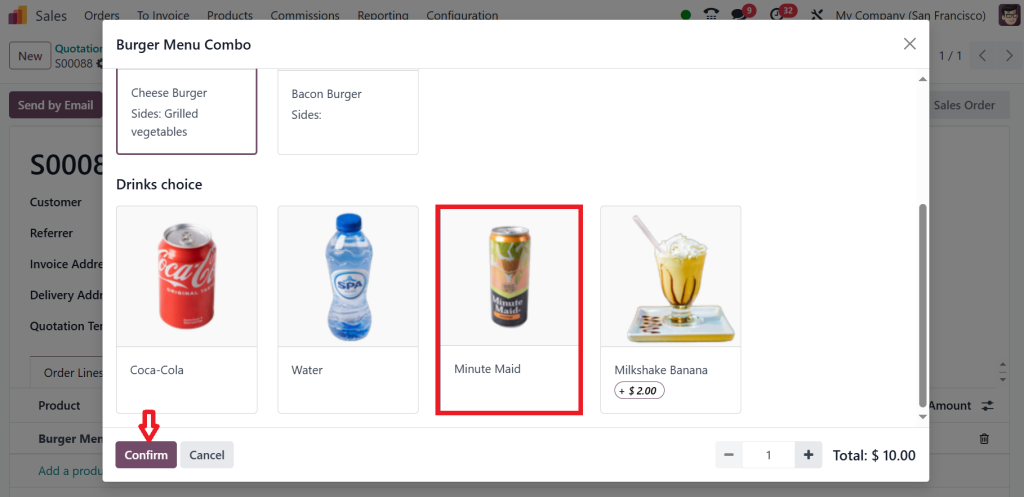
After that, I would like to choose a Minute Maid for my customer because she loves this drink and click on the ‘‘Confirm’’.
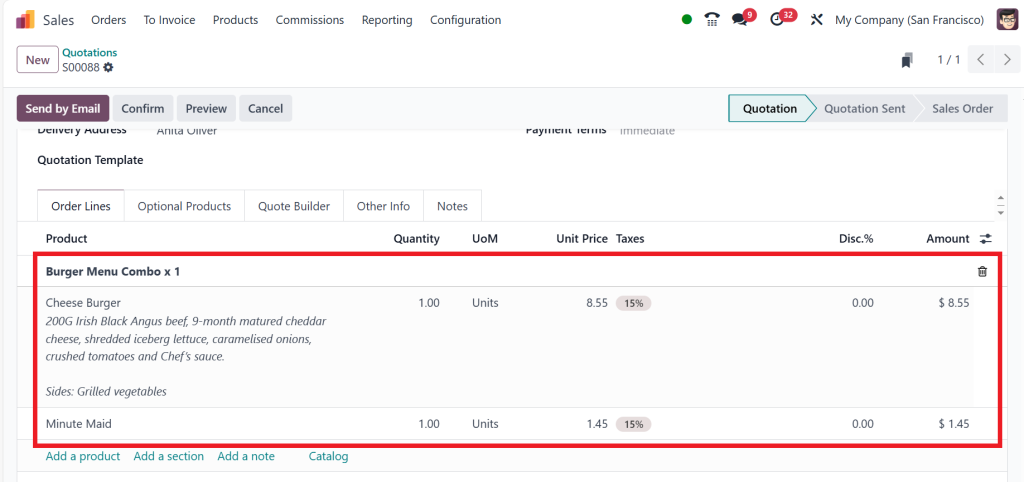
In the screenshot below, you can see everything.
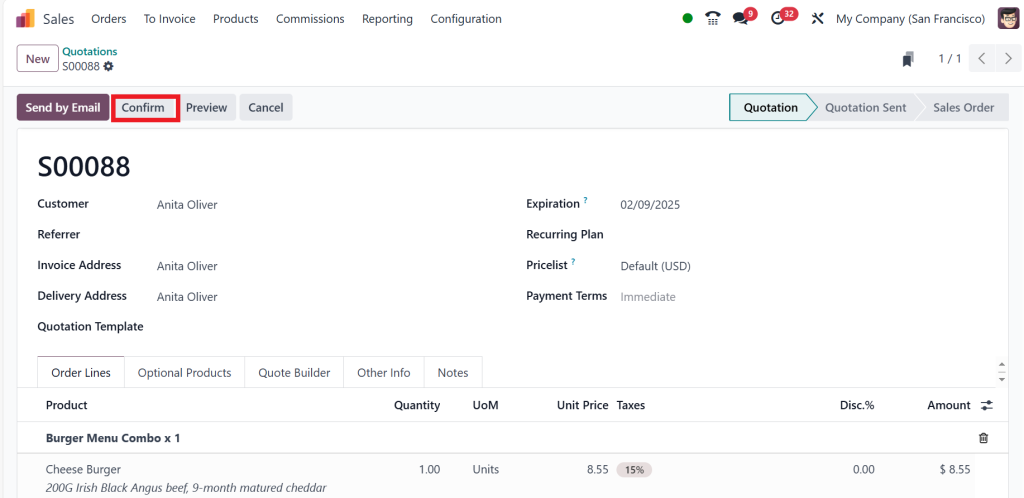
Then click on the ‘‘Confirm’’ button.
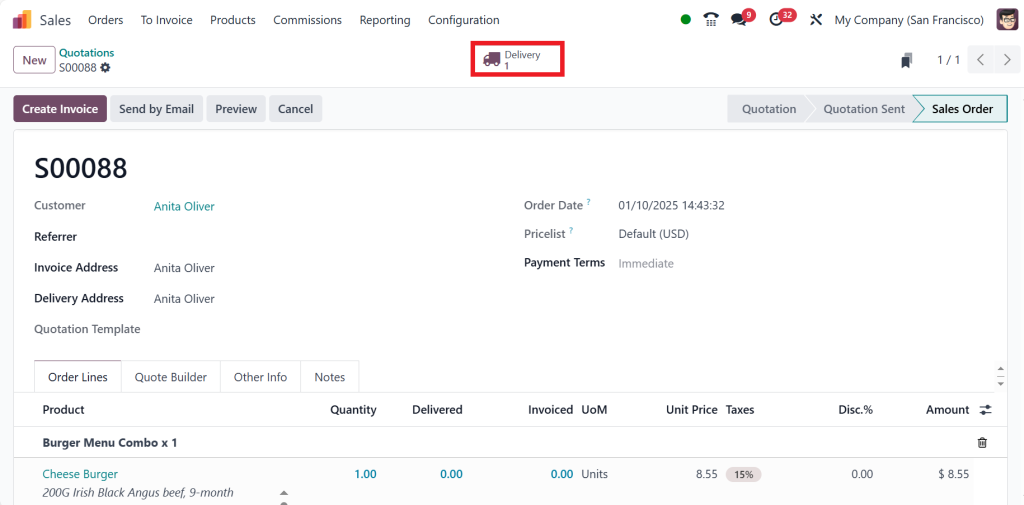
And finally, we just need to deliver the item to the customer by clicking on the ‘‘Delivery’’ tab.
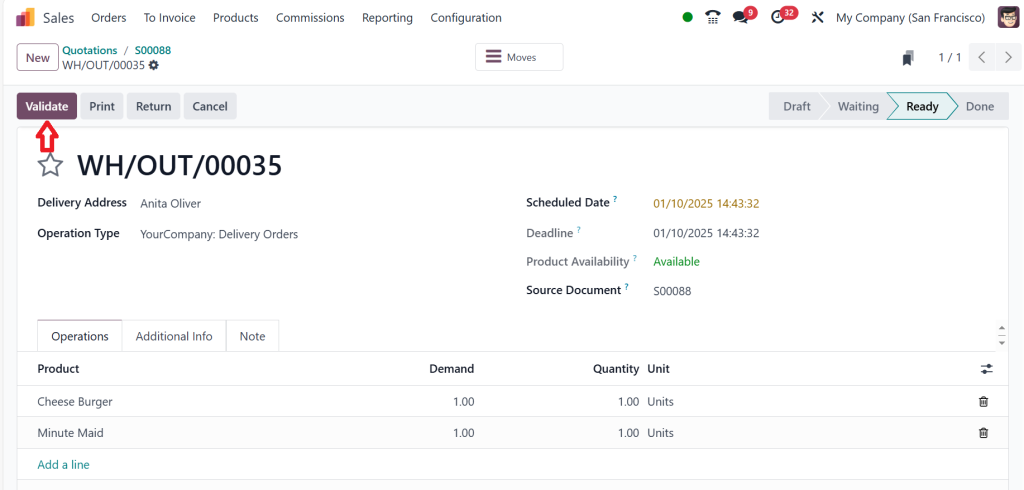
Then, click on ‘‘Validate’’.
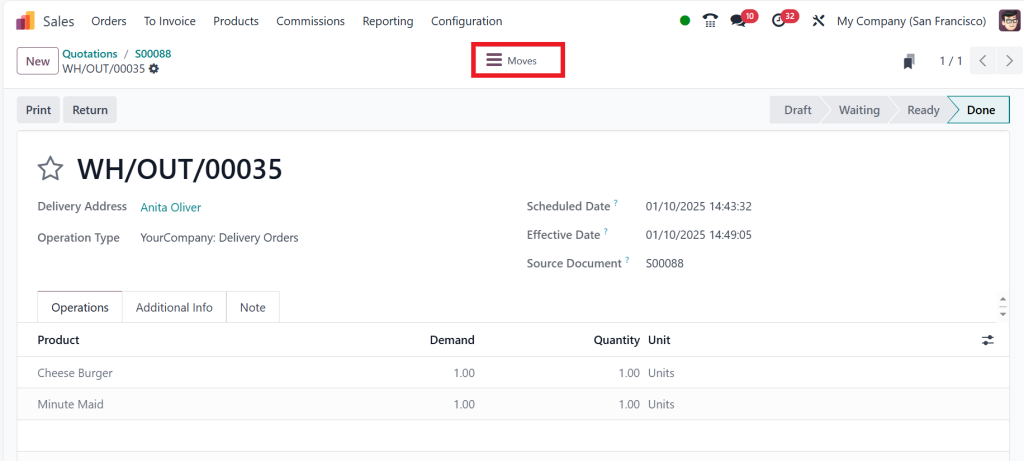
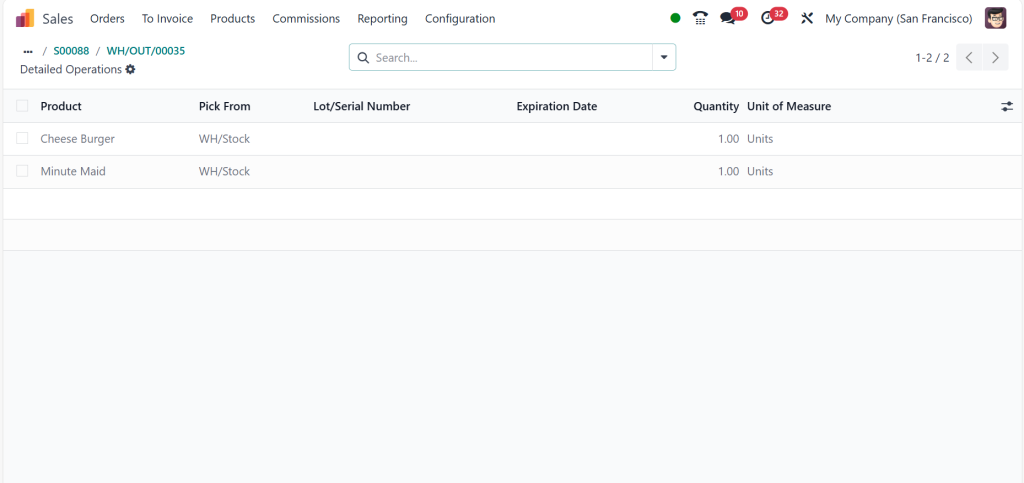
If you want to find the moves, click ‘‘Moves’’.
You can see that the products ‘‘Cheese Burger and Minute Maid’’ have been picked from WH/Stock in one quantity.
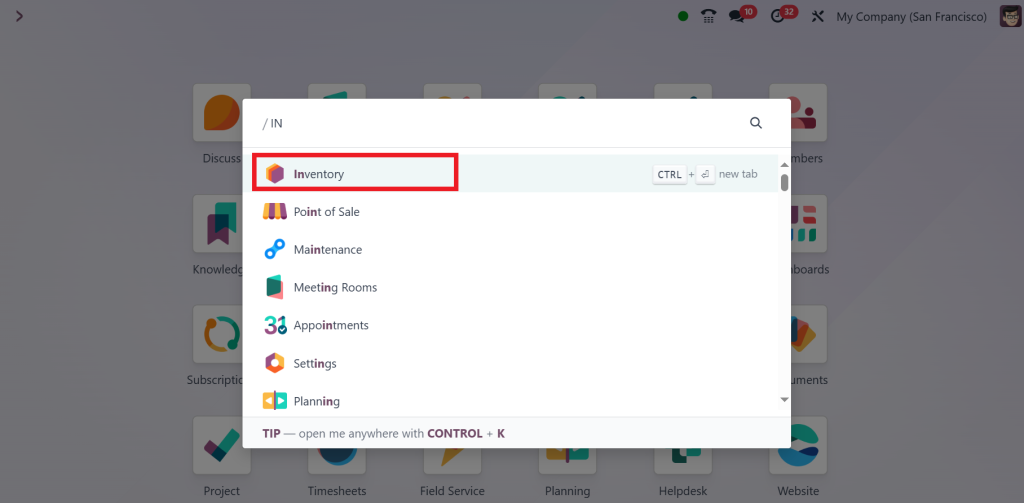
So, if you want to find the inventory tracking, open the Inventory module.
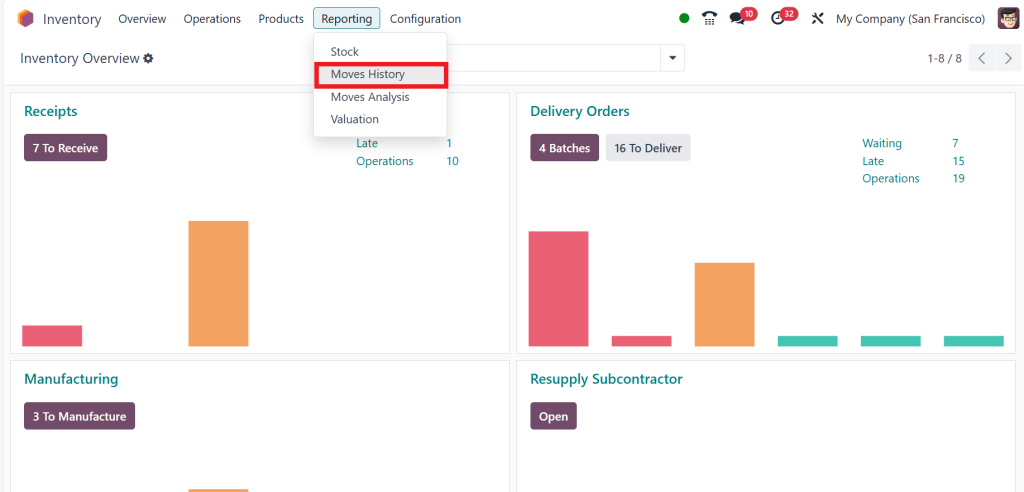
Go to the Reporting menu and select Moves History.
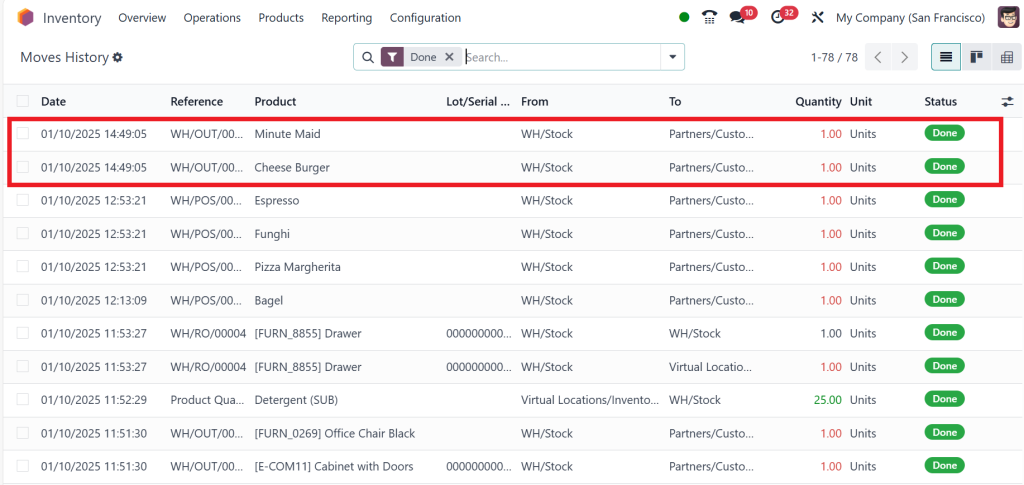
This shows the item taken from the stock or inventory, as shown in the screenshot below.
That is how you can create and manage the combo products in the Odoo 18 sales module.
Why Inventory Management is Key for Combo Products
Managing stock levels is already challenging, but Odoo 18 manage product kits makes it possible to maintain accurate inventory counts without breaking a sweat. When products are bundled, inventory for each component must sync perfectly to avoid overselling or stock shortages.
Here’s how Odoo 18 ERP combo product management helps with inventory control:
Real-Time Inventory Syncing: Automated updates ensure that stock levels for individual products and bundles are always accurate.
Component-Level Tracking: Even if products are sold in different kits, Odoo tracks each item’s availability.
Stock Alerts: Get notified when key components are running low so you can reorder before a stock-out happens.
The Art of Pricing Combo Products in Odoo 18
Pricing bundles strategically can significantly impact consumer buying behaviour. Think about how often you’ve chosen a “Buy 2, Get 1 Free” deal simply because it felt like a better bargain.
In the Odoo 18 sales bundle configuration, you can apply various pricing models:
Discounted Bundles
Offer a price reduction when items are purchased as a bundle. Customers love a good deal, and this strategy encourages bulk purchases.
Tiered Pricing
Set volume-based discounts, where larger purchases reveal better pricing. This approach is excellent for incentivizing high-volume orders.
Time-Limited Promotions
Seasonal offers or flash sales are perfect for creating urgency and driving quick sales of product kits.
By leveraging Odoo’s built-in pricing tools, businesses can automate these strategies, eliminating manual calculations and ensuring consistent platform pricing.
Tracking Sales Performance of Combo Products
What gets measured gets managed, and sales performance is no exception. Monitoring how well your bundles perform is crucial for optimizing your offerings.
Key Performance Metrics
Sales Volume: How many bundles are sold within a given time frame?
Revenue Contribution: What percentage of total revenue comes from combo products?
Customer Preferences: Which bundles perform best and why?
Custom Reports in Odoo
Odoo’s reporting tools allow businesses to:
Create detailed sales performance reports.
Monitor trends in bundle purchases.
Identify best-selling kits and underperforming combos.
Best Practices for Managing Combo Products in Odoo 18
Start Small and Scale
Begin with a few well-curated bundles to test customer response. Gradually expand as you gather data and insights.
Keep Inventory in Check
Ensure that stock levels for bundle components are regularly updated to avoid overselling or disappointing customers.
Offer Customizable Options
Flexibility is a selling point! Allow customers to customise bundles by selecting optional components where appropriate.
Listen to Customer Feedback
Pay close attention to what your customers are saying about your bundles. Use their input to improve product offerings and ensure customer satisfaction.
Common Challenges and Solutions in Combo Product Management
Challenge: Stock discrepancies when managing multiple product kits.
Solution: Utilize Odoo’s real-time stock synchronization feature to maintain accurate inventory counts across all channels.
Challenge: Pricing inconsistencies or calculation errors.
Solution: Automate pricing rules and regularly test setups for accurate discount calculations.
Challenge: Customer confusion over bundle contents.
Solution: Provide clear, detailed descriptions and images for each combo product to set accurate expectations.
The Future of Combo Product Management with Odoo 18
As markets evolve, so will customer expectations. Mastering how to manage combo products in Odoo 18 Sales ensures your business stays agile, competitive, and customer-centric. The ability to flawlessly offer curated bundles, manage inventory, and optimize pricing makes Odoo a game-changer for modern companies.
So why wait? Take control of your product strategy today and reveal new levels of sales success by fully leveraging Odoo 18 sales product combinations and bundle management capabilities.
Hi, I'm Ilsa Shabbir, an Odoo ERP content writer specializing in functional blogs on Odoo modules. I simplify complex Odoo features, creating clear and engaging content to help businesses understand and optimize their ERP solutions.
We use cookies to ensure that we give you the best experience on our website. If you continue to use this site we will assume that you are happy with it.