How to Manage Post-Dated Cheque PDC in Odoo 18 Accounting?
Why Post-Dated Cheque PDC in Odoo 18 Accounting Is Advanced
Let’s talk about something that many businesses still deal with every single month – post-dated cheques.
If your business accepts future-dated payments, you know the stress that can come with manually managing them: missing due dates, lost records, errors in journals… the list goes on. Now, what if I told you that the latest version of Odoo has a solution that doesn’t just solve this – it transforms it?
With Post-Dated Cheque PDC in Odoo 18 Accounting, managing cheques no longer feels like a chore. Odoo 18 brings automation, control, and visibility that can save your accounting team hours and prevent costly mistakes.
In this article, we’ll walk through:
Why managing post-dated cheques is still so important
How Odoo 18 makes it extremely easy
A step-by-step guide to set up and manage PDCs
Real-life scenarios and best practices
And how your business can get the most out of this feature
Let’s look deeper into why managing Post-Dated Cheques PDC in Odoo 18 Accounting might be your smartest upgrade this year.
What Is a Post-Dated Cheque and Why Does It Still Matter in Odoo 18 Accounting?
You’d think post-dated cheques were old-school, right? But in reality, they’re still widely used across industries like:
Real estate
Education
Rentals
Wholesale trade
Service agreements
A post-dated cheque (PDC) is a cheque written with a coming or future date on it. This means it can’t be cashed until that specific date. It’s a great way to handle scheduled payments, secure long-term agreements, and manage instalment-based transactions.
But there’s a catch…
If not appropriately tracked, post-dated cheques can become a financial mess – leading to bounced cheques, unpaid bills, and inaccurate reporting.
That’s precisely where Odoo PDC management comes in. With the release of Odoo 18, you now get a clean, organized, and automated way to stay on top of your cheque game.
What Makes Odoo 18 Post-Dated Cheque Features So Good?
Here’s the truth, previous Odoo versions required extra modules or manual workarounds to manage PDCs. But Odoo 18 post-dated cheque handling is now fully built-in – and better than ever.
Here’s what’s included:
Automatic payment scheduling
smooth journal entry management
Calendar and dashboard views for due dates
Reminder notifications before the deposit
Easy reconciliation with your bank statements
Clear status updates: Cleared, Pending, or Bounced
That turns Odoo 18 accounting PDC into a dynamic tool that adapts to your business workflow. Whether you handle 10 or 10,000 cheques monthly, Odoo can manage them all efficiently.
How to Manage Post-Dated Cheques in Odoo Using the Odoo PDC Management Workflow
Let’s get hands-on. Here’s a practical walkthrough on managing post-dated cheques in Odoo accounting using the new tools in version 18.
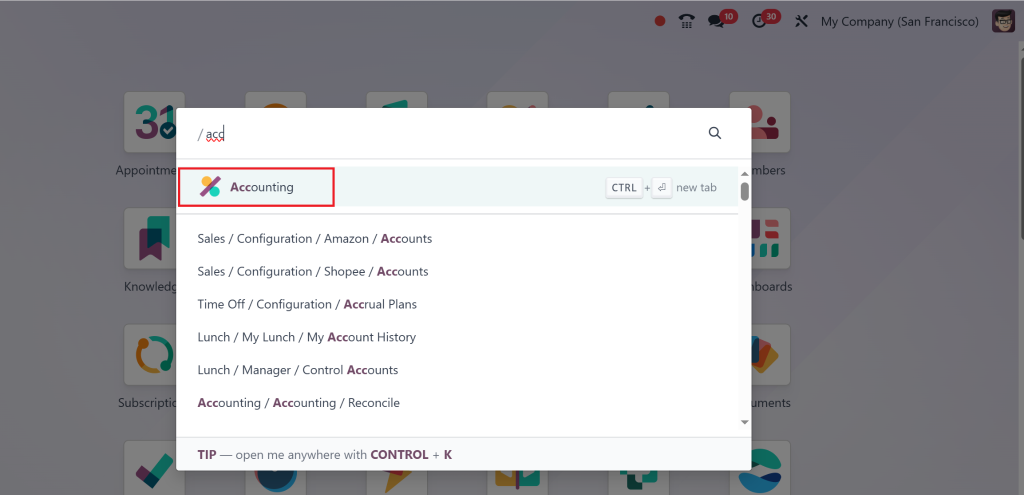
Step 1: Enable the Post-Dated Cheque in Odoo Accounting
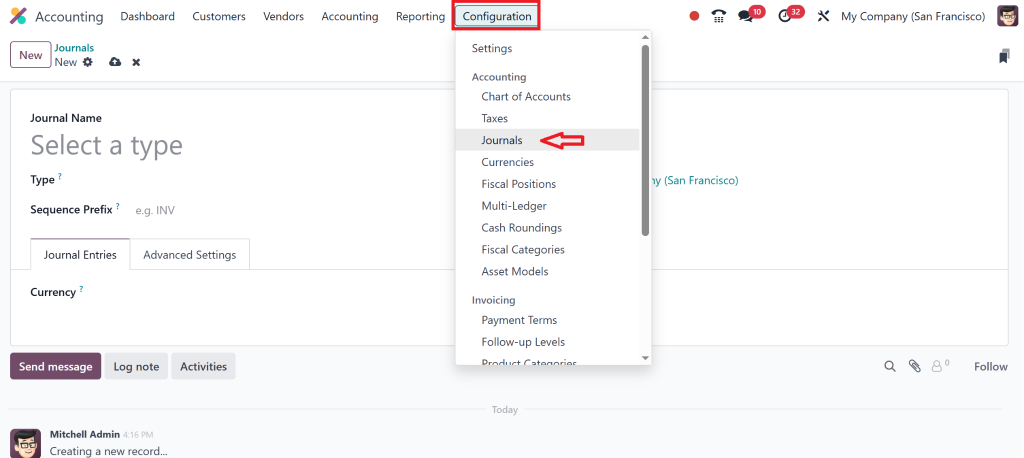
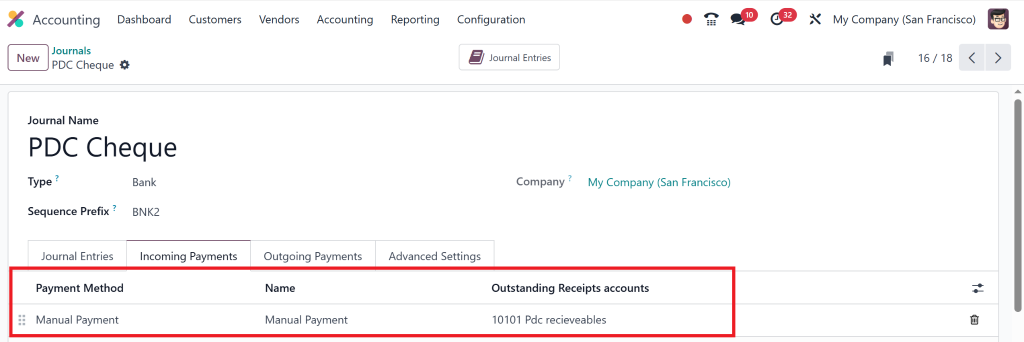
First, create the journal: for this, go to Accounting >
Then, Configuration > Journal
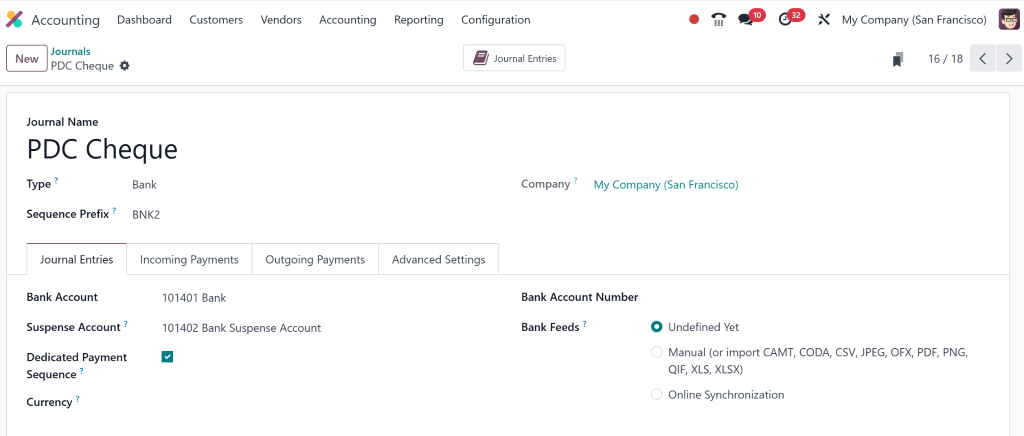
Give it a name (PDC cheque).
Journal entries will automatically include all the details, and you can also check the incoming payments to see which account you need receivables for.
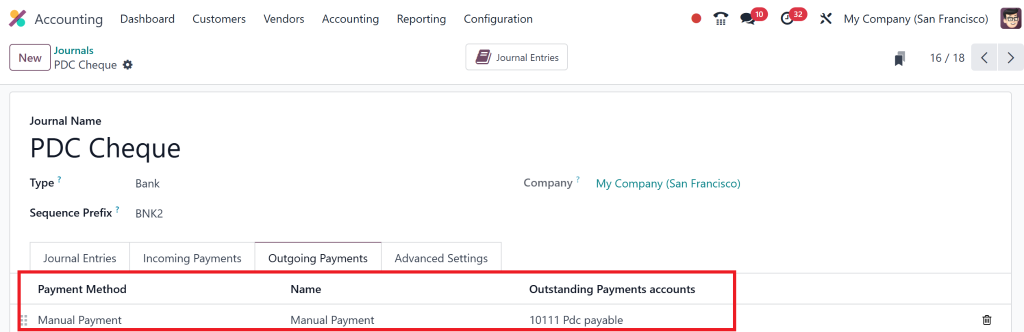
Also, the details of the outgoing payment.
That opens the entire Odoo post-dated cheque workflow across your accounting module.
Step 2: Register a New Cheque as a PDC
When you receive a cheque dated in the future:
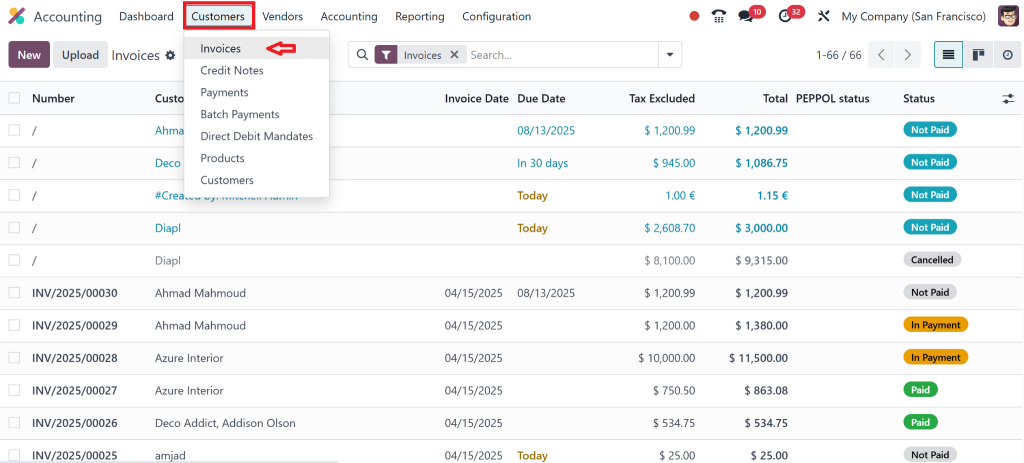
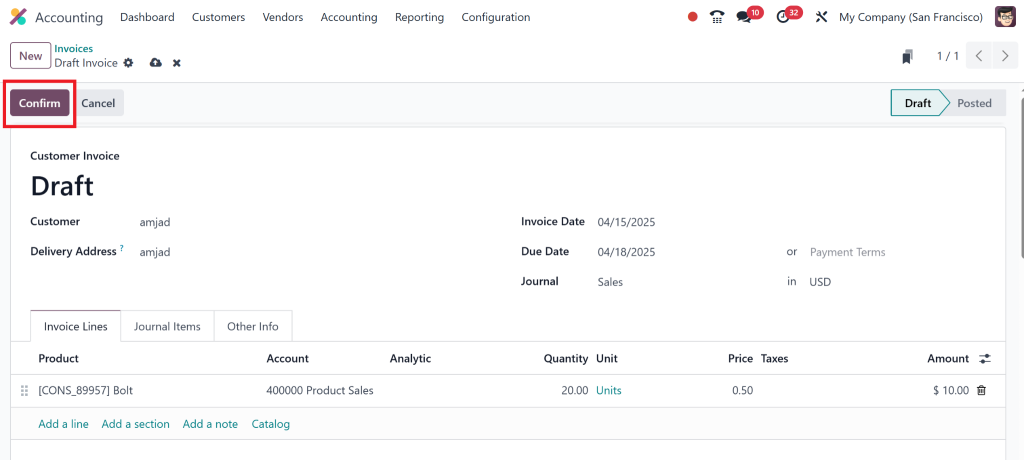
Go to Accounting > Customers > Invoices
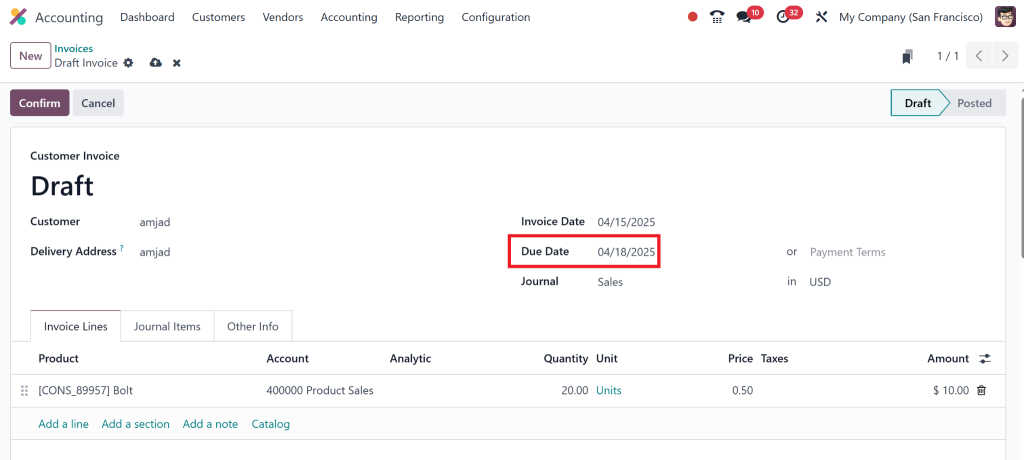
Click on NEW and add customer details, products and due date as a future date.
Then, click on confirm and post it.
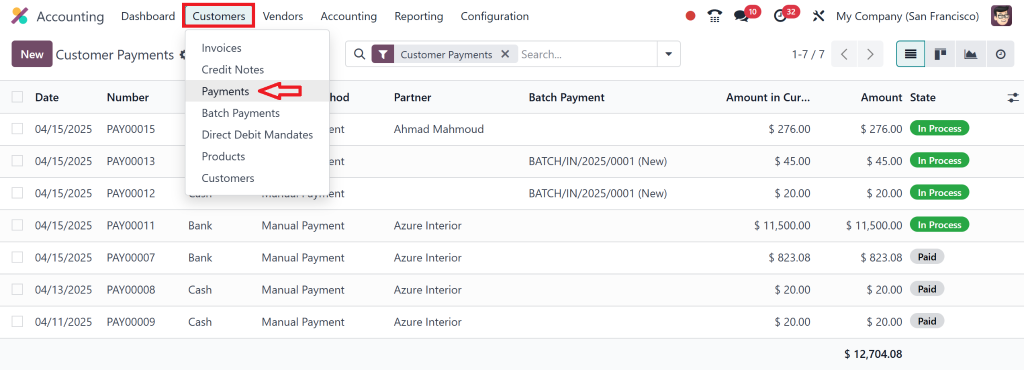
Then, move toward the payment process for the same invoice by going to Customers > Payments.
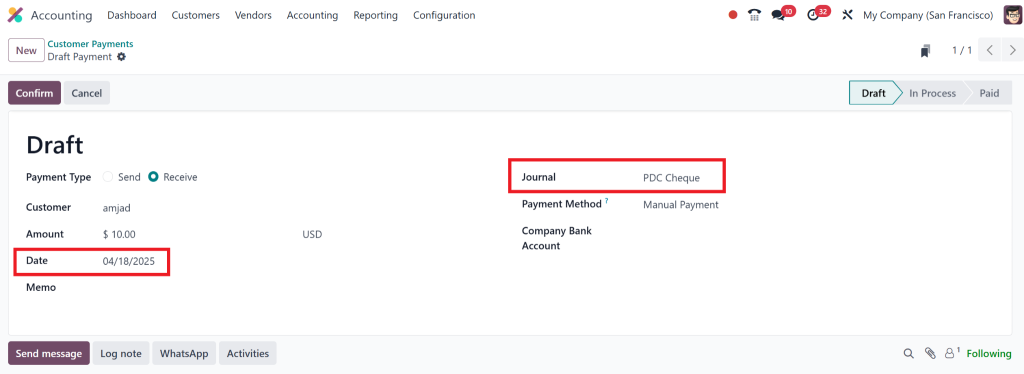
Click on New and add all the details, make sure to carefully add the post date and the correct journal of PDC.
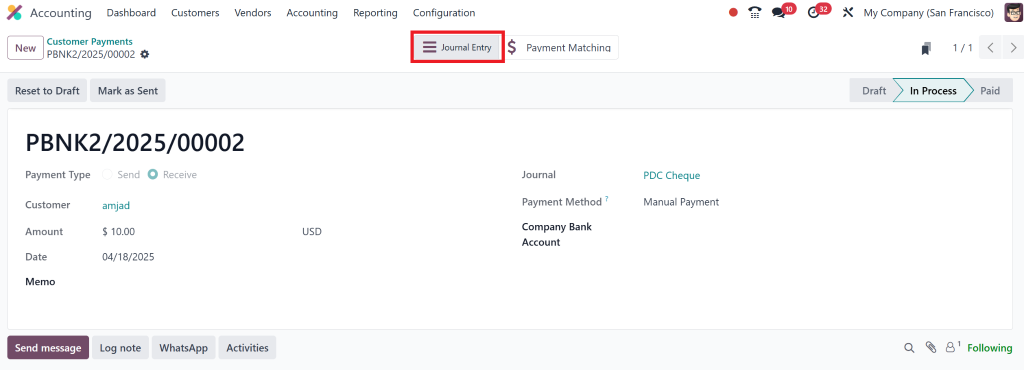
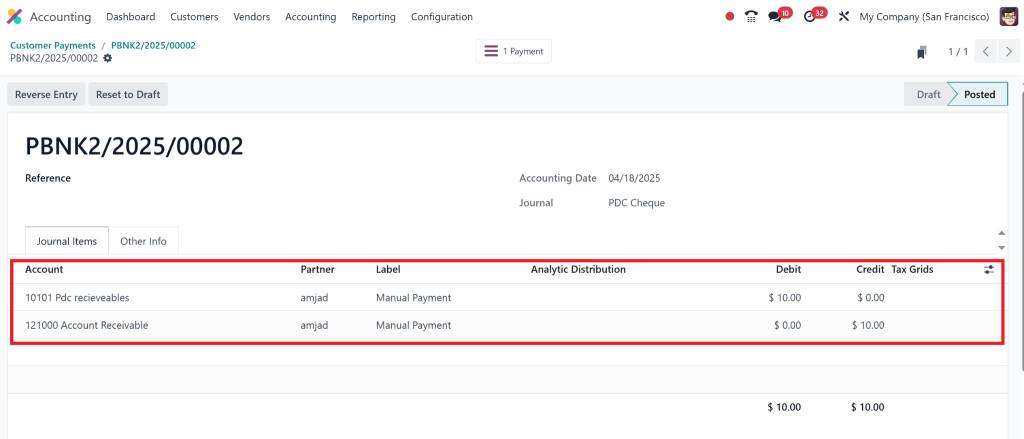
After confirming this, we can check the journal entries.
Here, we can see the entries.
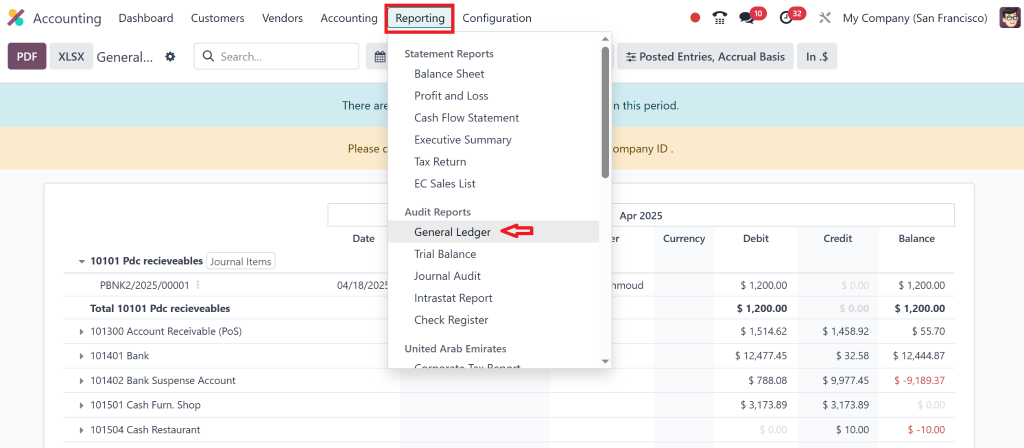
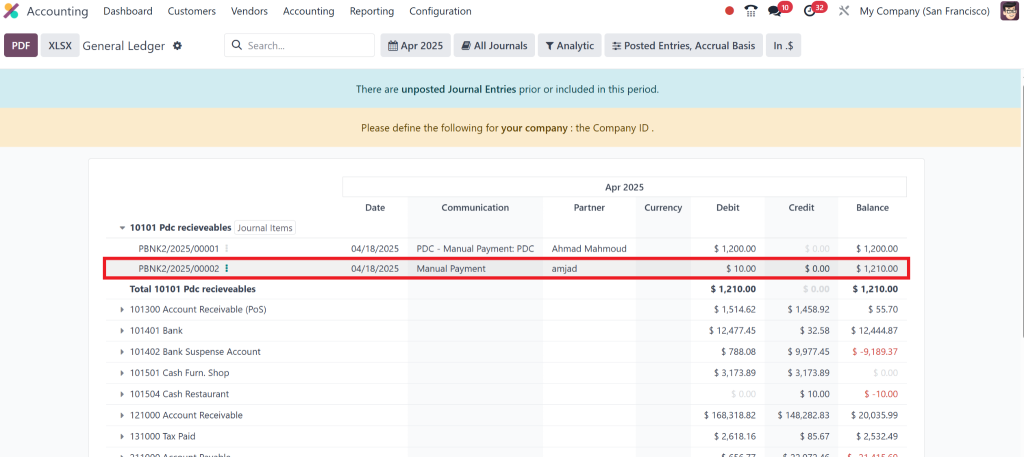
You can also verify this in the “General Ledger”.
You can see the entry details here.
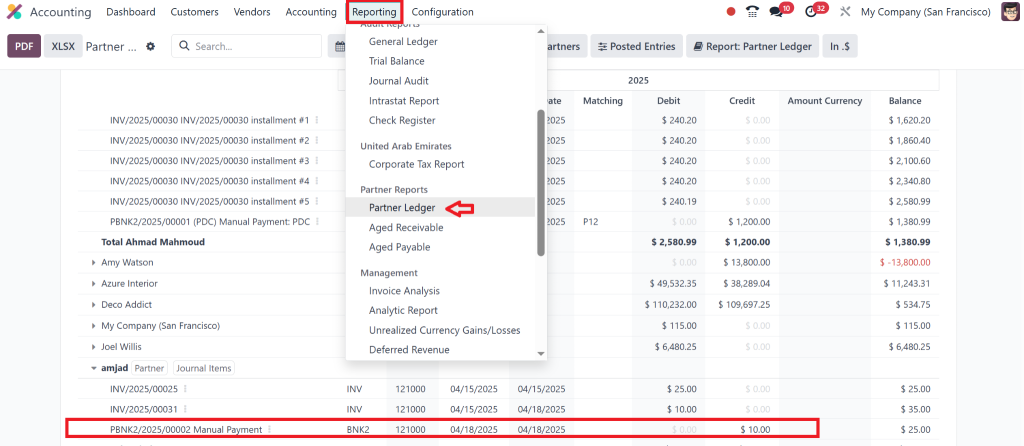
We can also check it under “Partner Ledger”
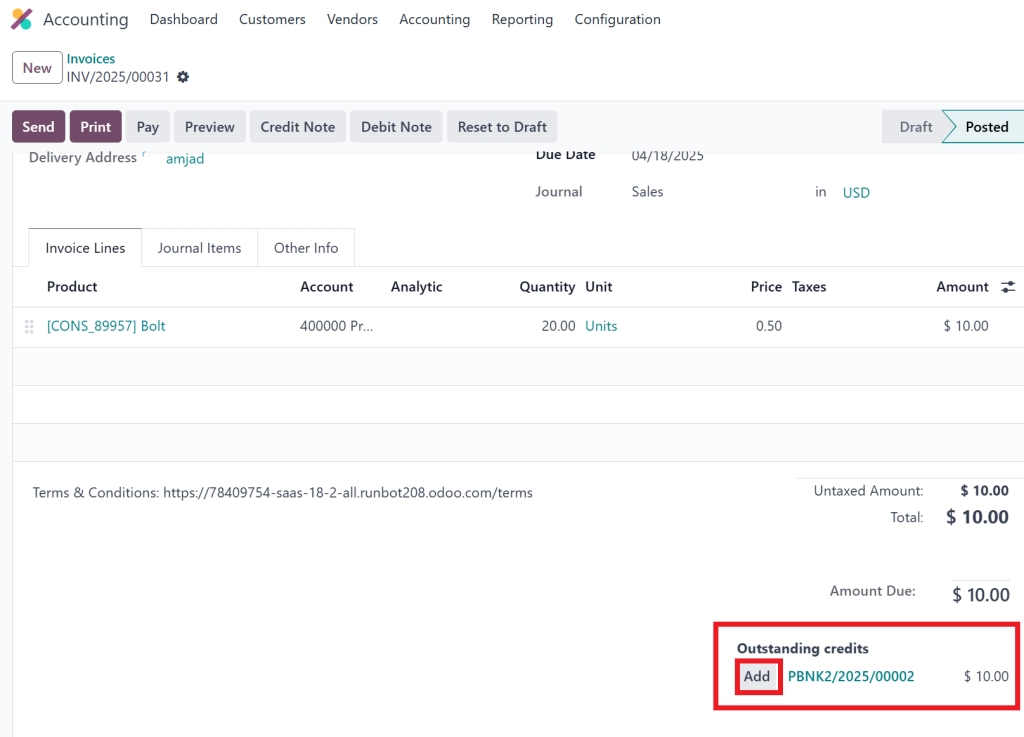
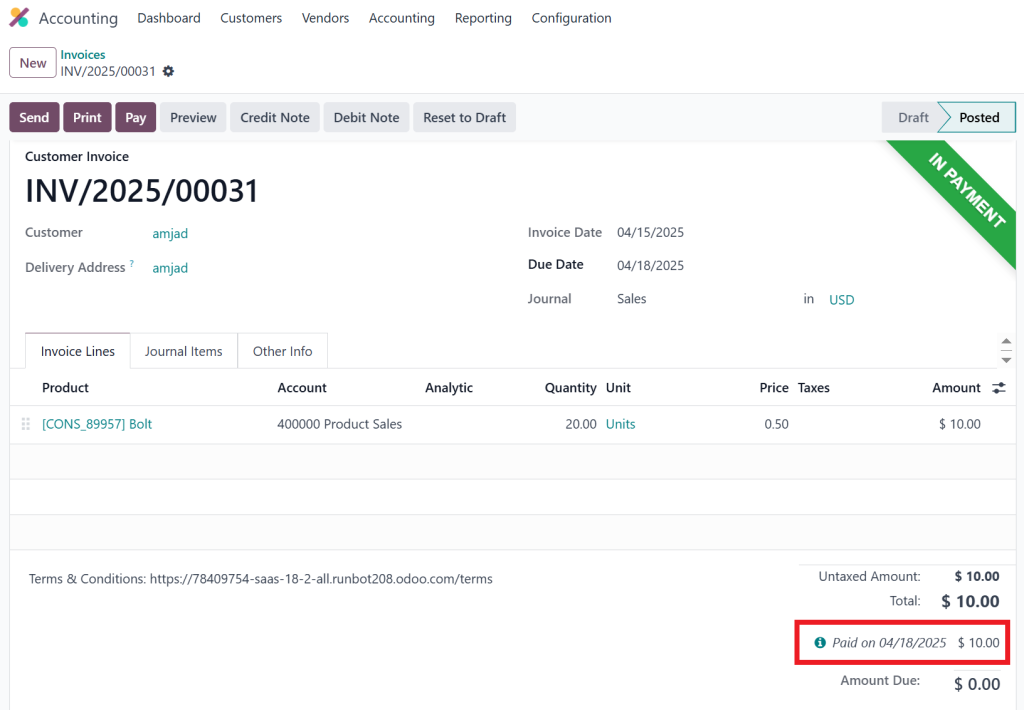
Move towards the customer invoice we created earlier and click Add PDC.
Step 3: Monitor and Track Using the Odoo 18 PDC Dashboard
Once you start logging PDCs, Odoo gives you complete visibility over the following:
Cheques due today, next week, next month
Status of each cheque (Deposited, Cleared, Bounced)
History of cleared and failed cheques
Audit-ready logs of every transaction
You can filter by partner, due date, or bank, which gives you clean financial insights on demand.
Step 4: Deposit, Clear, and Reconcile
On the due date:
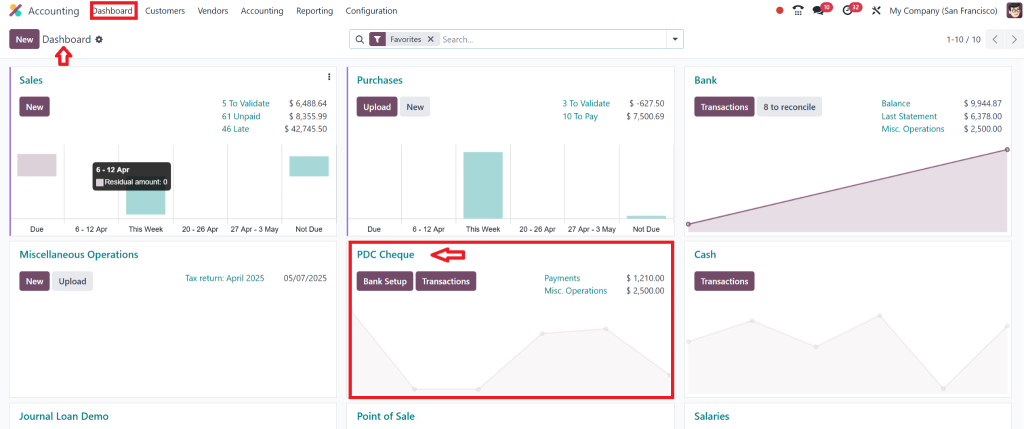
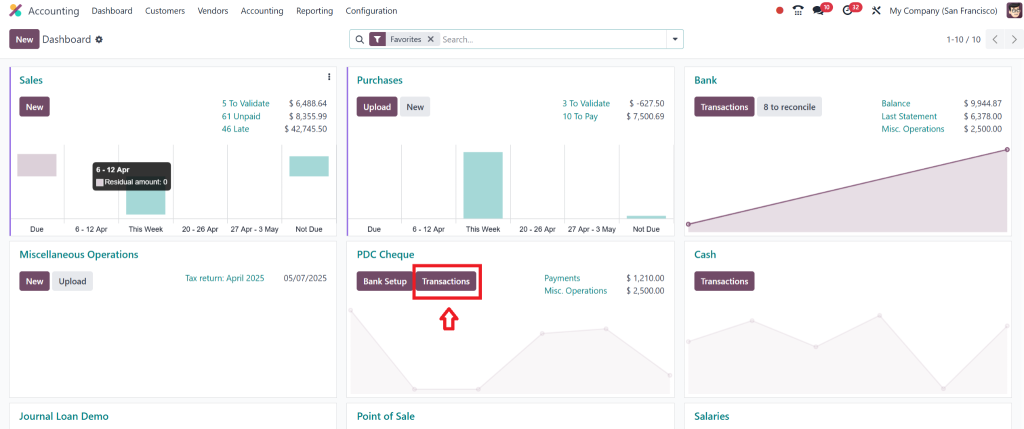
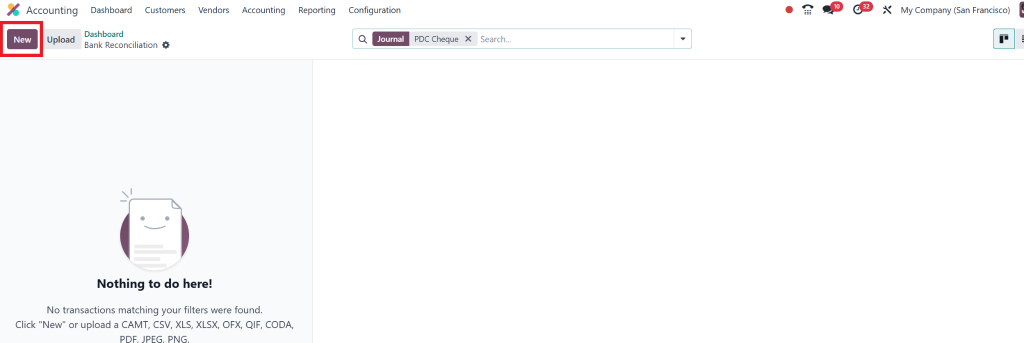
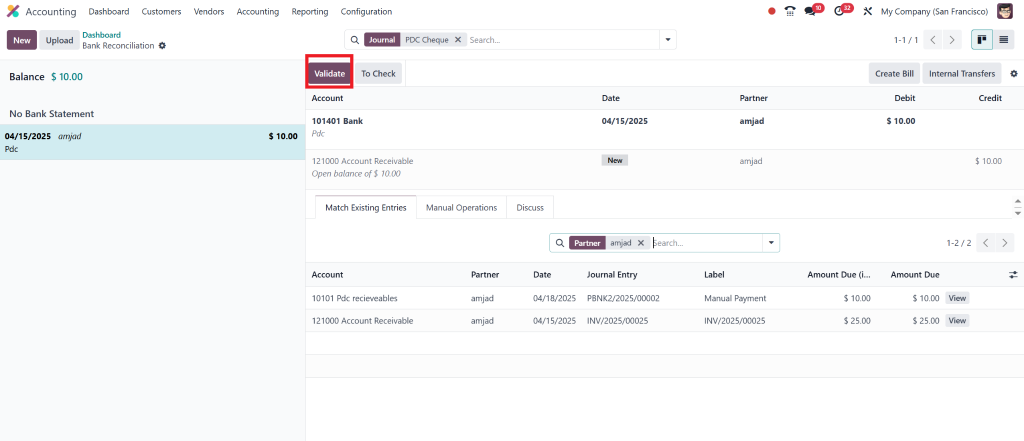
To reconcile, go to the PDC dashboard
Click on the Transactions.
Click on New and add all the relevant details.
And click on add & close.
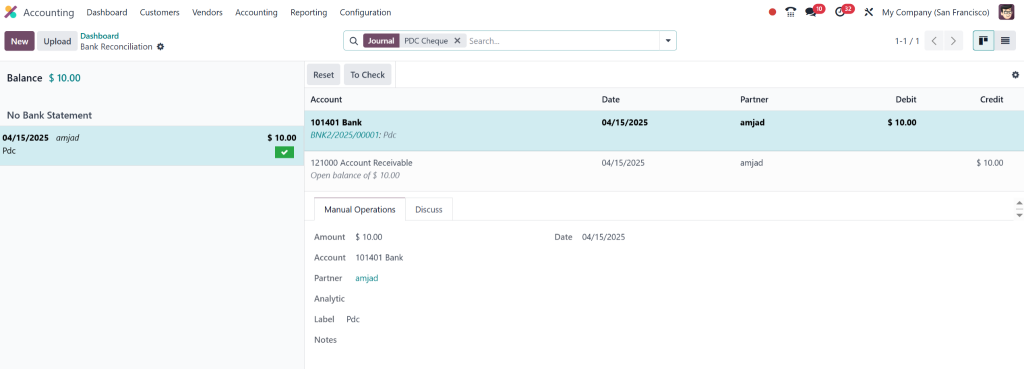
Click on Validate and then the payment will automatically reflect in the customer’s account and link to your bank journal
No double work. No duplicate entries.
That is the magic of Odoo 18 cheque payment processing.
How Businesses Are Using Post-Dated Cheques PDC in Odoo 18 Accounting (Real Use Case)
Let’s take an example.
Imagine you’re running a training institute. You enrol students on a 6-month course and collect monthly post-dated cheques.
Here’s what used to happen:
Your admin team tracked the cheques in spreadsheets.
Someone had to check which cheque was due and deposit it manually.
There were frequent delays, missed deposits, and disputes with parents.
Now, with Odoo 18 post-dated cheque features:
Each cheque is entered once at the time of admission
Odoo automatically reminds your team of upcoming deposits
Accounting gets updated instantly when a cheque clears
That’s the difference intelligent automation makes. It’s not just easier – it’s smarter.
Why Managing Post-Dated Cheques in Odoo Accounting Is Better Than Excel or Manual Tracking
You may be wondering: “Why not just use Excel?”
Here’s the thing – Excel doesn’t notify you of due dates. It doesn’t connect to your accounting journals. It certainly doesn’t auto-reconcile.
Using Odoo 18 accounting PDC features gives you the following:
At-the-spot notifications and alerts
Role-based permissions for security
Integrated financial reporting
End-to-end automation from cheque receipt to clearance
When your business grows, manual tracking becomes risky. Errors multiply. Things fall through the cracks.
Using Odoo for post-dated cheques in Odoo accounting helps you grow with confidence.
Best Practices to Maximize Odoo Post-Dated Cheque Workflow
Here are a few expert tips for smooth sailing with PDCs:
1. Create a Role for PDC Manager
Limit who can create, update, or delete PDC entries. This protects data accuracy and security.
2. Set Up Reminders
Use scheduled actions to notify your finance team two days before each cheque’s due date.
3. Review the PDC Register Weekly
Spot any delays, bounced cheques, or potential issues early.
4. Integrate with Bank Feeds
If you’re using Odoo’s bank integration, auto-reconciliation becomes even more seamless.
5. Keep Audit Trails Clean
Use the journal entries created by the system. Never override or backdate cheque entries.
By following these, you’ll get the full power of Odoo PDC management without the headaches.
Why Choose Us to Implement Post-Dated Cheque PDC in Odoo 18 Accounting?
Sure, you can do it yourself. But why not do it the right way from the start?
We specialise in setting up:
Custom PDC dashboards
Automated workflows for your industry
Training sessions for your team
Migration from older Odoo versions
Complete support for Odoo post-dated cheque workflow
Let us help you save time, reduce risk, and build a more innovative finance process.
Post-Dated Cheque PDC in Odoo 18 Accounting Is the Future of Payment Management
Managing cheques doesn’t have to be messy or manual any more. With Post-Dated Cheque PDC in Odoo 18 Accounting, you finally get the control, automation, and insights you’ve always wanted.
Odoo takes care of every step from accepting a cheque to final clearance.
Switch if you still use spreadsheets, manual logs, or third-party tools. You’ll save time, avoid errors, and manage your finances completely.
So, what are you waiting for?
Take your cheque management to the next level with Odoo 18 post-dated cheque automation – and if you want a hand setting it up, we’re just one message away.
Hi, I'm Nabia, an Odoo ERP functional & technical content writer. I specialize in blogs, social media content, ad copy, landing pages, service pages, and email campaigns.
We use cookies to ensure that we give you the best experience on our website. If you continue to use this site we will assume that you are happy with it.