

In Odoo, businesses must often customize their ERP system to fit operational needs. One common requirement is restricting access to specific modules or features for different groups of users. This can be crucial for ensuring that only authorized users can access sensitive or specialized data, such as financial records or, in this case, the Rental module. In this blog, we’ll explore how you can hide specific modules in Odoo 18, using the Rental module as an example.
Why Hide Specific Modules in Odoo 18?
As organizations grow, their requirements for managing user roles and access control become more complex. Let’s say you run a business that offers multiple services, but you want to limit the visibility of certain apps for specific users. For instance, you may want to give employees in your sales or support departments access to general functionalities but restrict access to modules related to rental equipment, which is only relevant to your operations team.
Hide specific modules in Odoo 18 is not just about hiding menu items but can be done more robustly. By restricting the entire module, you can ensure that users never even see the option to interact with sensitive features. This blog will show you exactly how to accomplish this by hiding the Rental module from users in a custom user group called “Non Rental”.
Use Case
Imagine you have a group of employees who work in various departments but are not involved in Rental operations. You don’t want these employees to see the Rental module in their Odoo dashboard. By following the steps outlined below, you can create a custom group (group_non_rental) and use Odoo’s menu system to dynamically hide this module from the users in that group.
- Creating a custom group (group_non_rental)
- Inheriting ir.ui.menu to control visibility of the menu dynamically
- Using the discard() method to remove the Rental menu from their view
Step 1: Define the Group
The first step is to define a new security group in Odoo. This group will represent users who should not have access to the Rental module.
The security group controls which menus, views, and modules users can access. In our case, we’ll create a group called “Non Rental” that prevents users from seeing the Rental module.
Let’s start by defining the group in the security/groups.xml file
					<?xml version="1.0" encoding="utf-8" ?>
<odoo>
   <data>
       <record id="group_non_rental" model="res.groups">
           <field name="name">Non Rental</field>
       </record>
   </data>
</odoo>
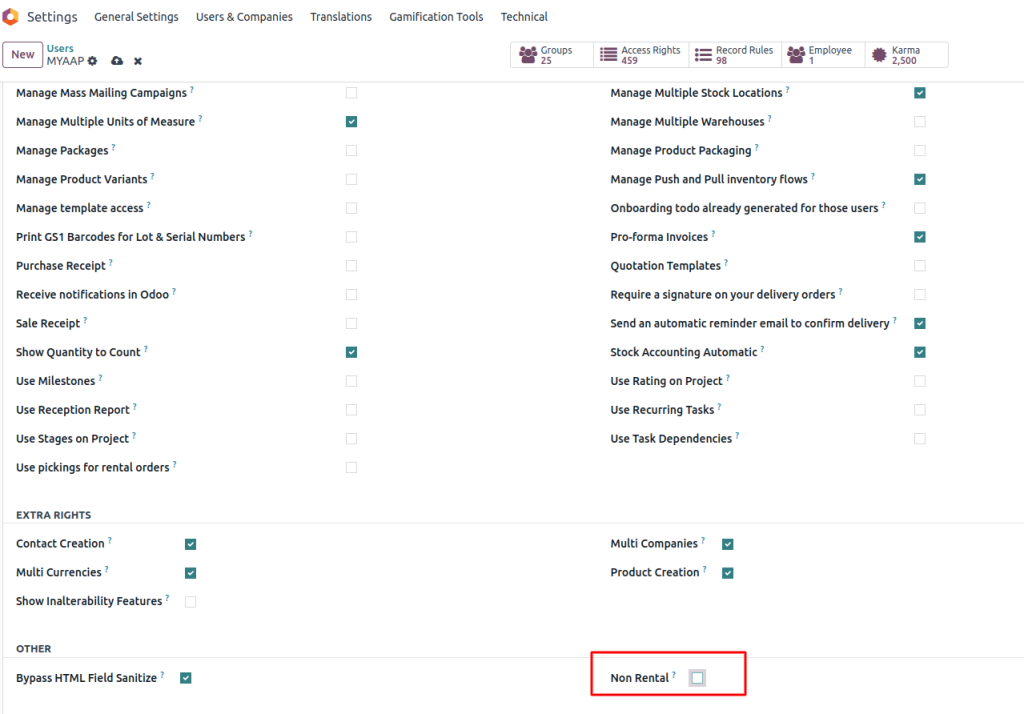
Here’s what’s happening:
- group_non_rental: This defines a new security group named “Non Rental”.
- Once this group is created, you can assign users to it, which will restrict their access to the Rental module.
Step 2: Override Menu Visibility Logic
The next step is to control the visibility of menus based on the user’s group. Odoo’s menu system is flexible; we can override it to hide specific menus conditionally. For this, we will extend the ir.ui.menu model to customise which menus are visible to which users.
Use the _visible_menu_ids Method to control which menus are visible to users. By overriding this method, we can programmatically exclude specific menus for users in the “Non Rental” group.
models/ir_ui_menu.py
from odoo import models, api
					class IrUiMenu(models.Model):
   _inherit = 'ir.ui.menu'


   @api.model
   def _visible_menu_ids(self, debug=False):
       menus = super()._visible_menu_ids(debug)
       if self.env.user.has_group('sdm_rental_equipment.group_non_rental'):
           menus.discard(self.env.ref('sale_renting.rental_menu_root').id)
       return menus
Explanation of the Code:
- super()._visible_menu_ids() gets the default list of visible menus.
- self.env.user.has_group(…) checks if the current user is in the “Non Rental” group.
- menus.discard(…) removes the Rental menu from the visible list if the condition is met.
This method works with Odoo’s native menu system, so there’s no need for complex workarounds or hacks. You modify the visibility logic and use the built-in discard() method to remove unwanted menus.
Step 3: Assign the Group to Specific Users
Now that we’ve defined the group and the logic to hide the Rental module, the next step is to assign the “Non Rental” group to specific users through the Odoo User Management interface.
- Go to Settings → Users & Companies → Users.
- Open the form view for the user you want to restrict.
- Under the Other Groups section, check the box for the Non-Rental group.
By assigning users to this group, they will no longer see the Rental module in their dashboard.
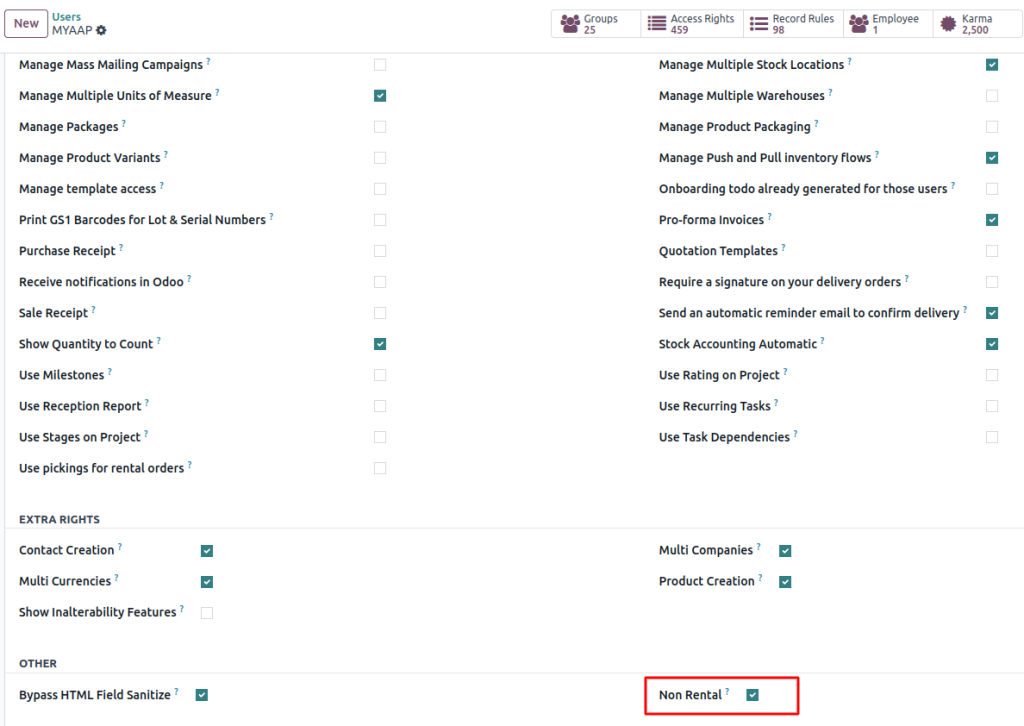
Result
Once you’ve completed these steps, users in the “Non Rental” group will no longer see the Rental module in their Odoo interface. This hides the menu items and ensures the entire Rental app is inaccessible to them.
Bonus Tip: Extend This to More Menus
What if you need to hide more than just the Rental module? The process is incredibly flexible, and you can extend the logic to hide additional modules for specific user groups.
You can easily extend the logic to hide other modules:
					if self.env.user.has_group('your_module.group_no_accounting'):
   menus.discard(self.env.ref('account.menu_finance').id)
This will ensure that the Accounting menu is hidden for users in the “group_no_accounting” group.
How It Works for Other Modules:
This method can be extended to any module or menu in Odoo. Simply identify the menu item you want to hide and use the discard() method with the appropriate menu reference. For example:
- Sales Module: menus.discard(self.env.ref(‘sale.menu_sale_order’).id)
- Inventory Module: menus.discard(self.env.ref(‘stock.menu_stock_inventory’).id)
Why This Method Works
This approach leverages Odoo’s native menu system, ensuring a clean and efficient way of managing menu visibility. Unlike other methods (like using record rules), this method doesn’t require complex configurations and is entirely based on modifying the menu rendering logic. It’s also scalable and can be applied to multiple user groups and menus across the system.
Here’s why this approach is practical:
- No reliance on record rules: Unlike access control lists (ACLs) or record rules, this method works purely on the UI and menu structure, making it less prone to issues when data or access changes.
- Cleaner user interface: By dynamically hiding entire menus, users are not distracted by irrelevant options, making their workflow more intuitive and efficient.
- Flexible and extensible: You can easily add additional menu restrictions as your business grows, without complicated changes to the underlying structure.
Hide Specific Modules in Odoo 18
With just a few lines of code, you can elegantly hide entire modules from specific users. This method:
- Doesn’t rely on record rules
- Works with Odoo’s native menu visibility system
- Keeps the UI clean for users with limited access
With this solution, you’ll improve your system’s efficiency and reduce users’ complexity, giving them a more focused and tailored experience.
By Hide specific modules in Odoo 18 and controlling access, you ensure that your team can focus on what matters most, without the distractions of unnecessary functionalities.




