


Understanding the Invoice Reconciliation Issues in Odoo 18
Odoo 18 is a great solution for simplifying several corporate operations, such as financial management and accounting. Though invoice reconciliation issues in Odoo 18 are not unique, even the best accounting tools have certain difficulties. Odoo 18 invoice reconciliation causes users difficulty tracking payments, invoices, and financial data.
So, you’re not alone if Odoo 18 accounting reconciliation problems arise. It’s a typical problem among companies running Odoo for their accounting needs. These difficulties sometimes result from differences between the paid invoices and those entered into the system. This blog will discuss how to effectively address Odoo 18 bank reconciliation problems, handle Odoo 18 reconciled payments and invoices, and resolve Odoo 18 outstanding payment reconciliation challenges. We will also discuss the Odoo 18 manual reconciliation process and how to set the Odoo 18 reconciliation model configuration to prevent mistakes and raise accuracy.
Recognising Odoo 18's Invoice Reconciliation Problems
What is invoice reconciliation in Odoo 18?
In Odoo 18, invoice reconciliation, matching payments with matching system invoices, is an essential component of the accounting process. It guarantees that consumer amounts paid match the issued bills. Odoo 18’s invoice reconciliation problems might result from system faults, mismatched payment data, or erroneous data entering.
Reason Behind Odoo 18 Invoice Reconciliation Problems
Inaccurate Payment Matching: Reconciliation becomes challenging when payments do not match bills. Odoo 18 invoice reconciliation regularly runs over this problem.
Partial Contributions: Partial payments can cause problems, particularly if they aren’t fairly distributed among several invoices.
Mismatch of Currencies: Making payments in a foreign currency different than the invoice can complicate the reconciliation procedure.
Recording Multiple Invoices: Recording multiple invoices or payment mistakes could result in mismatched records.
Early identification and resolution of these issues will help greatly reduce the time spent on Odoo 18 accounting reconciliation.
How to Handle Odoo 18 Accounting Reconciliation Issues?
Review Reconciliation Model Configuration
Ensuring your reconciliation models are suitably configured is the first step in addressing Odoo 18 reconciliation model problems. These models define the Odoo 18 criteria and matching payment procedure for invoices.
How to Set Up Reconciliation Models in Odoo 18
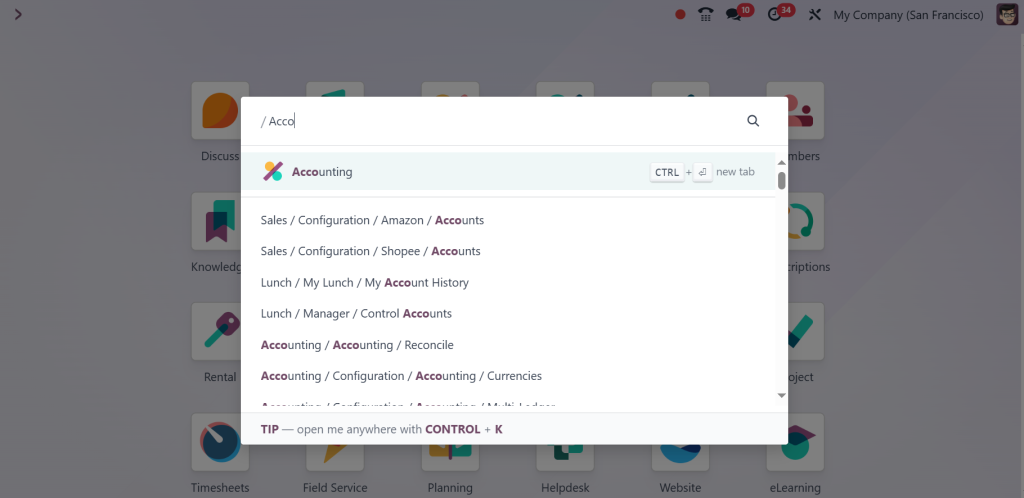
Go to the Accounting module in Odoo 18.
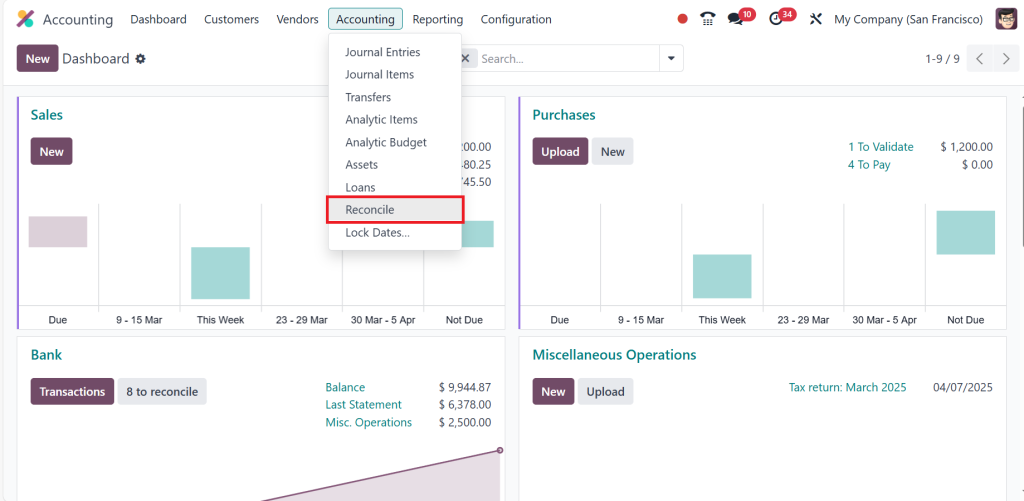
Under the Accounting menu, select Reconcile.
Check that the reconciliation models are correctly set up based on your business requirements. Ensure they match your payment methods (e.g., bank transfers, checks, or credit card payments).
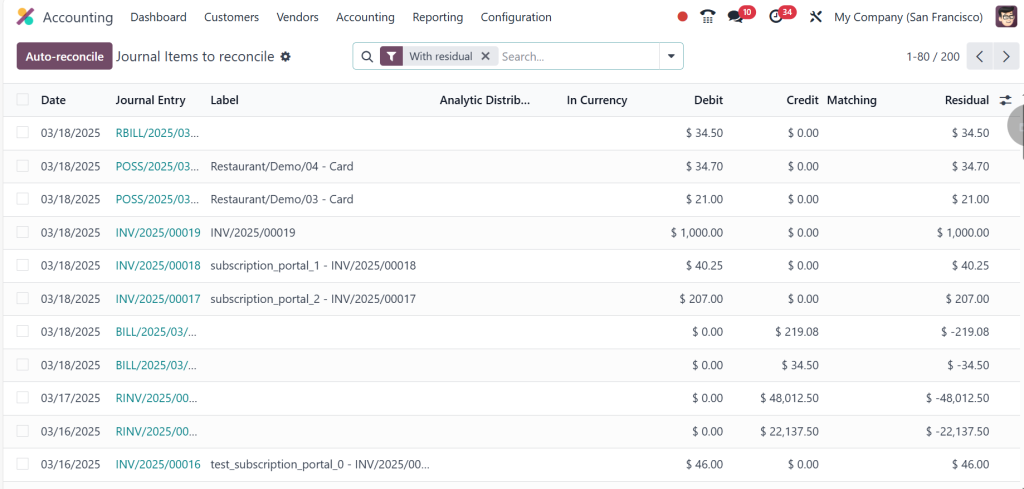
Ensure that automatic rules facilitate smooth reconciliation, minimizing manual intervention.
Having the proper Odoo 18 reconciliation model configuration can prevent many issues related to invoice reconciliation and streamline the entire process.
Odoo 18's Reconciliation of Invoices and Payments
Once your reconciliation models are properly set, the next phase is reconciling payments and invoices using Odoo 18.
How Would One Reconcile Invoices and Payments?
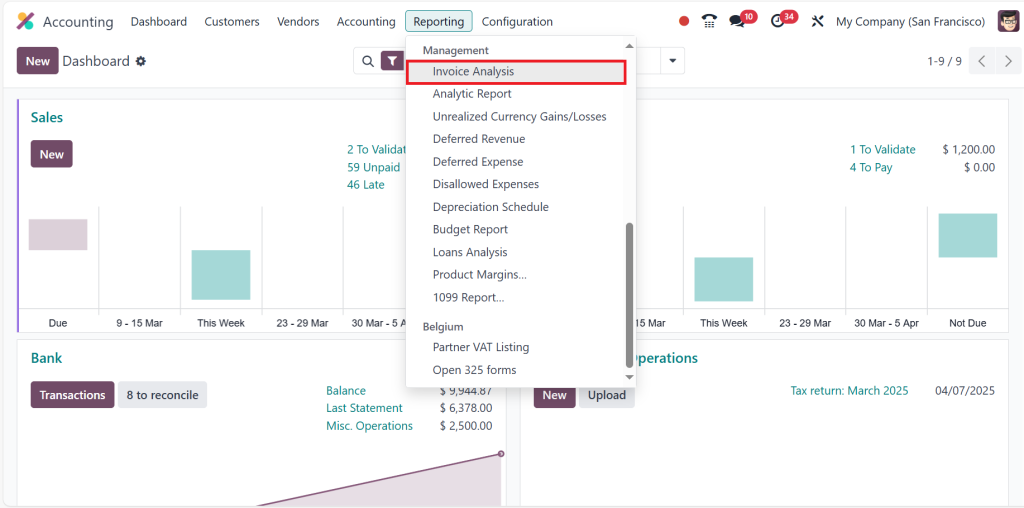
Open the accounting module and click on the invoice analysis under-reporting.
Odoo 18 will automatically link the invoices with the payments. You can manually choose the correct invoice for every payment if there are disparities. If the customer sends a payment that does not cover the whole amount, make sure that partial payments go to the relevant bills.
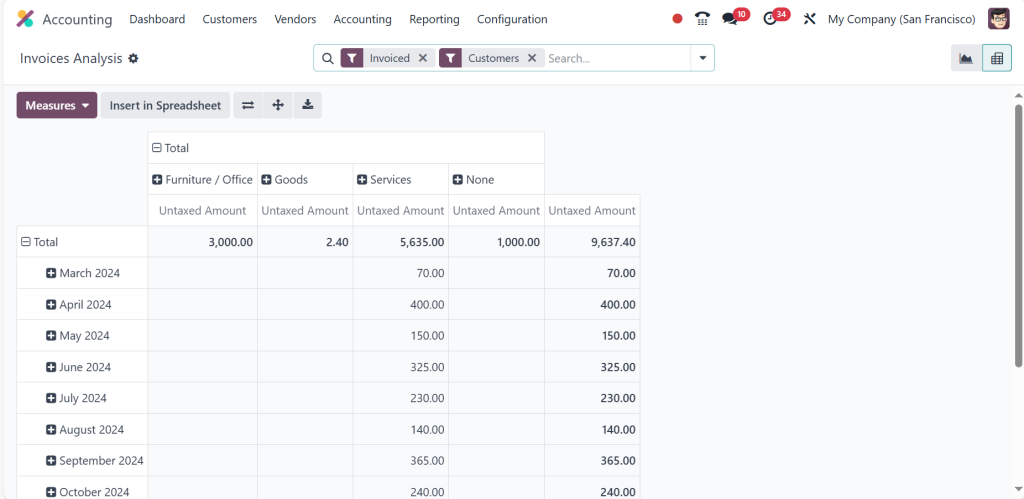
Many Odoo 18 invoice reconciliation problems can be avoided by properly matching payments with invoices.
Managing Odoo 18 Bank Reconciliation Problems
Why do Odoo 18 bank reconciliation issues arise?
Bank reconciliation is among the most common areas where companies deal with Odoo 18 accounting problems. Variations could arise from bank statements not always matching the Odoo recorded transactions.
Distinctive Bank Reconciliation Problems
Unmatched Transactions: Odoo occasionally falls short of automatically matching bank and system transactions.
Unreconciled fees: Unreconciled fees from bank fees not entered into Odoo might create issues with reconciliation.
Currency variations: Odoo might not accurately determine the exchange rate when payments are made or received in foreign currencies, which might lead to disparities.
How to Fix Bank Reconciliation Issues in Odoo 18?
Make sure Odoo 18 has the bank statement appropriately imported into Odoo 18. Re-import the statement should there be any disparities.
- If Odoo does not automatically reconcile some transactions, manually match them by choosing the matching invoice or payment.
- If your bank has charged fees not noted in Odoo, manually add these costs to your records.
- If your company deals with foreign transactions, be sure Odoo is properly set to manage several currencies.
Managing Odoo 18 Outstanding Payments Reconciliation
What are the outstanding payments in Odoo 18?
Outstanding payments reconciliation in Odoo 18 helps to clear invoices either partially paid or unpaid. Customers who postpone payments or whose payments are not sufficiently connected to the relevant invoice typically bring this problem.
Problems with Extra Payments
Unpaid invoices: Customers who fail to pay on time can cause a backlog of unpaid invoices.
Partial Payments: Odoo must distribute this payment to the relevant bills to prevent ambiguity should a consumer pay only partial amounts.
Errors in Payment Entries: When reconciling outstanding payments, payments entered with mistakes such as inaccurate amounts may cause problems.
How to Resolve Outstanding Payments Reconciliation?
- Use Odoo’s invoicing tools to remind clients of missing payments or send statements using unpaid invoices.
- If a client makes a partial payment, ensure Odoo distributes the money to the relevant invoices. If necessary, you could have to divide the money among several invoices manually.
- Check that the Odoo entered payment values are exact and match those received.
- Dealing with Odoo 18 overdue payments reconciliation can help keep your financial records current and lower the error risk.
Odoo 18 Manual Reconciliation Process
Why Manual Reconciliation Could Be Required
Odoo 18 automates most reconciliation chores, yet the system could fail to automatically reconcile some transactions, particularly partial payments or inconsistent invoice data. Under these circumstances, a manual reconciliation procedure is needed.
How to accomplish it?
- Go to the part on Bank Statements in the Accounting Module.
- Look for transactions that Odoo does not automatically reconcile.
- If Odoo hasn’t matched a payment to an invoice, manually search for and link the corresponding invoice.
- Verify that the payment amount entered matches the actual amount paid by the customer.
- The Odoo 18 manual reconciliation process guarantees proper recording of all payments and invoices, even if it can be time-consuming, especially in complicated circumstances.
Final Thoughts on Learning Invoice Reconciliation in Odoo 18
For many companies, Odoo 18’s invoice reconciliation problems might aggravate them; however, these problems can be fixed with excellent configuration and strategy. Your invoices and payments will always be precisely reconciled if you correctly arrange the Odoo 18 reconciliation models configuration, solve Odoo 18 bank reconciliation issues, and master the Odoo 18 manual reconciliation process.
Odoo 18 offers the tools to keep your accounting process clear and effective whether you need to reconcile payments and invoices manually or are handling Odoo 18 outstanding payments reconciliation. Following the advice in this article will help you preserve your financial records in perfect form and prevent typical reconciliation problems.
Regularly addressing Odoo 18 accounting reconciliation issues will ensure that your financial processes are transparent, dependable, and efficient. This will lower the chance of mistakes and enhance general business performance.




