How to Automate Bank Reconciliation in Odoo 18 Accounting?
What if you could reconcile your bank statements with just a few clicks?
Managing finances manually is a thing of the past. Thanks to bank reconciliation in Odoo 18, businesses can automate and simplify the process, saving time and reducing errors. Whether you’re dealing with bank statement reconciliation, managing large volumes of transactions, or ensuring real-time synchronization with your bank, Odoo ERP accounting automation offers the tools to handle it all.
Just imagine it’s the end of the month, and you’re sitting at your desk trying to reconcile bank transactions with your accounting records. The pile of receipts grows higher, the spreadsheets blur together, and the clock ticks away. Frustrating.Right!
Now imagine a scenario where reconciliation happens almost instantly, with no manual effort, no late nights, and zero discrepancies. Sounds too good to be true? It’s not. Welcome to the world of Odoo 18 bank reconciliation, a revolutionary feature in Odoo 18 ERP Accounting designed to automate your financial processes like never before.
This blog discovers the mystery behind how to automate bank reconciliation in Odoo 18 ERP Accounting. We’ll dive into this game-changing solution’s tools, techniques, and benefits. By the end of this read, you’ll know why Odoo is the future of accounting and how it can save you time, money, and stress.
What Is Bank Reconciliation and Why Automate It?
Bank reconciliation is the process of matching the transactions in your bank statement with the corresponding records in your accounting system. It ensures that every payment, deposit, or withdrawal is accurately recorded, helping you identify discrepancies like missed entries, double payments, or bank fees.
For example, let’s say your business sold a product for $500 and recorded it as income in your accounting system. However, the bank charged a $5 fee when the payment was deposited, leaving $495 in your account. You can identify and adjust for this difference through bank reconciliation, ensuring your records match reality.
Why Automate It?
Manual bank reconciliation can be tedious, especially for businesses handling large transactions. Automation simplifies this process by using software like Odoo 18 ERP Accounting to:
Import bank statements automatically.
Match transactions with invoices or expenses in seconds.
Highlight mismatches or discrepancies for review.
By automating bank reconciliation, businesses save time, reduce errors, and gain real-time financial accuracy, allowing them to focus on strategic decision-making instead of ordinary data matching.
Why Manual Bank Reconciliation is Holding You Back
Before we explore automation, let’s take a moment to understand the headaches of traditional bank reconciliation.
It’s Tedious
Manually matching each transaction with your bank statements is a boring task. It’s a job no one looks forward to.
It’s Error-Prone
Human error is inevitable. A misplaced digit or forgotten transaction can create chaos in your financial records.
It Lacks Real-Time Insights
With manual reconciliation, you’re always playing catch-up. Without real-time data, you’re blind to your business’s financial health.
So, how do you break free from these constraints? The answer lies in Odoo ERP accounting automation.
What Makes Odoo 18 Bank Reconciliation So Powerful?
Real-Time Bank Synchronization
The days of manually uploading bank statements are gone. With Odoo bank synchronization, your transactions flow flawlessly into your accounting system, keeping everything current.
Automated Matching and Reconciliation
The advanced reconciliation models in Odoo 18 automatically match transactions based on predefined rules. Think of it as a digital accountant that never sleeps.
User-Friendly Interface
Odoo’s intuitive dashboard makes it easy to view, validate, and finalize reconciliations in just a few clicks.
Personalized to Your Business
Whether you’re managing recurring payments, high-volume transactions, or multi-currency accounts, Odoo 18 accounting features offer the flexibility to adapt to your unique needs.
How to Automate Bank Reconciliation in Odoo 18 ERP Accounting
Automation might sound complex, but Odoo makes it remarkably simple. Here’s how you can get started:
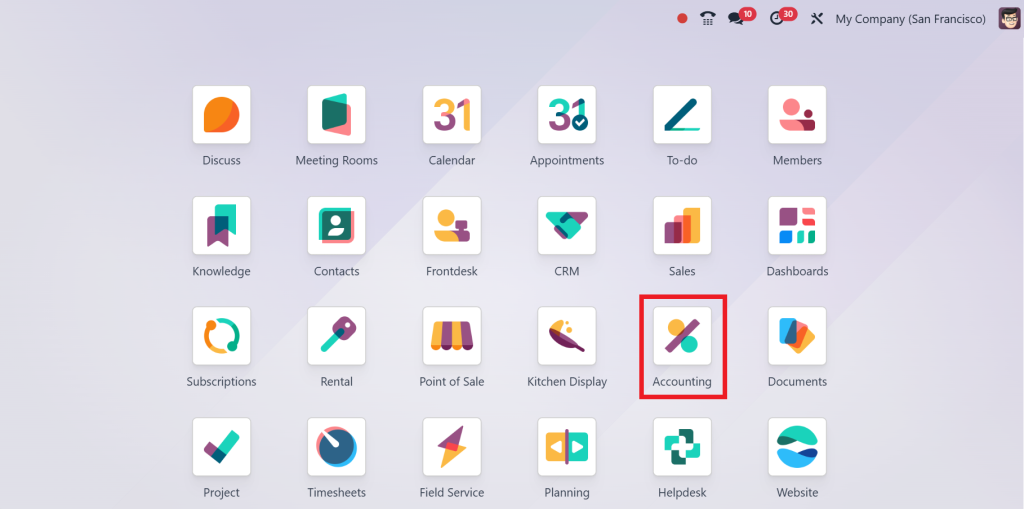
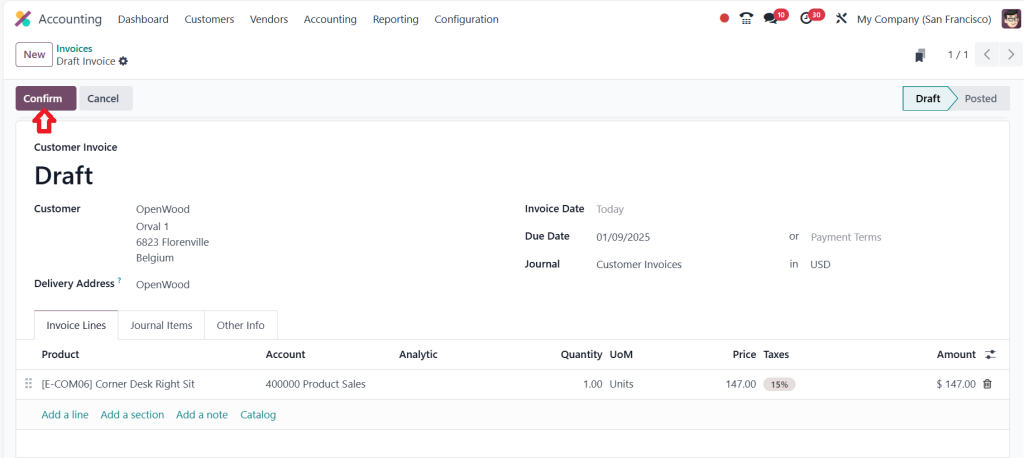
Open the “Accounting” module in Odoo 18.
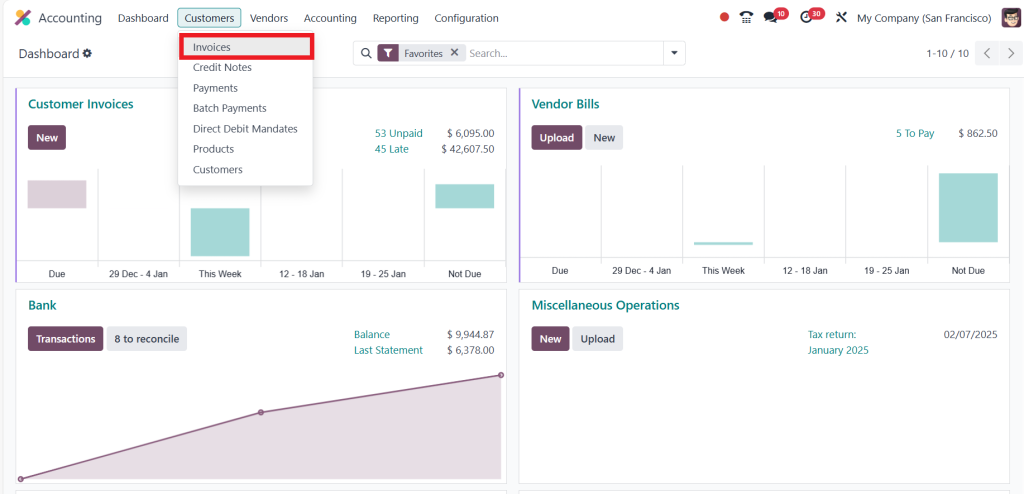
Go to the Customers menu and click on Invoices.
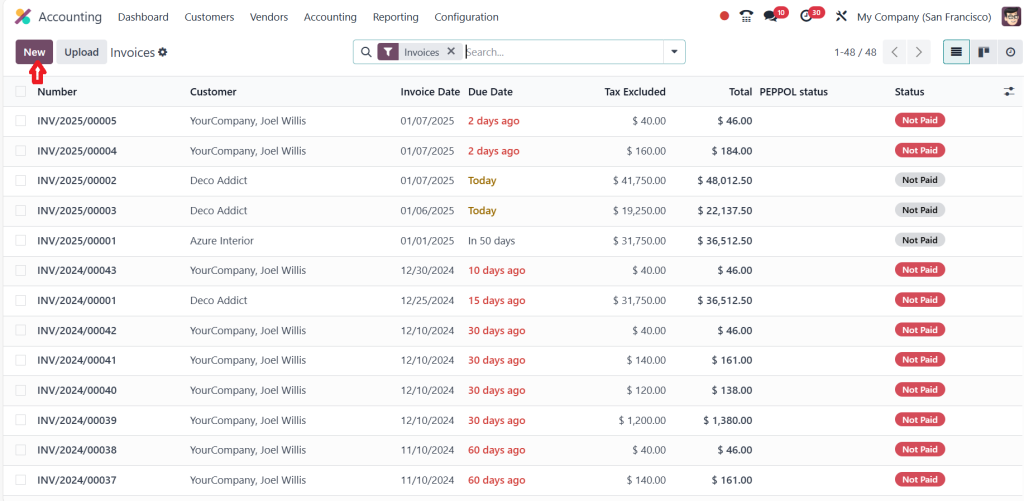
Then, click on ‘‘New’’.
Create a new invoice here by choosing customer ‘‘OpenWood’’ and adding a product ‘‘Corner Desk Right Sit’’ then click on ‘‘Confirm’’.
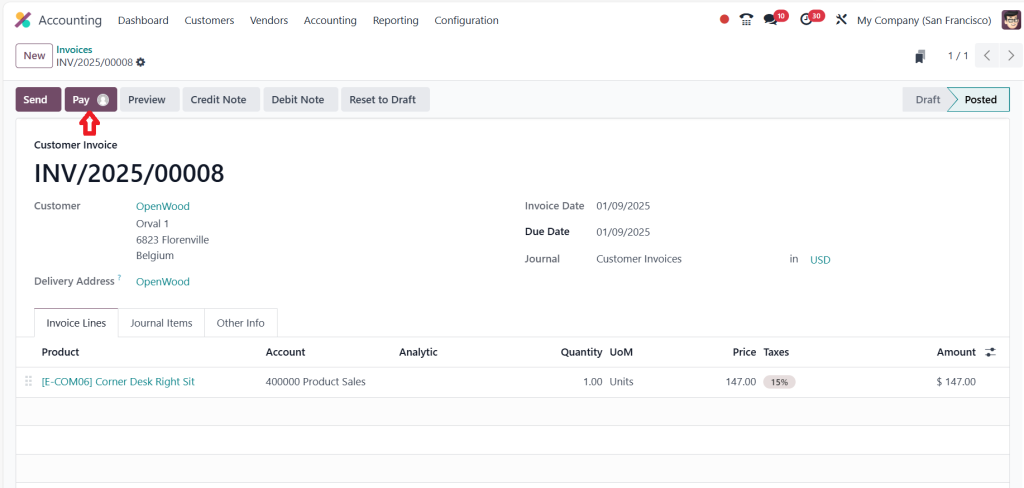
So, the invoice is moving from the Draft stage to the Posted stage, and then we just need to request the payment from the customer by clicking on ‘‘Pay’’.
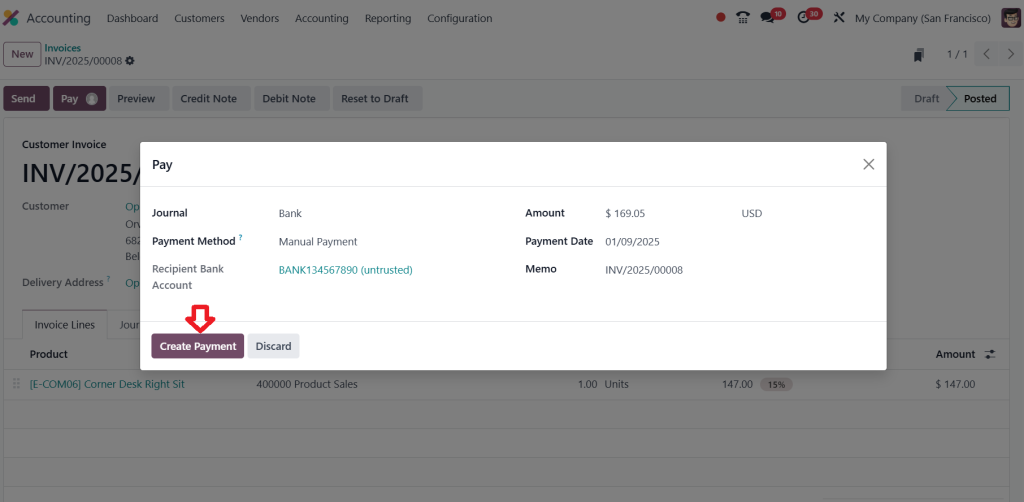
Then, click on ‘‘Create Payment’’.
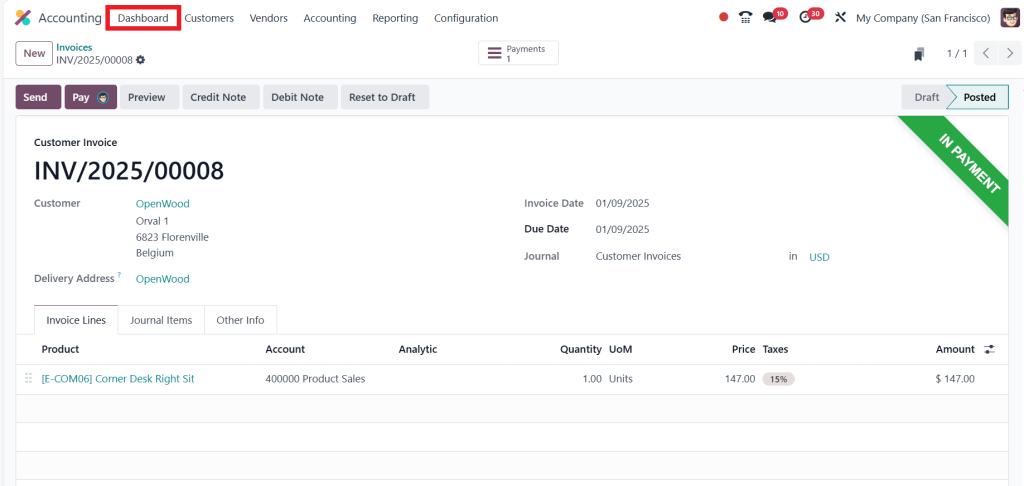
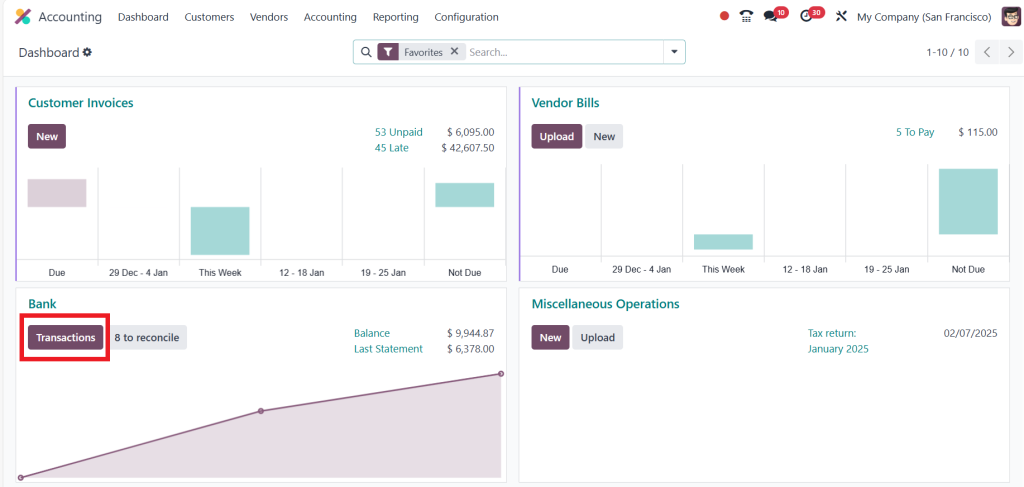
Now, as you can see in the screenshot below, this is in the payment state and after reconciliation only the payment will be moving to the bank. Then, go to the ‘‘Dashboard’’.
Choose ‘‘Transactions’’.
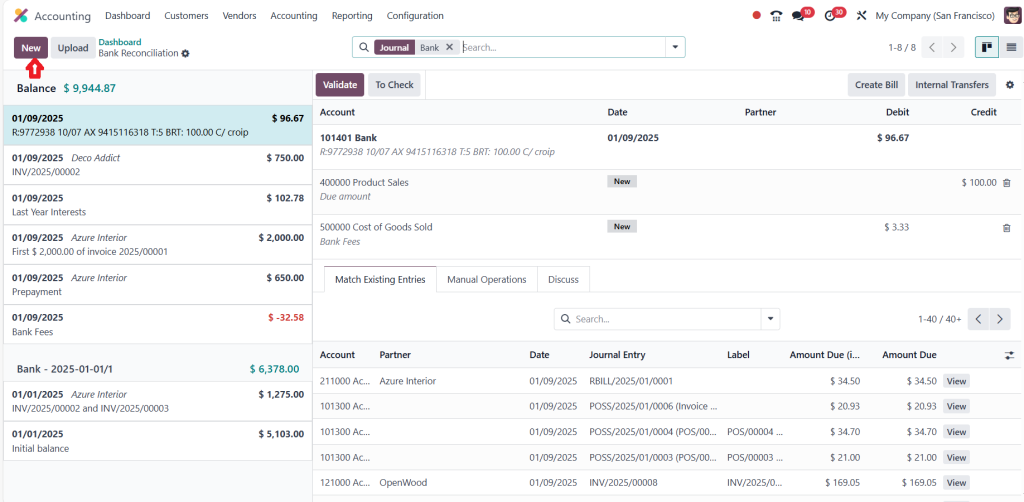
Then, click on ‘‘New’’.
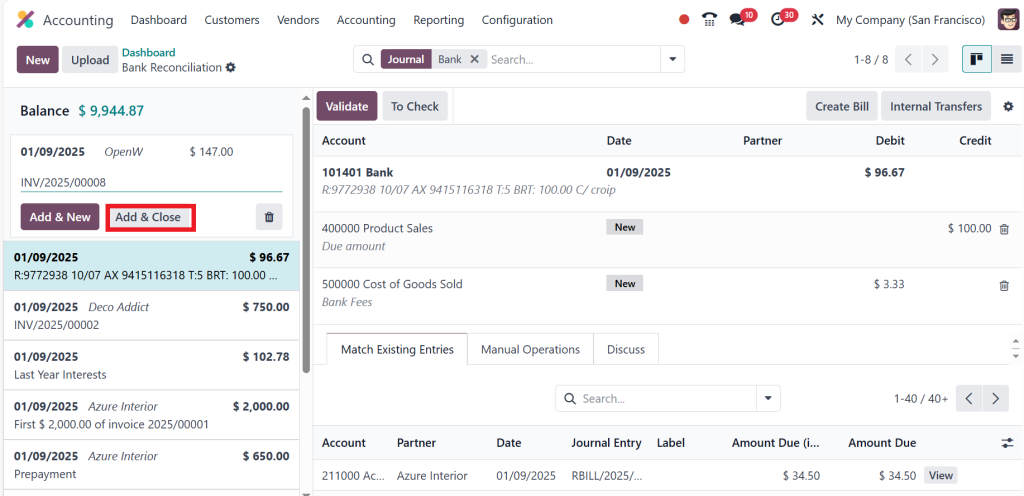
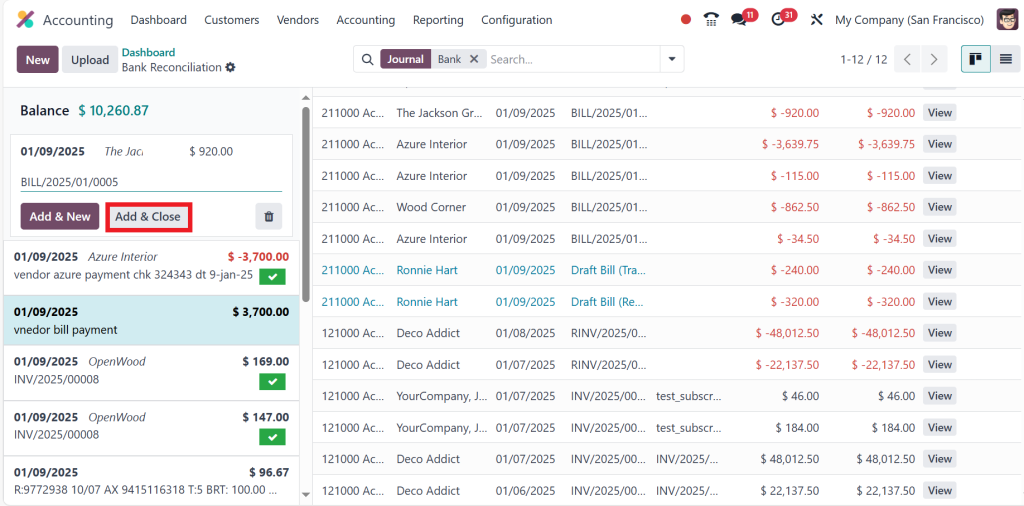
Now, just provide the partner’s name, the amount and the memo. So, give the memo as a reference number for the invoice. And if you want to create multiple statements, just click on ‘‘Add & New’’ and if you’re going to create only a single statement, then just click on ‘‘Add & Close’’.
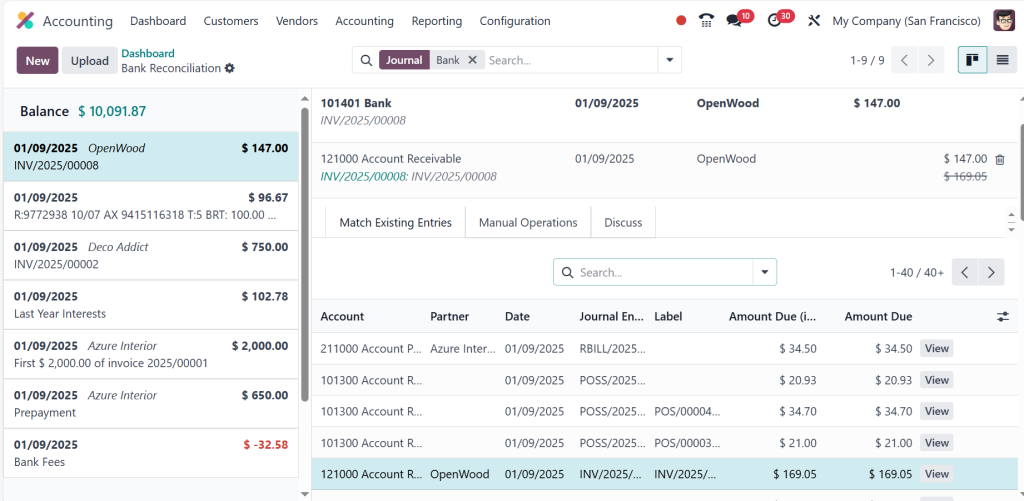
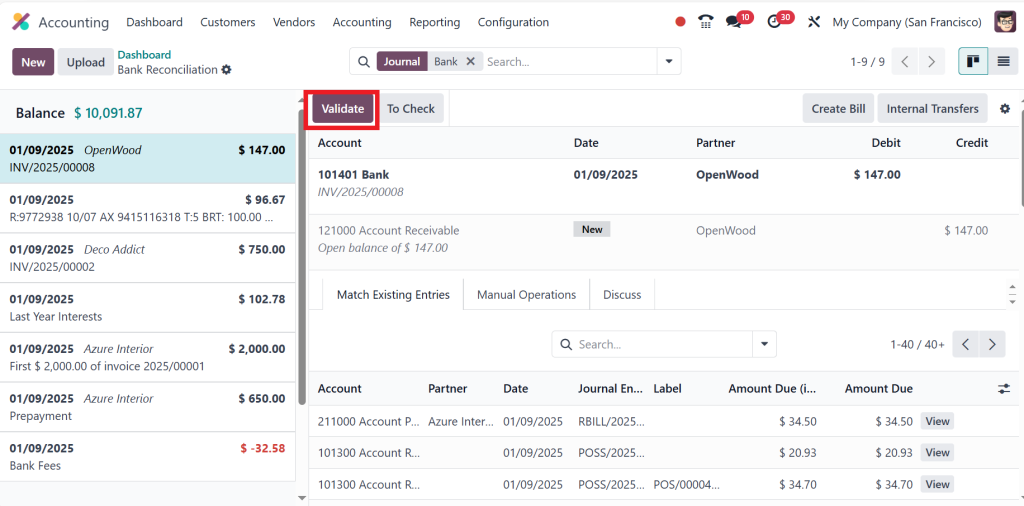
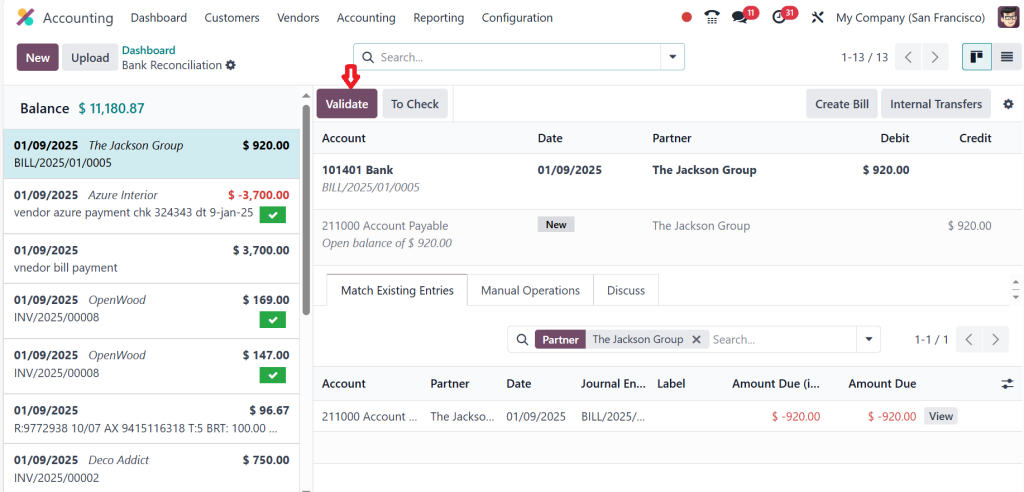
After that, you just need to choose the payment and statement.
Then click on ‘‘Validate’’.
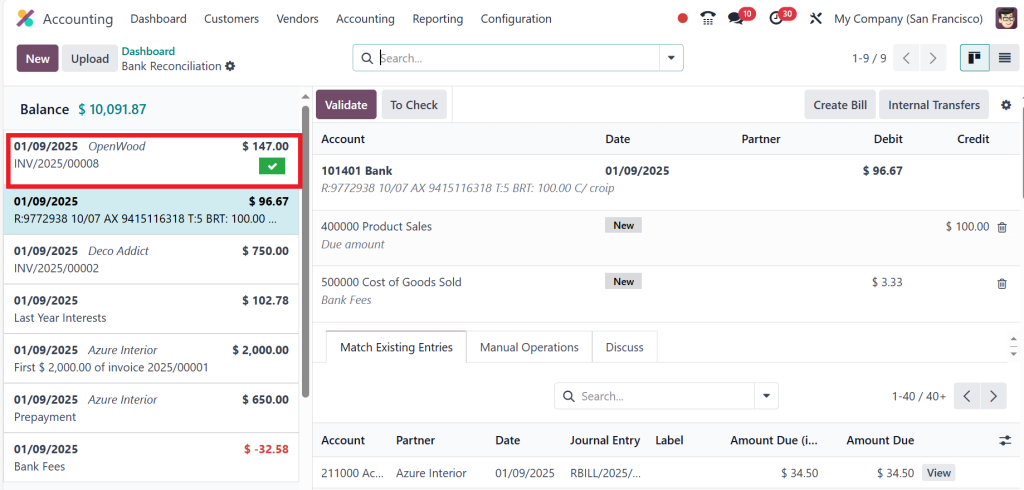
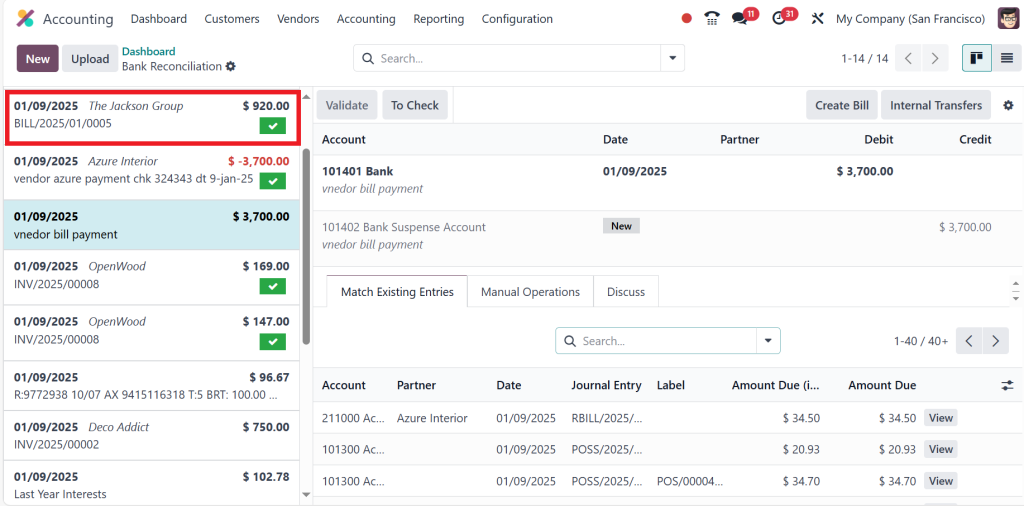
Now, it’s matched, and it will moved to the paid state; this means we have successfully paid the amount.
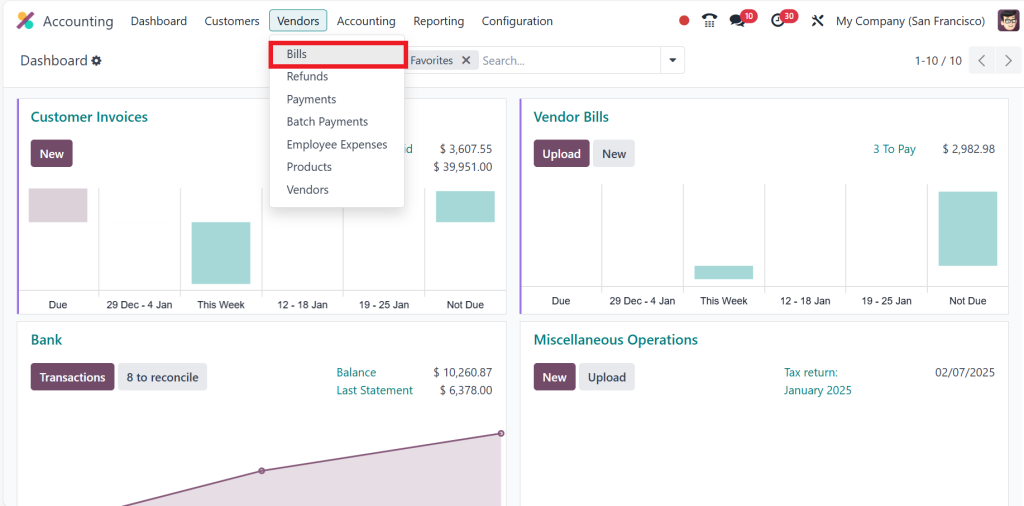
Likewise, we can also manage vendor bank reconciliation. You just need to go to the Vendors menu and click on Bills.
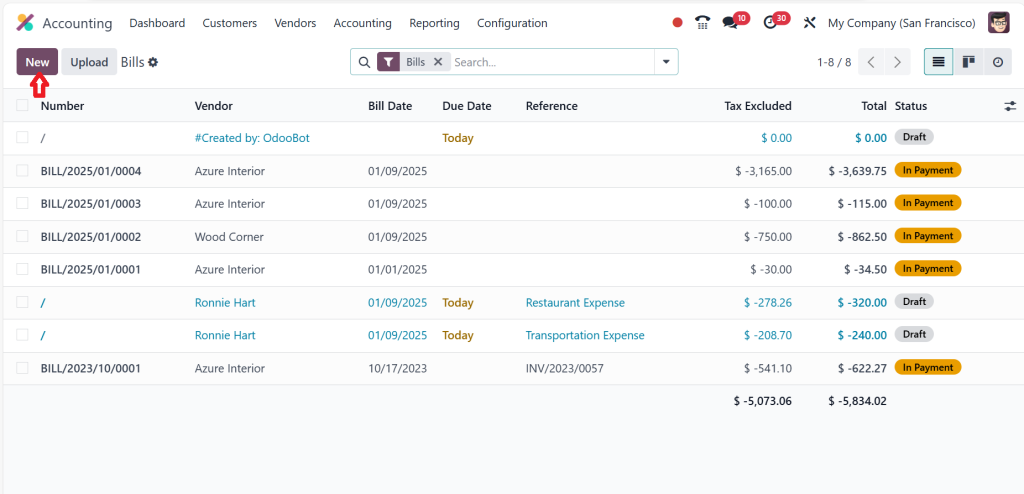
Then, click on New.
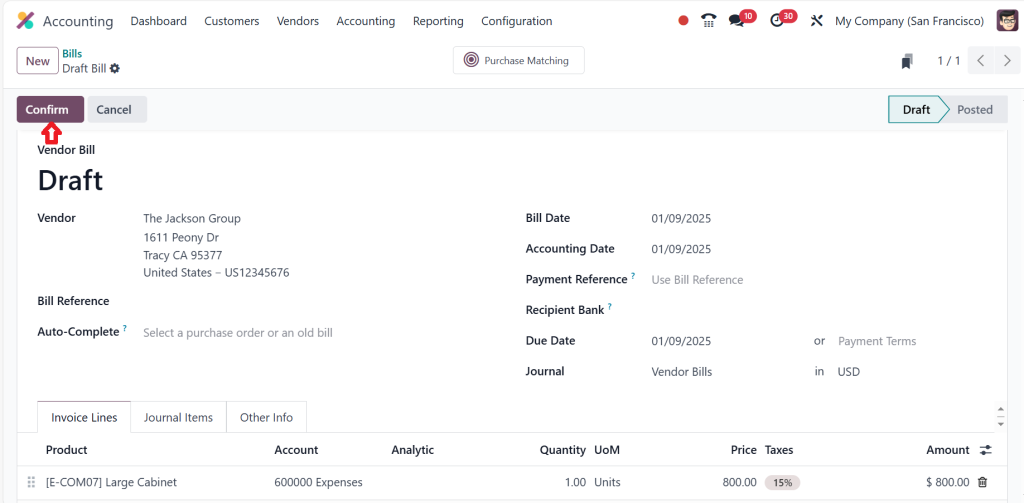
Now, choose the Vendor, and it is mandatory to set the bill date then, choose the Product and click on ‘‘Confirm’’.
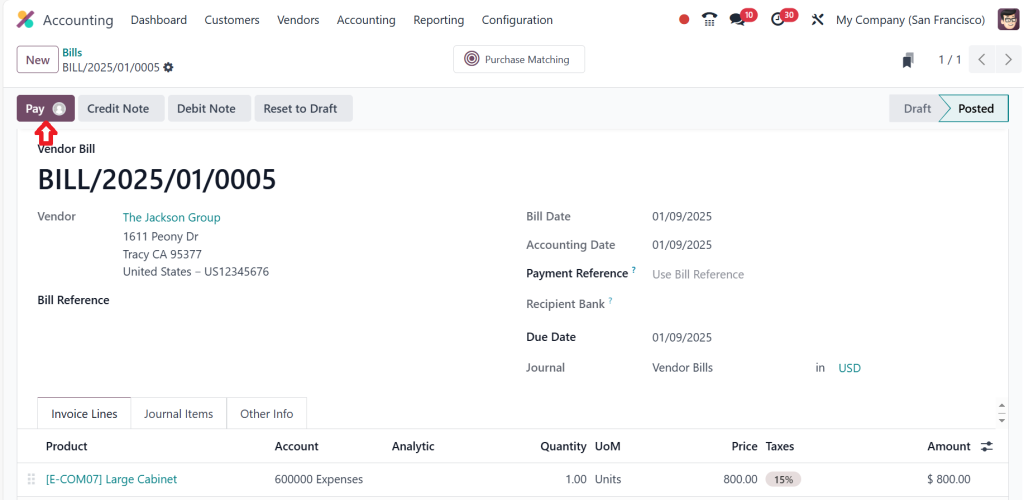
Then, click on ‘‘Pay’’ to continue the process.
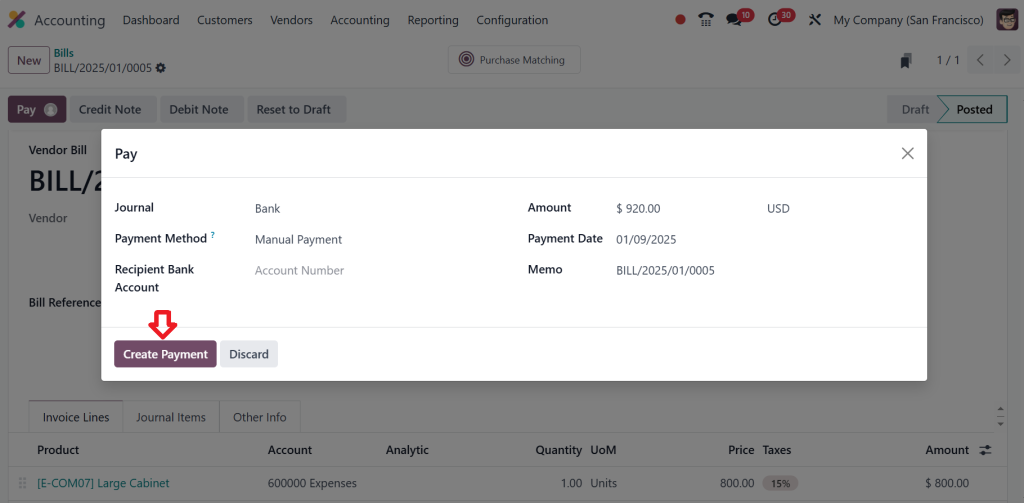
Create a payment by clicking on the button below.
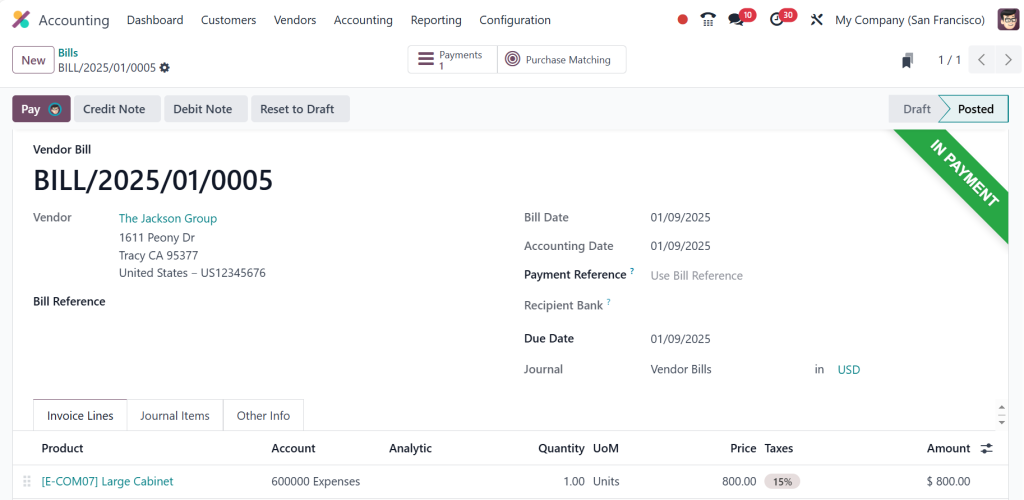
This is now in the payment stage; then again, click on the Dashboard and click on Transactions.
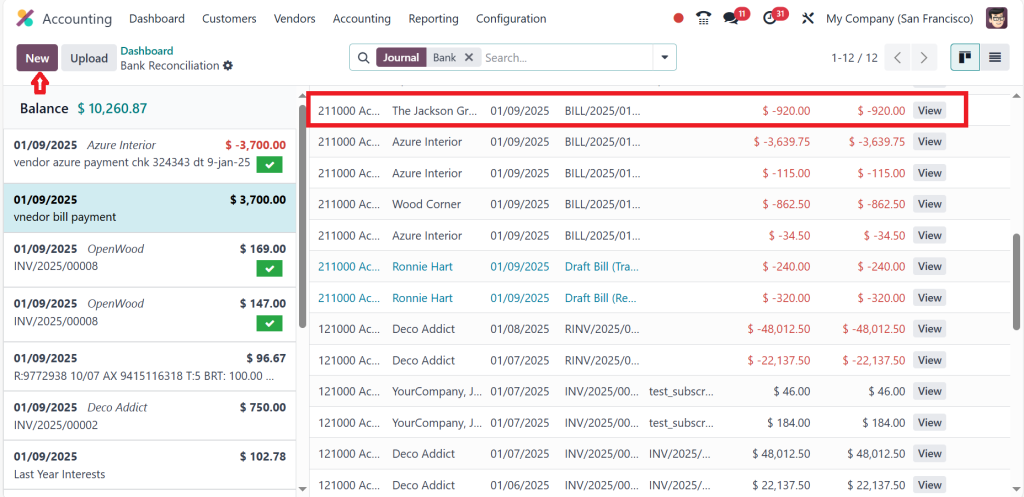
In the screenshot below, you will be able to find the payment that is created, which is indicated in negative red color because it’s an expense which means it’s moving out of the bank. Now you need to make a statement against this payment by clicking ‘‘New’’.
Add the partner name, the amount and the memo, then click on ‘‘Add & Close’’.
After that, select the payment, choose the statement against the payment and click on ‘‘Validate’’.
It’s matched, and we have completed the reconciliation. Once reconciliations are complete, Odoo allows you to generate detailed reports for cash flow, income, and expenses. These insights are invaluable for decision-making.
That’s how you can deal with the bank reconciliation in the Odoo 18 ERP accounting module.
Key Features of Odoo 18 for Bank Reconciliation
Intelligent Matching Algorithms
The backbone of Odoo 18 bank reconciliation is its AI-powered matching engine, which minimizes human intervention and improves accuracy.
Bulk Reconciliation
Save hours by reconciling multiple transactions in one go.
Multi-Currency Support
Operate across borders? Odoo ensures accurate reconciliation for transactions in different currencies.
Real-Time Alerts
Get notified of anomalies or discrepancies instantly, thanks to Odoo bank synchronization.
Why Choose Odoo 18 ERP Accounting for Automation?
Accuracy
Say goodbye to costly mistakes. Odoo ERP accounting automation ensures every transaction is matched and recorded accurately.
Time-Saving
Automating bank reconciliation frees up your time, allowing you to focus on growing your business.
Cost-Efficiency
Odoo eliminates the need for manual labour, reducing operational costs.
Scalability
Whether you’re a small business or an enterprise, Odoo’s flexibility grows with you.
The Impact of Odoo Automation
Imagine a mid-sized retail company managing thousands of transactions monthly. Before adopting Odoo, the finance team spent days reconciling bank statements. After implementing Odoo 18 accounting features, they:
Reduced reconciliation time by 80%.
Minimized errors to almost zero.
Gained real-time insights into their cash flow.
This transformation isn’t unique. Businesses worldwide are reaping the benefits of Odoo’s automation tools.
Hold the Future with Odoo 18 ERP
The ability to automate bank reconciliation in Odoo 18 ERP Accounting is more than a luxury; it’s a necessity in today’s fast-paced business world. By leveraging tools like Odoo reconciliation models, Odoo bank synchronization, and other advanced features, you can simplify your accounting processes and open new levels of efficiency.
So, why stick to outdated methods? Step into the future with Odoo 18 and discover how easy financial management can be.
With its innovative features, all-in-one integration, and user-friendly design, Odoo 18 isn’t just software; it’s a partner in your business’s success. Dive into the Odoo 18 bank reconciliation world today and transform how you work!
Hi, I'm Ilsa Shabbir, an Odoo ERP content writer specializing in functional blogs on Odoo modules. I simplify complex Odoo features, creating clear and engaging content to help businesses understand and optimize their ERP solutions.
We use cookies to ensure that we give you the best experience on our website. If you continue to use this site we will assume that you are happy with it.