

User Addresses in Odoo 18 for Smooth Portal Experiences
Managing user addresses in Odoo 18 is no longer just a backend task; it’s the gateway to creating exceptional customer experiences. Whether you’re operating an e-commerce store, a service-based business, or any organisation that interacts with customers, having a streamlined way to manage portal addresses in Odoo 18 is critical.
This guide is your ultimate walkthrough to understanding how to handle Odoo 18 portal user address management expertly. We’re talking complete control, allowing customers to handle their details, simplifying your internal processes, and optimising your operations like never before.
In this post, we’ll cover:
- Why address management matters now more than ever
- How to add, edit, and update addresses from the portal
- How to configure admin-side settings for a portal user’s multiple addresses in Odoo
- How to ensure data accuracy and customer satisfaction
By the end, you’ll be convinced that mastering user addresses in Odoo 18 is not just smart, it’s essential.
Pro Tip:
A frictionless portal experience starts with good data. That begins with how you manage portal user addresses.
Why User Addresses in Odoo 18 Transform Customer Experience
Your ability to manage user addresses in Odoo 18 is more than a technical feature, it’s a direct reflection of your customer or consumer service quality. Mistakes in shipping, billing, or communication often stem from one place: bad address data.
With Odoo 18 portal user address management, customers can:
- Add, modify, and delete addresses anytime
- Switch between billing and shipping addresses
- Get faster delivery and more accurate invoices
That’s not just a feature. That’s power.
How to Manage Portal Addresses in Odoo 18 Like a Pro
Managing portal addresses in Odoo 18 isn’t just for IT teams or ERP admins; it’s designed for real businesses that need practical tools.
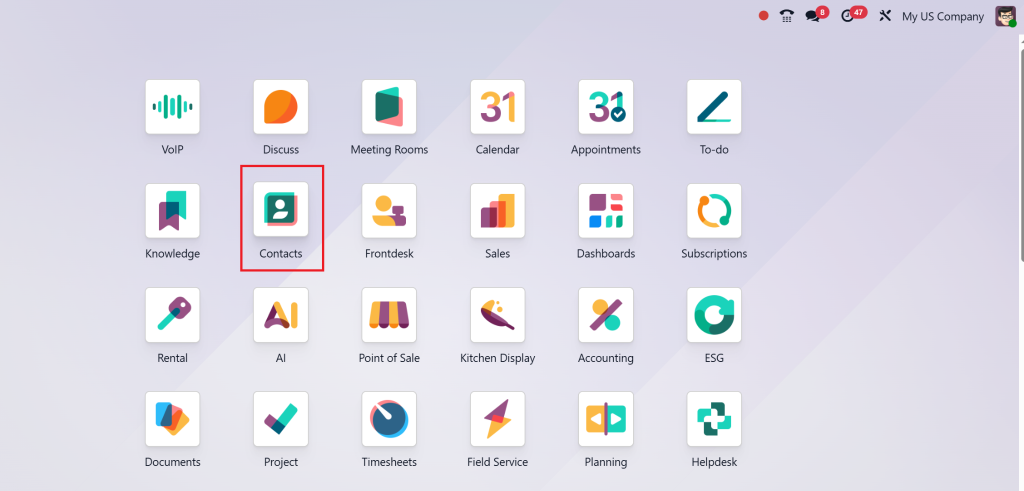
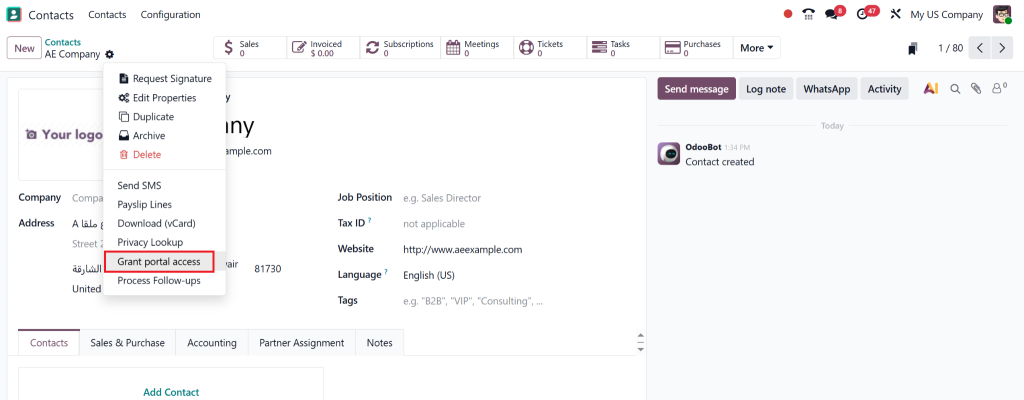
Step 1: Enable Customer Portal Access
Navigate to Contacts > Configuration > Portal Users, and assign the portal role.
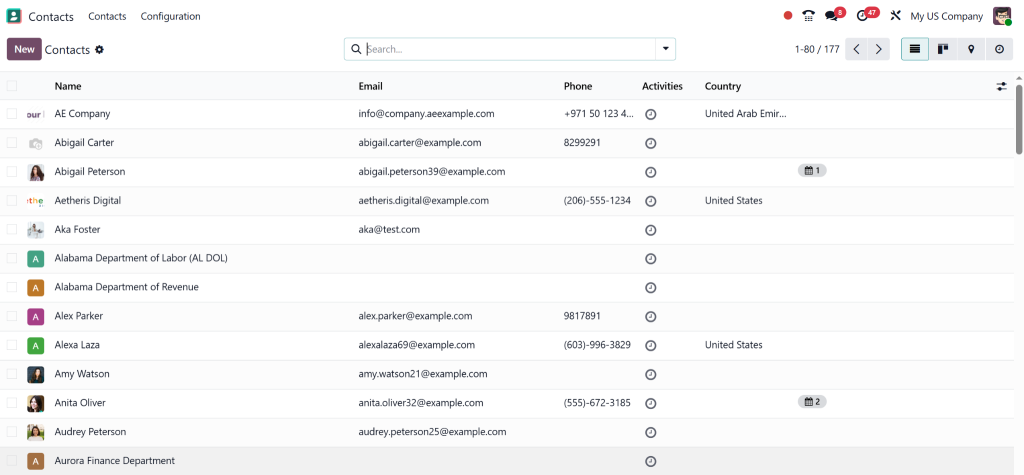
All contact information will be shown in it.
Step 2: Allow Address Editing
Under General Settings, enable the feature “Allow users to edit addresses.”
Step 3: Customise Fields
Want users only to see relevant address fields? Use Odoo Studio to configure the address view.
With just a few toggles, you’re empowering your customers to take control of their data, and you’re making your life easier.
Add New Address Portal Odoo 18 – Simple, Fast & Intuitive
Let’s face it: customers don’t like asking support to change an address. That’s why the new address portal feature in Odoo 18 is an Upgrade
Here’s how customers do it:
- Go to “My Account” on the portal
- Click “Addresses”
- Select “Add New Address”
- Fill out the form and hit save
Done. In seconds, a new billing or shipping address is ready to use.
Did You Know?
Businesses that enabled customer-controlled addresses in their Odoo 18 portals saw a 20% drop in support tickets.
Odoo 18 Customer Address Portal: A Complete Overview
The Odoo 18 customer address portal offers a clean and interactive way to manage information. But it goes deeper:
- Default address options
- Multiple address tagging (home, work, billing)
- Integrated with sales orders and delivery documents
- Easy update tracking for admins
With this robust system, you won’t just satisfy customers, you’ll impress them.
Update Portal Address Odoo 18 Without Calling Support
Change is constant. People move, offices relocate, and contact info evolves. With the update portal, you can access Odoo 18 features and make those changes fast and frictionless.
How to Update:
- Log in to the portal
- Navigate to “Addresses”
- Click the pencil/edit icon
- Save updated details
Odoo 18’s UI makes this feel smooth and professional, no training or support needed.
Portal User Multiple Addresses Odoo:
Modern users operate in multiple locations. That’s where the portal user has multiple addresses, Odoo comes into play. Instead of one static address, users can maintain separate ones for home, office, billing, or deliveries.
Benefits:
- Avoids confusion during checkout
- Saves time with default options
- Better communication with location-specific data
Imagine a customer who orders on behalf of two different branches. This feature makes it effortless for them to toggle addresses while placing an order.
Odoo 18 Portal: Manage Shipping Address – Key to Delivery Accuracy
Shipping issues cost money and damage your reputation. But with Odoo 18’s portal management of shipping addresses, you stay ahead.
Key Highlights:
- Easy selection of preferred shipping location
- Display during checkout
- Integrated with logistics modules
Having accurate and multiple shipping addresses saves your business from costly returns, delays, and frustrated customers.
Admin Tools for Managing Portal User Addresses in Odoo 18
Although customers handle their data, admins still require complete oversight. User addresses in Odoo 18 can be easily viewed and managed from the backend.
Admin Features:
- View all user-submitted addresses
- Edit/delete on behalf of the user
- Monitor updates and history
- Export address data for reporting
Best Practices for Odoo 18 Portal User Address Management
To make your Odoo 18 portal user address management foolproof, follow these actionable tips:
Do This:
- Enable address editing permissions
- Use custom tags for address types
- Validate addresses using automation or plugins
- Educate users with tooltips or mini-guides
- Sync portal addresses with backend sales/delivery
Odoo 18 Portal User Address Management: Real Impact Stories
A digital retail company rolled out a complete Odoo 18 portal user address management and saw:
- 25% fewer delivery complaints
- 30% more accurate billing
- 3x better customer satisfaction scores
In another example, a SaaS agency using user addresses in Odoo 18 for invoicing dramatically reduced payment delays after enabling customer-side edits.
Why Netilligence is Your Best Bet for User Address Customisation in Odoo 18
Lorem ipsum dolor sit amet, consectetur adipiscing elit. Ut elit tellus, luctus nec ullamcorper mattis, pulvinar dapibus leo.
Netilligence, as an Odoo Partner, doesn’t just help you install ERP, we transform the way you interact with your customers.
What We Offer:
- Custom development for Odoo 18 portal user address management
- UI/UX enhancements for adding a new address portal to Odoo 18
- Address validation and automation setups
- All-in-one integration with shipping APIs
Let our team help you turn a basic feature into a powerful customer engagement tool.
Take Control with User Addresses in Odoo 18
In the digital age, control and flexibility aren’t just luxuries; they’re expectations. Whether you’re dealing with one customer or one thousand, managing user addresses in Odoo 18 the right way sets the foundation for reliability, trust, and speed.
From simple edits to managing multiple addresses for portal users, Odoo 18 makes it all possible.
Want to empower your customers and update your backend? Start with how you manage addresses.
Contact Netilligence Today
Click here to get expert help configuring your Odoo 18 customer address portal and take your ERP experience to the next level.




