Are you ready to give your sales numbers massive growth? The Flash Sale feature in Odoo 18 Sales is a Future for businesses looking to drive urgency and excitement. You can immediately spike in traffic and sales by creating limited-time offers. Flash sales are known for generating quick and significant sales volumes, and the Odoo 18 flash sale configuration makes it easier than ever!
In this comprehensive guide, we’ll show you exactly how to set up and manage a flash sale in Odoo 18 Sales, provide tips on maximizing its effectiveness, and help you take advantage of the flash sale feature in Odoo 18. Let’s get in and turn your business into a flash sale powerhouse!
What is a Flash Sale in Odoo 18 Sales?
Before setting up the flash sale in Odoo 18 Sales, let’s define it. A flash sale is a time-sensitive discount event that offers deep discounts for a short period. In Odoo 18, you can configure everything about this sale, from the start and end times to the products on sale and the discount percentages.
The Odoo 18 flash sale setup is designed to generate excitement and create urgency. It’s a perfect strategy for clearing inventory, attracting new customers, or creating buzz around your brand. Flash sale promotions are easy to set up and manage, giving you all the tools to increase revenue fast.
Why You Should Use the Flash Sale Feature in Odoo 18 Sales
So, why should you choose flash sales in Odoo 18 Sales to boost your business? Well, the results speak for themselves! Flash sales can increase your sales dramatically by creating urgency and excitement. Let’s take a closer look at why flash sales in Odoo 18 Sales are an excellent strategy for your business:
Instant Sales Surge:
Flash sales immediately spike in sales because customers know the clock is ticking and don’t want to miss out on discounts.
Attracting New Customers:
Flash sales provide a unique opportunity to get new customers drawn in by limited-time offers.
Clear Inventory Quickly:
If you have surplus stock, flash sales help clear it out quickly while still earning a profit.
Increased Engagement:
The urgency of flash sales drives customers to act fast, keeping them engaged and interested in your products.
With all these advantages, the flash sale feature in Odoo 18 is a powerful tool you shouldn’t miss.
Step-by-Step Guide to Create Flash Sale in Odoo 18 Sales
Creating a flash sale in Odoo 18 Sales is incredibly simple. The Odoo 18 flash sale configuration gives you everything you need to run a successful sale. Let’s go over the steps!
Step 1: Enable Flash Sale Feature Odoo 18 Sales
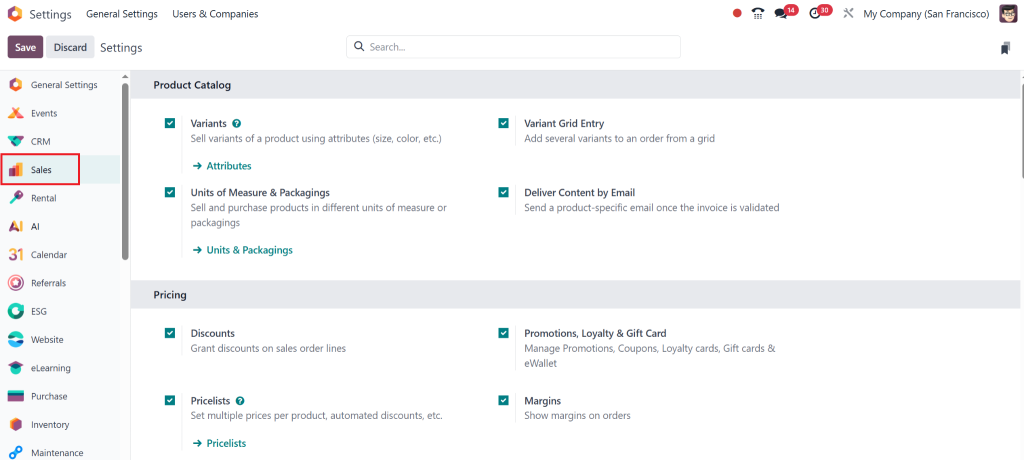
Before you can create a flash sale, you need to make sure the feature is enabled in your system:
Under Sales, click on Sales Settings.
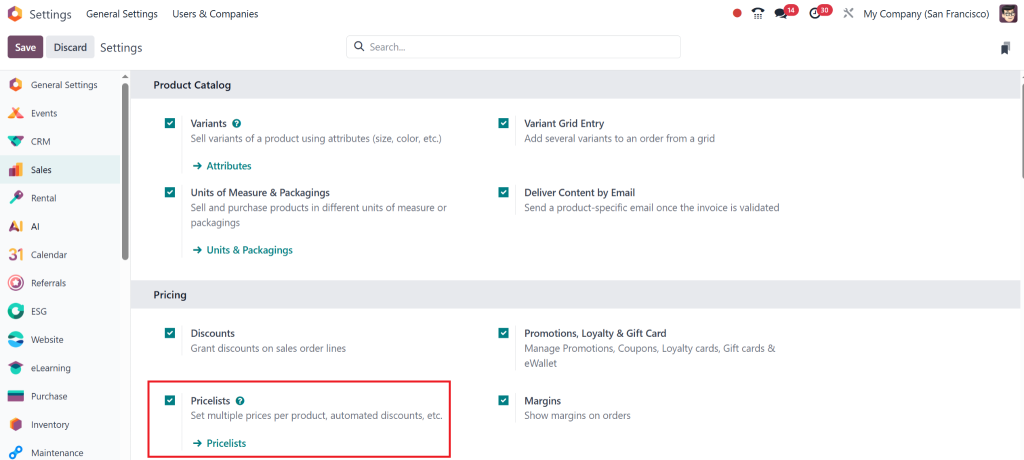
Enable the Flash Sale (pricelists) Feature by toggling the switch.
Once the feature becomes activated, you can start creating your flash sale in Odoo 18 Sales. It’s that simple!
Step 2: Odoo Sales Promotion Flash Sale
Now, let’s create a flash sale in Odoo 18 Sales:
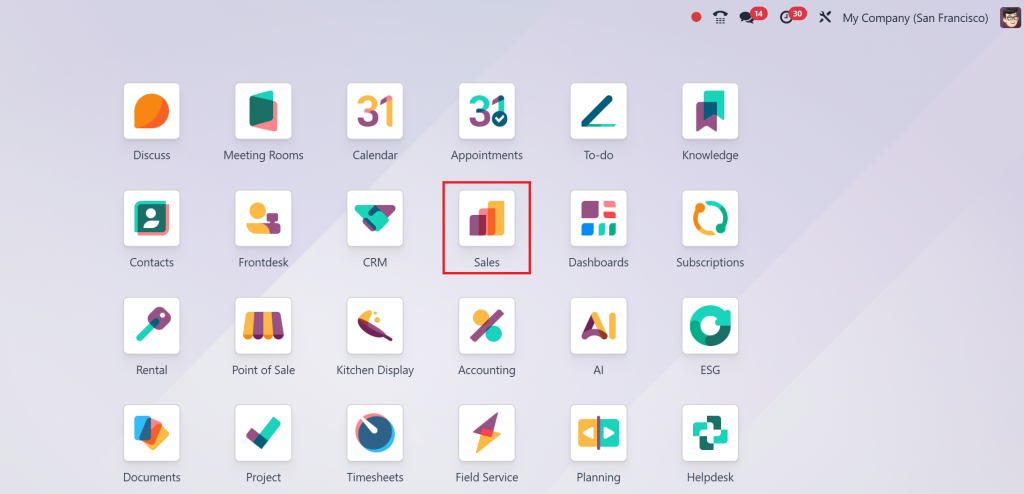
Go to the Sales module in your Odoo dashboard.
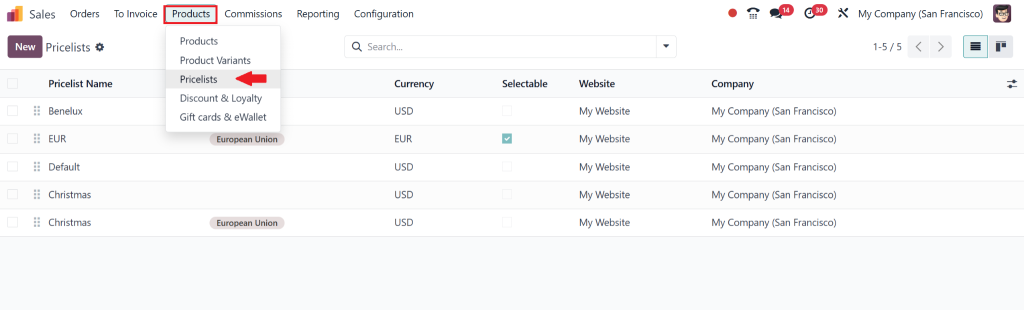
Click on Products, then Pricelists.
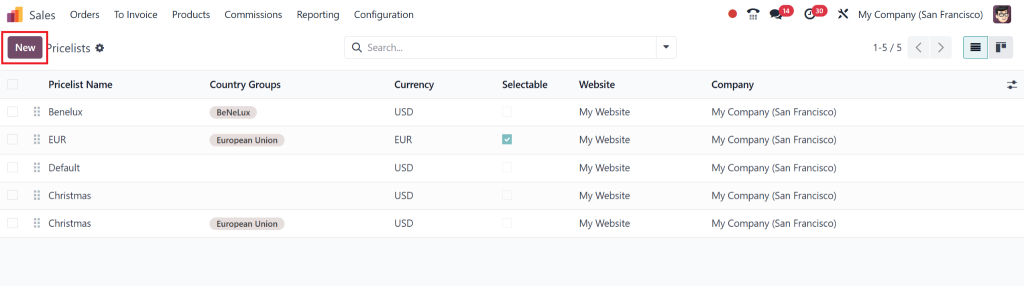
Click on Create to start a new flash sale.
This is where the magic happens! You’ll enter all the details of your Odoo 18 flash sale setup.
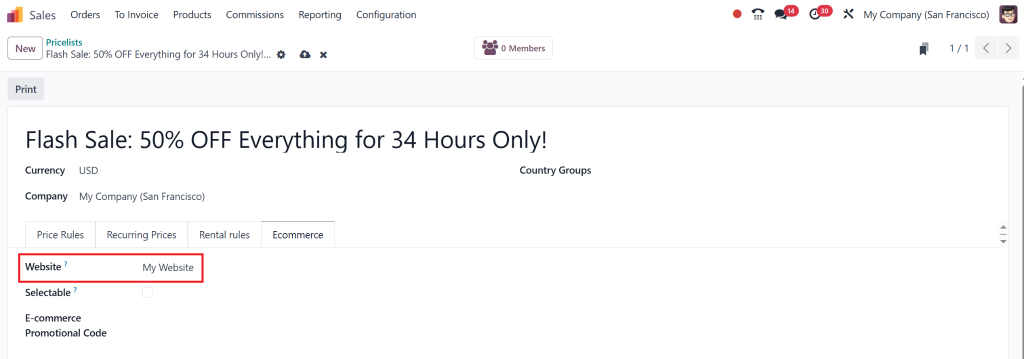
Step 3: Configure Your Flash Sale Details
Now, it’s time to set up the details of your flash sale in Odoo 18 Sales:
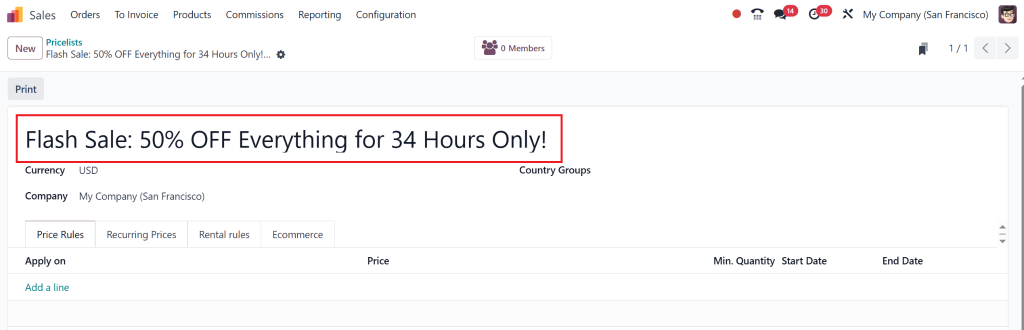
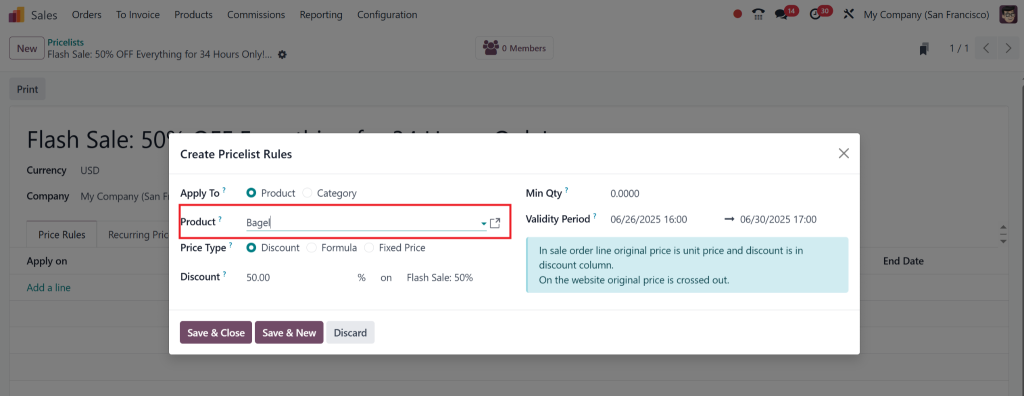
Title: Make it catchy and exciting, like “Flash Sale: 50% OFF Everything for 34 Hours Only!”
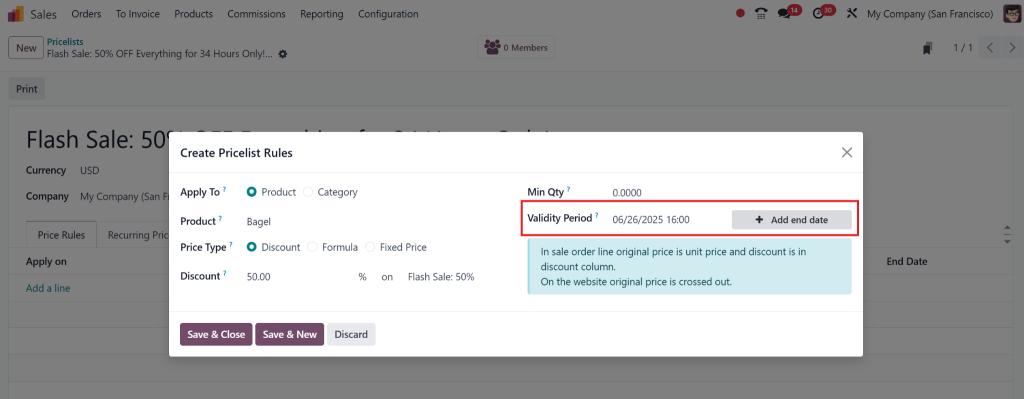
Start and End Time: Set your sale’s start and end times. The shorter the time, the more urgency it creates!
Sale Products: Choose which products will be on sale. You can select individual products or entire categories.
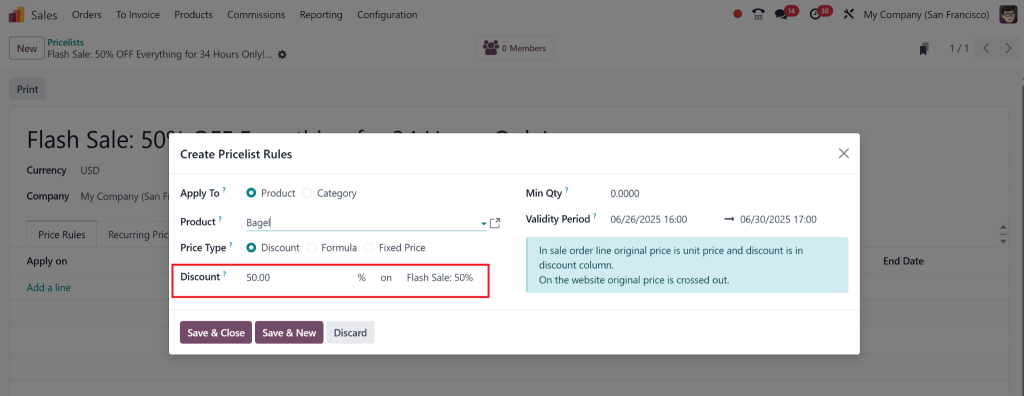
Discount: Set the discount for the sale products, whether a percentage or a fixed amount (e.g., 50% OFF).
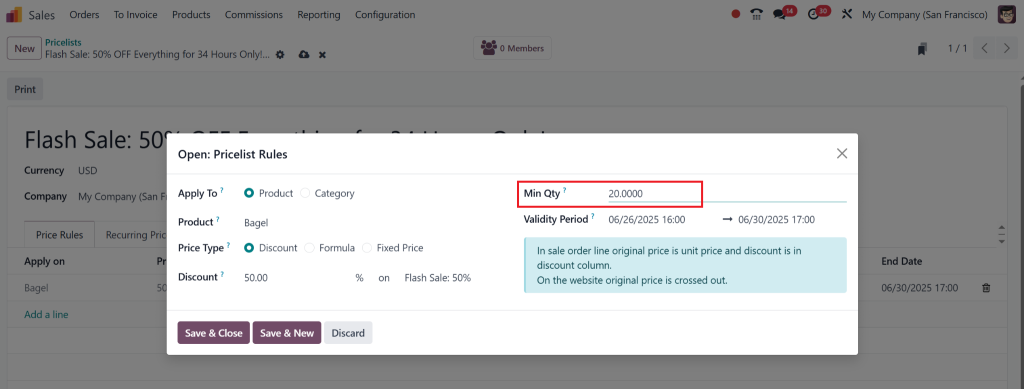
Minimum Quantity (Optional): If you want customers to buy a minimum quantity to qualify, set that here.
With these details configured, you’ve just set up your flash sale in Odoo 18 Sales!
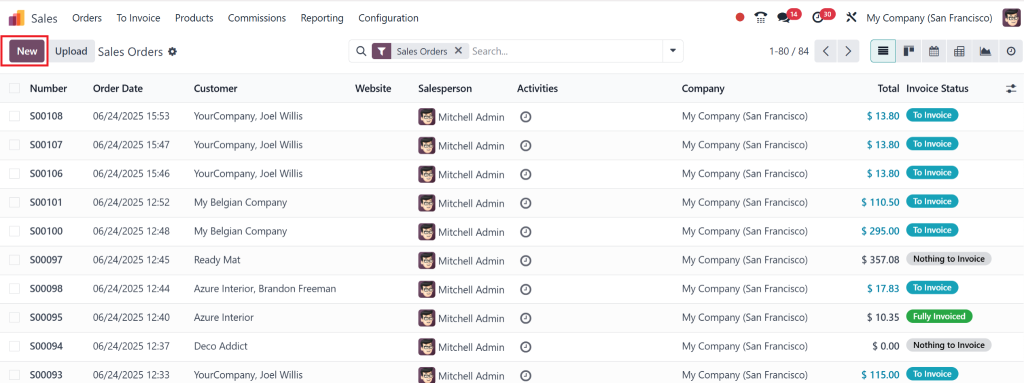
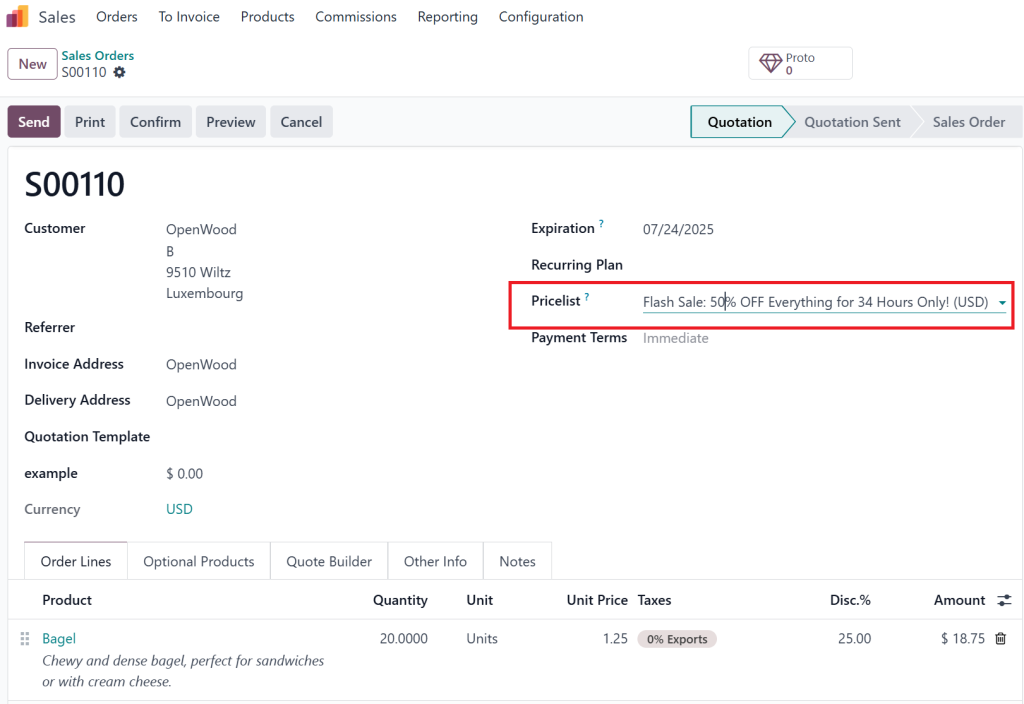
By creating a new sales order for this specific product, we can check whether it’s applied.
To check this, create a new sales order by going to Order> New.
By adding the product to the price list, we can see that offer.
Where to Run Your Flash Sale in Odoo 18 Sales?
One of the best things about the flash sale feature in Odoo 18 is its flexibility. You can promote your flash sale across multiple channels:
Website:
If you use Odoo’s eCommerce platform, you can display the flash sale directly on your website. Use banners, pop-ups, and countdown timers to attract attention.
Point of Sale (POS):
If you have a physical store, integrate the Odoo 18 flash sale feature with your POS system. Your in-store customers can participate, too!
Email Campaigns:
Use Odoo’s email marketing tools to send out an announcement about your flash sale. You can even schedule reminder emails to keep the sale top-of-mind for your customers.
These options allow you to promote your flash sale to as many potential customers as possible.
Promote Your Flash Sale Like a Pro
Setting up the flash sale in Odoo 18 Sales is just half the battle. You need to promote it to get the most out of it actively! Here are a few tips to make your flash sale in Odoo 18 stand out:
Social Media:
Post about your flash sale on Facebook, Instagram, and Twitter. Use catchy images and countdowns to get people excited.
Email Marketing:
Send emails to subscribers with details about the sale. Don’t forget to include a countdown timer!
Website Pop-Ups:
Add pop-ups to your Odoo website to notify visitors about the ongoing sale. A sense of urgency is key to getting people to act fast.
The more you promote, the more successful your flash sale in Odoo 18 Sales will be.
Track Your Flash Sale Results in Odoo 18 Sales
Once the flash sale in Odoo 18 Sales ends, it’s time to analyze its performance. Odoo’s analytics tools can help you track:
Sales Volume:
See how much you sold during the flash sale.
Customer Engagement:
Track how many customers participated in the sale and how many completed their purchases.
Discount Effectiveness:
Analyze whether the discounts were enticing enough for customers to purchase.
These insights will help you refine future flash sales and continually improve your sales strategies.
Tips for Running a Successful Flash Sale in Odoo 18 Sales
Here are some expert tips to make your flash sale in Odoo 18 Sales even more effective:
Create a Sense of Urgency:
The more time-sensitive your sale is, the better. Use countdown timers, pop-ups, and email reminders to keep customers on their toes.
Promote Across Multiple Channels:
Use your website, email marketing and social media to reach as many people as possible. The more people who know about your flash sale promotion, the better.
Set Attractive Discounts:
Offer enough discounts to excite your customers, but don’t overdo it. The goal is to drive urgency without hurting your profit margins.
With these tips, you can run a flash sale in Odoo 18 Sales, bringing serious results.
Take Your Sales to the Upper Level with Odoo Flash Sale Tutorial
The flash sale feature in Odoo 18 Sales enables businesses to achieve rapid sales growth while maintaining customer engagement and increasing financial performance. The Odoo 18 flash sale setup provides all necessary tools for running successful campaigns whether you want to eliminate old stock or draw new customers or generate excitement.
Are you prepared to execute a flash sale through Odoo 18 Sales? The flash sale process remains straightforward while delivering substantial advantages which will lead to increased sales when properly implemented. Start your flash sale promotion creation today to experience immediate results.
Hi, I'm Nabia, an Odoo ERP functional & technical content writer. I specialize in blogs, social media content, ad copy, landing pages, service pages, and email campaigns.
We use cookies to ensure that we give you the best experience on our website. If you continue to use this site we will assume that you are happy with it.