What are the Best Practices for Managing Shipping Policies in Odoo 18?
Managing Shipping Policies in Odoo 18 the Smart and Simple Way
Shipping may look like a small part of the business, but has a significant impact. If shipping is fast and smooth, customers are happy. If it’s slow or confusing, they get upset. That’s why managing shipping policies in Odoo 18 is super important.
With Odoo 18, you don’t have to do everything manually. The system helps you plan, track, and control every part of your shipping process. Everything can be done in one place, from setting rules to choosing delivery methods and keeping your logistics in order.
This blog will walk you through:
How to start managing shipping policies the right way
The Odoo 18 shipping policy best practices that work
Tips for managing shipping rules in Odoo 18 without stress
How to Manage Shipping Policies & Picking Policies in Odoo 18 step by step guide
How to handle Odoo 18 shipping methods configuration
Ways to set smart Odoo 18 delivery method rules
The perfect Odoo shipping policy setup for your business
And how Odoo 18 logistics policy management helps your business grow
Let’s make your shipping faster, easier, and smarter together!
Managing Shipping Policies in Odoo 18: Make Rules That Work for You
Managing shipping policies in Odoo 18 means deciding how products will be delivered, who will provide them, and what shipping costs to charge. You can create rules based on country, weight, product type, or even order value. This helps your system automatically choose the best shipping method for each order.
Instead of sending every order the same way, you can set different options. For example, use express shipping for high-value items or free shipping for orders above a certain amount. When you understand how to control and manage shipping policies in Odoo 18, you take control of your entire delivery system.
Odoo 18 Shipping Policy Best Practices That Save Time and Money
Now, let’s discuss the best ways to manage your shipping system. These Odoo 18 shipping policy best practices help you avoid mistakes and save effort.
First, always organize your shipping zones. Group countries or cities together based on how you deliver. This helps Odoo apply the proper method for each place. Next, use pricing rules based on weight or distance. This way, your shipping cost will always be accurate.
Also, add more than one delivery option for your customers. Let them choose between standard or express shipping. Give clear names like “2-Day Delivery” or “Free Delivery Above $100.” These builds trust.
The most important tip? Test your rules. Before using them on real orders, try them in a test system. Fix any issues before they affect customers.
Managing Shipping Rules in Odoo 18 Without Confusion
Managing shipping rules in Odoo 18 can initially feel tricky, but it gets easy once you understand how rules work. You can set conditions like:
If the weight is more than 10kg, use heavy cargo shipping
If the customer is from a particular country, use a special courier
If the order value is low, don’t offer free delivery
These shipping rules make your system smart. It knows what to do, when, and how to apply the correct method. You don’t need to do things manually anymore.
Also, keep your rules simple. Too many conditions can confuse the system and cause delays. Start small, then add more rules as your business grows.
How to Manage Shipping Policies & Picking Policies in Odoo 18: Step-by-Step Guide
In Odoo 18, managing Shipping Policies and Picking Policies helps you control how your products are delivered and prepared for shipment. It impacts how quickly and correctly your customers get their orders. This guide covers everything from creating delivery methods to deciding how and when products are picked from the warehouse.
Let’s get started!
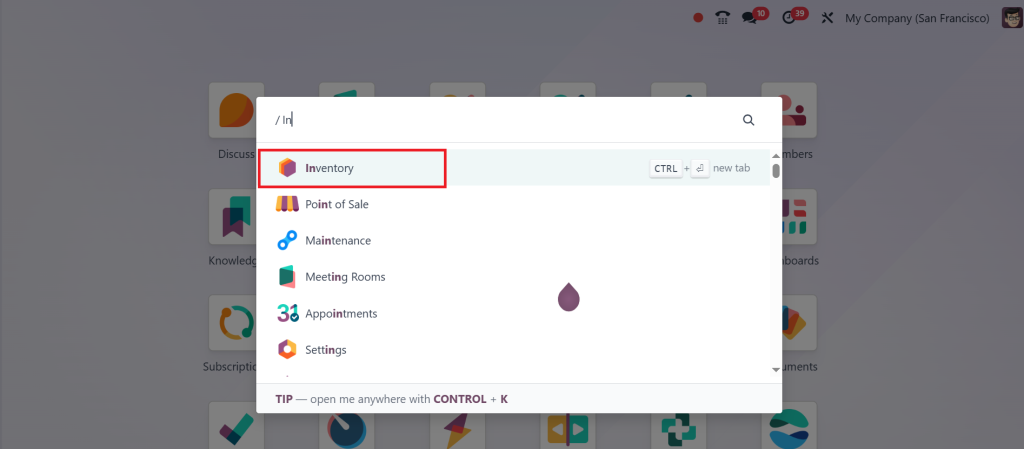
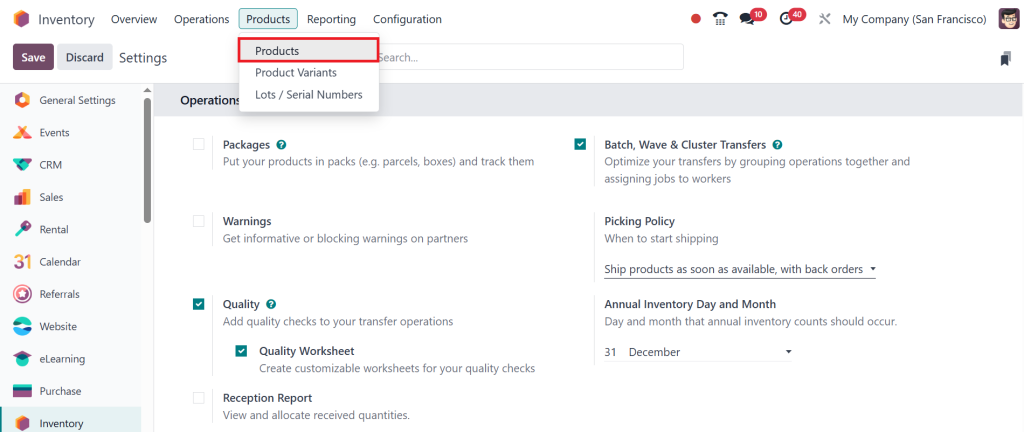
Open the Inventory Module.
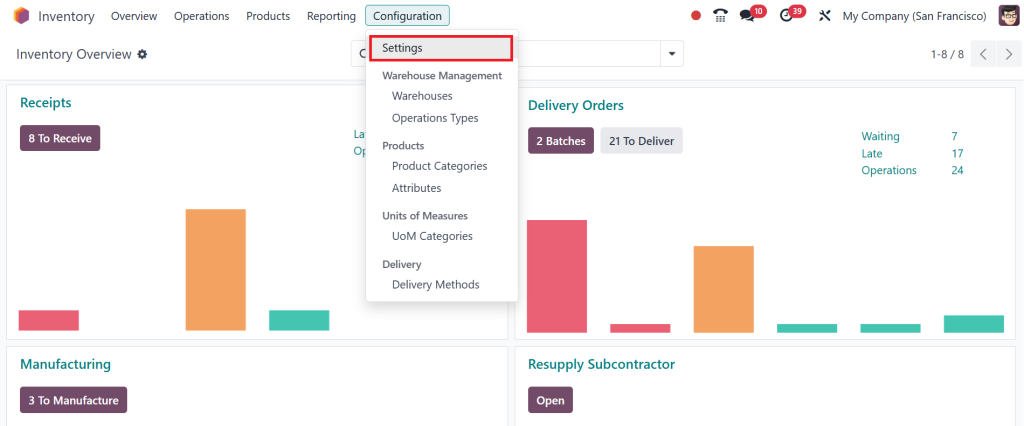
Direct to Configuration > Settings.
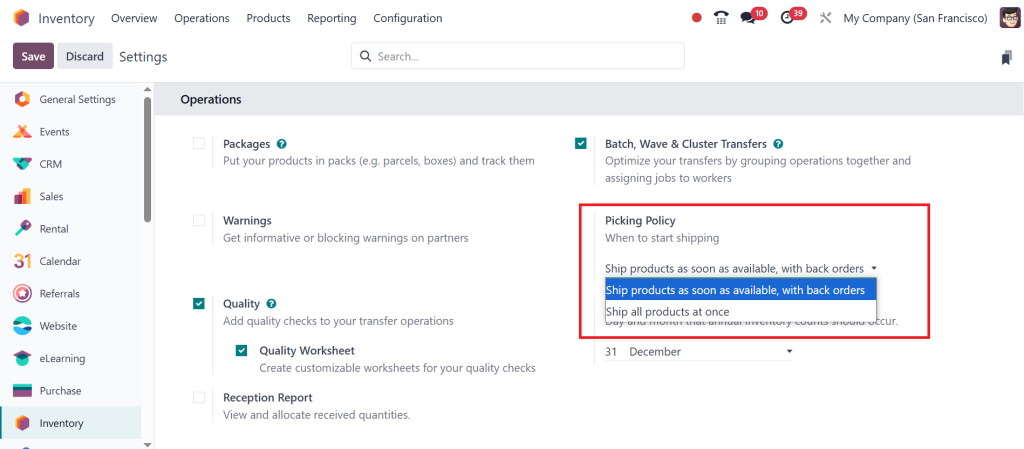
Under the Operations section, you can find an option called Picking Policy. This says when to start shipping. So, there are two options: the first is ‘ship products as soon as available, with back orders’, and the other one is ‘ship all products at once’. Now, let’s see how it works.
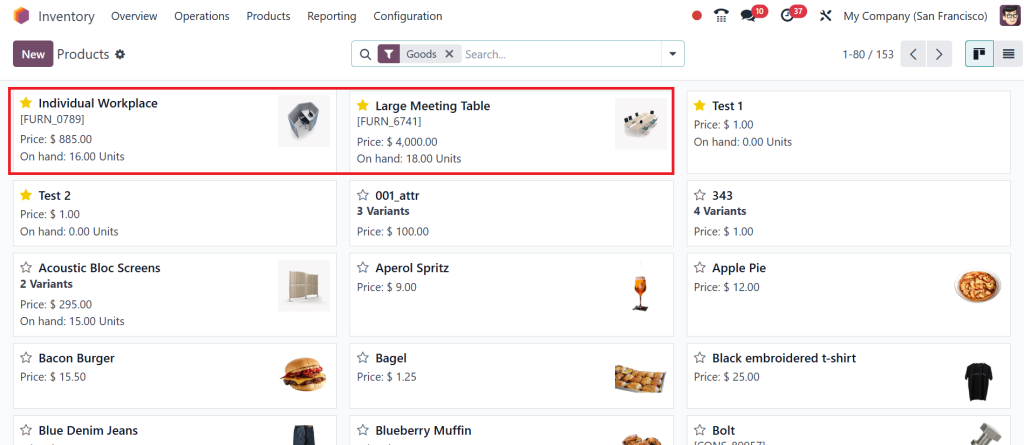
Click Products > Products.
Now, you can see all the products here. Let’s create the order.
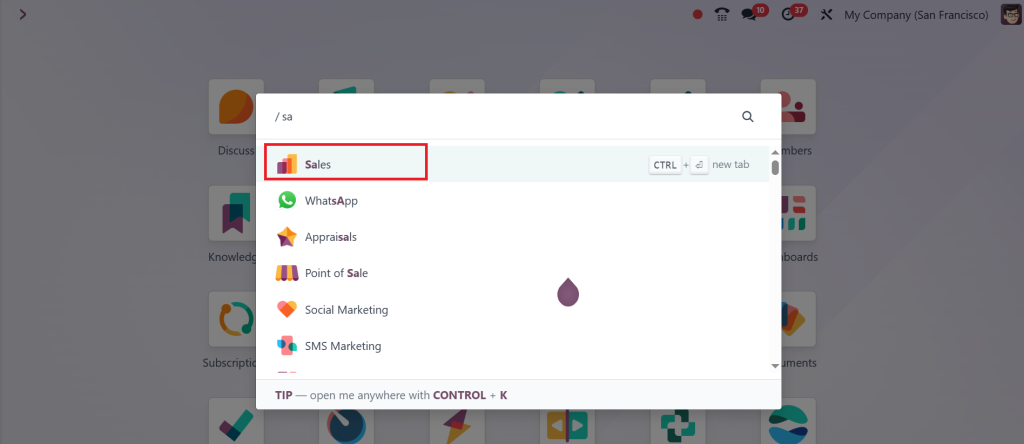
Go to the Sales App.
When the order is placed, Odoo creates a picking order for each available product immediately. So, if a product is out of stock, a back order is created for the remaining quantity.
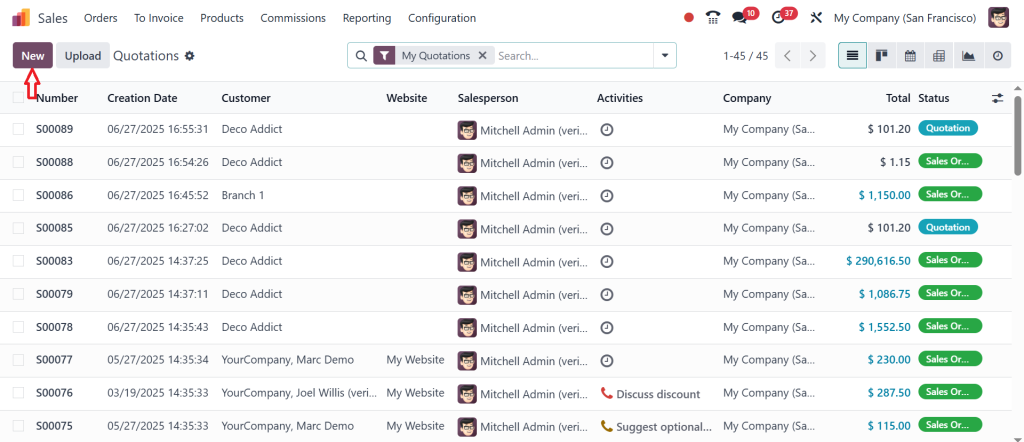
Click on New.
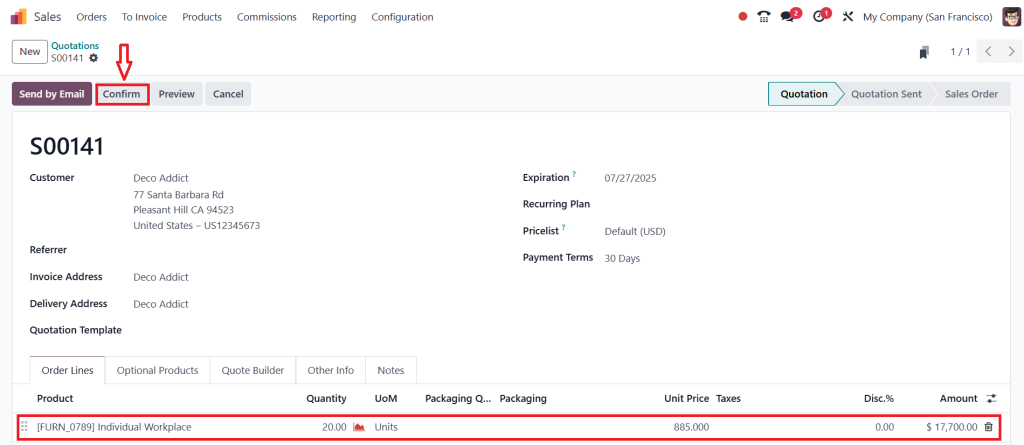
Fill out all the details & click on Confirm. I have just set the picking policy’ ship products as soon as available, with back orders’. So, even if we don’t have sufficient quantities, we can create a backorder for the remaining quantities. This policy is ideal for businesses that prioritise quick fulfilment and want to ship available items promptly. It also suits customers who are willing to accept partial shipments, even if the order cannot be fulfilled immediately.
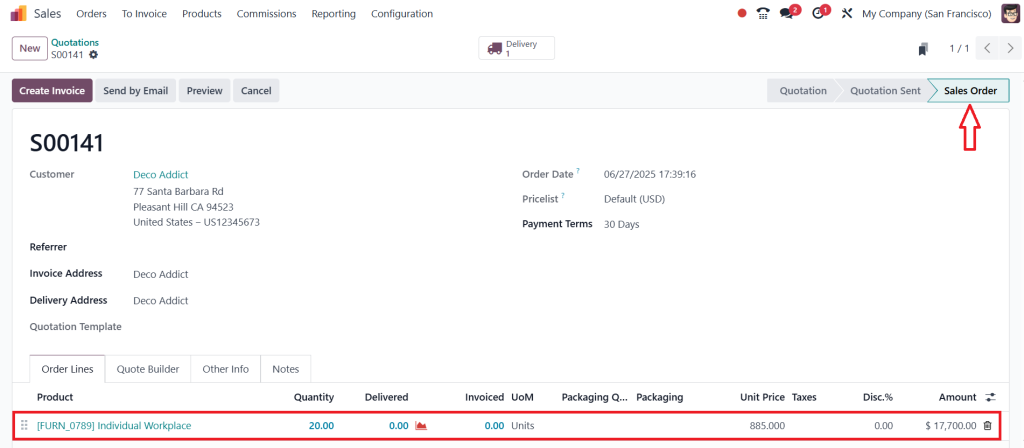
The quotation has been moved to the Sales Order state.
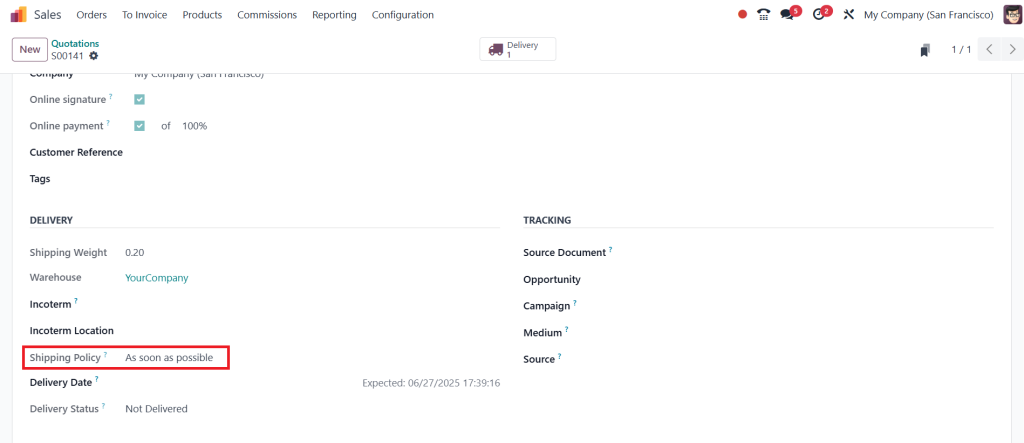
By clicking on the other info tab, you can also see that we have a Shipping Policy field, and here you can see that ‘as soon as available’ will be automatically configured.
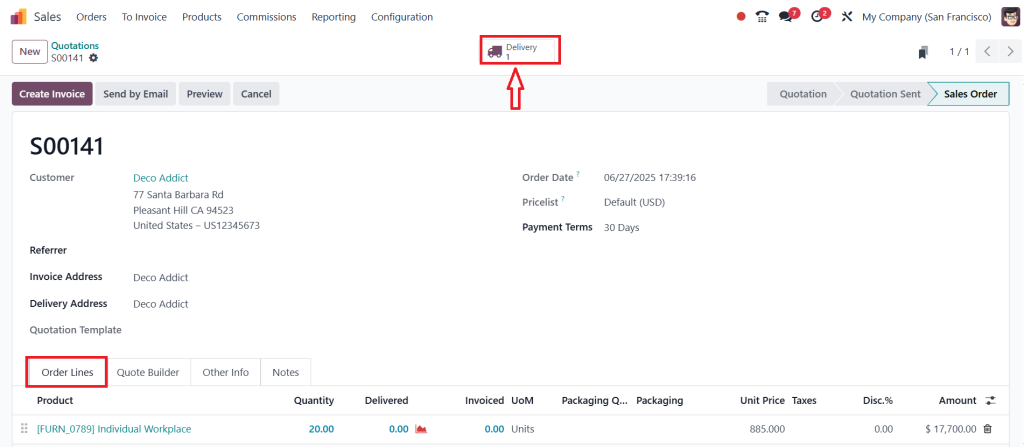
Now, move to the order lines & click on the Delivery button.
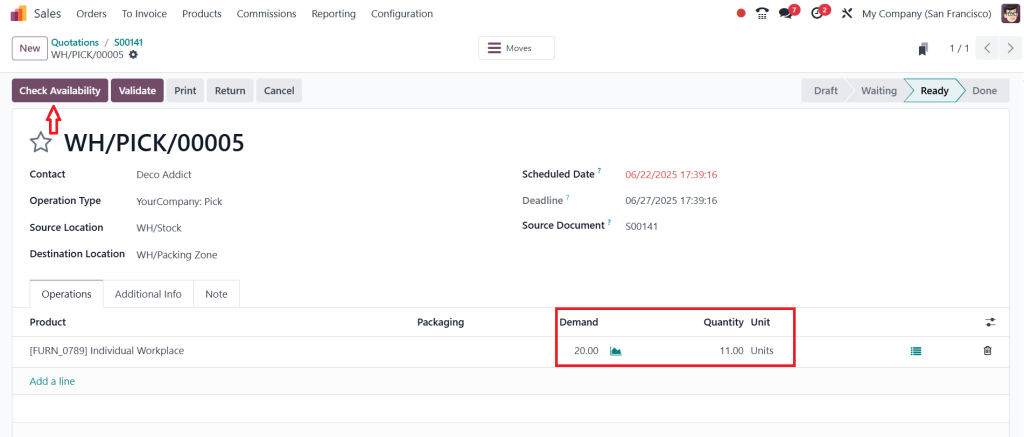
Now, you can see that the quantity demanded by the customer is 20, but we have only 11 quantities. Click on Check Availability, and we don’t have sufficient quantities in our stock. We cannot check the availability because it only updates the 11 quantities that we have in our stock.
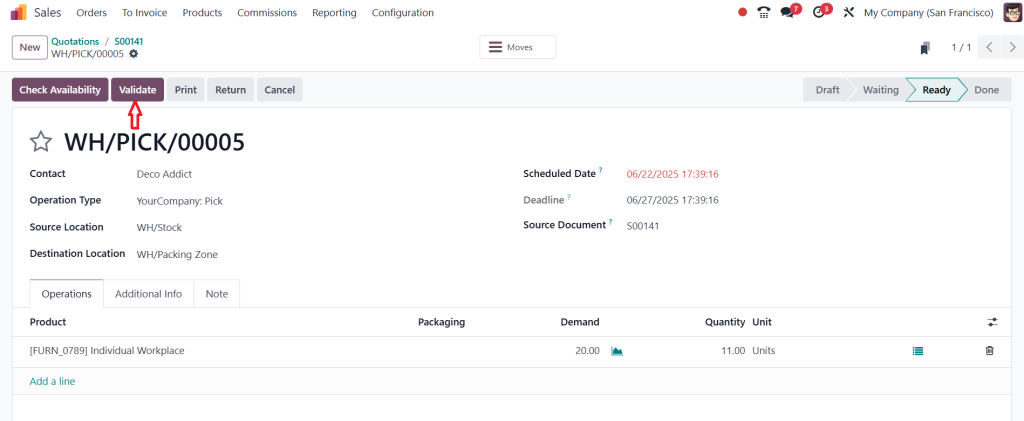
Now, click on the Validate button to process the order.
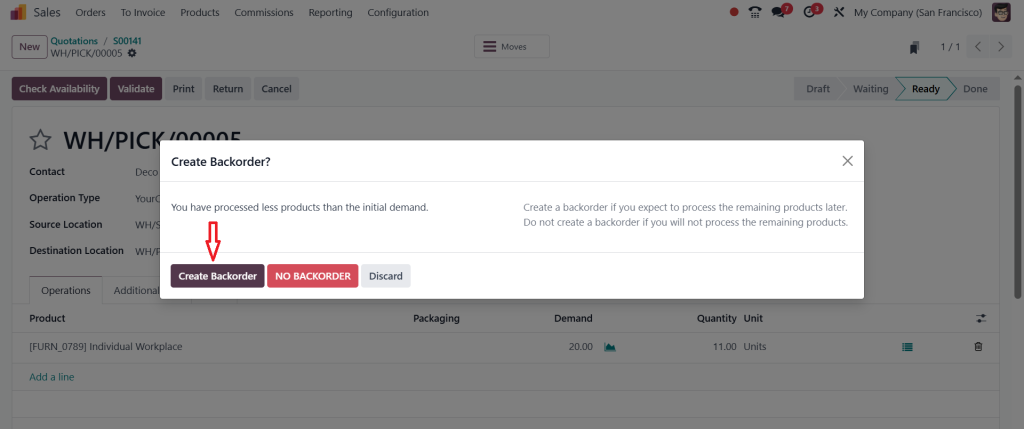
After clicking on the validate, you can see that we can either create a backorder or no backorder. If the customer is going with no backorders, they must forget about the rest of the quantity they have made. If he creates a backorder, we simply deliver the remaining quantity to the customer once the product is returned. So, in this case, I am going to click on ‘‘Create Backorder’’.
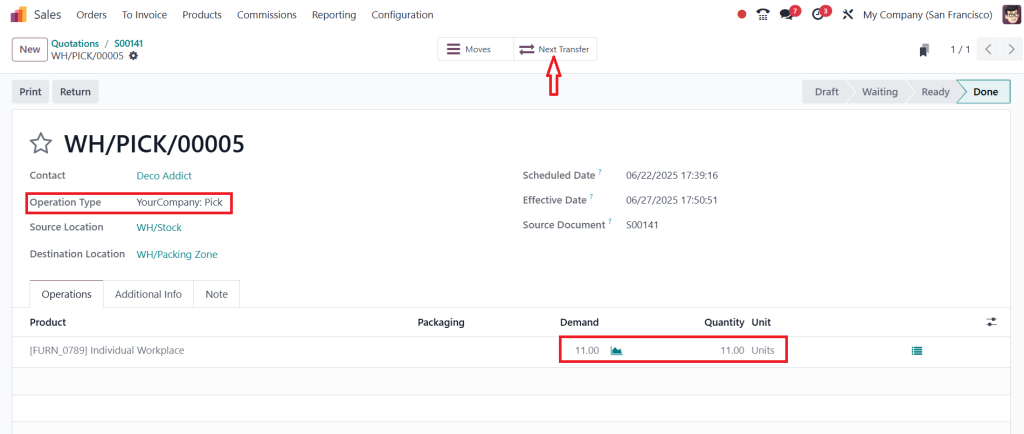
We are currently going to deliver the 11 quantity, which is what we have in our stock. We are using a multi-step process to deliver the item. We have picked the item and now need to move it to the output location by clicking the Next Transfer smart button.
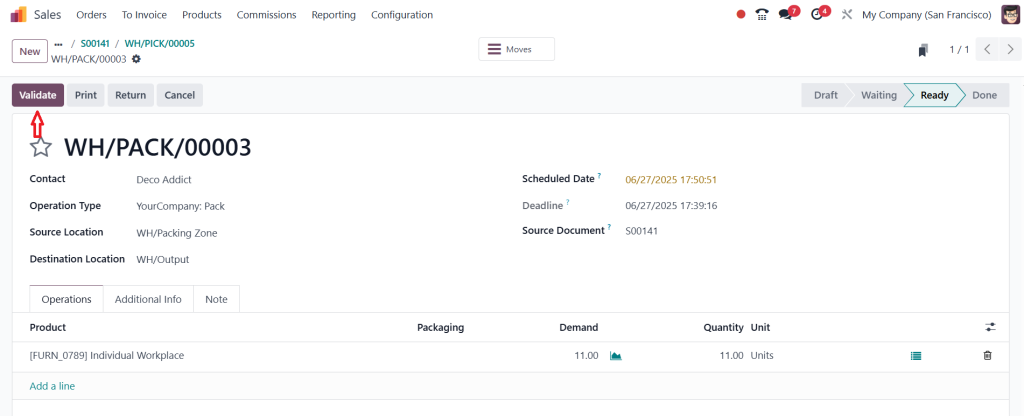
Then, click on the Validate.
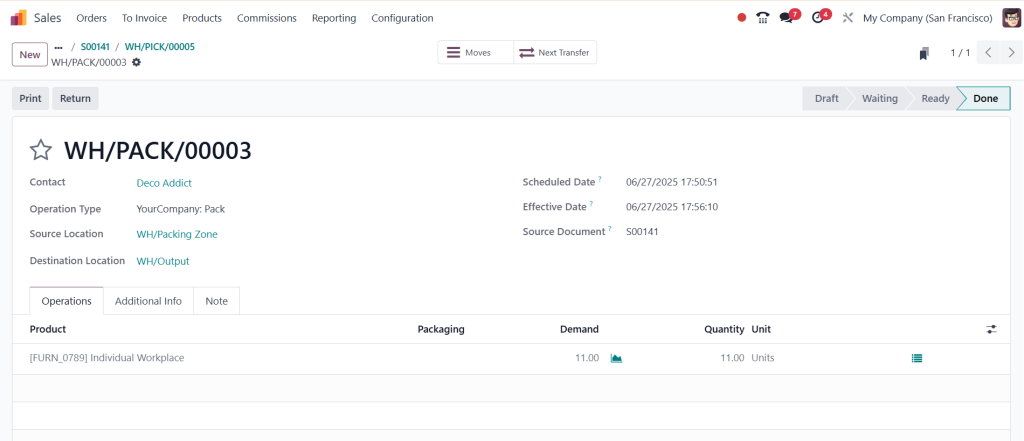
By clicking the validate button, we can deliver the item directly to the customer.
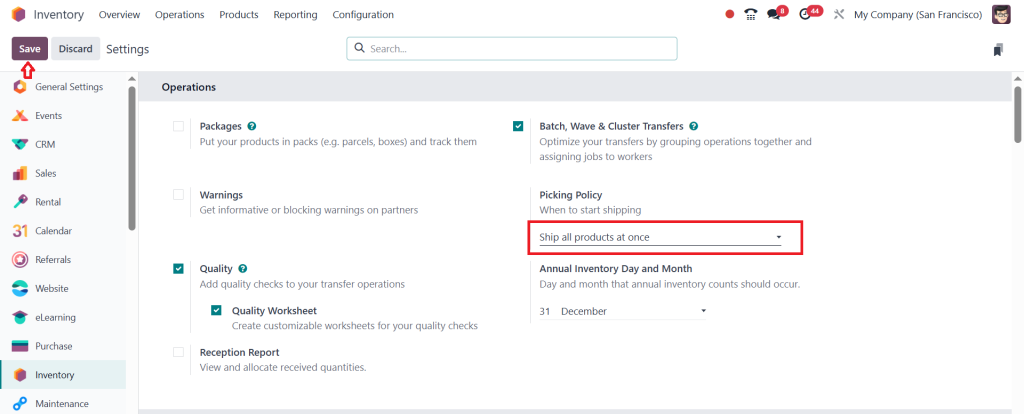
Now, let’s discuss the other one, that is ‘‘Ship all products at once’’. To do this, go to the Inventory App > Configuration > Settings, change the picking policy, and then click Save.
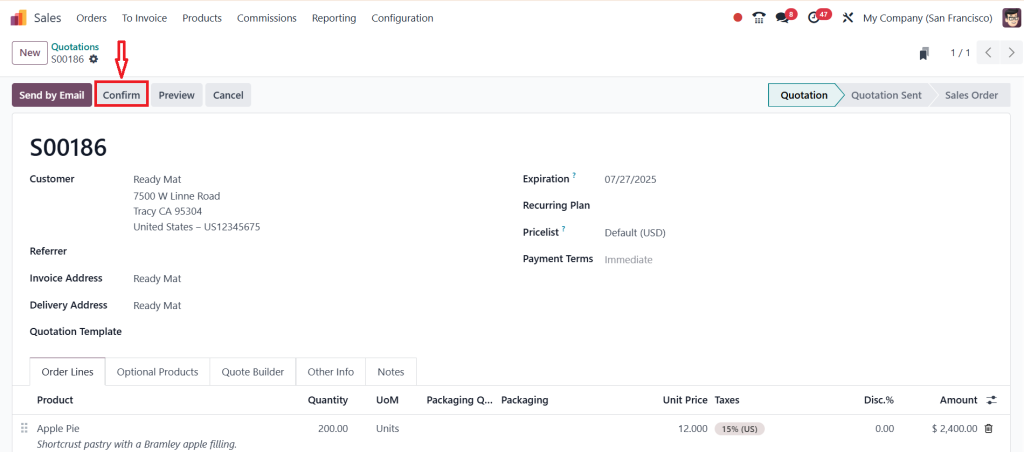
Next, return to the Sales module and create a new sale order by clicking on New. Select the customer, add the product, and then click Confirm.
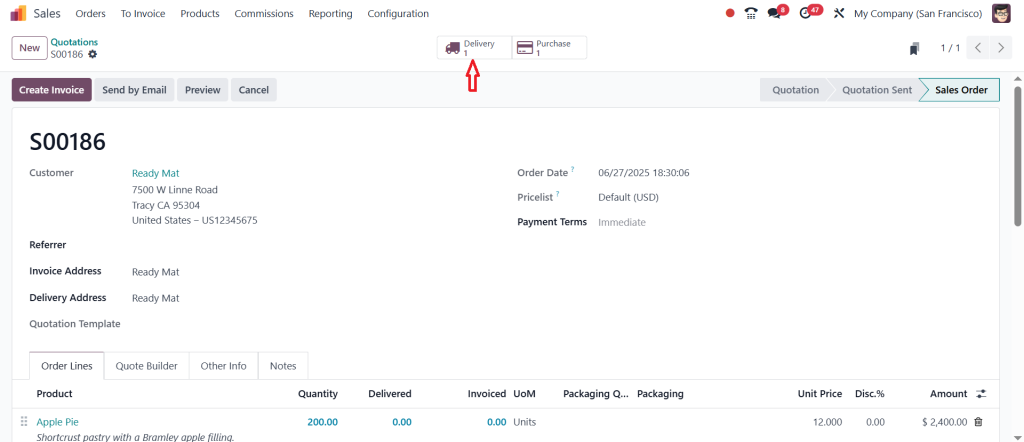
As you can see in the screenshot below, the quotation has just moved into the sales order, and we need to deliver the item to the customer by clicking on the Delivery button.
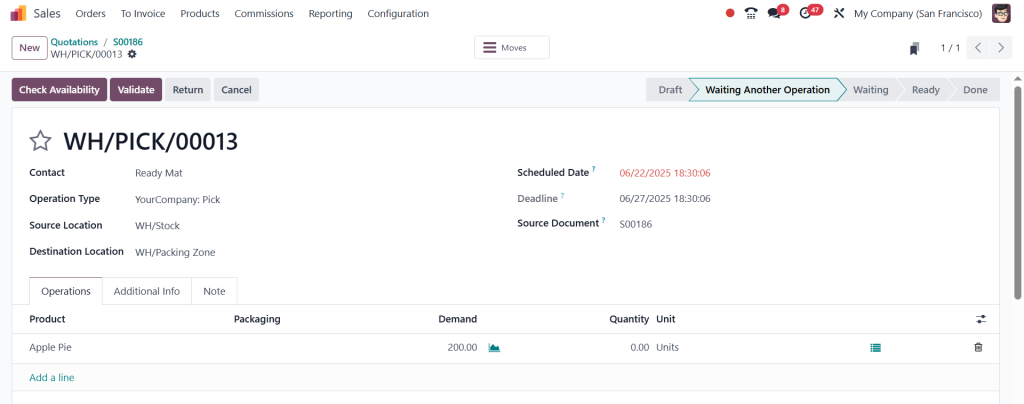
Here, you can see that it is in the waiting stage, and it is best suited for the business that prioritises complete order fulfilment and wants to ship all the items together. This policy is also ideal for the customers who expect to receive their entire order in one shipment.
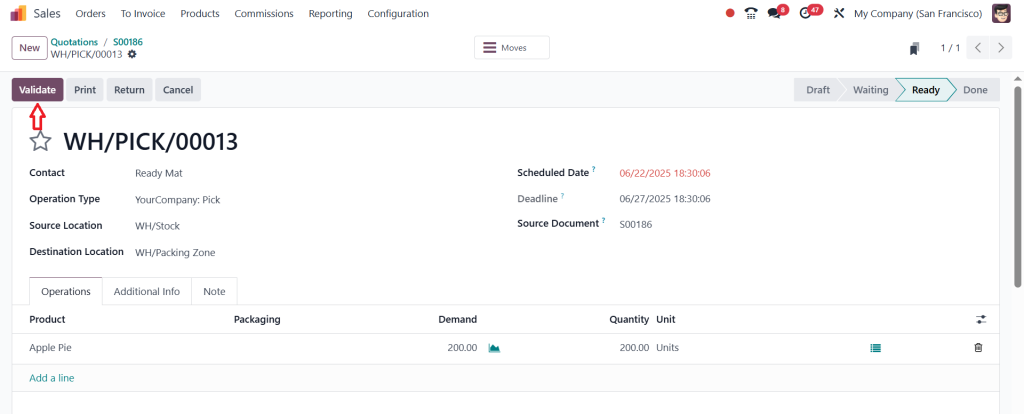
Once the product is available, the waiting status is updated to Ready. Then you can click ‘‘Validate’’ to move the item from the Ready stage to the Done stage.
So, this is the optimal picking policy depending on your business model, customer expectations and inventory management strategies. By carefully considering your business needs and customer preferences, you can select the most appropriate picking policies to optimise your order fulfilment process in Odoo.
Odoo 18 Shipping Methods Configuration Made Simple
Let’s break down Odoo 18 shipping method configurations easily. Shipping methods are the choices your system uses to send out orders. You can add as many as you want. For example:
Free shipping
Standard delivery
Express delivery
International shipping
Odoo 18 lets you connect with real DHL, FedEx, UPS, and more couriers. The system can show real-time shipping rates based on the order details. You can also set fixed prices if you don’t want dynamic rates.
Setting this up is simple:
Go to your Odoo Sales or Inventory settings.
Turn on the delivery methods feature.
Add shipping options with the correct prices and rules.
That’s it! Your system is now ready to use innovative delivery options.
How to Set Odoo 18 Delivery Method Rules Like an Expert
Odoo 18 delivery method rules let you choose how each delivery method works. Think of them like “if this, then that” actions.
You can say:
If the order weight is over 20kg, use truck delivery.
If the customer is in the same city, use bike delivery.
If the item is fragile, send it with a special handler.
These rules give you complete control. You don’t have to change anything manually every time. Once your rules are set, Odoo does the work.
Make sure your rules match your real-world needs. Don’t overcomplicate them. Simple rules that solve big problems are the best kind.
Odoo Shipping Policy Setup: Start Strong from the Beginning
Setting up your shipping system is the most crucial step. Your Odoo shipping policy setup decides how your system works from day one.
Here are some smart tips:
Start with basic rules and methods
Add zones and countries where you deliver
Decide on free shipping limits or charges
Enable delivery tracking if possible
Connect with popular couriers for better options
Write everything down. Create a small guide for your team so everyone understands your shipping setup. This will save you time and help you avoid mistakes in the future.
Odoo 18 Logistics Policy Management That Grows with You
Your shipping system is not just about sending packages but the journey from order to delivery. That’s where Odoo 18 logistics policy management helps you the most.
You can manage:
Warehouses
Pickup points
Return processes
Third-party delivery companies
Odoo brings all this together in one place. It gives you complete visibility over your logistics. You can track stock, check orders, and plan routes from your dashboard.
As your business grows, your logistics will get more complex. Odoo 18 is built to grow with you. Start small, then keep improving as you learn what works best.
Best Practices Odoo Shipping Users Swear By
Let’s end this with some golden tips. These best practices Odoo shipping users follow can make a big difference in your daily work:
Always test your shipping rules before using them live.
Keep your shipping methods easy to understand for customers.
Offer multiple delivery options so customers feel in control.
Set up tracking numbers and notifications to reduce calls and emails.
Regularly check courier performance and shipping costs.
Use delivery feedback to improve your system.
Make your team familiar with how the shipping rules work.
These small steps lead to significant results. Your customers will get better service, and your team will work more smoothly.
Smart Shipping Starts with Odoo 18
If you want happy customers and a smooth delivery process, managing shipping policies in Odoo 18 is the way to go. From simple rules to innovative delivery options and complete logistics policy management, everything becomes easier when you use the system well.
With the right Odoo 18 shipping policy best practices, your orders will move faster, your team will make fewer mistakes, and your customers will keep coming back.
Remember, it’s not about doing more work. It’s about working smarter. And Odoo 18 helps you do just that.
Need Help? Let Netilligence Set Up Your Odoo Shipping the Right Way
At Netilligence, we help businesses like yours use Odoo in the most innovative way possible. Whether you’re starting fresh or improving your current setup, we’re here to guide you.
Hi, I'm Ilsa Shabbir, an Odoo ERP content writer specializing in functional blogs on Odoo modules. I simplify complex Odoo features, creating clear and engaging content to help businesses understand and optimize their ERP solutions.
We use cookies to ensure that we give you the best experience on our website. If you continue to use this site we will assume that you are happy with it.