

Why Managing E-Wallet in Odoo 18 Sales Matters More Than Ever
In a world where digital payment is the new norm, managing customer expectations is no longer about offering a credit card option or a cash-on-delivery checkbox. It’s about flexibility, speed, and smooth user experiences. That’s where the ability to manage e-wallet in Odoo becomes a real catalyst.
With the rise of integrated platforms, Odoo 18 e-wallet functionalities make it easier for businesses to handle transactions and add a layer of sophistication and personalization to the customer journey. Enterprises gain a massive competitive advantage when they understand how to manage an e-wallet in Odoo and align it with the broader Odoo 18 sales features.
Modern consumers seek autonomy, and with Odoo e-wallet integration, they get instant, secure, and reusable digital credit. Whether running a full-scale e-commerce empire or a retail chain looking to modernize operations, knowing how to leverage Odoo payment methods, especially the digital wallet, can revolutionize how you sell and engage. Let’s dive deeper into this underrated yet effective feature.
How to Manage E-Wallet in Odoo 18 Sales: A Step-by-Step Guide
At its core, the e-wallet in ERP system is not just a wallet; it’s an experience enhancer. To manage an e-wallet in ERP system, you first enable it through the sales app configuration. It begins by activating “Discounts, Loyalty & Gift Cards,” which opens wallet functionalities within the system. Once enabled, you can assign digital credits to customers, think gift cards, refunds, or prepaid account balances.
Now imagine this: A returning customer visits your e-commerce site and decides to buy. Instead of re-entering payment details or calculating discounts, they use their wallet balance. The transaction is quick, secure, and satisfying. That’s the magic; when you manage an e-wallet in Odoo 18 sales, you’re not just processing payments but building customer loyalty through ease and trust.
Step 1: Enable Wallet Features in Sales App
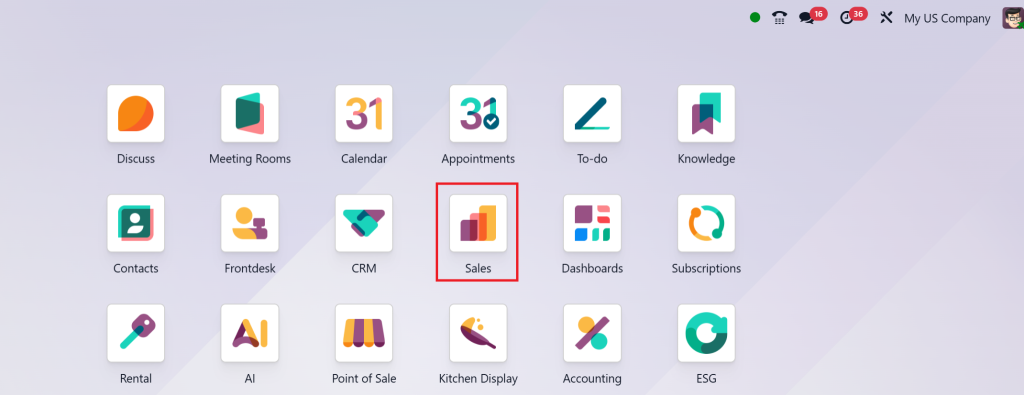
- Go to Sales App in Odoo 18.
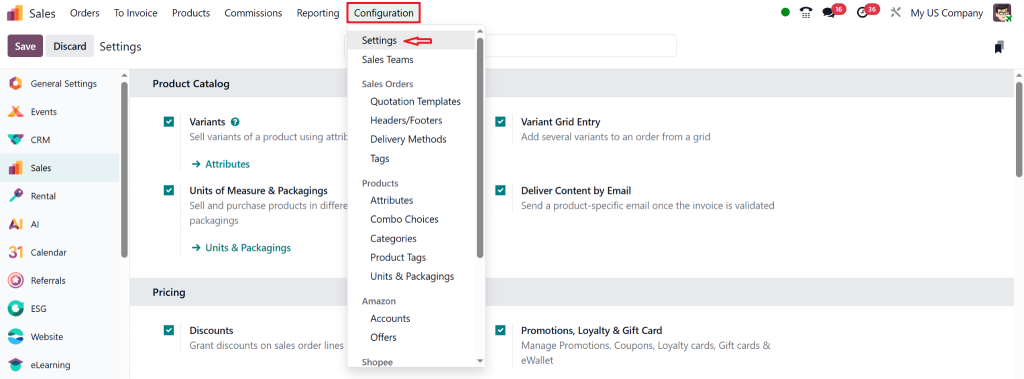
- Click on Configuration > Settings.
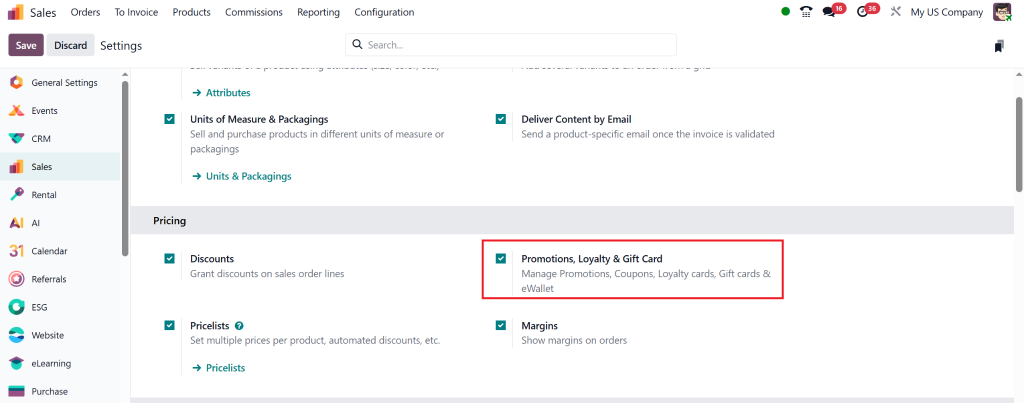
- Under the “Pricing” section, activate the checkbox for:
- Discounts, Loyalty & Gift Cards.
- Click Save.
This activates all features related to digital wallets including prepaid balances, loyalty programs, and gift card integration.
Step 2: Create a Wallet Product (Optional but Recommended)
Go to Sales > Products > E-Wallet Credit
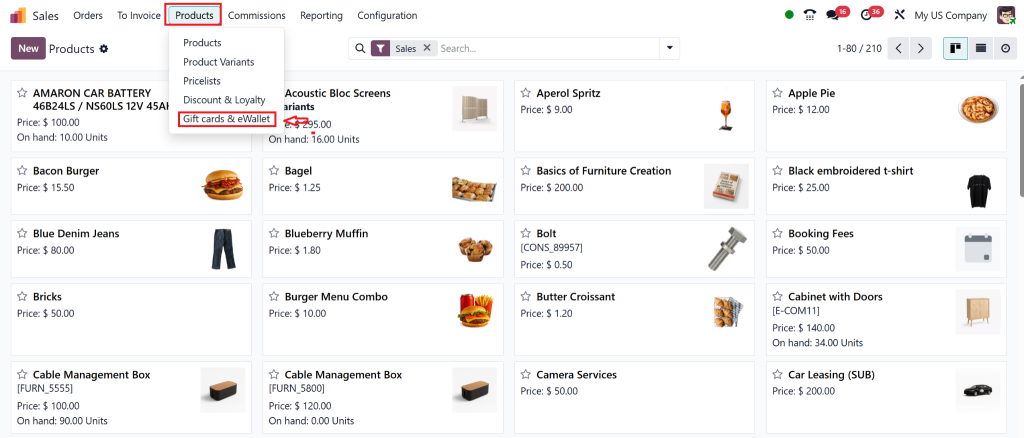
- Click Create and name it something like eWalet.
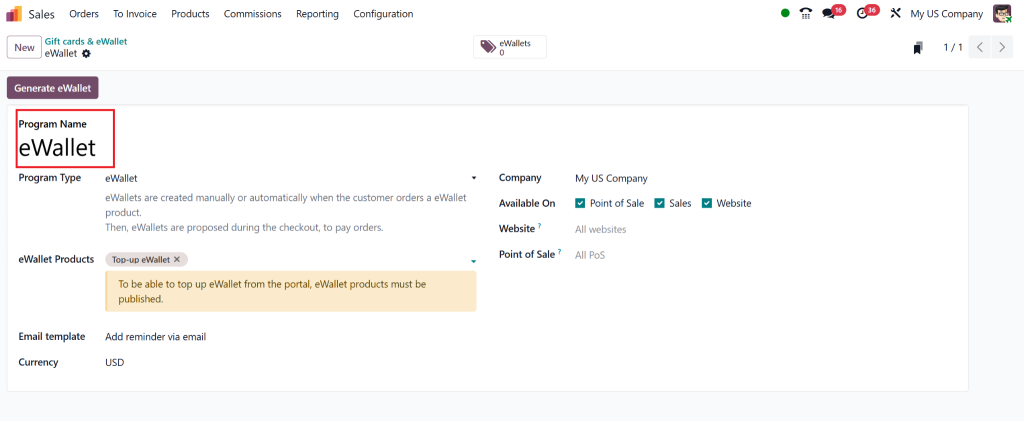
Step 3: Assign Wallet Balance to a Customer
You can add credits to a customer’s wallet manually or through a sale/refund:
Manual Method:
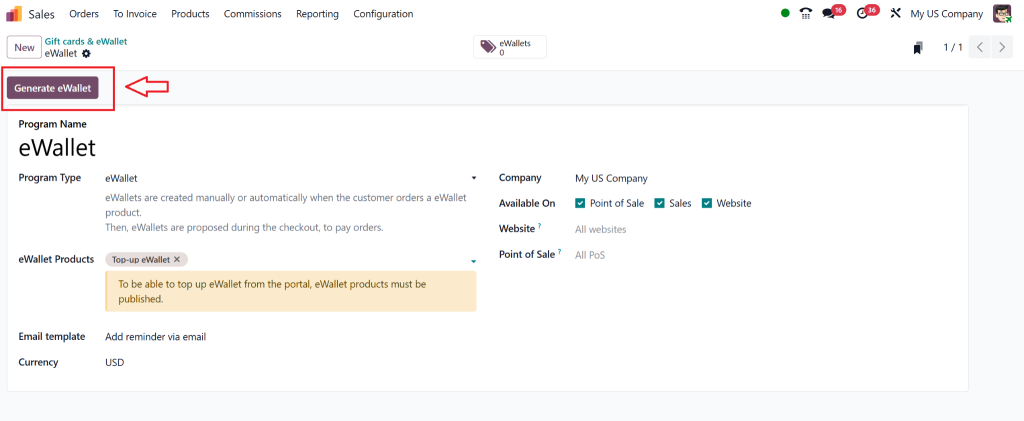
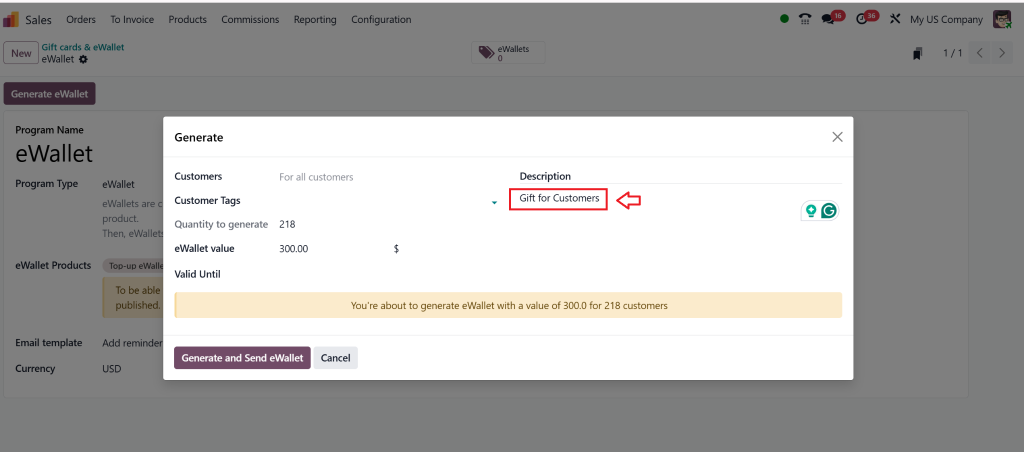
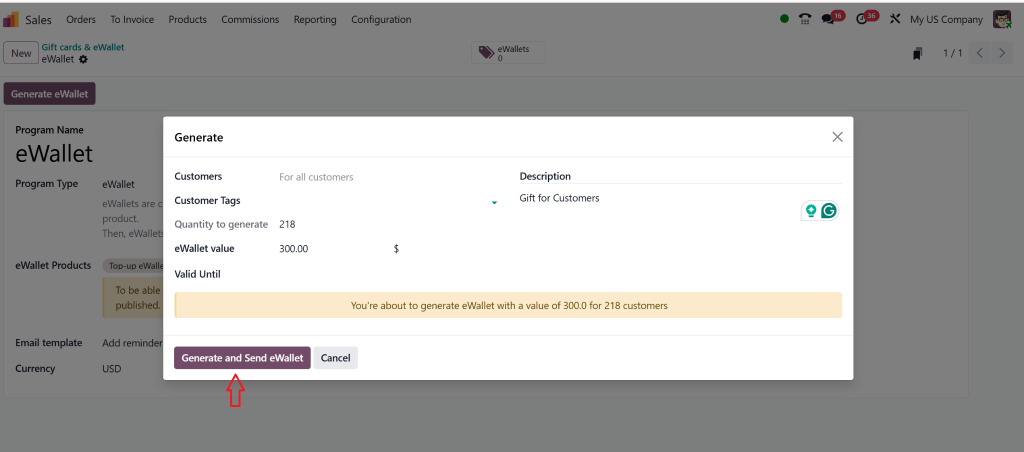
- Click on Generate eWallet.
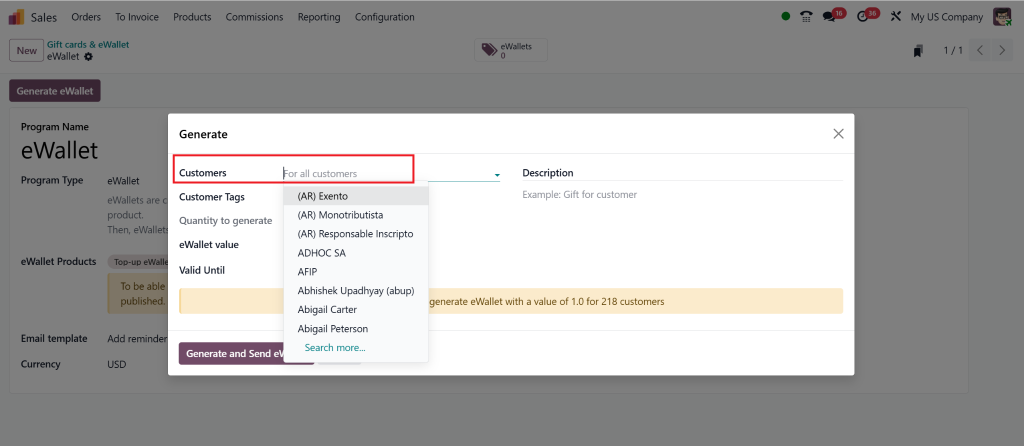
- Add Required Customer or otherwise the system assigns it to all customers saved in the database.
- Click Add Balance.
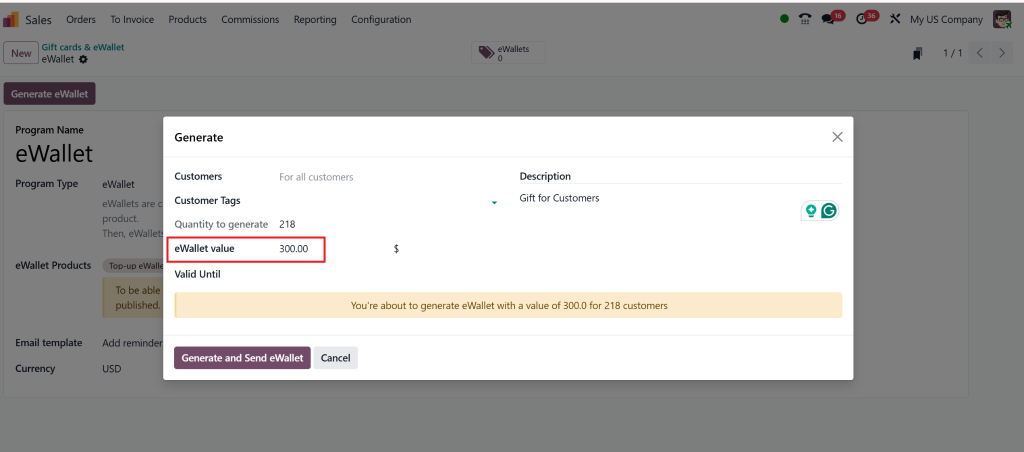
- Enter the amount and reason (e.g., refund, gift, promotion).
- Click Confirm.
Sale-Based Method:
- When a customer purchases a gift card or top-up, create a Sales Order using the E-Wallet Credit product.
- Confirm and register payment. Once validated, the amount is added to the customer’s wallet.
Set Wallet Usage Rules (Optional)
You can configure conditions for wallet usage under Sales Settings or Promotions, such as:
- Minimum purchase amount to use the wallet
- Expiry dates on wallet credits
- Wallet balance limits
- Loyalty reward points are convertible to wallet credit
Bonus Tips:
- Enable email notifications to alert customers of wallet top-ups or usage.
- Use portal access to let customers check their wallet balance online.
- Combine wallet with loyalty programs for long-term retention.
Disclosing Odoo 18 E-Wallet
More Than Just a Payment Option
The ERP system 18 e-wallet isn’t a bolt-on gimmick. It’s a native part of the ecosystem, designed to work flawlessly across your sales, POS, and e-commerce modules. Its effortless alignment with your existing business operations makes it stand out. You can configure digital credit values, create personalized top-up programs, and even set expiration rules. This isn’t limited to online sales; walk-in customers can also use wallets via PoS systems.
This adaptability makes it ideal for businesses with varied sales channels. Want to provide cashback for frequent buyers? Launch a loyalty program that rewards customers directly into their ERP system digital wallet. Want to encourage pre-payment for services? Offer wallet bonuses. It’s all possible with ERP system e-wallet integration, no complex third-party app, and just pure ERP system magic.
Odoo E-Wallet Integration
Real-Time Benefits That Drive Sales
When discussing ERP system e-wallet integration, the conversation naturally extends into real-time data sync, secure storage, and multi-platform usability. It’s one thing to allow digital wallet usage and another to do it well. ERP system 18 nails this by ensuring that every wallet transaction, whether a credit or a debit, is tracked in the customer’s sales history, accounting, and CRM modules.
It’s smooth: Your sales representative processes an order, the customer uses wallet credits, and your backend updates all records automatically. This level of automation means fewer human errors and faster reconciliation. As businesses scale, these time and effort savings translate into serious revenue gains. The keyword here is simplicity, and ERP system payment methods are increasingly about simplifying the customer journey while allowing your teams.
Exploring Odoo 18 Sales Features That Make Digital Wallets Work Effortlessly
Many users overlook how deeply wallet functionality is tied to broader ERP system 18 sales features. It’s not just about storing credits; it’s about offering those credits as a dynamic payment method. From the sales quotation stage to invoicing and payment, e-wallet balances are always visible and usable. You can even send digital credits for a promotion campaign, making your sales strategy more robust and engaging.
In short, the wallet extends your business philosophy: give more, sell smarter, and retain better. Through thoughtful configuration and customer-centric usage, ERP system 18 e-wallet turns your backend process into a front-end advantage.
Odoo Payment Methods Meet the Future
The Rise of the Digital Wallet
Traditional payment methods are beginning to feel outdated. Customers are tired of inputting card numbers, managing OTPs, and waiting for payment confirmations. With the growing rage of digital wallets in everyday life (think Apple Pay, Google Wallet, etc.), integrating that same ease into your ERP is non-negotiable. And that’s precisely what ERP system payment methods now support.
When customers use their ERP system digital wallet, they’re enjoying frictionless purchasing. You’re reducing cart abandonment, improving checkout times, and boosting average order value. And the backend? It keeps track of every transaction in your sales, accounting, and customer service modules. Every stakeholder benefits, from the customer to the CFO.
Smart Selling with Odoo Sales Payment Options
The management of ERP system sales payment options depends on how intelligently they’re structured. Want to offer a hybrid payment where the wallet covers part of the amount and the rest is paid by card? Done. Want to create wallet recharge packages with extra credits as a bonus? Easy. This flexibility means you’re never boxed into a rigid payment structure.
In practice, customers love options. Giving them control over how they pay, especially when wallet credits are involved, increases their satisfaction and likelihood of returning. It also creates a gamified shopping experience where every purchase could earn wallet rewards. With ERP system 18 sales features, this level of personalization becomes second nature, not a tech nightmare.
Reimagine Loyalty with the Odoo Digital Wallet
At this point, it’s clear that the ERP system digital wallet is more than a feature; it’s a loyalty engine. Unlike traditional points systems that require third-party tools or clunky integrations, ERP system’s digital wallet works natively. You define the rules, the expiration dates, the top-up methods, and even the refund workflows. Every aspect is controlled within your ERP system environment, giving you unprecedented power over your sales and marketing strategy.
Envision this scenario: A customer returns a product. Instead of refunding their card and risking customer disengagement, you refund their e-wallet, ensuring they’ll return for another purchase. Or think about holiday campaigns where purchases over a certain amount earn wallet credits. The possibilities are endless, and they all contribute to better customer engagement and higher repeat purchase rates.
Grasp the Art of Managing E-Wallet in Odoo and Varying Sales
To manage e-wallets in ERP systems , it adopts a future-ready sales strategy prioritizing convenience, loyalty, and business intelligence. With ERP system 18 e-wallet, businesses now have an integrated tool that simplifies payment experiences while driving higher conversions. Add to that the beauty of ERP system e-wallet integration, and what you get is an efficient, fully traceable, and secure digital wallet environment.
The real power lies in how deeply the wallet interacts with Odoo’s 18 sales features, from customer profiles to invoices and POS to eCommerce. Your ability to offer varied and flexible ERP system payment methods will define your customer retention and satisfaction strategy in the coming years. With the increasingly digital nature of commerce, implementing the ERP system digital wallet might be the most intelligent decision you’ll make for your business this year.
Let your competitors keep guessing. Thanks to ERP system 18’s digital wallet ecosystem, you’ve already opened the secret to more brilliant, faster, and more rewarding selling.




