


Calls in Odoo Discuss – The Future of Collaboration
Calls in Odoo Discuss are one of the most powerful features that transform how teams connect, collaborate, and communicate in real-time. Imagine a workspace where you don’t have to juggle between multiple third-party apps like Zoom, Google Meet, or Teams—because Odoo Discuss video calls and the Odoo voice call feature bring everything inside your ERP ecosystem.
With the rise of remote and hybrid work, businesses need more innovative communication solutions. And that’s precisely what Odoo starts meeting. Discuss empowers you with. From Odoo group chat video call features to the ability to enable video calling for one-on-one or team discussions, it’s designed to simplify communication while boosting productivity.
In this blog, we’ll explore step-by-step how to use Calls in Odoo Discuss, why they matter for your business, and how this built-in tool redefines Odoo Discuss real-time communication. By the end, you’ll see why investing in Odoo’s ecosystem is not just about managing workflows but also about transforming how your people connect.
In this guide, we’ll cover:
- The role of Odoo Discuss chat features
- Setting up and using Odoo Discuss video calls
- Leveraging the Odoo voice call feature for instant communication
- How to start meetings in Odoo: Discuss and collaborate in real-time
- Why Calls in Odoo Discuss is the most innovative alternative to external apps
Why Calls in Odoo Discuss Important for Teams
Before pitching into the “how,” let’s answer the “why.” Why should businesses care about Calls in ERP platform Discuss?
- No Need for External Tools: You don’t have to install Zoom or Skype separately. Everything is integrated inside ERP platform.
- Whole Real-Time Communication: With ERP platform Confer, teams can instantly start a call directly from their chat window.
- Improved Collaboration: Whether it’s a quick check-in or a project brainstorming session, the ERP platform group chat video call feature brings teams together.
- Better Security & Control: Since calls happen within ERP platform, your data remains inside your system instead of floating across multiple platforms.
Imagine you’re chatting with your team about a project deadline in the ERP platform Confer chat features. Instead of typing long explanations, you click the call icon and instantly enable video calling in ERP platform, all without leaving the app. That’s powerful.
Exploring Odoo Discuss Chat Features
The ERP platform Confer chat features are much more than just text-based communication. Here’s what makes them special:
- Private & Group Chats: Start individual or group conversations depending on your needs.
- Message Threads: Keep discussions organized and easy to follow.
- Push Notifications: Never miss an important update.
- Integration with Other Odoo Apps: Confer links smoothly with ERP platform CRM, Sales, Projects, and more.
And the best part? All of these features work hand-in-hand with Odoo Discuss video calls and the ERP platform voice call feature, giving you an all-in-one communication hub.
How to Enable Video Calling in Odoo and Voice Calls in Odoo. Discuss
Now let’s get practical. How do you actually use Calls in ERP platform Confer?
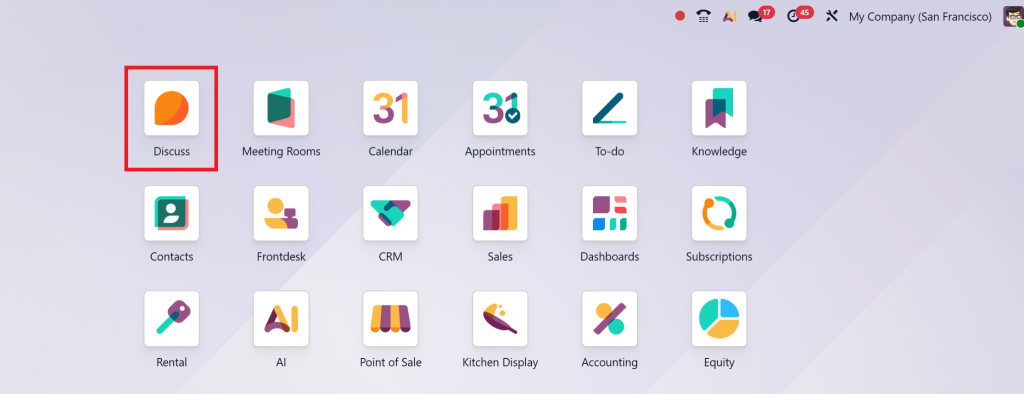
Step 1: Open Odoo Discuss
Go to the Confer app from your ERP platform dashboard. This is your central hub for communication.
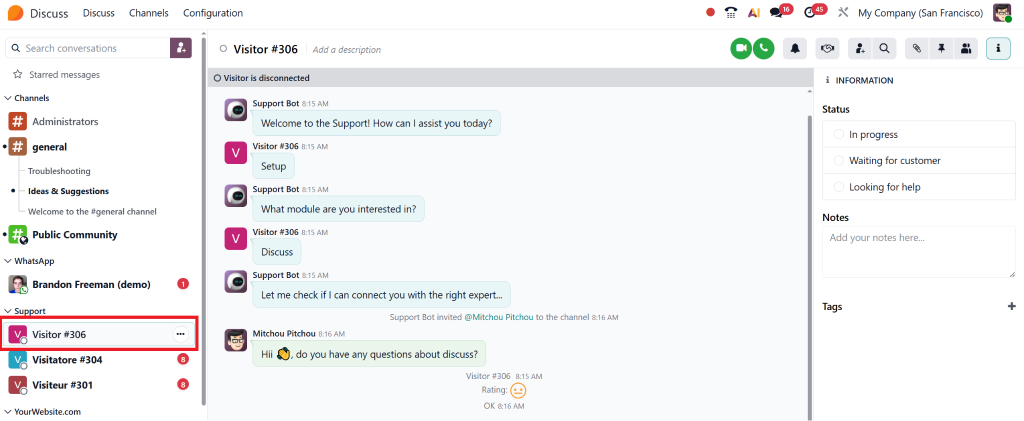
Step 2: Select the Chat or Group
Click on the individual chat or group chat where you want to start the conversation.
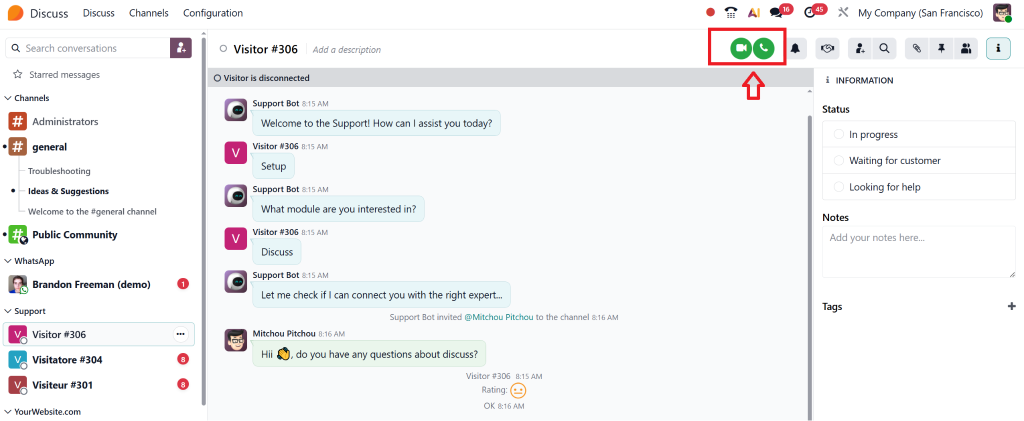
Step 3: Start a Call
- For the ERP platform voice call feature, click the phone icon.
- For ERP platform Discuss video calls, click the video camera icon.
Step 4: Collaborate in Real-Time
Once connected, you can share ideas, Confer projects, or conduct quick meetings.
And if you want to make it collaborative, use the ERP platform’ Start Meeting’ Confer option to gather multiple team members instantly.
Pro Tip: Ensure that your microphone and camera are enabled in your browser settings before starting the call.
Benefits of Using Odoo Start Meeting Discuss
The ERP platform’ Start Meeting’ Confer option is perfect for structured discussions. Here’s why businesses love it:
- Instant Team Collaboration: Instead of scheduling external meetings, click and start.
- Integration with Projects: Jump into a meeting from within the context of a task or project.
- Group Brainstorming: Use the ERP platform group chat video call feature to bring multiple departments together.
- Reduced Costs: No need to pay for third-party communication tools.
Think of it this way: Calls in ERP platform Confer turns your ERP into not just a management tool but a complete collaboration suite.
Odoo Discuss Video Calls vs. Third-Party Apps
Why not just stick to Zoom or Microsoft Teams? Here’s the comparison:
Feature | Odoo Discuss Video Calls | Third-Party Apps |
Integration | Fully integrated with Odoo apps | Requires switching |
Cost | Included with Odoo | Often requires a subscription |
Security | Data stays in your ERP | Data stored on external servers |
Convenience | One-click from chat | Requires app switching |
Productivity | Chat + Tasks + Calls in one place | Calls are separate from workflows |
Clearly, having Calls in ERP platform Confer saves time, money, and effort while keeping communication secure.
Real-World Use Cases of Calls in Odoo Discuss
- Sales Teams: Close deals faster by instantly jumping on a video call with leads.
- Project Managers: Kick off projects using ERP platform and start meeting with the entire team.
- Customer Support: Provide faster help through the ERP platform voice call feature within Confer.
- Remote Teams: Use ERP platform group chat video call to replicate in-office collaboration.
Every team benefits when communication is quick, contextual, and directly connected to their workflows.
Why Businesses Should Enable Video Calling in Odoo Today
The ability to enable video calling in ERP platform is not just a nice-to-have; it’s essential in today’s business world. With hybrid workplaces becoming the norm, companies need secure, real-time, and integrated communication solutions.
By adopting Calls in ERP platform Confer, you:
- Boost team productivity
- Improve collaboration across departments
- Reduce the costs of third-party apps
- Keep your data secure within your ERP
In short, ERP platform transforms communication from being “just a tool” to being a growth driver.
Make Every Conversation Count with Calls in Odoo Discuss
Business growth depends not just on what tools you use but on how effectively your team communicates. With Calls in ERP platform Discuss, ERP platform has bridged the gap between workflow and collaboration.
From ERP platform Confer video calls to the ERP platform voice call feature, from one-on-one chats to ERP platform group chat video call sessions, you now have everything you need to make communication smarter, faster, and more productive.
So the next time you’re stuck typing a lengthy explanation, don’t. Just hit the call button in ERP platform Discuss.
Your team, your time, and your growth will thank you.




