If you’re looking to optimize your eCommerce operations, learning how to manage dropshipping in Odoo 19 is a must-have. With Odoo 19 dropshipping, you can facilitate your supply chain, automate order fulfillment, and boost profits without handling inventory.
In this complete Odoo dropshipping tutorial, you’ll learn how to automate dropshipping in Odoo, configure Odoo ERP dropshipping setup, and simplify your vendor management process. Dropshipping lets you sell products directly to customers while your supplier fulfills the orders, and Odoo 19 makes this process even easier.
At Netilligence, an official Odoo Partner, we help businesses harness the full potential of Odoo 19 dropshipping. From real-time supplier management to dropshipping inventory tracking in Odoo 19, our team ensures your business runs efficiently and profitably.
By the end of this article, you’ll know exactly how to use Odoo 19 dropshipping to grow your business and automate your entire supply chain seamlessly.
Why Choose Dropshipping in Odoo 19?
Odoo 19 is one of the most advanced ERP versions, integrating every part of your business, from sales and inventory to suppliers and customers, in one place.
Choosing dropshipping in Odoo 19 provides multiple benefits that traditional methods cannot match:
1. Zero Inventory Hassle
You don’t need to maintain a warehouse. Products are shipped directly from the supplier to your customer. Odoo 19 automates these processes with its dropshipping inventory Odoo 19 module.
2. Real-Time Synchronization
All orders, shipping statuses, and stock levels are automatically updated. This automated dropshipping feature in Odoo ensures accurate, instant order management.
3. Vendor Management
With vendor-managed dropshipping in Odoo, you can easily manage multiple suppliers, assign rules, and optimize cost per vendor.
4. Integrated Order Fulfillment
The dropship order fulfillment Odoo system allows you to handle multiple suppliers effortlessly. Odoo automatically generates purchase orders for vendors when a sales order is confirmed.
Understanding How Dropshipping Works in Odoo 19
Before getting into the Odoo ERP dropshipping setup, let’s understand how it works step by step.
When a customer places an order:
The Sales Order is created in Odoo.
Odoo automatically generates a Purchase Order to your supplier.
The supplier ships the product directly to the customer.
Odoo automatically updates the shipping and invoice details.
This continuous cycle makes dropshipping in Odoo 19 an end-to-end, fully automated experience.
Step-by-Step Odoo Dropshipping Tutorial (Odoo 19)
Here’s your detailed Odoo dropshipping tutorial to set up and run a fully automated system:
Step 1: Enable Dropshipping in Odoo 19
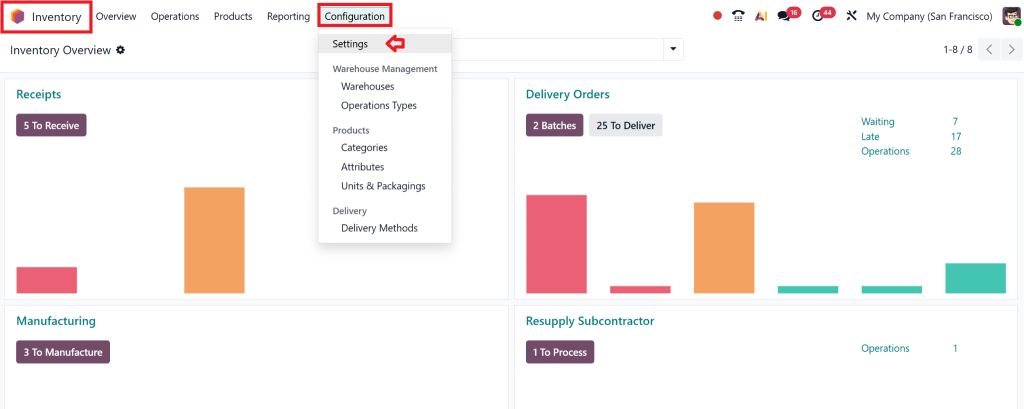
Go to Inventory → Configuration → Settings.
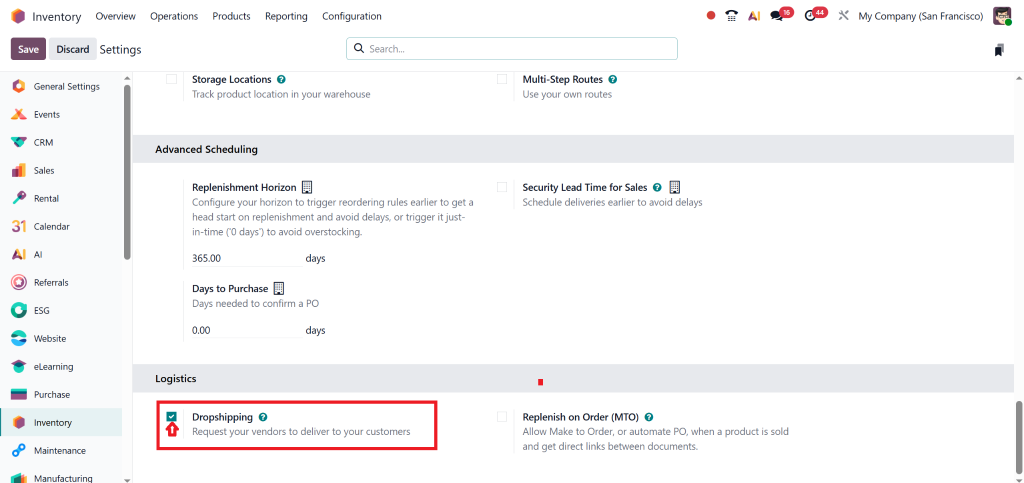
Under the Logistics section, check Dropshipping.
Click Save.
Now, Odoo knows you want to enable dropshipping in Odoo 19.
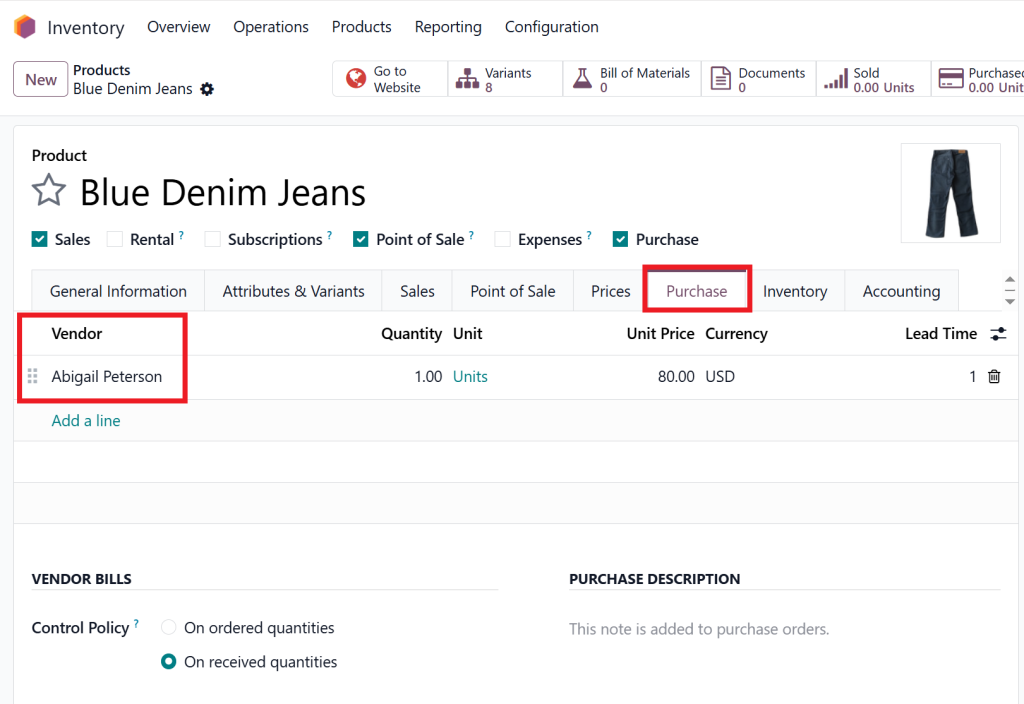
Step 2: Set up Vendors for Your Products
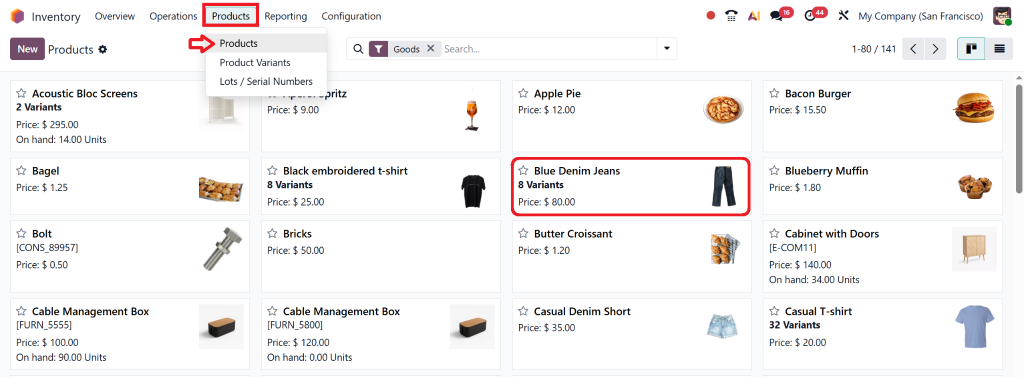
Navigate to Products → Products.
Select the product you want to dropship.
In the Purchase tab, add your Vendor Information (name, delivery lead time, and price).
This connects each product to its supplier for vendor-managed dropshipping in Odoo.
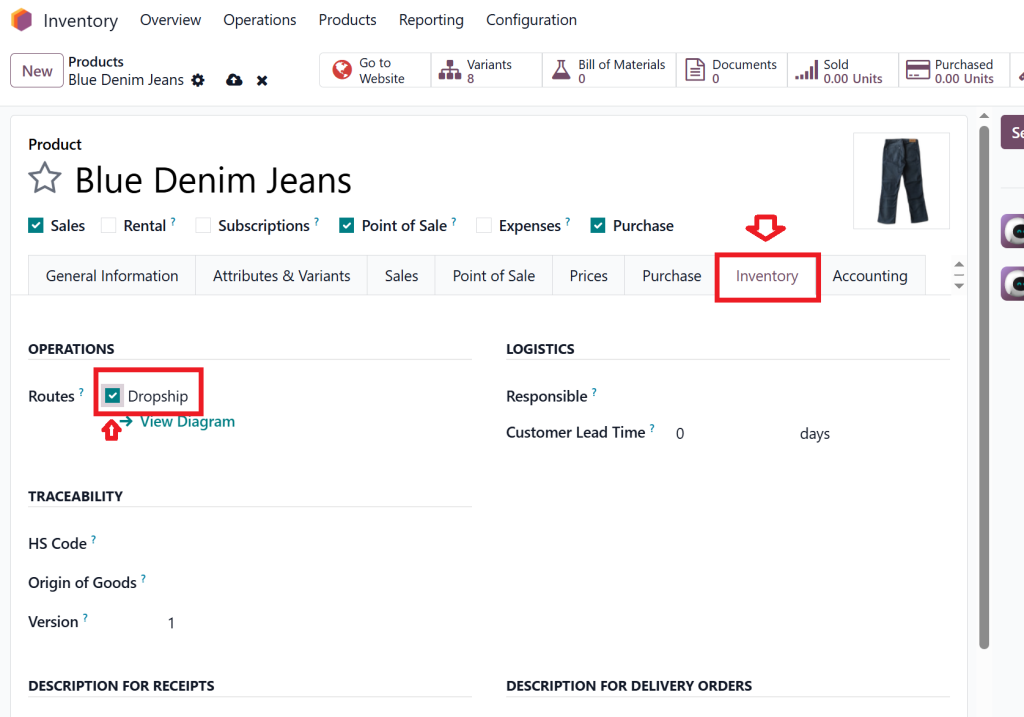
Step 3: Configure Routes
Go to the Inventory tab of the product.
Select the Dropshipping route.
This ensures that every order for this product is fulfilled directly from the supplier to the customer.
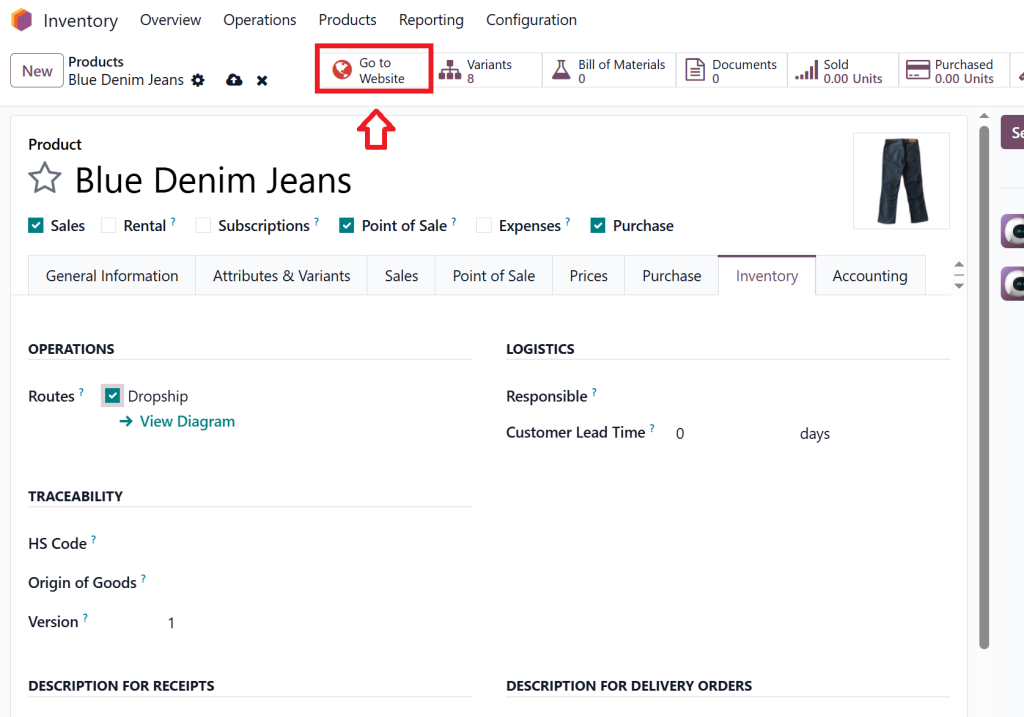
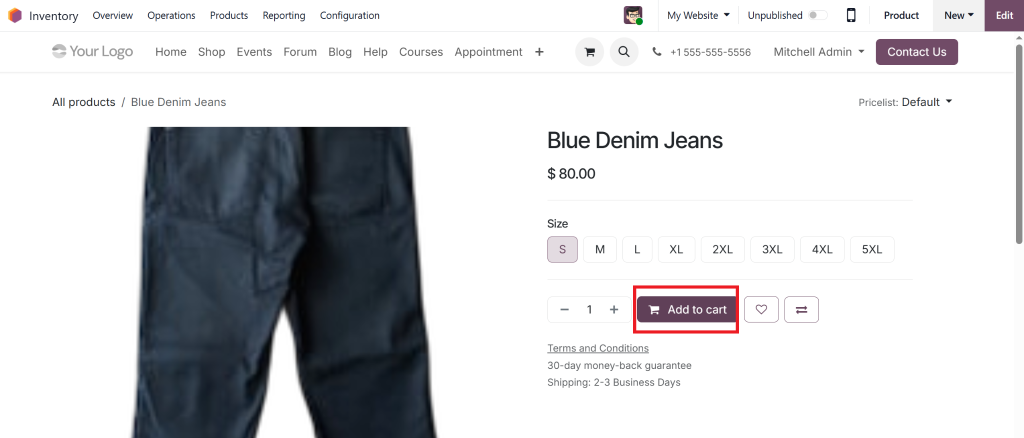
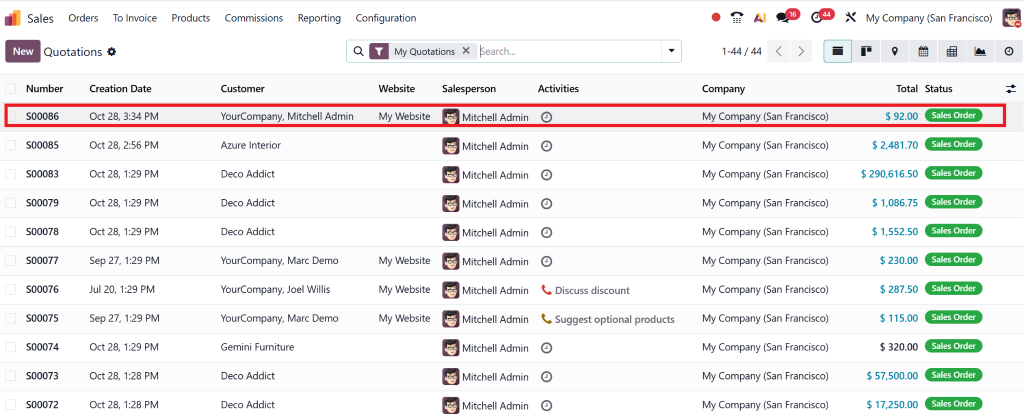
Open Sales → Orders → Create or direct create order by going to a website.
Add the product, confirm the order, and pay.
Now go to sales and check the recently created order.
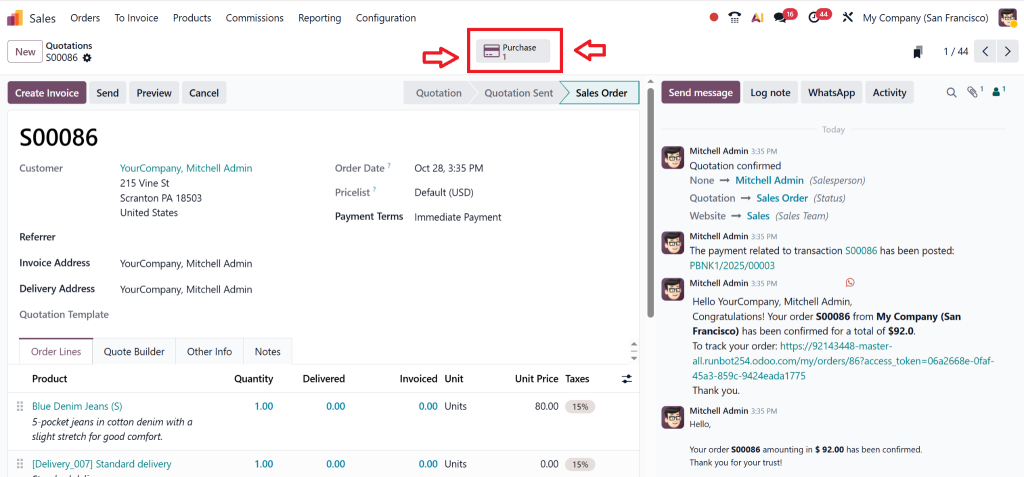
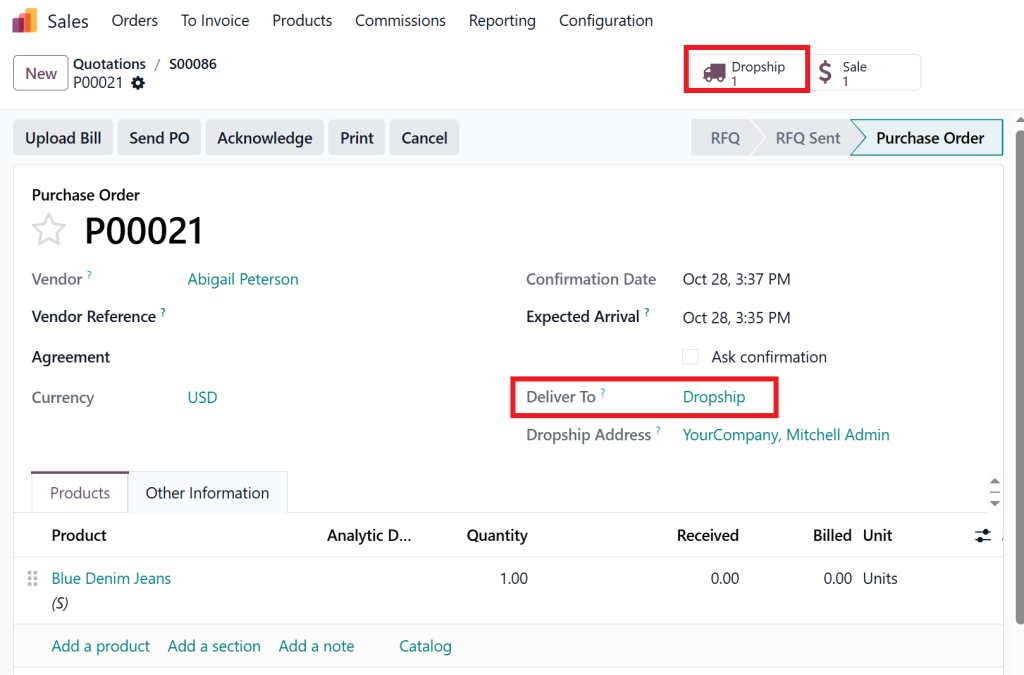
Odoo will automatically generate a Purchase Order to the linked vendor.
After confirming the order, you can see the dropship option.
This is how automated dropshipping in Odoo works, no manual actions required!
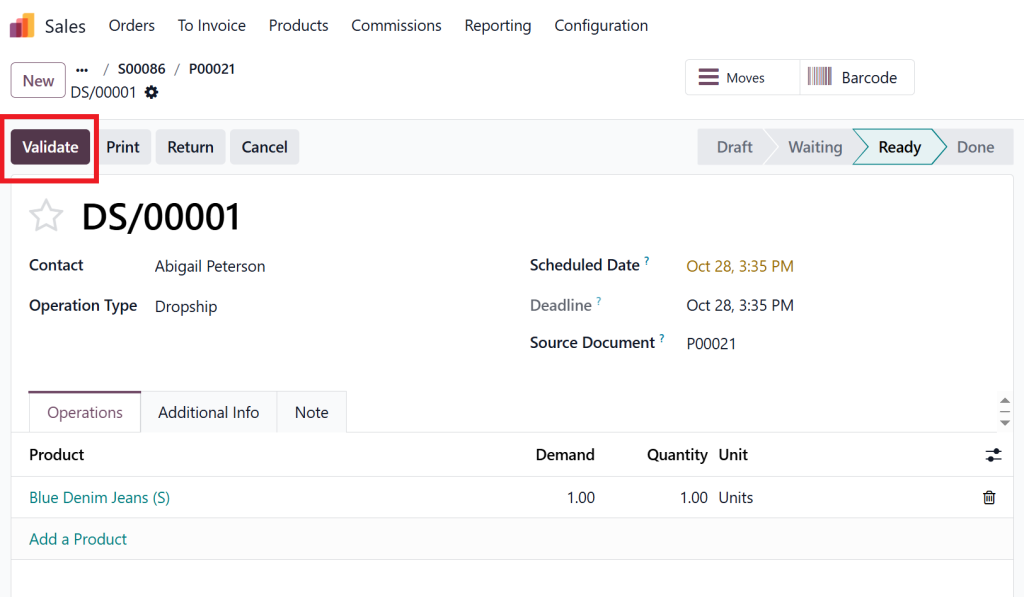
Step 5: Validate Delivery
The vendor ships the product directly to your customer.
Once delivered, Odoo automatically updates the order status and invoices.
Congratulations! You’ve completed your Odoo ERP dropshipping setup.
Automate Dropshipping in Odoo 19, Save Time, Reduce Errors
Automation is the heart of Odoo 19 dropshipping. Instead of juggling multiple platforms, emails, and spreadsheets, Odoo lets you automate dropshipping with built-in workflows.
1. Automatic Purchase Orders
Odoo automatically generates purchase orders for your vendors when a customer order is confirmed.
2. Real-Time Tracking
Both your team and the customer can track order status in real time using Odoo modules for dropship order fulfillment.
3. Integrated Accounting
Invoices and bills are synced instantly, saving you hours of manual data entry.
4. Smart Inventory Management
Even if you don’t hold stock, Odoo 19’s dropshipping inventory provides real-time visibility into vendor stock availability.
Vendor Managed Dropshipping in Odoo 19
Vendor management is crucial to the success of any dropshipping business. Odoo 19’s vendor-managed dropshipping capabilities seamlessly integrate your suppliers into your workflow.
1. Multivendor Setup
Add multiple suppliers for each product. Odoo automatically selects the best vendor based on rules like price or lead time.
2. Supplier Performance Tracking
Monitor vendor performance directly in Odoo, view delivery speed, accuracy, and pricing trends.
3. Contract Automation
Automate long-term vendor contracts and purchase conditions, reducing manual follow-ups.
4. Communication Tools
Use Odoo’s built-in email and chat tools to collaborate directly with your suppliers.
This makes vendor-managed dropshipping in Odoo a powerful tool for efficiently scaling your eCommerce.
Managing Dropshipping Inventory in Odoo 19
While traditional inventory management involves storage, with dropshipping inventory in Odoo 19, you still need visibility.
1. Virtual Stock Tracking
Odoo 19 displays supplier stock levels, so you can avoid selling out-of-stock products.
2. Centralized Dashboard
Get a real-time overview of orders, stock movements, and delivery statuses.
3. Automated Alerts
Set up alerts to inform you when vendors change prices or lead times.
4. Inventory Forecasting
Odoo 19’s AI-based analytics help you forecast future demand even when you don’t hold inventory.
This level of insight makes dropshipping in Odoo 19 a future-ready business model.
Dropship Order Fulfillment in Odoo 19
Order fulfillment is where Odoo truly shines. The dropship order fulfillment Odoo process reduces delivery time and increases customer satisfaction.
1. Direct Delivery
Your vendor ships the order directly to the customer, and Odoo automatically updates the delivery notes.
2. Automated Status Updates
Customers receive automatic notifications at every stage: order confirmation, dispatch, and delivery.
3. Integrated Returns
For returns or refunds, Odoo manages communication between you and the supplier effortlessly.
4. Real-Time Tracking
Both vendors and customers can track the shipment through Odoo’s portal.
This efficiency ensures that your Odoo 19 dropshipping business operates smoothly and profitably.
Best Practices to Succeed with Dropshipping in Odoo 19
To get the most out of dropshipping in Odoo 19, follow these proven best practices:
Choose Reliable Vendors:
Partner only with suppliers who consistently meet delivery deadlines.
Automate as Much as Possible:
Use Odoo’s automated dropshipping feature to minimize manual intervention.
Monitor KPIs:
Regularly track vendor performance, delivery times, and profit margins.
Optimize Your Product Listings:
Keep product information, pricing, and lead times up to date.
Leverage Odoo Integrations:
Connect your online store (Shopify, WooCommerce, etc.) directly with Odoo for seamless data flow.
Hi, I'm Nabia, an Odoo ERP functional & technical content writer. I specialize in blogs, social media content, ad copy, landing pages, service pages, and email campaigns.
We use cookies to ensure that we give you the best experience on our website. If you continue to use this site we will assume that you are happy with it.