What Makes a Great Sales Process?
Are you struggling to simplify your sales process and keep track of leads? Do you often wonder how to improve your team’s efficiency and close more deals?
If so, learning how to create stage or a pipeline in Odoo 18 CRM could be the game-changer you’ve been looking for.
A sales pipeline isn’t just a saying; it’s the foundation of any successful business. It helps you visualize your workflow, identify bottlenecks, and make data-driven decisions. But the magic happens when you learn to customize stages in Odoo CRM to match your unique sales process. By leveraging the power of Odoo CRM configuration, you can advance your business operations to new heights.
In this detailed guide, we’ll walk you through everything you need to know about creating and managing Odoo CRM pipelines. From setting up a basic pipeline to mastering advanced customizations, this is the ultimate resource to help you get started.
Why Should You Care About Creating Pipelines in Odoo CRM?
Imagine trying to direct a complex sales process without a clear roadmap. Leads get lost, follow-ups are missed, and opportunities slip through the cracks. That’s where Odoo 18 CRM comes in, offering a powerful pipeline feature that ensures no lead is left behind.
Creating a pipeline in this system allows you to:
- Organize your sales opportunities visually.
- Monitor progress at every stage.
- Rationalise communication within your team.
- Improve forecasting and decision-making.
But the real beauty lies in the ability to customize stages in Odoo CRM, modifying the software to fit your business needs. Let’s delve deeper into how this works.
Understanding Pipelines and Stages in Odoo CRM
Before diving into the “how,” let’s explore the “what.” A pipeline in a CRM system is a visual representation of your sales process. It shows where each lead or opportunity stands, from the initial exploration to the final sale.
Stages, on the other hand, are the steps within this pipeline. Think of them as milestones that guide your leads through the journey. For example:
- Lead Generation
- Qualification
- Proposal Sent
- Negotiation
- Closed – Won or Lost
By customizing these stages in Odoo 18 CRM, you create a system that works exactly as your business operates.
Guide to Creating a Stage or a Pipeline in Odoo 18 CRM
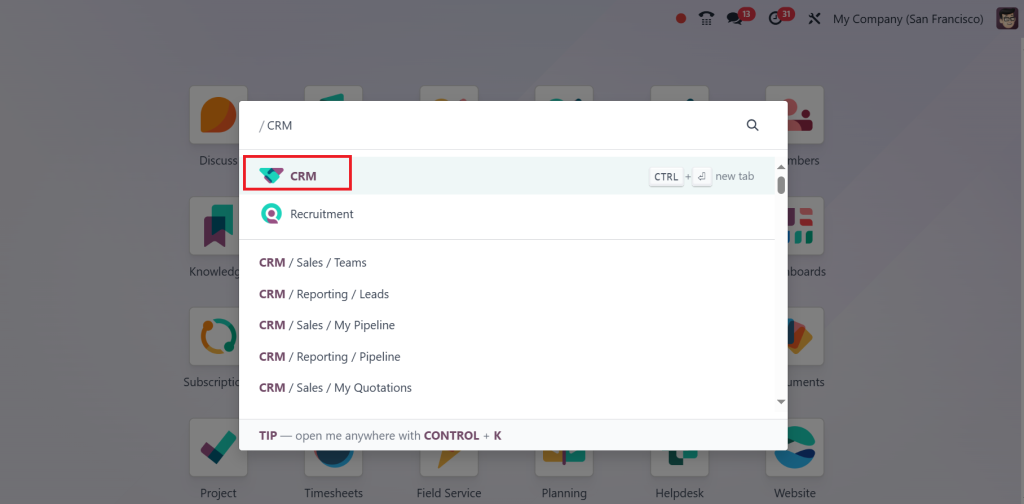
Open the CRM module in your system.
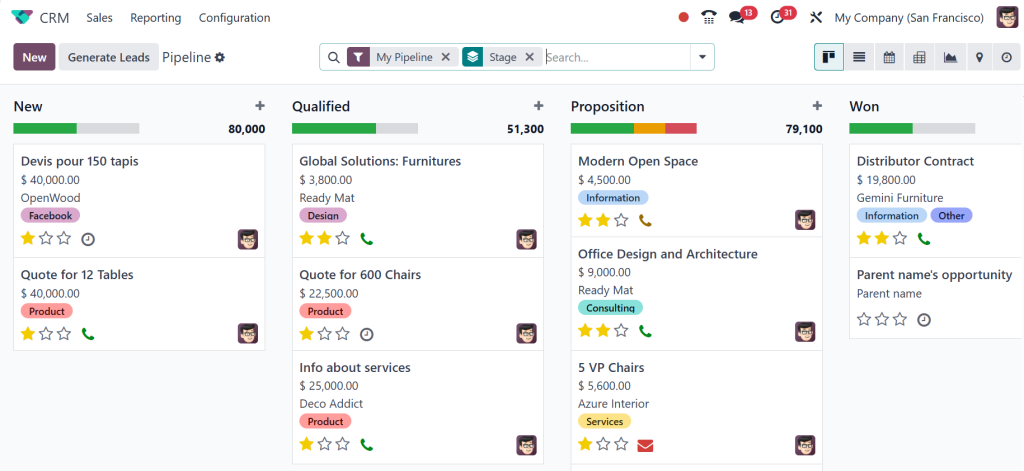
Now, you can see the Pipelines.
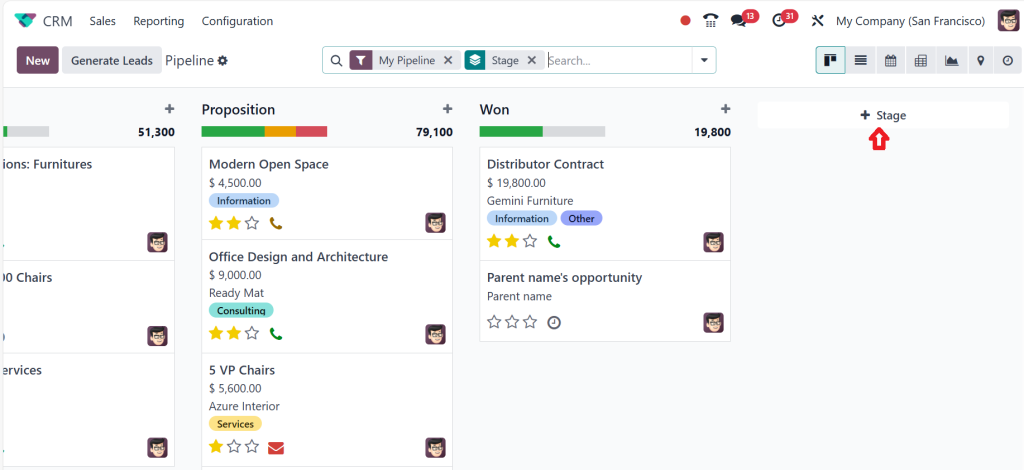
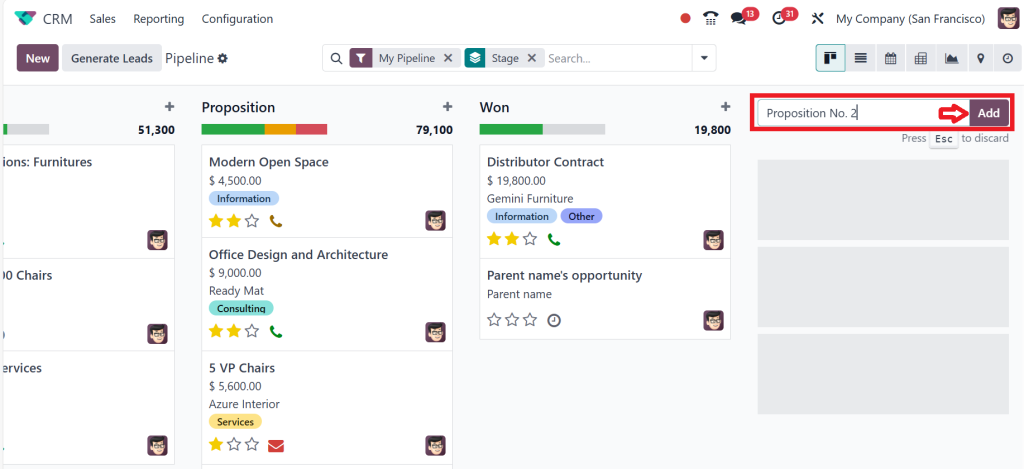
Let’s add the New Stage here by clicking on Stage.
Add the name of your new stage and then click the ‘‘Add’’ button.
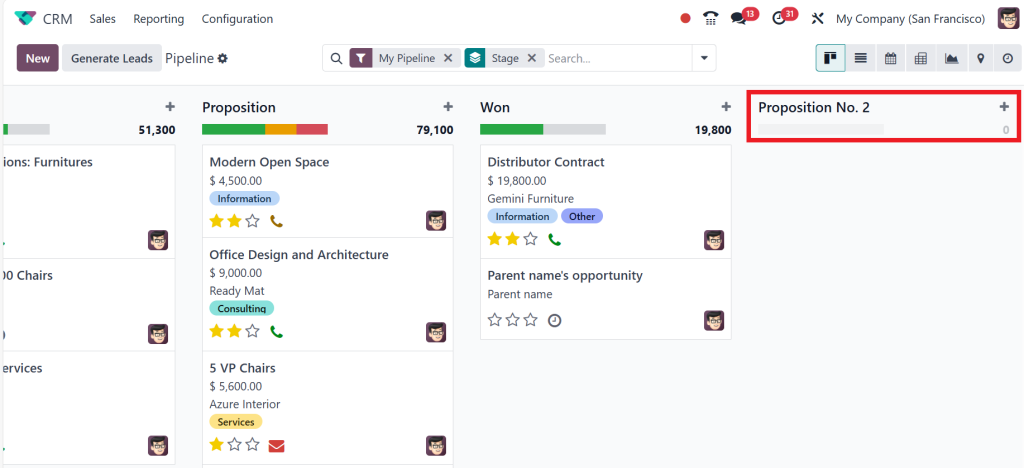
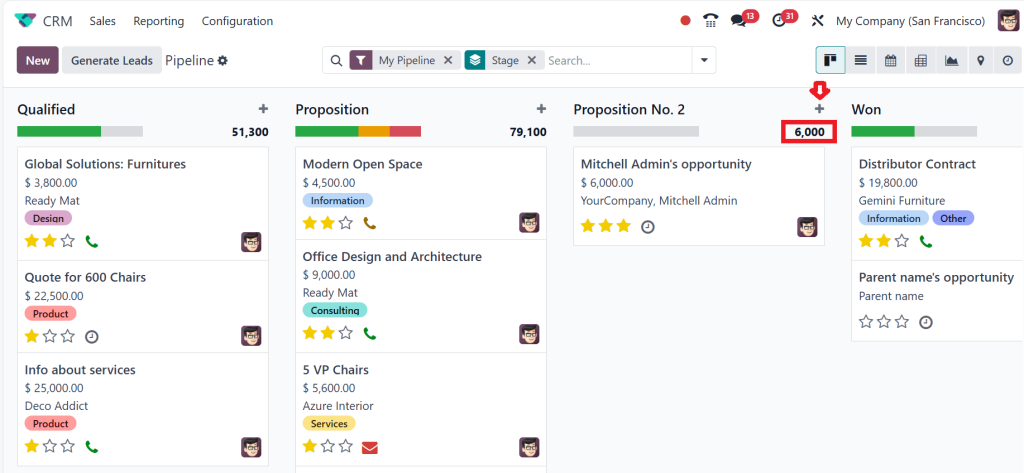
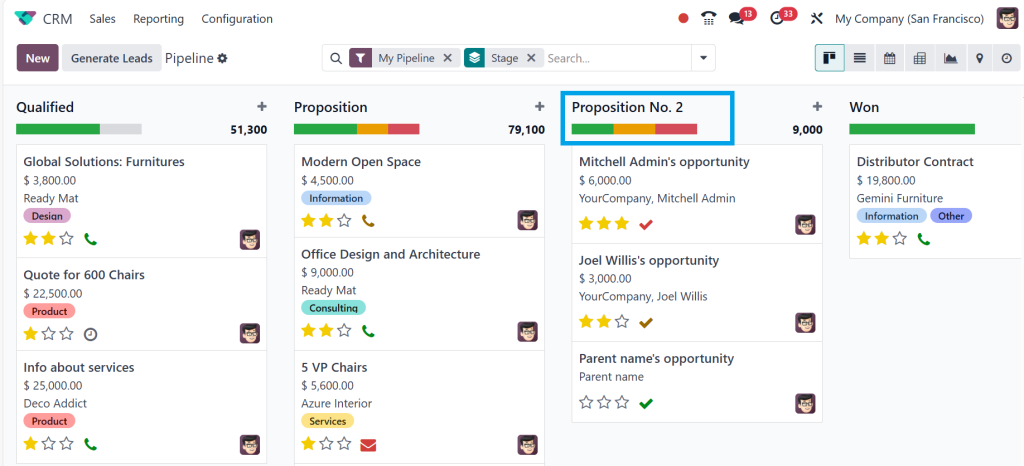
As you can see in the screenshot below, a new stage named Proposition No. 2 has been added.
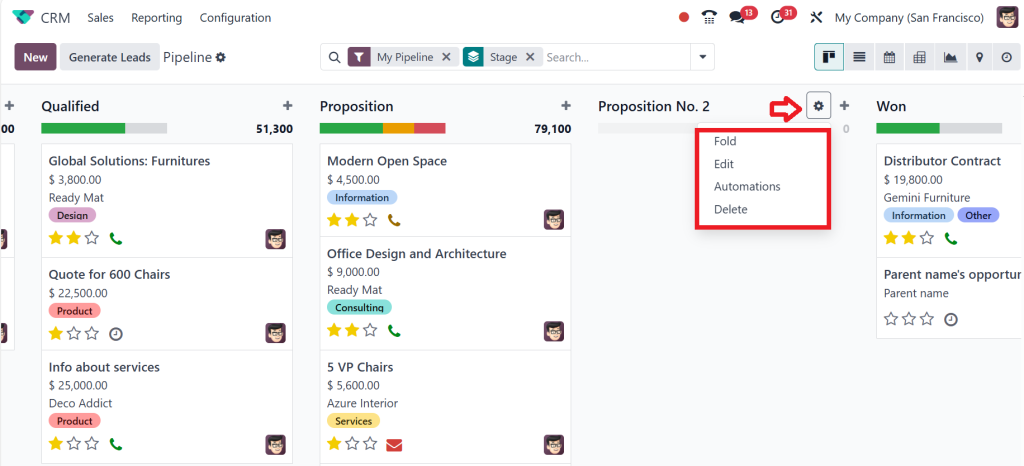
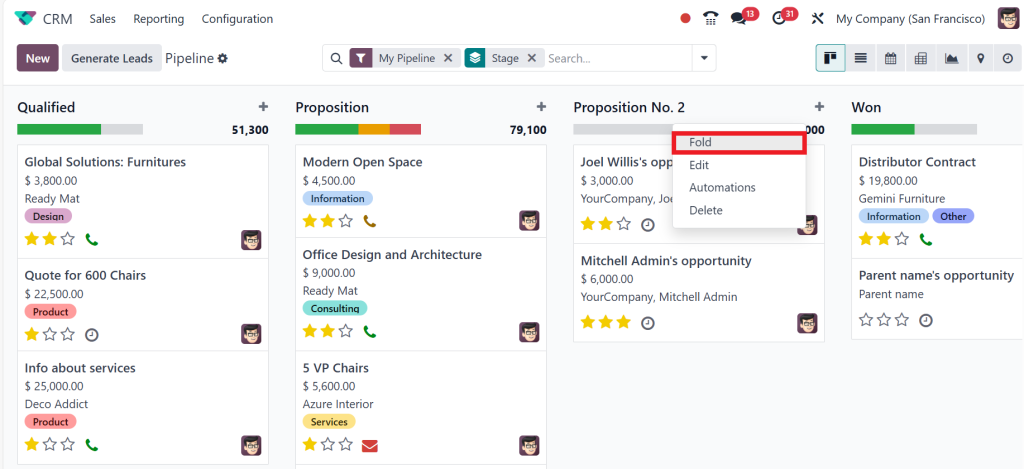
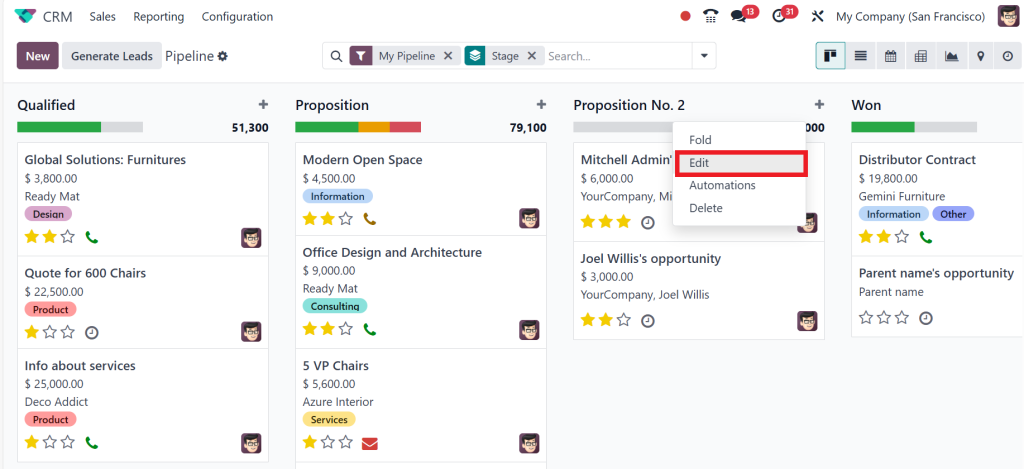
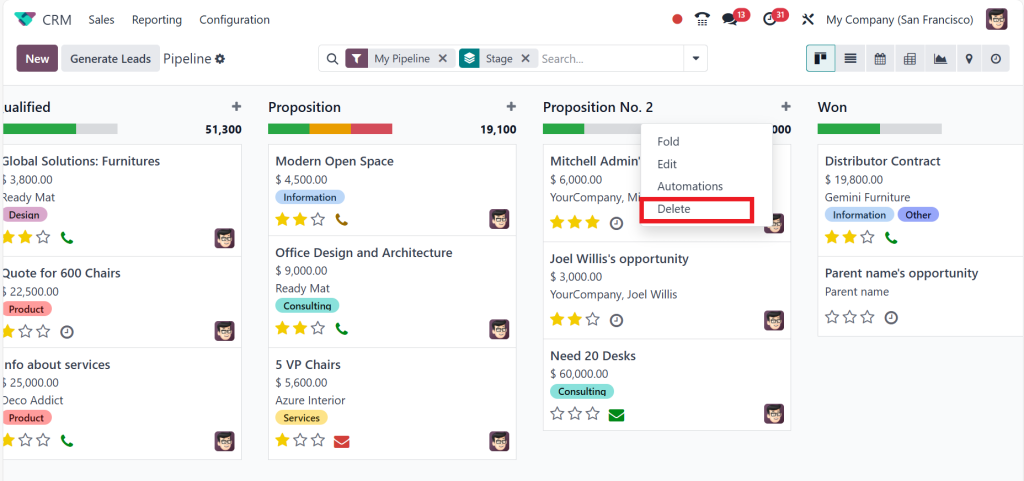
You have two different icons corresponding to your stage, which are the settings and the plus (+) icon. So, if you click on the settings, you will see four options: Fold, Edit, Automation, and Delete.
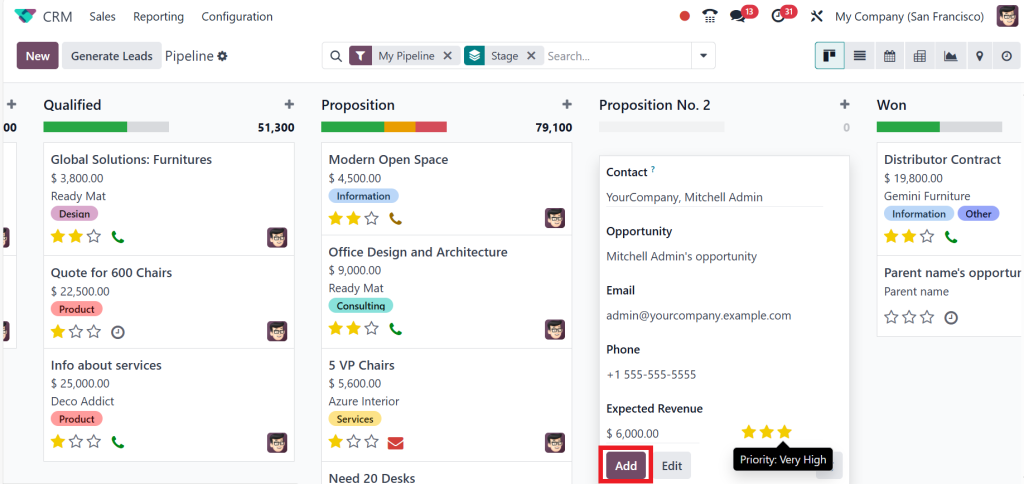
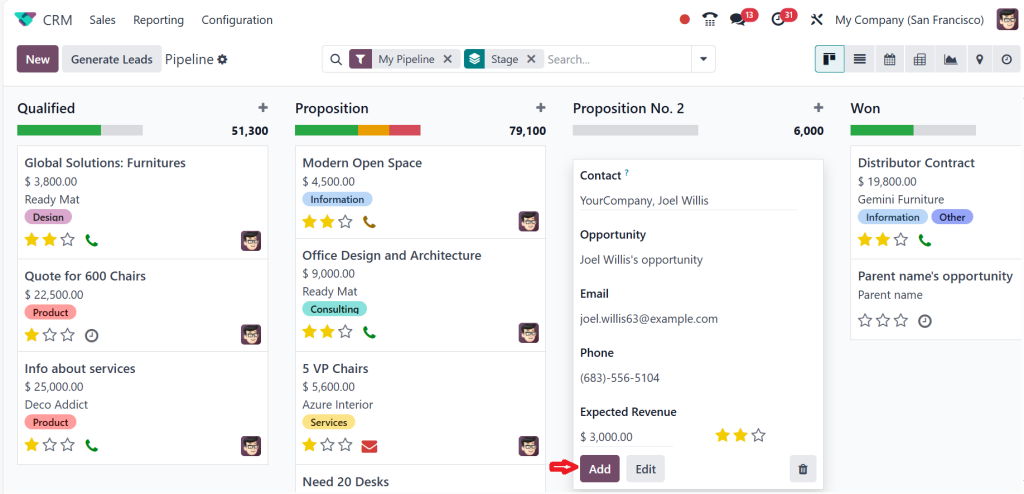
Before using these, you must create an opportunity simply by clicking on the plus (+) icon. After adding the contact details the opportunity name, email, and phone number have come automatically. Then, you have the option to specify the revenue so I’m putting it as $6000 then you have to set the priority for an opportunity by clicking on stars and then clicking on ‘‘Add’’.
Now, you can see the opportunity has been created, and you can see the 6000 that is shown above. This is the revenue of that stage.
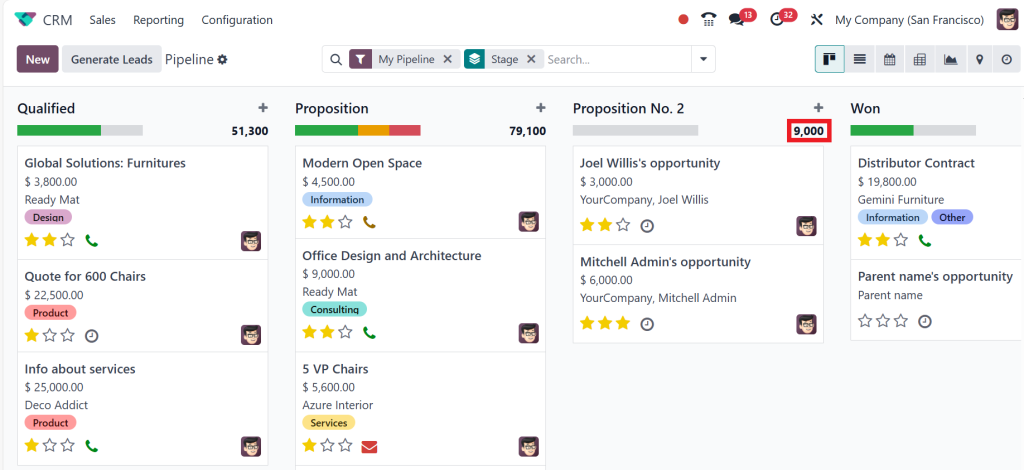
By using the same method, let’s create another opportunity. So this time im giving the revenue of $3000, then click on Add.
Now, you can see the revenue has changed to 9000. The revenue of all the stages is shown on top of each stage.
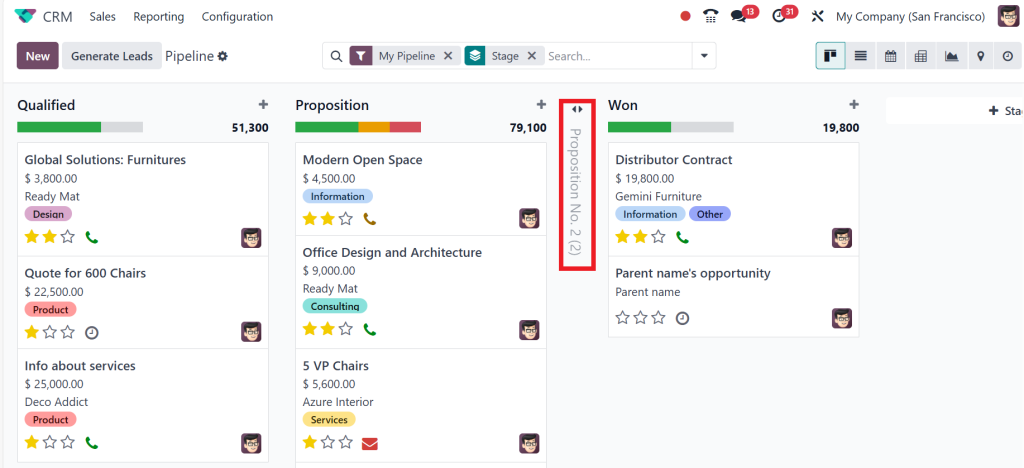
As you can see, there is a Fold option here; just click on Fold.
Then you can see in the screenshot below it’s been folded over here. By clicking on this, you can also expand this.
If you want to edit the stage, just click on Edit.
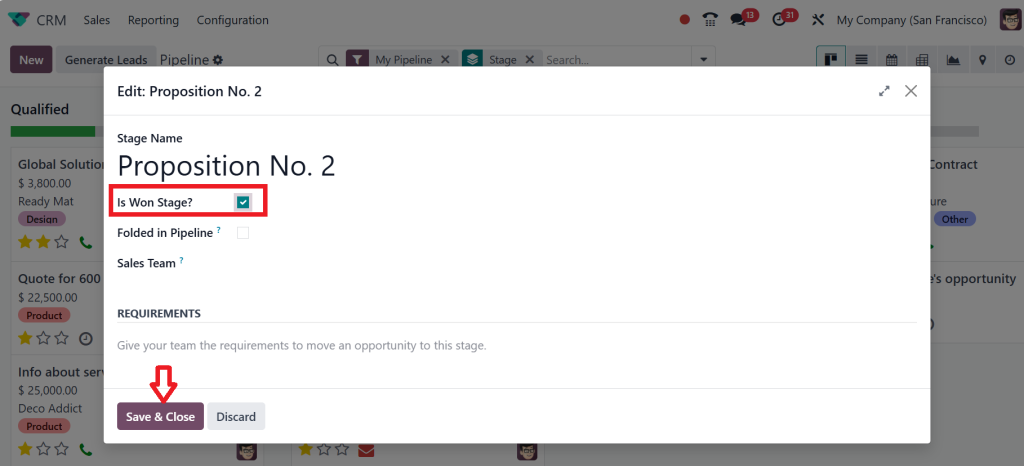
Then, a new window will open where you can change or edit the stage’s name. If you want to mark it as a won stage, tick the Won Stage, then click Save & Close.
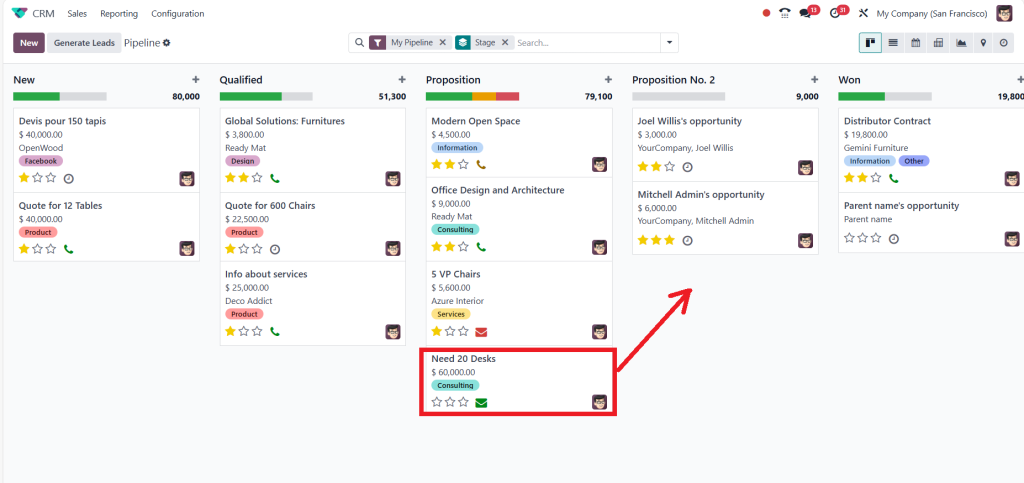
You can see the opportunity under the Proposition Stage, so I will drag it and drop it on Proposition No. 2.
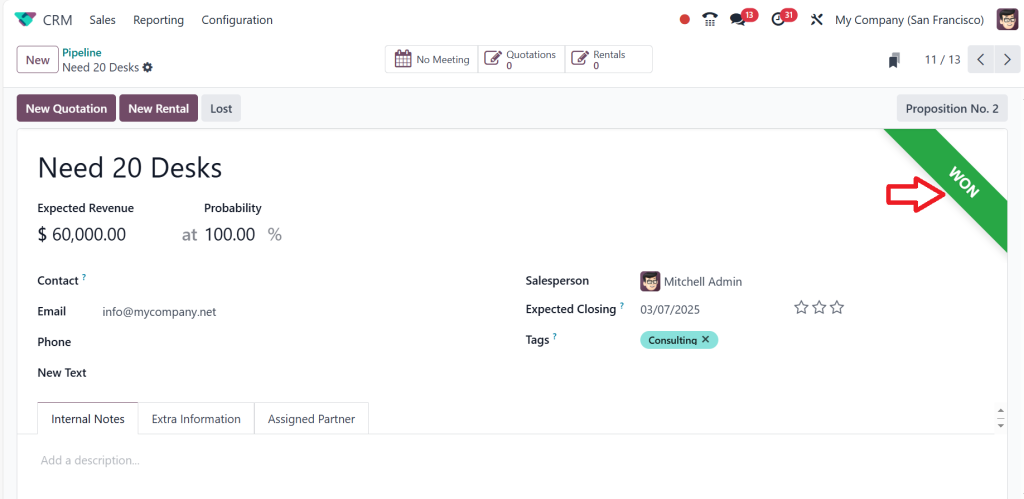
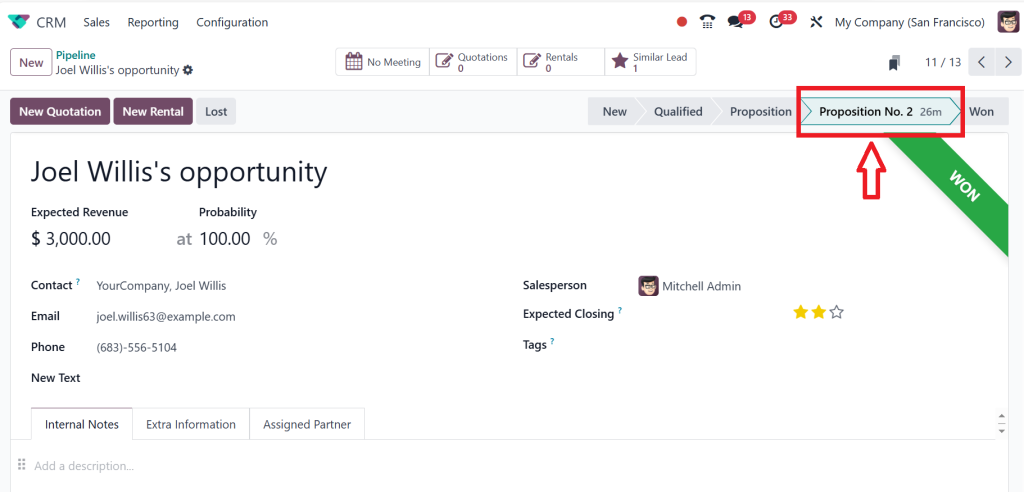
Now, it’s in the Proposition No. 2 stage; if you open it, you can see it’s in the Won stage. So, by default, every opportunity that reaches this stage will be labelled as won because we have already given it such a setting and marked it as the Won Stage.
Here, you also have a Delete option; if you want to delete, you can simply click Delete.
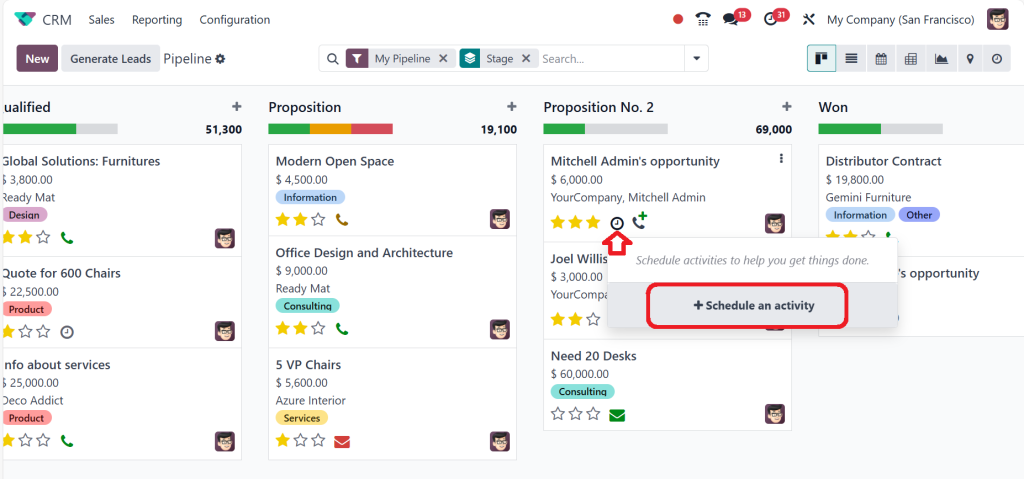
Corresponding to each of the opportunity activities can be scheduled. So, you can set the activity by clicking on the clock icon and then clicking on Schedule an activity.
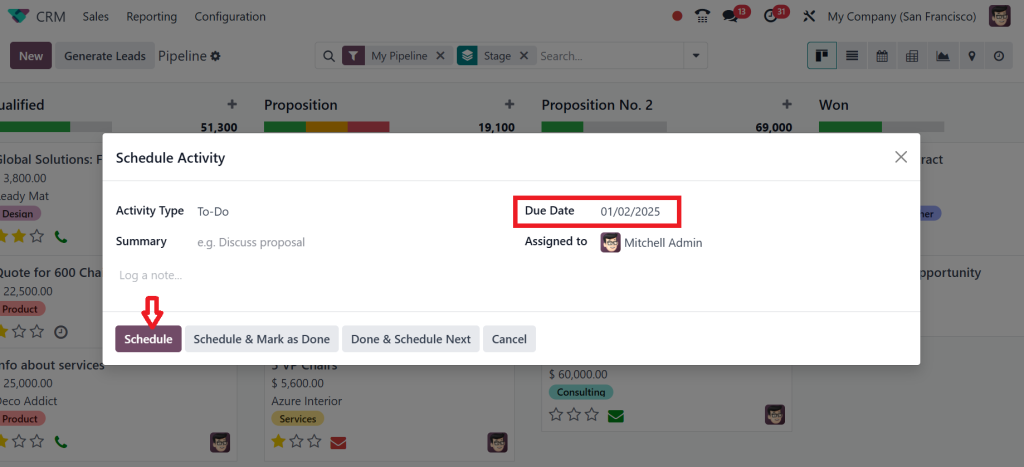
So, I’m scheduling an activity for the past, and the date I choose is 01/02/ 2025; then, click on Schedule.
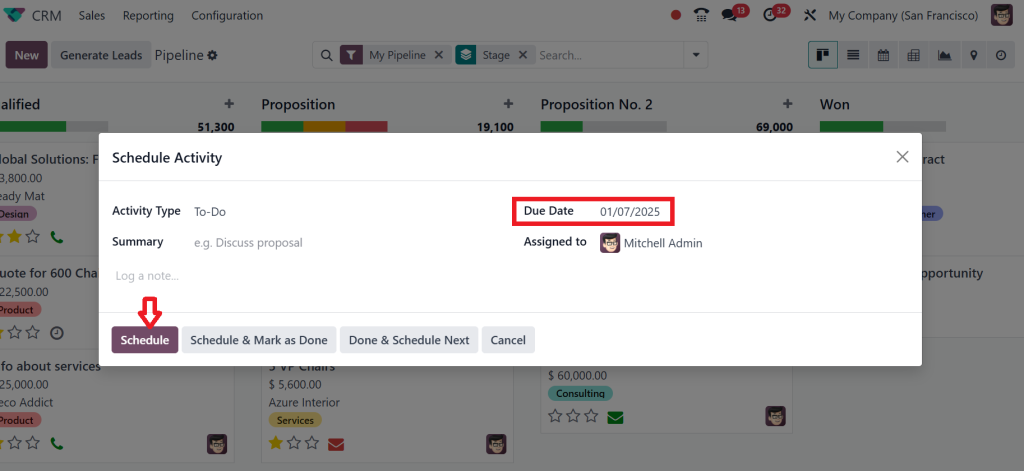
Next, I will schedule an activity for today by clicking on the second opportunity under the Proposition No. 2 stage. The date I set today is 01/07/2025. Then, click on Schedule.
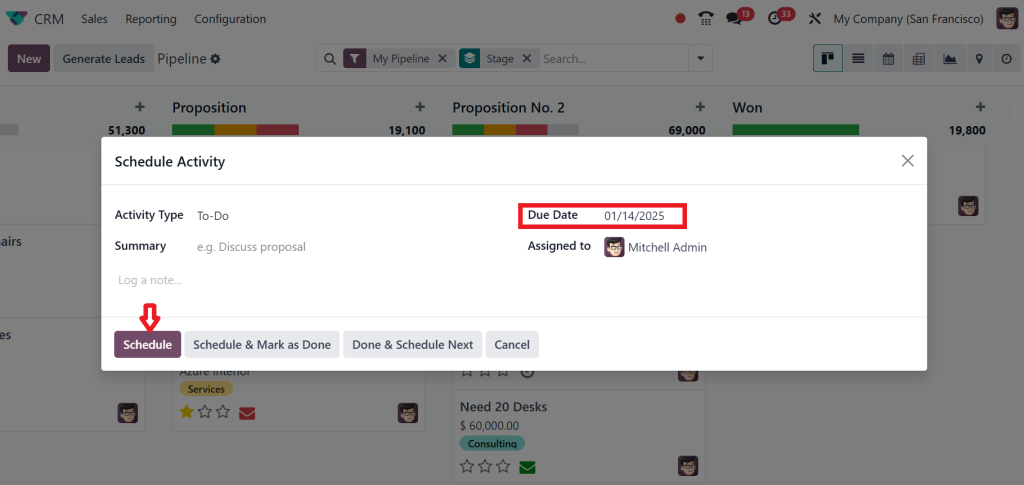
Then, I will schedule an activity for the future by clicking on the third opportunity under the Proposition No. 2 stage; the date I set for the future is 01/14/2025 and clicking on Schedule.
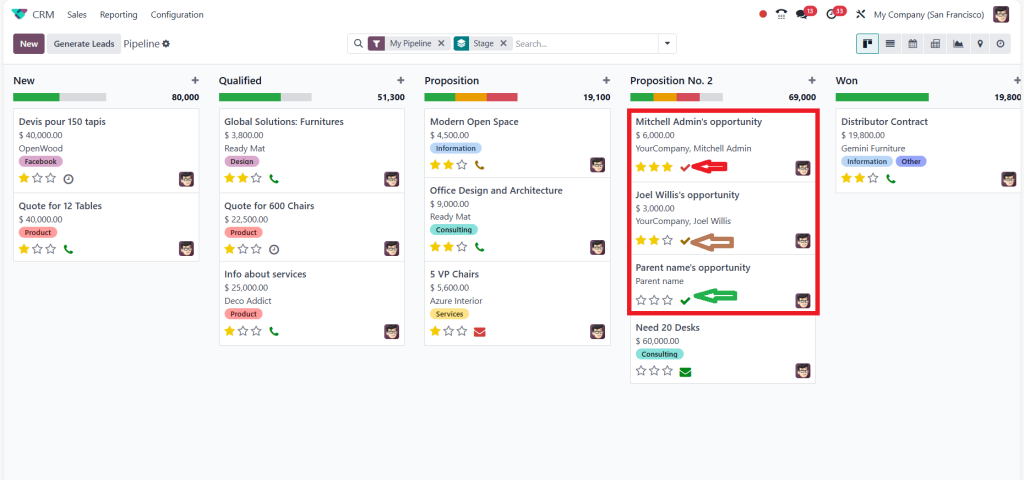
As you can see in the screenshot below, every scheduled activity shows different colours. The first shows the Red colour, the second shows the Brown colour, and the third shows the Green colour. Why? Because the first activity is overdue, the second activity is scheduled for today, and the third activity is planned for the future. That’s why these shows are in different colours.
If you look at the screenshot below, the colour has been updated to show scheduled activities.
If you open any opportunity under Proposition No. 2, you can also see the updated stage shown above in the window.
Customizing Stages in Odoo CRM
Generic pipelines don’t work for every business. That’s why the customization of stages in Odoo CRM pipelines is crucial. Let’s look at some scenarios:
Service-Based Businesses
Might need stages like “Consultation Scheduled” and “Proposal Reviewed.”
E-Commerce Companies
Could include “Cart Abandoned Follow-Up” and “Order Shipped.”
Real Estate Agencies
Could have stages such as “Property Visit” and “Offer Accepted.”
Modifying your pipeline to your workflow makes the system work for you, not vice versa.
Advanced Features of Odoo 18 CRM for Pipeline Management
Once you’ve mastered the basics, it’s time to explore the advanced features of Odoo CRM configuration:
Reporting and Analytics
Track the performance of your pipeline with detailed reports. Identify bottlenecks, forecast sales, and make data-driven decisions.
Multi-Pipeline Management
Manage multiple pipelines simultaneously. This is especially useful for handling different products, services, or sales teams.
User Permissions
Control who can view, edit, or move leads within the pipeline. This ensures data integrity and accountability.
Tips for Creating Effective Pipelines in Odoo CRM
Start Small
If you’re new to CRM systems, start with a simple pipeline and add complexity as you grow.
Collaborate with Your Team
Get input from your sales team to ensure the pipeline reflects the workflow.
Regularly Review and Update
Your sales process will evolve. Make sure your pipeline stays up-to-date to reflect these changes.
Automation
Use automation to save time and reduce human error. For example, tasks can be automatically assigned when a lead moves to a new stage.
Focus on Visualization
The Kanban view in Odoo 18 CRM makes it easy to visualize your pipeline. Use colors and icons to make it even more intuitive.
The Impact of Well-Designed Pipelines
A well-designed pipeline isn’t just a tool; it’s a strategy. Businesses that effectively use Odoo CRM pipelines report:
- Increased lead conversion rates.
- Better collaboration between teams.
- More accurate sales forecasting.
- Higher customer satisfaction.
By investing time in setting up and optimizing your pipeline, you’re setting your business up for long-term success.
Real-Life Success Stories of Businesses using Odoo 18 CRM Pipelines
Creating and customizing pipelines in Odoo 18 CRM has helped businesses across various industries simplify their operations and achieve remarkable success. Here are three inspiring real-life examples:
Lead Conversion for a Digital Marketing Agency
The Challenge
A growing digital marketing agency struggled to manage an increasing number of leads. With no structured sales process, they faced follow-up delays, missed opportunities, and poor conversion rates.
The Solution
The agency implemented Odoo 18 CRM to create a personalized pipeline that matched its sales funnel. They defined stages such as:
- Lead Generation
- Client Qualification
- Proposal Sent
- Contract Negotiation
- Project On boarded
They also utilized Odoo CRM configuration to automate tasks like sending follow-up emails and reminders for upcoming client meetings.
The Result
The agency’s lead conversion rate improved by 35% within six months. The pipeline visualization enabled the team to prioritize high-value leads and ensure timely follow-ups.
Operations for an E-Commerce Retailer
The Challenge
An online retailer selling fashion products struggled with managing multiple customer interactions simultaneously. Leads from different platforms (email, social media, and website) were often lost due to manual tracking methods.
The Solution
Using Odoo CRM pipelines, the retailer created stages personalised to their customer journey:
- Initial Inquiry
- Product Recommendation Shared
- Cart Abandoned Follow-Up
- Order Placed
- Order Shipped
The retailer also automated triggers for cart abandonment emails and integrated the CRM with their inventory system for seamless order updates.
The Result
Abandoned cart recoveries increased by 50%, and overall sales grew by 40% in just one year. The efficient process reduced errors and improved customer satisfaction.
Enhancing Client Management for a Consulting Firm
The Challenge
A consulting firm offering business advisory services struggled to keep track of client interactions and manage the long sales cycles typical of their industry.
The Solution
The firm customized its Odoo CRM stages to align with its sales process:
- Initial Consultation Scheduled
- Needs Assessment Completed
- Proposal Delivered
- Negotiation Phase
- Contract Signed
They used Odoo CRM configuration to assign tasks automatically to consultants based on the stage of the lead. They also utilized reporting tools to track the progress of each opportunity.
The Result
The firm reduced its sales cycle time by 20% and increased client acquisition rates by 30%. The automated task assignments ensured no steps were overlooked, improving the client experience.
These success stories demonstrate the transformative power of creating and customizing pipelines in Odoo 18 CRM. By modifying the CRM to fit their unique workflows, these businesses optimized their operations, boosted efficiency, and achieved measurable results. Let their experiences inspire you to open the full potential of your CRM system!
Mastering the Odoo CRM Pipeline
By now, you’ve seen how a well-constructed pipeline in Odoo 18 CRM can transform your sales process. The possibilities are endless, from creating a basic pipeline to customizing stages and configuring automation. But the real secret lies in continuously refining your approach. Treat your pipeline as a living, breathing system that evolves with your business.
So, the next time you log into Odoo 18 CRM, take a moment to revisit your pipeline. Are the stages aligned with your current goals? Are there opportunities to add automation or rationalise workflows? By asking these questions and embracing the flexibility of Odoo, you’re not just managing sales, you’re mastering them.
Start today with Netilligence and see how creating and customizing pipelines in Odoo 18 CRM can take your business to the next level.