


Handling a sales team is not just about giving targets or pushing people to close deals. It’s about guiding the team, creating wise systems, and using the right tools to make their work easier and more effective. And that’s where Odoo 18 CRM shines. If you’ve ever wondered how to manage a sales team in Odoo, you’re about to discover a system that converts scattered sales efforts into organized, goal-driven teamwork.
Odoo has always been known for simplifying business processes, but with version 18, it becomes even more effective. From assigning leads to tracking every deal in real time, Odoo 18 CRM gives you all the tools you need for CRM sales team management. Whether you’re a startup, a growing business, or a large organization, managing your sales team through Odoo can save time, reduce stress, and increase profits.
Let’s explore the real magic behind sales team management in Odoo, and how this excellent tool can help you make a stronger, more focused, and highly productive sales force.
Why Odoo 18 CRM is Perfect for Sales Team Management in Odoo
The most prominent challenge in managing a sales team is visibility. You often don’t know which deals are moving forward, which ones are stuck, and who needs help. But Odoo 18 CRM solves this problem at the root. It offers a clear, easy-to-use dashboard where you can see all leads, opportunities, and team activities in one place.
When you use Odoo 18 CRM, your sales team gets their own space with specific targets, assigned leads, and a pipeline to manage their deals. You, as the manager, can easily track performance without asking for daily updates. You can set up automated reminders, score leads based on behavior, and assign opportunities based on location or industry.
This system makes CRM sales team management more innovative and more human at the same time. You’re not just pushing numbers; you’re guiding your team with real-time data and supporting them where they need help.
Sales Team Management in Odoo
Build Your Team, Set Your Rules
Odoo allows you to create different sales teams depending on how your business operates. You can have teams based on geography (like UAE Sales, Europe Sales), product lines (like Software Sales, Hardware Sales), or customer types (like B2B, B2C). Setting up a team in Odoo is quick. To set up your team, go to the CRM configuration, click “Sales Teams,” and then set your team’s name, team leader, and members.
This structure is the first step to sales team management in Odoo, as it provides clarity. You know who is working on what, and you can assign tasks more wisely. You can also enable email labels for each team, so leads automatically land in the right inbox.
The best part is that each team can have its own pipeline stages, targets, and workflows. So, one team can focus on high-ticket B2B deals, while another can chase quick retail sales all within the same CRM.
How to Manage a Sales Team in Odoo 18 CRM: A Step-By-Step Guide
Let’s break down exactly how to manage a sales team in Odoo, step by step, so that your team stays focused, your leads don’t fall through the cracks, and your results improve week after week.
The first step in sales team management in Odoo is creating and organizing your teams.
Open your CRM from your Odoo dashboard.
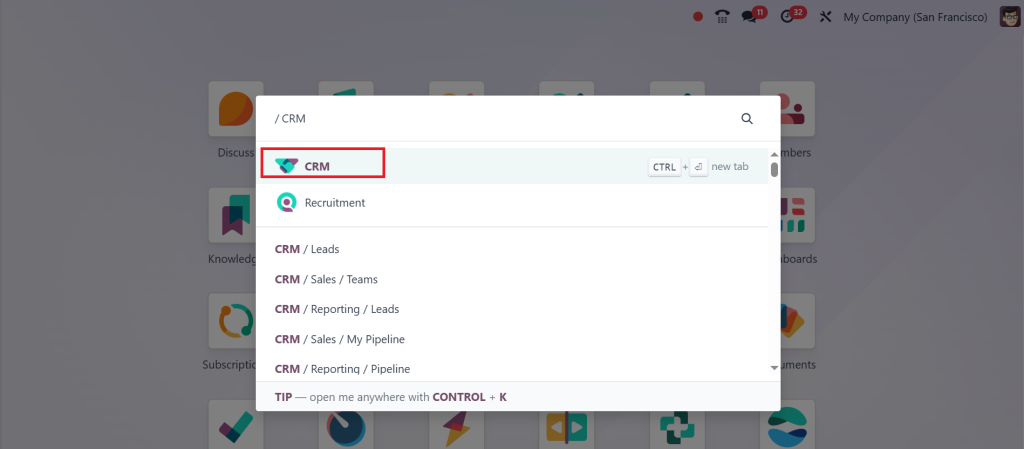
Go to Configuration → Sales Teams.
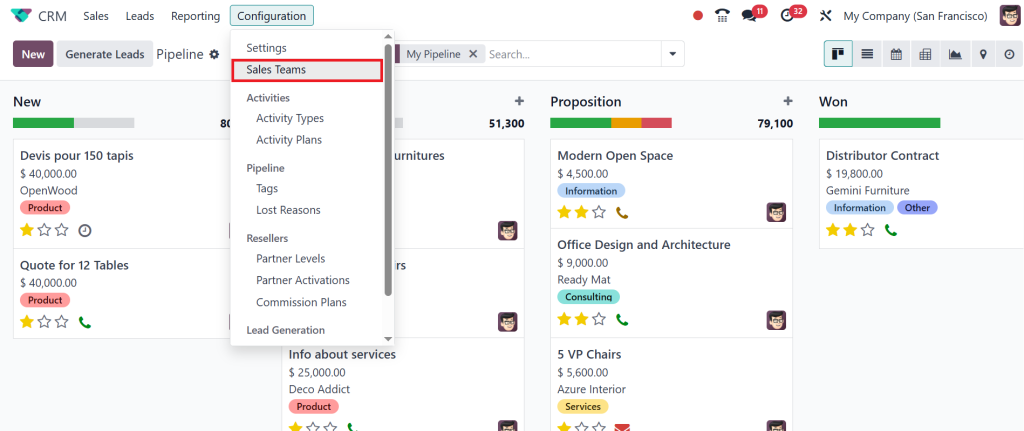
This displays all your currently configured sales teams, including sales, website, and point of sale. So, to create a new team, click on New.
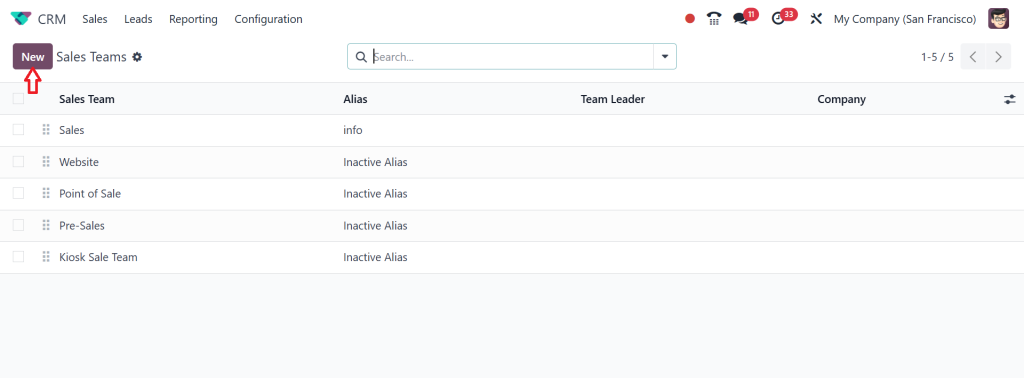
The first step is to give your team a clear name and description. So, I’m giving it the name Demo Team. Then, you have both checkboxes, such as Pipeline & Leads. If you want them to get involved in both, you have to make sure you enable both.
Next, you need to enter the team details, including Team Leader, Email Alias, Accept Emails from & Company. Then, add the members to your team by clicking on the Add button.
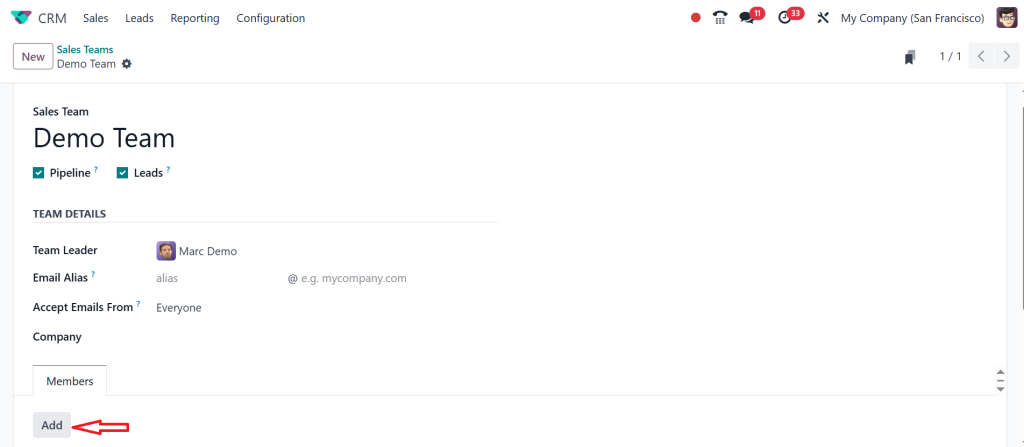
Once you click on add a window pops up. Here, you can choose how many members you want from the checkbox. So, whichever member is necessary, you can tick (✔) the checkbox and click on Select.
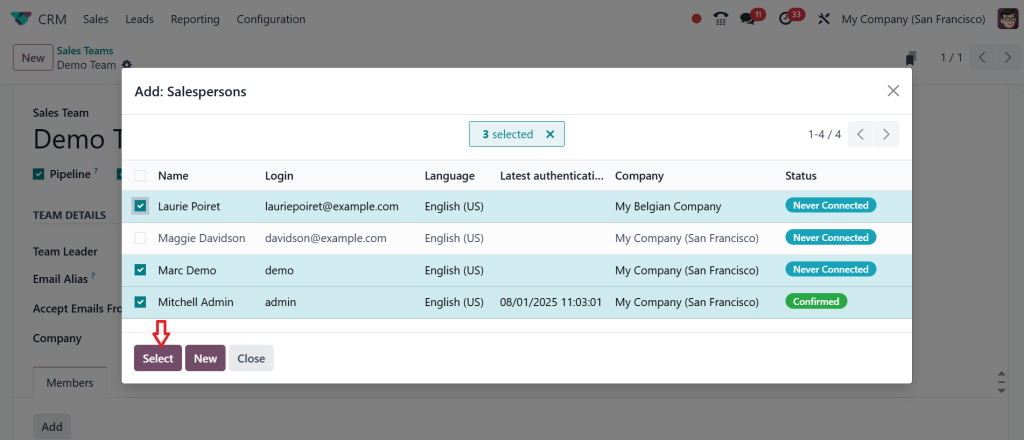
In Odoo, you even have the option to add new members. If you click on the Add button again, you see the option called New.
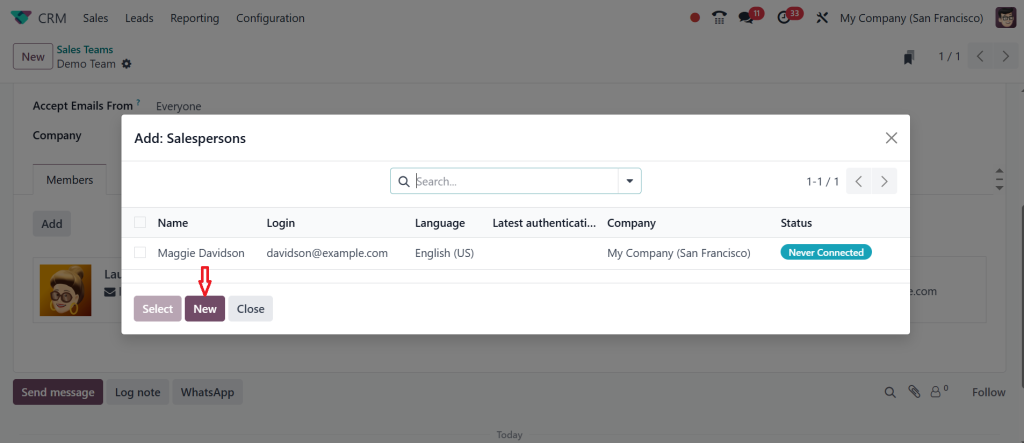
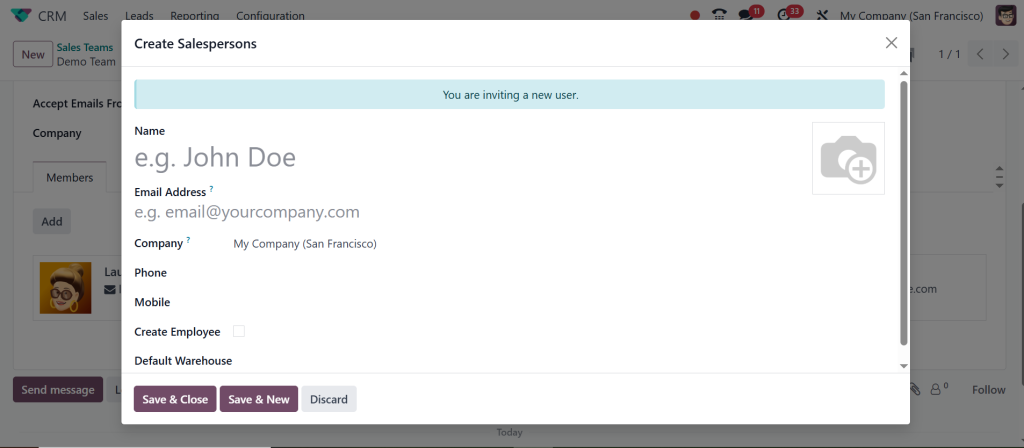
Clicking on that will create a new salesperson. It’s exactly like building a new contact. If not necessary, you can click on Discard.
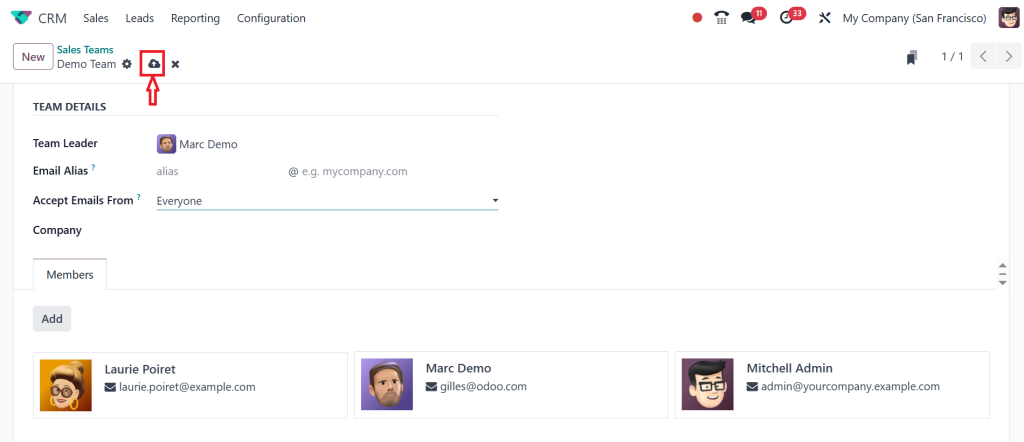
Now, the Demo Team has three members. So, this is how a team is created by clicking Save.
If you want to assign the same salesperson to multiple teams, you can’t do that before the correct settings are enabled. For that, go to the Configuration → Settings.
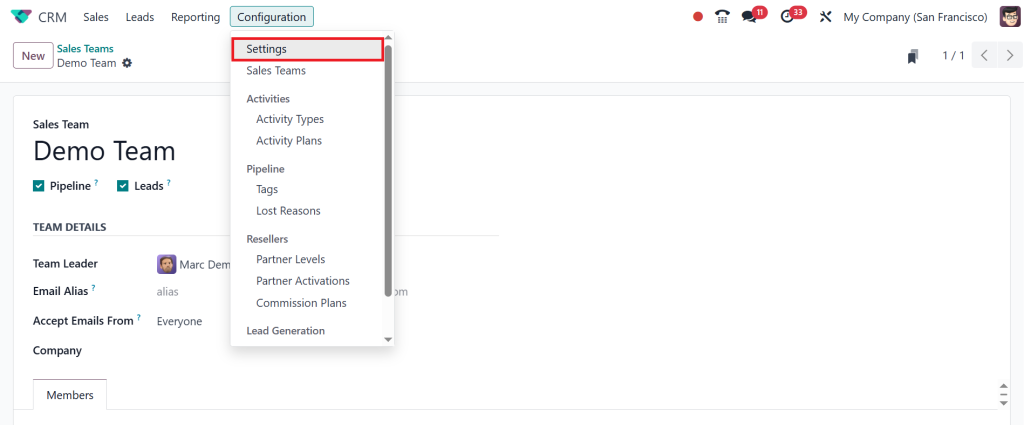
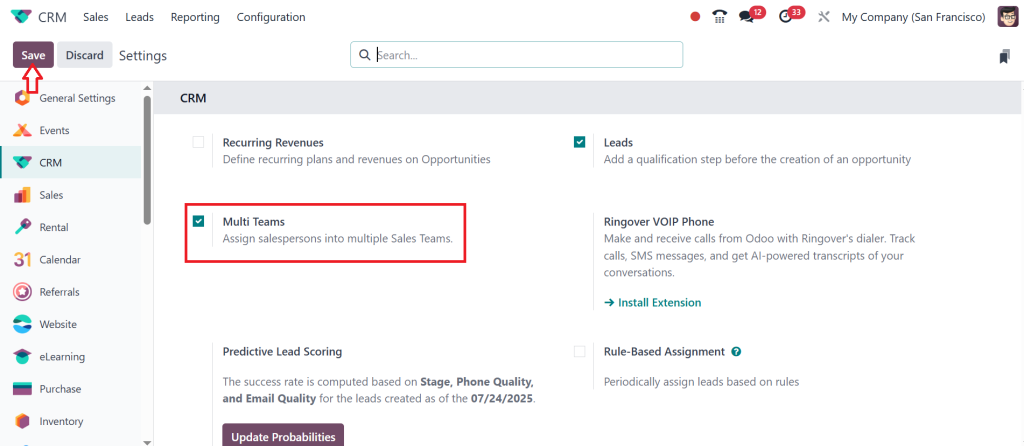
Enable Multi Teams and click Save. It allows you to assign salespersons to multiple sales teams. So, that’s how the creation works.
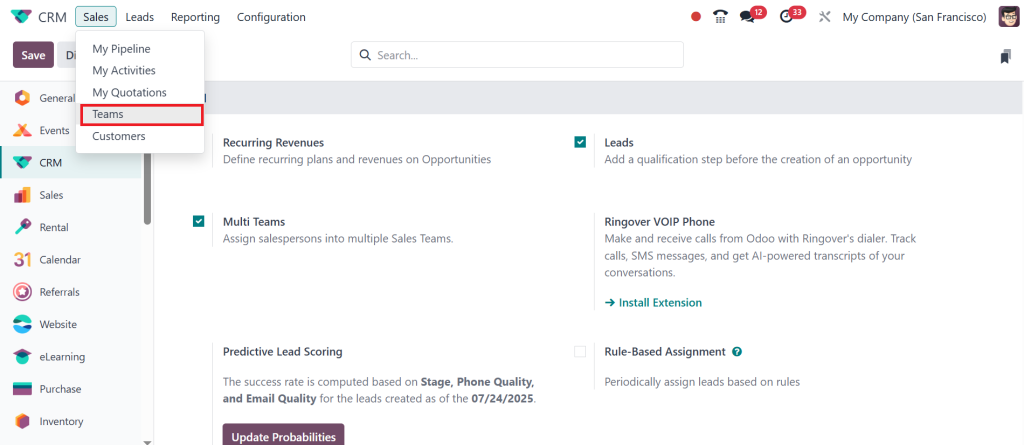
Now, let’s explore how robust the sales team dashboard is. For that, go to the Sales → Teams.
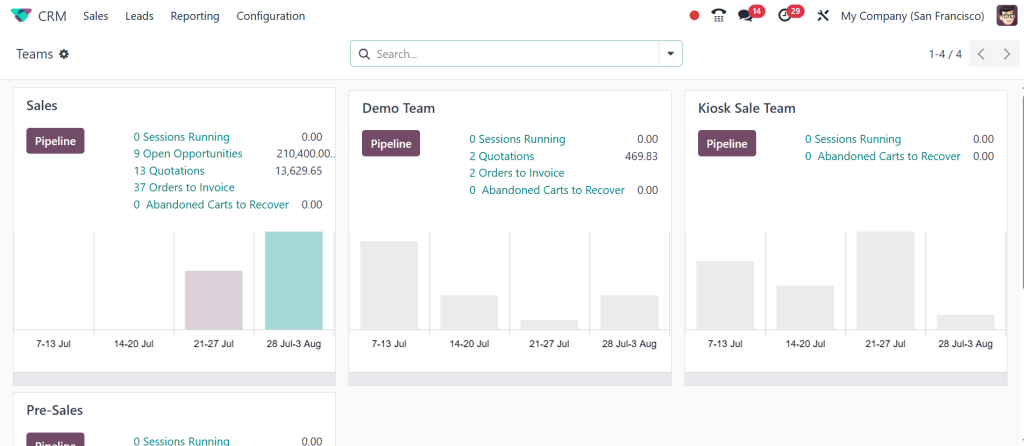
Here, you will see a Kanban card for every sales team you are a member of, giving you an immediate snapshot of their performance. Each card provides a quick overview. So, if you take a look at the Sales Teams Card, you can see the number of open opportunities, the quotations, how many sessions are running for this particular team, etc. And if you set a target or a goal for your team, that can also be found here. It also displays the invoicing progress graph. If you want a detailed view, click on the Pipeline button.
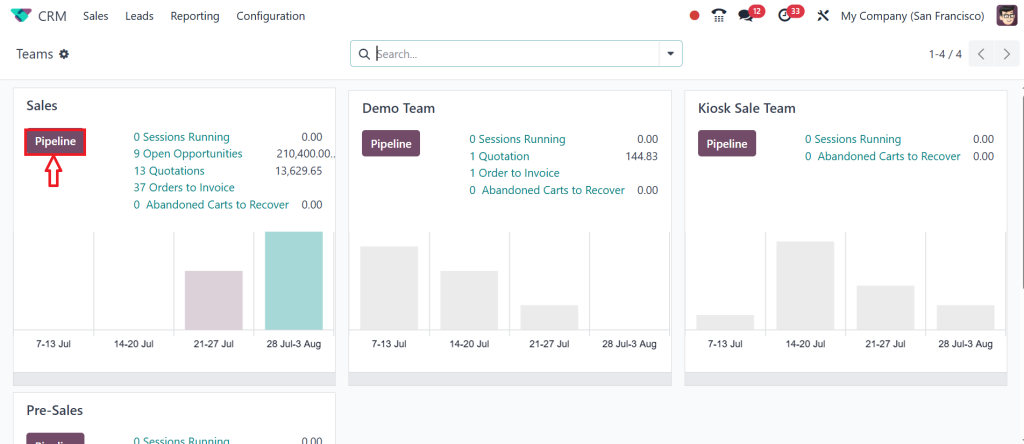
So, this will directly take you to the Sales Teams Pipeline. This gives you a clear idea about the team.
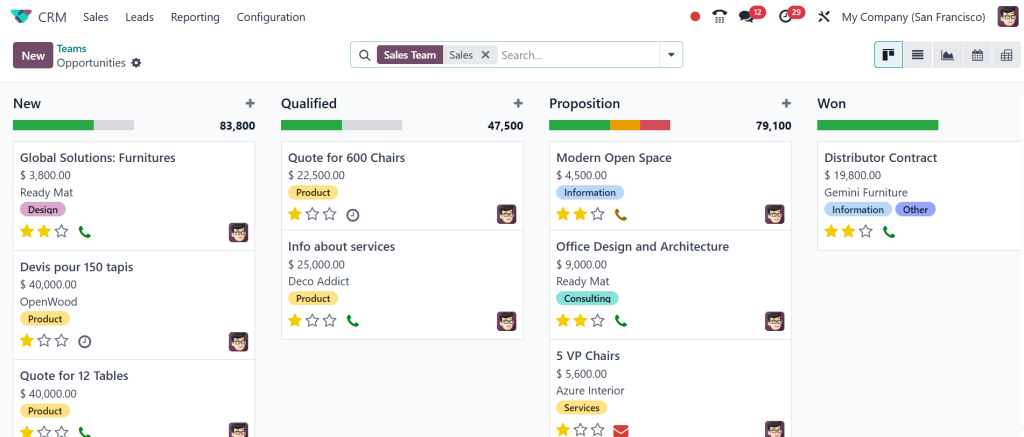
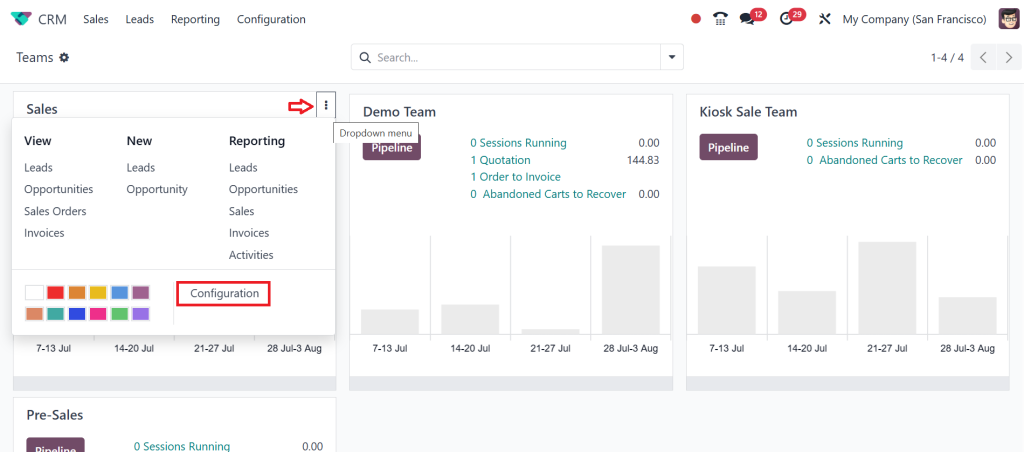
If you need to view or edit a sales team’s settings quickly, you can click on the (፧) dropdown menu, and it will offer you a menu called Configuration, along with some other menus. Click on the Configuration.
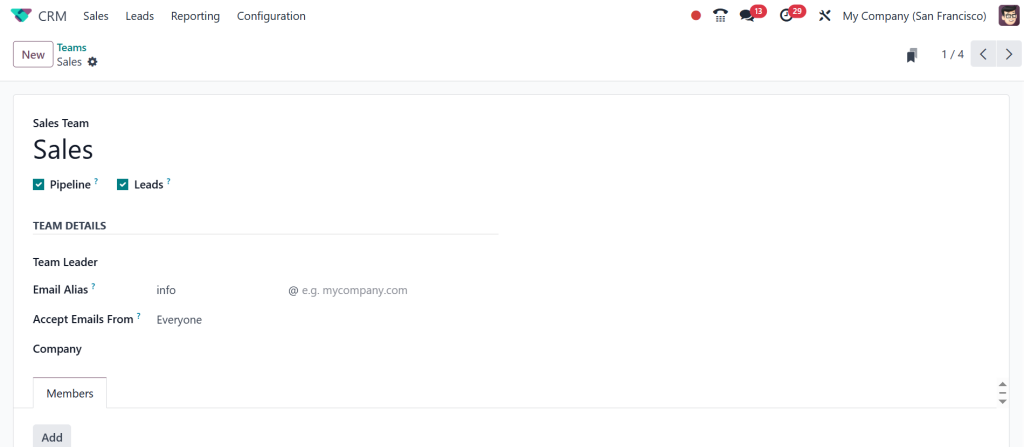
It opens the creation form for that specific team, prefilling all the details. If you want to perform any edits, you can do it here.
That’s how you manage the Sales team in Odoo 18 CRM. By organizing your sales force effectively, you’ll gain clear insights, improve lead distribution and drive better results.
This feature is a must-have for any business aiming to manage a sales team in Odoo more efficiently.
Odoo Sales Pipeline
Your Visual Map to Success
Suppose you walk into your office and instantly see what’s happening with every lead and deal in your CRM. That’s precisely what the Odoo sales pipeline gives you. It uses a simple Kanban board where every lead moves from one stage to another, like New → Contacted → Proposal Sent → Won.
This visual flow helps both the sales representatives and the manager. Representatives know where to focus each day, and managers can spot where deals are getting stuck. You can even color-code deals by priority or add tags to organize them better.
With the Odoo sales pipeline, your team doesn’t have to guess what to do next. Everything is in front of them: deadlines, contact info, notes, emails, and calls, all linked to each opportunity. You can even automate some of the movements, so when a client replies, the deal automatically moves to the next stage.
This way, managing the team becomes more about coaching and less about micromanaging. And when you manage a sales team in Odoo using the pipeline, everything clicks into place.
CRM Sales Team Management
Lead Smarter, Not Harder
One of the most frustrating things in sales is when leads go cold because nobody followed up. It often happens when leads are randomly assigned or forgotten in the system. But with CRM sales team management in Odoo, you can set up rules that take care of this.
You can define how leads should be assigned by location, product, team, or even by score. For example, leads from the UAE can automatically go to Team A, while high-value leads (based on lead scoring) go to your senior team.
The lead assignment feature in Odoo is beneficial here. You can automate the entire lead routing process so that no lead is missed and every sales representative gets a fair workload. If a lead isn’t touched in 48 hours, Odoo can even escalate it or reassign it.
This smart assignment helps you balance your team’s efforts and gives every lead the attention it deserves. Your customers are happier, your team performs better, and you spend less time doing manual work.
Lead Assignment in Odoo
The Art of Speed and Accuracy
Speed matters in sales. The faster you respond to a lead, the higher your chances of converting it. But speed must come with structure. That’s where lead assignment in Odoo shines.
Instead of dumping all leads into one pool, you can use automated rules to distribute them based on any criteria you like: industry, location, deal size, or even custom fields. And it’s not just about assigning. You can set reminders for follow-ups, automate email responses, and track every step your sales team takes.
For example, if a lead comes from your website, it can be scored as “Hot” and immediately go to your top performer. Or if a lead hasn’t been contacted in 3 days, Odoo can send a friendly reminder to the representative or escalate it to the manager.
This innovative workflow ensures no opportunity slips through the cracks, helping you manage your Odoo sales team like a professional.
Odoo CRM Reporting
Real-Time Insights for Real Decisions
One of the biggest strengths of Odoo 18 CRM is its reporting ability. With just a periodic click, you can develop real-time reports on almost everything, including lead conversion rates, deal stages, sales by team, win/loss ratios, and more.
Odoo CRM reporting isn’t just for the end of the month. It’s for daily use. You can monitor which team is hitting their targets, which representative is lagging, which region is performing better, and how long your deals usually take to close.
You can also create customized dashboards with graphs and pivot tables that update live. Need to see how many deals are stuck in the “Proposal Sent” stage? Just filter your view. Want to compare performance across different teams? It’s all there.
This kind of visibility helps you manage your team not just reactively, but proactively. You can run coaching sessions, update goals, and spot trends early, all thanks to the insights from Odoo CRM reporting.
CRM Sales Team Management with Real Results
When you bring all of this together, team structure, pipeline, lead assignment, and reporting, you create a complete ecosystem for CRM sales team management. Your team knows their responsibilities, your customers get faster responses, and you, as a manager, can focus on improving the strategy instead of fixing daily chaos.
One of the great things about Odoo is that it doesn’t force you into one system. You can customize almost everything, including fields, workflows, rules, and dashboards, to match how your team works. Whether your sales cycle is 3 days or 3 months, Odoo adapts.
And the more your team uses the system, the better the data becomes. You can forecast revenue, plan your hiring, and refine your marketing, all based on the live numbers coming from your Odoo sales pipeline.
The Future of Sales Team Management in Odoo 18 CRM
Sales are changing fast. Customers expect instant replies, personalized offers, and smooth experiences. To keep up, your sales team needs tools that are just as smart. With Odoo 18 CRM, you’re not just getting a CRM; you’re getting a complete command center for your sales team.
From managing opportunities to assigning leads, from automating tasks to tracking reports, everything works together in a straightforward interface, eliminating the need to switch between tools, lose leads, or deal with endless spreadsheets.
The way you manage a sales team in Odoo is different from traditional CRMs because it blends automation with flexibility. It helps your team do their job better and enables you to lead them with clarity and confidence.
It's Time to Manage Your Sales Team in Odoo Like an Expert
Sales management doesn’t have to be stressful or messy. With Odoo 18 CRM, it becomes transparent, efficient, and even enjoyable. You can finally stop chasing reports, stop guessing who’s doing what, and start focusing on growth.
So, if you’re looking to manage a sales team in Odoo, now is the perfect time. Set up your teams, build your Odoo sales pipeline, use smart lead assignment in Odoo, and track progress with influential Odoo CRM reporting. Whether you’re just getting started or scaling up fast, Odoo 18 CRM gives you everything you need to win in sales.
Want to see your sales team hit new milestones effortlessly? Let Netilligence show you how Odoo 18 CRM can make it happen. Reach out today, we’d love to help.




