

Why the Trial Balance Report in Odoo 18 Matters
Running a business means keeping a close eye on numbers. If the numbers are not accurate, then every decision you take could go in the wrong direction. The Trial Balance Report in Odoo is one of the most crucial tools for ensuring accurate accounts. It displays the debit and credit totals for every account in one place, helping you verify whether your books are balanced.
With Odoo 18, this task has become even easier. The system enables the quick generation of a trial balance in Odoo 18, review of balances, and verification for any errors. This guide will serve as a comprehensive tutorial on creating an Odoo 18 trial balance report, walking you step by step through the process. You will also see how the trial balance feature of Odoo 18 works, how to analyze the trial balance in Odoo, and how you can export the trial balance report in Odoo 18 for external use.
The Odoo trial balance accounting report is not just a technical requirement for accountants. It is also a clear summary that helps business owners and managers see the health of their accounts. And when you understand the trial balance vs the general ledger in Odoo, you realize how each report has its own place in your financial checks.
By the end of this blog, you will have a clear and practical understanding of how the Trial Balance Report in Odoo 18 works and why it is so essential for your daily business.
What is the Trial Balance Report in Odoo 18?
The Trial Balance Report in Odoo is a financial report that displays every account along with its debit and credit balances. It serves as a checkpoint to ensure that total debits are equal to total credits. If they do not match, it means there is an error somewhere in your books.
The trial balance feature in Odoo 18 has been designed to rationalize this process, making it fast and simple. Instead of manually checking accounts, you can generate the report instantly. This not only saves time but also gives you peace of mind that your numbers are accurate.
The Odoo trial balance accounting report is also a helpful starting point before preparing financial statements, such as the profit and loss statement or balance sheet. Without this check, those statements could present an inaccurate picture.
Odoo 18 Trial Balance Report Tutorial
If you are new to this report, here is a simple Odoo 18 trial balance report tutorial that shows you how to use it.
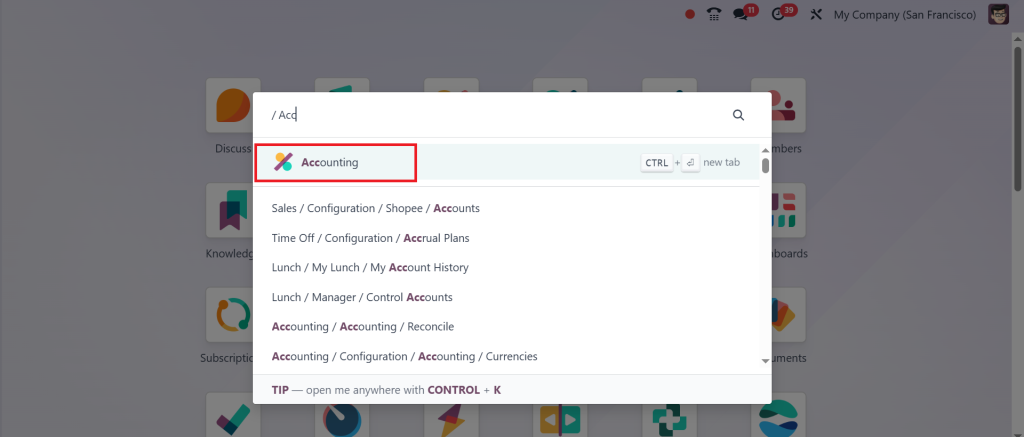
First, log in to your Odoo 18 account and go to the Accounting module.
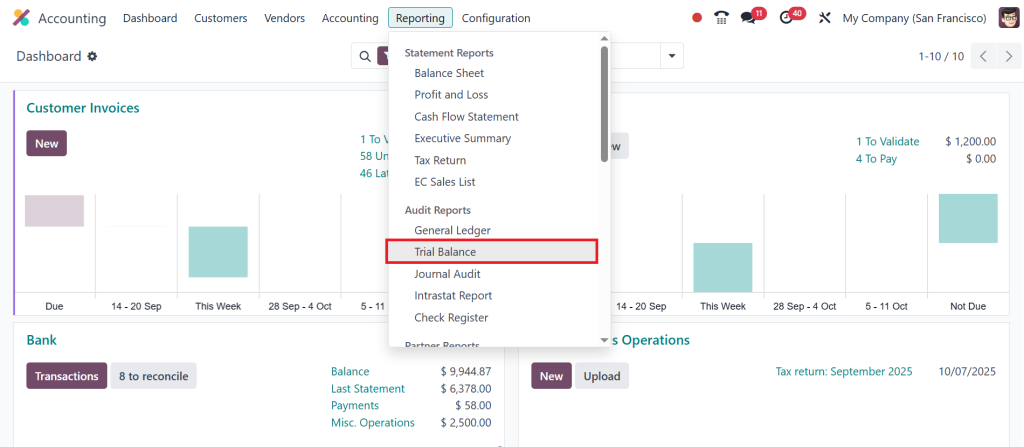
From the reporting section, select Trial Balance.
The page that opens will allow you to set the time frame you want to review. You can choose monthly, quarterly, yearly, or even a custom date range.
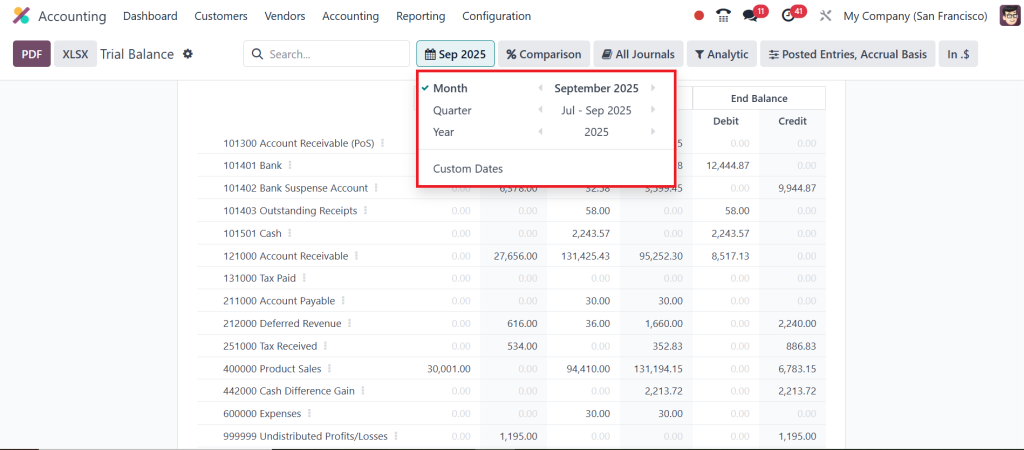
Once the dates are selected, Odoo will create a trial balance within seconds. The report will show each account, with separate columns for debit and credit.
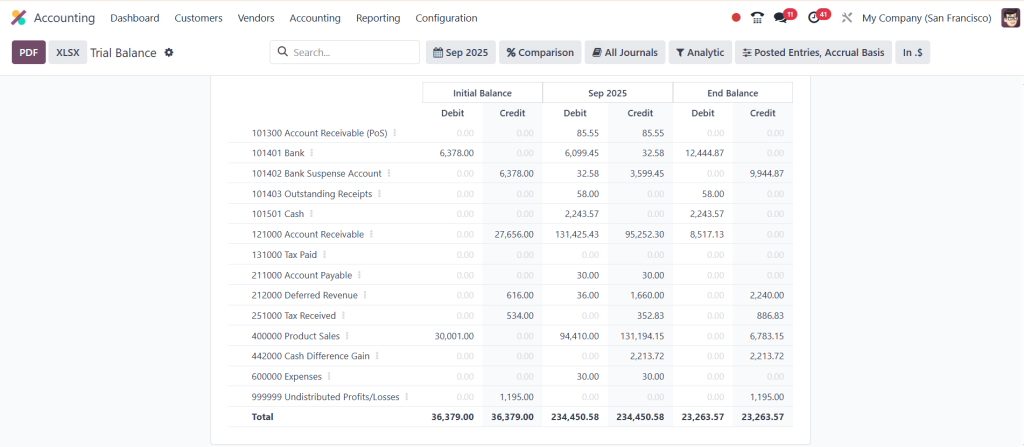
The next step is to review the numbers. This is where you need to carefully analyze the trial balance in Odoo to make sure that the totals are equal. If debits and credits do not match, then you know there is an issue that must be corrected. This could be due to a missing entry or a mistake in posting.
Finally, once you are satisfied, you can export the trial balance report in Odoo 18 as a PDF or Excel file.
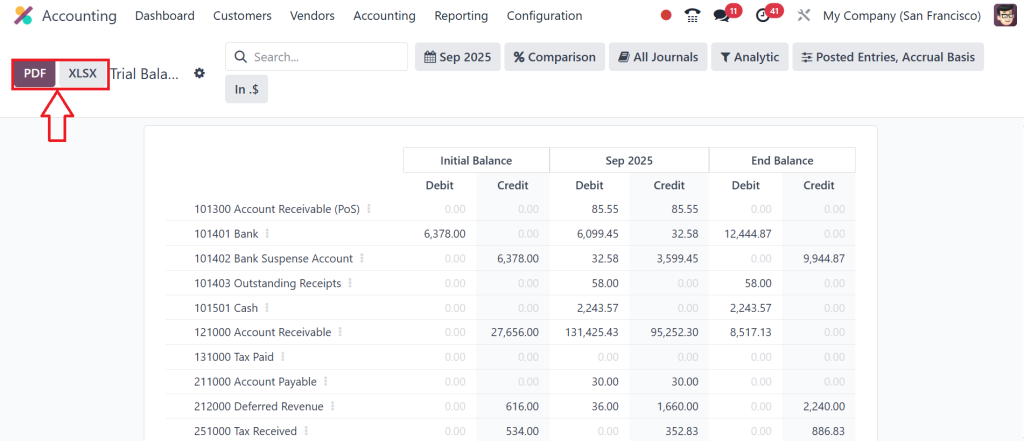
This option is helpful if you need to share it with auditors, external accountants, or if you want to keep a copy for your records.
Why the Trial Balance Feature of Odoo 18 is Useful
The trial balance feature in Odoo 18 is helpful for both accuracy and convenience. It ensures that your books are always balanced, which is the foundation of proper accounting. By running the report regularly, you can identify small mistakes before they escalate into larger problems.
Another reason it is useful is that it works with real-time data. The report always reflects the most recent entries in your system. This makes it reliable for day-to-day monitoring, not just for year-end reporting.
The Odoo trial balance accounting report also facilitates the preparation of other financial documents. Since it displays all accounts in one place, you can quickly verify whether your profit and loss statement or balance sheet is accurate.
How to Analyze Trial Balance Odoo 18
When you run the Trial Balance Report in Odoo, the most crucial step is analysis. To analyze the trial balance in Odoo, start by verifying that the total debit equals the total credit. If they are equal, it means your books are balanced. If not, you will need to investigate further.
Next, look at individual accounts. Does the balance of each account make sense? For example, if you see a negative balance in an expense account, that could mean something was entered incorrectly. If you notice unusually high balances in certain accounts, it may indicate that you should review those transactions.
Comparing the trial balance with previous periods is another good way to analyze it. This allows you to notice trends or sudden changes. For example, if your advertising expenses have doubled compared to last month, the trial balance will help you identify this quickly.
Export Trial Balance Report Odoo 18
Once you have reviewed your report, it is often necessary to save or share it. Odoo makes this easy by providing the option to export the trial balance report in Odoo 18. You can choose between Excel and PDF formats depending on your needs.
Exporting to Excel is helpful if you want to apply your own formulas or further customize the data. Exporting to PDF is useful when you need a clean version to share with managers, auditors, or investors.
By exporting the report regularly, you can also build a record of your company’s financial history. This makes it easier to revisit and review past data whenever needed.
Trial Balance vs General Ledger Odoo
It is essential to understand the distinction between a trial balance and a general ledger in Odoo, as many people often confuse these two concepts.
The trial balance is a summary. It displays the ending balance of each account, along with debit and credit totals. It does not show every transaction but only the final balances. The purpose is to make sure debits and credits are equal.
The general ledger, on the other hand, is detailed. It lists every single transaction for each account. While the trial balance gives you a snapshot, the general ledger tells you the whole story of how you reached that balance.
The Trial Balance Report in Odoo serves as a checkpoint to confirm accuracy, while the general ledger is used for detailed investigation. Both are needed, but they serve different purposes.
Using Odoo Trial Balance Accounting Report for Everyday Business
The Odoo trial balance accounting report is not just a tool for year-end closing; it is also a valuable resource for ongoing financial management. It can be used daily or monthly to keep track of your company’s finances. When you check it regularly, you reduce the likelihood of errors accumulating over time.
For business owners, it is a quick way to see if everything is on track. Instead of waiting for an accountant to prepare complicated reports, you can open the trial balance and immediately see the overall picture.
For accountants, it reduces manual work. Instead of spending hours balancing books by hand, the system does it automatically. This allows them to focus more on analyzing the data rather than preparing it.
How to Generate Trial Balance Odoo 18 for Different Needs
The ability to generate a trial balance Odoo 18 for different periods and with other filters makes it highly flexible. You can generate it for a single month if you want to check the monthly performance. You can generate it for a quarter if you are preparing quarterly reports. You can even generate it for a custom period if you need to review a specific project or department.
This flexibility means the report adapts to your business needs, rather than forcing you to follow a fixed format. It also means you can quickly answer questions from managers or auditors without needing to prepare separate reports.
Using the Trial Balance Report in Odoo 18 for Better Accounting
The Trial Balance Report in Odoo is one of the most reliable tools for checking the accuracy of your books. With Odoo 18, it has become even easier to use. You can follow the Odoo 18 trial balance report tutorial to learn how to set dates, apply filters, and generate a trial balance Odoo 18 in just a few clicks. You can then review it carefully, analyze the trial balance Odoo for mistakes, and export the trial balance report Odoo 18 when needed.
The trial balance feature in Odoo 18 is designed to rationalize your accounting work, making it faster and more accurate. By using it regularly, you can be confident that your accounts are correct and ready for financial reporting. By understanding the difference between the trial balance and the general ledger in Odoo, you know exactly when to use each report.
For both accountants and business owners, the Odoo trial balance accounting report is a valuable part of everyday financial management. It is simple, straightforward, and reliable, providing you with the information you need to make informed decisions with confidence.
If you want to explore more about Odoo 18 accounting features and see how they can help your business, get in touch with Netilligence today and let our experts guide you.




