

Every business owner knows that selling a product or service is only half the work. The real challenge often begins when it is time to collect payments. Customers may delay, forget, or request alternative payment methods. This is why the option to generate a payment link in Odoo 18 sales feels so useful for businesses of all sizes.
With the new Odoo 18 ‘Generate Payment Link’ option, you no longer need to send lengthy instructions for bank transfers or continually remind clients about them. Instead, you can send a simple link that allows them to pay immediately. This link works on any device, making it easier for your customers to clear their dues on time.
Setting up the Odoo payment link is simple. Once enabled, the system gives you a direct option to create links for sales orders or invoices. This is the strength of the payment link feature that Odoo has added; it eliminates confusion and replaces it with clarity. Customers know exactly what to do when they receive the link.
When you use the Odoo online payment link, payments reach you faster. There is no need to manually track each order, as the system automatically updates itself once payment is made. The time you would typically spend following up can now be used to focus on your business.
Businesses that create a payment link in Odoo 18 often notice how much smoother their sales process feels. Customers are also more satisfied because paying becomes a quick, familiar task. And since the Odoo sales order payment link connects directly to the sales order, both sides have a clear record of the transaction.
In this blog, we will explore how to generate a payment link in Odoo 18 sales, the steps involved in setting up an Odoo payment link, and why the Odoo online payment link has become a crucial tool for businesses. We will also explore how the ‘Create Payment Link in Odoo 18’ option works in everyday situations and why the Odoo sales order payment link saves time for both customers and businesses.
Odoo 18 Generate Payment Link – Why Businesses Need It
The option to generate a payment link in Odoo 18 sales matters because it directly solves a problem almost every business faces; delayed or missed payments. Typically, you would send an invoice and then wait for the customer to make a payment transfer. This often leads to back-and-forth emails, missed deadlines, and frustration for both sides.
With the Odoo 18-generated payment link, the experience is very different. You confirm a sales order, click a button, and share the link with the customer. They open it, see the order, and pay right there. The process is faster and easier.
Setting up the Odoo payment link is also not complicated. Once you have it ready, you no longer need to think about writing detailed payment instructions. The payment link feature in Odoo ensures that customers always have a straightforward way to pay.
For customers, the Odoo online payment link saves time and effort. They don’t need to copy bank account numbers or attach payment proofs. They click and pay. For businesses, the ‘Create Payment Link in Odoo 18’ option reduces the time wasted on manual confirmations. For the finance team, the Odoo sales order payment link ensures that records are updated as soon as payment is received.
Odoo Payment Link Setup – Simple Process for Odoo 18
Setting up the Odoo payment link in version 18 is straightforward. You start by enabling online payments in your Odoo settings. From there, you connect the payment provider you want to use, such as PayPal, Stripe, Razorpay, or any other supported option.
Once this is done, Odoo provides the option to create a payment link in Odoo 18 from your sales orders or invoices. The link that is generated is secure and works on any device. Customers can click on it from their mobile phones or desktops, making it a flexible and easy-to-use option.
When the customer makes a payment through the Odoo online payment link, Odoo updates the sales order status immediately. This means the Odoo sales order payment link is not just about sending a link; it also keeps your accounting clean and updated without extra effort.
Step-by-Step Guide to Generate a Payment Link in Odoo 18 Sales
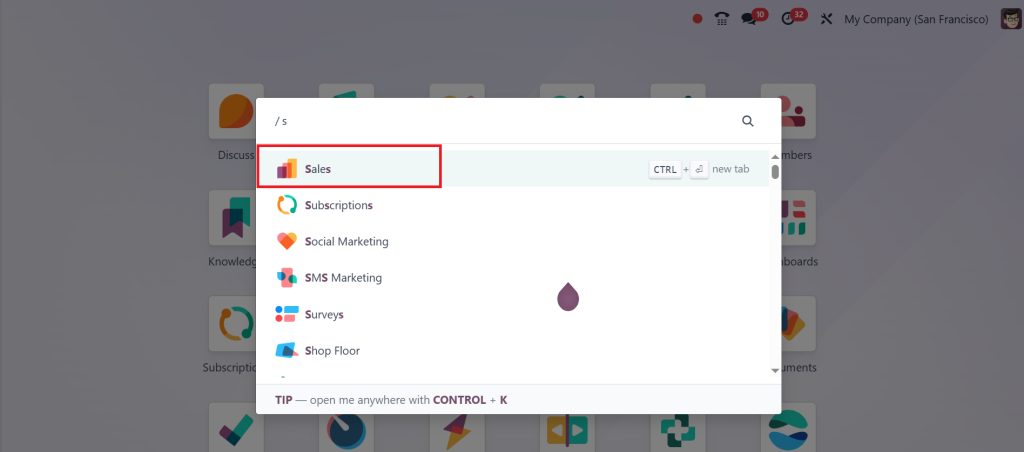
Let’s break down how you can generate a payment link in Odoo 18 sales step by step. First, open the Sales App.
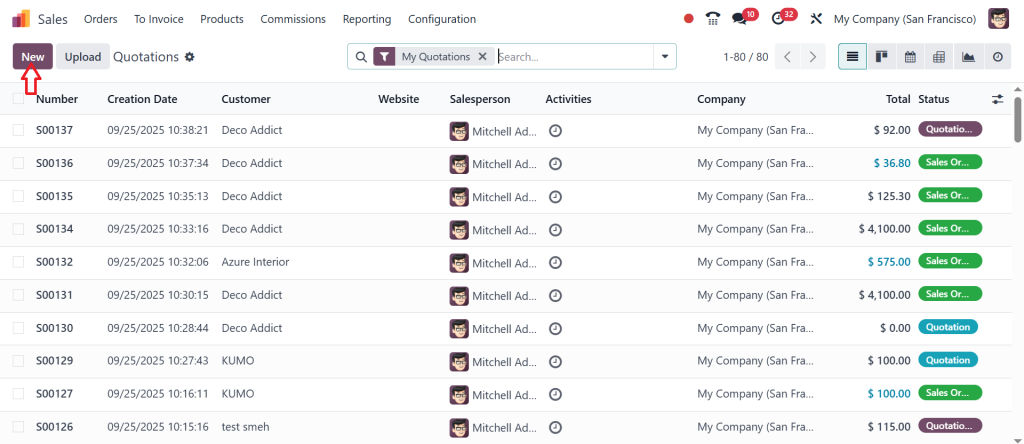
Click ‘New’ and create a new quotation.
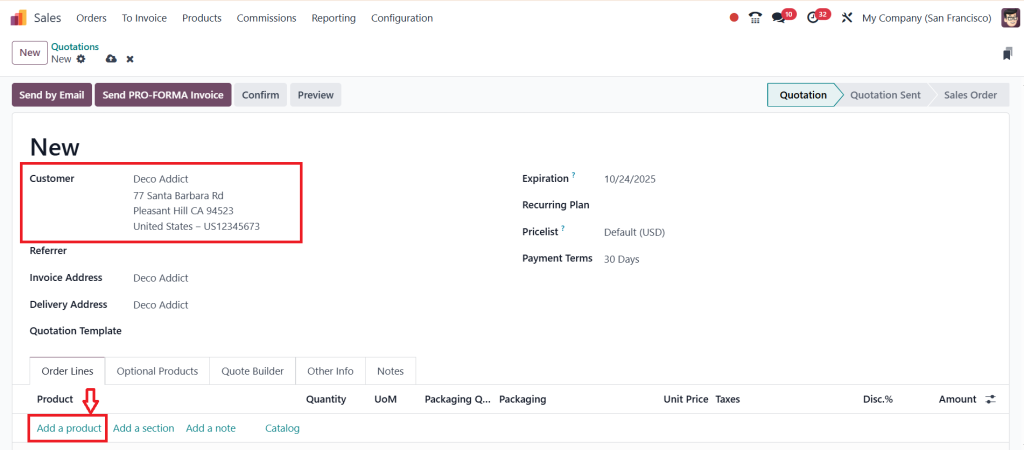
Select the customer and then click ‘Add a Product’.
Next, add the product. I select the Conference Chair, set the quantity to 10 units, and click on Confirm.
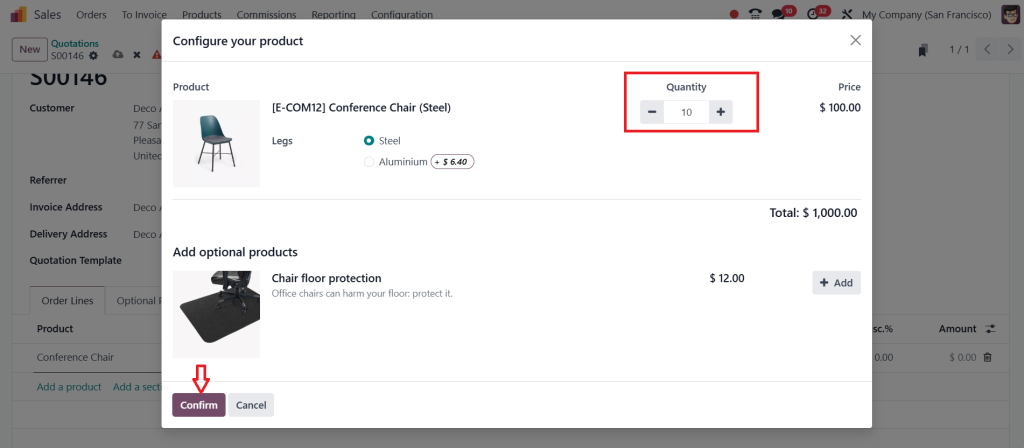
Now, let’s configure the online payment. Under the Other Info tab, you will see that online payment is already enabled. This option is important because it allows you to request payment from the customer before confirming the order. For subscriptions, it even ensures payments are made before each renewal.
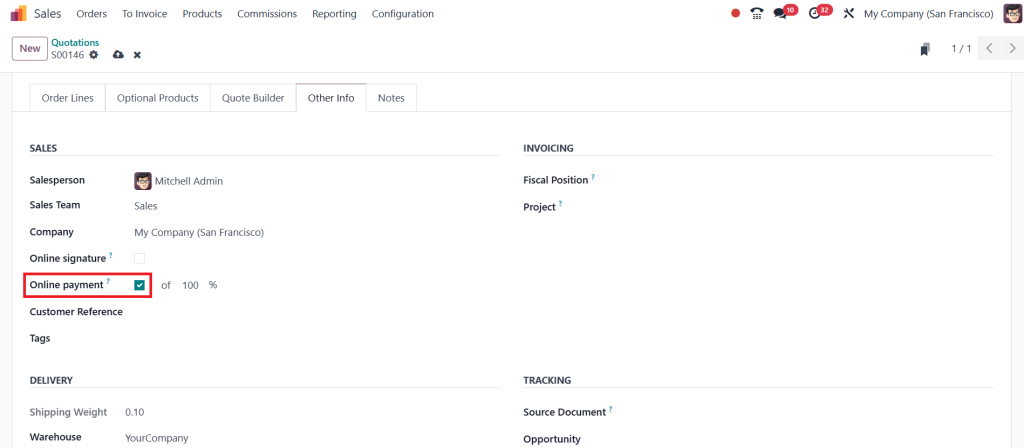
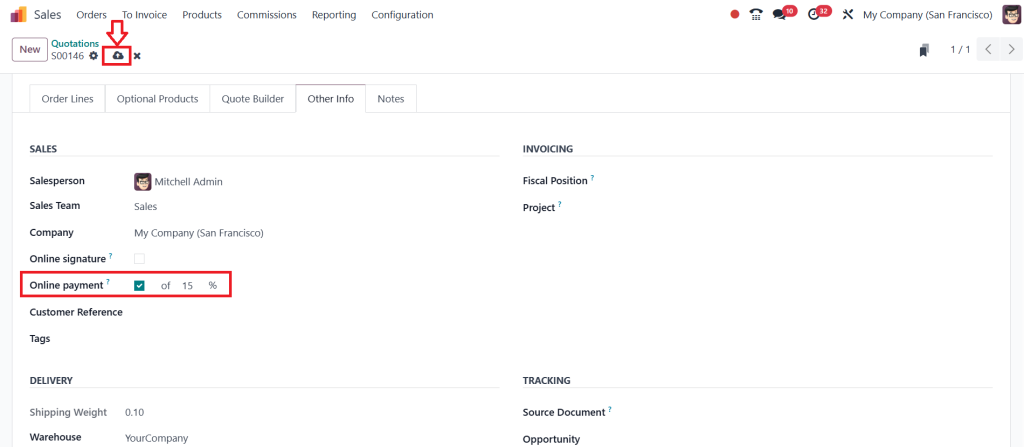
Here, you will set the down payment to 15%, 25%, or 50%. After setting the down payment, click Save.
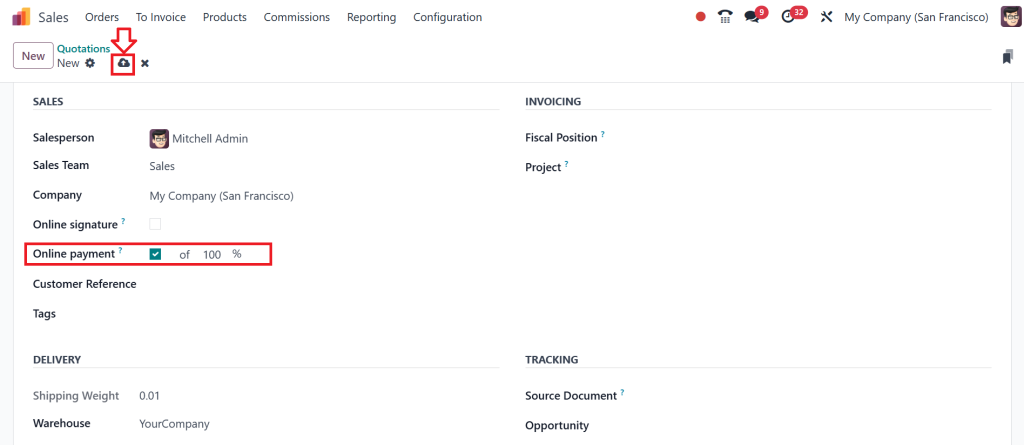
However, I will proceed with 100% Payment and click the Save button.
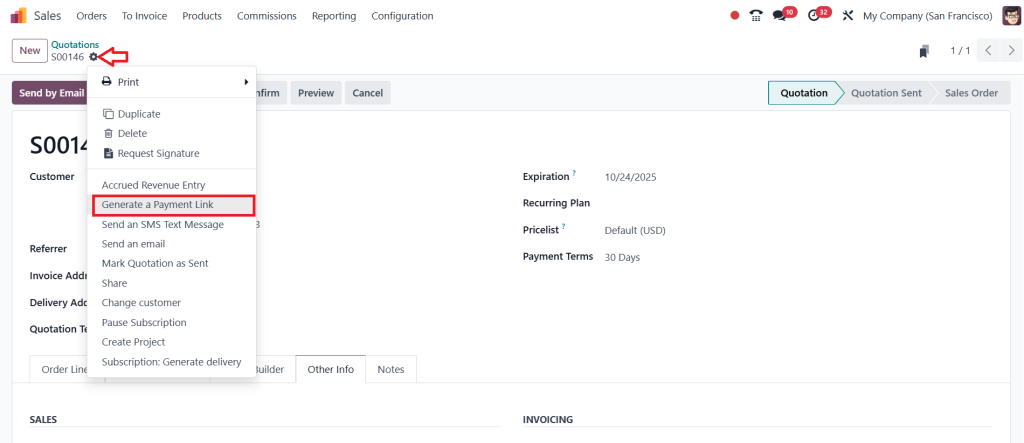
Now comes the best part: generating the payment link. From the quotation, click the gear (⛭) icon and choose the ‘Generate a Payment Link’.
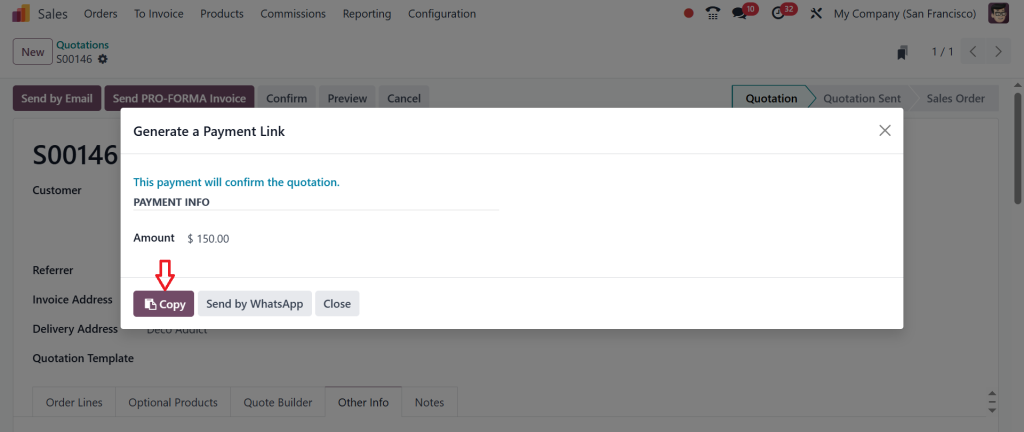
A window appears with the payment details. Since we require 100% payment, the amount due is $150. At the bottom, we have two options: you can copy the link and share it directly with the customer, or send it via WhatsApp if that is already set up in your database. Let’s copy the link and open it in a new browser tab.
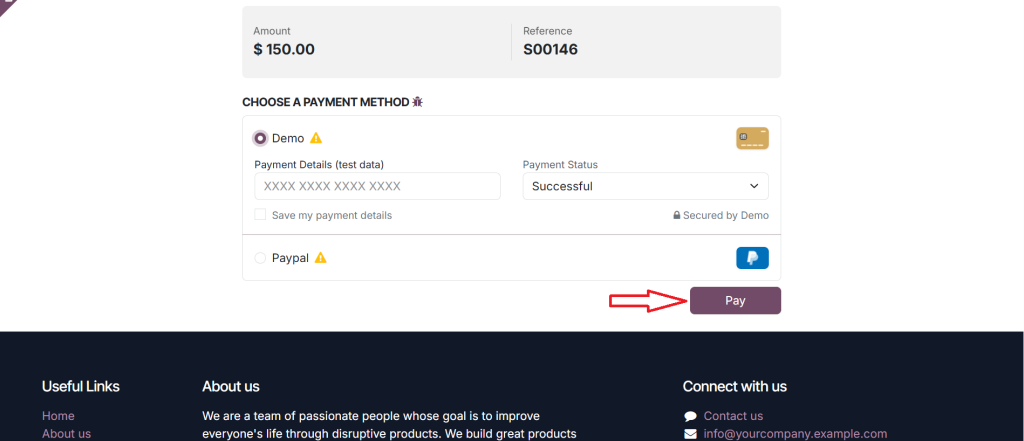
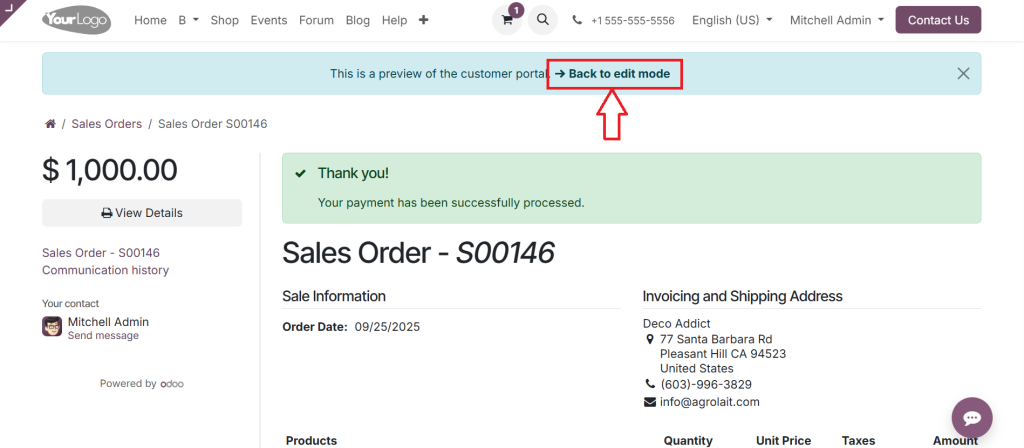
This takes us straight to the customer portal. Here, the customer pays the amount. The customer can then choose their preferred payment method. For this example, I’ll select the Demo and click Pay.
The payment is processed instantly.
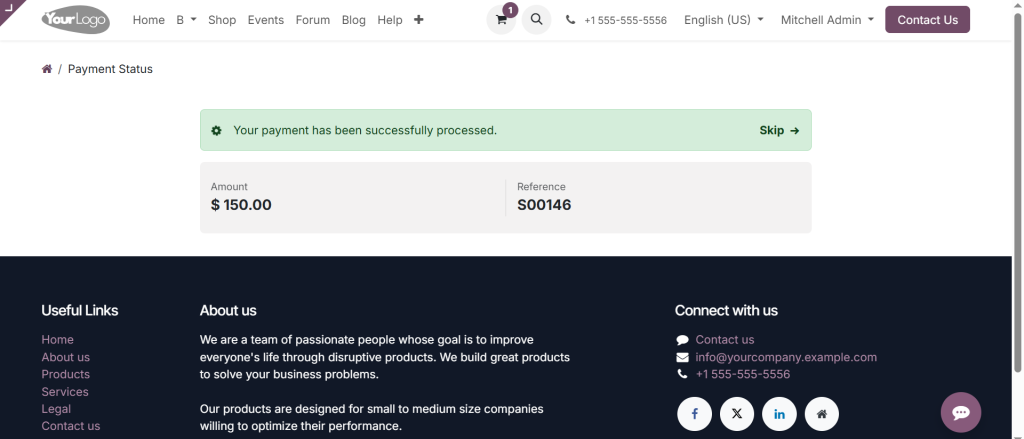
Go back to the Sales app by clicking on the ‘Back to the edit mode’.
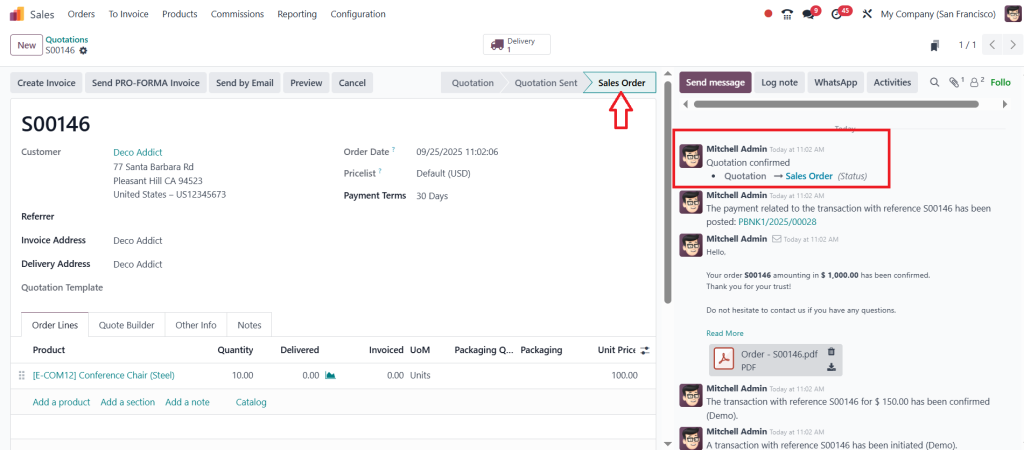
As you can see in the screenshot below, the quotation has now been automatically confirmed and converted into the ‘Sales Order’.
Now, you might be asking, why use a payment link when you could just send an invoice? However, the difference lies in the fact that sending an invoice follows the traditional process. You confirm the quotation, create the invoice, send it to the customer, and then wait for payment to be received.
A payment link, on the other hand, is much faster. You generate it right from the quotation, share it, and the customer can pay instantly. Once they do, the quotation is automatically confirmed and converted into a sales order. This is especially useful when you want a deposit up front or simply want to make the payment process easier for your customers.
Payment Link Feature Odoo – How It Helps in Daily Business
The payment link feature introduced by Odoo is convenient in daily business situations. For example, if you run a service company, you can confirm a sales order and send the payment link the same day. The customer pays promptly, and you can start work without delay.
In retail or wholesale businesses, sending an Odoo online payment link after confirming an order makes customers trust your process more. They can clearly see the order details and know exactly how to proceed with payment. The Odoo sales order payment link also helps when dealing with international clients, as it supports multiple currencies and gateways.
By generating a payment link in Odoo 18 sales, businesses can reduce the time gap between order confirmation and payment. This improves cash flow and ensures that orders move forward without delay due to lengthy payment processes.
Create Payment Link in Odoo 18 – Making Payment Simple for Customers
When you create a payment link in Odoo 18, you are not only making it easier for yourself, you’re also making it easier for your customer. Many customers prefer to pay through simple links rather than filling out lengthy forms or waiting for manual invoices.
Odoo 18 generates a payment link, allowing you to share payment options immediately. Whether you send it by email, message, or even attach it in the customer portal, the process is the same. The customer opens the Odoo online payment link, checks the sales order, and pays. The Odoo sales order payment link ensures everything is recorded correctly, both for the customer and the business.
For businesses that handle high volumes of sales orders, the ability to generate a payment link in Odoo 18 sales rationalizes the workload for both the sales and accounts teams. It also minimizes errors that usually happen when payments are tracked manually.
Odoo Sales Order Payment Link – Why It Saves Time
One of the most significant advantages of the Odoo sales order payment link is the time it saves. Without this feature, businesses spend hours confirming whether payments have arrived, updating records, and following up with customers.
With the Odoo payment link set up, this process becomes significantly shorter. The customer pays through the Odoo online payment link, and the sales order updates automatically. The payment link feature ensures that businesses no longer need to reconcile payments every time.
For customers, this also means a better experience. They know their payment has been received, and they can see the confirmation instantly. For businesses, the ability to create a payment link in Odoo 18 ensures a smoother workflow from sales to accounts.
Final Words on Generating Payment Link in Odoo 18 Sales
The ability to generate a payment link in Odoo 18 sales gives businesses a simple way to collect payments. With the Odoo 18-generated payment link, you remove confusion and speed up the process for your customers. Setting up the Odoo payment link is quick and easy to implement. Once it is ready, you can start using the payment link feature in your daily operations.
By using the Odoo online payment link, you make it easier for customers to pay from anywhere, on any device. The option to create a payment link in Odoo 18 reduces the time spent on manual updates, and the Odoo sales order payment link ensures that both your sales and accounting records remain accurate.
This feature is simple, practical, and helpful for every business that wants to make payments faster and more reliably. If you haven’t tried it yet, now is the perfect time to set up the payment link with Odoo 18 and see how much easier payment collection becomes.
Ready to try this in your business? Let Netilligence help you set up the Odoo sales order payment link and guide your team on how to create a payment link in Odoo 18. Contact us today and make your payment process faster and smarter!




