

Importance of Access Rights on Odoo 18 Sales Management App
Every business needs to understand the impact of access rights on Odoo 18 Sales Management App for effective and secure sales management. Odoo 18 sales access rights impact ensures security and drives efficiency by limiting access to relevant sales data based on user roles. Properly configuring access rights in Odoo Sales 18 can completely transform how your sales teams work, enhancing performance and reducing risks. Let’s dive into how Odoo 18 sales role-based access control can benefit your business and why Odoo 18 sales permission setup is essential for smooth operations.
By setting up robust Odoo 18 sales record rules impact, businesses can maintain data integrity, control sales order management, and ensure that every user in the sales process accesses only the data they need to perform their duties. Let’s explore how access control on Odoo sales processes plays a pivotal role in this process.
Why Is the Impact of Access Rights on Odoo 18 Sales App Crucial?
Odoo 18 sales access rights impact determines the user access level to sensitive information in the system. This impact is especially crucial in large organizations with diverse sales teams. For instance, sales representatives should have access to their customer data, whereas sales managers should have a broader view of the entire sales pipeline. By configuring access rights in Odoo sales 18, businesses can ensure that each team member sees only what they are authorized to, promoting security and productivity.
Let’s look at a few areas where Odoo sales access rights impact is most evident:
Data Security:
Controlling who can view or modify sales records keeps sensitive information safe.
Data Integrity:
Restricting access to sales orders, invoices, and customer records ensures no unauthorized changes are made.
Operational Efficiency:
With a personalized Odoo sales permission setup, sales teams can focus on their tasks without being distracted by irrelevant data.
The impact of access rights on Odoo 18 Sales Management App is undeniable. It ensures a more controlled and efficient sales operation.
How to Configure Access Rights Odoo Sales 18
Understanding the impact of access rights on Odoo 18 Sales Management App begins with knowing how to configure these rights effectively. Odoo allows businesses to set role-specific granular permissions, which means that each team member only sees what they need to do their job.
Key Steps in Configuring Access Rights in Odoo Sales 18:
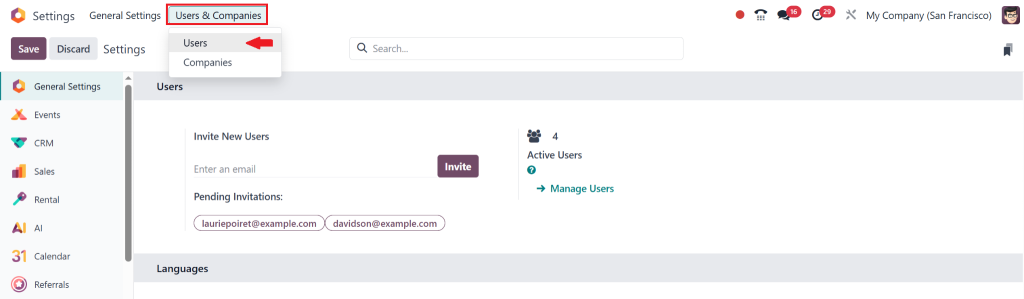
Goto Settings: Go to the Settings dashboard in Odoo 18, then select Users & Companies > Users.
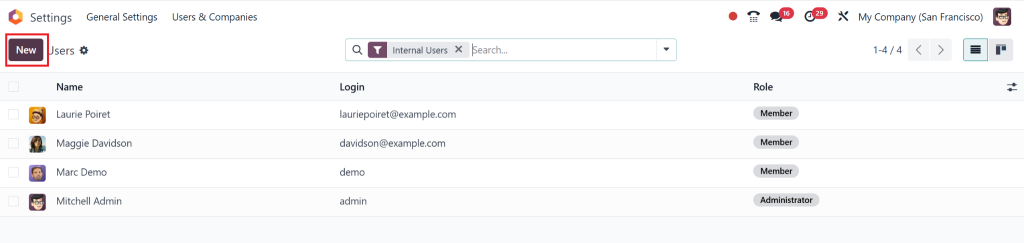
Edit User Profile: Click New to add a user or select an existing user (e.g., Mitchell Admin).
Modify key information such as name, email, and partner record.
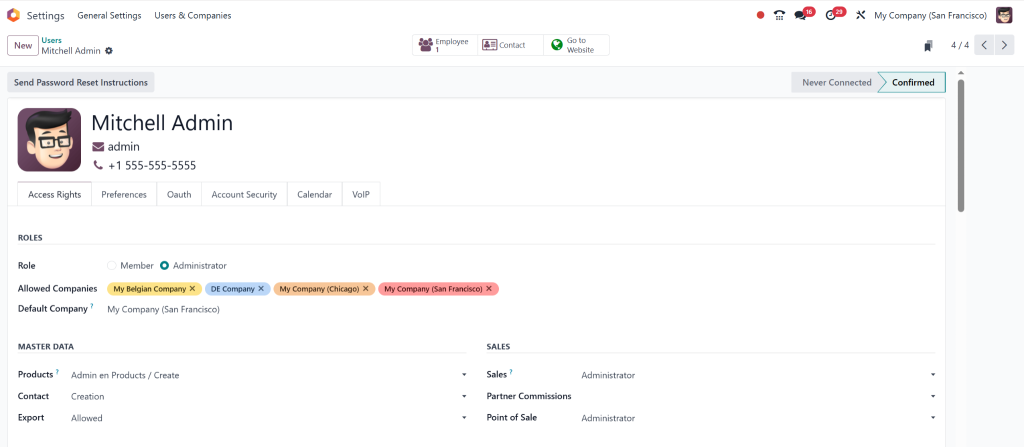
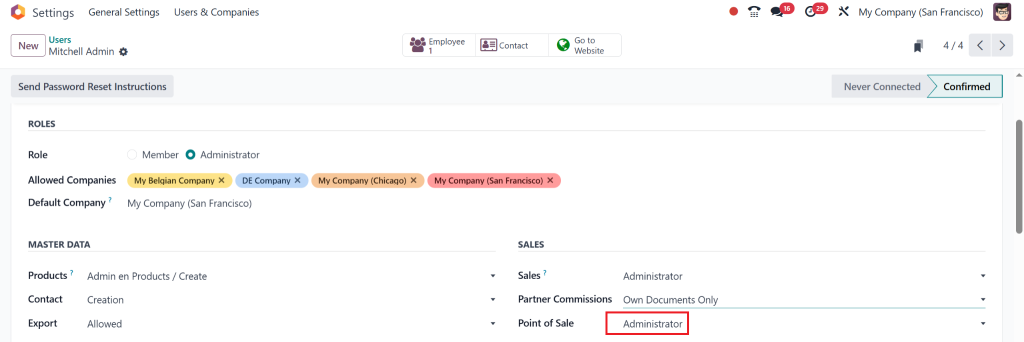
Set User Permissions: Under the Access Rights tab, assign the following Sales access levels:
- User: Own Documents Only – Access to their own records.
- User: All Documents – Access to all records in Sales.
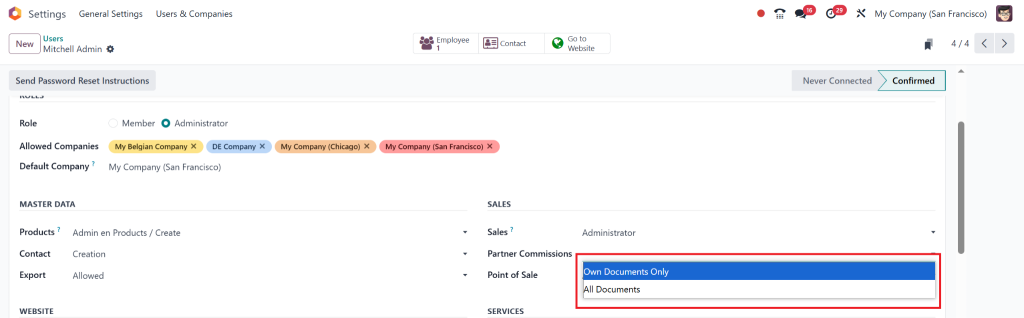
- Administrator – Full access to Sales configuration and reports.
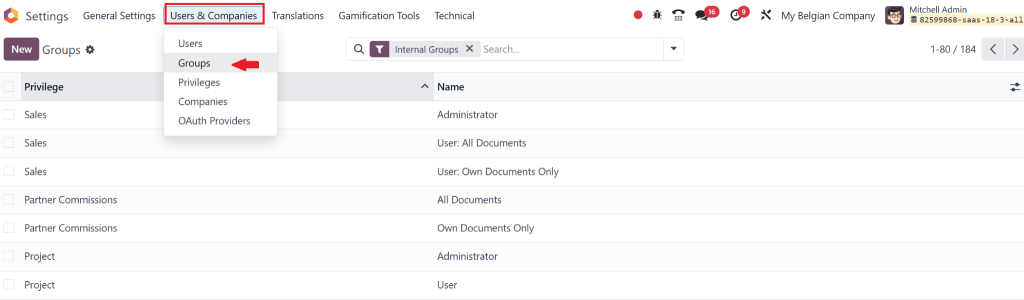
Use Groups for Access Control: Go to Users & Companies > Groups to create or modify user groups.
For example, you can create a Sales / Administrator group for advanced access.
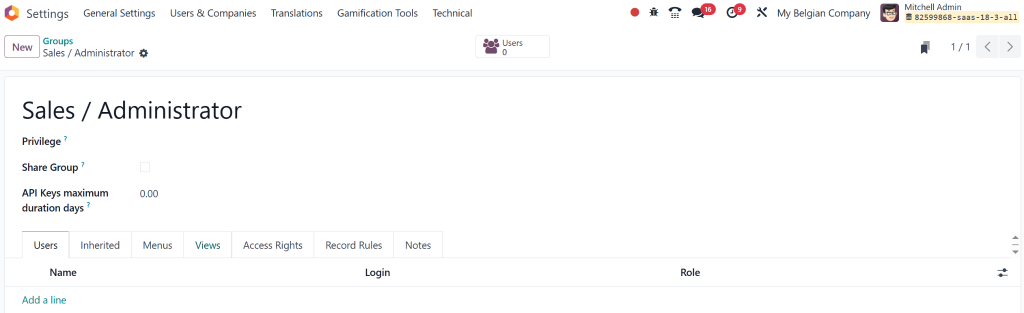
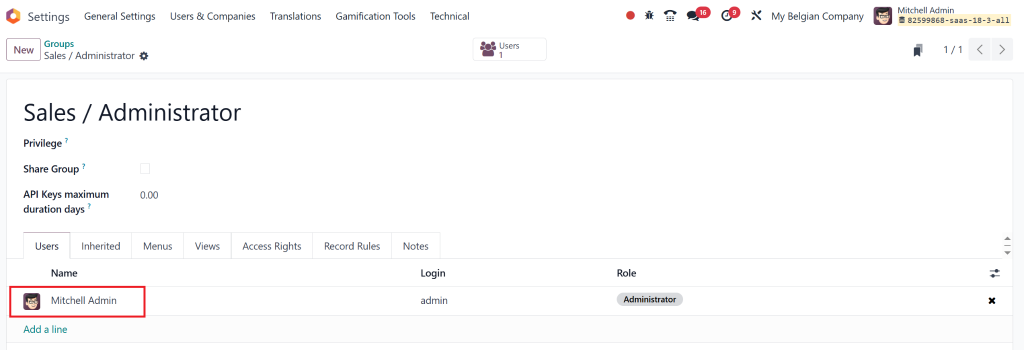
Assign Users to Groups: Under the Users tab, click Add a line to assign users to a group.
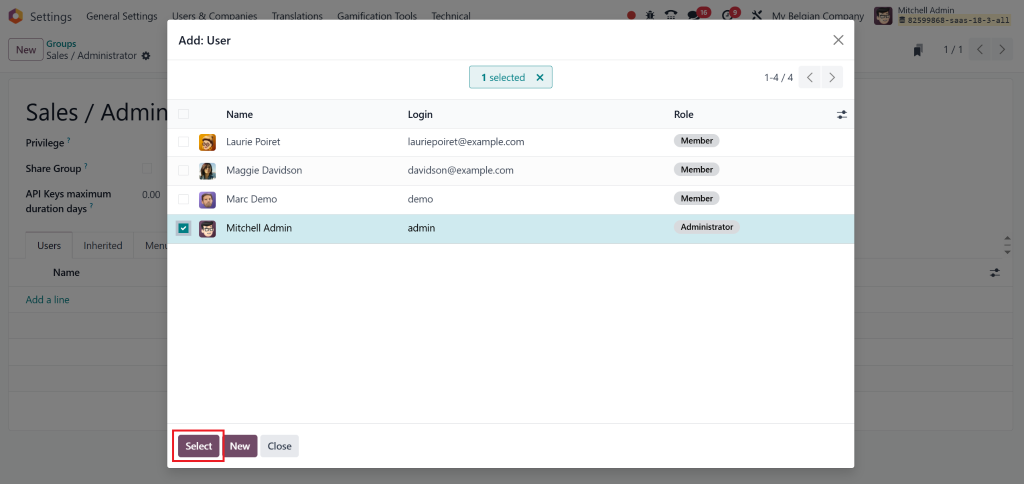
The users automatically inherit the group’s permissions.
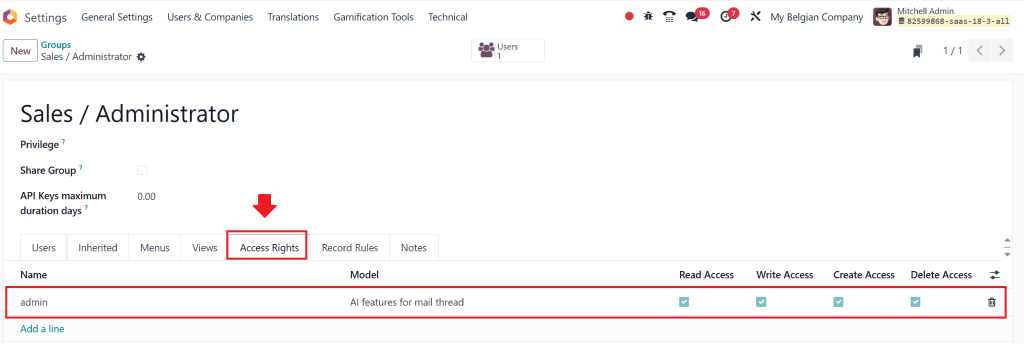
Advanced Permissions with Access Rights: In the Access Rights tab within groups, define permissions (Read, Write, Create, Delete) on a model-by-model basis.
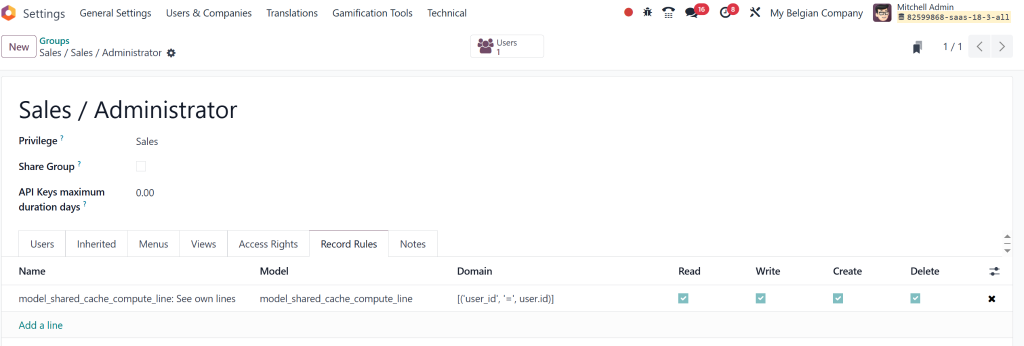
Use Record Rules for Advanced Filtering: Under the Record Rules tab, define access conditions for different records using Domains.
Document Group Configuration: Add internal comments or notes in the Notes tab for better clarity.
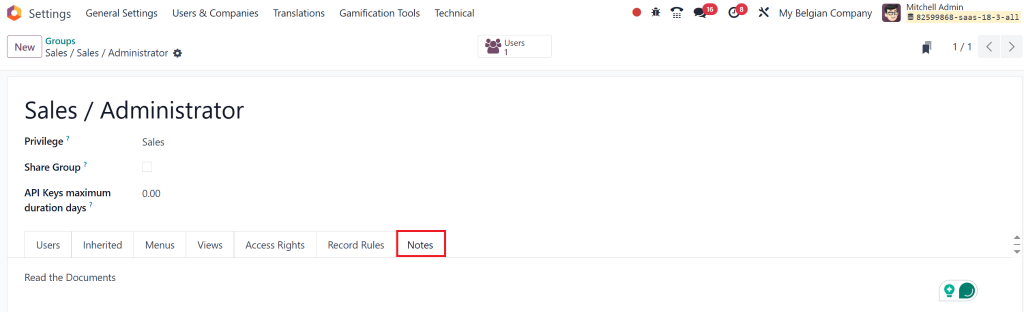
Save Settings: Once all configurations are set, save the group settings, and permissions will take effect immediately.
By configuring access rights in this manner, businesses will see the positive impact of role-based access control on their Odoo 18 Sales Management App.
How Odoo 18 Sales Role-Based Access Control Enhances Security
One of the most significant advantages of configuring access rights in Odoo 18 Sales Management App is implementing role-based access control (RBAC). With RBAC, Odoo ensures that only users who require access to specific data can view or modify it. The Odoo 18 sales role-based access control system assigns permissions based on roles and job functions rather than individuals.
How Odoo 18 Sales Role-Based Access Control Works:
- Sales Representatives: Can view and manage only their orders and customers.
- Sales Managers: Have the ability to access all orders, set discounts, and manage customer relationships.
- Admins: Full access to the entire sales module and all settings, including the ability to configure Odoo sales permission setup.
With Odoo 18 sales role-based access control, you can control the flow of information within your sales teams, minimizing the risk of errors or fraud while improving operational efficiency. The Odoo 18 sales access rights impact on security is significant, and they prevent unauthorized users from modifying sensitive sales data.
Understanding the Odoo Sales Record Rules Impact
Another important feature of Odoo 18 Sales Management App is the ability to set sales record rules. These rules dictate which sales records are visible to which users, providing an additional layer of control and security. The impact of Odoo sales record rules determines who can access certain customer data, sales orders, or invoices, depending on their role and permissions.
Example of Sales Record Rules:
- Sales Representatives: Can only view records that belong to their own assigned customers.
- Sales Managers: Can view all records within their team but not the ones from other teams unless explicitly authorized.
- Admins: Have full access to all records across the system.
With the impact of the Odoo 18 sales record rules, businesses ensure that users can only view relevant data, increasing security and preventing sensitive information from being exposed to the wrong individuals.
The Effect of Access Control on Odoo Sales Processes
The effect of access control on Odoo sales processes is far-reaching. When access rights are correctly configured, sales teams can perform their tasks more efficiently and securely. Sales reps can focus on their customers without being distracted by irrelevant data, while managers can monitor performance and ensure compliance with company rules and regulations or policies.
How Access Control Improves Sales Processes:
- Data Accuracy: Proper access control minimises the risk of accidental changes or data corruption.
- Sales team can access the information they need to close deals without wading through unnecessary data.
- Role-based access ensures team members have access to the information they need, making collaboration smoother and more effective.
Ultimately, the impact of access rights on Odoo 18 Sales Management App leads to better data management, improved communication, and a more organized workflow.
How to Set Up Odoo 18 Sales Permission Setup for Maximum Efficiency
Setting up Odoo 18 sales permissions correctly is important for ensuring each team member has the appropriate level of access. By aligning access rights with job responsibilities, you can optimize the sales process and enhance overall efficiency.
Steps to Set Up Odoo 18 Sales Permission Setup:
Map Out Sales Roles:
Identify all essential positions in your sales department and determine the required authorizations for each role to execute their responsibilities.
Configure Permissions in Odoo 18:
Use Odoo’s user management settings to configure the necessary permissions, ensuring that users only have access to relevant sales data.
Set Record Rules for Sales Data:
Create specific rules to determine which users can access sales orders and customer records and manage invoices.
Monitor and Adjust Permissions Regularly:
Regularly check user activity and modify permissions to match organizational changes.
The impact of access rights on Odoo 18 sales app will be evident in your sales teams’ smooth, efficient functioning, with each user accessing only the information they need to succeed.
Why You Need to Understand the Impact of Access Rights on Odoo 18 Sales Management App
The impact of access rights on Odoo 18 Sales Management App is more than just a security feature; it’s a core aspect of efficient sales operations. Properly configuring access rights in Odoo Sales 18 ensures that sensitive data is saved and team members can focus on tasks without distractions.
The impact of the Odoo 18 sales access rights provides the foundation for role-based access control and a structured Odoo sales permission setup, which enhances operational efficiency, data security, and collaboration. By implementing these controls, businesses can significantly improve their sales processes and safeguard critical information.
If you want to take full advantage of the impact of the Odoo 18 sales access rights, it’s essential to configure your system correctly. As an Odoo Partner, Netilligence specializes in helping businesses like yours optimize Odoo sales processes for greater security and efficiency. Contact us today to learn how we can help you harness the full potential of Odoo 18 sales access rights for your business!




