

Let’s discuss a common challenge that every business encounters when making a purchase.
Whether you run a small trading company or manage large-scale procurement, getting the best deals from your vendors is always the goal. That’s where the RFQ work in Odoo 19 Purchase module makes all the difference.
When you first open Odoo 19’s Purchase module and see “New RFQ,” you might wonder: “What exactly happens here?”
Don’t worry, you’re not alone. Many businesses start using Odoo and see this feature, but don’t fully understand how effective it actually is. So, let’s take a simple approach to know how RFQs work in Odoo 19 Purchase, why they matter, and how they can completely change the way your company handles buying.
Understanding the Odoo 19 RFQ Process
Think of an RFQ (Request for Quotation) like asking different vendors, “Hey, how much will you charge for this product and how soon can you deliver?”
That’s precisely what the Odoo 19 RFQ process does, but in a more professional, automated, and transparent way.
When you create an RFQ in Odoo 19, you’re starting a conversation with your vendors. You list the products you want, add quantities, and Odoo automatically organizes everything for you. You can even send the same RFQ to multiple vendors at once, compare their offers, and choose the best deal all without switching tabs or doing manual work.
This is what makes RFQ work in Odoo 19 Purchase so assertively; it’s not just about requesting prices, it’s about saving time, improving communication, and making wise purchase decisions.
How the Odoo 19 Request for Quotation Works (Step-by-Step)
Let me walk you through it step by step as if we’re doing it together.
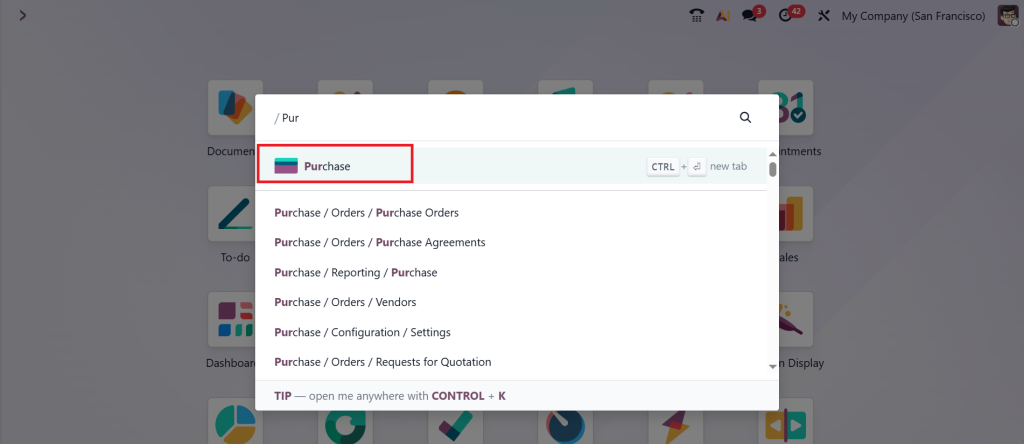
You open Odoo → Go to Purchase
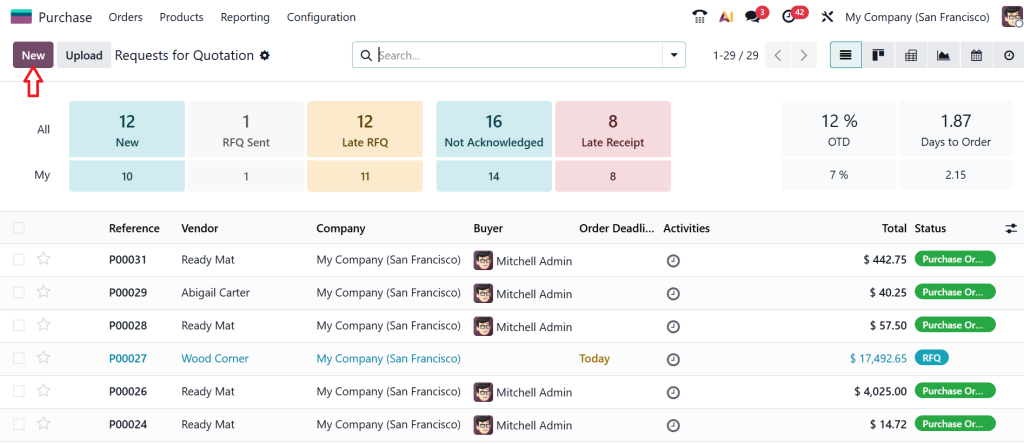
Click New RFQ.
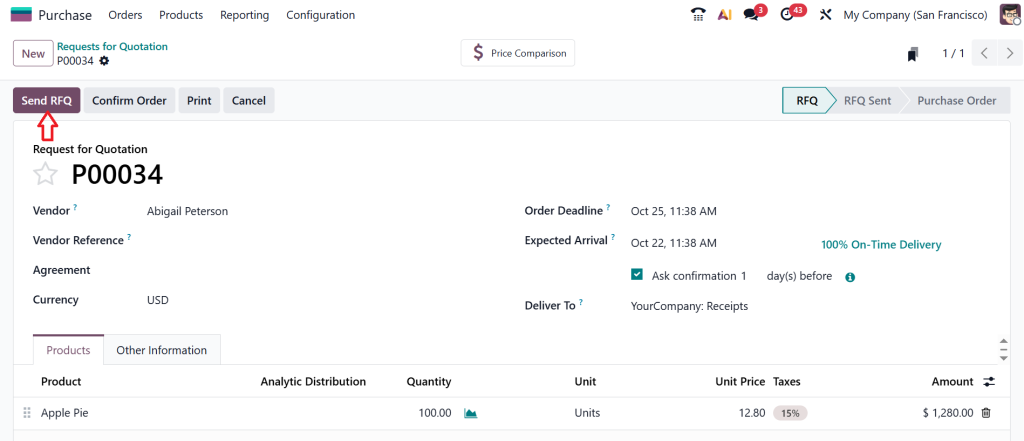
Now, suppose you want to buy 100 units of Apple Pie for your business. You add them to your RFQ form. You can either choose a specific vendor or leave it blank for now.
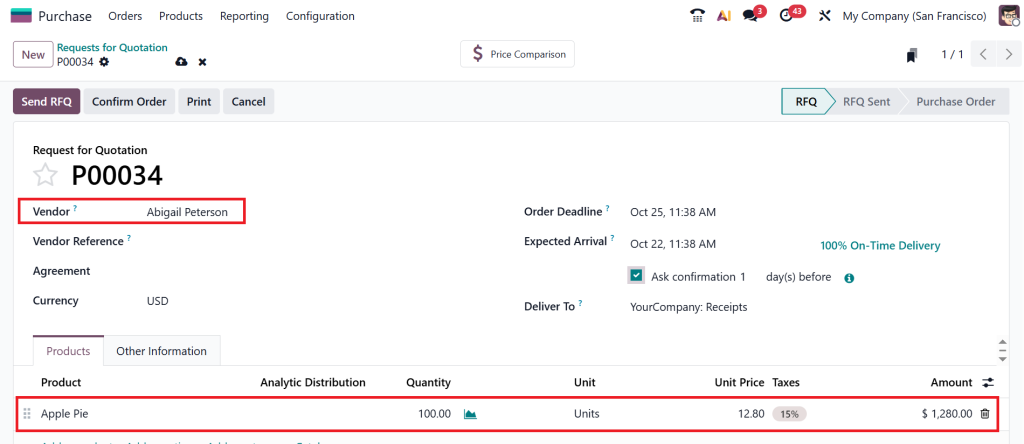
Then, Odoo helps you move forward smoothly. It allows you to:
- Add multiple products.
- Set delivery dates.
- Add notes for vendors.
- Feel free to attach files if needed.
Once that’s done, you hit Send RFQ, and your vendor instantly receives a professional quotation request.
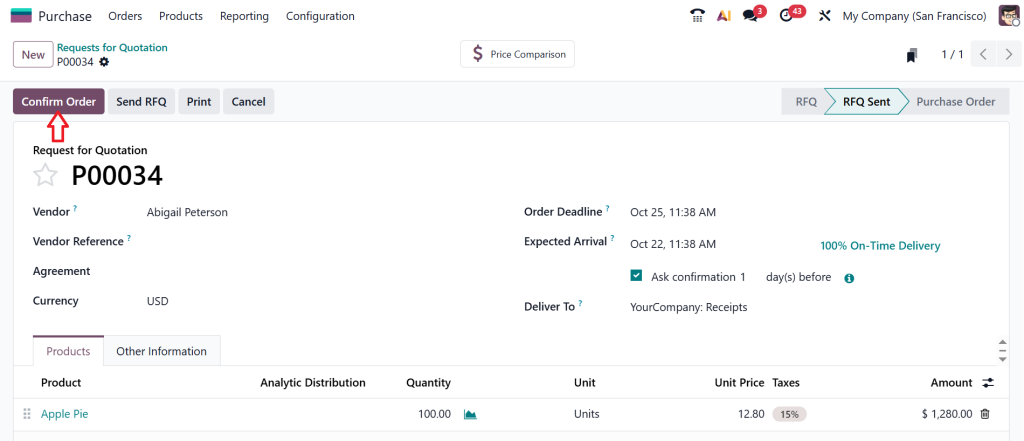
Then, click on Confirm Order.
After clicking on the confirm order button, the RFQ instantly turns into a Purchase Order.
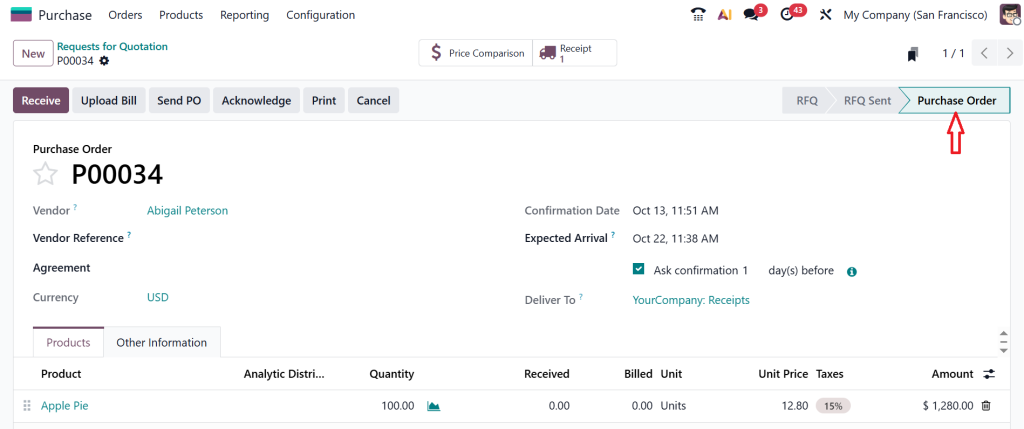
That’s the magnificence of the Odoo 19 request for quotation. It looks simple, but it’s smart, fast, and built for real business scenarios.
Exploring the RFQ Workflow in Odoo 19 Purchase
Now comes the part you’ll really want to see. The RFQ workflow in Odoo 19 Purchase is similar to a journey that spans from requesting quotes to finalizing the purchase.
Draft Stage: You start by creating your RFQ.
Sent Stage: Once you send it to the vendor, Odoo updates its status automatically.
Waiting Stage: Now, you wait for the vendor’s response.
Negotiation Stage: You can communicate, adjust terms, and ask questions right inside Odoo.
Confirm Stage: Once you’re satisfied with a vendor’s quote, you convert it into a purchase order.
The best part is that all of this is tracked, including every email, change, and update. You never lose any information.
The system keeps everything in one place, providing full RFQ status tracking in Odoo, so you always know which quotation is pending, which vendor has replied, and which deal you’ve confirmed.
Send RFQ to Multiple Vendors in Odoo 19 The Smart Way
Have you ever wished you could send one RFQ to multiple vendors without duplicating the effort?
Well, Odoo 19 makes that wish come true.
Here’s how: you create one RFQ, then click Duplicate and choose a different vendor. Odoo will automatically copy your details and resend them. You can do this for as many vendors as you want.
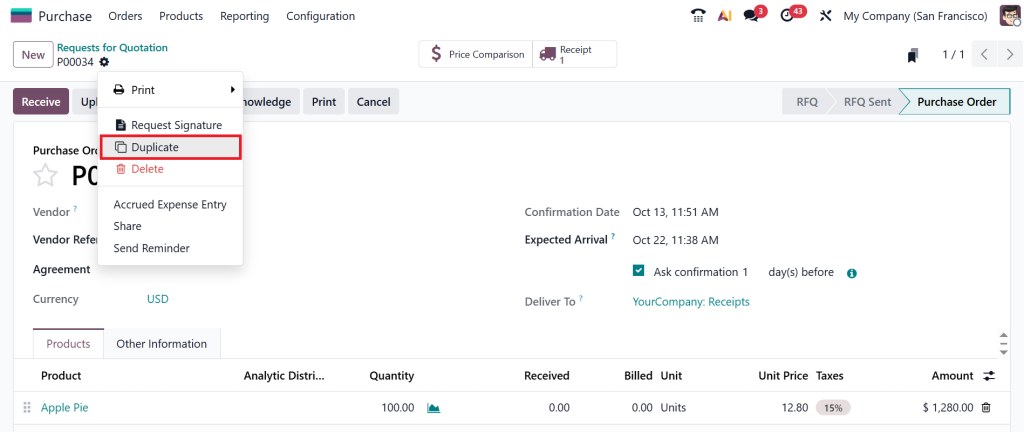
Suppose three vendors receive your RFQ simultaneously. One offers a better price, another promises faster delivery, and the third gives an extended warranty.
All these options are now visible side by side on your Odoo screen. You can compare, analyze, and decide which one fits your business needs.
That’s how the Send RFQ to multiple vendors feature in Odoo 19 simplifies a complex task into a few clicks, saving you hours and enabling data-driven decisions.
Stay Updated Every Step of the Way with RFQ Status Tracking in Odoo
You know that anxious feeling when you’ve sent a quotation and don’t know what’s happening next? Odoo 19 eliminates that.
The system tracks your RFQ status from start to finish. You can instantly see whether:
- Your RFQ is still a draft.
- It has been sent to vendors.
- A vendor has responded.
- It’s late.
- Or it’s been converted into a purchase order.
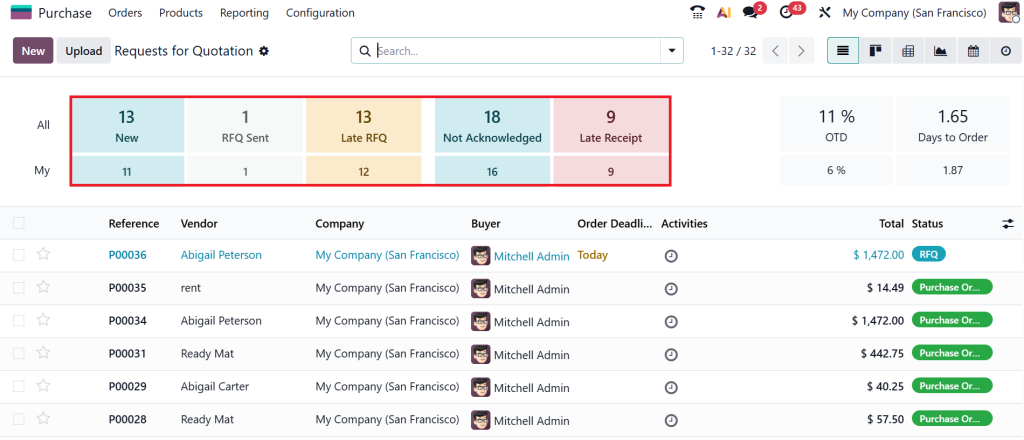
This RFQ status tracking in Odoo gives you complete visibility, eliminating confusion and follow-up chaos.
You can also use filters to view all “waiting” or “late” RFQs, which helps you prioritize and stay organized.
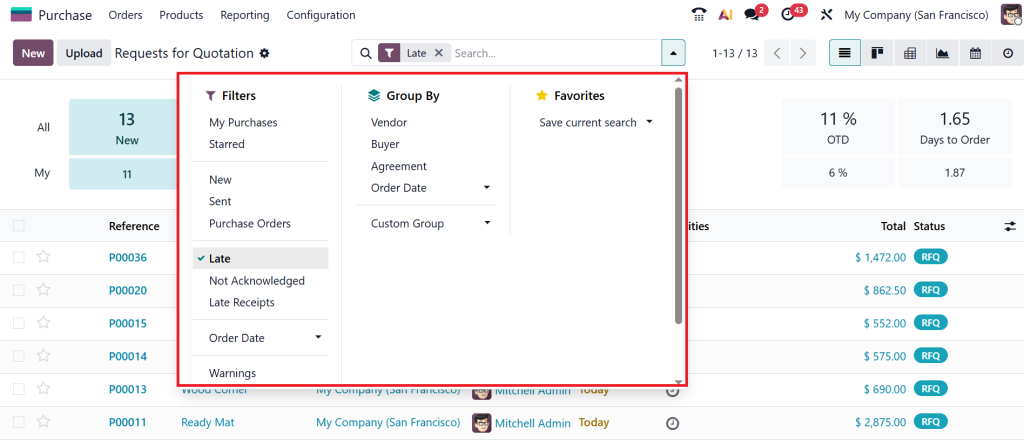
That’s one reason many companies appreciate how RFQs function in Odoo 19 Purchase. It makes tracking effortless.
Vendor Negotiation in Odoo 19 Purchase & Build Stronger Relationships
Now let’s talk about one of my favourite parts, vendor negotiation in Odoo 19 purchase.
When your vendors send back their quotations, you don’t just have to accept them as they are. Odoo gives you the flexibility to negotiate professionally and transparently.
Here’s how it works:
- You can reply directly to vendor emails through Odoo’s built-in chatter system.
- You can ask for discounts, request changes in delivery dates, or even add comments for clarification.
- Every message and reply is automatically recorded in the RFQ.
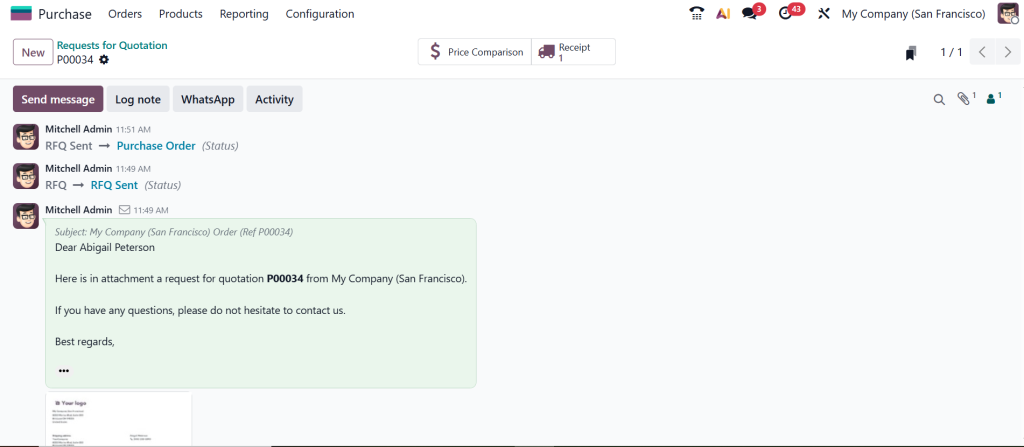
So, the next time you open that record, you’ll see the whole conversation, with no lost emails and no missing details.
This makes negotiation easier and smarter. You build better relationships with vendors while ensuring your company gets the best value.
And honestly, that’s what the Odoo 19 RFQ process is all about: making purchasing efficient and human.
The Final Step is to Convert RFQ to Purchase Order in Odoo 19
After comparing all offers and finalising your deal, convert the RFQ to a purchase order in Odoo 19.
This step is as simple as it sounds. You open your selected RFQ, click Confirm Order, and boom, your RFQ becomes a confirmed purchase order.
You don’t need to re-enter details or duplicate any data. Odoo carries forward all vendor information, products, pricing, and terms, ensuring everything stays intact.
And here’s something even better:
- If you have sent the RFQ to multiple vendors, Odoo will prompt you to either cancel the alternative quotations or keep them open for later. That’s clean, smart, and practical.
- From this point, your Purchase Order becomes part of your inventory workflow, ready for receiving, billing, and payment.
That’s the complete cycle of how RFQs work in Odoo 19 Purchase, from requesting prices to completing the deal.
Why Businesses Love the Odoo 19 RFQ Process
Managing vendors and manually comparing quotations is a stressful process. With spreadsheets, emails, and reminders, it’s easy to miss something important.
But Odoo 19 changes the play. Here’s why businesses love using it:
- You can manage everything in one place.
- You can send RFQs to multiple vendors in Odoo 19 effortlessly.
- You get complete RFQ status tracking in Odoo.
- You can negotiate better terms with vendors directly.
And most importantly, you can convert an RFQ to a purchase order in Odoo 19 without losing any details.
The system is designed to make your purchasing journey smooth, transparent, and bright.
So instead of misrepresenting spreadsheets, you can focus on what really matters: building great vendor relationships and making profitable decisions.
Real-Life Example of RFQ Work in Odoo 19 Purchase
Suppose you run a trading company, and you need to buy 500 LED lights for your next shipment.
You open Odoo, create a new RFQ, and add all the product details.
Then, with just a few clicks, you send the same RFQ to three suppliers.
Within a day, you start getting responses:
- Vendor A offers a competitive price, although with a two-week delivery time.
- Vendor B provides a slightly higher price in exchange for next-day shipping.
- Vendor C gives you a bulk discount.
Now, you use Odoo’s Compare Product Lines feature to see all three offers side by side. You like Vendor C’s discount, but you ask for a faster delivery using the vendor negotiation in the Odoo 19 purchase feature.
Vendor C agrees, and you click Confirm Order. Odoo automatically converts RFQ to purchase order in Odoo 19, updates the status, and marks the other two RFQs as cancelled. Everything is tracked, transparent, and unified.
That’s how prevalent and practical the RFQ workflow is in Odoo 19 purchase.
The Real Influence Behind RFQ Work in Odoo 19 Purchase
It’s not just about sending quotations. It’s about:
Saving time: You don’t have to repeat the same work over and over.
Making smarter decisions: You can compare everything clearly.
Improving control: You always know the current stage of your RFQ.
Strengthening vendor relationships: Communication stays clear and professional.
Every part of the Odoo 19 RFQ process is designed to help your business make better, faster, and more intelligent purchasing decisions.
Once you get used to this system, you’ll never want to go back to manual quotations again.
A Few Tips to Make the Most of RFQ Workflow Odoo 19 Purchase
Here are a few little secrets that can help you get even more out of it:
- Keep vendor data updated. Always maintain accurate vendor price lists and contact info.
- Use alternatives wisely. Send RFQs to multiple vendors only when necessary; this helps keep your workflow clean.
- Use notes and chatter. Communication inside Odoo keeps things transparent.
- Check status daily. Don’t let “Waiting” RFQs stay unattended.
- Confirm on time. Don’t miss order deadlines. Odoo helps you track that easily.
These simple habits will keep your RFQ workflow in Odoo 19 purchase running smoothly and efficiently.
Wrapping It All Up — What You've Learned
By now, you know precisely how RFQs work in Odoo 19 Purchase from creating your first quotation to finalizing your order.
You’ve learned:
- What the Odoo 19 RFQ process looks like.
- How Odoo 19’s request for quotation feature connects you with vendors.
- How to send RFQ to multiple vendors in Odoo 19 without repeating work.
- How RFQ status tracking in Odoo helps you stay on top of things.
- How to handle vendor negotiation in Odoo 19 purchase with confidence.
- Learn how to easily and accurately convert an RFQ to a purchase order in Odoo 19.
So, the next time someone asks you, “What’s so great about Odoo’s Purchase module?”, you can say:
“It doesn’t just manage quotations, it manages relationships, decisions, and results.”
That’s the true passion of RFQ work in Odoo 19 Purchase, where technology meets business sense.
The most innovative businesses are already using Odoo 19 to simplify purchasing.
Need help implementing Odoo for your business? Contact Netilligence for expert Odoo solutions.




